


An unfamiliar payment receipt can interrupt your day faster than almost any other email. Before you’ve finished reading it, you’re already thinking about which card it could have hit.
This one gives you two different totals for the same purchase. The quickest way to settle the question isn’t in the message.
Overview
The $240 receipt that also says $270
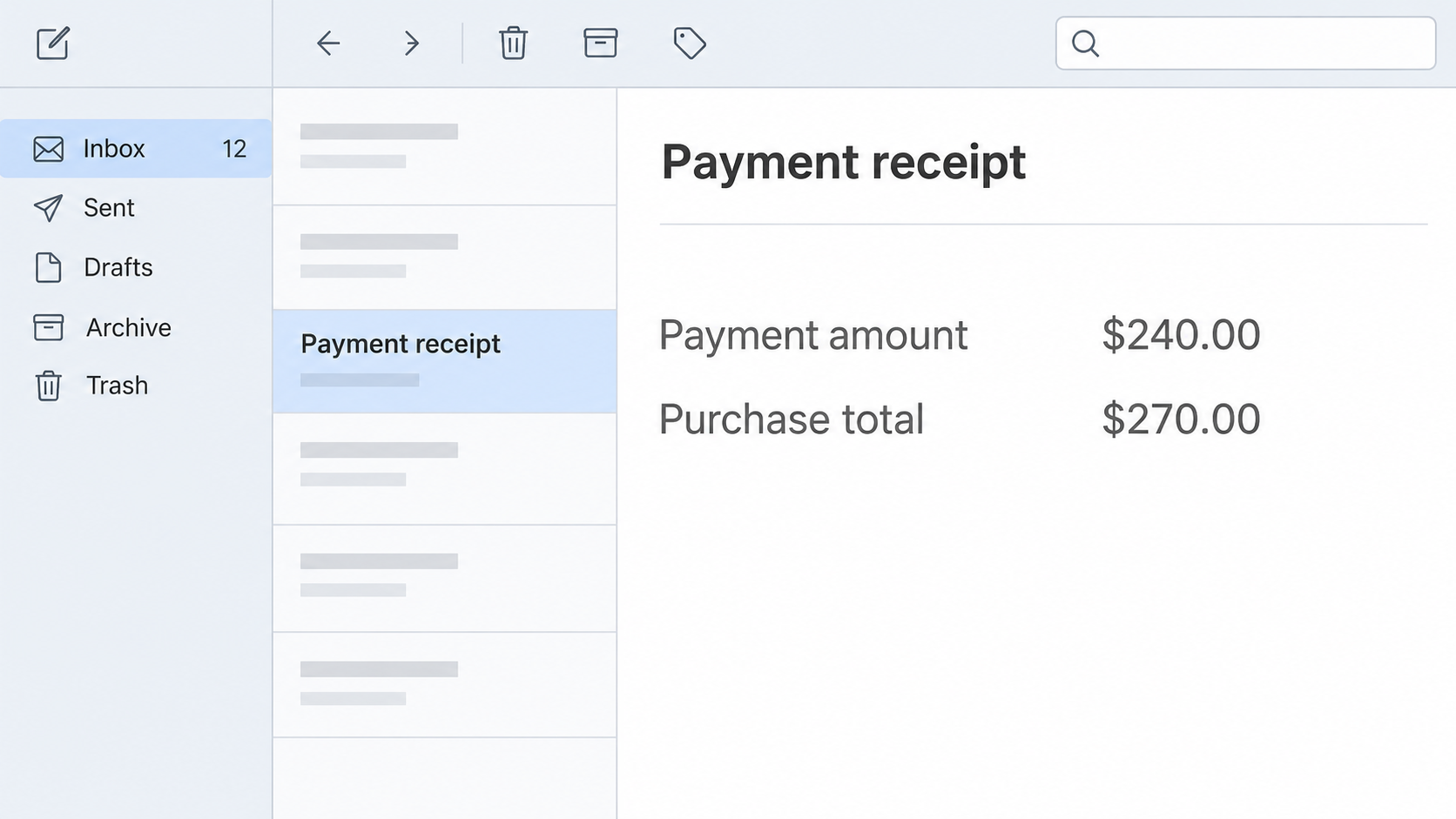
The fake PayPal receipt in this campaign claims you paid $240.00 to a merchant identified as AI Data Corp. The purchase summary on the same message says $270.00.
That is not an explanation of tax, shipping, or exchange rates. The email gives two headline figures without reconciling them, even though both supposedly describe the same purchase.
The image above is a reconstruction highlighting the mismatch. The merchant name in the message is an identifier for the lure, not proof that a real business sent it.
Don’t stop at the arithmetic, though. Another copy of the same lure could show matching totals and still lead to the same dangerous file.
What the receipt link reportedly delivers
The message names a card type and supplies transaction references, making it look like something you could reconcile with a statement. The receipt button sits where you’d expect it.
In the reported sample, the receipt button delivered a JavaScript file. There was no PayPal activity page on the other end.
The final malware family wasn’t established. This is a reason to investigate execution seriously, not a reason to tell every recipient that their files or banking credentials were stolen.
Keep the email, account, and computer separate
Start by asking what happened outside the message. These are different questions, and answering one doesn’t automatically settle the other two.
- The email claims there was a charge, but you need an independent payment record.
- A file in Downloads suggests the browser saved something, but not necessarily that Windows ran it.
- A security alert is useful evidence, especially if it says when the action was prevented.
- A genuine unexplained statement entry belongs with the card issuer, even if the email is counterfeit.
PayPal’s security guidance tells users to check their account directly when a transaction email seems suspicious. Use the app you already have or open the known site yourself.
How the Fake PayPal Receipt Scam Works
Step 1: An unfamiliar payment provides the hook
The sender doesn’t have to talk you into buying anything. It claims a purchase has happened already, which makes an immediate check feel more urgent than a careful one.
The receipt form does much of the work. A date, apparent reference numbers, and a statement descriptor make it feel like a record produced after a real payment.
None of those fields is a lookup result from your own account. An email sender can fill a receipt with convincing labels without having access to PayPal’s records.
Before visiting any link, use another route to see if there is a charge at all. That one check removes the reason the sender gave you for opening the file.
Step 2: An ordinary receipt action moves you to another site
The button is presented as a way to see the receipt, not as a request to install anything. The target thinks they’re asking for information about their own money.
You don’t need to test the button to work out where a genuine transaction belongs. A PayPal payment made through your signed-in account can be investigated from that account.
If the purchase came through guest checkout, it may not show in your personal PayPal history. Use the card issuer’s own records to check an actual charge instead.
Do not call a number from an unexpected receipt or a search advertisement. The support channel shown in your app, account, or on the card is a better starting point.
Step 3: The browser saves a script instead of showing purchase details
The sample points to a site that sends a script. A file can land in Downloads while you are still expecting a receipt to render in the browser.
A file icon doesn’t establish what the file does. If you need its full name for a report, read the download history without opening the item.
The critical difference is whether your system executed the file. Merely finding it in the downloads list is not evidence that any later software ran.
If the browser says the download was blocked, keep that result and don’t override it. Retrying with another browser would only undo a protection that may have worked.
Step 4: Running the file changes the nature of the problem
Once an untrusted script runs, the risk extends beyond PayPal. The computer may have been available to other software, including while you were still using email or a password manager.
Don’t assume that nothing ran because no window appeared. Record the time, whether you opened or approved anything, and any warnings the device showed.
The correct next move is to stop using that Windows computer for sensitive accounts while you investigate. You can check the payment separately from a device you trust.
How to Check Whether the Payment Actually Happened
Match it in PayPal without opening the email again
Start from your PayPal app or type the known PayPal address. Open Activity and look around the date in the message, including a search for either claimed amount.
Open only a transaction found inside your real account. Look at the payee, date, funding source, amount, and status before deciding it is connected to the receipt.
An authorization that is still pending is not the same as a completed purchase. If it is unfamiliar, use PayPal’s support guidance rather than negotiating with whoever sent the email.
Look for a corresponding card or bank entry
Open your bank’s app independently and switch to the card or account you normally use. Examine recent and pending transactions without relying on the descriptor in the email.
If there’s no match, don’t file a dispute about a charge you can’t see. Keep the message as evidence and report it as phishing instead.
If there is a real charge, record how it appears in the issuer’s app. A scammer can send a fake receipt on the same day you made an unrelated payment.
Use the right process for the record you find
For real unauthorized activity inside PayPal, open its Resolution Center, choose Report a Problem, select the transaction, and describe the unauthorized activity using the offered option.
PayPal’s reporting instructions explain what happens next. Keep the case number and check the progress inside your own account.
For a charge on the card that you can’t locate as a PayPal transaction, call the issuer directly. Ask whether it represents a pending authorization or an actual debit.
What to Do After Receiving the Fake PayPal Receipt
-
Check your payment records independently if you haven’t touched the email. You can verify both amounts without interacting with the notice.
Use PayPal’s suspicious-message instructions to report the original. Don’t include extra information such as a card photo, password, or bank statement.
-
Stop if the page or download surprised you. Close the tab, note what appeared and check your browser’s download list without clicking the filename.
On a private PC, remove the unwanted download after noting the name if you didn’t run it. On a work system, send IT the details first.
-
Isolate the Windows computer if you executed the script. Turn off Wi-Fi and disconnect Ethernet when safe. Keep it off shared drives and out of account recovery.
If you can’t tell whether the file ran, treat that as an uncertainty worth reporting. Keep the alert, download name, and approximate time for whoever can help.
-
Secure real accounts from a separate, trusted device. Change the PayPal password if it was entered on an untrusted page, reused there, or exposed on the affected computer.
Start with email if it can reset your PayPal password. Review recovery details, sign-ins, and recent account activity, and follow the provider’s procedure for unfamiliar sessions.
-
Use the real financial record to report a charge. Have the displayed amount and date ready. Call your bank immediately if an unexplained debit appears.
Ask the issuer what it wants you to do about the card, pending transactions, and dispute. Do not supply details to anyone who contacts you about the fake receipt.
How to Check Windows After Running the Fake Receipt File
Step 1: Record what was blocked or allowed
If a work computer is involved, follow its incident procedure instead of installing a consumer tool. Ask IT whether it needs to collect evidence before a reboot.
On a personal PC, open Start > Windows Security > Virus & threat protection > Protection history. Note whether Windows reports a block, quarantine, or an action still needed.
Don’t restore a detection to establish what the file looked like. Let the alert and browser history tell you what happened without reopening the download.
Step 2: Install the scanner from a known copy
Use the Malwarebytes Windows download for a personal Windows system. A separate trusted device or technician can help obtain it if the affected computer needs to stay isolated.
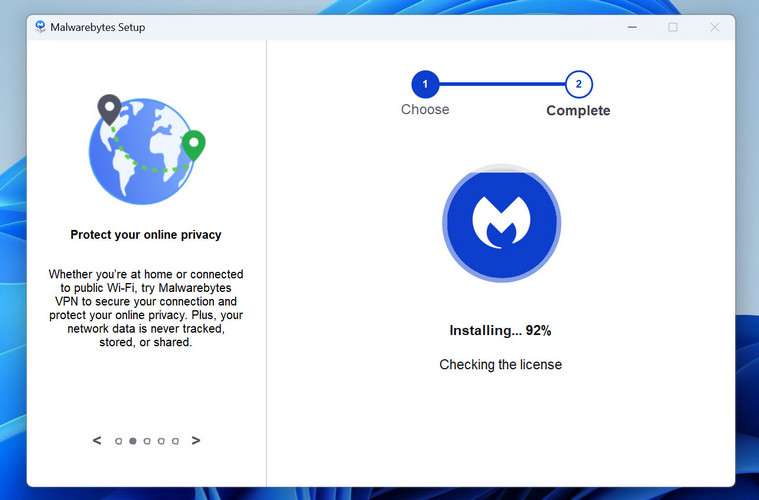
Run the confirmed installer and follow its setup screens. Don’t accept a security tool offered by the receipt page or somebody who claims to handle the purchase.
If isolation prevents setup or updates, ask for authorized help before reconnecting. A receipt problem is not a reason to expose an unreviewed computer to shared storage again.
Step 3: Scan and keep the result
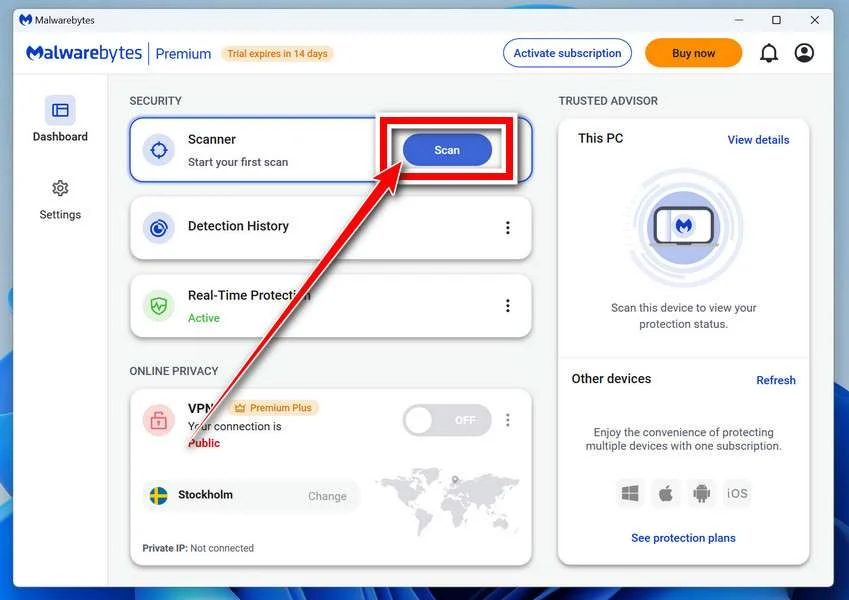
Open Malwarebytes and choose Scan on the Scanner card. When it finishes, read the results and quarantine the confirmed threats if this is your device.
Save the report with the original download time. If a restart is requested, do it only after preserving relevant evidence.
Run another scan after an approved restart. A scan finding nothing doesn’t tell you whether somebody used a password earlier or whether a real payment was made.
Step 4: Decide when to hand it over
If new detections appear, Windows protections stay disabled, or the PC behaves strangely, stop using it for sensitive work. A technician can assess whether it needs a clean rebuild.
Ask MalwareTips support about a sanitized report if you’re managing a personal PC. Never attach the suspect script to a public forum post.
Malwarebytes Premium for Windows is an optional affiliate offer for future protection. You can run the response steps without buying it.
When the Email and Your Payment Records Don’t Agree
A real receipt on one account does not settle another
Start with the card shown in your own records, not the type printed in the email. Compare the amount and payment method inside the activity entry.
If you have more than one card, ask others who are authorized to use them whether they recognize the purchase. That check doesn’t require sending them the suspicious link.
Don’t post your statement to ask strangers about the descriptor. A cropped record for your bank can omit the balances and other purchases that don’t belong in the case.
Watch for a second message that offers to fix the charge
If somebody later offers a refund by chat or phone, verify the request through the case you opened yourself. A caller quoting the receipt amounts hasn’t accessed a trusted record.
You shouldn’t need to install software to dispute an unauthorized debit. Tell the issuer if somebody asks to see your screen or guide a transfer to a different account.
Frequently Asked Questions
Is the AI Data Corp receipt proof that a merchant charged me?
The name is the one printed in the fake example. Treat the charge as unverified until you find an independent record inside PayPal or at your financial institution.
Should I look for $240 or $270?
Check both, but don’t stop when one amount happens to match. Compare the payee, date, and account before treating a real transaction as related to the message.
Does reading the email run the script?
The reported file is delivered through the link, not through reading the email. If all you did was read it, verify the payment independently and report the message.
What if the download is on my computer but I didn’t open it?
Keep it unopened and note its name. A file present on disk isn’t proof of execution, though Windows alerts or an unexpected application launch warrant a closer look.
Can I get a refund by contacting the person on the receipt?
Use PayPal or your financial institution if there is a real charge. Replying to the suspicious sender can’t establish that the payment occurred.
Does a clean Windows scan close the financial issue?
Only your provider or account records can answer the payment question. Finish the account and bank checks separately if either one shows real activity you don’t recognize.
The Bottom Line
Don’t use the receipt button to investigate the $240 or $270 claim. Go to PayPal or the card issuer directly and decide what to do based on their records.
If you ran the downloaded script, keep that PC isolated and investigate it before signing in again. There may never have been a charge, but execution still deserves a response.

Join the discussion
0 commentsShare your experience or ask a question about this article.
Community experiences
Did this happen to you?
Your experience could help someone recognize the same scam. Submit a private report for our team to review.
I experienced this tooReports are reviewed before publication. Sharing publicly is always your choice.
Discussion
Start the conversation
Have a question or something useful to share? Add the first comment.