


An invitation to discuss a new supplier can look like a welcome break from a crowded inbox. It takes only a second to decide the conversation sounds useful.
But there are two things to check before you make room for the meeting: who asked for it, and what they expect you to open.
Overview
Someone is borrowing a procurement company’s name
The invitation presents itself as outreach from Provision Global Procurement Services in Dubai. It proposes a short virtual discussion about sales and procurement.
That name is the identity claimed in the message. It isn’t evidence that the real company coordinated the outreach or that the genuine firm had any security incident.
The request sounds ordinary because vendor introductions happen all the time. Ask whether anybody at your company was expecting the conversation before touching the RSVP button.
A meeting response turns into a software download
The invitation points to a counterfeit event page that borrows RSVPify branding. The genuine RSVPify service is not the source of the downloaded file in this case.
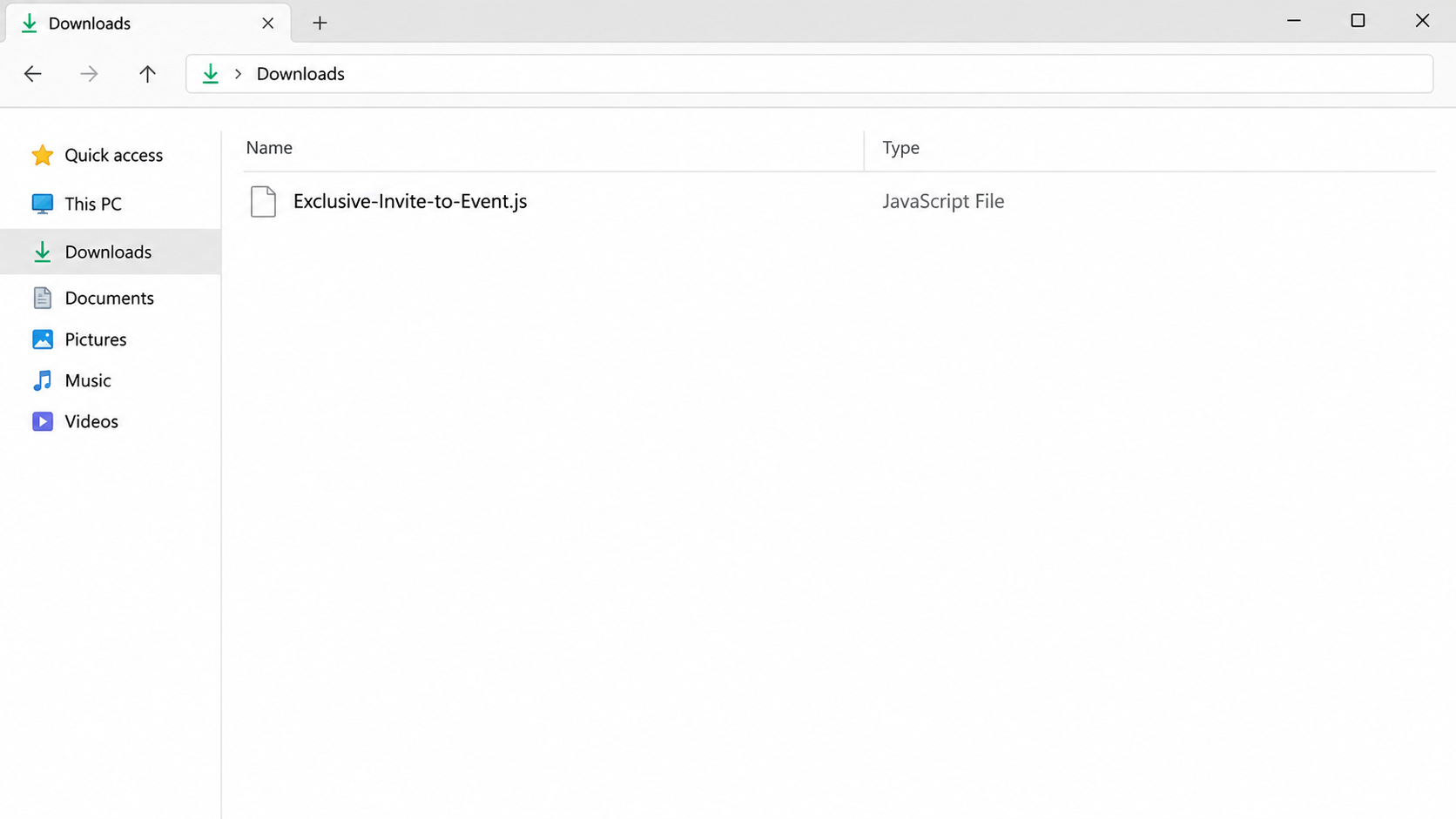
The page’s join action reportedly downloads Exclusive-Invite-to-Event.js. That name sounds related to an appointment, but the final extension identifies a script, not an ordinary calendar file.
The image above is a reconstruction of the file entry. It doesn’t depict a real event invitation or attach the script.
Where the risk actually starts
The delivered file was reported as malicious. The exact downstream malware wasn’t identified, so neither the invitation nor the filename tells you what a particular machine lost.
- An outreach email is not evidence that somebody accessed your procurement system.
- A file saved in Downloads does not establish that the script ran.
- A downloaded script launched on Windows warrants device review, even when no window stayed open.
- A response submitted through email can confirm interest, but that isn’t the same as execution.
If a coworker already forwarded the notice, tell them about the actual filename. A specific warning is more useful than a broad instruction never to accept online invitations.
How the Fake Procurement Meeting Invitation Scam Works
Step 1: A familiar work task lowers the bar for a reply
The message proposes an introductory business call rather than an obvious expense. The recipient doesn’t need to approve a payment, only make time to hear about a potential supplier.
For someone who regularly deals with external partners, an unfamiliar name isn’t unusual. A plausible procurement subject therefore tells you little about the sender’s authority.
If there is a genuine opportunity, somebody should be able to confirm the contact through an independent route. Use your vendor records or the firm’s established public contact.
Step 2: An outside RSVP page looks like normal event administration
The email’s accept button takes the reader to a page resembling a familiar event service. It feels like an administrative handoff, not an entirely new request.
The appearance of RSVPify branding is not evidence that an event is hosted by RSVPify. Even a genuine event page wouldn’t authenticate the relationship the sender claims to have.
Confirm the host rather than treating a second screen as a second source. The initial email and the page it links can be part of the same approach.
Step 3: The reader expects a calendar event
The page offers an action that sounds like accepting or joining. A download appears where the recipient may expect an invitation they can import.
Calendar software can use files ending in .ics. The file described here ends in .js, which doesn’t turn into a calendar entry because of its event-themed name.
If a browser displays a file entry, don’t open it to see which app responds. Write down the full name or let IT retrieve the download evidence through its controls.
Step 4: Running the script takes the event off the calendar entirely
If Windows executed the script, the next question is about device activity. It isn’t enough to remove the calendar item or change the meeting service password.
The sample does not identify the final program. If the script ran, let the security team check the computer rather than diagnosing it from an email subject.
Give the person assessing it the download time and what appeared afterward. This helps them interpret records even if you can’t identify every action you took.
How to Confirm a Meeting Without Accepting Its Download
Confirm the organizer using records you already trust
Check whether the company is in your existing supplier list or whether a colleague introduced the contact. Ask about the specific meeting topic, date, and organizer.
If the company isn’t a current vendor, use a published contact you find independently. Don’t call a number copied from the same invitation or use its reply address for verification.
Stop if the sender won’t provide a route your company can verify. A useful supplier conversation can wait for ordinary due diligence.
Ask for the same meeting through a normal channel
Have the confirmed organizer send a fresh invite through the system your company already uses. Ask for the host name and time separately if anything looks inconsistent.
Opening the installed calendar or conferencing app independently is safer than installing a tool the invitation recommends. A genuine meeting should be joinable through an approved process.
If the person asks you to bypass the browser’s download warning, don’t do that. Ask the event organizer or your IT team to arrange a verified method.
Check the final extension without launching the file
On Windows 11 File Explorer, choose View > Show > File name extensions to display complete extensions. You don’t need to double-click a file to see this information.
If your browser download history already shows the complete name, use that instead. Write down the suffix and whether the browser marked the item as blocked.
If a company manages the PC and the setting isn’t available, ask the help desk. Showing file extensions helps identify the file, but doesn’t remove it.
What to Do After the Fake Procurement Meeting Invite
-
Report the email if you didn’t use the RSVP link. Use your organization’s phishing reporting control. Don’t send the original invite to another employee to ask what they think.
A message received at a personal address can also be reported through the mail provider. Contact the purported company independently only if you need to confirm actual business.
-
Stop at the browser if you didn’t run anything. Leave the event page, check download history without opening the item, and note any file name shown.
If the download exists on an employer’s PC, wait for IT’s handling instructions. On a home PC, remove the unopened file after recording what you need.
-
Treat execution as a device incident. When safe, disconnect the computer from network access. Use a different device to call your security team or arrange help.
Tell them the campaign claimed to offer a calendar file. The detail they need is that a .js file may have been launched instead.
-
Protect business accounts that were active on the affected device. Contact your administrator about access to email, procurement records, and shared storage during the incident window.
Ask it to review active sessions and route any necessary sign-in changes. If you manage a personal account yourself, handle its credentials from a separate device.
-
Warn teams that might recognize the supplier story. Share the subject, the time, and the unexpected file type in a safe internal message.
If an actual vendor payment instruction arrives later, confirm it through your existing approval process. Do not assume it’s linked to this invite without evidence.
How to Check Windows After Running the Fake Calendar Download
Step 1: Let the right person handle the device
For a work computer, stop before deleting the download or restarting. The help desk may need download history, endpoint alerts, or information about software that ran.
On a home computer you control, use Windows Security > Virus & threat protection > Protection history to review events recorded around the supposed meeting.
Distinguish the original script from any later detection. Do not choose Allow or restore a quarantined file just to check how it opens.
Step 2: Install a scanner through the site’s verified route
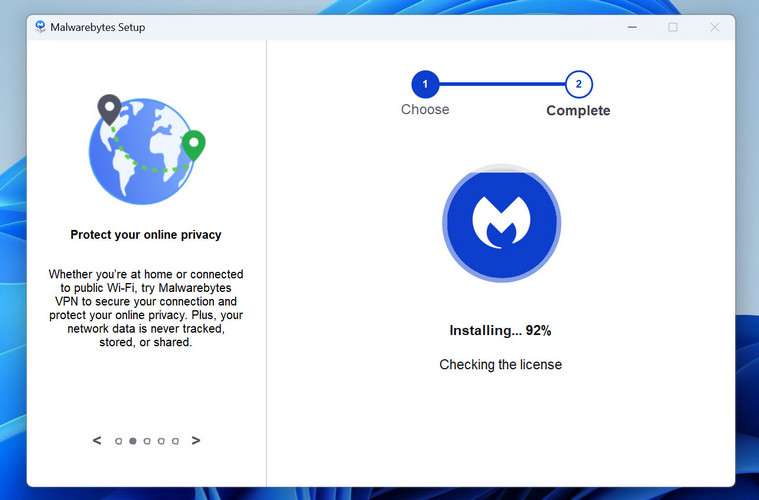
If the device is yours, use the Malwarebytes installer for Windows. Have a technician arrange trusted transfer or updates if the isolated system cannot get them safely.
Check that you have the expected installer before opening it. Go through its normal setup screens and decline any unrelated download from the meeting page.
Leave company-managed endpoints to the organization. A consumer scan or removal action can conflict with the response team’s evidence collection.
Step 3: Review detections instead of reopening the invite
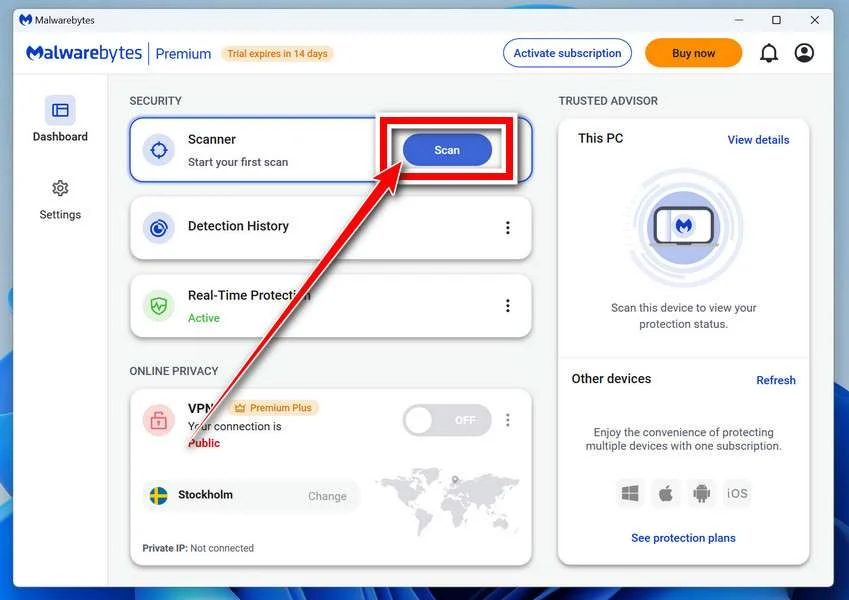
Open Malwarebytes, then choose Scan on the Scanner card. Let it finish and inspect the findings before clearing or removing anything.
Quarantine confirmed threats on a personal device you own. Save the report, allow an appropriate requested restart, and scan again to see whether detections return.
If the only saved item was a download you didn’t run, don’t re-create the incident to test the scanner. Keep the record of what was actually observed.
Step 4: Verify before returning the PC to business use
When findings persist or the execution outcome is unclear, ask qualified support about further containment or rebuilding. Don’t use a vendor call as your first test after cleanup.
Home users can ask MalwareTips support about a clean copy of the detection summary. Omit the real invite and any supplier data.
The Malwarebytes Premium affiliate offer is optional for continuing Windows protection. It does not determine whether company records were accessed.
Keep the Real Procurement Conversation Separate
Ask the questions a new vendor should be able to answer
Someone may have sent a real introduction before the suspicious message arrived. Go back to that established thread rather than continuing from the newer invitation.
Ask who at your company owns the discussion, whether a colleague requested it, and which meeting provider was agreed on. Those details are more useful than logos.
When a new vendor claims to represent a customer you know, verify that relationship independently. A company name in the subject makes a story familiar without making the introduction real.
Don’t send a current supplier list, pricing sheet, or customer names just to show that you belong in the meeting. Discuss scope once the organizer has been verified.
Keep the invitation from becoming a vendor approval
A calendar slot isn’t approval to onboard a business or access a procurement portal. Use the company’s usual process before sharing documents or changing where an invoice gets paid.
If someone already accepted an ordinary calendar entry, its presence doesn’t authenticate any information in the description. Check the organizer separately and remove the unwanted event through your calendar.
If an attendee expects a meeting from you, send a separate notice with the approved join method. Don’t copy the suspicious invitation into the replacement.
For reception or shared inbox teams, report this through the person who manages referrals. They may be able to spot other versions aimed at buyers in the same organization.
Give the help desk an incident timeline it can use
Separate the time the original email arrived from the time you visited the external page. Those might be hours apart if you came back to it after a meeting.
Tell the help desk if several people use the workstation. An alert may belong to a different login, so record who was using it at the time.
If the browser saved a second file on another attempt, report both entries without opening either one. Don’t assume that a repeated name means the second file is identical.
If the event request came through a personal account on a work PC, report that distinction too. The personal inbox and employer’s computer may need different evidence and recovery steps.
Frequently Asked Questions
Is RSVPify itself sending out malware?
The reported page borrows RSVPify’s branding. That doesn’t establish that the genuine event service distributed the script or had a security breach.
Is this the same as a fake Zoom update invitation?
Both abuse the expectation of a meeting. This example uses a procurement pitch and a script presented as a calendar download rather than a Zoom update.
What does the invitation filename tell me?
The final .js identifies a script. It is not an ordinary calendar item, so don’t open it to see whether your calendar will recognize it.
Does accepting a real calendar invitation require a script?
An ordinary calendar invitation should not require running a .js file. Ask a verified organizer to send the meeting through your normal calendar or conferencing system.
Do I need to warn every supplier about the message?
Tell the staff responsible for the relevant workflow and anyone who received or forwarded it. Let your security team decide whether there is evidence that outside contacts were affected.
Can deleting the meeting invitation undo an infection?
Deleting an email cannot undo code that already executed. Keep those two actions separate when deciding whether to report the message or investigate the PC.
The Bottom Line
Verify this kind of supplier outreach through the organizer you already trust. Don’t open a script to RSVP, even if a page says it’s a calendar download.
If somebody ran the file, isolate that Windows computer and report exactly what was opened. That is the starting point for checking whether something else ran.

Join the discussion
0 commentsShare your experience or ask a question about this article.
Community experiences
Did this happen to you?
Your experience could help someone recognize the same scam. Submit a private report for our team to review.
I experienced this tooReports are reviewed before publication. Sharing publicly is always your choice.
Discussion
Start the conversation
Have a question or something useful to share? Add the first comment.