

A familiar service emails you about a charge you do not recognize. The message looks authentic, but its bold instruction is to call a support number.
The fake support call scam can arrive inside a real platform notification. That uncomfortable detail is why checking the sender alone may not settle it.
Overview
The fraudulent part can be inside an authentic email
In this campaign, attackers put their own billing-warning text into fields that legitimate online services later copy into automated notifications.
The email can therefore come from real service infrastructure while carrying a fake purchase or subscription warning and an attacker-controlled telephone number.
That distinction matters. A genuine-looking header does not turn a user-supplied message inside the email into official customer support advice.
The real services were not shown to be compromised. Attackers misused features that let users influence what appears in a generated notice.
Check Point measured a coordinated phone-based campaign
Check Point Research documented about 133,260 phishing emails reaching 20,049 organizations in the described operation.
It also reported a broader six-month total of roughly 648,291 SaaS-abuse phishing emails. That larger figure is not this one campaign’s count.
The research includes examples involving Zoom, PayPal, YouTube, Microsoft, Amazon Business, and Malwarebytes-related notifications or branding.
Those names identify services whose trust was borrowed or features were misused. They are not a list of companies accused of operating the scam.
The study does not measure how many recipients called, paid, or lost account access. We will not turn delivery counts into victim counts.
The caller is the point of the lure
The messages often avoid a malicious website link. Instead, they frame a fake charge or account problem and ask the reader to call a supplied number.
Once a person calls, the conversation is outside the platform’s authenticated email system. The operator can invent the next steps in real time.
- The outer email may genuinely originate from a familiar service.
- A name, subject field, invitation, or account detail can carry attacker-written text.
- The text claims an urgent charge or security problem.
- The displayed phone number belongs to the scam route, not necessarily the service.
- The safest answer is to verify inside your own account or through known official support.
The confirmed deception is the fraudulent callback instruction carried through an authentic workflow. A particular caller’s later demands must be assessed from that call’s evidence.
How a Real Notification Becomes a Bad Instruction
Most people learn to inspect an email’s sender domain. That remains useful, but this campaign exploits a gap in that habit.
A service might send a verification email after a user signs up. If the user’s chosen name appears in that email, the name is not the service’s statement.
The attacker can choose a name that reads like a billing alert. The platform then puts those words into a message it really sends.
The result can pass technical authentication because the platform’s servers did send it. Authentication identifies the sending system, not the truth of every embedded field.
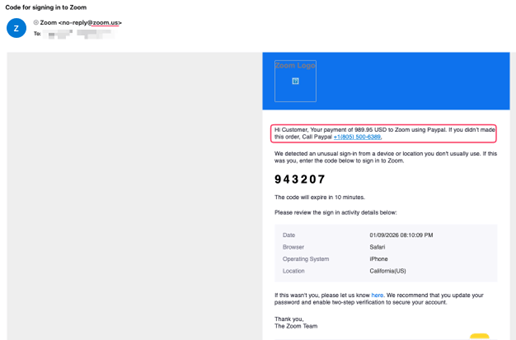
In one observed example, a Zoom verification message included a claim about a PayPal payment and a phone number. The two brands are used together to confuse.
The person reading it may concentrate on the payment amount, not why a Zoom code email is discussing PayPal.
That mismatch is a useful clue. A real platform notification can contain content that makes no sense for the action it supposedly confirms.
Another method used Microsoft notification workflows, where user-controlled account or subscription fields appeared in emails sent through Microsoft’s own infrastructure.
Amazon Business invitations supplied another route: a custom business name or invitation message could carry the alarming charge narrative.
Check Point also observed redistribution of genuine emails. A forwarding rule can preserve much of an authentic message’s appearance while moving it farther.
You cannot resolve all this from a logo alone. Separate the service-generated wrapper from the user-provided content inside it.
How the Fake Support Call Scam Works
Step 1: An attacker chooses a platform that sends notifications
The operator looks for an ordinary workflow: account verification, subscription notice, meeting invitation, business invitation, or similar automated message.
These notices are valuable because recipients are accustomed to opening them. They often arrive from reputable domains and resemble routine account activity.
No server breach is necessary for this method. The attacker can work within an existing feature intended for legitimate users.
Step 2: The scam warning is placed in a writable field
Instead of using the field for a name or business label, the attacker writes a false charge, cancellation claim, or urgent support instruction.
Where the platform repeats that text in the subject or body, the warning becomes visually part of an official-looking notification.
The formatting can make two voices appear as one: the platform’s template and the attacker’s inserted words.
That is the exact trust boundary the scam crosses. A generated email should not be treated as endorsement of every character its users supplied.
Step 3: The platform sends the message through normal channels
The legitimate service generates the notice. In some observed cases, the attacker then redistributes it using automated mail rules.
Mail checks may pass because the original service really sent the email. A recipient can therefore see a plausible sender and still face a fraudulent instruction.
Check Point performed a limited test with Zoom to validate that attacker-written fields could appear inside a genuine generated verification email.
That controlled test supports the mechanism. It did not involve researchers sending a mass scam to people.
Step 4: A fake payment or subscription creates a reason to call
The injected wording often says an unfamiliar purchase was made. The natural reaction is to dispute it before a supposed deadline.
The email offers a telephone number as the fastest fix. Unlike a link, a phone number may not be caught by link-reputation checks.
The second captured example shows attacker-written PayPal purchase text riding inside a Microsoft account verification message.
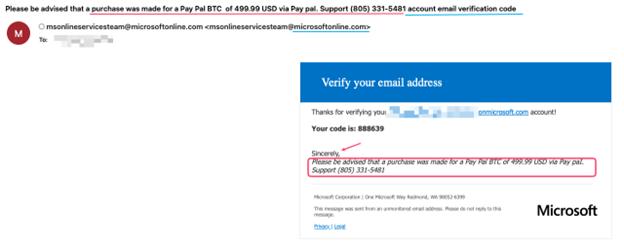
The subject and body should not be read as Microsoft’s confirmation of a PayPal payment. The alarming text originated from a user-controlled field.
Step 5: The call transfers control to the fraudster
Calling the printed number connects the reader to whoever controls that number, not automatically to the company named in the email.
That operator may ask for identity details, payment information, account access, or remote-control software. Those are possible follow-ons, not outcomes verified for every case.
If a caller asks you to authorize a payment to “reverse” a charge, do not assume the reversal claim is true.
If they request a one-time code, password, or remote access, end the call. Those requests do not become safe because the email looked official.
Step 6: The same formula can move to another service
Blocking one phone number or brand does not eliminate the pattern. Another user-controlled field can be found on another platform.
The stable warning sign is a serious billing or security claim embedded in an unrelated notification, coupled with an unfamiliar callback route.
Verify the charge at the source. A legitimate account or card statement will show whether any transaction exists.
How to Verify a Scary Charge Without Calling the Email
First, look at your actual bank or card activity. A statement is a better place to confirm a charge than a sentence inside an unsolicited notice.
Then open the relevant service directly. Check purchases, subscriptions, invoices, or security notices inside the account you already use.
If you need support, obtain the number from the service’s official website or app. Do not copy it from the alarming message.
Inspect whether the email’s task and warning belong together. An account verification code about an unrelated PayPal charge is a conspicuous mismatch.
If the notification was unexpected, do not enter the code it contains into another site or read it aloud to a caller.
A real company may send an email after a change you made. If you did not initiate anything, investigate through the account, not the message.
For workplace accounts, send the original message to your security team. Headers and fields may reveal how the notice was generated or forwarded.
Tell colleagues about the specific number and claim if the message circulated internally, but avoid spreading it as a clickable or callable alert.
Technical email authentication is helpful, yet not a substitute for this contextual check. The attack deliberately uses authentic infrastructure.
If your organization uses several cloud services, maintain a known way to review each service’s notifications. A routine path makes urgent email instructions less persuasive.
A billing alert should match a specific account, service, and transaction. When those pieces do not align, treat the discrepancy as a warning.
Do not send a screenshot of the email to the listed number. That can reveal additional account details to the same operator.
If your card statement shows no charge, you have no reason to call an unfamiliar cancellation desk merely because the email says one exists.
If your statement does show a charge, the card issuer can investigate it without requiring you to use a phone number supplied by the questionable notice.
Why a Phone Number Can Be More Dangerous Than a Link
Links can be scanned against known bad domains. A number inside an otherwise valid email may receive less automated scrutiny.
A person on the line can answer objections immediately. They can adjust the script after hearing what account or card the caller uses.
That flexibility makes a false charge especially potent. The caller wants the recipient to solve the problem before confirming that the problem exists.
Caller ID does not rescue the situation. A displayed name or return number can be misleading, and the emailed number remains unverified.
Do not install a remote-access program to “cancel” a charge. The ability to see or control your screen would expand the risk far beyond the original email.
Similarly, do not move money to a “safe” account or buy gift cards for a refund process. Those requests are incompatible with normal charge disputes.
If the transaction is genuine but unauthorized, your card issuer can explain dispute options through its established support route.
What to Do if You Have Fallen Victim to This Scam
- End the call and document it.
Write down the number you called, the time, the service named, and what the person requested. Keep the original email intact.
Do not call back to challenge the operator. Use independent contacts for every next step.
- Act according to what you disclosed.
If you gave a password or code, secure that real account and review active sessions. If you gave card data, contact the issuer immediately.
If you shared personal details, monitor affected accounts and ask the relevant institution what protective steps are appropriate.
- Tell the payment provider about any transfer.
Use the number on your card or the official app. Ask about fraud review, transaction disputes, and whether the card or account should be replaced.
Provide the exact payment route and date. A bank cannot investigate a vague “support scam” as effectively as a specific transaction.
- Remove remote access if it was installed.
Disconnect the affected device from the internet, seek trusted help to remove the program, and change credentials from a clean device.
A reputable security scan such as Malwarebytes may help after software installation. It does not by itself reverse a transfer or revoke account permissions.
- Report the abuse to the service and your mail provider.
Send the full message through the service’s official abuse channel. Explain which user-supplied field carried the false charge and number.
Use your email provider’s phishing report option. If you work for an organization, alert its security team so similar notices can be identified.
- Ignore follow-up “recovery” calls.
Someone may claim they can recover a payment for another fee or ask for fresh codes. Verify any recovery proposal independently.
Keep a record of new contacts, but do not treat knowledge of your case as proof that the caller is legitimate.
Frequently Asked Questions
Can an email from a real service contain a scam?
Yes. A genuine service can send a notice containing text supplied by an attacker through an ordinary user-controlled field.
Were Zoom, Microsoft, or Amazon hacked in this campaign?
Check Point says the underlying platforms were not compromised in the observed methods. Their normal notification features were misused.
Does a passed DKIM or SPF check make the phone number safe?
No. Those checks concern message origin. They do not verify the accuracy of user-entered text or the ownership of an embedded phone number.
Did all 133,260 recipients lose money?
No. That figure counts observed phishing emails in the described campaign, not confirmed calls, payments, or losses.
What if I called but disclosed nothing?
End contact, block further calls, and verify any claimed charge through your real account. A call alone does not prove financial compromise.
Should I use the cancellation number printed in the notice?
No. Obtain contact details from the provider’s official app, website, or your card. The printed number is the scam’s central lure.
The Bottom Line
The fake support call scam shows why “the email is genuine” and “the instruction is safe” are different statements.
Check the claimed charge in the real account. If it is not there, do not let an attacker-written phone number become your support desk.

Join the discussion
0 commentsShare your experience or ask a question about this article.
Discussion
Start the conversation
Have a question or something useful to share? Add the first comment.