

A document needs your signature, a voicemail is waiting, or an invoice demands attention. The link opens a sign-in screen that seems routine.
The Whisper 2FA phishing scam exploits that ordinary workday moment. The first password prompt is not the whole story, and the page can keep asking.
Overview
Several familiar messages lead into the same account trap
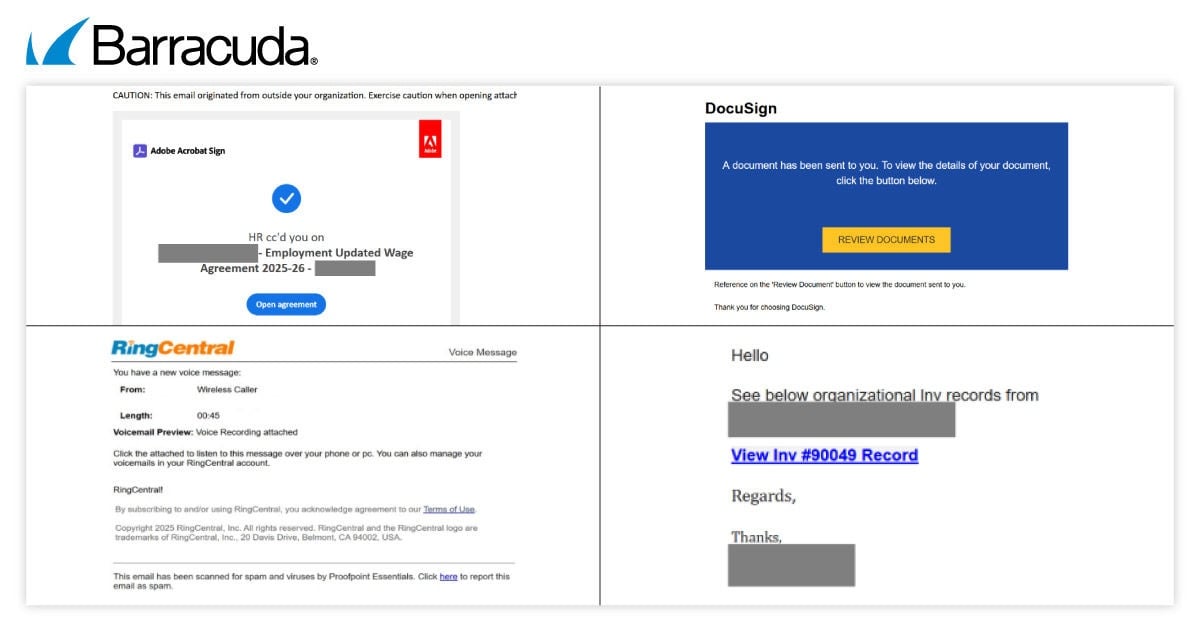
Researchers observed emails styled as document signatures, voicemail notifications, Adobe files, and invoices. Their presentation varies because different recipients have different reasons to click.
The shared destination is a fake work-account sign-in flow. It asks for Microsoft 365 credentials while appearing to process a legitimate business task.
Microsoft, DocuSign, Adobe, and other names in these lures are not the operators of the phishing kit. Their identities are borrowed to create trust.
A convincing brand header does not make the linked page an official login. The destination and its behavior matter more than the email’s appearance.
Barracuda documented a large campaign and the kit behind it
Barracuda’s analysis of Whisper 2FA describes a phishing-as-a-service kit tracked since July 2025 and updated in September 2026.
The company reported close to one million observed attack attempts in a month. Those are detected attempts, not a count of successful account takeovers.
The technical study inspected how the fake page collects form entries and coordinates with an attacker’s server to obtain a working verification code.
That direct inspection supports calling the mechanism phishing. It does not mean every email variant reached a real user or defeated every security setting.
The page tries to keep the victim present during login
Many people know that a password alone should not be enough. Whisper 2FA takes advantage of that expectation by requesting the second factor too.
The page may show a spinner, change screens, request a code, and ask again if the first code does not work.
- A work-related lure prompts an unsolicited click.
- A copied sign-in page captures the account name and password.
- A follow-up screen asks for a current verification code or approval.
- The attacker checks submitted codes while the victim remains on the page.
- A repeated prompt can keep the person trying until a usable code arrives.
The central danger is not that multifactor authentication is useless. It is that a person can be tricked into handing a live code to the attacker.
Why the First Email Can Feel Like Normal Office Work
A signature request is a familiar interruption. So is a voicemail notice from a phone service or an invoice attached to a business conversation.
That makes these lures more persuasive than a generic “urgent security” warning. They ask the reader to complete a task already common at work.
The emails do not all look alike. A fraudster can choose a document theme for finance staff and a voicemail theme for someone else.
This flexibility matters when searching your inbox. Blocking one subject line or spotting one copied logo will not cover the entire campaign.
The captured collage shows multiple styles tied to the kit. It is evidence of variation, not proof that all four messages went to one recipient.
Some messages may arrive through a compromised sender or use a convincing display name. Others simply rely on the reader acting before checking.
Ask what task you were expecting. A document from a known colleague should still make sense in the surrounding conversation.
When it does not, contact that person through a channel you already use. Do not reply to the questionable email and ask it to confirm itself.
A fake sign-in screen can also appear after a real-looking intermediate page. The chain is designed to make the final password request seem inevitable.
Pause when a link asks for work credentials, especially if the email’s original task could be verified without that link.
How the Whisper 2FA Phishing Scam Works
Step 1: The message supplies a believable work pretext
The attacker presents a file, signature, voicemail, or invoice as the reason to open a link. The task itself is the bait.
An employee may feel that ignoring it could delay a client or colleague. The scam benefits from ordinary pressure to be responsive.
Nothing in the lure proves the file exists. A button that says “review documents” can lead somewhere unrelated to the claimed service.
The particular brand can rotate. The stable warning sign is an unsolicited route from an email to a credential form.
Step 2: The link opens a copied account screen
The next page imitates a Microsoft 365 sign-in. It may already know the email address from the link or ask the person to type it.
Its visual resemblance can be strong. Familiar fonts, buttons, and loading effects are easy for a phishing kit to recreate.
The browser address is still worth checking. A lookalike page on an unrelated domain is not the same as your organization’s authentic sign-in.
Do not rely on the presence of HTTPS. A phishing site can encrypt its connection while collecting the password entered there.
Step 3: The entered password goes to the attacker
Barracuda observed the kit capture form fields as a person types or submits them. The visible page continues as though the sign-in is processing.
Behind that ordinary animation, the credentials are sent to infrastructure controlled by the attacker. The victim may never see an obvious error.
If the password is also used elsewhere, that reuse creates an additional risk. The fake page does not need access to every service in advance.
The kit’s code is intentionally hard for analysts to read. That complexity is not something a user must understand before protecting the account.
Step 4: A second screen asks for the live security code
If the real account requests multifactor authentication, the phish presents a matching-looking step for a one-time code or approval.
The person may believe they are finishing the login they just started. In reality, they are supplying the factor the attacker needs.
The illustration below is a fictional reconstruction of this stage, not a recovered Whisper 2FA page. Its address uses a non-operational example domain.
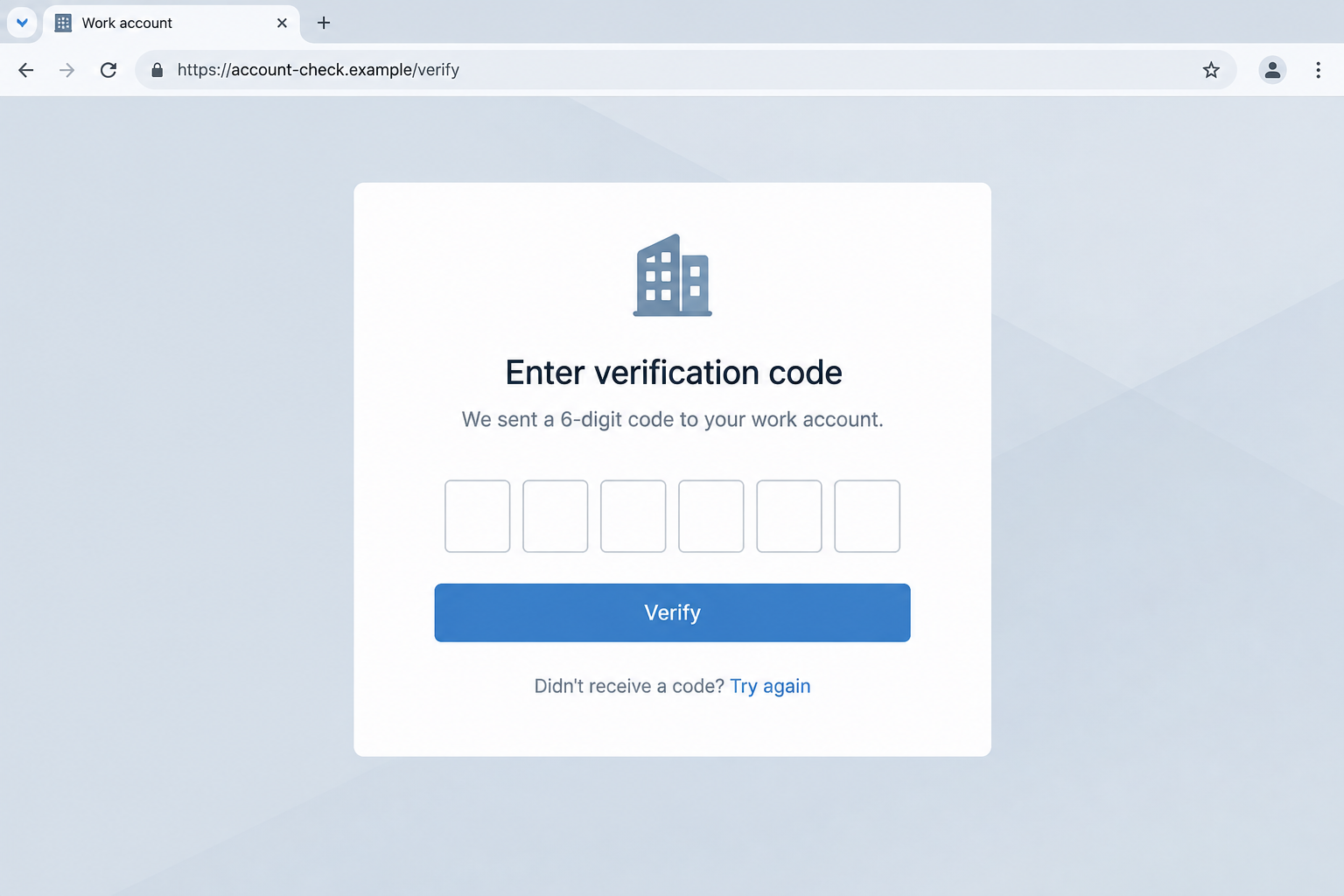
A real phishing page could look different. The essential question is why an email-selected site is requesting a current security code.
Step 5: The page may repeat until a code works
The kit can send a submitted code for immediate checking. If it fails, the interface can politely request another attempt.
That creates a live exchange rather than the simple theft of a password stored for later. The victim may stay engaged through several prompts.
Some variants also offer choices for different authentication methods. A fresh prompt does not necessarily mean the previous attempt was harmless.
Never approve an unexpected push notification just to make a sign-in page stop asking. Inspect the actual request in your authenticator app.
Step 6: The attacker tries to use the account
A valid password and factor may let the attacker sign in. What happens next depends on the account’s permissions and other protections.
Possible consequences include reading mail, sending convincing follow-up messages, or changing account settings. These are risks, not confirmed outcomes for every attempt.
Work accounts can expose colleagues too. A message from a compromised mailbox may appear more trustworthy to the next target.
That is why prompt reporting to an employer or IT team matters even if no money has moved.
What Makes This Different From a Basic Password Phish
The kit is built to handle the moment after password entry. Many simple fake forms stop there and hope the credential is enough.
Whisper 2FA keeps the page active, asks for the live second factor, and may validate it while the victim waits.
Barracuda also documented code that complicates inspection, including obfuscation and attempts to interfere with debugging tools.
Those defensive tricks protect the criminal operation from researchers. They do not grant the page any legitimate authority over your account.
The practical boundary is simple: your real sign-in should begin from the service or application you intended to use.
If a document email unexpectedly sends you to a new authentication page, close it and reopen the service from a known bookmark.
A genuine company may use single sign-on. That does not excuse a link whose destination cannot be connected to your organization’s normal login route.
If unsure, ask IT whether the page is expected. A delayed document review is easier to fix than an exposed work account.
How to Check a Document or Voicemail Notice Safely
For a document, open the service you already use and look for the item there. Do not use the email’s button as your only route.
For voicemail, check the official phone application or existing provider portal. A real message should be discoverable without a strange login page.
For an invoice, compare the sender and transaction against established records. Ask the known contact about it using their existing address or number.
Do not forward the suspicious link to a colleague as a casual test. They may click before understanding why you sent it.
Instead, send the message to your security team using its reporting method. Preserve original headers if the team asks for them.
When a page asks for repeated codes, stop. A failed verification is not a reason to keep feeding an unverified site fresh factors.
Check the sign-in activity of the real account through its official security portal. Look for unfamiliar locations, devices, or sessions.
Remember that an email’s brand and a login page’s design are two separate claims. Both can be imitated by an attacker.
If the sender insists that a file will vanish unless you authenticate immediately, ask why the task cannot be confirmed through the normal service.
Do not treat a familiar contact name in the subject line as verification. The name may be copied from public information or an earlier conversation.
A URL preview can expose a mismatch, but shortened links and redirects may hide the final destination. The safest choice is still an independent route.
For teams, an agreed reporting button removes the pressure to decide alone. Staff can flag a questionable request without starting its sign-in flow.
For personal accounts, the same principle works: open the actual service, find the item, and let an unverified message expire if nothing matches.
What to Do if You Have Fallen Victim to This Scam
- Tell your organization immediately if a work account was involved.
Describe the email, link, time, password entry, and any code or push approval. A security team can act faster with that sequence.
Do not wait for proof of misuse. The kit’s real-time behavior makes a valid submitted factor especially urgent.
- Change the password from the real service.
Open Microsoft 365 or your organization’s sign-in through a known route, not the phishing tab. Choose a new, unique password.
If that password was reused, change it on the other accounts too. Start with email, banking, and any administrator access.
- Review and revoke suspicious sessions.
Ask IT to inspect recent sign-ins, terminate unknown sessions, and examine account recovery methods, forwarding rules, and app permissions.
A password change alone may not clean up a session already established or a malicious forwarding rule left behind.
- Secure the second factor.
Tell the account administrator exactly which code or approval you supplied. Ask whether the method should be reset or replaced.
Consider phishing-resistant methods such as passkeys or security keys where your organization supports them. No method excuses approving a request you did not initiate.
- Warn affected colleagues through a trusted channel.
If messages were sent from your account, let recipients know which conversation or file request may be suspicious. Coordinate wording with your security team.
Do not continue communicating inside the questionable email thread. It may already include the attacker or a compromised mailbox.
- Check the device if the email delivered a file.
Phishing pages do not always install malware, but a downloaded attachment changes the response. Follow employer instructions and scan with a reputable tool if appropriate.
Malwarebytes can help check a personal device after a suspicious download. It cannot revoke a stolen Microsoft 365 session by itself.
Frequently Asked Questions
Does Whisper 2FA break every kind of multifactor authentication?
No. The observed kit asks people to supply codes or approvals in a live phishing flow. Protection depends on the method and account controls.
Is a DocuSign or Adobe notification automatically suspicious?
No. Those services send real notices. Treat an unexpected sign-in route from an unsolicited message as something to verify independently.
Did nearly one million Microsoft 365 accounts get stolen?
Barracuda reported nearly one million observed attack attempts during a month, not one million confirmed compromised accounts.
What if I typed a password but not the code?
Change the password promptly, report the exposure, and inspect account activity. The missing second factor helps, but do not assume no session was affected.
Why does the fake page ask me to try another code?
The kit can check a submitted factor in real time. Another prompt may be an effort to obtain a code the attacker can use.
Can I rely on the padlock in the browser?
No. HTTPS encrypts communication with the displayed site. It does not prove that the site belongs to Microsoft or your employer.
The Bottom Line
The Whisper 2FA phishing scam makes routine document and voicemail tasks into a live credential-and-code handoff.
Use the service you opened yourself, not the email’s sign-in route. If you entered a password or code, report it and secure the account now.

Join the discussion
0 commentsShare your experience or ask a question about this article.
Discussion
Start the conversation
Have a question or something useful to share? Add the first comment.