

An email wearing Uber’s familiar black logo says your payment details need attention. You’re not booking anything, but you might need a ride later.
It looks like a quick account chore. Before you tap the update button, take a closer look at what that message is asking you to do.
Overview
A payment reminder that leads away from Uber
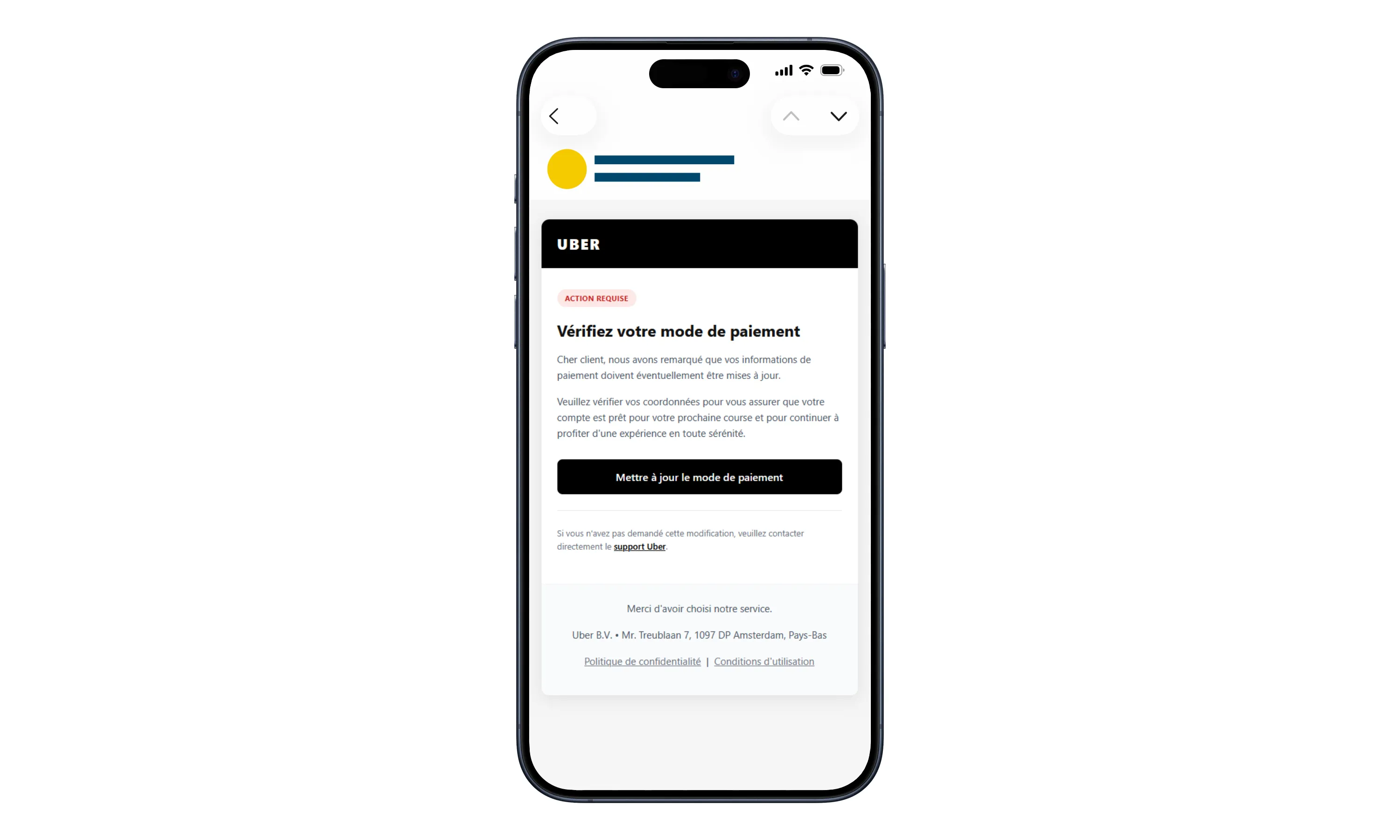
The fake Uber payment update email scam starts with an ordinary-sounding request: check the card attached to your account before your next trip.
In the French-language message shown above, the alert reads Action requise, meaning action required. The prominent button offers to update the payment method.
The problem isn’t an expired card. It’s the destination behind the message. Criminals use a copied account experience to ask for information they shouldn’t receive.
Uber is the impersonated service, not the operator of this scam. A fraudulent email using its branding isn’t evidence that Uber itself is fraudulent.
Police documented a card-theft campaign
Cybercrimepolice’s campaign warning describes personal-information forms, a fake account-management page, card collection, and a one-time payment-authentication code.
That combination matters. You may think you’re repairing an account setting while the person behind the page is trying to get a transaction authenticated.
The warning establishes an actual phishing mechanism, rather than a disputed fare, an unhappy passenger, or a complaint about Uber’s customer service.
The questions that determine your next move
Start with what you actually shared. A message sitting in your inbox requires a different response from a completed card form.
- Did you only read the email, or open its link?
- Did you type personal details, a password, or card information?
- Did you enter a bank code or approve anything in your banking app?
- Does the real Uber app show an account problem or an unfamiliar trip?
- Does your card statement show a payment you didn’t intend to make?
You don’t need to finish the fake process to find out whether it’s dangerous. Stop wherever you are and check through a route you already trust.
Why This Email Feels Like Something You Should Handle
Payment settings are easy to neglect. A card expires, a bank issues a replacement, or an app asks you to confirm an existing method.
That makes this particular excuse believable. Unlike a huge prize or an arrest threat, it asks you to do something you’ve probably done before.
The message also borrows a future inconvenience. You picture needing transport and discovering, at the worst moment, that your account isn’t ready.
There’s no need for the sender to know your next destination. You supply that concern yourself, especially if you’re traveling or arranging an important appointment.
Its compact layout helps, too. A logo, a few sentences, and one large button give you very little reason to pause over the surrounding details.
The captured message even includes a support reference and a corporate-style footer. Those elements can be copied just as easily as the logo.
Don’t treat an address printed at the bottom as proof of who sent the email. A copied signature doesn’t establish control of a legitimate company’s systems.
Nor does professional French establish authenticity. The question is whether the request appears inside your independently opened account, not whether the writer sounds convincing.
How the Fake Uber Payment Update Email Scam Works
Step 1: The email gives you a reason to leave your inbox
The initial request sounds administrative rather than financial. You’re asked to verify a payment method, not openly asked to send money to a stranger.
That distinction can lower your guard. You may approach the button as account maintenance and forget to ask whether you’ve started a purchase.
Pause before following it. If a card really needs attention, opening Uber yourself gives you a way to investigate without accepting the sender’s destination.
You also avoid an unnecessary argument with the email. You don’t have to prove every spelling choice wrong before deciding not to use its link.
Step 2: Familiar branding carries you into a different website
The linked page looks connected to Uber, but the police warning identifies it as fraudulent. Recognizable design is part of the disguise.
A logo tells you what the page wants to resemble. It doesn’t tell you who receives the information typed into its forms.
A secure connection can still lead to a scammer. It protects the connection, not the honesty of the person collecting your details.
Don’t enter a harmless-looking test value to see what happens next. Exploring a suspicious form isn’t necessary to protect your real account.
Step 3: The page turns a small task into a larger disclosure
Personal details come before the copied payment-management screen. That gives the process the feel of completing or confirming a customer profile.
Think about the difference between checking an existing setting and rebuilding your identity for a website you reached unexpectedly.
If you’re asked to supply more information than the original reminder led you to expect, stop. Earlier answers don’t create an obligation to continue.
That applies even if a progress bar says you’re nearly finished. Time already spent on a form isn’t a reason to expose something more sensitive.
Step 4: The card form makes the page financially dangerous
A page resembling account management asks for card details. It benefits from the expectation that a payment-settings task will naturally involve a card.
But you’re no longer just reading a notice. You’re giving a stranger information that your card issuer needs to know has been exposed.
Don’t wait for an error screen, a receipt, or a visible charge before calling the issuer. Describe the disclosure even if nothing appears to have happened.
If the fake form rejects the first card and asks for another, don’t try again. Tell the bank about every card you already entered.
Step 5: A one-time code is presented as the last bit of housekeeping
The police describe an OTP request connected to 3-D Secure payment authentication. It isn’t simply proof that your Uber profile has been refreshed.
EMVCo explains that card authentication can involve a one-time code or confirmation through a banking app.
A genuine bank prompt can therefore appear during a dishonest journey. The bank’s involvement doesn’t authenticate the email that brought you there.
Read the action, merchant, amount, and currency shown by your bank. Reject an unfamiliar request rather than trusting the explanation beside the phishing form.
If you already supplied a code, tell the issuer exactly that. Don’t describe the incident only as an accidental click.
Is This the Same as the Uber Verification Code Text Scam?
No. The distinction helps you protect the right thing first.
A login-code scam usually involves someone seeking a code that grants access to an Uber account. That requires account recovery and a review of account changes.
This documented email instead leads toward a card form and payment authentication. A clean trip history doesn’t establish that the card is safe.
You can check the app and find no strange rides while still needing urgent help from the card issuer about information entered elsewhere.
Conversely, an unfamiliar ride or changed account detail deserves a separate report to Uber. Don’t assume every problem will be solved by replacing a card.
Uber’s compromised-account guidance identifies unexpected trips, changes to account information, and other activity worth reporting.
Keep the two records separate: what your Uber account shows, and what your bank shows. They’re related checks, not interchangeable evidence.
Checking a Payment Warning Without Following Its Link
Open the app from your usual icon. Review the payment area and any notices already inside the account.
If something needs changing, make that change within the genuine service. You don’t need to return to the email to complete it.
If you’re unsure where to find the right setting, use the app’s own Help area. Avoid support numbers displayed by the suspicious page.
For a work account, ask your travel administrator whether payment changes are centrally managed. Don’t replace a company card because an unsolicited message asks you to.
If a family member handles the account, speak to them directly. Forwarding an active phishing link with a vague question can pass the risk along.
A screenshot is enough to explain what you received. Keep passwords, card numbers, codes, and unrelated travel details out of anything you share.
Finally, don’t confuse this warning with an allegation that all payment reminders are fake. The safe habit is independent verification, not ignoring genuine account problems.
When a Follow-Up Message Knows What You Just Entered
A later message mentioning your payment update can feel like confirmation that you reached the right service. Don’t let that familiarity decide what happens next.
Information typed into the fake form could be repeated back to you. Knowing the story doesn’t give a caller authority to request another code.
If someone offers to cancel a pending payment, end the interaction and call the issuer yourself. Use your existing banking app to identify the appropriate contact.
Tell the issuer about the follow-up as part of the same incident. Preserve its timing and wording without continuing the conversation.
This isn’t a claim that every recipient gets a second approach. It’s a precaution for someone whose personal details have already reached an untrusted website.
The useful boundary is consistent: account questions go to Uber, card questions go to the issuer, and neither should be reached through the suspicious sender.
What to Do if You Have Fallen Victim to This Scam
-
Stop interacting with the page. Close it without completing further checks. Don’t reply to the sender or ask its support link whether the email is genuine.
If you only viewed the message, report it as phishing in your mail app. Reading it alone doesn’t mean your card information was stolen.
-
Call the card issuer if you entered card details. Use the number on your card or the bank’s own app, not a number from the email.
Explain that a fake Uber payment-update page collected your information. Ask about blocking or replacing the card and checking attempted as well as completed payments.
Mention every exposed card. A second card entered after a supposed failure needs attention, too.
-
Be precise about any approval. Tell the bank whether you entered an SMS code, approved an app notification, or confirmed a transaction another way.
Provide the time and any merchant or amount shown. Ask which payments require a dispute and what supporting records the issuer needs.
Ask for the reporting deadline applicable to your card and location. Don’t assume a general online refund promise describes your rights or outcome.
-
Secure Uber if account information was exposed. Open the real app and contact its support team about unfamiliar activity or changed profile details.
If you typed a password into the fake site, replace it through the genuine service. Change matching passwords on other accounts as well.
Protect the associated email account if it used that password. A safe inbox is important when you’re relying on messages to recover access.
-
Keep a compact record. Save the original email, sender details, destination address, bank alerts, and relevant statement entries in a private folder.
Write down what you entered while you remember it. Record the type of information, not full card numbers or authentication codes in an unsecured note.
Don’t revisit the phishing site for a better screenshot. Existing browser history and the original message can help explain the route.
-
Handle device exposure separately. A card form doesn’t automatically install malware. If you downloaded or installed something, stop using that software and assess the device.
Malwarebytes can help check suspicious downloads. AdGuard can add protection against some harmful advertising and web destinations, but neither replaces card cancellation or account recovery.
Get software from its official source, never from an urgent cleanup offer that appears on the fraudulent page.
-
Report the incident and distrust follow-up rescuers. Send the message through your email provider’s phishing-report option and notify Uber through its genuine support route.
Report financial loss to your local police. Cybercrimepolice accepts incident information, but its website isn’t a substitute for filing a formal criminal complaint.
Anyone offering guaranteed recovery for an upfront fee deserves the same skepticism as the original sender. Deal directly with your bank.
Frequently Asked Questions
Is Uber responsible for this payment-update email scam?
The documented campaign impersonates Uber. The fraudulent message and copied pages are the problem, not the legitimate transport service or ordinary payments made inside it.
Why would a bank send a real code after a fake Uber email?
A criminal can try to use exposed card information for a transaction. Bank authentication concerns that transaction, not the trustworthiness of the message you received.
I didn’t book a ride. Should I update my card anyway?
Don’t use the email’s button. Open Uber independently and inspect the payment settings there. An unsolicited reminder isn’t a reason to disclose details elsewhere.
Does an empty Uber trip history mean I’m safe?
No. A card disclosed to a separate website can be misused outside Uber. Contact the card issuer even when your real Uber account looks normal.
Can I ignore it if the form said my payment failed?
Don’t rely on that message. Tell the issuer what you entered and ask it to investigate. The fake site’s status isn’t a dependable record of card activity.
What if I clicked but didn’t enter anything?
Close the page, don’t approve notifications or downloads, and report the email. A click alone doesn’t prove account takeover, a charge, or a malware infection.
The Bottom Line
Don’t update payment information through this fake Uber email. Open the real app instead; the copied page is trying to collect information for financial misuse.
If you entered a card or approved a bank request, contact the issuer now. Check Uber separately if credentials or account access were also involved.

Join the discussion
0 commentsShare your experience or ask a question about this article.
Discussion
Start the conversation
Have a question or something useful to share? Add the first comment.