

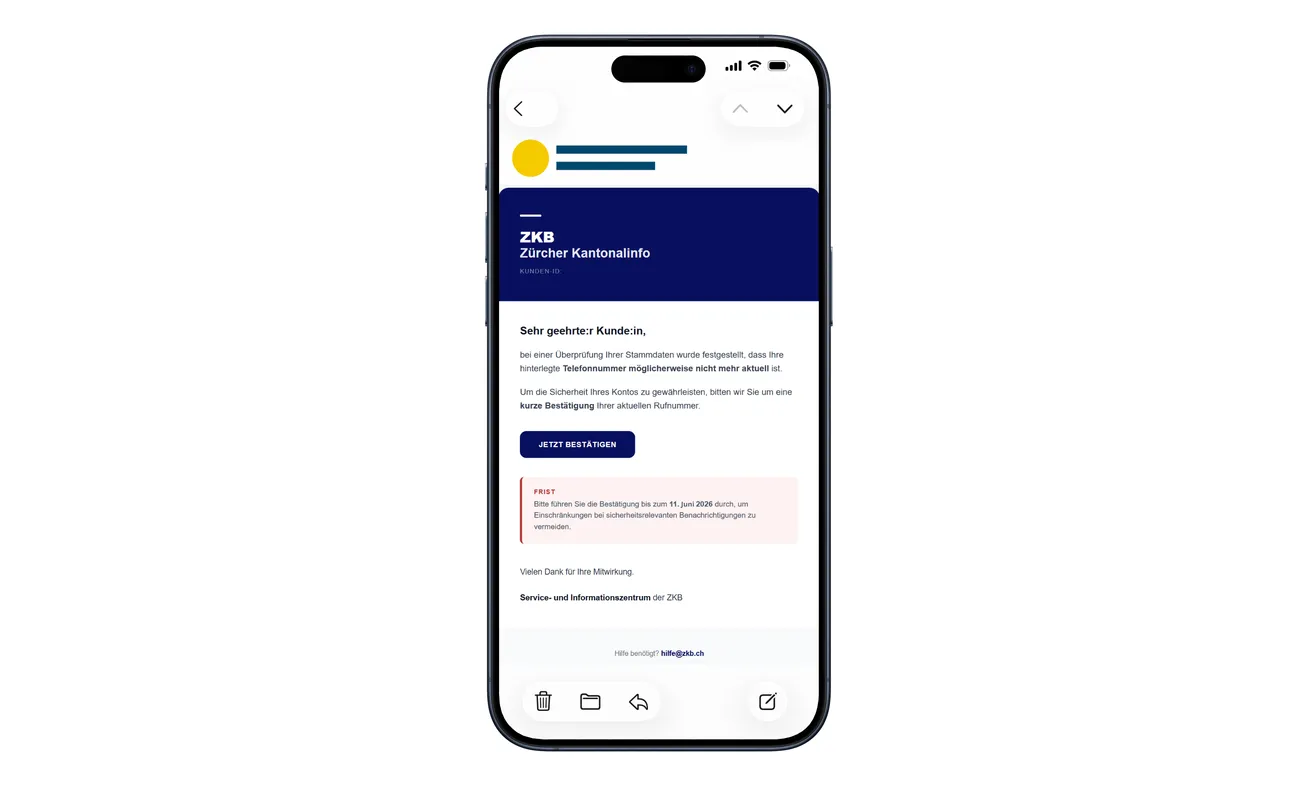
An email claiming to come from Zürcher Kantonalbank says your saved phone number may be out of date. It asks for a quick confirmation.
That sounds sensible when a bank uses your number for important notices. Before following the button, look at how far this particular request can go.
Overview
A contact-detail check becomes a banking-access request
The ZKB phone number confirmation email scam starts with an alleged records check. The sender says a possibly outdated number could affect account security.
The linked website looks like the bank’s service. Its requests go well beyond confirming how the bank can reach you.
Contract information, a banking password, personal details, and an uploaded ZKB Access activation letter are involved in the documented journey.
Zürcher Kantonalbank is the legitimate institution being impersonated. The fraudulent email and website are not evidence that the bank itself operates a scam.
The activation document is the crucial escalation
The police advisory warns that the uploaded activation letter can help criminals attempt to register another device for access to eBanking.
The paper may stay in your drawer, but its activation information leaves with the scan. Treat that upload as a banking-security issue, not routine paperwork.
The original email above shows the phone-confirmation hook. The high-risk upload appears later, after the reader has already been drawn into a bank-like process.
What matters if you already responded
Contact the real bank promptly if you supplied login information or the letter. Describe the documents and actions involved, not just the original email.
- A password disclosure requires account protection.
- An uploaded activation letter requires an explicit warning about possible device enrollment.
- A code, scan, or approval should be described separately.
- Unfamiliar transactions need a financial-fraud report as well.
- A message you only read doesn’t establish successful account access.
You can stop the process even if the website says confirmation is incomplete. Finishing isn’t a way to undo the information already supplied.
Why Updating a Phone Number Sounds So Reasonable
The opening request doesn’t look like an attempt to take money. It sounds like a bank maintaining accurate customer records.
That is a useful disguise because customers know security notifications matter. A warning about missing them can feel like a reason to act responsibly.
The email shown above asks for a brief confirmation and includes a deadline. Its appearance encourages a quick response to what seems like a minor administrative task.
But keeping your contact details current and granting banking access are very different things. The later requests should be evaluated on their own.
A form doesn’t gain permission to ask for an activation document simply because you already typed your phone number.
Likewise, a familiar bank design doesn’t explain why an unsolicited email has brought you into a device-activation process.
You don’t need to finish that process to avoid losing genuine notifications. Open the bank through your normal route and ask it to verify your records.
A real issue can be addressed there. The suspicious sender doesn’t get to be the only route to correcting the problem it claims to have found.
How the ZKB Phone Number Confirmation Email Scam Works
Step 1: A records-check story supplies a reason to click
The email says the stored telephone number may no longer be current. It presents confirmation as necessary for the account’s security.
The button offers a shortcut. That’s the first thing to decline: open the bank independently instead of accepting the destination chosen by an unexpected sender.
If you’re assisting a relative, ask them to open their own banking app. Don’t click the email on their behalf because the request sounds straightforward.
For a business account, pass the concern to your normal banking administrator without forwarding an instruction to complete the suspicious form.
Step 2: A bank-looking page requests login details
The counterfeit site asks for the contract number and eBanking password. That turns a contact-detail check into a disclosure of banking credentials.
Stop if you’ve arrived from the email. A convincing login screen doesn’t establish that your password is being sent to the bank.
Don’t assume a rejected password means the site didn’t receive it. If you typed it into the fake form, tell the genuine bank.
A password manager not recognizing the page can be a reason to pause. Don’t override that hesitation just to make the promised confirmation work.
Step 3: Personal questions make the process feel like authentication
The page requests information including a name, telephone number, and date of birth. These questions can resemble identity checks.
Think about who’s asking them. Familiar categories of information don’t authenticate an unfamiliar destination.
The questions also encourage continuation. After supplying several answers, you may feel you’re completing a legitimate procedure rather than deciding whether to trust a stranger.
You can leave at any point. The fact that earlier details were accepted doesn’t prove a genuine customer record was consulted.
Step 4: The site asks you to scan and upload an activation letter
The final documented request is for an Access activation letter. The page portrays that upload as a way to complete authentication.
This isn’t a harmless copy request. You’re being asked to hand over material connected to activating banking access.
Don’t photograph the letter for a chat agent who offers to help with the upload. Changing the delivery method doesn’t make disclosure safe.
Nor should you post the image online to ask whether it’s genuine. Seek advice without exposing the very document you’re trying to protect.
Step 5: The attacker can attempt to enroll another device
The police describe the risk of a new device being registered for eBanking. That is why the response must address access, not just your phone number.
Tell the bank about the uploaded document and ask it to examine device enrollment and account activity. Let its support team determine the protective measures needed.
Don’t assume a password change alone settles an enrollment concern. Explain every sensitive item the page received so the bank can assess the whole incident.
If the genuine app still opens normally, that’s useful information for support, not proof that no unauthorized access was attempted.
Why the ZKB Access Letter Isn’t Ordinary Paperwork
ZKB’s device-replacement guidance explains that a valid activation letter is one of the methods available when adding an Access device.
The genuine process can also involve an existing activated device or a biometric passport. Those options belong to a deliberately started banking procedure.
The important distinction is who initiated the procedure and where it takes place. An unexpected contact-detail email isn’t a reason to send activation material elsewhere.
A scan preserves information. It doesn’t become safe merely because the original paper remains in your drawer.
Keep activation documents away from shared photo folders and casual messaging. If you need help, ask the bank how to proceed without disclosing them to an intermediary.
If you’re managing documents for a parent, don’t interpret a request for a clear photo as routine customer service. Verify the request with the bank first.
Explain the difference in plain language: the letter may help activate access, so it deserves the same care as other banking security information.
You don’t have to become an authentication expert. You only need to refuse an unsolicited upload and use a trusted channel for assistance.
Bank Security Checks You Can Make Without the Email
ZKB’s fraud guidance recommends starting eBanking through the bank’s own address rather than a search advertisement and warns against suspicious authentication requests.
Use your established bookmark or banking app to review account information. If you don’t know where a setting belongs, ask genuine support.
Check the phone number actually stored in the account without following the email’s instructions. An outdated number can be corrected without trusting the impersonator.
If you see an unexpected authentication graphic or request, don’t scan it just because a page tells you it’s for security.
The person asking for a security action should not be allowed to explain away every inconsistency. End the interaction and verify independently.
Also avoid the idea that knowing your name makes a sender genuine. Personal information can make a request persuasive without proving any authority.
This email doesn’t, by itself, prove a breach at the bank. Keep the report focused on the message, the fake site, and what you disclosed.
For shared business access, tell the person authorized to manage the banking relationship. Don’t let an unexpected email quietly become an informal change of device.
If You’re Helping Someone Who Already Uploaded the Letter
Begin with the next protective action, not a lecture. The person may feel embarrassed and minimize what happened if the conversation turns accusatory.
Help them contact the bank through a known route. Let the account holder speak and authorize any changes the bank requires.
Write a short timeline together: email received, link opened, password entered, document uploaded, and any approval made.
That timeline is more useful than a general statement that they clicked a suspicious message. It tells support which parts of the account need examination.
Don’t take possession of their password or activation document yourself. You can help navigate the situation without creating another copy of sensitive information.
If money moved, preserve the actual transaction references. Avoid promising that every payment will be reversed; the bank needs to investigate the individual circumstances.
Once the urgent report is underway, help identify other accounts using the same password. Handle those through their genuine services rather than links in follow-up emails.
A calm response can make future reporting easier. The goal is to shorten the time between recognizing the fraud and getting qualified help.
What to Do if You Have Fallen Victim to This Scam
-
Stop the requested confirmation. Close the counterfeit website. Don’t upload a clearer copy, provide another document, or approve further prompts.
If you only received the email, mark it as phishing. Its arrival doesn’t establish that someone has successfully signed into your banking account.
-
Contact Zürcher Kantonalbank urgently if banking information was entered. Use its official app, existing bank paperwork, or independently opened contact information.
Say whether the site received your contract number, password, personal details, or Access activation letter. Each detail helps the bank assess the exposure.
Ask it to secure eBanking and examine unfamiliar devices or access attempts. Don’t wait for a visible balance change before reporting.
-
Describe every authentication action. Include any code you entered, image you scanned, or approval you made during the process.
If you no longer remember the exact order, say so. An honest partial timeline is better than accidentally omitting the most sensitive step.
-
Review transactions with the bank. Identify payments you didn’t intend, including pending items or recently changed instructions if support asks you to check them.
Ask what can be stopped or investigated, what evidence is needed, and which reporting deadlines apply. Keep a case reference for follow-up.
Never transfer the remaining balance to an account a caller describes as safe. Verify any financial instruction directly with your established bank contact.
-
Replace exposed passwords through genuine services. Follow the bank’s account-recovery directions and change the same password anywhere else it was reused.
Secure your email account if it shared that password. Review recovery details and access there as appropriate, using the email provider’s own settings.
-
Preserve evidence without spreading the activation document. Save the original email, destination address, timestamps, and relevant bank notifications privately.
Tell investigators that the letter was uploaded, but use the secure submission method they specify if they need sensitive material.
Don’t attach it to a public forum post or forward it through a group chat. A request for reassurance shouldn’t expose the document to more people.
-
Address device changes only if they occurred. If the fake site led you to install software or grant remote access, tell the bank that too.
Malwarebytes can help inspect suspicious software. AdGuard may reduce contact with some harmful web destinations, but neither removes an unauthorized banking device from the bank’s records.
Use a trusted device for sensitive recovery if the one involved may be compromised. Don’t delay the bank call while waiting for a scan.
-
Report the fraud through the appropriate channel. Contact your local police about loss or unauthorized access and retain the bank’s incident reference.
An incident submitted to Cybercrimepolice helps flag the campaign, but a formal criminal complaint must go through the responsible police service.
Reject anyone demanding a fee to invalidate the letter or retrieve the account. Recovery should continue with the actual bank, not a new unsolicited helper.
Frequently Asked Questions
Is the email genuinely from Zürcher Kantonalbank?
The campaign described here is a documented impersonation. Verify your own account through the bank independently rather than following the message’s confirmation button.
Why would confirming a phone number require an activation letter?
That’s the dangerous escalation. The fake site moves from a contact-record story to information that can help with banking-device activation.
Can uploading a photo be as risky as handing over the original?
A photo can disclose the activation information while the paper stays with you. Tell the bank promptly if you uploaded or sent a readable copy.
I changed my password. Is that enough?
Don’t assume so if activation material was also disclosed. Ask the bank to examine possible device enrollment and determine what additional protection is required.
Does normal access to my app prove nobody else got in?
No. Your continued access doesn’t rule out an attempt involving another device. Report the disclosure and let the bank inspect the account.
Should I mail the activation letter to anyone helping me?
Don’t send it to an unsolicited helper. Ask the bank directly how to handle the affected activation material and follow its verified instructions.
The Bottom Line
Don’t confirm your phone number through this ZKB scam email or upload an activation letter to its linked page. Open the genuine bank service instead.
If login details or the letter were disclosed, contact ZKB now. Explain the possible device-activation exposure so the response goes beyond simply changing a password.

Join the discussion
0 commentsShare your experience or ask a question about this article.
Discussion
Start the conversation
Have a question or something useful to share? Add the first comment.