


A Christmas market invitation can feel like welcome news for a small trader. The dates sound plausible, spaces appear limited, and the message seems timely.
Before paying for a pitch, however, one small detail can separate a genuine council opportunity from a costly seasonal trap.
Overview
What is the Farnham Christmas Market pitch scam?
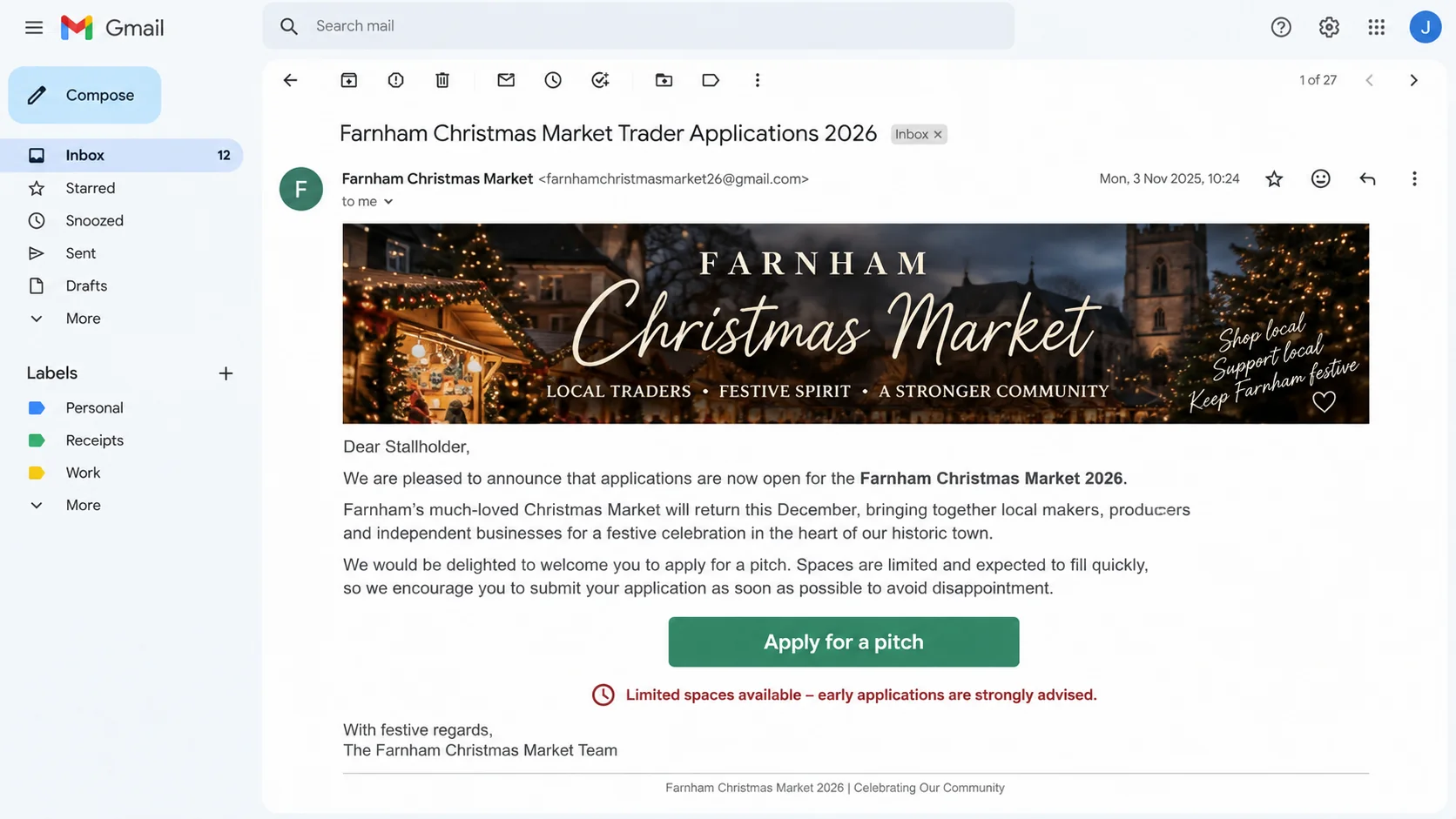
The Farnham Christmas Market pitch scam is a fraudulent trader invitation that falsely claims to represent Farnham Town Council or its Christmas event team.
Recipients are encouraged to apply for a stall, reserve a pitch, or pay a deposit before the remaining spaces supposedly disappear.
Farnham Town Council warned traders about messages sent from Gmail addresses. The council said official communications use addresses ending in @farnham.gov.uk.
Why the offer can look believable
Christmas markets genuinely recruit independent retailers, food sellers, craftspeople, and community groups months before an event. An application invitation is not unusual by itself.
Criminals can copy dates, venue names, photographs, council logos, stall dimensions, and public contact names from real event pages.
The result may resemble ordinary event administration rather than obvious spam. That professional surface is intended to make a deposit request feel routine.
What the criminals want
The immediate objective is usually money paid for a nonexistent stall. Later requests may involve insurance charges, electricity fees, licences, or refundable security deposits.
A fake application can also collect identity documents, business details, payment information, product photographs, and account credentials useful for further fraud.
- The invitation arrives unexpectedly from a free or unrelated email address.
- The sender claims only a few Christmas market pitches remain.
- A deposit must be paid before the council can confirm anything.
- The payment route does not match a known council process.
- The recipient is directed to a third-party application website.
- Questions receive pressure, vague answers, or another payment demand.
The Warning From Farnham Town Council
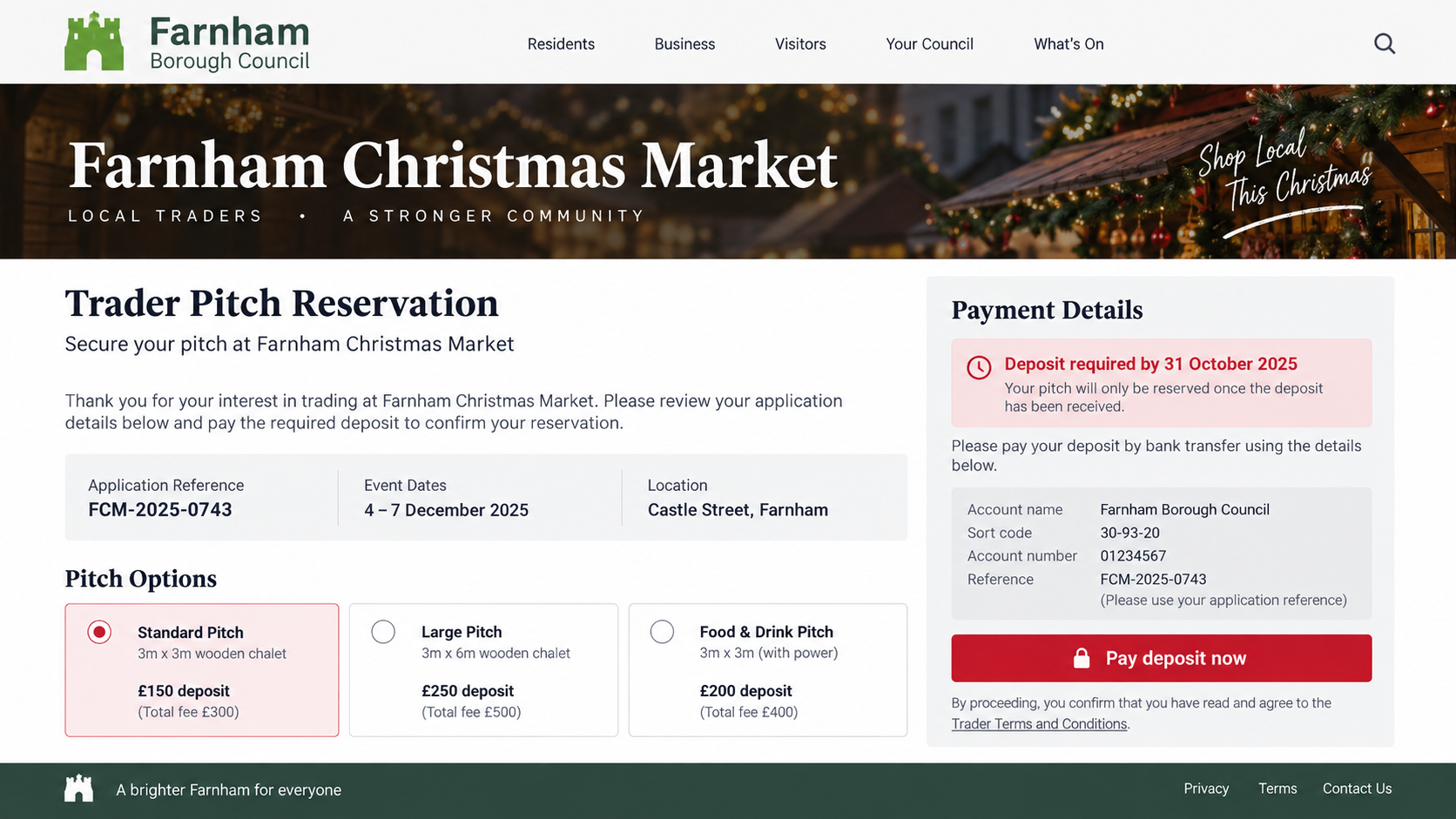
The council’s warning is unusually specific. It says messages inviting traders to apply for a Farnham Christmas Market pitch have been circulating from Gmail accounts.
That matters because an attractive flyer or convincing signature cannot override the sender’s real address. A Gmail mailbox is not a Farnham council account.
The council also says it does not use third-party organizers or external websites to sell or book stalls for its events.
A stranger cannot make an outside booking portal official by placing council branding on it. Ownership must be verified independently through the council.
Traders should begin at the council’s known website, not through a link inside the invitation. That reverses control of the verification process.
If the opportunity is genuine, the event team can confirm the application window, fees, availability, and correct payment method through an official channel.
How Seasonal Timing Makes the Invitation More Persuasive
Traders plan Christmas stock, packaging, staffing, and travel long before December. An early invitation therefore fits a real commercial calendar.
Popular events can receive more applications than available spaces. Criminals exploit that competition by suggesting hesitation will cost the trader a valuable weekend.
A vendor may also be juggling several genuine applications. A fabricated message can blend into existing paperwork without inventing an entirely new situation.
The sender may reference products shown on social media. Public research can produce that personalization without any council involvement.
Seasonal excitement matters too. Sellers imagine busy footfall, local visibility, and strong December revenue before examining the payment route carefully.
That optimism is normal. The protection is procedural: verify the organizer before allowing a promising opportunity to influence the decision.
Keep a spreadsheet of applications, official contacts, invoices, and payment dates. An unexpected reference becomes easier to spot when it matches no prior entry.
Share verification with another person. A colleague who did not receive the invitation may notice domain, beneficiary, or contract inconsistencies immediately.
How the Farnham Christmas Market Pitch Scam Works
Step 1: The fraudster identifies likely market traders
Small businesses often advertise their products, upcoming events, and contact details publicly. Market directories and social pages make potential targets easy to find.
The criminal may contact jewellery makers, bakers, artists, gift sellers, food vendors, and other businesses likely to welcome a seasonal sales opportunity.
A personalized greeting can come from public information. Knowing a trading name or product range does not prove access to council records.
Step 2: A polished invitation borrows the council’s identity
The email may display a council logo, Christmas market photograph, local street name, event date, or familiar staff title.
Its sender name might say Farnham Christmas Market Team, while the actual address ends in Gmail or another domain outside council control.
Some versions may attach an application form. Others lead to a website designed to resemble a local-government event portal.
Step 3: Scarcity pushes the trader toward a quick decision
The message claims applications are closing, popular pitch sizes are nearly gone, or another trader is waiting for the same category.
Seasonal events naturally have deadlines. The scammer turns that reality into pressure that discourages a telephone call to the council.
A genuine organizer should tolerate independent verification. Anger, repeated urgency, or warnings that questions will forfeit the space are serious red flags.
Step 4: The fake form gathers valuable business information
The application may request a proprietor’s full name, address, telephone number, identity copy, insurance document, social profile, and banking details.
Some information would appear normal in a real trader application. The danger comes from sending it to an unverified operator.
Collected records can support identity fraud, account recovery attempts, counterfeit trader profiles, or targeted messages to the business’s customers and suppliers.
Step 5: A pitch deposit is demanded outside council channels
The trader receives a supposed approval and payment deadline. Bank transfer, payment application, card form, or cryptocurrency may be offered.
The beneficiary may be an individual, a newly created company, or an account whose name differs from the council and event.
Bank transfers are attractive to criminals because recovery can be difficult after money reaches another account or moves through a money mule.
Step 6: Additional event fees appear after the first payment
A victim who pays may be told that electricity, waste handling, insurance verification, food licensing, equipment rental, or a security bond remains outstanding.
Each demand is framed as the last requirement. The growing investment makes walking away feel harder, which the fraudster deliberately exploits.
No real stall is being reserved. The documents and payment stages exist to keep the victim engaged while more money is requested.
Step 7: The sender disappears or returns under another identity
Contact may stop after the victim questions the process, contacts the council, or refuses another payment. The fake website can vanish without notice.
The same operator can return as a bank investigator, refund service, insurer, or event administrator who promises recovery for another fee.
Information from the application makes follow-up approaches more convincing. Victims should treat unexpected recovery offers as a continuation of the original risk.
What a Genuine Market Application Should Provide
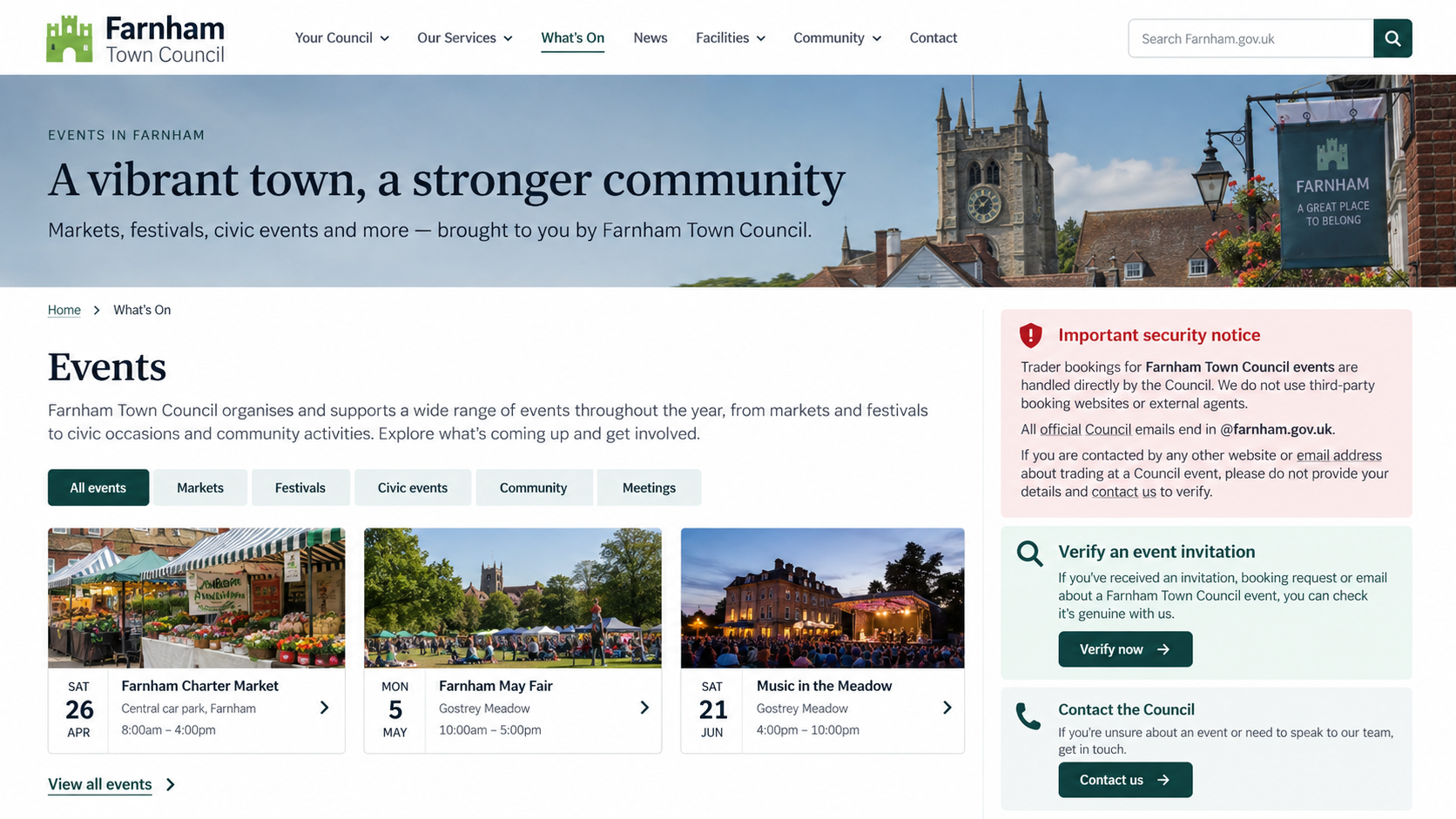
A legitimate application should identify the legal organizer, event location, trading dates, exact fee schedule, cancellation terms, and required documents before payment.
It should explain what the fee includes. Electricity, furniture, shelter, vehicle access, waste collection, security, and overnight storage may have separate conditions.
Food traders should receive clear requirements for hygiene registration, allergens, insurance, equipment, and inspections. Vague promises are not a substitute for written rules.
The organizer should provide a contract or booking terms that can be verified outside the email. A payment alone should never be the only proof.
Real availability can be confirmed through an official event office. A countdown on a third-party page cannot establish that a particular pitch exists.
Traders should also understand refund conditions before paying. Seasonal weather, event cancellation, nonattendance, and application rejection must be addressed in writing.
Red Flags Traders Should Check Before Paying
- The sender uses Gmail, Outlook, Yahoo, or another free mailbox.
- The domain differs from the council’s verified government address.
- The message arrives without any application the trader remembers submitting.
- The website appeared only through the invitation and has no independent trail.
- The beneficiary is a person or unfamiliar company.
- A deposit is described as refundable without written conditions.
- The sender refuses a telephone call through the council switchboard.
- The form requests excessive identity or banking information.
- The pitch must be paid for immediately to avoid losing it.
- New charges appear after the original amount has been transferred.
One warning sign may have an innocent explanation. Several together justify stopping the application until the event team confirms every important detail.
Do not use the telephone number, map link, or social profile supplied by the questionable sender. Those channels may be controlled by the same operation.
Company, Address, and Fulfillment Checks
The organizer’s legal identity must match the event
A council logo does not establish authority. Confirm who legally organizes the market and who is entitled to collect trader fees.
Search official council pages independently. If another company is named, ask the council to confirm that relationship before sending documents or money.
The email and telephone routes must belong to the council
Official Farnham Town Council email addresses end in @farnham.gov.uk. A display name cannot turn Gmail into an official council mailbox.
Call a number obtained from the council website. Do not let the sender transfer you to a supposed accounts team or event coordinator.
The address and bank beneficiary must survive comparison
Compare the contract, invoice, bank recipient, website footer, and correspondence. Mismatched legal names or unexplained addresses are not minor administrative details.
A mailbox, virtual office, residential address, or unrelated business can be used to imitate a local presence. Verification must connect every detail.
Fulfillment means a verifiable pitch, not a receipt
An emailed receipt proves only that somebody generated a document. It does not prove the council recorded a booking or allocated a stall.
Ask the official event team to confirm the trader name, pitch type, payment status, and booking reference within its own records.
How to Verify a Farnham Market Invitation Safely
- Close the email and open a fresh browser window. Search for Farnham Town Council through a trusted search result or saved address.
- Find the council’s official events information and published contact details. Do not copy any contact route from the suspicious message.
- Forward the invitation to the official council team only after confirming the destination ends in @farnham.gov.uk.
- Ask whether applications are open, whether your reference exists, and whether the council recognizes the sender, portal, and beneficiary.
- Compare every payment instruction with the council’s response. Never accept an explanation supplied only by the original sender.
- Keep a copy of the invitation and full email headers. They can help the council, bank, and investigators connect related reports.
This process may take a few minutes, but it protects both money and business records. A genuine opportunity will remain genuine after verification.
Protecting a Small Business Beyond the Lost Deposit
A completed trader form may reveal stock plans, turnover estimates, vehicle registrations, insurance records, and staff contact details.
Review which information was submitted and decide what can be replaced, monitored, or limited before another approach arrives.
Tell employees that the supposed booking is fraudulent. Otherwise, a follow-up caller may persuade somebody else to complete an outstanding payment.
Check business email rules and shared inbox permissions when credentials were entered. Criminals may quietly monitor genuine event and supplier conversations.
Watch for invoices using the same branding but different recipient accounts. The operation may reuse application details in a more targeted message.
Search for copied business profiles and product photographs. A fraudster could impersonate the trader when approaching customers or other market organizers.
Record the incident in internal procedures. Future event applications should require a second-person check before new beneficiaries receive money.
Recovery is not only about one transfer. Closing the information trail reduces the chance that the seasonal invitation becomes a longer business compromise.
What to Do if You Have Fallen Victim to This Scam
- Stop all payments and contact. Do not pay another charge to preserve the pitch, release a refund, or complete a supposed cancellation.
- Call your bank immediately. Identify the transfer as fraud and ask about a recall, beneficiary freeze, card replacement, and account monitoring.
- Notify Farnham Town Council through its official website. Provide the sender address, website, payment details, forms, and booking reference used.
- Preserve the complete evidence. Save emails with headers, screenshots, contracts, receipts, account names, telephone numbers, and every follow-up demand.
- Report the fraud through the appropriate national reporting service and local police when money, identity documents, or threats are involved.
- Protect exposed identity information. Contact document issuers, consider fraud alerts, and watch business and personal credit records for unfamiliar activity.
- Change passwords from a trusted device if you created an account or reused a password. Enable multi-factor authentication and review active sessions.
- Run a full Malwarebytes scan if you downloaded a form, opened an unusual archive, installed software, or allowed browser notifications.
- Use AdGuard to reduce malicious advertisements, phishing redirects, and repeated scam domains. It complements verification but cannot reverse a bank transfer.
- Warn staff and neighbouring traders. A campaign may approach several vendors from the same public directory using slightly different sender identities.
- Reject recovery agents demanding upfront payment. A stranger cannot guarantee a refund, and prior victims are often targeted again.
Is Your Device Infected? Run a Free Malware Scan
Slow performance, constant pop-ups, or strange behavior? These are classic signs of a malware infection. A quick way to check is to scan your device with Malwarebytes Free, one of the most trusted malware removal tools available. If you only visited a scam page and didn’t download or install anything, this scan is optional.
The free version detects and removes the most common threats, including:
- Adware — the cause of those annoying pop-ups
- Browser hijackers — unwanted redirects and changed homepages
- Trojans and spyware — hidden programs stealing your data
- Potentially unwanted programs (PUPs) — software you never asked for
👉 Select your device below — Windows, Mac, or Android — then follow the simple steps to download Malwarebytes, scan your system, and remove any threats it finds. The scan usually takes 5 to 20 minutes.
Run a Malware Scan with Malwarebytes for Windows
Malwarebytes is one of the most popular and trusted anti-malware tools for Windows — and it’s completely free for removing infections. It catches threats that many antivirus programs miss, including adware, browser hijackers, and trojans. Follow the steps below to scan your PC and remove what Malwarebytes finds.
Download Malwarebytes
Click the button below to download the latest version of Malwarebytes for Windows from the official source. The free version is all you need — it will scan your computer and remove adware, browser hijackers, and other malicious software at no cost.
Download MalwarebytesOfficial installer for Windows 11 and 10. Your download starts right away.Want real-time protection? See Malwarebytes Premium Malwarebytes Free for WindowsScans and removes malware at no cost
-
Install Malwarebytes
When the download finishes, open your Downloads folder and double-click the MBSetup file. If Windows shows a User Account Control pop-up, click “Yes” to allow the installation.

Follow the On-Screen Prompts to Install Malwarebytes
The setup wizard will walk you through a few quick screens:
-
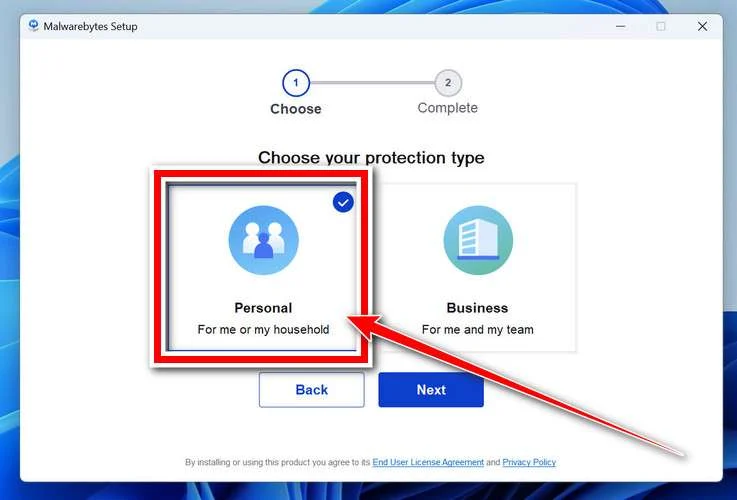
Choose where you’re installing the program — “Personal Computer” or “Work Computer” — then click Next.
-
Malwarebytes will now install on your device. This usually takes under a minute.
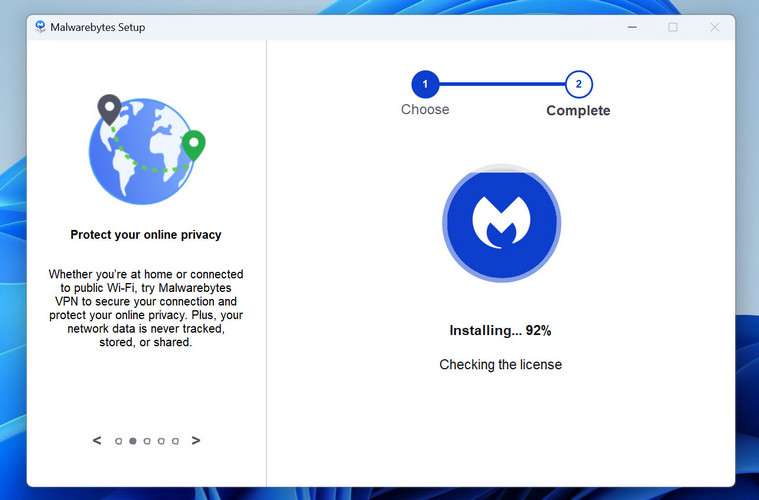
-
When installation is complete, the “Welcome to Malwarebytes” screen will open automatically.
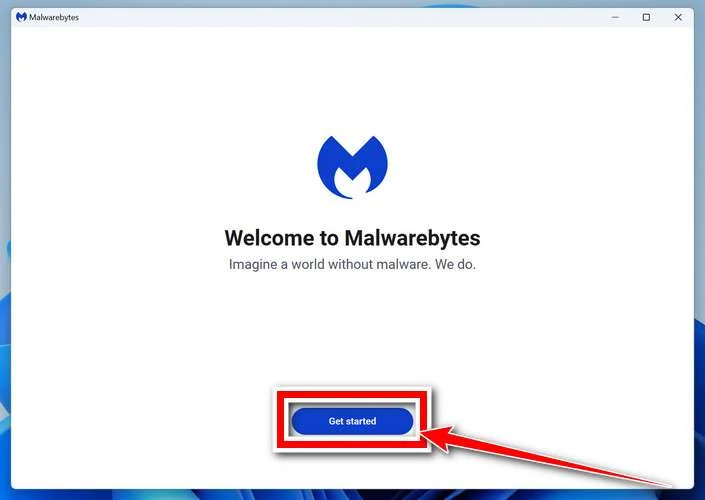
-
On the final screen, click Open Malwarebytes to launch the program.
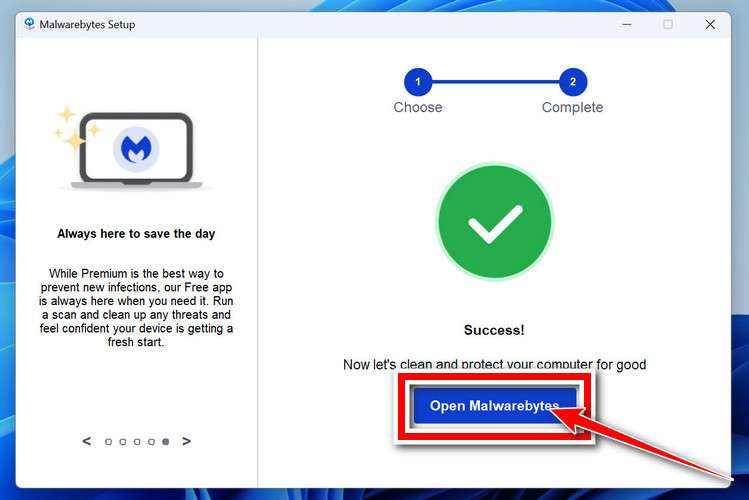
-
Optional: Check for rootkits with a Custom Scan
You don’t need to change any settings for a normal scan. The standard Threat Scan in the next step is enough for most problems, so you can go straight to it.
If you also want to check for rootkits, use a Custom Scan. In current versions of Malwarebytes, rootkit scanning is only available there:
- On the Scanner tile, click the three-dot menu and select Advanced Scan.
- Choose Custom Scan. In its options, check Scan for rootkits.
- Select your system drive (usually C:\) as the location to scan, then start the scan. It takes longer than a Threat Scan.
- When it finishes, review and quarantine the results as described in the steps below.
Rootkit scanning isn’t available on Windows devices with ARM processors.
Start the Scan
Click the blue Scan button. Malwarebytes will automatically update its virus database and start checking your computer for malware.
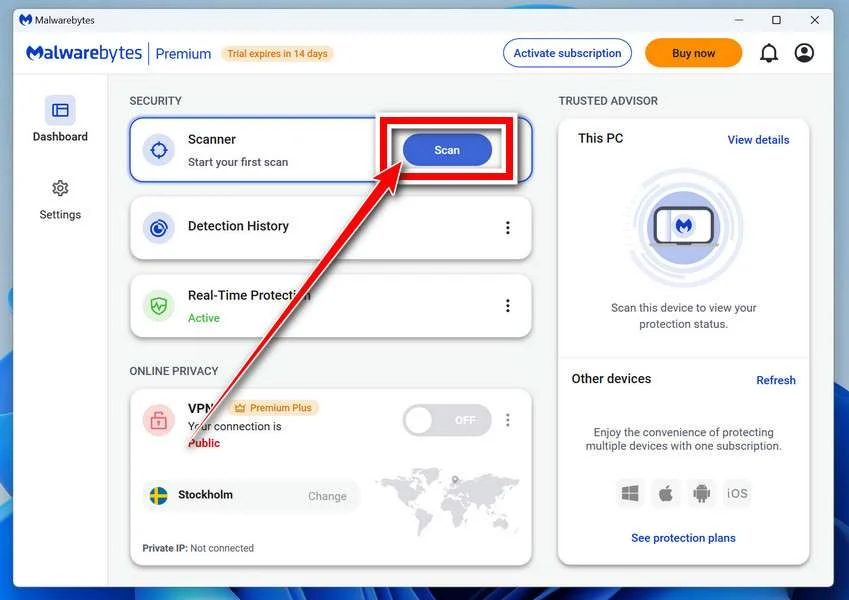
-
Wait for the Scan to Finish
The scan checks your entire system for browser hijackers and other malicious programs, so it can take 5 to 20 minutes depending on your computer. Feel free to do something else — just check back occasionally to see the progress.
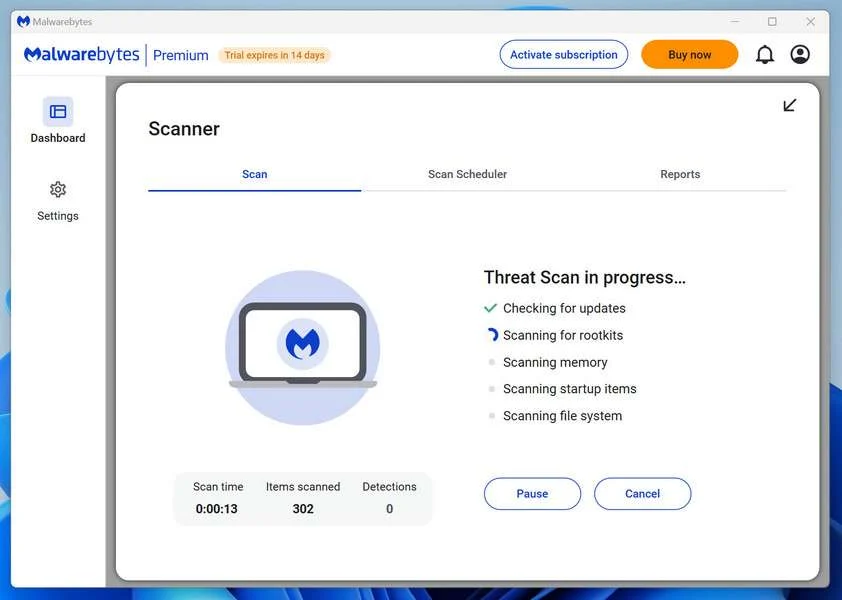
-
Quarantine the Detected Threats
When the scan is done, you’ll see a list of everything Malwarebytes found — malware, adware, and potentially unwanted programs. Click the “Quarantine” button to remove all of them at once.
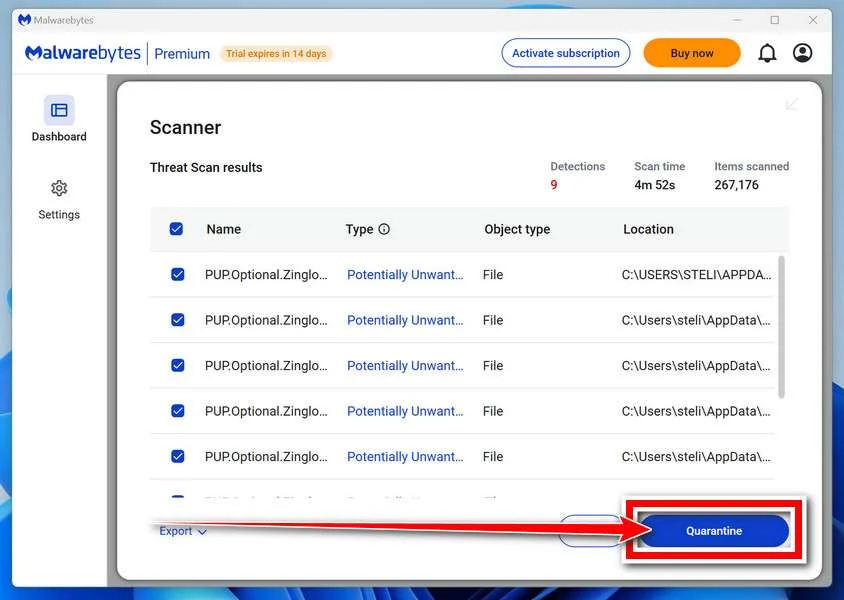
Malwarebytes will now remove the malicious files and registry entries and move them safely into quarantine.
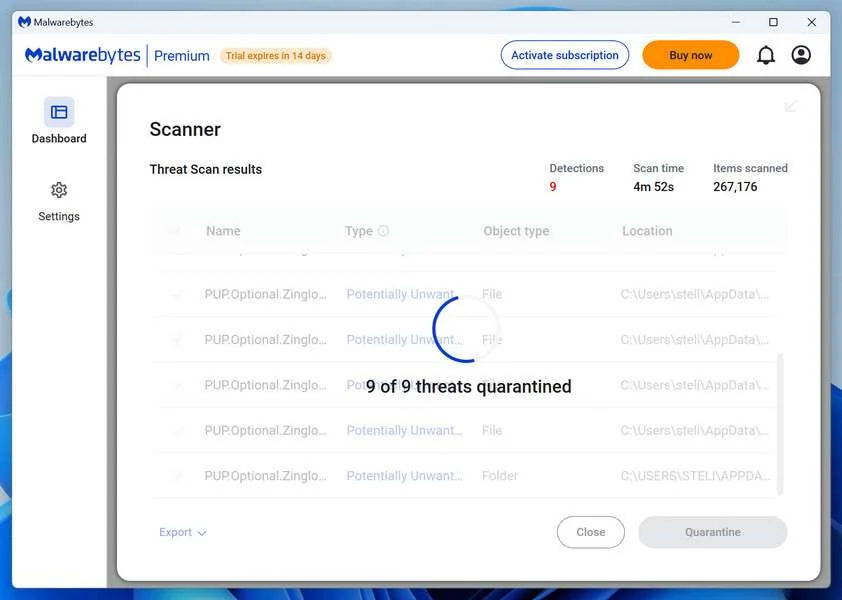
-
Restart Your Computer
Some threats can only be fully removed after a reboot. If Malwarebytes asks you to restart, click Yes. Once you’re logged back in, Malwarebytes has finished removing the threats it found.
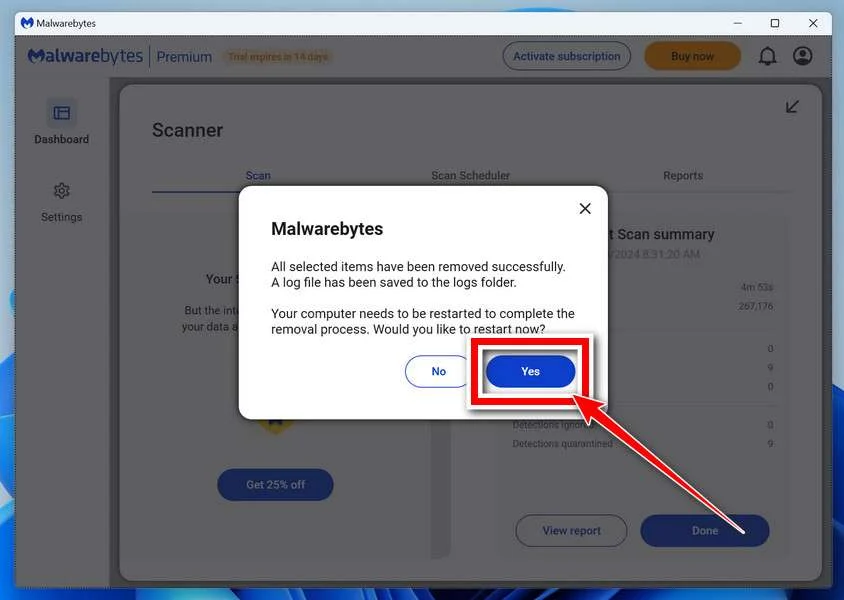
When the scan is done, check whether the problems you noticed have stopped. If they continue, see the options below.
If you are still having problems with your computer after completing these instructions, then please follow one of the steps:
- Run a computer scan with ESET Online Scanner
- Ask for help in our Windows Malware Removal Help & Support forum.
Run a Malware Scan with Malwarebytes for Mac
Malwarebytes for Mac is a free on-demand scanner that removes the malware other security software tends to miss — adware, browser hijackers, and unwanted programs included. Cleaning an infected Mac with Malwarebytes has always been completely free, and it’s our go-to recommendation. Follow the steps below to scan your Mac and remove what Malwarebytes finds.
-
Download Malwarebytes for Mac
Click the button below to download the latest version of Malwarebytes for Mac.
Download MalwarebytesOfficial installer for macOS. Your download starts right away.Want real-time protection? See Malwarebytes PremiumMalwarebytes Free for MacScans and removes malware at no cost -
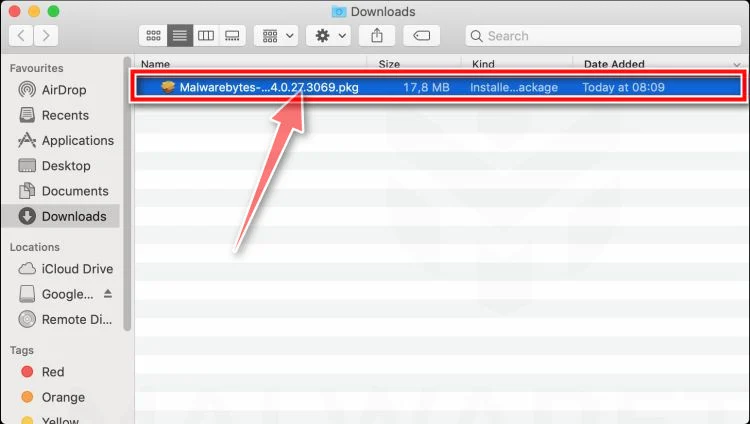
Open the Malwarebytes setup file
When the download finishes, open your Downloads folder and double-click the setup file to begin the installation.
-
Follow the On-Screen Prompts to Install Malwarebytes
The Malwarebytes for Mac Installer will guide you through a few quick screens. Click “Continue” and keep following the prompts until the installation completes.
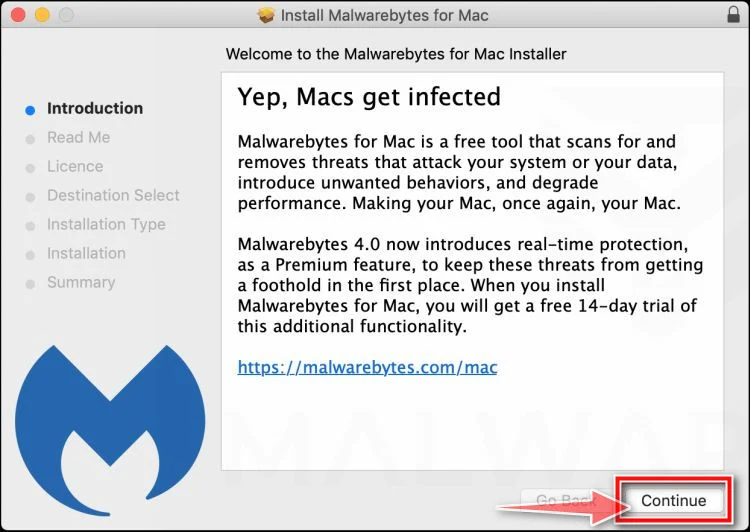
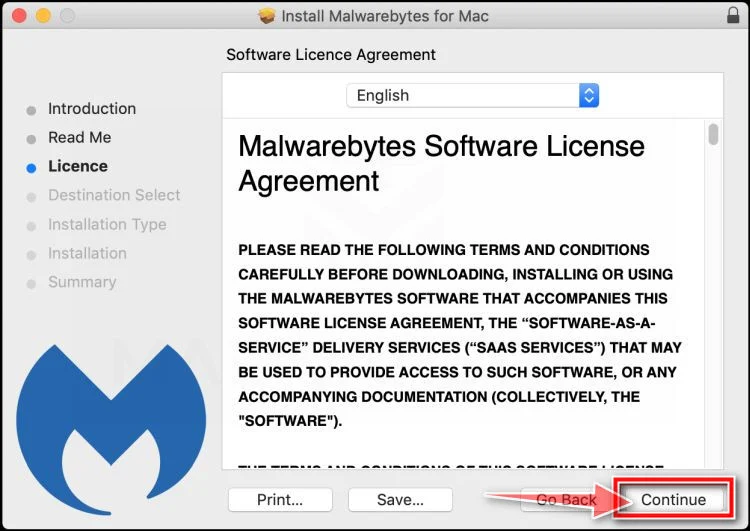
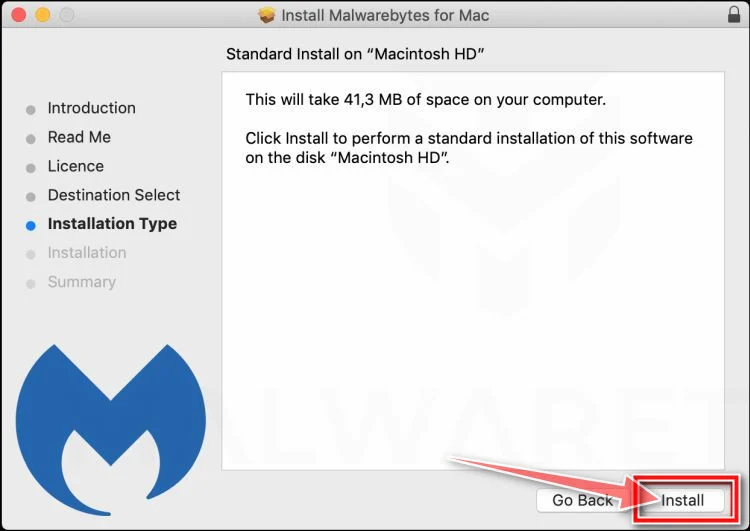
When the installation is complete, Malwarebytes opens to the Welcome to Malwarebytes screen. Click “Get started“.
Malwarebytes needs Full Disk Access to check your whole Mac. When it asks, open System Settings > Privacy & Security > Full Disk Access, turn on Malwarebytes (it may be listed as Malwarebytes Protection), and confirm with your password or Touch ID. Then return to Malwarebytes. On macOS Monterey and earlier, this setting is in System Preferences > Security & Privacy > Privacy.
-
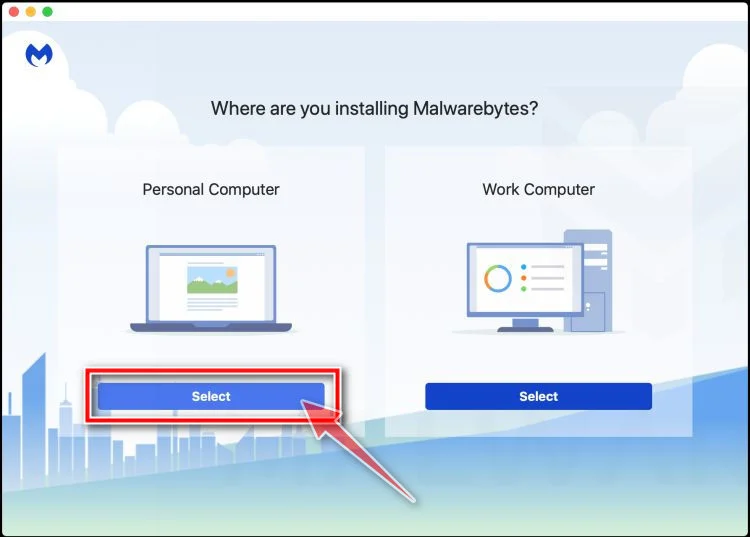
Select “Personal Computer” or “Work Computer”
Malwarebytes will ask what type of computer you’re installing it on. Click either Personal Computer or Work Computer, whichever applies.
-
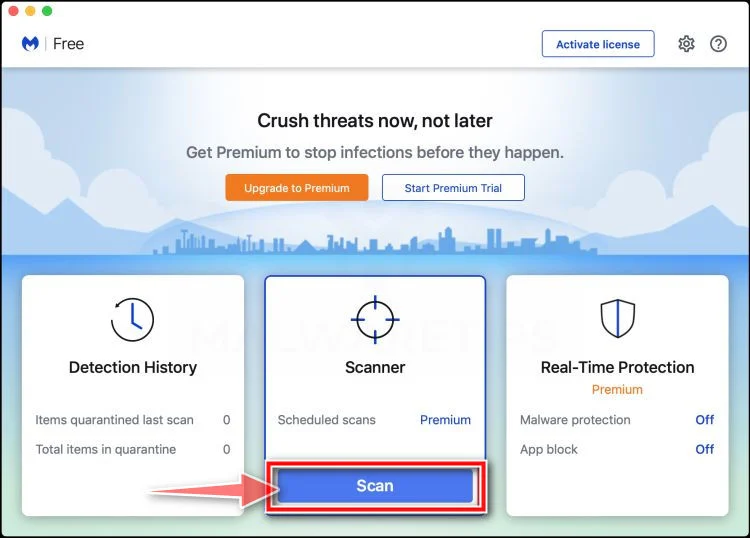
Start the Scan
Click the “Scan” button. Malwarebytes will automatically update its detection database and begin checking your Mac for malware.
-
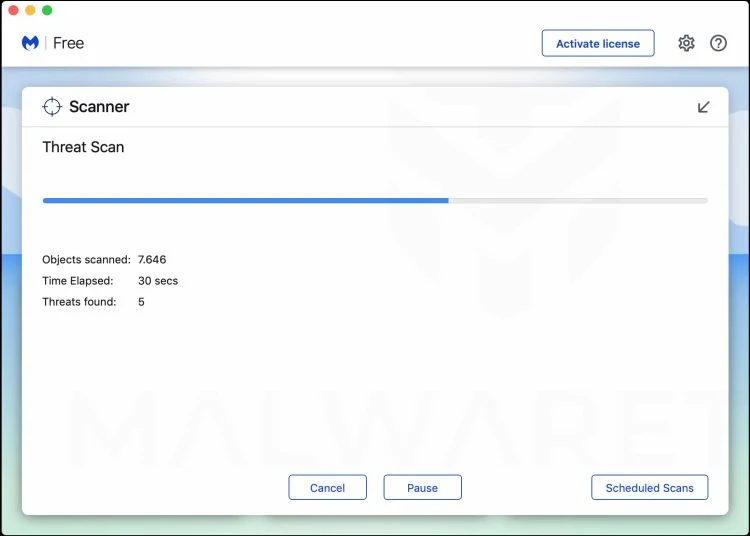
Wait for the Scan to Finish
Malwarebytes will scan your Mac for adware, browser hijackers, and other malicious programs. This can take a few minutes, so feel free to do something else — just check back occasionally to see the progress.
-
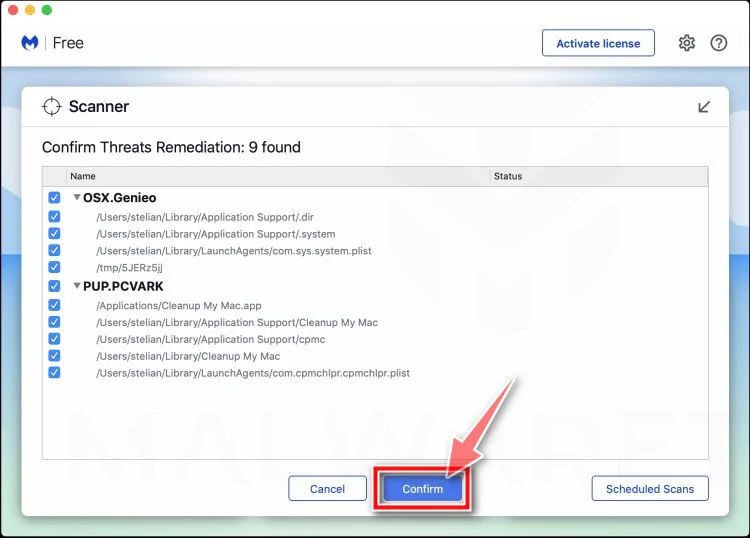
Quarantine the Detected Threats
When the scan is done, you’ll see a list of everything Malwarebytes found. Click the “Quarantine” button to remove all the threats at once.
-
Restart Your Mac
Malwarebytes will now remove all the malicious files it found. Some threats can only be fully removed after a reboot — if Malwarebytes asks you to restart, allow it. Once you’re logged back in, check whether the problems you noticed have stopped. If they come back, save the scan report and ask for help in our forum.
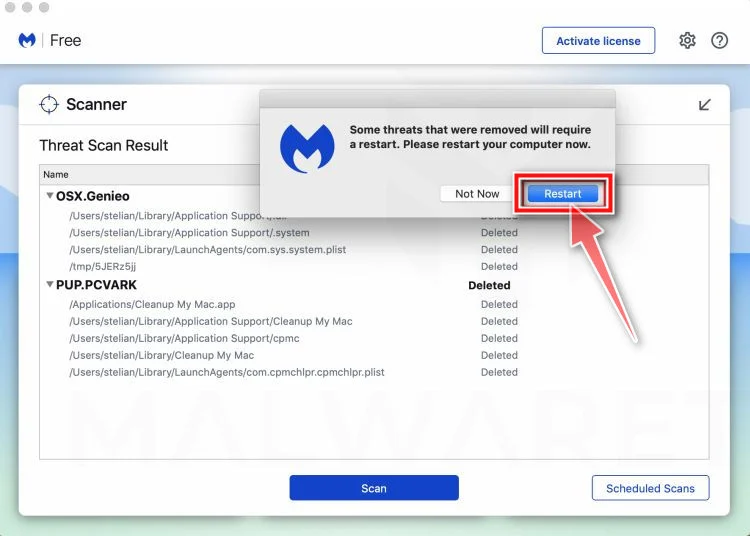
If the problems you noticed continue after the scan, see the options below.
If you are still experiencing problems while trying to remove a malicious program from your computer, please ask for help in our Mac Malware Removal Help & Support forum.
Run a Malware Scan with Malwarebytes for Android
Malwarebytes for Android scans your phone or tablet for malware, adware, and potentially unwanted apps. The free version scans only when you start a scan. Real-time protection, which checks apps automatically, is part of the paid Premium version.
-
Download Malwarebytes for Android.
You can download Malwarebytes for Android by clicking the link below.
Get Malwarebytes for AndroidOpens Google Play in a new tab.Want real-time protection? See Malwarebytes Premium for AndroidMalwarebytes for AndroidScans your phone and removes malware at no cost -
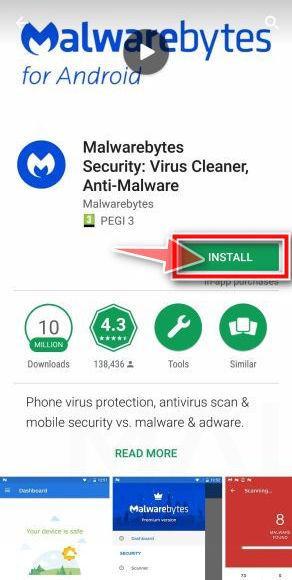
Install Malwarebytes for Android on your phone.
In the Google Play Store, tap “Install” to install Malwarebytes for Android on your device.
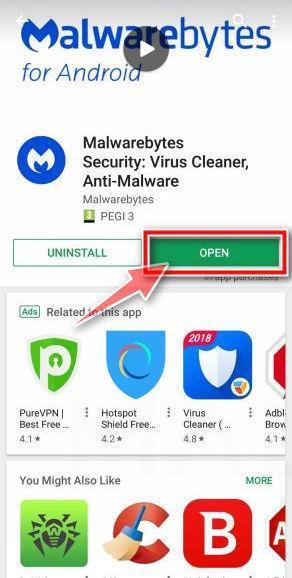
When the installation process has finished, tap “Open” to begin using Malwarebytes for Android. You can also open Malwarebytes by tapping on its icon in your phone menu or home screen.
-
Follow the on-screen prompts to complete the setup process
When Malwarebytes opens, it walks you through a short setup. Tap Get started and follow the prompts. If you see an offer for a trial or a paid plan, read it before you accept. You can skip it and keep using the free scanner.
Malwarebytes will ask for permission to access the files on your phone so it can scan them. Tap Allow, or turn on the permission in the Android screen that opens, then return to Malwarebytes.
-
Run a scan with Malwarebytes for Android
On the main screen, tap Scan now. In some versions, you open the menu, tap Scanner, and then tap Run a scan.
-
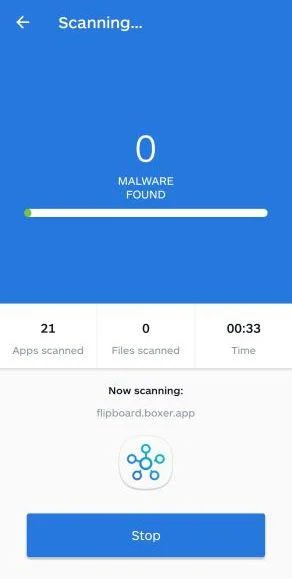
Wait for the Malwarebytes scan to complete.
Malwarebytes will now start scanning your phone for adware and other malicious apps. This process can take a few minutes, so we suggest you do something else and periodically check on the status of the scan to see when it is finished.
-
Remove the detected apps.
When the scan has been completed, you will see a list of the threats that Malwarebytes for Android has detected. Next to each detected item, tap the menu icon (three dots), then choose to uninstall the app or delete the file. Android then asks you to confirm. Tap OK or Uninstall to remove the app.
-
Restart your phone.
When the detected apps are removed, restart your phone if Malwarebytes asks you to. Then check whether the problems you noticed have stopped.
If the problems you noticed continue after the scan, see the options below.
If you are still having problems with your phone after completing these instructions, then please follow one of the steps:
- Ask for help in our Mobile Malware Removal Help & Support forum.
- Only as a last resort, reset your phone to factory settings. Read the warning below first.
- Back up your photos, videos, files, and messages, for example to your Google account or a computer.
- Make sure you know your Google account email and password. The phone asks for them after the reset. If you changed the password recently, Google recommends waiting 24 hours before you reset.
- On a Samsung phone, also make sure you know your Samsung account password.
- If you use an authenticator app for two-step verification, move your accounts to another device or save your backup codes first.
Stay Protected: Block Ads and Malicious Sites
No scan can prove a device is completely clean, so it helps to block threats before they reach you. Most infections start with a malicious ad or a fake download button — so blocking them at the source is your best defense.
We recommend AdGuard, which blocks malicious ads, phishing pages, and dangerous redirects before they can reach you.
👉 Download AdGuard and browse safely
Frequently Asked Questions
Is Farnham Christmas Market itself fake?
No. The warning concerns criminals impersonating Farnham Town Council and its event. A real organization can be used as the cover for a fraudulent message.
Does Farnham Town Council use Gmail for trader bookings?
The council says official email addresses end in @farnham.gov.uk. Treat a Gmail invitation claiming council authority as fraudulent and verify independently.
Can a fake application contain correct event information?
Yes. Dates, locations, photographs, and staff names may be copied from public pages. Accurate details do not authenticate the sender or payment account.
What if I paid but received a confirmation receipt?
A receipt is not proof of a pitch. Ask the official council event team whether the booking and payment appear in its own records.
Should I complete the form if no payment is required yet?
No. An unverified form can collect identity and business records. Confirm the organizer, website, and application process before submitting any information.
Can my bank recover the pitch deposit?
Recovery is not guaranteed, but speed matters. Contact the bank’s fraud team immediately and provide the recipient details and transaction reference.
The Bottom Line
The Farnham Christmas Market pitch scam borrows a real local event to sell a stall that the sender has no authority to offer.
Verify every invitation through Farnham Town Council’s official website. A council opportunity should never depend on trusting Gmail, an outside portal, or an unconfirmed bank account.

Join the discussion
0 commentsShare your experience or ask a question about this article.
Community experiences
Did this happen to you?
Your experience could help someone recognize the same scam. Submit a private report for our team to review.
I experienced this tooReports are reviewed before publication. Sharing publicly is always your choice.
Discussion
Start the conversation
Have a question or something useful to share? Add the first comment.