

A delivery text arrives while you are busy: there is a problem with your package, and a quick tap will fix it. The message feels especially convincing if you really are waiting for something to show up.
One suspicious address pattern uses “fedexns” to borrow FedEx’s name. Before you enter a tracking number, address, or payment details, it is worth checking who actually sent you there.
Overview
What a FedExNS message claims
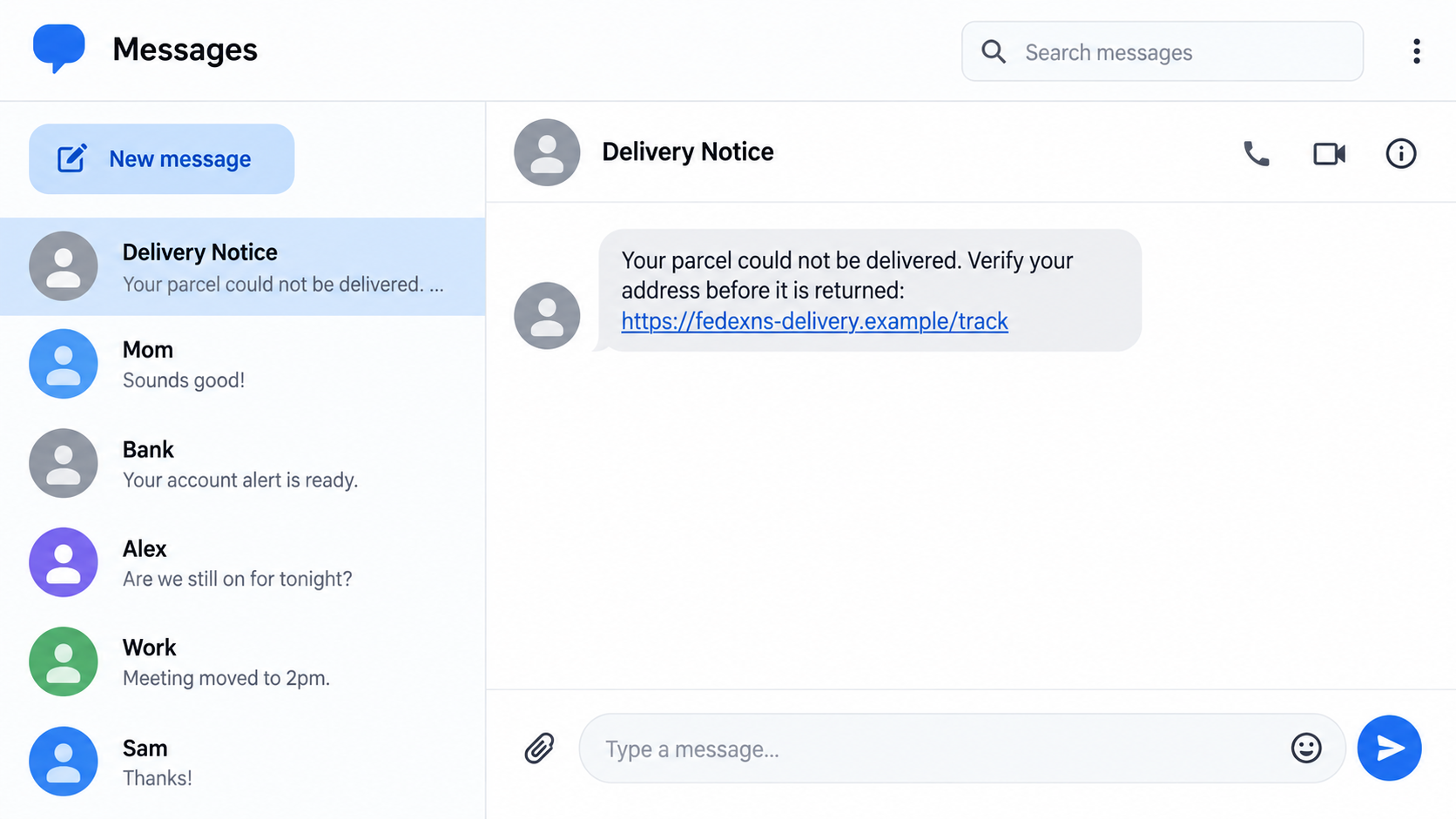
A FedExNS scam text may say a parcel could not be delivered, an address needs correction, or a small fee must be paid before a shipment can continue. The message pushes the recipient toward a link that looks delivery-related but is not a verified FedEx address.
“fedexns” is the distinctive string in this example. Scammers can use different full addresses and change them quickly. The point is not that every possible URL containing those letters is identical, but that a FedEx-looking name does not prove a page belongs to FedEx.
What the linked page may ask for
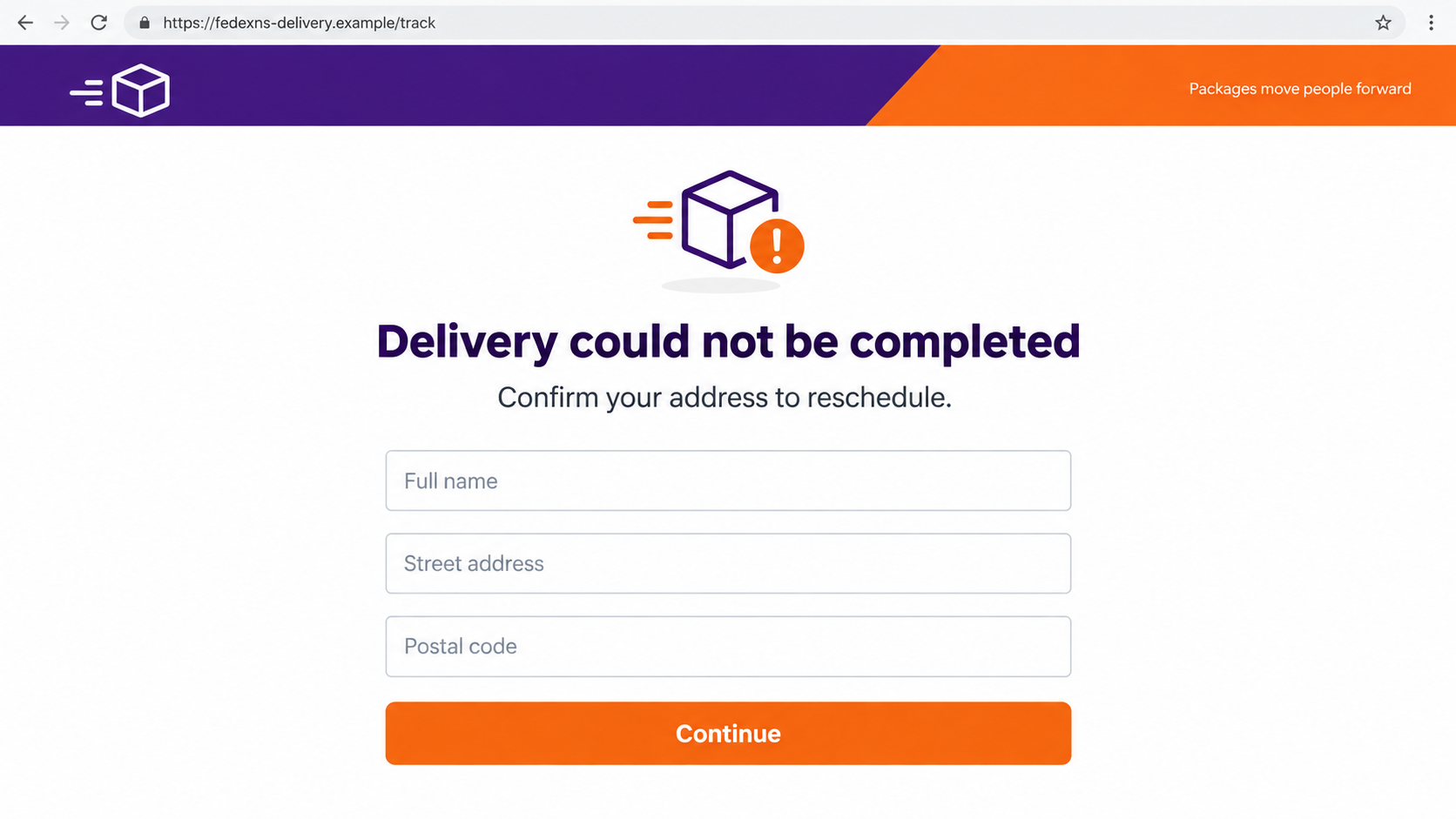
A fraudulent landing page can imitate a tracking result, an address-update form, or a customs payment screen. It may collect a name, street address, phone number, email address, card number, or account login. Some versions add a timer or warn that the package will be returned.
The images in this article are illustrative reconstructions, not screenshots of a particular victim’s message. Their `.example` addresses are nonfunctional. Real scam messages use changing domains; the safe check is to leave the message and open FedEx through a route you chose yourself.
What makes this different from a normal delivery alert
FedEx does send legitimate delivery notifications, and some real shipments can involve duties or taxes. That is why the blanket rule “FedEx never sends a payment link” is not reliable. The issue is whether a specific notice and payment request match a shipment in the official FedEx system.
Keep these distinctions in view:
- A package problem should have a real tracking history, not just an alarming sentence.
- The displayed sender name is not proof of who owns the link.
- A low fee can still be a way to harvest complete card details.
- A real shipment can be checked at FedEx.com or in the official app.
- A delivery notice should never require your email password or a one-time login code.
Why a Delivery Text Works Even When You Are Careful
People receive more parcels than they can easily remember. A generic missed-delivery text can land on the same day a real order is due. The timing feels personal even when the message was sent to thousands of numbers.
The proposed fix is deliberately small. Updating an address or paying a modest redelivery charge seems less risky than making a large purchase. The attacker is counting on the recipient to focus on the small amount rather than the value of the card data typed into the form.
A familiar carrier name does much of the work. A fake site can copy purple and orange branding, add a tracking icon, and place a parcel number near the top. Those details are easy to reproduce; they are not proof that FedEx controls the destination.
Shortened or slightly altered addresses are another problem on a phone. A link can show “fedex” near the beginning while the actual domain belongs to someone else. Even if it uses HTTPS, the secure connection may simply be to the scammer’s site.
The message may also create a false deadline. “Confirm within 24 hours” makes the package seem one tap away from being returned. The recipient is pushed to act before comparing the message with a known order.
When you are expecting a delivery, the sensible response is not to ignore all messages. It is to switch channels: use your order confirmation, the official FedEx app, or FedEx.com to check the tracking number independently.
How the FedExNS Scam Text Works
Step 1: A text creates a plausible parcel problem
The sender says delivery failed, the address is incomplete, or a shipment is waiting for an action. The wording usually applies to many people because it avoids details only the true carrier would know. It may include a tracking-looking string, but a string in a text is not a verified tracking event.
Sometimes the message arrives in the same conversation where you have seen other notifications. That can happen when sender IDs are reused or displayed similarly. Treat the content and destination as independent evidence rather than trusting the conversation label.
Step 2: The link borrows the FedEx name
The visible address may include “fedexns” or another carrier-like variation. On a small screen, many people read the brand fragment and stop there. What matters is the registered domain and whether you reached it from a trusted route, not merely the presence of “fedex” somewhere in the URL.
A scammer can replace the link after one domain is blocked. Do not build a safety rule around a single spelling. If a surprise text asks you to solve a shipment problem through an unfamiliar link, open FedEx independently instead.
Step 3: A counterfeit tracking page confirms the story
The page may claim to show a real package stuck at a depot. It can display a map, delivery status, progress bar, or familiar logo. Those visuals create the feeling that the carrier has checked your parcel, even when the page is just a static template.
Look for the underlying shipment in the official system. A fake page can invent a status, but it cannot create a matching event in your genuine FedEx tracking history or in the retailer’s order details.
Step 4: An address form gathers personal details
The page may request your full name, address, phone number, and email address as though it is fixing a delivery record. That data is useful for further scams even if you never enter a card. It can make later calls and messages more persuasive because the sender now knows details about you.
Do not assume an address form is harmless because it does not ask for money yet. It can be the first screen in a longer sequence. A real address correction should be handled through the shipment’s authenticated carrier or merchant workflow.
Step 5: A small fee becomes a card-collection opportunity
After the address, the page may ask for a redelivery fee, duty, or “verification” payment. The amount can be tiny. The attacker wants the card number, expiration date, security code, and billing details, not necessarily the small displayed charge.
Some genuine international shipments do require duties or taxes. Verify such a charge against the shipment in the official FedEx system and use the payment route offered there. A fee appearing only on the page opened from a suspicious text is not enough.
Step 6: The victim may see an error or another request
A fake checkout can say the card was declined and prompt the visitor to try another. That can expose multiple cards. It may also request a one-time bank code or send the victim to an unrelated page after submission.
Do not retry a card on the same page. If you already submitted data, close it and contact your card issuer through the number on your card or official app. A missing confirmation does not mean the details were not transmitted.
Four Checks Before You Trust a Delivery Link
Check the shipment independently
Find the tracking number in your retailer’s order page or original shipment confirmation. Enter it yourself at FedEx.com or in the official FedEx app. If the text’s “problem” is absent there, do not pay a fee through the text link.
If you cannot find a tracking number, contact the seller through its known website. Do not use a phone number or support chat displayed on the suspicious landing page.
Read the whole address, not the brand fragment
A domain can contain “fedex” and still be controlled by someone else. Watch for extra words, unusual endings, or brand text placed before an unrelated domain. The safe practice is to type the carrier’s known address rather than trying to decide whether each new lookalike is genuine.
A padlock does not settle the question. It tells you the connection is encrypted, not who deserves your trust. Many phishing pages use HTTPS.
Compare the request with the shipment
Does the notice match a package you ordered, a delivery address you recognize, and a status visible through the official carrier? A message with no merchant, no verifiable tracking history, and an urgent fee deserves skepticism.
Even when a parcel is real, criminals can send unrelated messages at the same time. The coincidence of an expected delivery does not authenticate the sender.
Use FedEx’s fraud-reporting route
FedEx’s fraud guidance explains how to report suspicious emails and texts. Follow the current instructions there rather than replying to the sender or clicking the questionable link.
You can delete the text after saving the information needed for a report. If you suspect an actual delivery problem, resolve it through the official tracking or customer-service route.
What if the Text Contains a Real Tracking Number?
A correct tracking number deserves attention, but it still does not make every accompanying link safe. Numbers can be copied from emails, compromised accounts, public posts, or other sources. The number proves only that someone knows it.
Enter the number at FedEx.com yourself and compare the status, destination, and requested action. If the official record says no fee or address change is required, do not use a separate payment page from a text.
If a fee genuinely exists, use the official payment path connected to that shipment. This is particularly important for international deliveries, where legitimate customs or duty requests can resemble a scammer’s pretext.
The same principle applies to phone calls. A caller who can read out a tracking number might still be an impostor. End the call and contact the carrier through a published number if the request involves a payment card or account credentials.
What to Do if You Have Fallen Victim to This Scam
- Stop using the link and preserve the message. Save the sender details, URL, screenshots, any fake tracking number, and the time you entered information. Do not revisit the form to test whether it still works. The record can help your bank and the carrier understand what happened.
- Call your card issuer if you entered a card. Use the number on the card or the issuer’s official app. Explain that the card details were entered on a suspected phishing page, even if no charge appears yet. Ask about blocking the card, monitoring transactions, disputing unauthorized charges, and replacing the card.
- Change passwords you typed into the page. Start with your email account, then any FedEx or retailer account using the same or similar password. Use a fresh, unique password and turn on multifactor authentication. If you entered a one-time code, tell the affected account provider immediately.
- Watch for follow-up contact. The name, address, and phone number you supplied may be reused in a more tailored delivery call or text. Do not trust a caller merely because they know the details you entered. Verify any new claim through the carrier or merchant independently.
- Check the device if anything was downloaded. Most fake redelivery pages aim to collect data, but a linked file or app creates a separate risk. Remove suspicious downloads and run a reputable scan, such as Malwarebytes, if you installed something or see unusual behavior. Do not claim an infection solely because you opened a page.
- Reduce repeat exposure. Block or report the sender in your messaging app. AdGuard may help filter some malicious destinations and intrusive ads, but it does not reverse a submitted card number or guarantee every scam link will be blocked. Continue using official routes for deliveries.
- Report the attempt and check the real package. Use FedEx’s current fraud-reporting instructions and contact the retailer if the order is real. If money was lost, report the unauthorized transaction to your financial institution and the relevant consumer-protection or cybercrime agency in your area.
Frequently Asked Questions
Is a text with “fedexns” in the link from FedEx?
Do not treat the brand-like fragment as proof. A scammer can register a lookalike address. Open FedEx.com or the official app independently and look up the shipment before entering personal or payment information.
Does FedEx ever ask for duties or taxes online?
Yes, some legitimate shipments can have duties or taxes. The right question is whether the charge appears for your shipment in FedEx’s official system. Do not rely on the payment page reached from an unsolicited text as your only evidence.
Can opening the link alone steal my card?
Simply viewing a page is different from entering a card number. Many delivery scams depend on persuading you to submit a form. Still, close the page, avoid downloads, and keep your browser and device updated.
What if I entered only my address and phone number?
You may receive more convincing scam calls or texts using those details. Be alert to follow-up messages, but do not panic. Watch for requests to pay, share a code, or move to another website, and verify them independently.
What should I do if my card was charged?
Contact your card issuer immediately through its official channel. Ask it to investigate the transaction, secure or replace the card as appropriate, and explain the dispute process. Keep the text, URL, and any receipt or screenshot.
How can I report a fake FedEx delivery message?
Use the instructions on FedEx’s official fraud-reporting page. Your mobile carrier or messaging app may also have a spam-report option. Do not reply to the suspicious sender to ask whether the notice is real.
The Bottom Line
A FedExNS scam text uses a familiar carrier name and a routine delivery problem to pull you toward an unfamiliar link. The page may ask for an address first, then a small fee, while the real prize for the scammer is your personal and card information.
Check the shipment through FedEx or the merchant using a route you chose yourself. If you entered details on a questionable page, secure the affected account or card promptly. A genuine package can wait long enough for an independent check; a scammer’s deadline is designed to stop you from making one.

Join the discussion
0 commentsShare your experience or ask a question about this article.
Discussion
Start the conversation
Have a question or something useful to share? Add the first comment.