

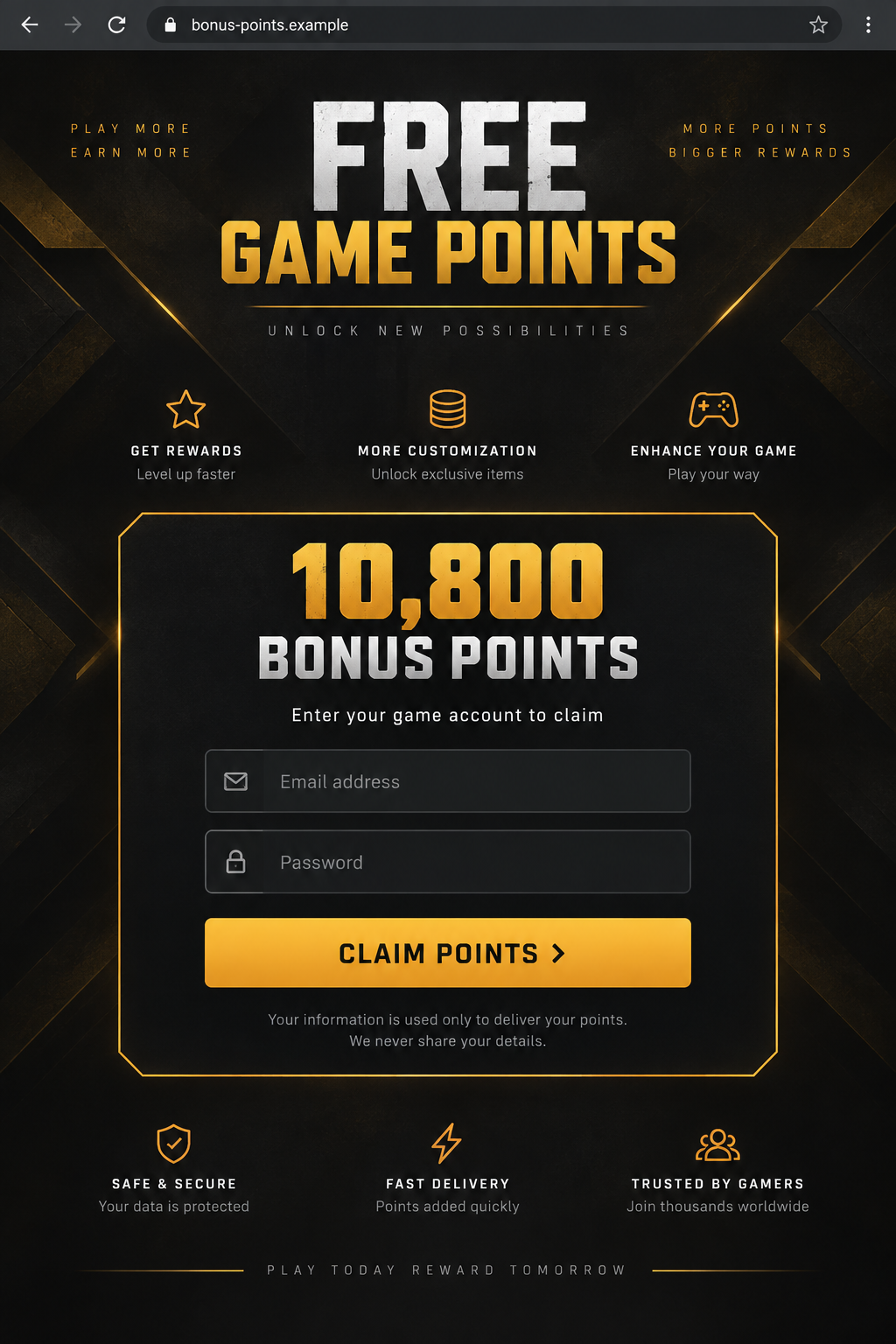
A page promises 10,800 free Call of Duty Points. It looks like a game promotion, right down to the familiar dark colors and a helpful-looking support bubble.
The offer asks for your game login first. Then another screen appears, asking for the fresh authentication code that just arrived in your email.
That second screen is where the fake Call of Duty Points giveaway becomes something else.
Overview
The prize is a cover for account theft
The fake Call of Duty Points giveaway is a phishing campaign targeting Call of Duty: Mobile players. Malwarebytes researchers examined a page offering 10,800 points in exchange for an email address and password. It then showed a separate form asking for a two-factor authentication code. The site was not connected to Activision.
Call of Duty Points, often shortened to CP, are real in-game currency. That real term helps the fake offer sound plausible. So does the suggestion that a claimed reward may take four to eight hours to appear. The delay gives the operator time while the player waits for a prize that the page cannot deliver.
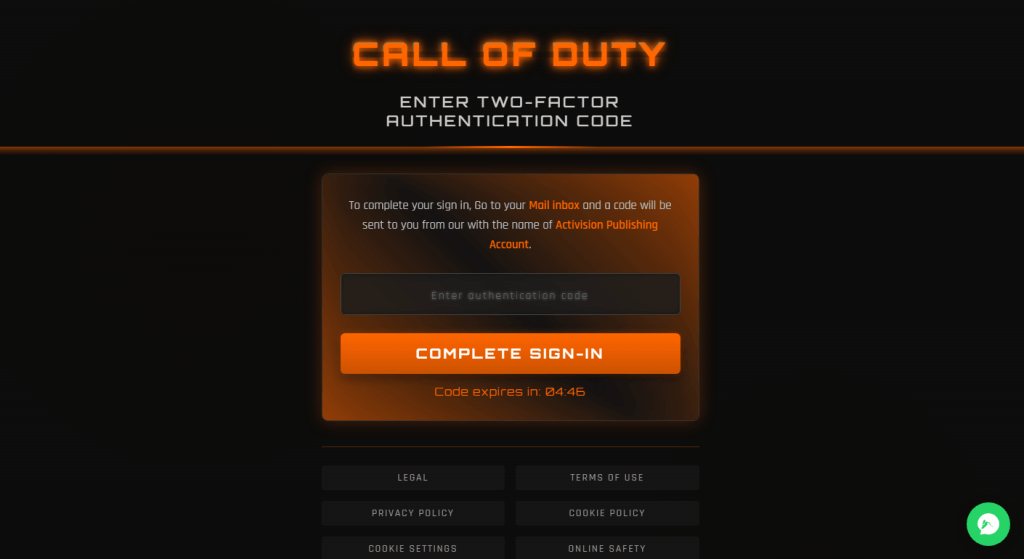
The first image is a nonfunctional reconstruction using a fictional `.example` address and generic game styling. It does not reproduce the actual phishing page. The second image later in this article is an authentic research capture of the attack’s code-entry screen. Neither image should be used to type real credentials.
The code request defeats the protection it imitates
After the victim enters a username and password, the phishing site can relay those details to the genuine Activision login. That real attempt may trigger a genuine one-time code. The attacker-controlled page then asks the victim to type the code into its own form before it expires.
This is why the incoming code can be confusing. A message from the real account provider does not mean the giveaway is genuine. It may mean somebody is attempting to sign in with credentials you just supplied to a fake page.
The code belongs in a login you started on the official site, not in an unfamiliar promotion flow.
Malwarebytes described this as a real-time credential relay. The name is technical; the idea is simple. The fake page sits between the player and the real login, collecting each piece of the sign-in as it happens.
What is confirmed about this campaign
The researchers captured both the offer page and the follow-up code form. They found a phishing process aimed at taking Activision accounts, not a legitimate free-point event or a complaint about Call of Duty pricing. The evidence does not show how many players were compromised, so the article makes no claim about a victim total.
Activision accounts may have linked platforms, purchases, and saved information. Those make an account valuable beyond its current points balance. The exact damage depends on what the attacker can access after sign-in. A stolen login is the immediate concern; any unauthorized purchases or further account links should be checked individually.
- Fake reward: 10,800 Call of Duty Points.
- First collection: email address and account password.
- Second collection: a live two-factor authentication code.
- Claimed delay: reward confirmation in four to eight hours.
- Safe destination: the official game app or Activision website reached independently.
Why a Real Code Can Appear in a Fake Flow
A genuine security code is not a verdict on the website that asked you to enter it. It is a response to a login attempt. If a criminal sends your email and password to the real service, the service may issue a code exactly as it would for you.
The fake form in the screenshot uses familiar language: complete sign-in, enter the authentication code, and act before the countdown expires. That urgency matters because one-time codes are short-lived. The attacker needs the victim to relay the code quickly enough to finish the genuine login.
The page also presents a support widget and policy-style links. Those ornaments do not connect it to Activision. A support button on a phishing page is still controlled by the page’s operator. A real login code from Activision should be entered only into a login screen you intentionally opened through the official app or website.
If you see a code arrive after using such a giveaway page, stop. Do not keep trying alternate codes or wait for the promised points. Go directly to the real account service and change your password.
If a code was already supplied to the fake page, assume the attacker may have crossed the second factor as well.
How the Fake Call of Duty Points Scam Works
Step 1: A huge bonus attracts players
The lure is a points windfall large enough to feel worth a minute of effort. The researched page offered 10,800 CP. It copied game presentation and included a “Get Free Point” style call to action.
The awkward wording is a clue, but the main warning is that an unrelated site asks for account credentials to deliver a reward.
Malwarebytes documented the page itself, not one exclusive distribution channel. It might be encountered through a message, search, or social post, but those routes should not be claimed as confirmed for every visitor. The dangerous part starts when a player leaves the official game ecosystem for the copied page.
Step 2: The site asks for an email and password
Instead of a redemption code, the page asks for a full Activision sign-in. That is a disproportionate request for a prize. A legitimate promotion may ask a player to use an official account flow, but an unfamiliar domain should never become a place to type the password.
The site claims the reward will be confirmed later. That is convenient for the attacker: no immediate points need to appear while the player is still on the page. If the operator obtains a working password, it can start its own login attempt immediately.
Step 3: The real service sends a real code
The phishing process can submit the credentials to Activision as the victim types them. If the account has two-factor protection, the real service may challenge that login. The player then sees a genuine email or authenticator code, perhaps seconds after pressing the fake claim button.
That timing can make the scam feel legitimate. In reality, the code is being generated because someone is trying to access the account. The code message may even say not to share it. Treat that warning literally, regardless of what the giveaway page says.
Step 4: The fake page asks you to relay the code
The second screen asks for the one-time code and uses a countdown. A player focused on the bonus may think this is routine verification. The attacker needs exactly that reaction. Once the code is entered, the operator can complete the real sign-in while it is still valid.
Do not assume the attacker needs your phone or access to your email inbox. In this flow, you act as the courier for the code. That is why a security feature can be bypassed without being technically broken.
Step 5: The account can be taken over or abused
With a working password and one-time code, an attacker may enter the Activision account, change recovery details, link other accounts, or inspect purchases and payment methods. The exact available actions depend on account settings and platform links. It is safer to audit the account than to guess which action occurred.
If the player waits four to eight hours for points, the attacker may already have had time to work. A missing reward is not the only sign. Unexpected emails, changed profile details, new linked accounts, or purchases you did not make all need prompt attention.
Company, Address, and Fulfillment Checks
The giveaway page is not Activision
Call of Duty: Mobile and its currency are real. The phishing page that researchers captured had no affiliation with Activision. It borrowed the game’s name to obtain a login. Check who owns the exact website address before entering credentials; game logos and artwork can be copied.
A web address is not a business address
The evidence identifies a counterfeit sign-in flow, not a verified legal company or physical office behind it. An address in a footer, if one appears, would need independent verification. Do not infer that a similarly named legitimate business or hosting provider runs the scam.
Fake support can keep the victim engaged
The captured offer displayed a chat-style support bubble. Its presence makes the page look attended, but it does not establish authorized game support. If the “agent” asks for more codes, recovery information, or payment to release points, leave. Use Activision’s own support site instead.
No points are being fulfilled
The promised reward is the bait. The traceable flow is credential entry followed by a code request. There is no verified mechanism in the research showing this page can credit a Call of Duty account with legitimate points. A success message would not change that.
How to Tell a Real Promotion From This Trap
Real game rewards do exist, which is why blanket advice that “all free points are fake” is not useful. The useful question is where the offer lives and what it demands. Open the official Call of Duty: Mobile app or official game site independently, then look for the promotion there.
Do not follow a shortened link just because it came from a player community. A screenshot of an offer can be copied, and social engagement is not proof of a partnership. If you cannot find the event through official channels, do not give it your password to test whether it works.
Pay attention to code messages. A two-factor code is for a sign-in you initiated, not a raffle entry. If you are not actively signing into your own account at the official address, do not enter the code anywhere. The same rule protects bank, email, and shopping accounts.
MalwareTips has covered other game-account phishing traps. This particular case is distinguished by the real-time relay from a Call of Duty Points page to a fake two-factor screen.
What to Do if You Have Fallen Victim to This Scam
- Change the Activision password. Go directly to Activision, not back through the giveaway link. Use a unique password. If you reused the old one on email or other gaming accounts, change those too.
- Assume access if you supplied a code. Review recent sign-ins, linked accounts, recovery addresses, and any settings that changed. Sign out of sessions you do not recognize. If you are locked out, use Activision’s hacked-account recovery process.
- Protect purchases and payment methods. Check game and platform purchase histories. Contact your card issuer or platform support about transactions you did not authorize. Do not give the fake site’s support chat a card number to “verify” the reward.
- Save evidence. Record the website address, message or ad that led there, screenshots of the two forms, the time of the code, and any account-change emails. Do not post your code, password, or full payment details in a public report.
- Check for downloads separately. The documented campaign is credential phishing; entering a password does not prove malware was installed. If a page also made you run an app or file, scan the device with Malwarebytes. AdGuard can help block known malicious ads and phishing pages in future browsing, but it cannot invalidate a code already handed over.
- Warn teammates and friends. If the link came from a gaming group or a friend’s account, tell them the offer is fake. Do not accuse the friend of running it; their account or post may have been abused.
- Ignore paid recovery promises. A stranger who offers to restore points or reclaim the account for an advance payment can be another scammer. Use the platform’s official support route.
Frequently Asked Questions
Are Call of Duty Points real?
Yes. CP is real in-game currency. That does not make a third-party page offering 10,800 points in exchange for a password legitimate.
Why did Activision send me a code after using the page?
The phishing site may have relayed your credentials to the real login. The genuine code is a response to that sign-in attempt, not proof that the giveaway is approved.
What if I entered my password but not the code?
Change the password immediately and review the account. The attacker may still hold the password and try it elsewhere, especially if you reused it.
What if I entered the one-time code too?
Assume the attacker may have accessed the account. Check linked platforms, account details, sessions, and purchases, then use Activision’s recovery process if needed.
Does a support chat bubble make the offer official?
No. The operator of a fake website can add a chat widget. It does not verify ownership, a game partnership, or the ability to award points.
Can a real event ask me to sign in?
Possibly, but sign in only after reaching the event through the official app or website. Never type credentials into an unfamiliar page reached from a giveaway link.
The Bottom Line
The fake Call of Duty Points scam promises a large bonus, then collects the password and live code needed to enter a real account. The code can be genuine even while the page requesting it is fraudulent.
If you used the offer, secure the account now. If you have not, find promotions through the official game and keep sign-in codes out of third-party giveaway forms.

Join the discussion
0 commentsShare your experience or ask a question about this article.
Discussion
Start the conversation
Have a question or something useful to share? Add the first comment.