

A message claims your traffic violation account has been declared delinquent, backed by a final court-ordered mandatory collection notice. It warns of license suspension, legal enforcement, and immediate penalties if you do not act.
It looks official. It sounds final. But it is a scam designed to make you react before you verify.
Scam Overview
The FINAL COURT-ORDERED MANDATORY COLLECTION NOTICE scam texts are part of a highly aggressive phishing campaign that impersonates state agencies, DMV systems, and courts.
These messages are crafted to simulate a worst-case legal scenario. They do not ask politely. They declare that enforcement is already active and irreversible.
That shift in tone is intentional.
Most scams try to persuade. This one tries to overwhelm.
What the scam message typically includes
The message or attached image often contains:
- A header such as “STATE OF [STATE]” or a department name
- A bold title like “FINAL COURT-ORDERED MANDATORY COLLECTION NOTICE”
- A notice ID formatted like a real case number
- An effective date to create urgency
- A long block of legal-style text
- A list of severe consequences
- A QR code or link labeled “official secure portal”
The design mimics real enforcement documents, but the content is engineered to push immediate compliance.
The tone is deliberately extreme
This scam stands out because of how absolute the language is.
Common phrases include:
- “OFFICIALLY DECLARED DELINQUENT AND IN DEFAULT”
- “NO EXTENSIONS. NO GRACE PERIODS. NO EXCEPTIONS.”
- “ENFORCEMENT ACTIONS ARE IMMEDIATELY ACTIVE”
- “PERMANENT AND IRREVOCABLE”
- “FINAL, LEGALLY BINDING OFFICIAL NOTICE”
These phrases are meant to shut down critical thinking.
When people believe there is no room to negotiate, they are more likely to comply instantly.
The list of consequences is exaggerated on purpose
The notice often lists multiple penalties at once, such as:
- driver license suspension
- registration holds
- credit impact tied to SSN
- court judgments
- collection actions
- permanent marks on driving records
Some of these claims are exaggerated, misrepresented, or entirely false.
The goal is not accuracy. The goal is pressure.
By stacking consequences, scammers increase the perceived risk of ignoring the message.
Here is what it may say:
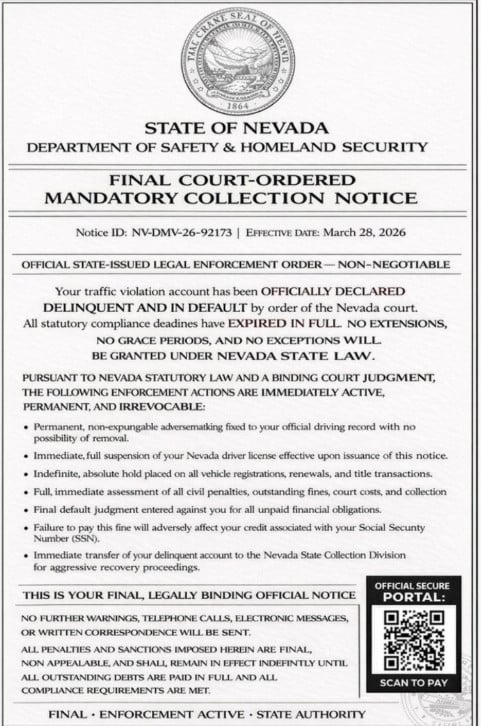
STATE OF NEVADA
DEPARTMENT OF SAFETY & HOMELAND SECURITYFINAL COURT-ORDERED
MANDATORY COLLECTION NOTICENotice ID: NV-DMV-26-92173
Effective Date: March 28, 2026OFFICIAL STATE-ISSUED LEGAL ENFORCEMENT ORDER — NON-NEGOTIABLE
Your traffic violation account has been OFFICIALLY DECLARED DELINQUENT AND IN DEFAULT by order of the Nevada court.
All statutory compliance deadlines have EXPIRED IN FULL. No extensions, no grace periods, and no exceptions will be granted under Nevada state law.Pursuant to Nevada statutory law and a binding court judgment, the following enforcement actions are immediately active, permanent, and irrevocable:
- Permanent, non-expungeable adverse mark on your official driving record with no possibility of removal
- Immediate, full suspension of your Nevada driver license effective upon issuance of this notice
- Indefinite, absolute hold placed on all vehicle registrations, renewals, and title transactions
- Full, immediate assessment of all civil penalties, outstanding fines, court costs, and collection fees
- Final default judgment entered against you for all unpaid financial obligations
- Failure to pay this fine will adversely affect your credit associated with your Social Security Number (SSN)
- Immediate transfer of your delinquent account to the Nevada State Collection Division for aggressive recovery proceedings
THIS IS YOUR FINAL, LEGALLY BINDING OFFICIAL NOTICE
No further warnings, telephone calls, electronic messages, or written correspondence will be sent.
All penalties and sanctions imposed herein are final, non-appealable, and shall remain in effect indefinitely until all outstanding debts are paid in full and all compliance requirements are met.FINAL • ENFORCEMENT ACTIVE • STATE AUTHORITY
OFFICIAL SECURE PORTAL:
Scan QR code to pay
The QR code is the gateway to the scam
At the bottom of the notice, there is usually a QR code or link labeled as an “official portal.”
This is the most dangerous element.
QR codes feel clean and trustworthy, especially when paired with official-looking documents.
But once scanned, they redirect you to a fraudulent website controlled by scammers.
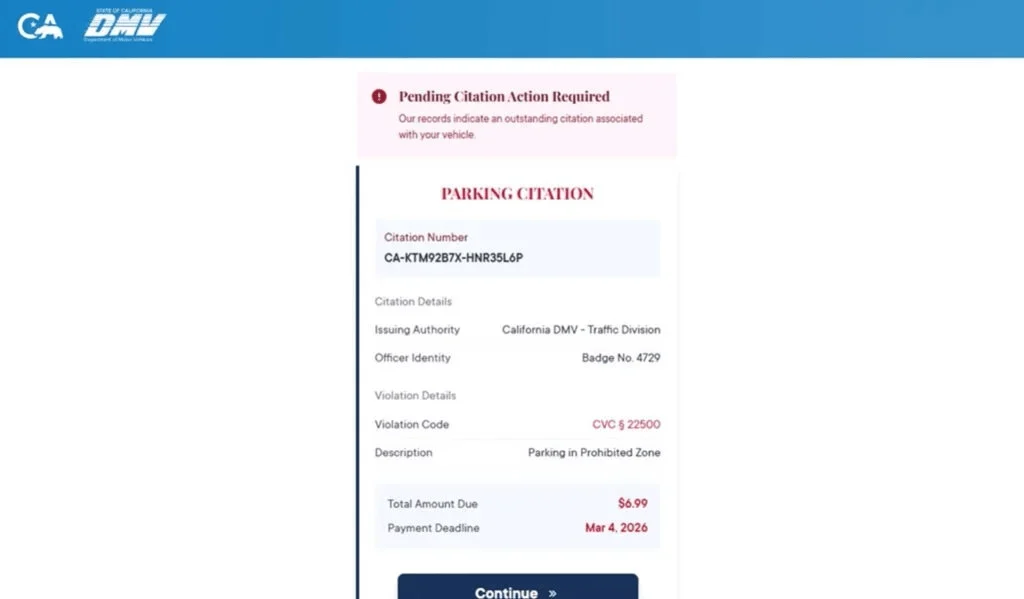
The fake payment portal
After scanning the code or clicking the link, victims land on a site designed to look like a government system.
It may include:
- a case lookup field
- violation details
- a deadline
- a payment button
The design is simple but effective.
It gives just enough information to feel real, while guiding you toward payment.
The small fee trick
The portal usually requests a small payment.
Typical amounts include:
- $6.99
- $9.99
- $14.95
This is one of the most effective parts of the scam.
A small fee feels harmless. People assume it is better to pay than risk larger penalties.
But the fee is not the goal.
The goal is to collect your credit card details.
What scammers gain
When you enter payment information, scammers capture:
- card number
- expiration date
- CVV
- billing address
- personal details
This data can be used to:
- make unauthorized purchases
- test and validate cards
- sell the information to other criminals
- launch targeted follow-up scams
The real damage often happens after the initial interaction.
Why the notice looks convincing
Scammers invest in presentation.
They use:
- official-style formatting
- structured layouts
- legal terminology
- bold headers and sections
These elements mimic real documents closely enough to bypass quick skepticism.
Most people do not analyze legal notices in detail. They react to the overall impression.
That impression is what scammers exploit.
Why this scam is spreading rapidly
This scam is highly scalable.
Scammers reuse the same template and change only:
- the state name
- the notice ID
- the date
Everything else remains identical.
That allows them to target multiple regions at once with minimal effort.
Key red flags
If you want to identify this scam quickly, look for:
- A legal notice sent via text without prior mail communication
- Extreme, absolute language with no room for appeal
- QR codes for payment
- Small payment amounts
- Generic or mismatched agency details
- Pressure to act immediately
A real legal enforcement process does not work this way.
How The Scam Works
Understanding the step-by-step flow helps you break the illusion.
Step 1: Mass distribution
Scammers send these messages to large numbers of people.
They do not know whether you have a violation.
They rely on volume.
Even a small response rate generates profit.
Step 2: Fear-based messaging
The notice is designed to trigger urgency.
It presents the situation as:
- already finalized
- already enforced
- already irreversible
This reduces the likelihood that you will verify the claim.
Step 3: Authority is established
The message uses:
- government-style headers
- legal language
- structured formatting
- case numbers
These elements create credibility.
Even cautious people may hesitate when they see what looks like a formal legal document.
Step 4: The QR code or link is introduced
This is the transition point.
The notice directs you to:
- scan a QR code
- access a portal
- resolve immediately
This step moves you from reading to acting.
Step 5: The fake website takes control
The site you land on is designed to look official.
It often includes:
- a case lookup system
- violation details
- a deadline
- a payment option
Everything is built to guide you toward payment.
Step 6: Personal data collection
Before payment, the site may ask for:
- name
- address
- phone number
This increases the value of your data.
Step 7: Payment step
You are asked to enter your credit card details.
This is where the theft happens.
Even if the site shows a confirmation, the transaction is not legitimate.
Step 8: Fake confirmation or retry loop
The site may:
- confirm payment
- or claim failure and ask you to try again
Both outcomes benefit scammers.
Step 9: Fraud begins
After the interaction, scammers may:
- use your card
- test transactions
- sell your data
- target you again
Step 10: Victim realizes later
Most victims only notice when:
- they see unauthorized charges
- their bank alerts them
- they receive more scam messages
By then, the scam has already succeeded.
What To Do If You Have Fallen Victim to This Scam
If you interacted with the scam, act immediately.
1) Contact your card issuer
Report that your card details were entered on a fraudulent site. Request a replacement.
2) Review transactions
Look for small test charges and dispute anything unfamiliar.
3) Enable alerts
Set alerts for all transactions or any charge above $1.
4) Stop communication
Do not reply or engage further. Block the sender.
5) Save evidence
Take screenshots of the message, notice, and website.
6) Report the scam
Mark it as spam and report it through official channels. Forward it to 7726 (SPAM) if supported.
7) Watch for follow-up scams
Be cautious of anyone offering to recover your money.
8) Verify independently
Check official DMV or court websites directly if you are concerned.
The Bottom Line
The FINAL COURT-ORDERED MANDATORY COLLECTION NOTICE scam texts are designed to overwhelm you with fear and urgency.
They use official-looking documents, legal language, and QR codes to push victims into fake payment portals.
The small fee is just bait.
The real goal is to steal your credit card details and personal information.
If you receive a message like this:
- do not scan
- do not click
- do not pay
Verify everything through official channels you access yourself.
If you already entered your information, act quickly to protect your finances and identity.
FAQ
What is the FINAL COURT-ORDERED MANDATORY COLLECTION NOTICE scam?
It is a phishing scam sent by text message or image attachment. Scammers impersonate a DMV, court, or state agency and claim your traffic violation account is delinquent and subject to immediate enforcement. The goal is to scare you into scanning a QR code or visiting a fake payment site.
Is the notice real if it includes a notice ID and official-looking formatting?
No. Scammers often add notice IDs, state seals, legal phrases, and structured layouts to make the message look legitimate. Those details do not prove the notice is real.
Why does the message sound so extreme and final?
Because fear drives fast decisions. Phrases like “non-negotiable,” “legally binding,” “final notice,” and “enforcement active” are used to make you panic and act before you verify the claim.
Why is there a QR code in the notice?
The QR code is the scammer’s shortcut to a fraudulent website. It is made to look like an official secure portal, but it usually leads to a fake payment page controlled by criminals.
What happens if I scan the QR code?
You are typically redirected to a fake portal that looks like a court, DMV, or citation payment site. From there, you may be asked for personal details and a small payment.
Why is the payment amount usually small?
Small fees like $6.99 or $9.99 lower suspicion. People are more likely to pay a small amount to avoid stress. The fee is bait. The real goal is stealing your card details and personal information.
What information are scammers trying to collect?
Usually:
- Full name
- Address and ZIP code
- Phone number and email
- Credit card number
- Expiration date and CVV
- Sometimes vehicle-related details
I scanned the code but did not enter anything. Am I safe?
Your risk is much lower if you did not submit any information. Close the site, do not return, and watch for follow-up scam messages or calls.
I entered my card details. What should I do right away?
- Call your card issuer immediately
- Report that your details were entered on a fraudulent site
- Freeze or replace the card
- Review recent transactions and dispute anything unfamiliar
- Turn on real-time alerts for new charges
Should I replace my card even if I do not see fraud yet?
Yes. Card details stolen through phishing scams are often used later or sold. Replacing the card quickly is the safest move.
Can a scam like this really suspend my license or place a hold on my registration?
Not through a fake website or text notice. Those threats are used to pressure you into paying. Real enforcement actions come through legitimate channels and can be verified independently.
How do I verify if I actually owe anything?
Do not use the QR code, link, or phone number from the message. Go directly to the official DMV, court, or agency website by typing it yourself, then verify through official portals or official customer support.
How do I report this scam?
- Mark the message as spam or junk in your messaging app
- Block the sender
- Forward it to 7726 (SPAM) if your carrier supports it
- Report it through official consumer fraud reporting channels and keep screenshots as evidence
How can I avoid scams like this in the future?
- Do not scan QR codes from unexpected legal or DMV messages
- Be suspicious of “final notice” texts demanding immediate payment
- Verify independently through official websites you access yourself
- Treat any surprise legal notice with urgency, but not blind trust








