

A text message claims you have an outstanding traffic violation in Franklin County, Ohio. It shows what looks like a court notice, includes a case number, lists toll, parking, or speeding violations, and tells you to scan a QR code to pay.
It looks formal. It sounds urgent. It is also a scam.
Scam Overview
The Franklin County Ohio Court Notice scam text is a fake traffic violation notice designed to impersonate the Franklin County Municipal Court or a similar Ohio court authority.
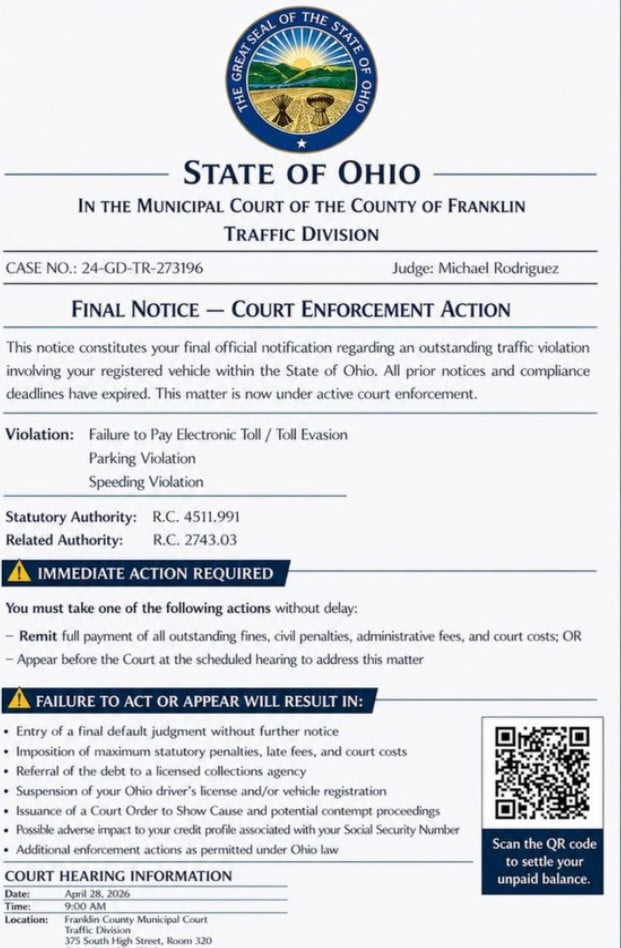
The message usually arrives as a text with an attached image. The image is made to look like an official legal notice, complete with a state seal, court-style formatting, legal references, a judge’s name, and a QR code.
In the example shown, the fake notice includes:
- State of Ohio
- In the Municipal Court of the County of Franklin
- Traffic Division
- Case No.: 24-GD-TR-273196
- Judge: Michael Rodriguez
- Final Notice – Court Enforcement Action
- Alleged violations such as toll evasion, parking violation, and speeding violation
- A QR code for payment
The goal is to scare the recipient into scanning the QR code or clicking a payment link.
Franklin County Municipal Court has directly warned about scams using the court’s name. The court says it does not send text messages about fines, and it will never ask people to pay by QR code. Fines must be paid through the Franklin County Municipal Clerk’s Office
Why This Scam Looks Convincing
It Uses Official-Looking Court Formatting
The fake notice is designed to look like a real court document.
Scammers include:
- A state seal
- A court name
- A traffic division label
- A case number
- A judge name
- Legal code references
- Warning banners
- A QR code
These details are meant to create trust. But official-looking formatting does not make a text message legitimate.
It Uses Fear and Urgency
The notice uses phrases like:
- Final Notice
- Court Enforcement Action
- Immediate Action Required
- Failure to Act or Appear Will Result In
This language is designed to make you panic.
Scammers want you to think the issue is already serious and that you must act immediately to avoid court penalties, license problems, or additional fines.
The FTC has warned about traffic violation text scams that use fake official notices, fake case numbers, QR codes, fake hearing dates, and threats of default judgments or enforcement actions to scare people into acting quickly.
It Uses a QR Code as the Payment Trap
The QR code is one of the biggest red flags.
A QR code may look official, but it is just a hidden link. If you scan it, it can take you to a fake payment website that asks for your personal information and credit card details.
How the Franklin County Ohio Court Notice Scam Works
Step 1: You Receive a Fake Court Notice by Text
The scam starts with an unexpected text message.
It may include an image that looks like a court document. The notice claims you have an outstanding traffic violation involving your registered vehicle.
The message may mention:
- Toll evasion
- Parking violation
- Speeding violation
- Court enforcement
- Expired deadlines
- Required payment
This does not mean you have a real case. It means scammers are trying to make the text look official enough for you to react.
Step 2: The Message Creates Legal Pressure
The fake notice may claim that all prior notices have expired and that the matter is now under court enforcement.
It may threaten consequences such as:
- Default judgment
- Maximum fines
- Late penalties
- Court costs
- Collections
- License suspension
- Vehicle registration consequences
This pressure is intentional.
The FTC says these scams often list frightening consequences to push victims into scanning a QR code and paying a fake balance. (Consumer Advice)
Step 3: The QR Code Sends You to a Fake Website
The notice tells you to scan the QR code to pay or settle your unpaid balance.
That QR code may lead to a fake website that looks like:
- A court payment portal
- A DMV-style traffic page
- A toll payment site
- A citation lookup system
The website may ask for:
- Full name
- Address
- Phone number
- Vehicle details
- License plate number
- Credit card number
- Expiration date
- CVV
- Billing ZIP code
Once entered, that information can be stolen and used for fraud.
Step 4: The Scammers Steal Your Payment Details
The fake payment site may show a small amount due to make the payment feel harmless.
But the amount is not the real target.
The real goal is to steal your:
- Credit card details
- Billing information
- Personal information
- Vehicle-related data
Red Flags in Franklin County Ohio Court Notice Scam Texts
The Notice Arrives by Text
Franklin County Municipal Court says it does not send text messages about fines.
The Message Asks for QR Code Payment
The court says it will never ask people to pay through a QR code.
It Uses a Judge Name That Cannot Be Verified
The scam notice may name a judge such as Michael Rodriguez. Similar names have appeared in fake traffic court notices in other states, which is a sign of a reused scam template.
It Lists Multiple Violations at Once
The notice may list toll evasion, parking violation, and speeding violation together.
A real citation usually identifies one specific event with clear details.
It Uses a Generic or Reused Case Number
The case number may look official, but similar formats have appeared in scam notices across multiple states.
It Pressures You to Act Immediately
Scammers use panic to stop you from verifying.
What To Do If You Receive This Text
Do Not Scan the QR Code
Do not scan it, even out of curiosity.
A QR code from an unexpected court notice is unsafe.
Do Not Click Links
If the text includes a link, do not open it.
Do Not Reply
Replying can confirm that your phone number is active.
Do Not Pay
Do not enter credit card details through the QR code, link, or fake payment page.
Verify Through Official Channels
If you are worried the notice might be real, check directly through official sources.
Franklin County Municipal Court says people can verify whether they have an actual case or court date by using the Franklin County Municipal Clerk’s official case search and checking upcoming court dates under “Events.”
What To Do If You Already Paid or Entered Information
1. Call Your Card Issuer Immediately
If you entered card details, call the number on the back of your card.
Tell them:
- You entered card details on a fraudulent court payment site
- The site came from a scam text
- You need the card blocked or replaced
- You want recent transactions reviewed
2. Review Your Transactions
Look for:
- Small test charges
- Unknown online purchases
- New subscriptions
- Declined attempts
- Charges from unfamiliar merchants
Dispute anything suspicious.
3. Turn On Transaction Alerts
Enable alerts for:
- Every purchase
- Online payments
- Transactions over $1
4. Save Evidence
Take screenshots of:
- The text message
- The sender number
- The fake court notice
- The QR code
- The fake website
- Any payment confirmation or error page
5. Report the Scam
Franklin County Municipal Court recommends not paying the fine and reporting scam messages to local law enforcement. The court also points people to the FTC’s fraud reporting process.
You can also:
- Mark the message as spam or junk
- Block the sender
- Forward the text to 7726 (SPAM) if your carrier supports it
- Report the scam to the FTC at ReportFraud.gov
The Bottom Line
The Franklin County Ohio Court Notice scam text is not a real court notice.
It is a phishing scam that uses fake court formatting, a fake case number, a QR code, and urgent legal threats to trick people into paying fake fines or entering personal information.
Franklin County Municipal Court is clear: it does not text people about fines, and it does not ask for payment by QR code.
If you receive one of these messages, do not scan, do not click, do not reply, and do not pay.
Verify only through official court or clerk channels you access yourself.
FAQ
What is the Franklin County Ohio Court Notice scam text?
It is a phishing scam where criminals send fake court-style notices claiming you have an unpaid traffic, toll, parking, or speeding violation in Franklin County, Ohio. The goal is to make you scan a QR code or pay through a fake website.
Is the Franklin County court notice real?
No. These messages are fake. They are designed to look like official court notices, but they are not legitimate communications from Franklin County Municipal Court.
Why does the notice include a case number?
Scammers use case numbers to make the message look official. A case number in a text image does not prove the notice is real.
Why does it mention Judge Michael Rodriguez?
The name Judge Michael Rodriguez has appeared in multiple fake traffic court notices across different states. That repeated use is a major red flag.
What happens if I scan the QR code?
The QR code may take you to a fake court payment website. That site may ask for your personal information, vehicle details, and credit card data.
What information are scammers trying to steal?
Usually:
- Full name
- Address and ZIP code
- Phone number and email
- License plate or vehicle details
- Credit card number
- Expiration date and CVV
- Billing information
I scanned the QR code but did not enter anything. Am I safe?
Your risk is much lower if you did not submit information. Close the page, do not return to it, and watch for more scam messages.
I entered my card details. What should I do now?
Call your card issuer immediately, report the card as compromised, freeze or replace it, review recent transactions, dispute anything suspicious, and turn on transaction alerts.
Can a real court ask for payment by QR code in a text?
A surprise court text with a QR code payment demand is a major red flag. Real court payments should be verified only through official court or clerk websites you access yourself.
How do I verify if I really have a Franklin County court case?
Do not use the QR code, link, or phone number in the message. Go directly to the official Franklin County Municipal Court or Clerk website and use official case search tools.

Join the discussion
0 commentsShare your experience or ask a question about this article.
Discussion
Start the conversation
Have a question or something useful to share? Add the first comment.