

Personal safety products sell fast for one simple reason: they tap into a real fear.
If you have ever walked to your car at night, waited for a rideshare alone, or watched a loved one leave for campus, a “one-click safety device” sounds like a smart purchase.
Halo Siren is marketed exactly that way: a compact keychain alarm with a loud siren, a flashing light, and simple “pull to activate” operation. The pitch is that it is affordable, easy to carry, and powerful enough to get attention instantly.
The more important question is not whether a personal alarm can be useful. It can.
The question is whether Halo Siren is a good purchase, or a high-markup dropshipping funnel selling a generic product with heavy sales tactics.
This article breaks it down clearly so you can make a calm decision.
What Halo Siren Claims to Be
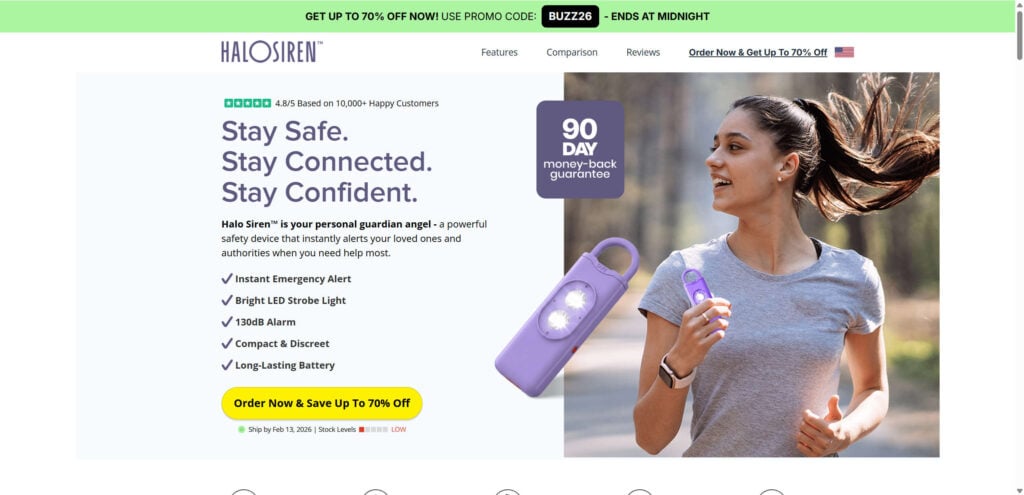
Halo Siren is presented as a personal safety alarm designed for quick use in an emergency. The typical sales page highlights features like:
- A very loud alarm (often advertised around 130 dB)
- Bright LED strobe lights to draw attention
- Compact size for a keychain, bag, or belt loop
- “Instant activation” by pulling a pin or triggering a switch
- Rechargeable battery
- No monthly fees, no app, no setup
- Big discounts, bundle deals, and a money-back guarantee
On the surface, these claims are not unusual. Personal alarms commonly include a siren, a light, and a pull-pin design.
Where the concerns start is not the concept. It is how the product is sold.
The Quick Reality Check: What This Product Usually Is
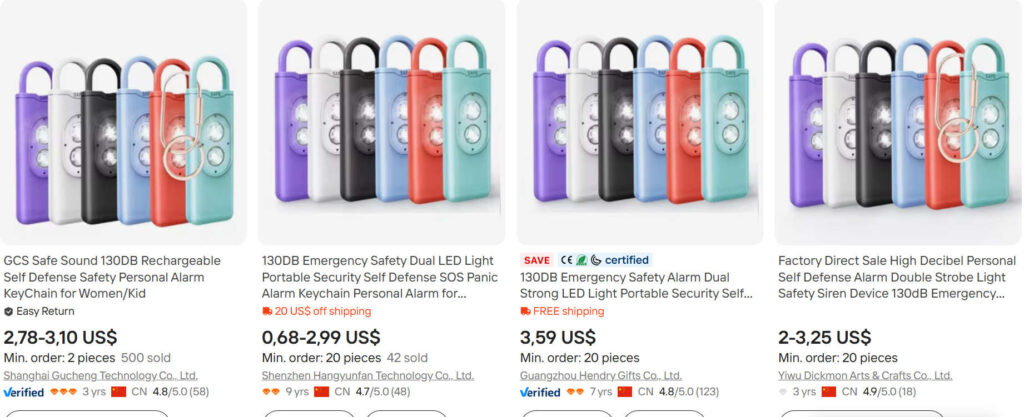
Based on the product photos and the way it is marketed, Halo Siren appears to be a rebranded version of a very common item: a generic rechargeable personal alarm keychain with dual LEDs.
These devices are mass-produced, sold by many suppliers, and frequently rebranded under new names.
That does not automatically make the product “fake.” It usually means:
- The core device is inexpensive at wholesale pricing.
- The brand is mostly a marketing layer.
- Customer support, shipping, and returns can be inconsistent.
- The sales page may exaggerate performance and urgency to push conversions.
If you are comfortable buying a generic product at a markup, that is your choice.
But you should buy it with clear expectations, not under pressure created by a countdown timer.
Major Red Flags Seen in Halo Siren Style Campaigns
Below are the patterns that tend to show up across these “viral gadget” safety alarm funnels. Many of these are visible directly on the sales materials and checkout flow.
1) Constant “limited-time” discounts that never end
If the page pushes “up to 70% off,” “ends at midnight,” or a promo code countdown that resets, that is not a real sale. It is a conversion tactic.
This matters because it encourages rushed purchases and discourages comparison shopping.
2) Inflated social proof (review counts, star ratings, “happy customers”)
Some pages display very large review totals and high star averages without a clear, verifiable review platform.
A trustworthy store can usually show where reviews come from and how they are collected.
When reviews appear as graphics only, treat them as unverified.
3) “As featured on” style logos without proof
A common tactic is placing media logos to imply coverage. Unless the page links to real coverage from those outlets, it is marketing decoration.
4) Thin company transparency
Many of these storefronts provide minimal information about:
- Who owns the company
- Where the company is based
- A physical address
- Clear return instructions
- A real support workflow beyond email
When a product is sold as safety gear, transparency matters more, not less.
5) Pricing that does not match what the product likely is
Generic personal alarms like this often cost only a few dollars at the supplier level, especially when ordered in quantity. These funnels commonly sell them for around $25 to $40 per unit, sometimes more, and then push bundles.
Markups are not illegal. The issue is whether the marketing implies you are buying something proprietary or premium when it is not.
6) Bundle pressure and upsells at checkout
Many buyers report a familiar pattern across these operations:
- The checkout strongly pushes “best value” bundles
- Add-ons appear mid-checkout
- The order confirmation sometimes shows more units than expected if the buyer is not careful
Not every buyer experiences this, but the pattern is common enough that you should treat the checkout screen like a contract and review it line by line.
7) Shipping and returns that can become a headache
Even when a page claims “fast shipping” or “US warehouse,” many of these operations fulfill from overseas supply chains or use third-party logistics.
The practical risk is returns. If the return address is overseas, return shipping can cost more than the item.
If the return process is slow or unclear, refunds become harder.
Does a Personal Safety Alarm Like This Actually Work?
A personal alarm can be useful, but not in the magical way ads sometimes imply.
What it can do well
- Draw attention fast. A loud sound can make bystanders look up and notice something is wrong.
- Create a moment of confusion. Noise and flashing light can disrupt a situation and give you a chance to move away.
- Increase confidence. For some people, having a tool in hand reduces hesitation and helps them react quickly.
What it cannot guarantee
- It cannot force someone to stop.
- It cannot guarantee bystanders will help.
- It cannot guarantee the alarm is as loud in real life as the claim on the box.
- It cannot replace situational awareness, planning, and proven safety habits.
Also, decibel claims are notoriously slippery. “130 dB” is a marketing number that can be measured in ways that do not reflect real-world use, such as measuring extremely close to the siren in ideal conditions.
The more practical question is: is it loud enough to get attention in a parking lot, hallway, stairwell, or street?
Many generic alarms are loud. Some are not.
Quality control is the difference.
The Real Buying Decision: It Is Not About the Concept, It Is About the Seller
If you want a personal alarm, you can absolutely buy one.
The risk with Halo Siren-style storefronts is that you are often paying for marketing rather than reliability.
Here is the clean way to frame the decision:
You are probably fine buying this if:
- You understand it is likely a generic product sold at a markup.
- You are comfortable with potential shipping delays.
- You are okay with a return process that might be slow or annoying.
- You mainly want a basic alarm and do not care about brand support.
You should skip it and buy elsewhere if:
- You want consistent customer service and easy returns.
- You want a proven retailer with clear policies.
- You are buying for a child, student, or someone vulnerable and you want reliable QC.
- You dislike aggressive checkout tactics and “timer” marketing.
When you are buying a safety product, paying a little more for clarity and support can actually be worth it.
What to Look for Instead (If You Want a Personal Alarm That Makes Sense)
If you decide not to buy Halo Siren, use this checklist when shopping anywhere else:
Product features that matter
- Pull-pin activation (simple, reliable, fast)
- Replaceable or reliable rechargeable battery
- A clear way to test it safely (and a clear way to stop it quickly)
- Strong keychain attachment that will not break off easily
- A strobe light if you want visibility at night
- A realistic return policy with a local return address if possible
Seller features that matter
- Clear company details and contact information
- A real returns page with step-by-step instructions
- Transparent shipping timelines
- Reviews hosted on a platform you can verify
A Note on the “Ships From the US” Claim
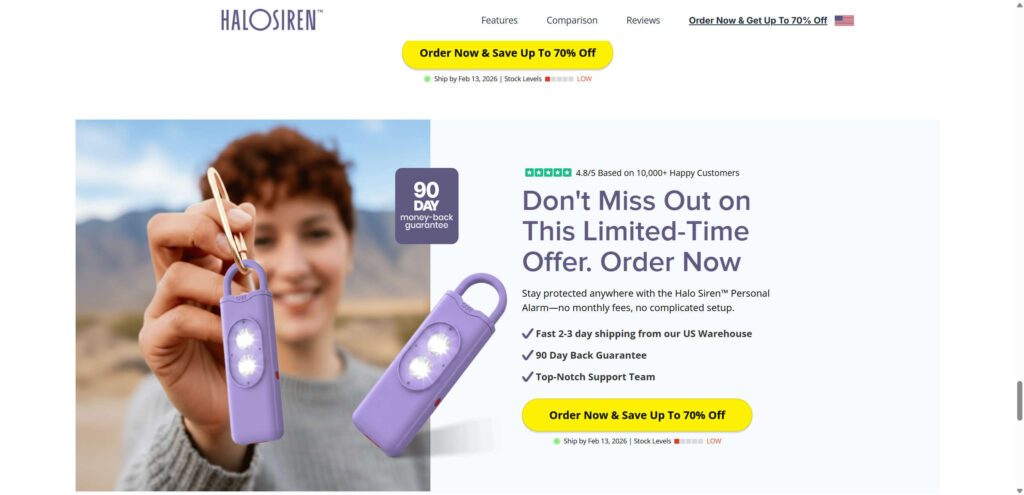
Many gadget landing pages say “ships from our US warehouse” or “fast 2 to 3 day shipping.”
Sometimes that is true.
Sometimes it is partially true (for example, a small number of units are stocked locally while most ship from overseas).
Sometimes it is marketing language that does not match reality.
The practical move is simple: buy from a retailer that you already trust, or buy from a brand that clearly lists where it ships from and where returns go.
How to Use a Personal Safety Alarm Correctly
Even a good personal alarm is only useful if you can deploy it quickly under stress.
If you already own one, or you buy one elsewhere, do this:
1) Practice once at home
Learn exactly how to activate it and stop it. Do not assume you will figure it out in the moment.
2) Carry it where you can grab it instantly
A personal alarm buried in a bag is not helpful.
Use a keychain, belt loop, strap, or an outer pocket.
3) Do not treat it like a shield
The alarm is a tool to create time and attention.
The goal is to move away, get to a safer area, and contact help.
4) Pair it with habits that actually reduce risk
- Share your location when meeting someone new
- Walk in lit, populated areas when possible
- Keep one ear free if you are using headphones
- Trust your instincts and leave early if something feels wrong
What To Do If You Already Ordered Halo Siren
If you purchased Halo Siren and now feel uneasy about it, take action quickly while you have leverage.
1) Save proof before anything changes
Take screenshots of:
- The product page claims (dB, guarantees, shipping promises)
- The discount and countdown timer
- The checkout screen showing quantity and total
- Your order confirmation email
2) Check your card statement carefully
Look for:
- Extra units you did not intend to buy
- Add-ons you did not notice
- Multiple charges
- A merchant name that does not match the brand you saw
3) Email support immediately, in one clear message
Ask for:
- Cancellation (if it has not shipped)
- A full receipt and itemized breakdown
- Confirmation of shipping origin and return address
Keep it simple and direct.
4) If you receive more units than you ordered
Document it immediately:
- Photo of the package label
- Photo of everything in the box
- Screenshot of your original order quantity
Then demand correction in writing.
5) If support stalls, move to a dispute
If you paid by card, you typically have dispute options for:
- Unauthorized charges
- Wrong quantity
- Item not as described
- Misleading advertising
If the merchant cannot resolve it quickly, escalate through your payment method.
If you used Visa or Mastercard, your bank can guide you through the dispute steps.
6) Do not pay return shipping blindly
If returns require sending the product overseas at your expense, get the full written policy first.
If the return cost is unreasonable compared to the item, that is an important detail to include in any dispute.
So, Should You Buy Halo Siren?
A personal safety alarm is a reasonable tool.
Halo Siren, specifically, looks like a classic “viral product” funnel: generic device, heavy urgency tactics, big discount framing, and a price that is hard to justify given how widely available similar alarms are.
If you want a personal alarm, the safer move is buying a similar device from a reputable retailer with clean policies and easy returns.
If you still buy Halo Siren, do it with eyes open:
- double-check the quantity,
- screenshot everything,
- and assume returns may be more difficult than the page suggests.
That is the difference between a smart purchase and an expensive lesson.








