

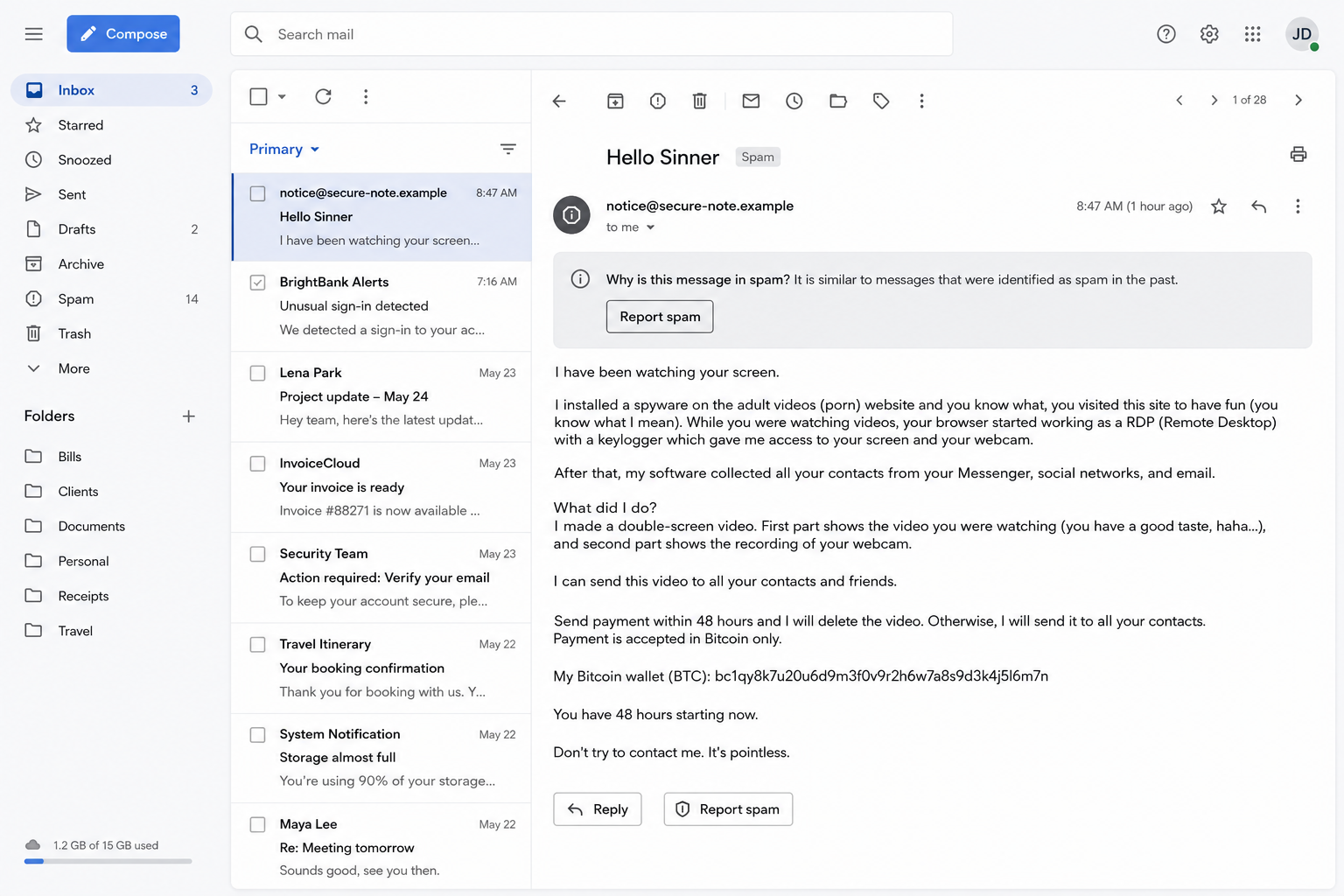
An email opens with two words designed to make the reader feel accused: “Hello Sinner.” The sender then claims to know what happened behind the screen and says a private recording is ready to be shared.
The message is blunt, personal, and timed to make quiet panic feel safer than asking anyone for help. A cryptocurrency address appears near the bottom, along with a deadline.
The Hello Sinner email scam is exposed by what the writer cannot prove, not by the frightening list of things the message claims to have seen.
Overview
“Hello Sinner” is a mass blackmail script
The Hello Sinner email scam is a new greeting wrapped around a familiar Bitcoin blackmail scheme. The sender claims spyware infected the recipient’s computer after a visit to an adult website. It supposedly recorded the screen, webcam, microphone, browsing, and contact list.
No recording is attached. No still image, recent file, device name, or verifiable detail proves that the computer was accessed. The email substitutes confident technical language for evidence, then gives the reader little time to notice the difference.
A recent BBB Scam Tracker report documents this exact opening and the same claims about spyware, surveillance, and device control. The submission is one example of a wider campaign, not proof that the sender hacked that recipient.
The threat is built from shame and uncertainty
Blackmail works best when the target wants the subject to disappear. The email names adult content because embarrassment can discourage the recipient from showing the message to a spouse, coworker, friend, or security team.
The script also leaves room for imagination. It does not need to know whether the recipient visited any particular site. It only needs enough people in a large mailing list to wonder whether the accusation could be connected to something private.
The phrase “Hello Sinner” sharpens that pressure. It is not a security finding or proof of surveillance. It is a taunt chosen to move the reader from analysis to fear before the payment deadline arrives.
A familiar password still does not prove a video exists
Some versions include an old password, phone number, street address, or other detail from a previous data breach. That can make the sender appear to have live access even when the information was bought, traded, or copied from an old leak.
The Federal Trade Commission warns that these messages may contain a real old or recent password while the webcam and video claims remain fabricated. A known password is a reason to secure accounts, not a reason to pay.
Common warning signs include:
- The message begins with an accusation instead of a verifiable security event.
- The sender claims months of access but provides no original evidence.
- Technical terms are piled together without a device name, date, or log.
- A vague “private video” is described but never shown.
- The recipient is told not to reply, report, or seek help.
- Payment is demanded only in cryptocurrency.
- A short deadline claims to begin when the email is opened.
- The sender promises permanent deletion after payment.
- An old password is presented as proof of current device control.
- The same wording reaches unrelated personal and business inboxes.
How the Hello Sinner Email Scam Works
Step 1: A large list of addresses is assembled
The operator starts with email addresses gathered from data breaches, marketing lists, exposed websites, infected systems, or earlier phishing campaigns. The message can be sent cheaply to thousands of inboxes, so it does not need to fool everyone.
Business addresses are useful because they are public and often monitored closely. Personal addresses may be paired with old breach records. Neither source requires the sender to enter the recipient’s current computer.
Step 2: The accusation arrives before any evidence
The first lines claim the device has behaved strangely or that a skilled hacker gained complete access. The writer says surveillance continued for months, a detail meant to suggest patience and technical power.
That story is intentionally difficult to disprove in a few seconds. A frightened recipient may search their memory instead of asking why someone with complete access produced no screenshot, file name, current password, or accurate device information.
Step 3: Ordinary computer terms create a false diagnosis
The email may mention spyware, a keylogger, remote desktop access, webcam control, microphone recording, browser history, and stolen contacts. These are real concepts, but placing them in a paragraph does not demonstrate that any of them occurred.
Awkward spelling can be deliberate variation. Mass senders alter characters and wording to evade filters while keeping the threat readable. A garbled letter is evidence of bulk delivery tactics, not sophisticated access to the machine.
Step 4: Shame turns a generic email into a personal crisis
The sender says the recipient visited adult sites and was recorded at an embarrassing moment. It threatens to send a split-screen video to family, friends, colleagues, or social contacts.
There is usually no sample because the operator has nothing unique to show. The victim supplies the emotion. Even someone who knows the story is false may worry that coworkers will misunderstand a fabricated message sent in their name.
Step 5: A breached detail may be used as borrowed credibility
An old password can appear in the subject line or body. The criminal expects the recognition to silence doubts about every other claim. In reality, password lists circulate for years after breaches and may no longer match any active account.
If the password is current anywhere, change it immediately through the real service. Do not click a link or attachment in the blackmail email. The detail shows exposure, but it does not establish a recording.
Step 6: Cryptocurrency and a clock block ordinary recourse
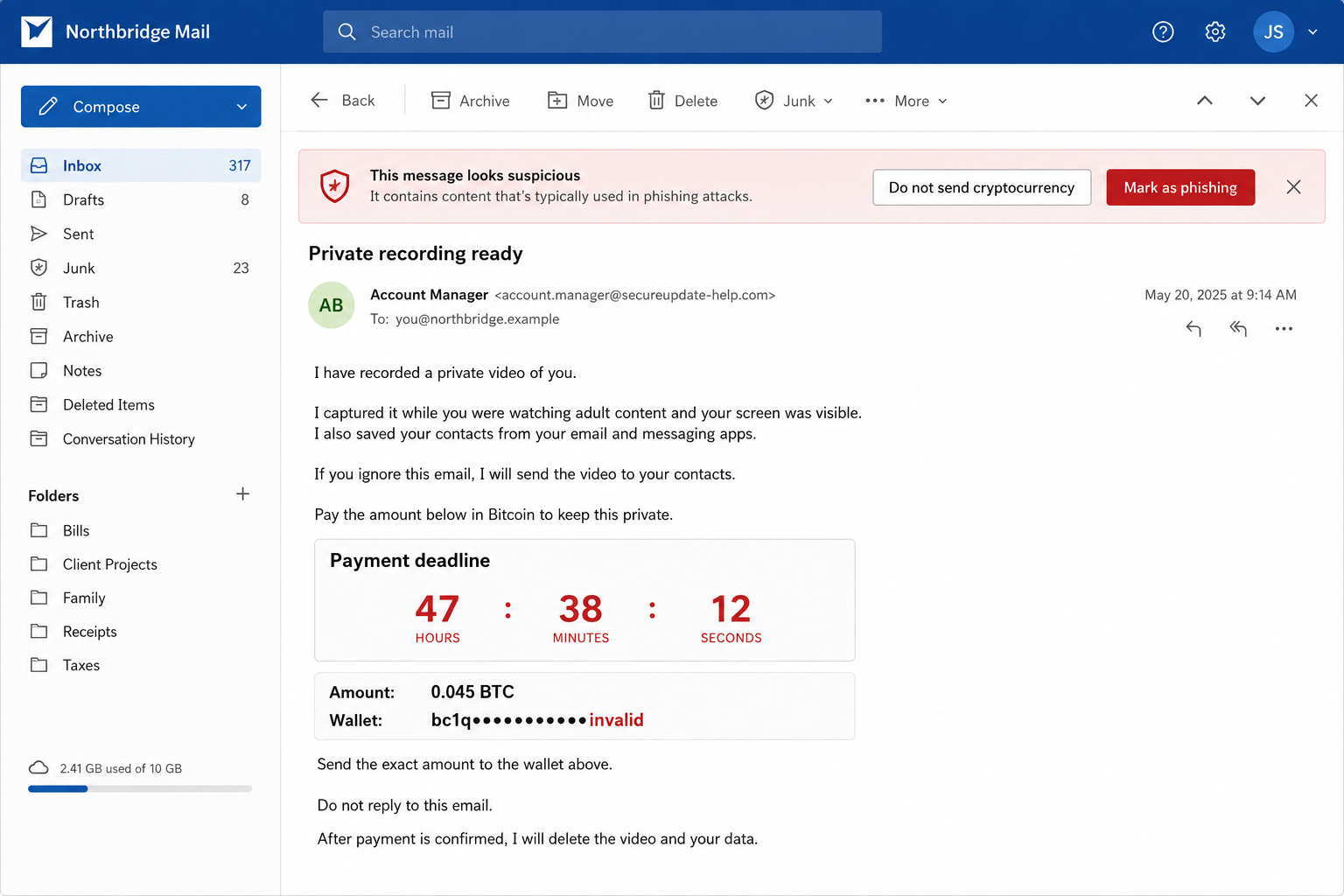
The demand points to a wallet and threatens release within 24 or 48 hours. Cryptocurrency is attractive to the operator because a transfer can be difficult to reverse and the recipient cannot open a normal card dispute.
The countdown is text, not a trustworthy timer. The sender may not know when the message was opened. The deadline exists to prevent calm verification, password changes, a malware scan, and conversation with someone who recognizes the script.
Step 7: Payment marks the victim for more pressure
Paying does not create a contract, prove that material was deleted, or prevent another demand. It confirms that the address is active and that fear can produce money. The same operator or another group may return with a new wallet and a larger amount.
The FBI’s victim guidance makes the broader point clearly: cooperating with an extortionist rarely stops blackmail and harassment. Save the evidence, stop contact, and report the threat.
What the Email Does and Does Not Prove
A copied email address proves that the sender knew an address. A displayed password proves that somebody obtained that credential at some point. Neither fact automatically proves the current mailbox, computer, webcam, or contact list is under the sender’s control.
Look for independent evidence. Check account sign-in histories, active sessions, password-reset notices, unfamiliar forwarding rules, antivirus alerts, browser extensions, and installed applications. A threat paragraph is not a substitute for those records.
Do not reply to demand proof. A response confirms that the mailbox is watched and may invite a more personal script. It can also give the sender a fresh signature, job title, telephone number, or emotional reaction to exploit.
Do not open an attachment offered as a “sample.” A mass blackmail message that began without device access can become a real compromise if the recipient launches malware while trying to inspect supposed evidence.
If the email includes a current password, assume that credential is exposed. Change it everywhere it was reused, starting with email and financial accounts. Use a password manager and enable an authenticator app or passkey where available.
Why the Same Script Keeps Returning
The economics favor repetition. Sending email costs very little, cryptocurrency instructions are easy to replace, and one payment can cover a huge volume of failed attempts. A new greeting helps an old scheme pass filters and attract fresh search traffic.
The message also exploits a verification problem. It describes events that supposedly happened in private, where the victim may feel nobody else can help. In fact, comparing the exact wording with public warnings is often what exposes the mass campaign.
Language can change from “Hello Pervert” to “Hello Sinner,” “I have bad news,” or a subject line containing a password. The mechanism stays stable: unsupported surveillance, reputational threat, irreversible payment, and a deadline.
Organizations should treat repeated copies as an email-security event without assuming every recipient is infected. Preserve one full message with headers, block the sender infrastructure where useful, search for matching content, and warn staff not to pay or open attachments.
Company and Checkout Checks
The display name identifies nobody
A personal name, “Security Team,” or “Account Manager” can be typed into the sender field. Expand the full address and authentication details, but remember that even a suspicious address only helps classify the message. It does not reveal the real operator.
The sending domain may be disposable or abused
Mass campaigns can use newly created domains, compromised mailboxes, or legitimate delivery services abused by a customer. Do not accuse the visible provider of writing the threat. Report the message through the provider’s abuse channel with complete headers.
The wallet is a payment destination, not proof
A cryptocurrency address does not validate the hacking story. Searching it may reveal other complaints or transactions, but an empty wallet does not make the email safe. Operators can generate new addresses for different waves.
No legitimate company can guarantee deletion
The sender offers no contract, identity, verifiable business, or enforceable promise. Even in a real data-theft incident, paying an anonymous demand cannot prove that copies were erased. Report the event and secure the affected systems instead.
What to Do if You Have Fallen Victim to This Scam
- Do not pay and stop replying. A payment cannot buy proof of deletion. Further conversation confirms that the address is active and gives the sender more material for pressure.
- Preserve the original message. Save the full email with headers, sender address, timestamps, wallet, attachments, and any payment receipt. Screenshots help, but the original headers contain better technical evidence.
- Change any password shown in the email. Open the real service independently. Replace that credential everywhere it was reused and start with the email account because it can reset many other services.
- Review the mailbox completely. Check recent sign-ins, active sessions, recovery addresses, forwarding rules, filters, delegates, app passwords, and connected applications. Remove anything unfamiliar and sign out other sessions.
- Enable stronger authentication. Prefer a passkey or authenticator app. Never approve an unexpected sign-in prompt or share a code with someone claiming to investigate the threat.
- Inspect the device if you opened anything. If an attachment, installer, document, or extension was launched, disconnect from sensitive accounts and run a full Malwarebytes scan.
- Use blocking as an extra layer. AdGuard can block many known malicious pages and advertising routes. It cannot determine whether a blackmail claim is true, so account review and evidence checks still matter.
- Contact the payment service immediately. If cryptocurrency was purchased through an exchange, report the receiving wallet and transaction ID. Ask whether any transfer remains pending, but understand that completed transfers may be irreversible.
- Report the campaign. In the United States, submit the email to ReportFraud.ftc.gov and serious internet crime to IC3.gov. Use the relevant cybercrime service in other countries.
- Tell someone you trust. Secrecy is part of the pressure. A calm second person can help review evidence, secure accounts, and prevent a rushed transfer.
- Reject recovery and deletion services. A stranger who promises to hack the sender, erase a video, or recover cryptocurrency for an upfront fee is likely beginning another scam.
Frequently Asked Questions
Does “Hello Sinner” mean my computer was hacked?
No. It is a reusable opening line. Check devices and accounts for independent signs of compromise, but do not treat the wording itself as technical evidence.
Why did the email know one of my passwords?
The password may come from an old data breach or reused credential list. Change it anywhere it remains active. Its presence does not prove the sender recorded a video.
Should I ask the sender to show the recording?
No. Replying confirms a monitored address and invites more pressure or a malicious attachment. Preserve the message, secure accounts, and report it.
Will the sender contact my family or employer?
Mass emails usually rely on the threat rather than possession of a real contact list. Do not pay for a promise. Warn trusted contacts if the message contains evidence of actual account access.
What if I already sent cryptocurrency?
Stop sending more, contact the exchange immediately, save the transaction ID and wallet, and report the crime. Ignore anyone promising guaranteed recovery for another fee.
Do I need to replace my computer?
Not because of the email alone. Update the system, review installed software, and scan it if you opened a file or observed genuine compromise. Replace hardware only on advice grounded in real evidence.
The Bottom Line
The Hello Sinner email scam turns a mass-produced accusation into a private emergency. Its strongest weapon is not spyware. It is the hope that embarrassment will make the recipient pay before asking for proof.
Do not send cryptocurrency. Save the email, secure any exposed password, review the account and device, and report the threat. A sender who truly controlled everything would not need a recycled script to make you imagine the evidence.

Join the discussion
0 commentsShare your experience or ask a question about this article.
Discussion
Start the conversation
Have a question or something useful to share? Add the first comment.