

A memorial notice is shared across social media, and one comment offers a way for distant friends to attend. The link promises a live video, a guest book, and a place to leave support for the family.
The timing makes the offer hard to question. People are grieving, the service is close, and nobody wants to miss a final goodbye because they paused over a web address.
That emotional shortcut is exactly what the fake funeral livestream scam exploits.
Overview
Scammers copy real memorial details and invent the stream
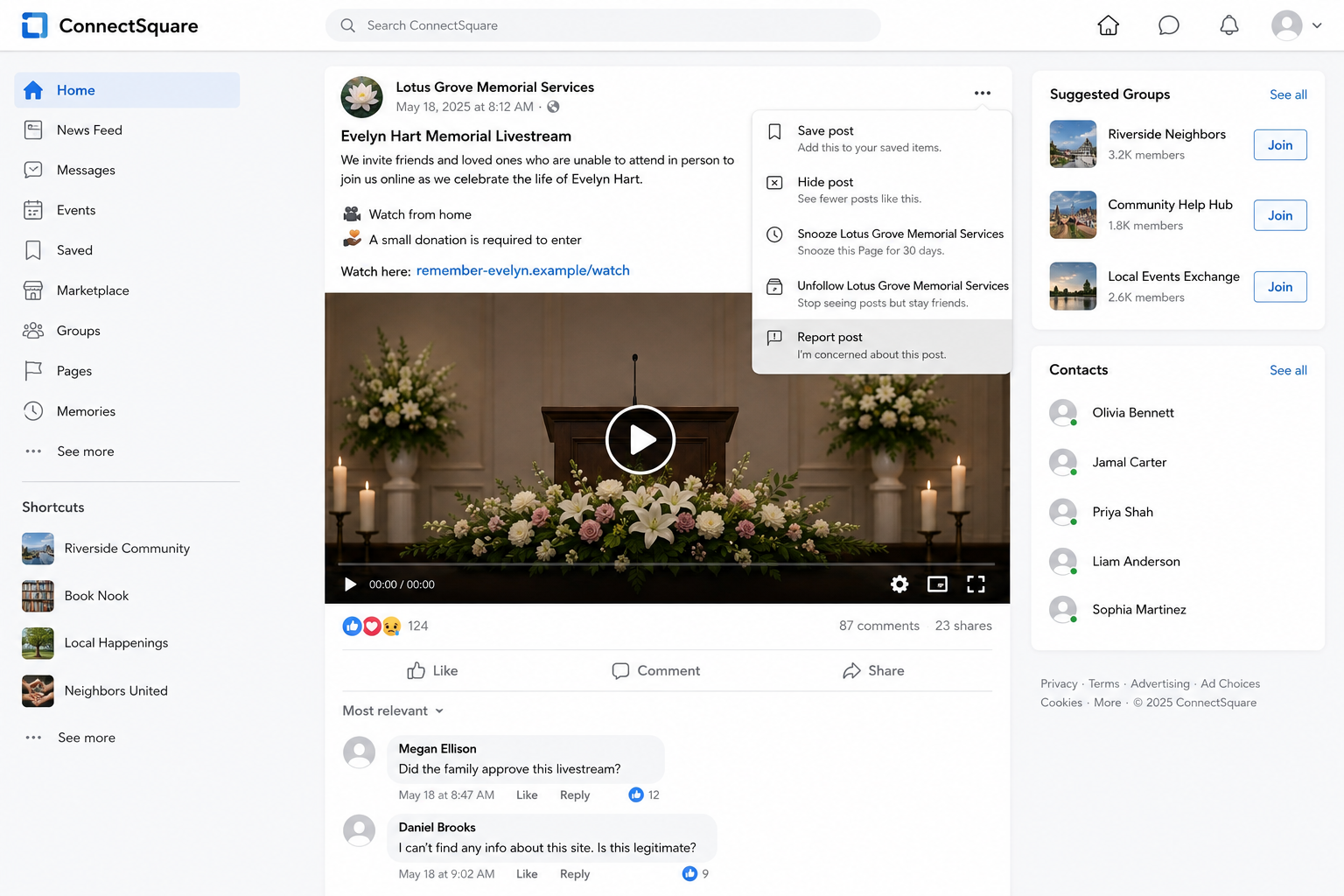
The fake funeral livestream scam begins with information that may be genuine. A name, photograph, funeral date, church, obituary, and family message can all be copied from public posts. The fraudulent account then advertises a livestream the family never created.
The link may appear in comments, replies, event pages, community groups, or profiles built to resemble a funeral home. Friends share it because the service is real and the page uses the same details. Authentic context becomes cover for an unauthorized destination.
Merseyside Police warned about Facebook accounts offering fake funeral livestreams in exchange for donations. The warning followed multiple accounts promoting an unauthorized stream around a real funeral.
The play button can lead to payment or phishing
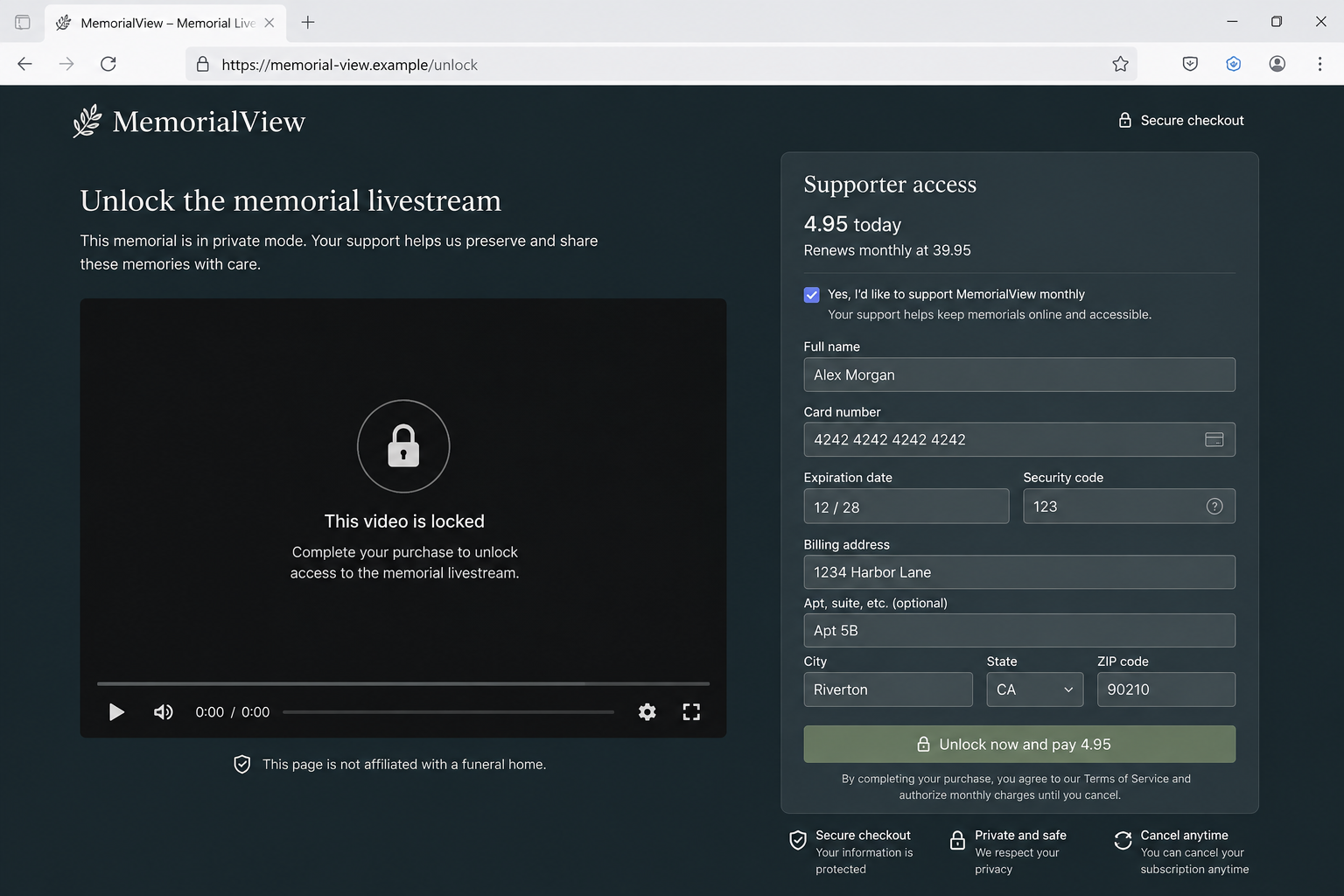
A legitimate stream normally opens through a link supplied by the family, funeral home, place of worship, or an established video provider. The scam version introduces an unexpected barrier: register, verify identity, make a donation, or pay a small viewing fee.
The page may collect a name, address, telephone number, email, card details, login password, or one-time code. A small initial charge can test the card. Hidden terms may authorize recurring billing, while a fake sign-in can compromise the victim’s social account.
Some pages never show video. Others embed a still image, countdown, prerecorded clip, or broken player to delay suspicion. The operator already obtained the information or payment before the visitor discovers there is no stream.
Grief makes ordinary verification feel uncomfortable
People hesitate to ask a bereaved family whether a link is genuine. Scammers use that courtesy. They may write that the family asked for privacy, that access is limited, or that donations support funeral expenses.
The safest verification can be respectful and brief. Check the funeral home’s independently reached website, the official obituary, or a family post from an account known before the death. Do not rely on the page that is asking for money.
Warning signs include:
- The livestream appears only in comments under a genuine memorial post.
- A recently created page copies the deceased person’s name and photograph.
- The link is not mentioned by the family or funeral home.
- Viewing requires a card, donation, account login, or identity check.
- The site promises private access but allows anyone to reach its checkout.
- A countdown says registration will close before the service.
- The destination domain does not match the funeral provider.
- Comments are disabled, deleted, or answered with the same link.
- The page asks visitors to share the stream widely.
- The video remains locked after payment.
How the Fake Funeral Livestream Scam Works
Step 1: Public funeral information is collected
Obituaries and memorial posts necessarily tell a community when and where a service will happen. Criminals monitor those public details because the audience is identifiable, the deadline is fixed, and relatives may share links quickly.
Nothing needs to be hacked. A public name, photograph, date, funeral-home logo, and tribute can be copied into a new profile within minutes. The copied facts make the fake page easier to find and harder to dismiss.
Step 2: A page or profile is built around the real event
The operator creates a memorial group, livestream event, tribute page, or account using a familiar name. It may repost the obituary and tag people who commented on genuine announcements.
The profile can look active because automated accounts add reactions and generic condolences. A high reaction count is not proof that the family controls the page. Check account history and the original source of the stream announcement.
Step 3: The link is planted where mourners will see it
Comments under the obituary are especially effective. Everyone reading already recognizes the name and may assume another relative supplied the link. The scammer can also reply directly to people who say they cannot attend.
Urgency comes naturally from the service time. A message posted shortly before the funeral leaves little opportunity for the funeral home or family to find, report, and remove every copy.
Step 4: The landing page asks for a small commitment
The first page may request an email address to reserve a place. That looks reasonable for a private stream and gives the operator a confirmed contact for later phishing.
The next screen introduces a fee or suggested donation. A small amount feels easier to accept during an emotional event, especially when the page says proceeds help the family. The person named may never receive anything.
Step 5: Card or account information is captured
A checkout requests normal payment fields. It may also preselect a monthly supporter plan or describe recurring terms in faint text. The visible button emphasizes access now, while the longer obligation is easy to miss.
A social sign-in button creates another route. The imitation login can steal credentials and use the real account to share the same memorial link with trusted friends.
Step 6: A fake player hides the missing broadcast
After submission, the page may show a loading spinner, scheduled countdown, muted player, or error saying capacity is full. The delay keeps the victim waiting while a card is tested or a password is used.
Some victims assume the funeral home had technical trouble. That explanation gives the scammer extra time and can stop the visitor from disputing the payment until the service is over.
Step 7: The same event is recycled for more victims
Multiple profiles can promote the same page. When one account is reported, another replies under fresh posts. After the funeral, the operator may rename the page and reuse its followers for a different memorial.
Stolen accounts are valuable because their real history makes new links look trustworthy. A victim who entered a password may unknowingly become the next apparent promoter.
How to Find the Real Livestream
Start with the official obituary or funeral home site you reached independently. If a stream exists, the notice should explain who provides it and whether a password is required. Search the funeral home’s own domain rather than following a comment.
Look at posts from relatives or close friends whose accounts predate the funeral. A newly created “memorial live” profile should not outrank the people organizing the service. If different links circulate, ask a known contact which one is authorized.
A private stream may require a password, but that password usually comes from the organizer. It should not require a visitor to provide a payment card merely to discover whether the video exists.
Funeral homes can help by posting one clear notice, naming the authorized provider, and stating whether viewing is free. Families can disable public comments or warn guests that donation links will never appear in replies.
Why “Donation” Does Not Make the Page Legitimate
The word donation creates a generous explanation for payment. It does not show who receives the money. A legitimate fundraiser should identify the organizer, beneficiary, platform, purpose, and withdrawal route.
Open any genuine family fundraiser through the organizer’s confirmed post, not through the livestream checkout. A criminal may copy a real charity’s name while sending payment somewhere unrelated.
Pressure is another clue. A real memorial does not become more authentic because a counter says only a few viewing places remain. Internet video access is not usually allocated like a sold-out theater.
Card protection still matters for small amounts. A low charge can verify that details work, while hidden recurring terms create later billing. Treat every unrecognized memorial-site charge as a financial-security issue, not merely a failed video purchase.
Compare the checkout with the appeal itself. A genuine fundraiser can explain who organized it, who receives the proceeds, and what expenses the money supports. A vague “support the family” label beside a card form leaves those basic questions unanswered.
Also inspect what happens when the donation box is cleared. A deceptive page may restore the amount, block access, or make payment mandatory despite calling it optional. The behavior reveals that the video is bait and the contribution is really an entry fee.
Do not let a copied charity badge settle the question. Open the charity’s real website independently and search for the appeal. If the organization does not list it, contact the charity before sending anything.
Finally, notice where the receipt comes from. An unrelated merchant name, personal payment handle, or foreign billing descriptor deserves immediate verification. The family name on the memorial page may have no connection to the account collecting funds.
Company and Checkout Checks
The funeral home must confirm the stream
Call the number on the provider’s independently reached website or obituary. Ask whether it created the stream and whether any fee is required. Do not use contact details printed only on the suspicious page.
The social account needs a real history
Review when the page was created, previous names, older posts, and administrators where visible. A memorial profile assembled after the obituary appeared deserves close scrutiny, even when its copied details are accurate.
The domain should match the authorized provider
Read the registered domain in the browser address bar. A person’s name in the path or subdomain does not prove family ownership. Search the exact domain with terms such as scam and complaint before entering information.
The donation recipient must be identifiable
Confirm the organizer and beneficiary through the family’s known account. If the checkout hides the legal payee, adds recurring billing, or routes to an unrelated processor, close it and report the link.
What to Do if You Have Fallen Victim to This Scam
- Close the page and stop all contact. Do not submit another card, login, verification code, or identity document to unlock the supposed stream.
- Contact the card issuer immediately. Report the page as fraudulent, dispute unauthorized charges, ask about replacing the card, and block future billing from the merchant descriptor.
- Cancel any hidden subscription. Save the checkout and terms first. Tell the issuer that the page may have enrolled the card in recurring billing without clear consent.
- Change any password entered on the page. Use the real social or email service. Sign out unknown sessions, inspect recovery settings, and enable a passkey or authenticator app.
- Warn the family or funeral home privately. Send the fake page’s address and screenshots through a known contact. Do not amplify the live link in a public warning without making its danger clear.
- Report every promoting profile. Use the platform’s impersonation, fraud, and compromised-account tools. Include the genuine memorial page so reviewers can compare them.
- Check the device if anything downloaded. A stream should not require a codec, extension, remote-support tool, or special player. Remove unfamiliar software and run a full Malwarebytes scan.
- Add blocking after cleanup. AdGuard can stop many known phishing and malicious-ad destinations. It cannot verify a family relationship, so always confirm the stream independently.
- Preserve evidence and report the loss. Keep messages, URLs, account names, receipts, card statements, and screenshots. In the United States, report at ReportFraud.ftc.gov; use the appropriate fraud service elsewhere.
- Tell contacts if your account shared the link. Delete unauthorized posts and direct messages, but first preserve copies. Ask recipients not to open the page or enter payment details.
- Ignore recovery offers. Nobody needs an upfront payment or remote access to dispute a card charge or report a fake page.
Frequently Asked Questions
Do real funeral livestreams ever require registration?
Yes, some private services use a password or guest registration. Verify the link through the funeral home or family before providing information, and question any unexpected card requirement.
Can a fake page use the correct obituary details?
Yes. Names, dates, photographs, and service locations are often public. Accurate copied facts do not prove the page was authorized.
Is a small donation safe?
No amount makes an unknown checkout trustworthy. A small charge can expose card data or begin recurring billing. Confirm the fundraiser and recipient independently.
What if the family shared the post unknowingly?
Contact them privately and provide the evidence. Their account may be safe but misled, or it may be compromised and require immediate recovery.
Should a stream require a special video player?
Usually not. Do not install software, browser extensions, or codecs from a memorial link. Ask the funeral provider for another viewing method.
How can a funeral home reduce this scam?
Publish one authorized link, state whether viewing is free, monitor comments, and warn families about impersonation. Clear information gives mourners a trusted reference.
The Bottom Line
The fake funeral livestream scam borrows a real loss, real names, and a real service time to make an invented viewing link feel official. The copied memorial can be accurate while the payment page is entirely fraudulent.
Find the stream through the family or funeral home, never through a stranger’s comment. A final goodbye should not require an unverified card, social login, or hurried donation.

Join the discussion
0 commentsShare your experience or ask a question about this article.
Discussion
Start the conversation
Have a question or something useful to share? Add the first comment.