

An email says your organization’s Claude access is in trouble. There is an appeal form attached, and the message makes it sound as though a missed deadline could lock people out.
If Claude is part of your daily work, that warning is hard to set aside. The attachment looks like the next sensible step.
The Claude Appeal Request scam turns that ordinary workplace worry into a route through pages your security team did not send you to.
Overview
A policy warning aimed at workplaces
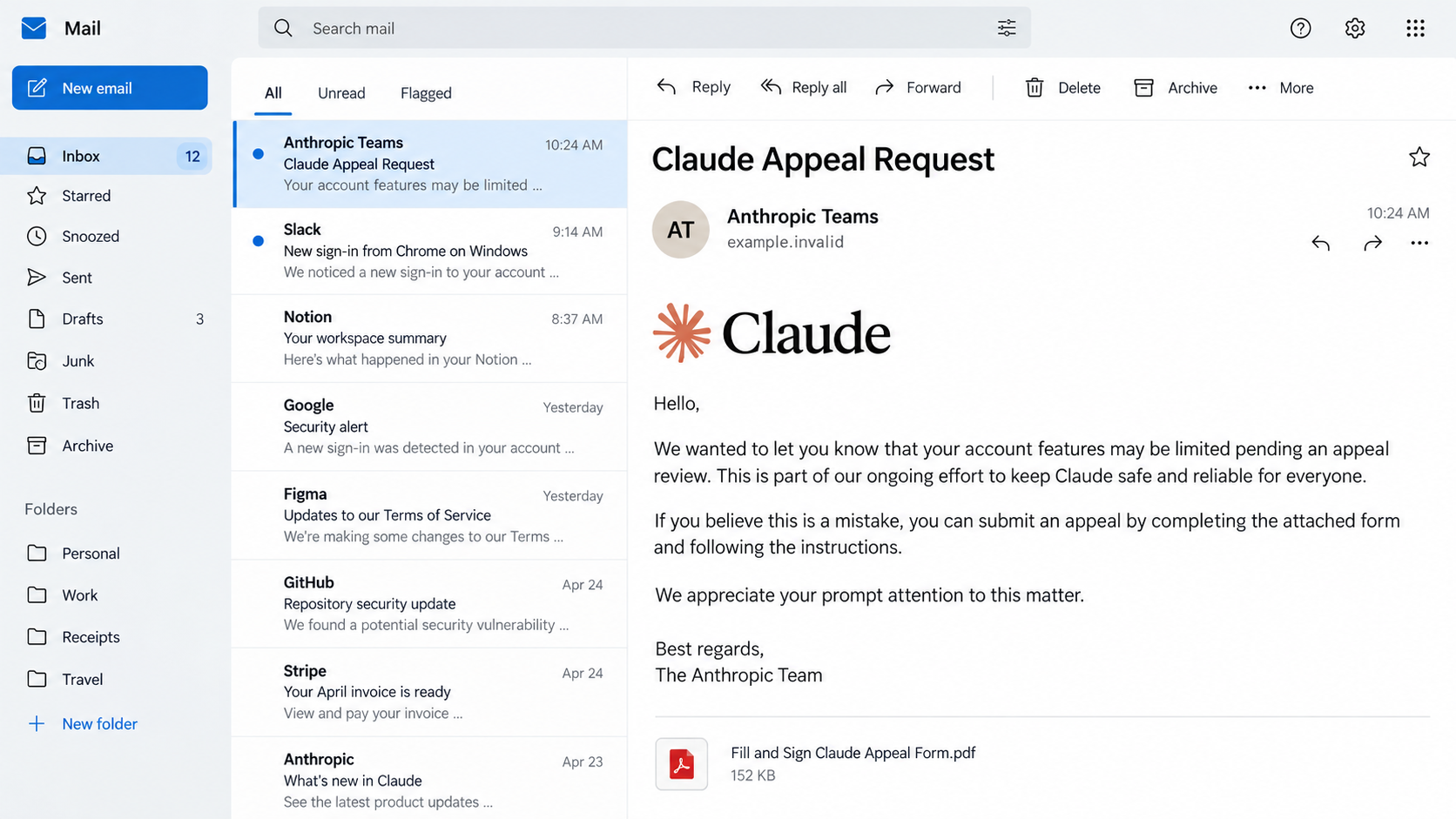
Microsoft Threat Intelligence documented a phishing campaign that impersonated Anthropic, the company behind Claude. The emails claimed the recipient had breached Claude’s acceptable-use policy and had to submit an appeal. Microsoft observed the campaign between April 20 and April 22, 2026, reaching more than 2,000 organizations.
The message was not an ordinary policy notice from Anthropic. It came with a PDF named like an appeal form, and the PDF pointed recipients toward attacker-controlled pages. Those pages presented verification and access-code steps that made the trip look administrative.
This is a confirmed phishing operation, not a complaint about Claude’s real policies or customer support. The operator borrowed the brand and a plausible compliance issue to get staff to leave the normal account-management route.
The attachment is the detour
The PDF title, “Fill and Sign Claude Appeal Form,” sounds like paperwork. It also gives an employee a reason to open a file and follow the link inside it. The first click is the transition from a questionable email to the operator’s web flow.
Microsoft saw multiple sender display names, including variations of “Anthropic Teams” and “Anthropic PBC.” A display name is text chosen by the sender; it is not proof the message came from Anthropic. The real sender address, reply-to address, and link destination matter more than the name in bold at the top of the inbox.
- The email warns of a Claude acceptable-use violation.
- An appeal PDF supplies the supposed fix.
- The PDF sends the reader to a non-Anthropic destination.
- A fake security check and access code add steps that appear official.
- The final destination could not be directly observed when Microsoft analyzed the campaign.
- Microsoft’s infrastructure analysis suggested an adversary-in-the-middle Microsoft sign-in attempt.
What is confirmed, and what remains unproven
Microsoft directly observed the emails, PDF lure, intermediate pages, and broad organizational targeting. Its analysis found infrastructure consistent with an adversary-in-the-middle, or AiTM, sign-in flow designed to take over Microsoft accounts. The final phishing page was unavailable during its investigation, so the exact screen shown to every recipient was not directly verified.
That distinction matters. We can say this was a phishing campaign and explain its documented path. We cannot honestly say that Microsoft watched every recipient enter a password, or that more than 2,000 organizations were compromised. The number describes organizations targeted by the campaign, not confirmed victims.
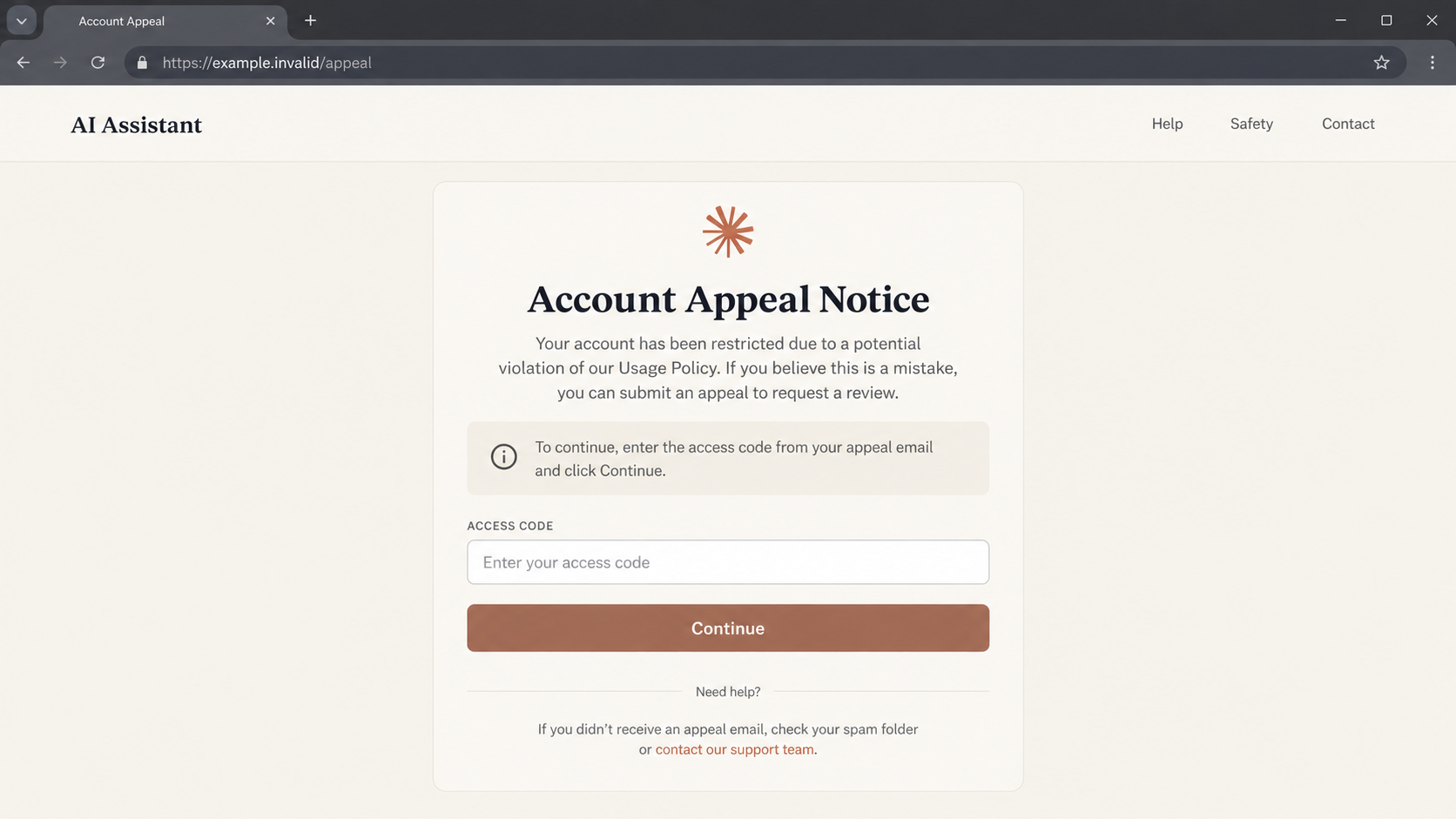
The images in this article are labeled reconstructions. They illustrate the email and intermediary page without presenting a fabricated screenshot as a captured attack page.
Why an “Appeal” Works So Well
A suspicious invoice asks you to spend money. This email asks you to protect access you may already rely on. That shift changes how it feels: the recipient is not buying something new but trying to prevent a disruption.
Workplace AI accounts may be used for writing, analysis, support, or development. An employee who sees a policy-warning subject line can worry that their team will lose a useful tool or that a manager will ask why the notice was ignored. The attacker uses that urgency without having to know whether any violation occurred.
The phrase “acceptable use” also sounds like real provider language. Legitimate services do enforce rules and offer appeal processes. The scam does not need to invent an impossible procedure; it only needs to move a believable one into an email attachment and a strange domain.
There is a second piece of social engineering in the PDF. Many people are cautious about clicking an unknown link directly in an email, but a document can appear more formal. The link is no safer because it has been placed inside a file. It is still a route chosen by the sender.
The fake security challenge gives the journey another veneer of normality. People have seen legitimate sites ask them to pass bot checks, so a verification screen can feel like evidence of protection. On an attacker-controlled site it merely controls the visitor’s path, and it may obstruct automated inspection.
The access-code step deepens the illusion of a controlled appeal. A code printed in the attachment and accepted by a related webpage may look like a private case number. The same operator can generate both. One fraudulent page confirming another proves only that the pages were designed together.
One confusing detail in Microsoft’s analysis was device-based routing. Code in the intermediary pages indicated different behavior for desktop and mobile visitors. A colleague checking the link on a phone may see a different outcome from someone on a Windows laptop. That discrepancy does not prove the report was a false alarm.
If you receive such a message, the right question is not “Can I pass the challenge?” It is “Why is this email moving me away from the account and support channels I already know?”
Do Not Let the Brand Be the Verification
A fake notice can use a real product name without coming from the product’s maker. Our separate report on fake Claude Desktop ads shows another way the same brand has been borrowed. This campaign’s appeal PDF and access-code pages are a distinct route.
The safest check is independent: start from your known Claude account and ask your workplace administrator if a policy case exists. The email, attachment, and web page all belong to one unverified chain. One link in that chain cannot authenticate the others.
How the Claude Appeal Request Scam Works
Step 1: The warning lands in a work inbox
The email presents itself as an Anthropic policy notice. It says there has been a violation and encourages the recipient to appeal. Microsoft observed the campaign at organizational scale rather than as one person’s disputed support interaction.
The brand in the sender name is the first shortcut to trust. Employees who skim the inbox may notice “Anthropic” and the word “appeal” before they inspect the actual address. An attacker does not need access to Anthropic’s mail system to choose a convincing display name.
Step 2: A PDF packages the instruction
The attachment is presented as a form to fill and sign. Instead of resolving a real account issue within Claude, it becomes a bridge to an outside website. A reader who sees an official-looking document may treat its link as an approved workflow.
Opening a PDF is not automatically the same as losing an account. The dangerous escalation is following its unverified directions and entering credentials or approving sign-in prompts on the resulting pages.
Step 3: Verification screens slow the visitor down
The linked route includes a fake Cloudflare-style verification check. Familiar branding and a challenge box make the path look protected. Neither the challenge nor the padlock in a browser proves that Anthropic owns the site.
Afterward, an intermediary page asks for an access code. This creates the feel of a unique case. It may also keep casual visitors from immediately seeing what lies beyond the gate. The code comes from the suspect campaign, not from an independently verified provider notice.
Step 4: The visitor is steered toward a sign-in trap
Microsoft’s analysis connected the observed infrastructure with an AiTM Microsoft-account phishing setup. In that type of attack, the operator attempts to relay a legitimate-looking sign-in and capture session material or credentials while the victim believes they are completing a normal login.
The final page was offline during Microsoft’s examination. That means the exact login form and successful account theft were not directly observed in the published case. If you encountered the flow, treat any password entry, authentication-code entry, or approval prompt as serious exposure, but do not assume that merely receiving the email caused compromise.
Step 5: A captured account can extend the attack
If an attacker obtains a usable Microsoft session, the risk can extend beyond one AI subscription. Work email, files, contacts, and connected applications may be involved depending on the organization’s permissions and controls. That is why the incident belongs with the company’s security team, not just with the employee who clicked.
Those are potential consequences of the indicated AiTM technique, not confirmed results for every recipient in this campaign. The practical response is to check account activity promptly and let defenders review logs before evidence disappears.
Sender, Address, Support, and Account Checks
Who actually sent the email?
Expand the sender details and compare the full address and reply-to field with Anthropic’s verified correspondence. A display name containing “Anthropic” can be typed by anyone. A mismatch is a strong reason to stop, but even a plausible-looking address should be checked against your genuine account.
Do not reply to the suspicious email to ask whether it is real. If the operator controls the mailbox, the answer will simply support the story. Open a fresh browser tab and use your known provider bookmark or your organization’s approved support route.
Where does the PDF link really go?
Inspect the destination without opening it. The important part is the actual host, not words such as “Claude,” “appeal,” or “verification” elsewhere in the URL. A link inside a PDF does not inherit the legitimacy of a provider logo printed above it.
A short-lived domain or a chain of redirects can change. Rather than memorizing one campaign address, ask whether you reached the page from within the genuine Claude account or through an unsolicited file.
Can support verify a real policy case?
Sign in through the official Claude site from a saved bookmark and check for a corresponding notice. If your workplace manages access, ask its administrator or security desk through a channel you already use. A real policy issue can be handled through a verified process; you should not have to trust an unexpected attachment.
Do not give a one-time code, recovery phrase, or admin approval to someone claiming that the appeal will fail without it. The support channel should confirm the existence of a case before you discuss any account details.
What account activity can be checked?
If you submitted a Microsoft work login, your IT team can review recent sign-ins, unfamiliar devices, session activity, mailbox rules, and connected applications. For a personal account, review Microsoft’s security activity directly. The point is to look for independent evidence, not rely on the phishing page’s “appeal received” message.
Keep the original email with headers and the PDF. A screenshot alone may omit routing information that helps defenders connect similar messages across the company.
What to Do if You Have Fallen Victim to This Scam
- If you only received the email, do not follow the attachment. Report it through your organization’s phishing-report process. Delete it after the security team has the copy it needs.
- If you opened the PDF, check what else you did. Viewing a document is different from entering credentials. Do not assume compromise, but avoid its link and tell your security team about the exposure.
- If you followed the link, close the page. Do not enter an access code, password, or one-time verification code. Save the URL and the time for a report.
- If you entered a work password, contact IT immediately. Change it through the real sign-in portal. The team may also need to revoke active sessions and examine sign-in logs; a password change alone may not end an AiTM session.
- If you approved a sign-in prompt, say so explicitly. Tell responders which prompt you approved and when. They can check whether a new session or application authorization was created.
- Review the affected mailbox and apps. Look for forwarding rules, deleted security notices, unfamiliar connected apps, and messages sent without your knowledge. An administrator can check the wider tenant.
- Preserve the email and PDF. Keep headers, attachment name, links, screenshots, and any browser warning. Do not forward the lure to coworkers as a casual warning with clickable links still active.
- Warn the people who may be targeted next. A short internal notice can explain the appeal subject line and the safe reporting route without repeating the malicious address.
- Scan only if you downloaded or ran something else. The reported campaign centered on phishing pages. Malwarebytes can check for unwanted software if a later variant delivered a file; it cannot invalidate a stolen Microsoft session. AdGuard may block known malicious sites, but account recovery and session review remain necessary.
Frequently Asked Questions
Is every Claude policy appeal email fake?
No. The documented campaign used a particular unsolicited PDF and off-site verification route. Check any notice through your genuine account or an independently reached support channel rather than deciding by its subject line alone.
Did Microsoft confirm that 2,000 organizations were hacked?
No. Microsoft reported that the emails reached more than 2,000 organizations. Targeting is not the same as successful compromise.
Why does the email include a PDF instead of a link?
The file makes the instruction feel like formal paperwork and moves the malicious link away from the inbox preview. The destination still needs independent verification.
Does a Cloudflare-looking challenge make the site safe?
No. A fake verification screen can be placed on a phishing route. Passing it says nothing about who controls the destination behind it.
Was the final Microsoft sign-in page observed?
Not directly in the published analysis; it was offline when Microsoft investigated. The observed infrastructure suggested an AiTM Microsoft-account phishing flow, so credential or session exposure deserves urgent review.
What if I entered only the access code?
That does not by itself prove your account was taken over. Stop there, report the route, and watch for later prompts. If you also entered a password or approved authentication, follow the account-response steps above.
The Bottom Line
The Claude Appeal Request scam uses a credible workplace worry, a formal-looking PDF, and staged verification to move employees toward an attacker-controlled route. The campaign is real; the exact final page and victim count are not established by the public investigation.
If an unexpected policy notice asks you to leave your account for an appeal file and an outside verification page, stop. Confirm the issue through Claude or your workplace support channel, and treat any Microsoft sign-in entered along that route as a security incident.

Join the discussion
0 commentsShare your experience or ask a question about this article.
Discussion
Start the conversation
Have a question or something useful to share? Add the first comment.