

A stranger’s emotional message can be easy to dismiss, until it speaks directly about illness, faith, generosity, and helping vulnerable people.
The story asks for compassion before it asks for anything else. That careful order is what makes the email worth examining.
Overview
A Dying Widow Supposedly Chooses a Complete Stranger
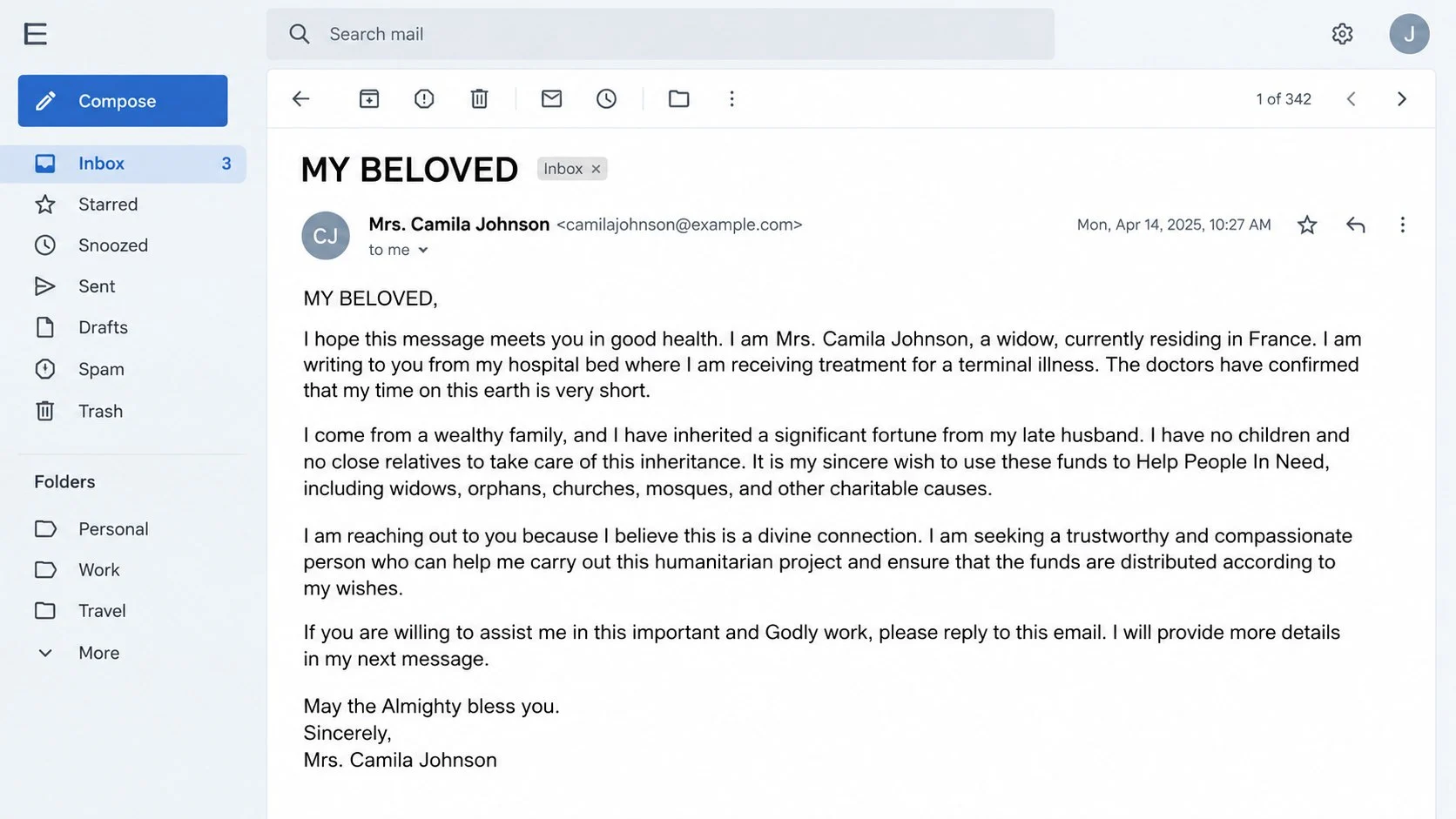
The Help People in Need email presents itself as a private appeal from someone calling herself Mrs. Camila Johnson.
She claims to be an American widow living in France, receiving treatment for a terminal illness, and preparing for the end of her life.
According to the story, her late husband left a substantial fortune. The couple supposedly had no children or close relatives to continue his charitable work.
The sender says she needs a trustworthy person to distribute money among widows, orphans, churches, mosques, and other people facing hardship.
That combination makes the recipient feel unexpectedly important. The email frames replying as an act of kindness rather than a financial decision.
The First Message Is Only an Invitation to Talk
The opening letter usually does not request immediate payment. It asks the reader to respond and promise discretion, reliability, or moral commitment.
This slow start lowers suspicion. A person can believe that replying costs nothing, while the scammer sees the response as proof of engagement.
Once contact begins, the story expands through supposed lawyers, banks, foundations, doctors, or estate representatives. Each character supports the same invented fortune.
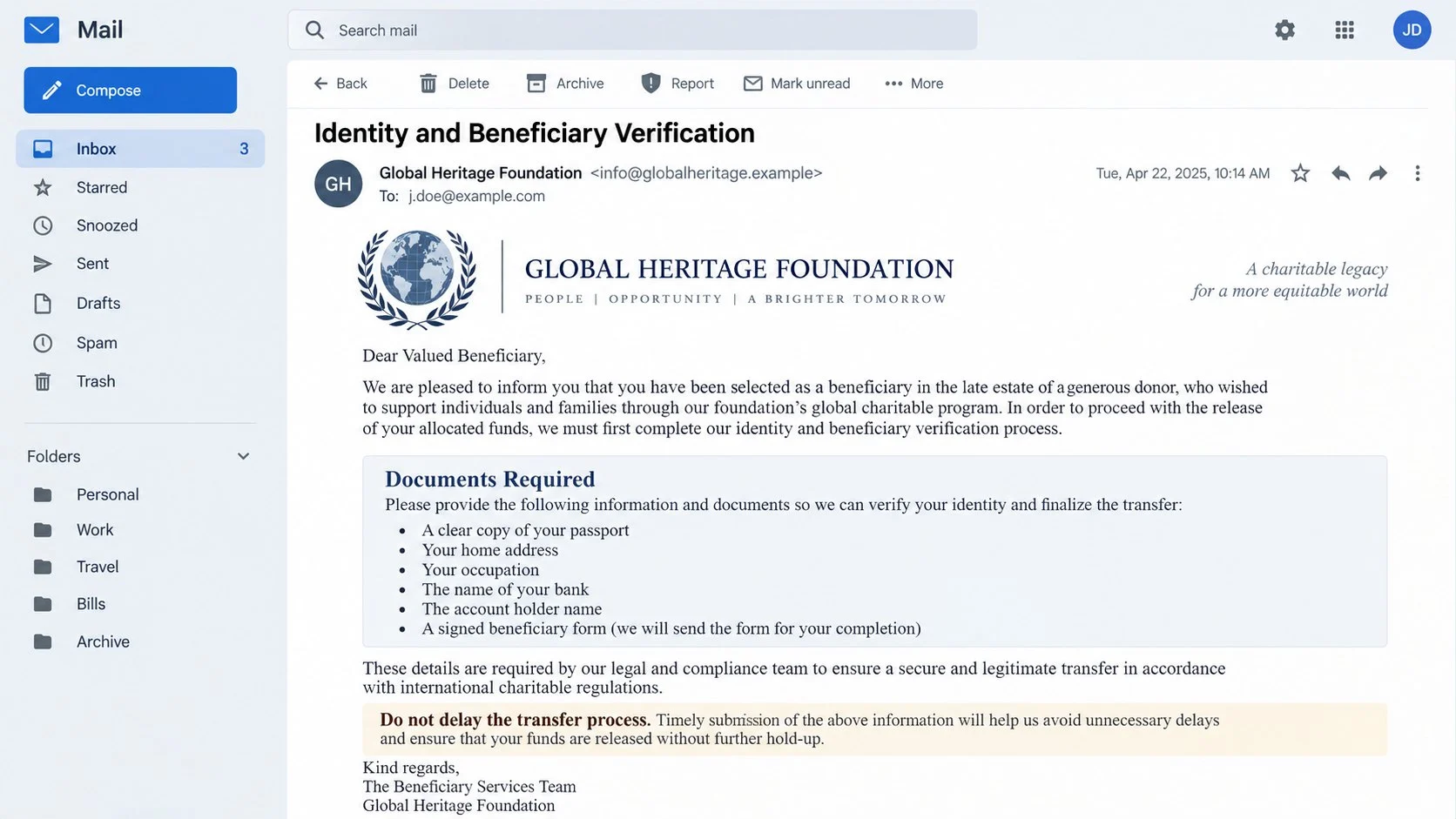
Official-looking documents may arrive later. Seals, reference numbers, beneficiary forms, and legal language are inexpensive to fabricate.
The relationship becomes the mechanism. The criminal invests time in conversation because trust can produce much larger payments than one urgent phishing page.
Money and Identity Requests Appear After Trust Develops
The promised donation never exists. Eventually, a new obstacle supposedly prevents the transfer and must be resolved by the recipient.
Common explanations include legal certification, account activation, cross-border processing, inheritance tax, courier charges, or anti-money-laundering clearance.
- The first email creates sympathy and spiritual duty.
- A reply confirms that the address is monitored.
- Friendly correspondence makes the story feel personal.
- Fake professionals add layers of apparent authority.
- Documents and reference numbers make progress seem real.
- Invented fees block the imaginary transfer.
- Identity documents create further fraud opportunities.
- Every payment leads to another manufactured problem.
This is an advance-fee scheme. The victim is promised a much larger amount, then asked to pay smaller charges before receiving it.
No genuine charity appoints random beneficiaries through unsolicited email. Legitimate estate distributions do not require recipients to finance the release of donated funds.
How the Help People in Need Email Scam Works
Step 1: The Email Opens With Illness and Loss
The sender describes terminal disease, widowhood, loneliness, and limited time. These details encourage empathy before the reader considers verification.
Specific locations and family circumstances provide texture. France, the United States, a late husband, and a hospital can make fiction feel biographical.
The message may mention faith repeatedly. Religious language can suggest honesty and make questioning the appeal feel unkind or cynical.
Scammers often target many addresses with the same story. A heartfelt tone does not mean the writer researched or personally selected the recipient.
Step 2: A Charitable Mission Makes Participation Feel Noble
The supposed fortune is not offered for luxury. It is attached to vulnerable groups, houses of worship, medical needs, or humanitarian projects.
This framing gives the recipient a respectable role. They are invited to become a steward, trustee, coordinator, or beneficiary with responsibilities.
The promise can also include a percentage for personal use. That reward may be presented as compensation for honest work rather than an obvious prize.
By blending generosity with self-interest, the story appeals to several motivations. A skeptical reader may still continue because the imagined impact seems meaningful.
Step 3: The Scammer Builds a Private Relationship
After a reply, the criminal answers warmly and may ask for secrecy. They can describe personal suffering, prayer, or urgency to deepen emotional investment.
Questions begin gradually. A full name, address, occupation, telephone number, age, and marital status may be requested as simple eligibility details.
Each response creates commitment. People naturally resist admitting that time, hope, and personal information were invested in a false story.
The conversation may move to messaging applications. Leaving email reduces filtering and allows persistent, immediate pressure from several fake participants.
Step 4: Documents and Professionals Stage a Transfer
A supposed lawyer or foundation officer can appear with a new address. That second identity makes the operation seem larger and more legitimate.
The victim may receive certificates, bank letters, probate papers, or beneficiary forms. Logos and signatures can be copied without any legal authority.
Reference numbers create an illusion of traceable progress. A fabricated portal may even show a balance awaiting release.
None of these materials prove money exists. Verification requires contacting the named institution through independently obtained records, not the details inside the package.
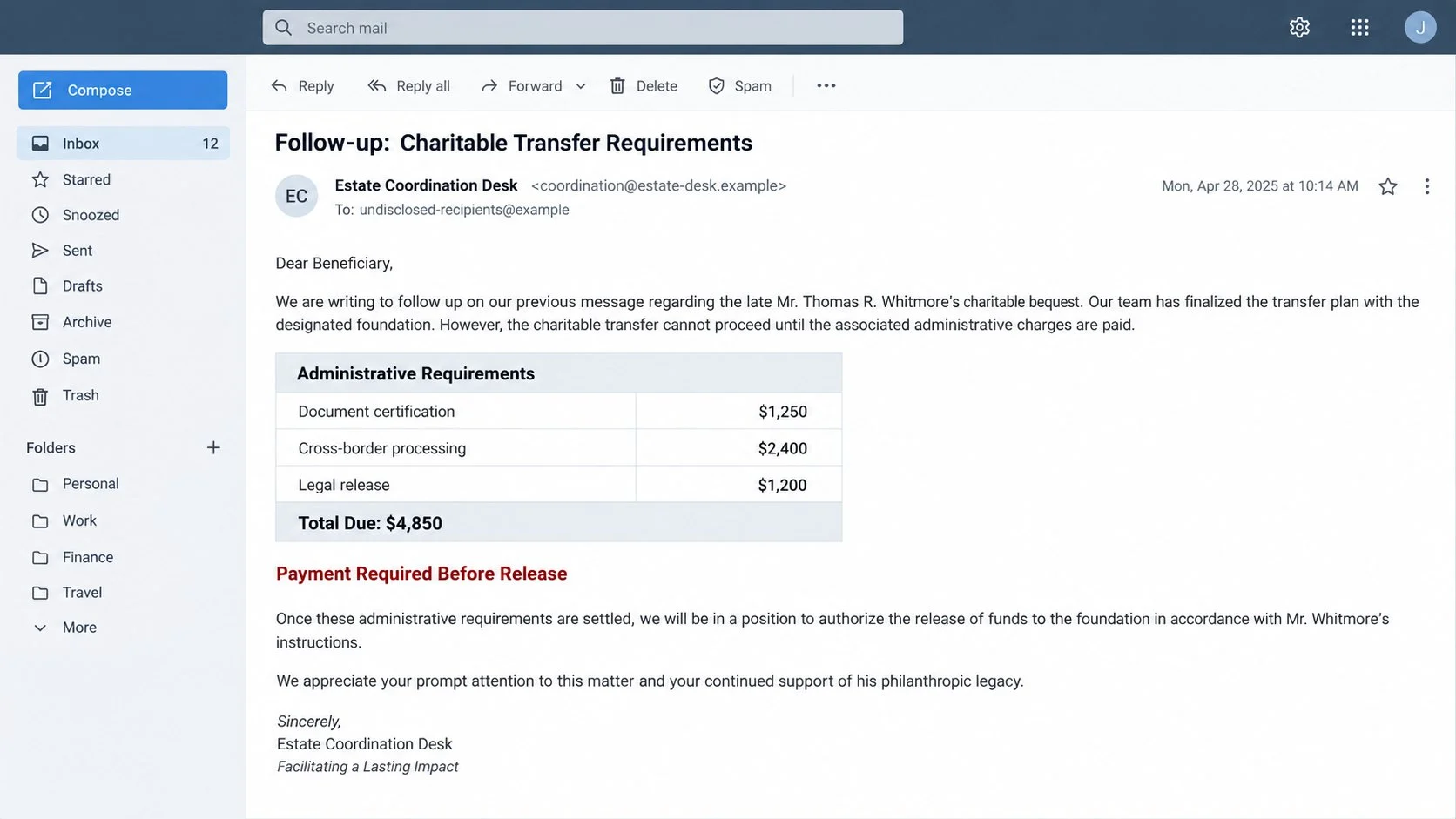
Step 5: An Unexpected Fee Blocks the Fortune
When anticipation is high, a representative announces that administrative charges must be paid before the transfer can proceed.
The first amount may appear manageable compared with the promised fortune. The victim is told it cannot be deducted because of regulations or account restrictions.
Payment methods favor speed and poor reversibility. Wire transfers, money-transfer services, gift cards, and cryptocurrency commonly serve this purpose.
A deadline adds pressure. The criminal may claim that funds will return to the estate, government, or bank unless the charge arrives quickly.
Step 6: New Obstacles Continue Until the Victim Stops
Paying one fee does not release anything. A tax, insurance bond, notarization, courier charge, conversion cost, or compliance deposit appears next.
The amounts can grow because the first payment proves willingness and available resources. Criminals may also introduce a manager who promises final approval.
When victims hesitate, the sender invokes the widow’s declining health or accuses them of abandoning people in need. Guilt becomes another collection tool.
The operation ends only when the victim refuses, runs out of money, reports the fraud, or recognizes that every milestone was fictional.
How to Verify a Charity or Estate Appeal
Search for an Independently Registered Organization
A legitimate charity should have a legal name, jurisdiction, registration number, governance information, and public record beyond one unsolicited message.
Search the appropriate government charity registry directly. Do not rely on a certificate image, search result advertisement, or website supplied by the sender.
Compare directors, filing dates, addresses, and stated activities. A similarly named organization does not prove the writer represents it.
If no verifiable entity exists, there is no accountable institution behind the promised project. Personal warmth cannot replace legal identity.
Contact Named Lawyers and Banks Outside the Conversation
Find the organization’s official contact details through its regulator, established directory, or known website. Do not use the telephone numbers inside emailed documents.
Ask whether the employee, case reference, and estate exist. Provide only enough information for confirmation and never reveal banking credentials during the inquiry.
Criminals sometimes copy the name of a real professional. Confirmation must reach that professional through a channel the scammer did not provide.
A genuine bank will not discuss a stranger’s fortune through an unverified free-email account. It will also avoid asking recipients to prepay release charges informally.
Examine the Sender’s Story for Practical Contradictions
Ask why an estate would choose an unknown person instead of a registered charity, executor, trustee, lawyer, or established foundation.
Consider why fees cannot be paid from the estate. Real legal administration has documented accounting procedures, not improvised transfers to personal recipients.
Look for shifting names, inconsistent countries, unexplained time zones, and documents using different organizations. Long correspondence often reveals details the script cannot maintain.
Reject Any Requirement to Pay Before Receiving Funds
An advance fee is the clearest warning. Legitimate estates account for taxes and professional expenses through formal channels with verifiable documentation.
Gift cards, cryptocurrency, or transfers to individuals are especially incompatible with regulated charitable administration. These methods reduce accountability and recovery options.
Do not borrow money to unlock a promised payment. A larger future reward cannot make an unverifiable present transfer safe.
If pressure continues, stop communicating. Independent advice from a lawyer, bank, trusted relative, or fraud specialist can break the emotional momentum.
What to Do If You Fell Victim to the Help People in Need Scam
Embarrassment is common after confidence fraud, but it should not delay action. These schemes are deliberately designed around empathy, patience, and social pressure.
- End communication without negotiating.
Stop replying across email, messaging applications, and telephone calls. Do not announce investigative plans or send a final payment to recover earlier money.
Block the accounts after preserving evidence. Criminals may return under a new identity offering reimbursement or law-enforcement assistance.
- Contact the payment provider immediately.
Tell the bank, card issuer, wire service, gift-card company, or exchange that the transfer resulted from fraud. Request a recall or freeze.
Time matters, even when recovery appears unlikely. Provide transaction references, recipient details, dates, amounts, and the exact method used.
- Secure every account used during the conversation.
Change passwords for email and messaging accounts if you shared them, reused credentials, or followed unfamiliar login links.
Enable strong multifactor authentication, close unknown sessions, and verify recovery details. Search the mailbox for unauthorized forwarding rules.
- Respond to exposed identity information.
If you sent a passport, identity card, tax number, address, or bank statement, contact the issuing authority and financial institution.
Ask about replacement, fraud alerts, credit monitoring, and protective registration available in your country. Keep written confirmation of each report.
- Preserve and organize the complete record.
Save emails with headers, chat exports, documents, envelopes, usernames, telephone numbers, websites, wallet addresses, and payment receipts.
Create a simple timeline while details remain fresh. This record helps financial institutions and investigators connect the participants.
- Check devices after files or software were opened.
Most advance-fee correspondence relies on persuasion, but attachments can still carry malware. Run a full Malwarebytes scan after opening suspicious files.
AdGuard can reduce exposure to known malicious destinations and deceptive advertising. It cannot validate a charity, lawyer, or inheritance claim.
- Report the fraud and warn vulnerable contacts.
File a report with local police and the appropriate national fraud service. Include the payment timeline and copies of the fabricated documents.
Tell close contacts that follow-up scammers may impersonate you or investigators. Use calm facts without repeating sensitive identity details.
Is Your Device Infected? Run a Free Malware Scan
Slow performance, constant pop-ups, or strange behavior? These are classic signs of a malware infection. The fastest way to find out is to scan your device with Malwarebytes Free — one of the most trusted malware removal tools available.
The free version detects and removes the most common threats, including:
- Adware — the cause of those annoying pop-ups
- Browser hijackers — unwanted redirects and changed homepages
- Trojans and spyware — hidden programs stealing your data
- Potentially unwanted programs (PUPs) — software you never asked for
👉 Select your device below — Windows, Mac, or Android — then follow the simple steps to download Malwarebytes, scan your system, and remove any threats it finds. The scan usually takes 5 to 20 minutes.
Run a Malware Scan with Malwarebytes for Windows
Malwarebytes is one of the most popular and trusted anti-malware tools for Windows — and it’s completely free for removing infections. It catches threats that many antivirus programs miss, including adware, browser hijackers, and trojans. Follow the steps below to scan and clean your PC in just a few minutes.
Download Malwarebytes
Click the button below to download the latest version of Malwarebytes for Windows from the official source. The free version is all you need — it will scan your computer and remove adware, browser hijackers, and other malicious software at no cost.
Download MalwarebytesOfficial installer for Windows 11 and 10. Your download starts right away.Want real-time protection? See Malwarebytes Premium Malwarebytes Free for WindowsScans and removes malware at no cost
-
Install Malwarebytes
When the download finishes, open your Downloads folder and double-click the MBSetup file. If Windows shows a User Account Control pop-up, click “Yes” to allow the installation.

Follow the On-Screen Prompts to Install Malwarebytes
The setup wizard will walk you through a few quick screens:
-
Choose where you’re installing the program — “Personal Computer” or “Work Computer” — then click Next.

-
Malwarebytes will now install on your device. This usually takes under a minute.

-
When installation is complete, the “Welcome to Malwarebytes” screen will open automatically.

-
On the final screen, click Open Malwarebytes to launch the program.

-
Enable “Scan for Rootkits”
Before scanning, turn on rootkit detection so Malwarebytes can find even the most hidden threats. Click the Settings gear icon on the left side of the screen.

In the settings menu, find “Scan for rootkits” and click the toggle so it turns blue.

Done? Click “Dashboard” in the left pane to return to the main screen.
Start the Scan
Click the blue Scan button. Malwarebytes will automatically update its virus database and start checking your computer for malware.

-
Wait for the Scan to Finish
The scan checks your entire system for browser hijackers and other malicious programs, so it can take 5 to 20 minutes depending on your computer. Feel free to do something else — just check back occasionally to see the progress.

-
Quarantine the Detected Threats
When the scan is done, you’ll see a list of everything Malwarebytes found — malware, adware, and potentially unwanted programs. Click the “Quarantine” button to remove all of them at once.

Malwarebytes will now remove the malicious files and registry entries and move them safely into quarantine.

-
Restart Your Computer
Some threats can only be fully removed after a reboot. If Malwarebytes asks you to restart, click Yes. Once you’re logged back in, Malwarebytes has finished removing the threats it found.

That’s it — your Windows PC is now clean of trojans, adware, and other malware, and should be back to running smoothly.
If you are still having problems with your computer after completing these instructions, then please follow one of the steps:
- Run a computer scan with ESET Online Scanner
- Ask for help in our Windows Malware Removal Help & Support forum.
Run a Malware Scan with Malwarebytes for Mac
Malwarebytes for Mac is a free on-demand scanner that removes the malware other security software tends to miss — adware, browser hijackers, and unwanted programs included. Cleaning an infected Mac with Malwarebytes has always been completely free, and it’s our go-to recommendation. Follow the steps below to scan and clean your Mac in just a few minutes.
-
Download Malwarebytes for Mac
Click the button below to download the latest version of Malwarebytes for Mac.
Download MalwarebytesOfficial installer for macOS. Your download starts right away.Want real-time protection? See Malwarebytes PremiumMalwarebytes Free for MacScans and removes malware at no cost -
Open the Malwarebytes setup file
When the download finishes, open your Downloads folder and double-click the setup file to begin the installation.

-
Follow the On-Screen Prompts to Install Malwarebytes
The Malwarebytes for Mac Installer will guide you through a few quick screens. Click “Continue” and keep following the prompts until the installation completes.



When the installation is complete, Malwarebytes opens to the Welcome to Malwarebytes screen. Click “Get started“.
-
Select “Personal Computer” or “Work Computer”
Malwarebytes will ask what type of computer you’re installing it on. Click either Personal Computer or Work Computer, whichever applies.

-
Start the Scan
Click the “Scan” button. Malwarebytes will automatically update its detection database and begin checking your Mac for malware.

-
Wait for the Scan to Finish
Malwarebytes will scan your Mac for adware, browser hijackers, and other malicious programs. This can take a few minutes, so feel free to do something else — just check back occasionally to see the progress.

-
Quarantine the Detected Threats
When the scan is done, you’ll see a list of everything Malwarebytes found. Click the “Quarantine” button to remove all the threats at once.

-
Restart Your Mac
Malwarebytes will now remove all the malicious files it found. Some threats can only be fully removed after a reboot — if Malwarebytes asks you to restart, allow it. Once you’re logged back in, your Mac is clean.

That’s it — your Mac is now free of adware, rogue browser extensions, and other potentially harmful software.
If you are still experiencing problems while trying to remove a malicious program from your computer, please ask for help in our Mac Malware Removal Help & Support forum.
Run a Malware Scan with Malwarebytes for Android
Malwarebytes for Android automatically detects and removes dangerous threats like malware and ransomware so you don’t have to worry about your most-used device being compromised. Aggressive detection of adware and potentially unwanted programs keeps your Android phone or tablet running smooth.
-
Download Malwarebytes for Android.
You can download Malwarebytes for Android by clicking the link below.
Get Malwarebytes for AndroidOpens Google Play in a new tab.Want real-time protection? See Malwarebytes Premium for AndroidMalwarebytes for AndroidScans your phone and removes malware at no cost -
Install Malwarebytes for Android on your phone.
In the Google Play Store, tap “Install” to install Malwarebytes for Android on your device.

When the installation process has finished, tap “Open” to begin using Malwarebytes for Android. You can also open Malwarebytes by tapping on its icon in your phone menu or home screen.

-
Follow the on-screen prompts to complete the setup process
When Malwarebytes will open, you will see the Malwarebytes Setup Wizard which will guide you through a series of permissions and other setup options.
This is the first of two screens that explain the difference between the Premium and Free versions. Swipe this screen to continue.
Tap on “Got it” to proceed to the next step.
Malwarebytes for Android will now ask for a set of permissions that are required to scan your device and protect it from malware. Tap on “Give permission” to continue.
Tap on “Allow” to permit Malwarebytes to access the files on your phone.
-
Update database and run a scan with Malwarebytes for Android
You will now be prompted to update the Malwarebytes database and run a full system scan.

Click on “Update database” to update the Malwarebytes for Android definitions to the latest version, then click on “Run full scan” to perform a system scan.

-
Wait for the Malwarebytes scan to complete.
Malwarebytes will now start scanning your phone for adware and other malicious apps. This process can take a few minutes, so we suggest you do something else and periodically check on the status of the scan to see when it is finished.

-
Click on “Remove Selected”.
When the scan has been completed, you will be presented with a screen showing the malware infections that Malwarebytes for Android has detected. To remove the malicious apps that Malwarebytes has found, tap on the “Remove Selected” button.

-
Restart your phone.
Malwarebytes for Android will now remove all the malicious apps that it has found. To complete the malware removal process, Malwarebytes may ask you to restart your device.
That’s it — your Android phone is now clean — no more malicious apps, adware, or browser redirects.
If you are still having problems with your phone after completing these instructions, then please follow one of the steps:
- Restore your phone to factory settings by going to Settings > General management > Reset > Factory data reset.
- Ask for help in our Mobile Malware Removal Help & Support forum.
Stay Protected: Block Ads and Malicious Sites
Now that your device is clean, keep it that way. Most infections start with a malicious ad or a fake download button — so blocking them at the source is your best defense.
We recommend AdGuard, which blocks malicious ads, phishing pages, and dangerous redirects before they can reach you.
👉 Download AdGuard and browse safely
Why the Story Can Feel Surprisingly Convincing
The email does not begin with greed. It begins with grief, illness, faith, and responsibility, themes that encourage a compassionate response.
The victim is praised as trustworthy before demonstrating anything. That flattering assumption can create a desire to live up to the assigned role.
A large fortune explains why complex paperwork and international participants appear. Complexity becomes evidence inside the story instead of a warning.
The scam also unfolds gradually. Each request seems only slightly more serious than the previous one, reducing the moment when danger becomes obvious.
Once money is sent, stopping feels like accepting the loss. Criminals exploit that discomfort by promising the next fee will finally complete everything.
They may show forged transfer receipts or a frozen account balance. Visible numbers create anticipation even when no banking system stands behind them.
Secrecy keeps the narrative protected from outside criticism. A friend hearing the full story often notices contradictions that feel invisible inside daily correspondence.
Strong emotion is not evidence of foolishness. It is evidence that the offender understood which human values could be manipulated.
Common Follow-Up Scams After the First Loss
Victim lists have value. Someone who paid once may receive new messages from supposed investigators, asset-recovery firms, banks, or government officials.
A recovery agent can claim that stolen funds were located. Another fee is then required for tracing, insurance, court filing, or release.
A fake police officer may request confidentiality and identification. Genuine agencies do not demand gift cards or cryptocurrency to open a fraud case.
The original criminal may return with an apology and a revised explanation. That message is designed to restart hope, not repay anything.
Romance approaches can also follow. Personal details learned during the estate conversation help another identity appear unusually compatible and attentive.
Treat unsolicited recovery offers as a separate threat. Verify any professional through licensing bodies and independently sourced contact information.
Never pay for a guaranteed recovery. Honest advisers explain uncertainty, fees, contracts, and legal authority without promising impossible results.
Families should avoid blame when discussing the incident. Supportive communication makes it easier to disclose new approaches before further money leaves.
Keep monitoring accounts and credit reports for months. Stolen documents can support identity fraud long after the original correspondence ends.
Changing contact details may help when harassment continues. Preserve evidence first, then ask providers about stronger filtering and number changes.
Frequently Asked Questions
Is Mrs. Camila Johnson a real wealthy widow?
The email provides no independently verifiable evidence of that identity, fortune, or charitable mission. The character functions as the scheme’s emotional centerpiece.
Why would the sender choose me?
They probably did not. These messages reach many addresses, and anyone who replies becomes a promising target for extended conversation.
Can an inheritance require taxes or legal costs?
Real estates have expenses, but strangers are not recruited by unsolicited email to prepay them through unverifiable personal channels.
What if the documents look official?
Logos, stamps, signatures, and reference numbers are easily fabricated. Confirm every institution through records and contact routes found independently.
Will paying one final charge release the donation?
No. Advance-fee fraud creates additional obstacles after each payment. The promised fortune exists only to justify the next demand.
Can I recover money already sent?
Recovery is uncertain, but immediate reporting improves the chance. Contact the payment provider first, then police and the relevant fraud-reporting authority.
The Bottom Line
The Help People in Need email turns compassion into a long confidence game, using a fictional widow and fortune to introduce fees and identity requests.
Do not reply, pay, or provide documents. Verify organizations independently, involve someone you trust, and report any transfer as quickly as possible.

Join the discussion
0 commentsShare your experience or ask a question about this article.
Discussion
Start the conversation
Have a question or something useful to share? Add the first comment.