


The route you see under your Sunday run is not necessarily the route another Strava user sees. The gray sections on your map tell part of that story.
The harder question is whether the runs you uploaded last month use your new settings. On Strava, the answer depends on which map control you changed.
Overview
Map visibility and activity privacy answer different questions
Activity privacy determines who can see a workout. Map visibility determines what part of its route those viewers can see if they are allowed to open the workout.
A run set to Everyone stays visible even if you hide its endpoints. Hide the entire map to remove the route from that audience’s view.
Restrict the activity audience if you don’t want the whole workout visible. Hide the map if you only want to keep the route private.
Some settings help with old runs and some don’t
Strava’s map visibility instructions distinguish three defaults. An address-based rule can affect older maps, while the general start-and-end and hide-entire-map defaults apply to new uploads.
Older activities with individually edited map settings are an exception to the address rule. Their own map settings take precedence, so review those activities directly.
That matters after a move: switching on a tighter default today doesn’t tell you what a follower can see on last spring’s rides or runs from a previous address.
Choose a rule that matches the part of your route you need to hide
- Use an address-based rule for starts or finishes near a particular home, workplace, or other place you want to keep private.
- Use the global start-and-end rule when future activities start in different places and you want a consistent approach.
- Hide the whole map if leaving most of the route visible would still reveal something you want to keep private.
- Review older workouts individually when a new default doesn’t apply to them or they already have their own map settings.
- Review other services separately when your device or account sends a copy of the activity somewhere besides Strava.
Set Strava Map Visibility for Your Next Upload
Open the map controls, not the profile audience
On the Strava website, open Settings from your profile picture and select Privacy Controls. Look under Additional Controls for Map Visibility.
In the app, go to the You tab and open settings in the upper-right corner. Choose Privacy Controls, then Map Visibility.
The control is for the route shown on activity maps. If you instead find a setting for who can see all your workouts, you’ve reached a different decision.
Before changing anything, note your existing choices. A setting you created for a sensitive location may matter more than the default you are about to add.
Select the address option for a regular start or finish
Choose the address-based option when your regular start or finish is near a specific place. Strava allows you to set how much of that nearby route to hide.
This rule is about activities starting or ending nearby. If you cycle past the same place in the middle of a route, don’t assume the address covers that exposure.
Strava says the address preference can also cover older activities, except ones you edited individually. This makes it useful for a backlog, but you still need to inspect exceptions.
If Strava cannot locate the address, its privacy FAQ identifies other map options. Do not enter a different home address just to get the form to accept it.
Use a location-independent rule when your routes vary
Hiding the start and end everywhere works for future trips that begin away from your usual address. It is a better fit for rotating starting points than a single address.
When the address and global endpoint rules overlap, Strava says it uses the larger hidden portion. An individually edited activity is still governed by its own settings.
Strava describes a default that hides the first and last 200 meters of future maps after your first upload and subsequent app opening.
Check the setting rather than assuming it applies.
If the visible route still shows a private location, hide the whole map or restrict the activity. Masking the endpoints alone may not meet your goal.
Decide whether you still want to share the workout
Some runners just want friends to see their time or distance without seeing where they ran. For that purpose, it makes sense to keep activity sharing and hide the map.
Another athlete might not want the date, time, photos, or title visible either. An audience choice addresses that broader question; a map setting does not.
Check the specific workout rather than using your profile settings as evidence of its audience. Its individual privacy may differ from what you use for new uploads.
Use Strava’s privacy controls FAQ to confirm how the current account and activity options differ. Keep the audience as narrow as you need.
Fix Older Routes That Are Still Visible
Start with the workouts that tell the most about you
Check an older route from each location you want to protect. A regular weekday loop, a school pickup ride, or an old commute may matter more than a one-off race.
Start with predictable outings rather than scanning every run in date order. You can catch the important exposures before spending time on routes that don’t show a sensitive place.
Pay special attention to maps you’ve ever adjusted manually. Strava says once you edit map visibility for an activity, its defaults no longer apply to that map.
If you added a protected address, verify an older map you did not edit and a second one you did. A difference between them can make sense under Strava’s rules.
Change the map for an individual workout
Open the activity in the app or on the website. Open its three-dot menu and choose Edit Map Visibility.
Adjust the part you want hidden or select Hide the Entire Map. Check the preview and save the change for that activity.
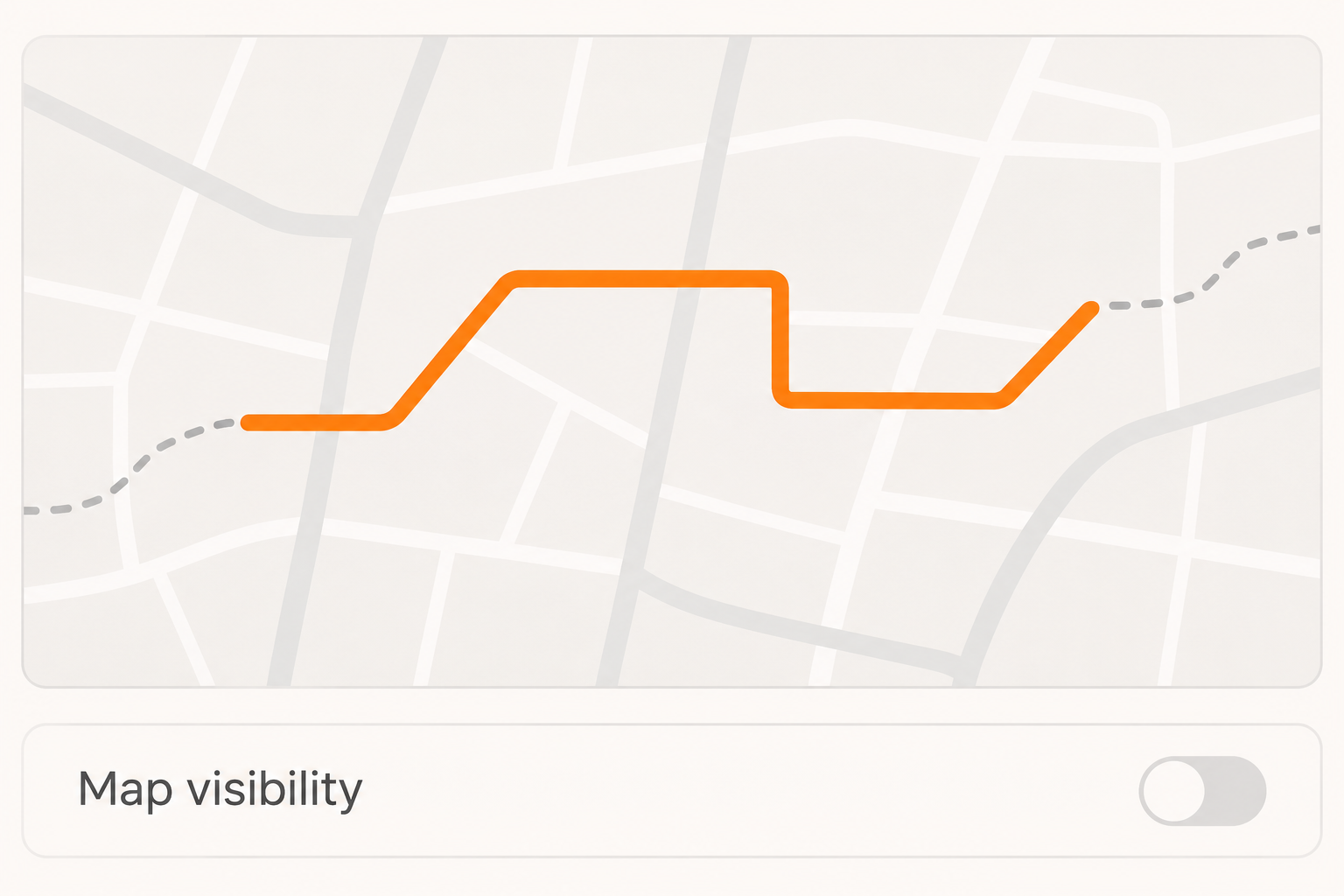
Strava says orange shows the portions that eligible viewers can see and gray indicates portions visible only to you. Seeing gray as the owner isn’t itself a privacy failure.
If you change the activity’s audience too, confirm both settings. A tightly cropped route with the wrong audience still exposes more of the workout than you intended.
Check whether another part of the post tells the same story
Open the title, description, and photos of the activity. A route with the last stretch hidden can still have a title that names the place where you finished.
If a photo carries an obvious location clue, don’t assume the map setting hides the photo everywhere. Inspect the visible activity and remove anything you don’t want shown.
A workout may also have been posted to an account outside Strava or sent to a friend as a file. Review that copy where it was shared.
If the exposure already happened, do not post a screenshot of the full route while asking for help. Describe the privacy issue or share a cropped view privately where appropriate.
What to Do if Your Strava Workout Shows a Private Location
- Identify the specific workout, where it appears, and who can see it. If you need to restrict the whole activity now, change its audience first.
- Open Edit Map Visibility for that specific workout. Hide the necessary portions or its entire map, particularly if the sensitive location appears mid-route.
- Review the title, route imagery, activity photos, and other details still visible. Remove or restrict any part that discloses the location independently of the map.
- Adjust the defaults for new uploads and check the older activities that used custom map visibility. Reopen the workout and inspect the saved choices.
- If your device sends activities to another service, review the same workout there too. Use Strava’s safety channel if unwanted contact or harassment accompanies the exposure.
Review the result without creating another public map
Look for a saved privacy indicator or an owner-view distinction on the activity. Do not publish another recording just to prove the setting now works.
If you ask a trusted person who already has the right access to check, don’t forward the unhidden map. Ask whether the activity and sensitive portion are visible.
One viewer cannot represent every audience. A follower may have permission to see the activity while someone outside your follower list does not.
If you encounter threats or unwanted contact, preserve relevant messages privately and see Strava’s Trust and Safety reporting guidance. Don’t make route changes your only response to a threat.
Know why a hidden segment may stop counting publicly
Strava says segments in a hidden portion can still match for you. Their times do not appear on those segment leaderboards and do not count toward segment challenges.
That is a tradeoff, not evidence the recording disappeared. Look at the activity itself before changing a map setting just to recover a missing leaderboard result.
If you want to share a competitive result but not a regular home route, you can handle those activities differently.
Review the specific map you are about to make more visible.
Check connected services before assuming they inherited the rule
Strava says map visibility applies to activities on Strava and isn’t shared with other services alongside the activity. A service that received the route can still have its own copy.
If your watch automatically uploads elsewhere, check that service’s map and audience separately. Its privacy behavior doesn’t follow from Strava’s colored map or checkboxes.
A screenshot or downloaded recording also lives outside that setting. If you know which recipient received it, ask about that copy rather than expecting Strava to change it remotely.
Check the heatmap separately from one route
Other views can aggregate workouts instead of showing one activity page. Strava’s heatmap guide explains the difference between public and personal heatmaps and how its privacy controls affect those views.
Check which heatmap you’re looking at before assuming an audience can see it. A personal heatmap is not a public copy of your activity history.
If your concern is a point along several repeat routes, consider your settings across that group of activities. Fixing only the most recent run leaves the older choices unresolved.
If you’re in a running group and need to share one specific workout, do that deliberately. The map setting for that workout does not require making your entire history public.
Consider which parts of a late-night or early-morning activity you want visible beyond the route. Restricting the full activity may make more sense than continuously re-editing individual details.
If you have moved, treat each address that matters as its own review. Removing one old map public view tells you little about a weekend route recorded from another home.
Frequently Asked Questions
Will hiding my start and end also change old runs?
The general start-and-end default applies to new uploads. An address-based rule can cover older activities near the address, except ones you already edited individually.
Open an older activity and check what the map setting shows. If it doesn’t match your goal, set visibility for the activity itself.
Why can I see a map I’ve hidden?
Strava says you can keep seeing your own map even after you hide it from eligible viewers. What you see when signed in is not a public preview.
Check the map visibility selection and the workout’s audience together. Those two settings determine what another athlete can see.
Does making a Strava profile private hide every route?
Profile and activity visibility are different parts of Strava’s controls. Check the audience for the actual workout and its map rather than inferring both from the profile.
If you want no one else to view the workout, use a restrictive activity audience. If you only want to hide the route, use map visibility.
Can a home address rule hide a place midway through a ride?
The address option is described for activities that start or end nearby. Don’t count on it to remove an address you pass in the middle of a route.
Hide the entire map or limit who can see the activity when a sensitive location appears along the public part of the route.
Does Strava change routes already sent to another app?
Strava’s map controls apply on Strava. They don’t travel to other services with your activities or erase a copy that someone saved earlier.
Check the service or file you sent it to. A changed map on Strava tells you nothing about how that copy is displayed.
Why did my leaderboard result disappear after I hid part of a route?
Strava limits leaderboard display for segments lying in the hidden portion. You may still be able to see the match when you view the activity yourself.
Decide whether that public result is worth showing more of the map. Check what becomes visible before changing the setting again.
The Bottom Line
Hide the map, not just the endpoints, when showing the remaining route would reveal a place you want to protect. If the workout itself is sensitive, restrict its audience.
Look back at activities you’ve shared from that location, especially ones you edited individually. Save the appropriate setting there and check any separate copy outside Strava.

Join the discussion
0 commentsShare your experience or ask a question about this article.
Community experiences
Did this happen to you?
Your experience could help someone recognize the same scam. Submit a private report for our team to review.
I experienced this tooReports are reviewed before publication. Sharing publicly is always your choice.
Discussion
Start the conversation
Have a question or something useful to share? Add the first comment.