


A notice from HSBC’s corporate finance department says an invoice has already been paid. The email puts the total in a neat table and gives you a payment reference.
No one is asking you to send money. That makes it easy to reach for the invoice before asking whether the transaction belongs to you.
Overview
The email looks like a payment confirmation, not a bill
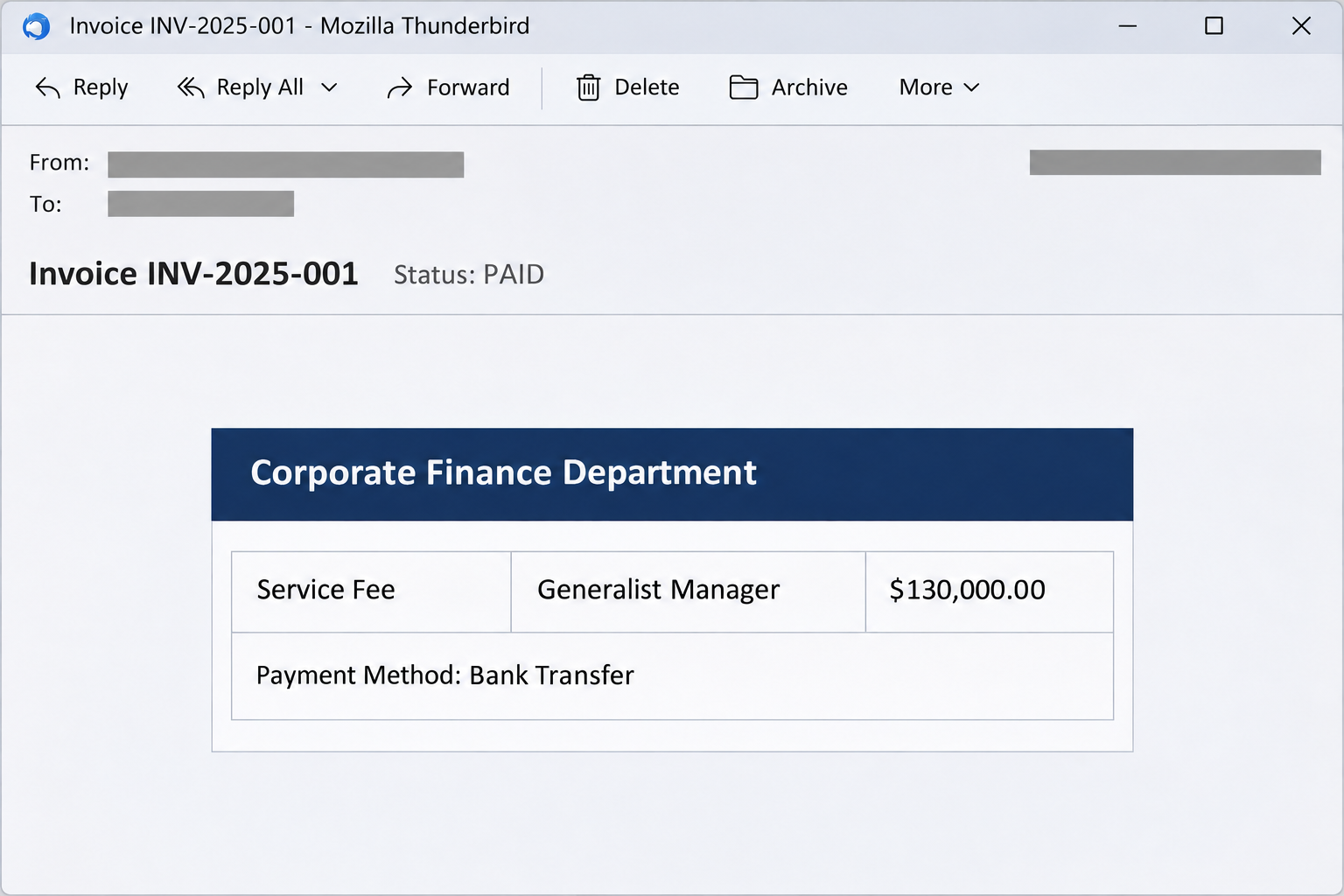
The HSBC Invoice Details email scam uses a corporate invoice marked paid. The sample names a service fee, gives the role as Generalist Manager, and shows $130,000.00.
The subject contains invoice number INV-2025-001. The body says the payment method was bank transfer and supplies a separate payment reference beneath the total.
It does not explain the project, name an actual client in the billing field, or show the matching entry in a banking portal. The polished table does the heavy lifting.
The image recreates part of that invoice email. There are no live links in the image, and the figures shown are claims made in the message.
Both invoice actions take you out of the email
The recorded message offers two choices: view the invoice or download an attachment. The choices look different, but the destination documented for them is an unrelated website.
At that address, the imitation tries to get the reader to sign in to email. In the example, a password box appears in front of a Google-style error screen.
That is a very different request from opening an invoice. The documented download label was a link, not evidence that the message carried or installed a malicious file.
The unrelated address is written here as mtkiscodental[.]com so you can recognize it without opening it. It is not an HSBC or Google login address.
An invoice number is not a bank record
A correctly formatted reference can make a document easier to search for. The sender can type a convincing reference without any bank transfer taking place.
HSBC is a genuine financial institution. This message uses its name to get attention, but the bank name and the figure inside the email don’t authenticate its request.
If you handle payments, start with records that were already available to your team:
- Look for the transaction in the bank activity you already reconcile, not in a statement supplied by the sender.
- Compare the billed entity, amount, and currency against the purchase order or existing agreement.
- Verify a claim of bank payment through a known contact rather than the address displayed in the invoice.
- Ask which internal case, supplier, or service the invoice belongs to before treating it as your responsibility.
- Keep the email and the banking record separate even if some of the numbers look similar.
Why a Paid Invoice Can Be More Effective Than a Demand
A payment demand tends to trigger approvals. A notice marked paid can move through the inbox as routine administration, especially if you only need to save or reconcile it.
The total changes how that routine feels. A $130,000.00 payment attracts attention even when there is no deadline and no demand for a transfer.
Imagine being the employee asked to close an open item before the books are finalized. An invoice number may feel like enough to start, even if you recognize nothing else.
The message also gives you a choice of actions. A person who avoids opening documents online may choose the download label, thinking it stays inside their mail app.
It’s worth counting actual files rather than taking button wording at face value. A button labeled Download Attachment can be an ordinary web link.
The generic role is another useful clue. Generalist Manager sounds like a job label, but it doesn’t tell accounts payable what was delivered or which contract authorizes the charge.
It is also possible for a real invoice to omit details. Find out whether your organization recognizes the transaction before judging the template.
Treat the claimed payment as a question that belongs in your payment records. Treat the request for your mail password as a separate security decision.
How the HSBC Invoice Details Email Scam Works
Step 1: The subject puts the transaction in the past
The notice announces that the invoice is paid. That framing invites you to confirm or file a completed event rather than ask whether a new payment should be approved.
A busy recipient may hit reply or forward it to finance before checking the sender. Colleagues then see a familiar name at the top of the forwarded message.
That familiarity doesn’t change the evidence. An internal forward of a suspicious invoice does not mean another employee has confirmed the transaction.
The subject’s invoice number helps the message look searchable. Search for it in your approved accounting tools first, not on a page linked from the message itself.
Step 2: The document borrows the authority of a bank
The HSBC heading, the visible total, and the transfer reference make the email resemble an account record. The sample also shows support details in the footer.
Those details are part of the body of the email. Their appearance doesn’t establish who sent the message or control where a button leads.
In the captured message, the sender line displays a corporate finance name but shows a mailbox outside HSBC’s domain. This is a different clue from the link destination.
If the matter could be real, contact your established banking representative. HSBC’s secure communications guidance explains how its communication arrangements can differ by customer.
Step 3: The document buttons lead toward a sign-in
The obvious next move is to open the document, so the email offers a view link and a download link. Neither label tells you who receives the click.
The recorded landing page uses the look of an email provider. It doesn’t display a banking record you can check, and it is not on the mail provider’s domain.
A complaint that you lack access can feel natural if you frequently open private documents. Here, the apparent error is part of the same untrusted page as the password prompt.
Don’t switch to a different browser to make that prompt work. Open the provider through a route you already trust and see whether any genuine share invitation exists.
Step 4: The requested secret belongs to a different service
A work mailbox can contain supplier orders, contracts, account alerts, and previous payment conversations. Access to it would be valuable even if the recipient had no HSBC account.
That helps explain why the page asks for a mailbox password instead of HSBC credentials. The supposed invoice is the reason to reach the form.
If a stored password doesn’t fill automatically, don’t find it in your password manager and paste it into the page. First check where the page actually came from.
A prefilled email address cannot authenticate the page. It can make the prompt look familiar without proving that the provider recognized your account.
Step 5: A stolen mailbox can put real payment conversations at risk
Someone who gains mailbox access could read a legitimate supplier thread or pose as the employee who normally responds. Watch for that possibility without assuming it already occurred.
For example, finance could receive a follow-up offering revised payment information for an actual order. A reply inside the correct conversation would not make a changed account number trustworthy.
This case shows a phishing form. It does not confirm an actual bank transfer, employee compromise, or follow-up payment request tied to the sample.
If you submitted a password, act on that disclosure now. Waiting until money goes missing makes it harder for your organization to prevent later misuse.
How to Compare the Email With Real Payment Activity
Check both records before you mark a transaction paid
Find the vendor or customer in your approved accounting system. Start with the legal name and purchase order, then check the payment separately.
For a genuine bank transfer, account activity may have a different reference or posting date from the invoice. Let the finance team reconcile those differences on its usual systems.
In a company with several accounts or subsidiaries, verify which entity supposedly received the payment. Another team’s legitimate transfer does not mean that this invoice matches it.
If colleagues cannot place the contractor, service, or amount, keep it out of payable or receivable records. The professional layout isn’t a basis for creating a new vendor or transaction.
Verify an unusual instruction through an older, trusted route
Use a number or contact saved before this message arrived. The footer is part of the material you are checking, so it should not be your route to verification.
If your company has an approved procedure for new bank information, use it even if the request arrives in an ongoing conversation. A familiar mailbox can be compromised.
HSBC’s security guidance recommends confirming payment details through secure channels. That check still matters if a follow-up says the original payment was applied to the wrong account.
Check whether the transaction has a genuine approval trail. Find the colleague or system that initiated it rather than relying on the name provided by the message.
What to Do if You Have Fallen Victim to This Scam
-
If you only saw the message, leave both document actions alone. Use the phishing report feature in your mail app or follow your organization’s process for reporting a suspicious invoice.
If someone sent it to you internally, let that person know through a separate channel. Don’t add another copy with clickable links to the original thread.
-
If you reached the fake sign-in, close it and identify what you did there. Note whether a password was typed, a prompt approved, or a file saved and opened.
Just seeing the prompt is different from giving it an account secret. If the browser downloaded an unexpected file in a different version, don’t open it to inspect the invoice.
-
If you submitted a work password, contact your security team immediately. Give them the account name, approximate time, and whether you entered a code or approved a notification.
Follow Microsoft’s compromised mailbox guidance if your administrators use Microsoft 365. They can revoke sessions and review forwarding, sign-in methods, and third-party app access.
-
If you submitted a personal Google password, recover the account through Google. Open Google’s account recovery guidance separately and change that password from a trusted device.
Check for unfamiliar devices, recovery details, and forwarding settings. If you used the same password elsewhere, replace it there with a different one for each affected account.
-
Tell finance if the mailbox handled real payments. Ask them to check for altered correspondence or payment instructions, even if the email never requested a transfer.
If your company already sent money because of a related instruction, call the bank through its normal fraud route promptly. Keep the transaction identifier and the approval record intact.
-
Preserve a usable record for follow-up. Keep the message, sender details, and any screenshots according to your reporting process. Don’t revisit the form for a better picture.
Include who received it and any activity you remember. The precise facts help responders more than a guess about who was behind the email.
If you handle the shared finance inbox, ask whether colleagues saw the same message. An administrator can locate copies without asking anyone to open them.
When a vendor has to be notified, give its established contact the practical detail they need. For example, ask them to verify the last payment instructions you received independently.
Tell the finance team if you did not enter credentials. Knowing that you only viewed the email helps them differentiate a suspicious message from a suspected account incident.
Frequently Asked Questions
Is the HSBC Invoice Details email a real bill?
The sample is a phishing message, not a verified transaction. It claims a transfer occurred but leads to a mailbox password prompt outside both HSBC and the mail provider.
Does the $130,000.00 total mean my company owes money?
The email actually says the invoice was already paid. Neither an amount owed nor a payment received can be established from the table; check your own accounting and banking records.
Is INV-2025-001 always a scam indicator?
That exact number appears in the reported example. A numbering format can be shared by unrelated real invoices, so compare the sender, transaction records, and destination as well.
Did the download option definitely install software?
The documented option linked to a credential form, not an observed installer. Report any unexpected file you downloaded and opened as separate exposure.
Why did it ask for my mail password?
The recorded target was the recipient’s email account. It did not need to be tied to HSBC for the attacker to learn something useful about payments and contacts.
Can I ask HSBC whether the invoice is genuine?
Use the bank’s known contact route or your existing relationship manager. Don’t use the link or contact details printed inside the unverified message to establish its legitimacy.
The Bottom Line
Leave the document links in the fake HSBC paid-invoice email alone. The $130,000.00 table is a claim, and that password page can’t authenticate a bank transfer.
Reconcile the transaction through existing finance records. If you entered sign-in details, alert your administrator or recover the affected mailbox now, then check the payment conversations it had access to.

Join the discussion
0 commentsShare your experience or ask a question about this article.
Community experiences
Did this happen to you?
Your experience could help someone recognize the same scam. Submit a private report for our team to review.
I experienced this tooReports are reviewed before publication. Sharing publicly is always your choice.
Discussion
Start the conversation
Have a question or something useful to share? Add the first comment.