


An end-of-year note thanks the team for getting through a busy year. Near the bottom, someone who sounds like leadership mentions a Christmas bonus.
The email doesn’t read like an emergency. It reads like the kind of good news you might open between two meetings or on your way out.
Overview
The message offers appreciation before it asks for anything
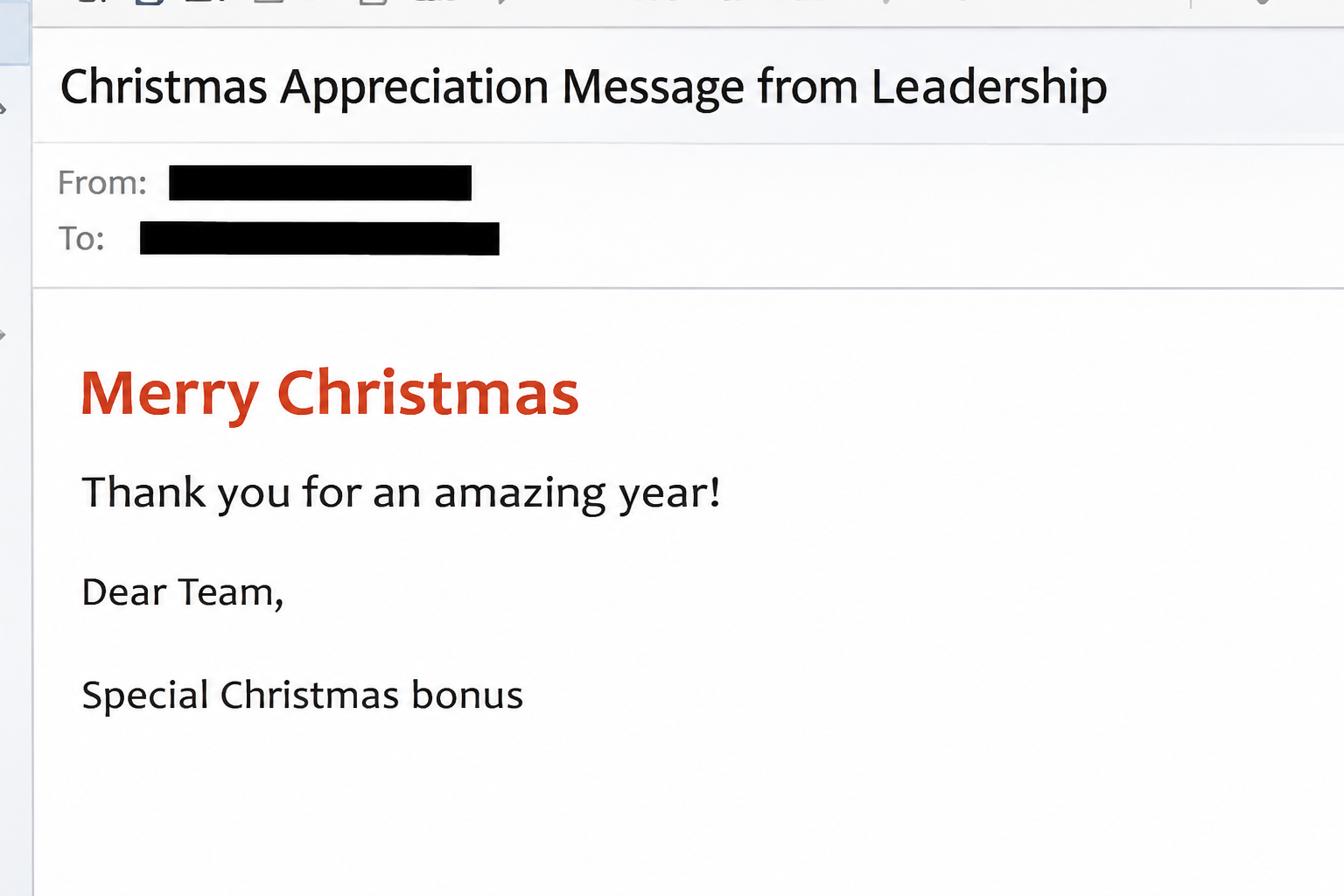
The Special Christmas Bonus email scam poses as a holiday message from an employer. One example arrived with the subject Christmas Appreciation Message from Leadership.
The message thanks the team and announces a special bonus. It asks staff to complete a short request form rather than saying payroll will issue it.
No specific bonus amount is given in the documented message. That gap leaves the reader to imagine what they might miss if they don’t respond.
The image recreates the top of the email. It doesn’t show a real employer’s message or provide a link to the supposed form.
The promised form asks for an email password
The sample’s bonus request link leads to a page styled around Gmail. It shows a password prompt beside a familiar-looking email service, not an employee benefits or payroll form.
The page contains Gmail branding, but its address is outside Google. An external host can display familiar graphics without being part of the actual sign-in system.
The request is for mailbox access. The example does not show a download prompt, bank card form, or a payroll deposit.
If you provided a password, focus on protecting the work account. Waiting for the supposed bonus to arrive does nothing to limit access to your inbox.
The employer controls the answer, not the email
Some employers give bonuses or ask people to review compensation information. The deception is the email’s false claim to speak for the employer and its unexpected route to a password.
Before investigating the promised payment, start in a place you’ve used for real employment information:
- Open your usual payroll or employee portal from a bookmark or the company intranet.
- Use the HR contact from your staff directory, not an address supplied by the holiday note.
- Ask whether the bonus exists, who qualifies, and whether employees need to make a request.
- Find out if the message was sent by leadership without forwarding its clickable button.
- Tell your security team about any password or authentication prompt that appeared after the click.
Why This Email Doesn’t Need a Threat or Deadline
Holiday messages can sound warm without being specific. It can refer to late nights, hard work, or a team goal without having to identify any of them.
That makes the message feel personal without requiring inside knowledge. Readers can mentally supply a real manager, project, or challenging few months to make sense of it.
The message also gives you a reason to click without asking for anything that sounds dangerous. Requesting a bonus sounds less sensitive than changing your banking details.
A short form also fits a worker’s expectations. Employers really do use forms for benefits, timesheets, acknowledgments, and other ordinary tasks.
Then the page changes the deal. Instead of asking which employee benefit you want, it requests the password that protects the account you already use for work.
The easiest way to preserve the distinction is to ask two separate questions. Is the bonus real, and does this web page belong to the service asking you to authenticate?
HR can usually answer the first. Security or IT can look at the second without asking you to open the page again.
No one needs your password to tell you whether leadership approved a bonus. You can ask for that confirmation without giving up anything about your account.
How the Special Christmas Bonus Email Scam Works
Step 1: A routine holiday message reaches the inbox
The subject sounds like something a leadership team might send in December. It doesn’t give away that the reader will ultimately be asked to sign in somewhere else.
The greeting addresses the team collectively. Employees are invited to recognize their own experience in the note, even when it doesn’t mention their job or department.
If it arrived in a forwarded thread, don’t assume the colleague who shared it checked the source. They may simply have thought someone else would appreciate the news.
Step 2: The thank-you note turns into a benefit request
The email introduces the extra payment as a reward for the year’s work. Accepting the offer appears to require only a quick visit to a form.
The natural impulse is to open it and see the details. Even people who don’t expect a large payment may want to find the amount or learn if they qualify.
An announcement that asks everyone to apply may be unusual for your organization. Compare it with how prior bonuses or other compensation changes were handled.
If there’s no prior experience to draw on, ask HR what a legitimate request would look like. You don’t have to know the policy already to check it.
Step 3: The request opens a mailbox sign-in imitation
The recorded link leads outside the employer’s systems and presents a password prompt with Gmail imagery. It looks like an extra login step rather than the destination the email promised.
A real employer might use Google Workspace or another sign-in provider. That does not make every page showing a provider logo an authentic part of that sign-in process.
A page can also put your address on screen. Knowing the address to which a phish was sent is not the same thing as your provider recognizing you.
If a colleague says the form opened with a different header or produced an error, don’t try multiple accounts to compare. Pass their observation to the team reviewing the message.
Step 4: The password can expose much more than a bonus
Work email can provide access to sensitive conversations, documents, and password-reset messages. A stolen mailbox can also make later requests look as if they came from a real employee.
Those are possible consequences of account compromise, not confirmed events in the holiday sample. The behavior you can check now is whether you supplied a secret or approved access.
If you use the same address to log into workplace tools, tell your help desk that too. The account may give access to more than email.
A normal-looking mailbox after the incident shouldn’t reassure you on its own. Talk to administrators who can check device sessions, security changes, and mail activity.
How to Verify a Real Bonus Without Opening the Form
Look for an announcement in the place people normally use
Your HR portal, employee handbook, or company intranet may tell you who handles pay questions. Ask that team how bonuses are communicated and whether a request is expected this time.
Employees on leave and contractors might not have the same portal access. Use a saved HR number or existing payroll contact rather than the offer.
If you manage a team, ask for one confirmation you can share in the usual workplace channel. Avoid asking each person to investigate the email on their own.
A plain warning that names the subject is useful. Copying the message’s original link into group chat can create a new path for someone to open it.
Keep payroll changes out of an informal conversation
A follow-up might ask you to confirm where the bonus should be deposited. Don’t send bank details or tax information in response to a reply about this offer.
If you have a genuine reason to change direct deposit, use the approved payroll process independently. Confirm the change was recorded there and watch for any confirmation you didn’t request.
FTC guidance recommends contacting the supposed sender through a channel you already trust. Give employees a clear way to report the message without leaving the company portal.
A reassuring internal note should also make it acceptable to admit someone clicked. A timely, honest report is more valuable than a perfect description submitted after the holidays.
What to Do if You Have Fallen Victim to This Scam
-
If you only read the message, don’t use the request link. Report it through your organization’s established phishing process and follow its instructions about removing the email.
Ask the people responsible for pay if you’re still curious about the bonus. Use a separate route to reach them instead of replying to the note.
-
If you saw the fake password page but didn’t interact, close it. Tell IT what you saw, including which browser or device you used.
Don’t open the original again to reproduce what happened. Your own recollection and a copy of the email give responders enough information to start.
-
If you typed your password, treat it as disclosed. Tell your administrator immediately and use the approved reset process from a device you trust.
Mention any sign-in notification you tapped or code you supplied. Your security team needs that information to decide whether account access remained possible after the click.
-
Ask your organization to look beyond the password reset. For teams on Microsoft 365, Microsoft’s mailbox response guide covers reviewing access, mail forwarding, and authentication methods.
For a personal Google account, follow Google’s recovery guidance. Replace the same password anywhere else you used it, beginning with accounts connected to that email address.
-
Let payroll know if the compromised account could authorize changes. Ask whether any pay destination, contact information, or employee record was modified since the message arrived.
If a change exists, get its time and confirmation through the approved system. Check your next pay advice and contact the bank if funds are missing.
-
Give responders a short timeline of the event. Include the subject, the approximate time you opened it, and the type of information the page asked for.
If suspicious replies have already gone out from your account, tell the people investigating. They can warn recipients without leaving you to handle a mailbox that may still be compromised.
What to Tell Your Team Before the Next Pay Run
Name the decision you want employees to make
A useful warning can say that the bonus email is not the way to request compensation. It should then tell staff exactly where to ask about any genuine announcement.
If your employer really does pay a holiday bonus, give the real process its own announcement. Keep the warning and the pay instructions separate so readers can find them later.
People may have seen different copies in separate inboxes. Avoid making the entire warning depend on a date, a specific picture, or the spelling of a manager’s name.
Let employees know which details help the help desk. A subject, delivery time, and whether the form asked for a password are useful without reproducing a working link.
Make it easy to correct an earlier assumption
Someone who thanked a manager for the bonus may feel awkward about saying they signed in. Invite them to call the help desk before anything goes wrong.
Finance may also be operating with a smaller team over the holidays. Give them a specific way to flag unexpected pay changes, even if the regular HR contact is away.
For an employee who can’t find instructions, the safest pause is simple. Leave the email alone until a verified representative explains what the company actually expects them to do.
If the company learns that a fake request reached only one department, warn people outside it too. Staff who hear about the supposed bonus may receive a forwarded copy later.
Make clear that reporting a message and asking about pay are different tasks. Staff don’t have to explain their compensation expectations to a security responder.
Frequently Asked Questions
Is the Christmas Appreciation Message from Leadership real?
The reported example is not an employee bonus announcement. Its link led to an imitation email sign-in page, where the requested password had nothing to do with payroll.
Does my company name in the email make it safe?
A company name can be copied into a greeting or footer. Check whether the employer actually announced the benefit through HR, payroll, or your existing employee portal.
Why would a bonus form show Gmail?
This example used Gmail imagery to make a password request feel routine. An authentic workplace Google login has to come through a route you can verify independently.
Can reading the note give someone access to my mailbox?
The example documents a credential request after a click, not a compromise from reading the note. How you respond should reflect whether you typed anything or approved access.
What if I submitted the password but never saw a confirmation?
Don’t wait for the page to confirm anything. Treat the password as exposed and tell your employer when it happened, even if the page stopped loading afterward.
Should I ask colleagues if they received the same message?
You can describe the subject through a trusted internal channel. Leave out the live link and let your security team decide how to warn everyone else.
The Bottom Line
Don’t claim a Christmas bonus from a link that asks for your mailbox password. Ask payroll or HR through the channel you use for ordinary employment questions.
If you entered sign-in details, report it now and help your administrator review active access and any changes to pay records. The time to do that is before payday.

Join the discussion
0 commentsShare your experience or ask a question about this article.
Community experiences
Did this happen to you?
Your experience could help someone recognize the same scam. Submit a private report for our team to review.
I experienced this tooReports are reviewed before publication. Sharing publicly is always your choice.
Discussion
Start the conversation
Have a question or something useful to share? Add the first comment.