


A governance dashboard shows a reward you don’t remember claiming. The number looks specific enough to have come from an account, not an advertisement.
If you’ve used RAILGUN before, some of the language may be familiar. The useful question is where that number came from and what it represents.
Overview
The lookalike gives a precise value to an unclaimed reward
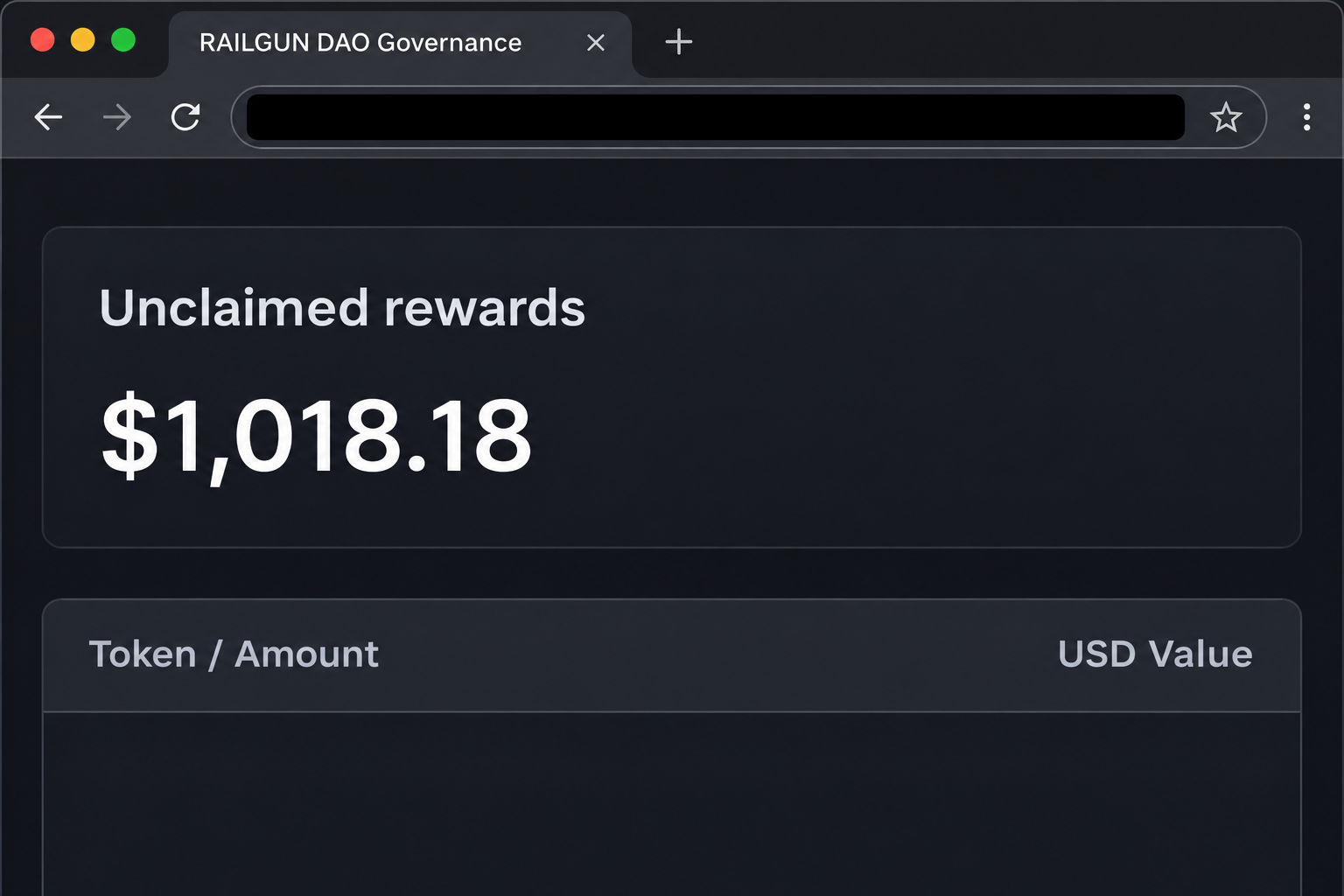
The fake RAILGUN Rewards page displays $1,018.18 under “Unclaimed rewards.” It surrounds the figure with a treasury summary and a table broken down by token.
That design makes the number look calculated. You see a specific total and recognize a few token symbols, but neither detail shows that the site checked an eligible wallet.
The warning concerns the page reported at governance-railguns[.]com. The extra letter and different domain ending are easy to overlook if you focus on the panel rather than the address.
The image recreates the part of the page that shows the reward. It doesn’t show your funds, a verified claim, or an authorized RAILGUN screen.
Real governance rewards have conditions the page cannot establish
RAILGUN’s reward documentation describes an allocation tied to locked RAIL and governance activity. The rules also distinguish a wallet’s own participation from delegated voting power.
That background helps explain why the pitch sounds plausible. A real program exists, but its existence doesn’t substantiate the balance on an unrelated site.
Treasury balances and individual rewards are two different figures. Even an accurate, publicly visible treasury total would not show what a particular address can claim.
The genuine rules link individual allocations to participation on the relevant chain. If the page cannot establish which address or chain the figure belongs to, that precision tells you nothing.
Your security response depends on what the wallet actually did
The fake dashboard uses a claim to prompt wallet interaction. It was reported as a wallet-drainer lure, but the displayed number doesn’t confirm an authorization or a loss.
Choose your response by identifying the last thing you actually did:
- If you only viewed the dashboard, the advertised balance is not evidence of an account change.
- If you allowed a connection, check the authorized sites in your wallet and end the unfamiliar connection.
- If you approved anything else, identify the kind of signature, permission, or transfer before deciding what to do.
- If you gave away a recovery phrase, don’t treat removing an app connection as a fix for that exposure.
- If assets moved, preserve the real transaction record rather than relying on the site’s reward table.
Why the Treasury Page Looks Familiar
The imitation describes compensation for governance participation. Readers who remember that mechanism may recognize the explanation and pay less attention to a small but important address change.
RAILGUN governance and the protocol’s privacy functions are related, but they aren’t the same activity. The protocol overview explains both the privacy system and the separate governance role of RAIL.
If you’ve only used a wallet that supports RAILGUN, that doesn’t by itself explain an allocation for voting or locking tokens. Ask what action made the address eligible.
A copied governance screen can blend actual terminology with an invented account figure. You can verify the program without accepting the number that someone put next to it.
Did you ever select the corresponding chain and address? A screenshot that identifies neither is a poor substitute for the record of your participation.
How the Fake RAILGUN Rewards Scam Works
Step 1: The page looks like a governance tool, not a giveaway
The visitor sees a browser tab labeled “RAILGUN DAO Governance.” The display features treasury balances before it shows the supposed personal reward.
That sequence matters because it presents the page as an administrative view of a real program. It doesn’t look like a stranger asking you to buy a new token.
If you arrived from a forwarded message, separate the person sharing it from the site that controls it. Someone can believe the offer and still forward the wrong address.
Step 2: An exact figure makes the reward look personal
The unclaimed amount appears as an ordinary currency conversion, down to the cent. Token rows make it easy to assume the site has already done the accounting for you.
The amount was part of the page as displayed in the example. It wasn’t backed by a confirmed distribution record tied to the account of a particular reader.
Ask how the site arrived at that number before taking it seriously. The legit program’s rules and your own history can be consulted without returning to the lookalike.
Step 3: Claiming becomes the reason to open the wallet
The dashboard presents one action for the advertised allocation. The reader is thinking about receiving assets, which is a different expectation from giving a site permission to act.
A connection can share a public address and allow the site to request actions. A later approval, signature, or transfer is the part that may carry additional consequences.
Close the page if you’re not sure who requested the interaction. There’s no safety benefit to confirming a prompt just to see what the site does next.
Step 4: The page’s label stops describing what you are being asked to do
A wallet confirmation should be read on its own terms. Is it requesting an address connection, a message signature, ongoing token access, or a transaction that can change balances?
A permission may enable another party to spend a token later. It can pose a risk even if you don’t see a matching transfer at the time you confirm it.
There isn’t a public transaction from this example that proves what happened to every visitor. Use your wallet’s records to determine whether you granted anything.
Step 5: Closing the imitation doesn’t reverse anything you authorized
Closing a tab can end your interaction with the page. It won’t remove a prior approval or cancel a confirmed transfer.
If all you did was open the page, that distinction works in your favor. You don’t need to take the financial risk of sending tokens somewhere else in a panic.
If you signed, locate the affected account and chain first. A permission review on a different address cannot tell you what happened to the one shown in the wallet prompt.
How to Check a Real RAILGUN Allocation Safely
Reconstruct the history of the address you actually used
Start with whether you locked RAIL and which network held it. If you used several accounts, don’t assume they share an eligibility record.
The project’s governance documentation explains delegated voting and where the related allocations accrue. Delegation can change which address is associated with a reward.
If you’re simply checking whether the rules apply to you, reading the documentation doesn’t require connecting your wallet. That gives you time to check the name, address, and chain.
An old bookmark can be useful if you know where it came from. If you aren’t sure, check its address against the project’s published documentation before using it.
Don’t let a quoted total substitute for a reliable record
A treasury isn’t a set of individual balances. It can hold tokens that are not earmarked for your wallet, even if the totals on a page look familiar.
A conversion to US currency changes with token prices. An attractive total doesn’t turn a rewards display into a payment guarantee.
Someone who locks RAIL on one network shouldn’t assume that a matching token name elsewhere refers to the same position. Compare the network before comparing the amounts.
If a previously used account is missing from your current wallet view, use your wallet’s official help to find it. Don’t reconnect through the site that advertised the reward.
If a follow-up tells you to send funds separately to release the amount, don’t do it. A network fee inside a legitimate transaction is not a private release payment.
Ask verified support about the right program or records, not whether to approve a screenshot someone forwarded. Give it only the information it needs to understand your question.
What to Do if You Have Fallen Victim to This Scam
-
Save the address and note what happened before you close it. Keep a screenshot if available, but don’t revisit the imitation to reproduce the prompt.
Keep the evidence separate from any secret information. A screenshot of your recovery phrase is not part of a fraud report.
-
Check for an unfamiliar site connection inside your wallet. Disconnect the imitation using the wallet’s settings, not a control the page provides.
Make a note of which wallet address you connected. That helps if you later find the site asked for more than a connection.
-
Review what you approved on the correct network. Look at the activity for the affected address, along with any permissions your wallet can show.
MetaMask’s approval guidance explains why revoking an allowance differs from ending the connection. Use the equivalent first-party guidance for your own wallet.
-
Treat a recovery phrase disclosure as a key compromise. Follow your provider’s compromised-wallet instructions from a trusted device instead of reusing the exposed phrase.
If a move is needed, the replacement wallet should have its own separate recovery material. Don’t share either phrase with someone offering to do the move.
-
Preserve records for any unauthorized transfer you can identify. Record the network, transaction ID, wallet involved, and date before seeking help.
If you know an exchange associated with the transfer, contact its real support promptly. It may be able to review a destination, but cannot promise recovery.
-
Report the incident without paying an agent to recover it. The FBI’s cryptocurrency guidance describes useful information for US reports.
Elsewhere, use your local reporting channel. Ignore people who approach you privately with an offer to unlock, trace, or return the missing assets for a fee.
Three Records That Answer Different Questions
A screen capture tells you what the site advertised
Save only what you already have when you report the page. A screen capture can show the reward claim and the page’s branding without any interaction with your wallet.
Keep it separate from records of your own activity. Without that separation, somebody reviewing the report might mistake the fake balance for a real asset that went missing.
An address displayed in a browser is useful for identifying a lookalike, but it doesn’t establish what account controlled the site. Don’t accuse an unrelated service based on that alone.
Wallet records tell you what you authorized
A wallet can show an app connection even if there is no transaction. That information helps you identify which account you linked and where to remove the connection.
An approval can be more specific than a wallet-wide change. Tell verified support which asset and network are affected instead of assuming every account needs the same response.
If you didn’t save the prompt, say so when you request help. Explain what you remember, but keep a confirmed transfer separate from the signature you believe you saw.
A network record can help establish what moved
A transaction ID points to a network record, not the fake page’s accounting. Use the right network when checking it so a similar-looking address doesn’t send you in circles.
Where activity is visible, compare the recorded time and change with the action you remember. The first suspicious prompt and the first unauthorized transfer aren’t always the same event.
A fraud report is easier to use when it separates the advertised amount from real losses. Report confirmed amounts and identify any figures that come only from the page.
If you still have access to your wallet, save the information without exposing other holdings. Verified support can ask for more detail if it’s relevant.
A later message may cite the exact advertised amount. That only shows the new sender knows the story, not that they can recover assets or release a reward.
Frequently Asked Questions
Is RAILGUN Rewards itself a real program?
RAILGUN documents rewards for eligible governance participation. This case concerns a separate dashboard presenting an unverified balance while borrowing the name of that program.
Why does the fake page show $1,018.18?
The reported page gives a precise total to make the allocation seem calculated. The amount doesn’t prove that a particular address is eligible.
Do users of RAILGUN automatically qualify for governance rewards?
Using a privacy-enabled wallet and participating in governance are different. The official documentation sets out conditions involving locked RAIL and participation, so check the rules directly.
What if I connected but rejected the next prompt?
End that site connection in your wallet and look at recent activity. A rejected prompt is not a completed transfer, though you should verify what you accepted elsewhere.
Can I find every risky signature in transaction history?
Not necessarily, since some signatures are requested off-chain and may not appear as transactions by themselves. Ask your wallet provider how to assess the specific request.
Can someone make a confirmed transfer disappear?
A service cannot simply roll back a confirmed blockchain transfer because you ask. Report suspected theft promptly, and don’t trust a stranger promising reversal for payment.
The Bottom Line
Ignore the $1,018.18 shown by the fake RAILGUN dashboard. Check the published governance rules and your own wallet history without using a link from the imitation.
If you already interacted, identify what you actually shared or approved. End an unfamiliar connection, check for permissions on the affected network, and report any unauthorized transfer.

Join the discussion
0 commentsShare your experience or ask a question about this article.
Community experiences
Did this happen to you?
Your experience could help someone recognize the same scam. Submit a private report for our team to review.
I experienced this tooReports are reviewed before publication. Sharing publicly is always your choice.
Discussion
Start the conversation
Have a question or something useful to share? Add the first comment.