


A voting page says the crowd is already leaning one way. There’s a running total, a feed of recent voters, and a reason not to sit this one out.
If it looks like a regular Moonshot decision, slow down long enough to ask who actually called the vote. The scoreboard leaves that part surprisingly hard to answer.
Overview
The ballot offers SOL for voting Yes
The fake Moonshot voting page presents a listing decision as if it were happening live. It promises SOL directly to wallets that cast a Yes vote.
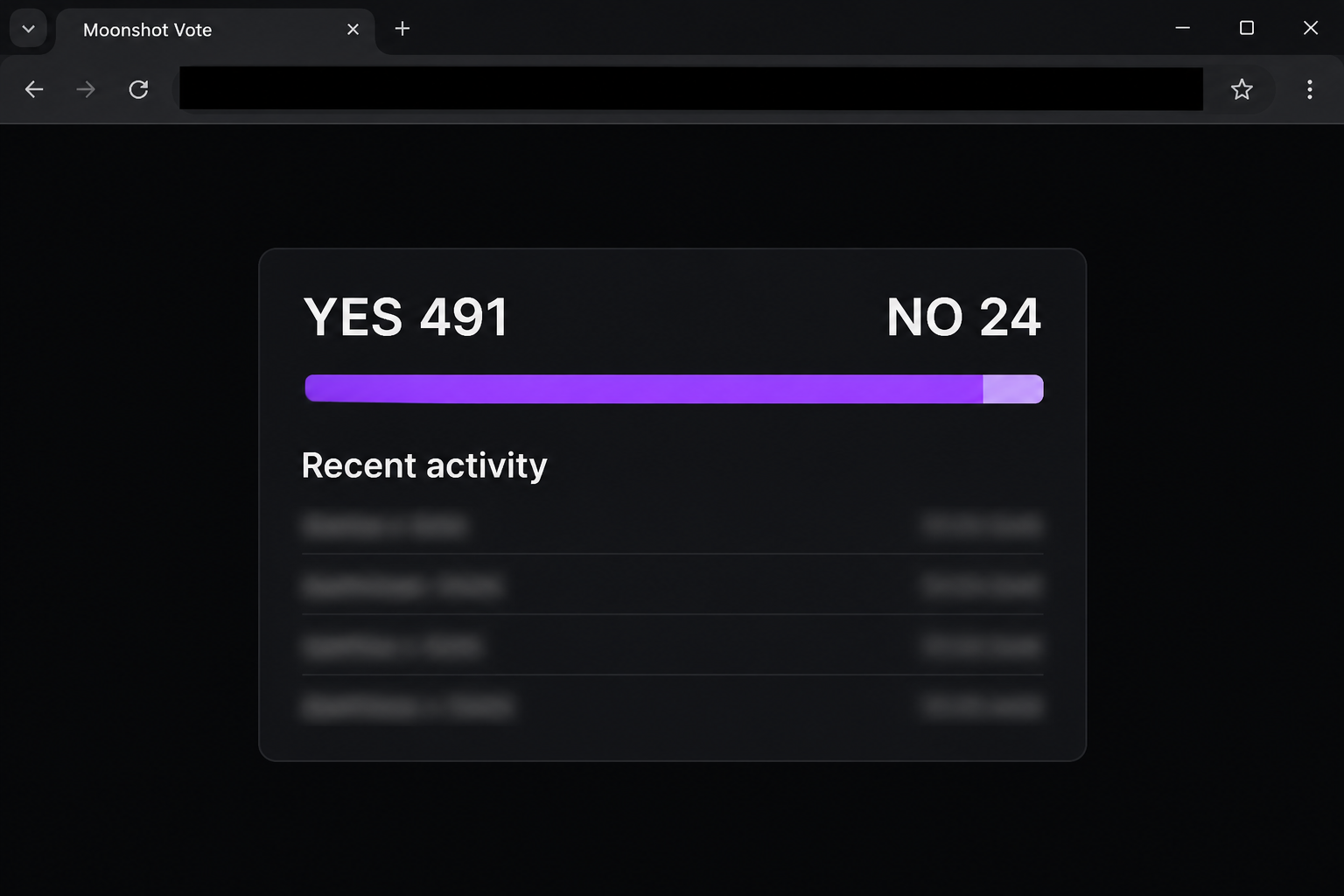
The documented version showed 491 Yes votes and 24 No votes. A purple bar and a list of shortened wallet identifiers made the result look independently measured.
At the same time, the page said it had no token ID. A precise count is hard to reconcile with a screen that can’t identify the subject of the vote.
The image recreates the noninteractive part of that scoreboard. It doesn’t show a real ballot, and the numbers should not be read as verified voting activity.
The listing choice is a reason to open a crypto wallet
The first version was reported on a site outside the real Moonshot service. Its apparent voting control opens a wallet selector, with a long list of recognizable wallet options.
Seeing your own wallet in that list doesn’t establish that its publisher endorses the site. Picking a familiar wallet does not resolve who created the request.
A later lookalike changed the reward language. Instead of offering SOL, it advertised Moonshot XP for eligible Yes votes and promoted a token listing.
The pages share a pattern, but that resemblance doesn’t identify their owners. The central claim to verify is whether Moonshot actually organizes the particular vote.
Moonshot’s real support is a better place to check
Moonshot’s scam guidance warns about giveaways that send people to an outside link. Support says it doesn’t ask for login codes or secret phrases.
The Moonshot help center directs app users to its in-app Support Center. You can ask about an unfamiliar vote there without opening the voting link.
Use a few straightforward questions to evaluate a page like this:
- Can you find a first-party announcement that identifies the actual ballot and its purpose?
- Does the vote name the token clearly, or is the listing information missing or broken?
- Is the reward described independently inside the service you already use?
- Is the tally verifiable somewhere other than the page asking you to participate?
- What does your wallet say the site wants, as opposed to what the voting button says?
Why the Scoreboard Is More Persuasive Than a Giveaway Banner
A giveaway asks you to trust the promoter. A ballot adds social pressure because it looks like other people already considered the offer and participated.
The “recent activity” rows are a shortcut for that feeling. Shortened identifiers resemble blockchain addresses, but you can’t tell from the panel whether they represent any genuine vote.
A counter can look current even when it doesn’t connect to a public source. Words about anti-spam checks don’t prove that the panel is counting separate participants.
The reward makes one choice more attractive. It nudges you to ask how to qualify before considering why a listing decision would pay you.
A real project can run a promotion or open a feedback process. That possibility makes the source more important, not less. Look for one announcement that actually matches the event.
How the Fake Moonshot Voting Scam Works
Step 1: A listing page makes the choice feel familiar
The imitation uses the Moonshot name and invites visitors to help decide what should be listed. It presents the poll as an activity for people already using the platform.
The frame doesn’t ask the visitor to buy a new token outright. It asks for something easier to agree to: expressing an opinion about one.
If someone you know sent the link, ask whether they saw the vote announced inside the real service. A forwarded page isn’t the same thing as an official announcement.
Step 2: The voting numbers manufacture urgency
A lopsided tally tells the reader what nearly everyone else supposedly decided. The activity feed adds the impression that the decision is unfolding while you look at it.
Notice the mismatch between the exact result and the missing token identifier in the first version. Before deciding how to vote, you should at least know what’s being voted on.
An updated page can look more polished and include a token name. That still leaves the same verification problem if there’s no independent record of the ballot.
Step 3: The reward nudges the visitor toward one action
In the SOL example, the page tells visitors that a Yes vote earns crypto immediately. That creates a reason to select the rewarded option even if you have no view.
The XP variant uses a softer incentive that sounds as if it belongs inside a platform. A points label doesn’t verify that the platform agreed to credit anyone.
You don’t need to link a wallet to determine whether a promotion exists. Resolve that question through the service before interacting with any supposed ballot.
Step 4: The displayed vote turns into a wallet request
The documented page shows a wallet selector once a visitor follows the voting route. A selector is not proof of what the final request will do.
A wallet may distinguish an app connection from a signature or a transfer. Read the prompt in the wallet, because the label on the website doesn’t define its consequences.
There is no verified completed transaction tied to that sample in this guide. The screenshot doesn’t establish what every visitor saw or whether somebody authorized an outgoing payment.
Step 5: The important record moves away from the page
Once you’ve closed the site, its counter and promised reward aren’t useful for establishing exposure. The transaction and permission records on the wallet side are what matter now.
A basic connection doesn’t mean funds automatically moved. A granted permission could still need attention after you’ve closed the tab or ended the connection.
If balances change, resist the urge to ask the voting site for help. Use the provider you already trusted before opening it, and preserve independent transaction details.
How to Check a Listing Vote Without Participating
Start with the app you already use or its help site. If Moonshot promoted a vote, there should be a way to identify it without relying on the ballot itself.
If a promotion appears in a post, compare the actual announcement with what you see on the landing page. Matching a logo, slogan, or ticker alone doesn’t verify the destination.
Look for differences in the type of reward. A promise of SOL sent directly to a wallet is not the same as an offer of points inside an app.
A smaller screen can hide parts of an address and make a familiar heading feel like enough information. When in doubt, close the page and start from an independent route.
If several domains claim to host the same vote, don’t try each one. Ask official support which event, if any, is real. You don’t need to supply a wallet secret.
It’s also worth asking why the page says money is awarded for one answer. That rule gives you a clue about the behavior being encouraged, independent of the supposed count.
What to Do if You Have Fallen Victim to This Scam
-
If you viewed the board without interacting, close it. Keep the address or a screenshot you already have if you want to report it.
Don’t reopen the ballot to gather more evidence. The visible or remembered title is enough to start explaining what you encountered.
-
If you granted a site connection, remove it in the wallet. Check the wallet account and device you used rather than trying to leave through the voting page.
Wallets can show connections differently on mobile and in a browser. If you connected in more than one place, consult the help instructions for those specific interfaces.
-
If you approved a prompt, find out which action it authorized. Check the activity for the affected address and network before assuming the page recorded only a vote.
For Phantom, the wallet’s scam response guide covers disconnecting, checking permissions, and protecting remaining assets. Use your own wallet’s instructions if you chose a different one.
-
If you shared a private key or recovery phrase, respond immediately. Use your provider’s guidance for replacing a compromised wallet and protecting any remaining assets.
A new wallet needs separate recovery material. Changing a device passcode won’t stop someone who can use the old recovery phrase away from your device.
-
If assets moved, preserve the transfer facts. Keep dates, the asset and network, the affected public address, and the transaction IDs you can confirm.
If a provider was involved, contact it through its official route. Be clear about what you approved and what appeared later without your consent.
-
Report the page to Moonshot through the real support route. If there was a loss, the appropriate local fraud authority may also need the transaction information.
Don’t pay someone who contacts you about reversing the transfer. A screenshot that makes your balance look restored is not money back in your wallet.
What the Two Versions Have in Common
The incentive changes, but the vote is still the excuse
The first page promises a direct reward in SOL. A captured later page instead calls the benefit Moonshot XP and says eligible votes could help prioritize a listing for review.
A new version can change the numbers and still use the same lure. Pay attention to what the voting page asks you to do.
The social post and landing page may tell different stories. Save both when reporting them if you already have them, without reopening the wallet request.
Neither version needs a big investment story. The hook can be as small as supporting a project or gaining a few points.
Ask what a listing vote can reasonably establish
A vote can express support for a token. It doesn’t guarantee the token will be listed, anyone will be paid, or the wallet request is safe.
A name can also refer to more than one token. Treat a matching ticker or familiar image as a reason to verify the identification, not a substitute for verification.
If the official support team cannot identify the event, you don’t owe the page any further action. Leave it alone and tell the person who originally sent you the link.
When you file the report, explain whether the page merely displayed a tally or actually opened a wallet dialog. That distinction can help categorize similar pages without overstating what happened.
A wallet owner who never opened the genuine Moonshot app may still see the fake ballot. The message is about the brand on the page, not proof of an account.
If an unfamiliar reward token appears afterward, ignore any link in its description. Ask your wallet provider how to report it without interacting with it.
Suppose a friend says they voted and got paid. Ask what evidence they saw in their own wallet rather than whether the confirmation on the voting page looked convincing.
They may have seen an estimated reward or a success banner without receiving anything. Even a real credit in another wallet wouldn’t authenticate a permission request on yours.
If the page suggests inviting other voters, don’t share the invitation while you’re checking it. Give friends the real support address or the name of the event instead.
If you run a group that shared the link, leave a short correction where people first saw it. Explain which reward and wallet request they should avoid.
Frequently Asked Questions
Is the Moonshot app itself the scam?
No, this warning concerns outside pages that misuse its name. The real app’s support route is where to check a listing or report a lookalike.
Does voting Yes really earn SOL?
The imitation claims that it does, but the claim isn’t verified by the scoreboard or activity rows. Don’t authorize a wallet request to find out.
What if another version promises XP instead?
A points offer can be just another reason to act. Verify the source inside the service rather than treating different reward wording as a sign that it’s legitimate.
Does the most popular voting choice make the ballot safe?
A count displayed by the same page is not independent evidence of users, votes, or a real listing decision. Look for a verified announcement first.
Can a fake vote drain money if I only looked at it?
Viewing the page alone does not establish a transfer or a permission change. If you connected or signed, use your wallet’s records to check those actions separately.
What if the wallet prompt vanished after I pressed something?
The voting page’s response doesn’t tell you which action succeeded. Inspect the wallet’s activity and connected sites, and ask the provider about anything you cannot identify.
The Bottom Line
Don’t vote through the lookalike Moonshot page or connect a wallet to receive its advertised reward. Verify any real listing decision through Moonshot’s own app or support.
If you interacted, find out whether you connected, approved a permission, or authorized a transfer. Take the response that matches that action instead of trusting the ballot’s display.

Join the discussion
0 commentsShare your experience or ask a question about this article.
Community experiences
Did this happen to you?
Your experience could help someone recognize the same scam. Submit a private report for our team to review.
I experienced this tooReports are reviewed before publication. Sharing publicly is always your choice.
Discussion
Start the conversation
Have a question or something useful to share? Add the first comment.