


You open a page that looks like Photon, the trading terminal you’ve seen in token screenshots. A market preview is already visible, and the page appears ready for Solana.
If you came to check a new listing, it’s easy to look at the chart first. The trading screen can wait while you read the address.
Overview
The imitation is built around trading, not free tokens
The fake Photon website copies the appearance of a Solana trading landing page. It uses the same fast-trading pitch a person might expect when looking for a token terminal.
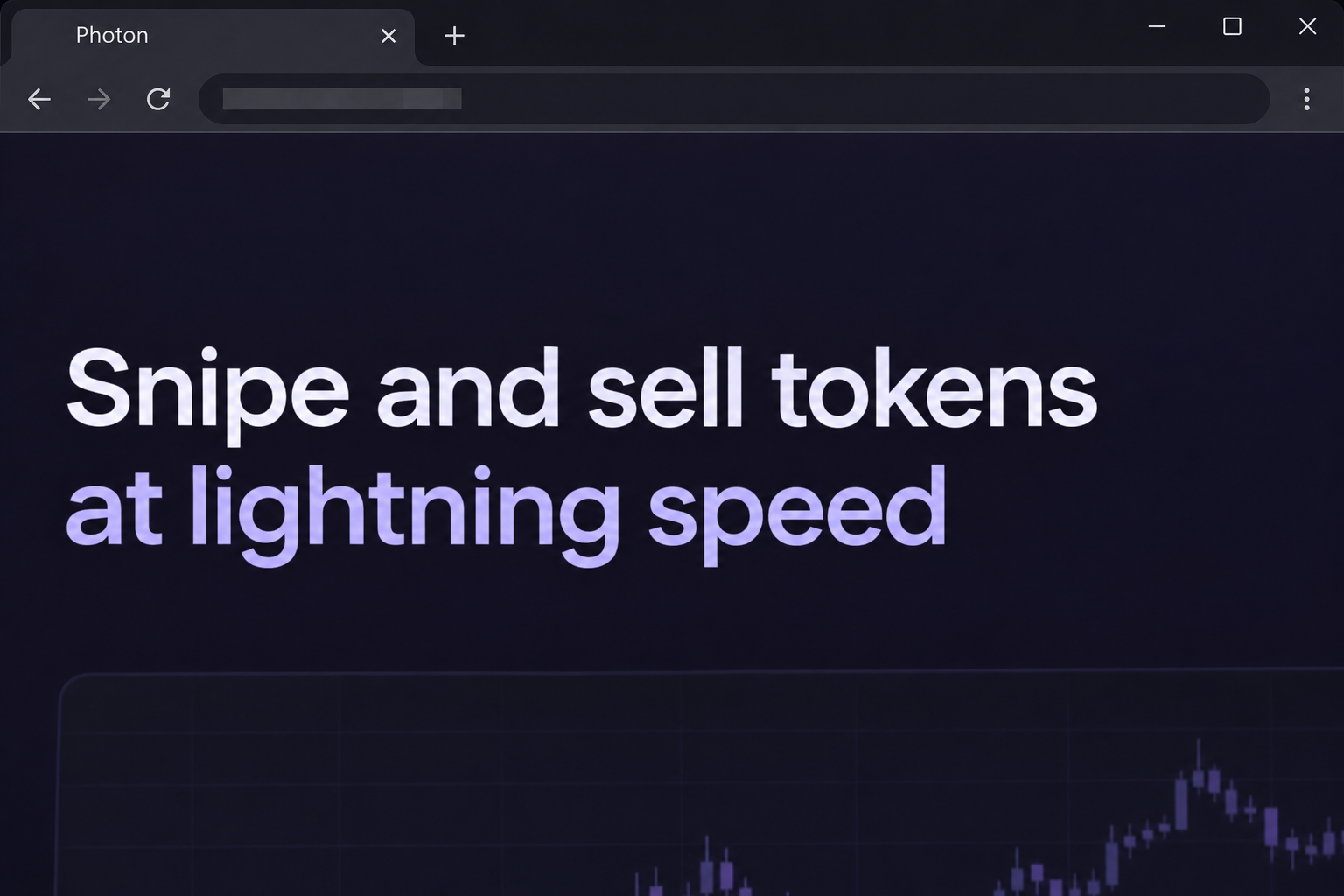
The copy was recorded at speedtrade[.]icu, not on the Tiny Astro domain. Its opening view shows a trading preview and invites visitors to start by connecting a wallet.
The image above recreates the wording and dark browser view. It doesn’t contain a live trade, an actual market quote, or a control you can use.
Unlike a giveaway, this page doesn’t need to promise a prize. It can get your attention simply by pretending to be the tool you were looking for.
The first recorded interaction is a wallet chooser
Selecting the main action brings up a list of familiar wallet providers. It looks like a normal integration screen, even though you reached it through the imitation.
The list does not prove any relationship with Photon or the apps named in it. In the recorded view, the page had not shown an actual trade or wallet statement.
A request that shows up in a genuine wallet extension can still originate from an untrusted website. Check the site’s identity alongside what the wallet asks you to authorize.
Looking at the recorded selector does not tell us what each visitor signed or whether funds moved. Those questions need to be checked against the affected wallet’s activity.
The real Photon workflow has more than one wallet role
Photon’s Solana documentation directs readers to the Photon Solana site on Tiny Astro’s domain and distinguishes a sign-up wallet from a dedicated trading wallet.
The documentation describes funding the trading wallet as a separate action. Connecting a wallet on a page with Photon’s colors does not establish that you funded an account you control.
Here are the questions to ask before treating a balance or trade as real:
- Does the address belong to the service linked in Photon’s own documentation?
- Which address is your sign-up wallet, and which address actually holds the trading balance?
- Did you intend to open the terminal, move funds, or make a trade?
- Does the wallet describe the action you intended and show a destination you recognize?
- Can you find the same activity in an independent record for the relevant wallet?
Why Speed Is Part of the Pitch
Some users look for a token terminal because they want to see a pair as soon as it appears. The page leans into that hurry without needing a countdown.
A visitor might expect to decide quickly whether to buy or sell. A copycat page benefits when that attention goes to a new token instead of the browser’s address.
Markets and trades can be real even when the page displaying a preview is not. A chart tells you what is being rendered, not who controls the site.
Trading shortcuts make sense once you’ve established where you are. They make less sense as a substitute for checking the identity of a page you haven’t used before.
If you usually open Photon from a bookmark, be wary when a conversation steers you toward a new route. Trading speed isn’t a reason to switch domains.
The same applies if someone shares a link alongside a chart that appears to match a real token. Find the token or pair through the platform’s own search instead.
You don’t need to place a trade to decide whether an incoming link is trustworthy. Checking the domain and documentation is a separate job that comes first.
How the Fake Photon Website Scam Works
Step 1: The clone greets you with a familiar trading screen
The page looks like a shortcut to a market terminal. Its emphasis on buying and selling quickly gives an impatient visitor something to recognize right away.
Because the pitch is a service rather than a prize, the deception can feel ordinary. Someone can arrive looking for Photon and miss that the address names something else.
Use the full domain written in the browser, not the label in a tab. A tab can say Photon even when the domain has nothing to do with Tiny Astro.
Step 2: The connection action appears before a confirmed trade
The imitation offers a way to connect for Solana trading. The recorded action opens a provider list without showing a trade that the visitor previously chose.
A wallet prompt around that point still deserves a close look. You are deciding which website may interact with a particular account, not merely choosing a visual preference.
If you only wanted to read about a token, pause when asked to authorize anything beyond that. You can compare public market information without accepting a mystery request.
Step 3: Familiar wallet names make the choice feel routine
The observed menu lists recognizable names such as Phantom and Solflare. A familiar icon can feel like reassurance even though the wallet provider isn’t vouching for the website.
Some wallets explain what they intend to do when a site requests a connection or another action. Read that text rather than trusting a label on the trading page.
If the site says connect but the wallet requests a signature or transfer, the two aren’t describing the same thing. Cancel rather than authorizing an unfamiliar action.
Step 4: A transfer or approval matters more than the landing page
If you interact beyond the chooser, separate the intended transaction from the exact wallet response. Focus on the asset, source account, destination, and request type.
A request can ask for more than a normal sign-in. Do not approve an unexpected transaction so that the rest of the screen will finish loading.
The archive does not show a completed victim transfer. If you noticed a missing balance, your own wallet and network history can tell you whether anything actually moved.
Step 5: The real trading account may not be the wallet you checked first
Someone who uses a service with separate trading wallets can accidentally inspect the wrong address after an incident. That is especially easy if the accounts have similar nicknames.
Open your records for the wallet that authorized the request. If you also have a trading account, match its address separately rather than assuming both balances describe the same funds.
List any outgoing transfer you’ve already recognized so that it isn’t mistaken for fraud. Keep unexplained activity in a separate list for reporting or help from your wallet provider.
How to Sort Out the Sign-Up Wallet and Trading Balance
Use public addresses to match activity to the right account
The address that originally signed you in may not be the one that contains your position. Photon’s multi-wallet guide describes deposits and withdrawals between wallet roles.
Look for a public address in your own notes, trusted app, or verified platform records. You don’t need a private key to identify a balance.
If the wallet you used to connect holds funds for other purposes, don’t limit your review to the token you wanted to trade. Look for changes across that account.
If you already know the address of a second wallet, you can compare its public record without opening the fake page. That avoids starting another session while you’re investigating.
Check transfers in both directions before deciding what was lost
An outgoing entry from a funding wallet may correspond to an incoming entry in a trading wallet you control. Compare the addresses and values before reporting the transfer as theft.
Conversely, a balance on the imitation is not evidence you control the receiving address. You need a record that identifies the wallet you own and what was actually credited there.
For an unauthorized transfer, note the transaction signature and account before closing your wallet. The identifier lets someone find the event later.
If a message suggests a fee to unlock withdrawals from the imitation, don’t add funds to find out. A second payment can’t turn a fabricated terminal into your own wallet.
What to Do if You Have Fallen Victim to This Scam
-
Close the copy if you did not use its wallet controls. Find the known Photon route from the product documentation the next time you need it.
Do not follow a second link from the same chat just because someone says the previous one expired. Verify the new source on its own merits.
-
Check which wallet was actually connected. Remove the unrecognized site from your wallet’s connection list and note the selected account, if you know it.
Phantom’s scam response guide separates an unwanted connection from a signed action or leaked key. Apply the remedy that describes your exposure.
-
Review the correct Solana account if you approved a prompt. Look at wallet activity for transfers or other unfamiliar changes near the time you visited.
If you recognize the transaction as yours, record the destination and reason. If you don’t, keep the signature and the public source and destination addresses.
-
Treat a disclosed key as a different type of incident. A key for the trading wallet is not the same secret as a phrase restoring your funding wallet.
Use your wallet provider’s trusted recovery instructions to protect affected funds from a clean device. Never hand over a private key to a support contact who approaches you.
-
Use an independent route if you sent funds. Contact any relevant exchange through its published support channel and report suspected theft to the appropriate authorities.
Keep the transaction details, a copy of the message that led you to Photon, and anything you safely saved from the clone. None of that requires reopening it.
-
Check the other addresses you used for the same task. If you moved SOL between accounts to trade, follow your paperwork rather than the copy’s displayed balance.
If a supposed recovery agent says the wallet will be released after another payment, stop there. That is not a reason to send a second transfer.
What to Verify Before You Try Trading Again
Start with the bookmark, not with a market alert
Save the official documentation separately from the app. If a token announcement redirects you to a different website, the documentation gives you a route that doesn’t depend on the message.
Make sure your normal bookmark actually opens that route. A link in a chat or browser suggestion can still point elsewhere.
If your device offers different browser profiles, check which profile contains the wallet you meant to use. A shortcut can open another session with different extensions.
Get back to an account you can identify
Before placing a trade, make sure you can name the address holding the funds. Compare a known balance or past transfer through records you already trust.
If your wallet was exposed, don’t keep sending deposits to its old saved address. Review any funding destination stored in exchanges or account notes before you resume.
If you frequently share charts, send price or token information without including a connection link. Let recipients open the trading platform themselves.
If a chart and a bookmarked platform disagree, compare the asset identifier and network. Matching tickers don’t always identify the same token, especially on pages listing recent launches.
Only resume trading when you can independently identify the platform and the account. A quote that seems to be moving quickly is not a reason to skip either check.
Frequently Asked Questions
Is Photon itself a scam?
The subject here is a website impersonating Photon, not a finding that the real platform is fraudulent. Start from Photon’s own documentation to check the address.
Is the speedtrade address the real Photon trading site?
It is the address where the imitation was recorded. Photon’s Solana documentation points to a Tiny Astro address instead of the domain used by the clone.
Is a wallet chooser proof that a trade went through?
The chooser shows a way to start an interaction. A trade requires evidence in your own activity or on the appropriate network, not a list of wallet names.
Why can my sign-up and trading balances differ?
Those balances can describe two different addresses. Compare the specific account and any known transfer between them before deciding whether something is missing.
Should I paste my Photon key into a support form?
Do not share a trading wallet key with a website or a stranger who claims to be support. Use the verified provider’s own instructions for any legitimate wallet-management action.
Can I recover a confirmed transfer by disconnecting?
Disconnecting changes the current website session, not a transfer already recorded on-chain. Preserve the signature and report an unexpected transfer through the relevant support and fraud channels.
The Bottom Line
Don’t connect a wallet or fund anything through the Photon copy. Matching colors and a quick-trading pitch do not make an unrelated address part of the real platform.
If you already interacted, find the exact account and action in your wallet. Work from the funding and trading addresses you actually control, not from the imitation’s screen.

Join the discussion
0 commentsShare your experience or ask a question about this article.
Community experiences
Did this happen to you?
Your experience could help someone recognize the same scam. Submit a private report for our team to review.
I experienced this tooReports are reviewed before publication. Sharing publicly is always your choice.
Discussion
Start the conversation
Have a question or something useful to share? Add the first comment.