


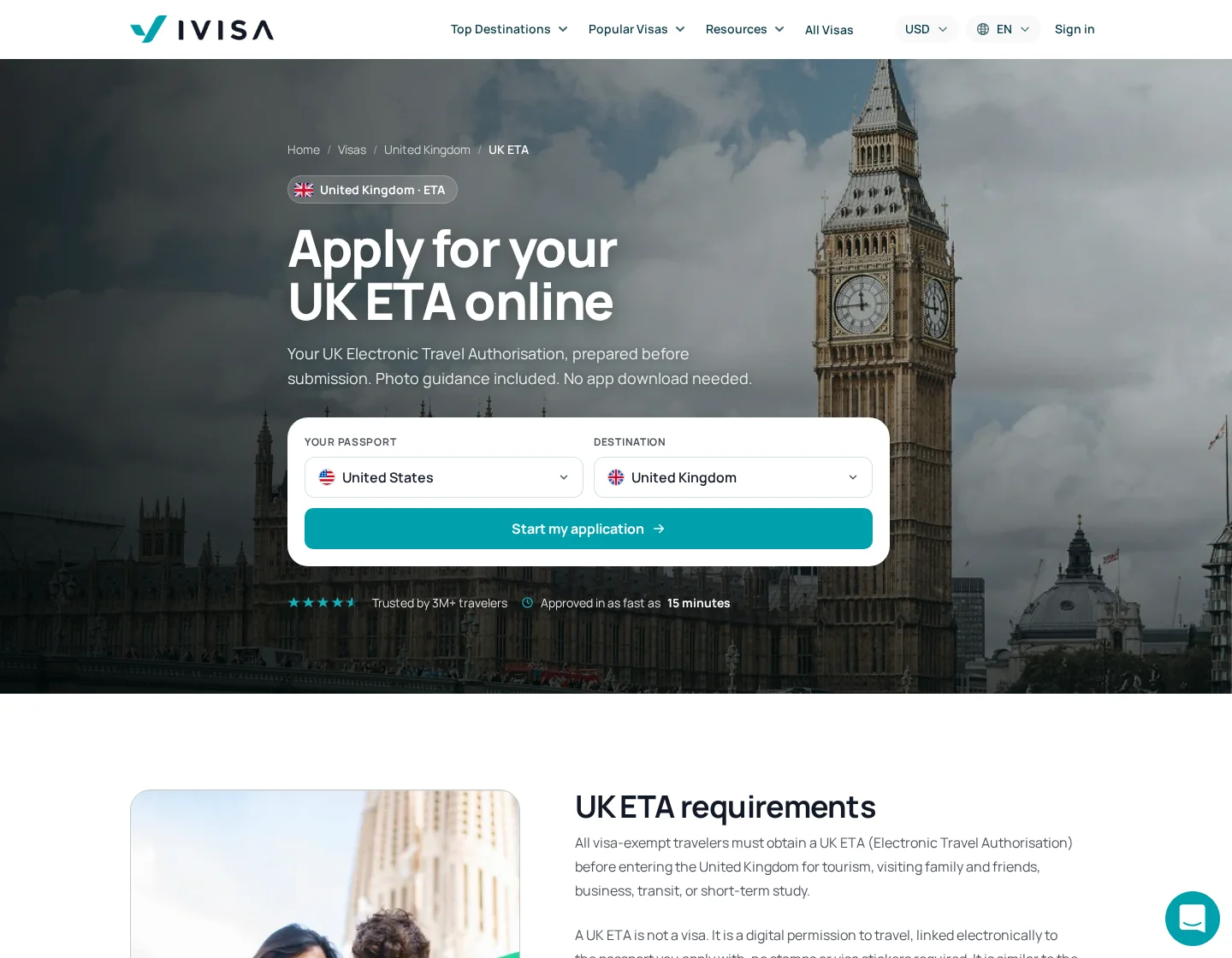
A search for permission to visit the United Kingdom can take you to iVisa. The page offers help with an application and highlights a fast turnaround.
It is easy to mistake the headline price for a government charge. The two routes sell different things, even though the same authority makes the decision.
Overview
The iVisa offer includes a paid service
The iVisa UK ETA page advertises a starting price of $129.99 in USD. It says the amount includes its own preparation and support service as well as the application fee.
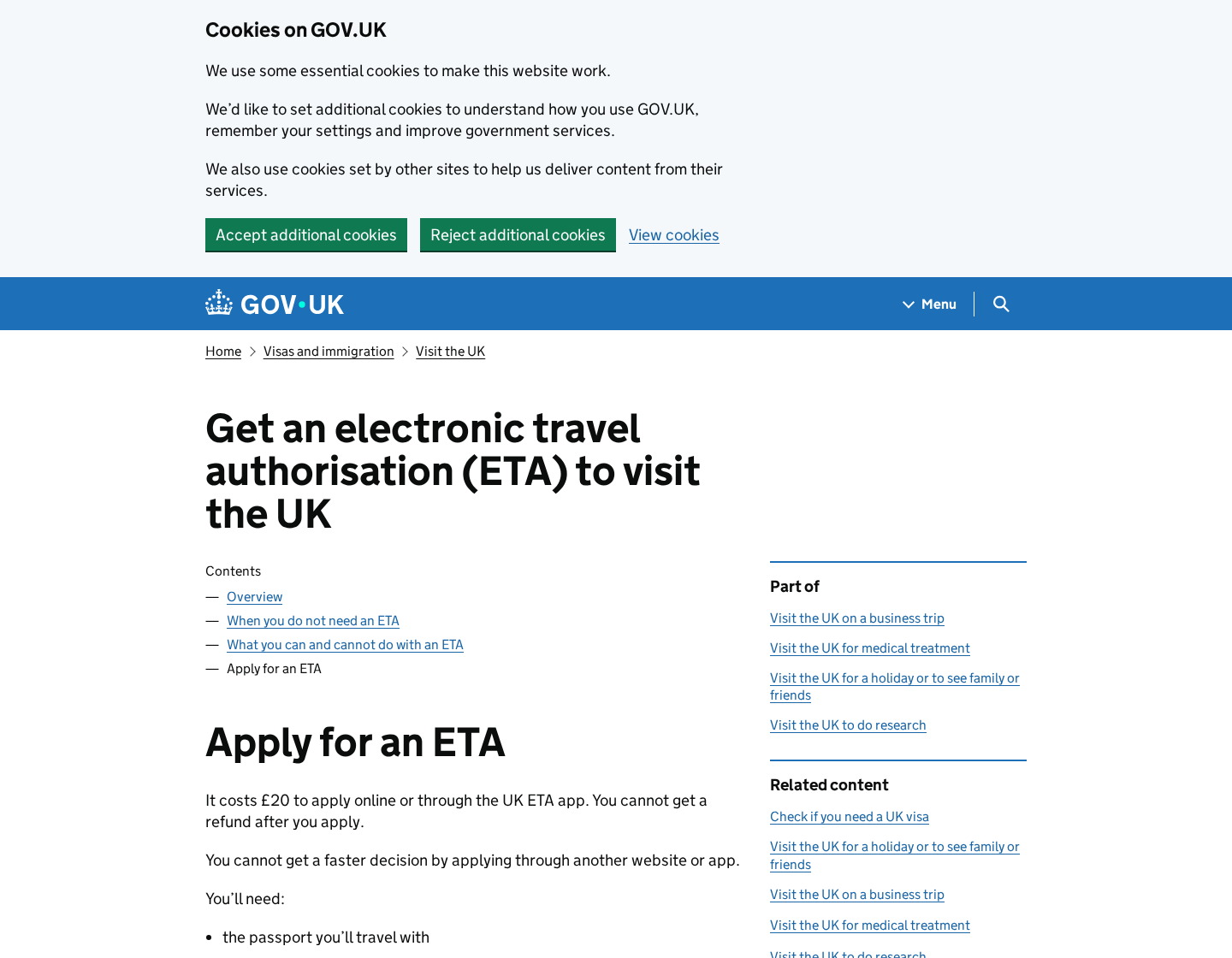
The official GOV.UK application page lists a £20 fee and offers its own app and online form. It does not require buying a separate service.
The advertised speed is not a government deadline
iVisa advertises approval in as fast as 15 minutes. The government says you cannot get a faster decision by applying through another website or app.
A company can help prepare and review your answers. It cannot give you priority with the UK Home Office simply because you chose a paid submission option.
Match your documents, fee and status to the right route
- Check on GOV.UK whether your nationality, immigration status and itinerary require an ETA.
- Compare the service price with the government fee without confusing USD and GBP or treating a starting price as a receipt.
- Find out whether any previous application reached the Home Office before paying to submit another.
If you just need the travel authorization, start with the government route. Pay an intermediary only if its separate service is something you understand and actually want.
How the iVisa UK ETA Offer Differs From Applying Directly
Step 1: Identify who runs the page
The iVisa page calls itself an independent service in its FAQ. It explains that it prepares and files applications, while the Home Office decides whether to grant them.
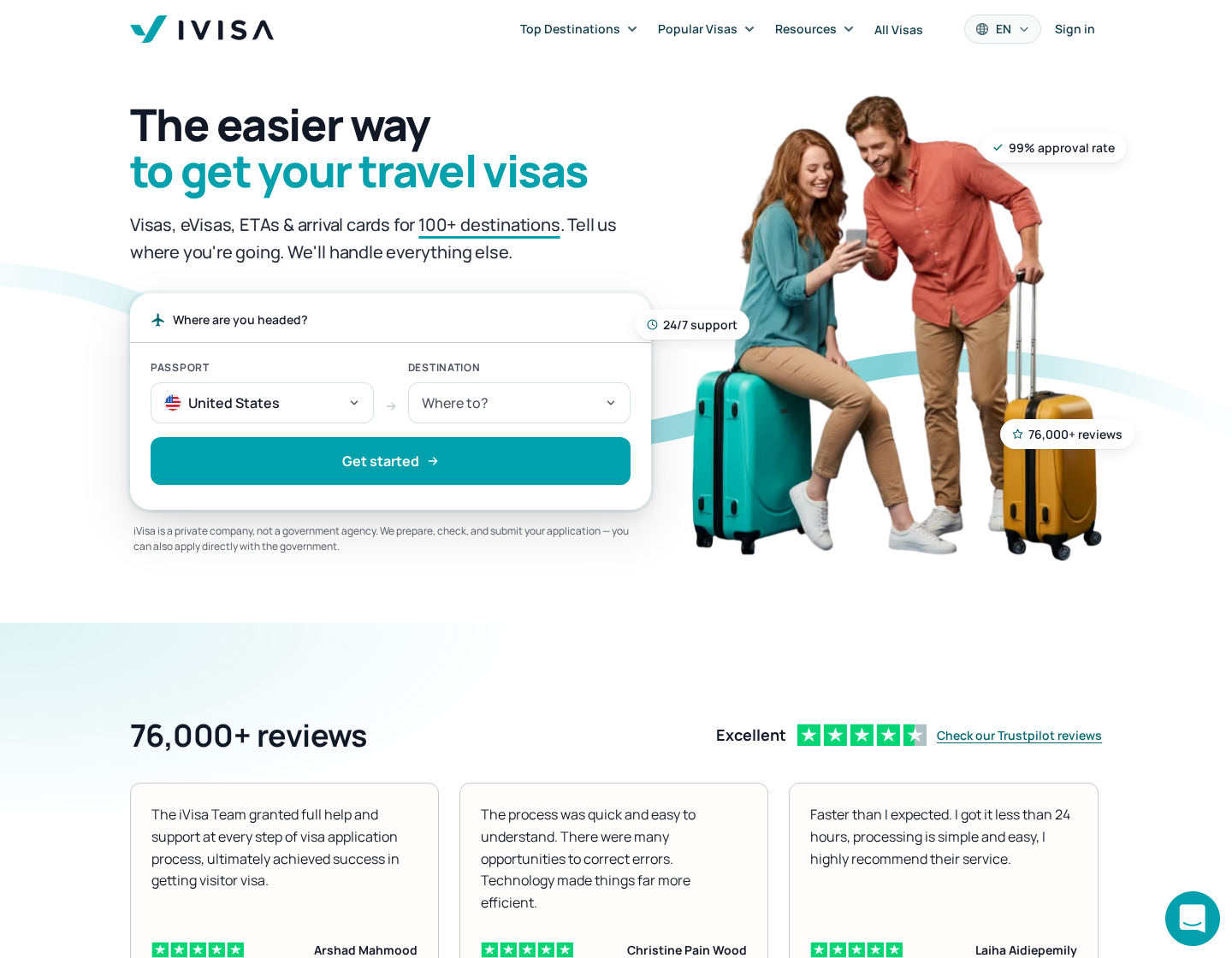
Its main website also states that it is a private company below the travel picker. A search result can take you straight to the product page instead.
Check the address bar before typing a passport number. The iVisa listing and GOV.UK both use the initials ETA, but only the latter is the UK government’s route.
An ETA is digital authorization to travel, not a visa sticker or a promise of admission. If you need a visa instead, the ETA product is not a substitute.
Step 2: Compare the advertised amount with the state fee
iVisa displays from $129.99 for the UK selection. The page describes review and support as included, but does not make that advertised price your final invoice.
The official route lists £20 for an application. The amounts are in different currencies and describe different offers, so a simple division gives a misleading markup figure.
Compare both in the same currency, using the exchange rate and any foreign transaction fee your issuer would apply. Use the full order total once a route shows it.
Step 3: Separate preparation time from decision time
iVisa says people can finish its form quickly and choose a processing speed. The time spent preparing your answers is separate from the time the Home Office takes.
GOV.UK says decisions usually come within a day and advises allowing up to three working days. Use that guidance rather than counting backward from a 15-minute advertisement.
If you are already at the airport, do not pay a second service solely because it promises speed. You must have the authorization before traveling when it is required.
Step 4: Keep the final decision apart from the payment receipt
A card charge or a message saying the service received your request isn’t the travel authorization. Look for correspondence showing the decision and the reference for the application.
GOV.UK says the decision email includes a 16-digit reference. Save it with the passport you used so you can find the actual government record if you need help.
If your receipt shows a service order but no government submission, ask for the status in writing before assuming an official application is already under review.
Who Charges You and Who Handles the Documents?
The intermediary and the deciding authority have different roles
iVisa describes reviewing your application and sending it to the UK government. Its service charge is neither a second government fee nor a payment that guarantees approval.
Read the itemized order to see which company charged you and for what. The payment description alone cannot show whether the application ever reached the Home Office.
A passport upload is part of an application, not proof of authorization
The official process also needs passport and face images. Seeing those requests on another site doesn’t make that site official, and the requirements don’t identify who will handle your data.
Review which website receives the images before attaching them. If you use a third party, check its privacy terms and save the relevant policy without uploading unnecessary documents.
A refund request is not the same as an ETA status check
GOV.UK says its application fee is not refundable after you apply. A request to refund a private service charge depends separately on your terms, purchase and submission status.
Ask the company that charged you for its cancellation position. If you think payment was unauthorized, contact your issuer directly, rather than waiting for an application-status response.
A public complaint is not proof of every checkout
A shopper publicly alleged that a card charge occurred without the expected application progress. The account does not identify a UK ETA transaction we could match to a receipt.
We checked both public routes without entering passport details or paying. One account of a disputed charge does not establish what happens in every order.
The Status Labels That Matter for an iVisa Refund
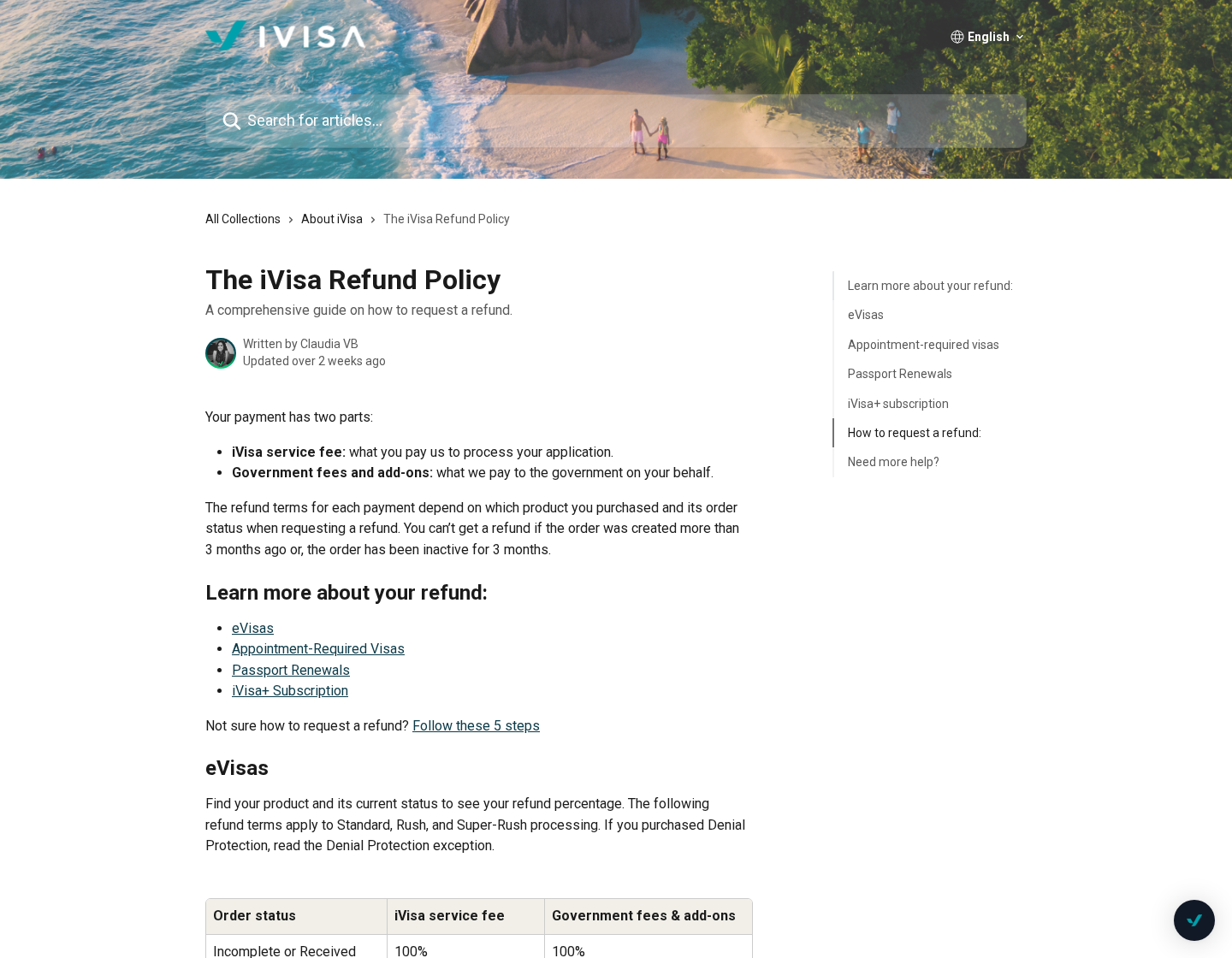
iVisa’s published refund policy separates the service fee from government fees and add-ons. It uses different tables for different documents, so an appointment visa’s rules may not fit an ETA.
Before accepting a refund estimate, confirm the document name and status applied to your order. Ask support which row of the policy it is using for that product.
Its policy describes Received as a stage when the company has your documents and is preparing to review them. That is not the same as a government submission.
Waiting on Gov means the policy describes submission and payment of the government fee. If your order shows that status, ask when it was submitted and save the reply.
The policy also lists a three-month cutoff for older or inactive orders. Do not wait until you travel to ask whether an incomplete, duplicate or mistaken order can be canceled.
Start a request through the company support route you locate yourself. Select the order, identify the product and clearly state whether you want cancellation, a refund or application status.
Keep the refund decision and check your original payment method after approval. The company’s policy says processing and the time for a credit to appear are separate.
If a refund covers only one part of the price, request a breakdown. An amount labeled government fees does not explain a remaining service charge on its own.
Its generic policy also describes a separate iVisa+ subscription. Check your receipt for it only if a membership is listed; a one-time application doesn’t establish that you subscribed.
How to Apply Directly for a UK ETA
Start at the GOV.UK ETA overview and check who can get one. A visa, immigration permission, certain passports or how you transit can change the answer.
Open Apply for an ETA from that overview. The page gives official UK ETA app links and an online option if you cannot, or prefer not to, use the app.
-
Have the passport you will travel with, an email you can access, a way to pay and a photo of the applicant. For someone elsewhere, use the online route.
-
For the official app, follow GOV.UK’s store link rather than searching for any app with ETA in its name. Follow its prompts to scan the passport and face.
-
For a browser, choose Start now under Apply online on GOV.UK. Follow the prompts for the passport and face photos, then check that the passport details are correct before paying.
-
Check the amount shown by the government route and complete payment only there. Save the confirmation and wait for the decision, not merely a bank notification.
-
If you have no decision after three working days, check junk mail. Follow the contact route on the government application page if you still cannot find the decision.
Check each traveler separately if you are organizing a group. A single payment or confirmation for one person does not establish that everyone received permission to travel.
Use the same passport to travel as you used to apply. If you entered a different passport’s details or renewed it, check the official guidance before departure.
For an itinerary involving a connection, check whether you pass border control. The answer can depend on collecting luggage or changing airports, not just the word transit on a ticket.
Check your decision and itinerary before buying a separate service to repeat what you have already done. If you already have valid permission, avoid paying for a duplicate application.
Check for an Existing UK ETA Before Filing Again
If you already received approval, go to the government’s ETA checker rather than paying a private service to look for it. Have the passport used in the original application.
Choose Start now and follow the prompts using that passport. The checker is for confirming whether an ETA exists and when it expires, not tracking a pending application.
If the checker confirms an ETA, compare the expiry with your travel date. GOV.UK says the authorization can end sooner than two years if the linked passport expires.
If your passport changed, the checker and the old decision email do not move permission onto the new passport. Use the government instructions for a new application if required.
If your application is pending, do not pay again because the checker shows no result. GOV.UK directs applicants to UKVI after three working days.
For family applications, keep each decision with the corresponding passport. GOV.UK notes that people in the same group may get decisions at different times.
What to Do If You Already Paid iVisa
-
Find the confirmation email and open your service account using a route you located yourself. Save the order number, currency, total and any promised handling speed.
Check whether there are separate entries for the service and government fee. An itemized receipt can help explain a higher charge without guessing at exchange rates.
-
Ask whether the application was submitted to the Home Office and request the government reference if available. Keep any response that distinguishes received, being reviewed and submitted.
If the account shows no submission and you want to cancel, request that in writing immediately. Ask whether any passport images can be removed under the company’s applicable process.
-
If you do not know whether the application exists, use the UK government’s contact instructions before trying again. A second payment may leave you with two separate orders to resolve.
If you have a decision email, keep its reference and check that it concerns the correct applicant and passport before drawing conclusions about your travel plans.
-
If the service cannot explain a disputed charge, use the issuer’s independently located fraud or dispute route. Describe whether you authorized the order and which service was not provided.
Do not send complete card and passport details by email to someone who contacts you unexpectedly. Ask the issuer what it needs and how to send it securely.
Frequently Asked Questions
Is the iVisa UK ETA page a government website?
No, the page identifies iVisa as an independent application service. The government route is on GOV.UK, and the Home Office makes the decision either way.
Does the UK government charge $129.99 for an ETA?
The iVisa page uses $129.99 as a starting service price. The government application page separately shows £20 for applying online or through the official app.
Can iVisa get the Home Office to decide faster?
GOV.UK explicitly says another website or app cannot secure a faster decision. Help completing the form is not a way to move ahead in the government process.
Can I apply directly if I do not want the official app?
Yes, the GOV.UK application page has an Apply online section. Follow its photo instructions and use its own Start now button rather than a third-party result.
Is an order receipt enough to board my flight?
An order receipt shows payment, not permission to travel. Wait for confirmation of an approved ETA from the government if your trip requires one.
What if I want a refund but already submitted the application?
GOV.UK says it does not refund its fee after applying. Check the separate service charge with iVisa and ask your payment provider what options apply to your particular transaction.
The Bottom Line
Apply on GOV.UK if you just need a UK ETA. The £20 route does not require iVisa’s paid service, and another website does not make the Home Office decide faster.
If you already paid iVisa, ask for the submission status, itemized receipt and government reference before paying again. Take unresolved charge questions to the provider that handled your payment.

Reviews & discussion
0 commentsShare a firsthand experience, or ask a question.
Community reviews
gov.uk
Moderated reader experiences, not an editorial verdict.
Start the conversation
Have a question or something useful to share? Add the first comment.