

Jarteaused.live is a dangerous scam website that tricks unsuspecting victims into signing up for unwanted subscriptions. This comprehensive guide will provide an in-depth overview of how the Jarteaused.live scam works, help victims understand what to do if they have fallen prey, and offer key takeaways to avoid this and similar subscription traps.
Overview of the Jarteaused.live Scam
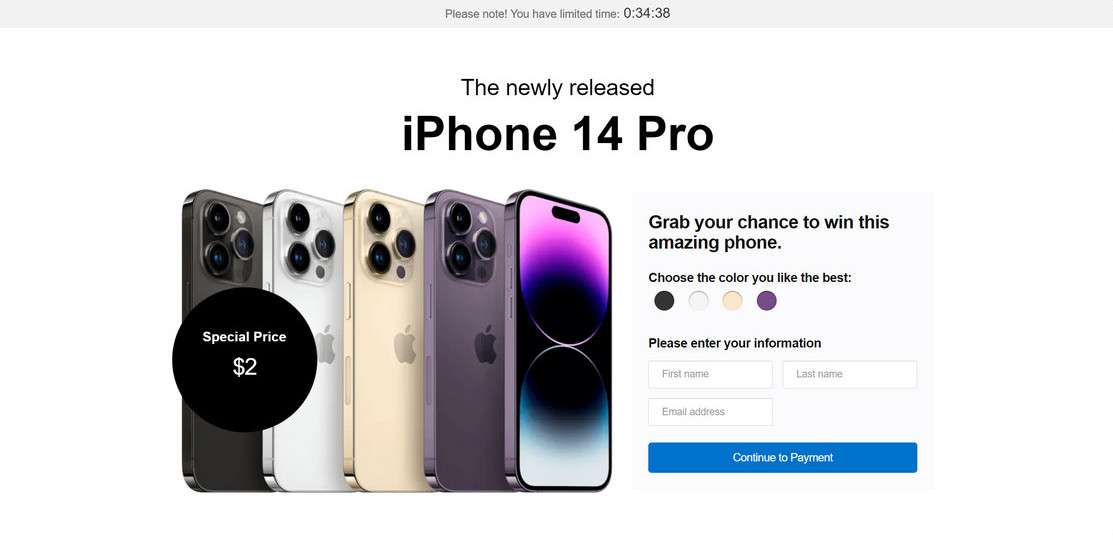
Jarteaused.live utilizes deceptive techniques and known brand names like Amazon, The Home Depot, and Walmart to fool visitors into taking an online survey. After completing the survey, victims are told they have won a valuable prize like an iPhone. However, in order to claim the prize, they must first pay a small $9.90 shipping fee.
This is where the scam truly begins. After entering payment information, victims are automatically signed up for expensive monthly subscriptions without consent. Additionally, the promised prize never arrives. Sadly, many honest, hard-working people fall victim to this scam while browsing the internet.
How Victims Are Lured to the Site
Jarteaused.live relies on unethical lead generation tactics to drive traffic to their scam website. The most common methods include:
- Malvertising – Malicious popup, banner, and video ads placed on shady websites. These ads may promote free gift cards, prize giveaways, or virus warnings to entice clicks. Once clicked, users are redirected to Jarteaused.live.
- Social Media Ads – Scammers often buy cheap social media advertising to target vulnerable demographics with clickbait offers. Messages may claim viewers have won a free iPhone or must take an important survey.
- Spam Emails – Deceptive emails are sent en masse to purchase email lists. Subject lines are catchy and content warns recipients they must take quick action to claim prizes or avoid account suspensions. Links lead to Jarteaused.live.
While navigating the web, staying vigilant against scams is crucial. If an offer appears too good to be true, it likely is.
An Inside Look at the Scam Website
Once lured onto the official Jarteaused.live website, users are met with convincing graphics and messaging to build trust and excitement around prize winnings and survey participation. Here is a glimpse at what visitors experience:
- Branding Elements – The site uses fonts, colors, templates commonly seen on legitimate ecommerce stores to appear credible. Logos like Amazon and official security badges are displayed despite being unaffiliated.
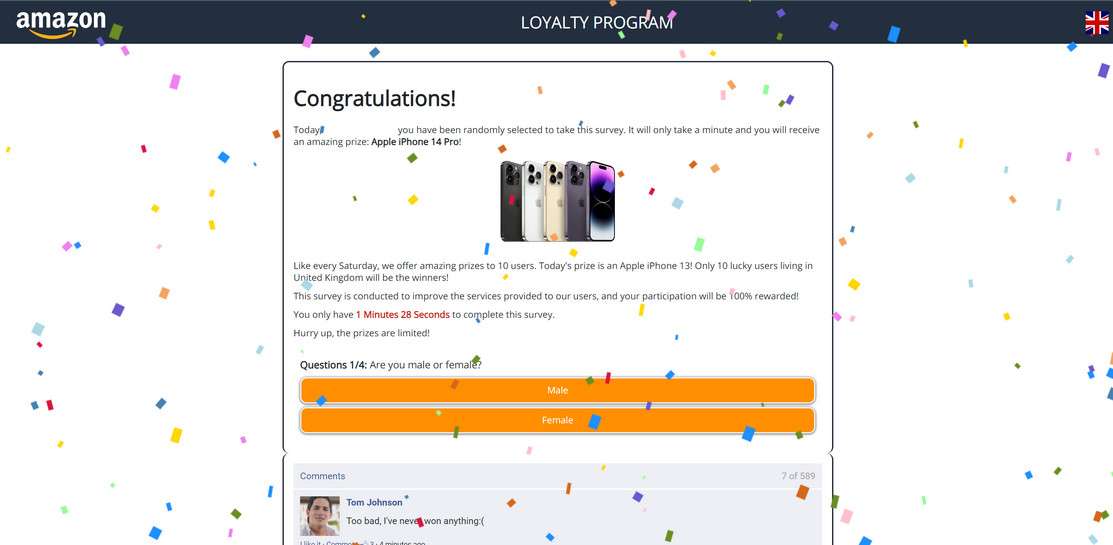
- Survey Questions – A series of short questions with buttons are presented covering basic demographic info. Submitting answers triggers prize notifications.
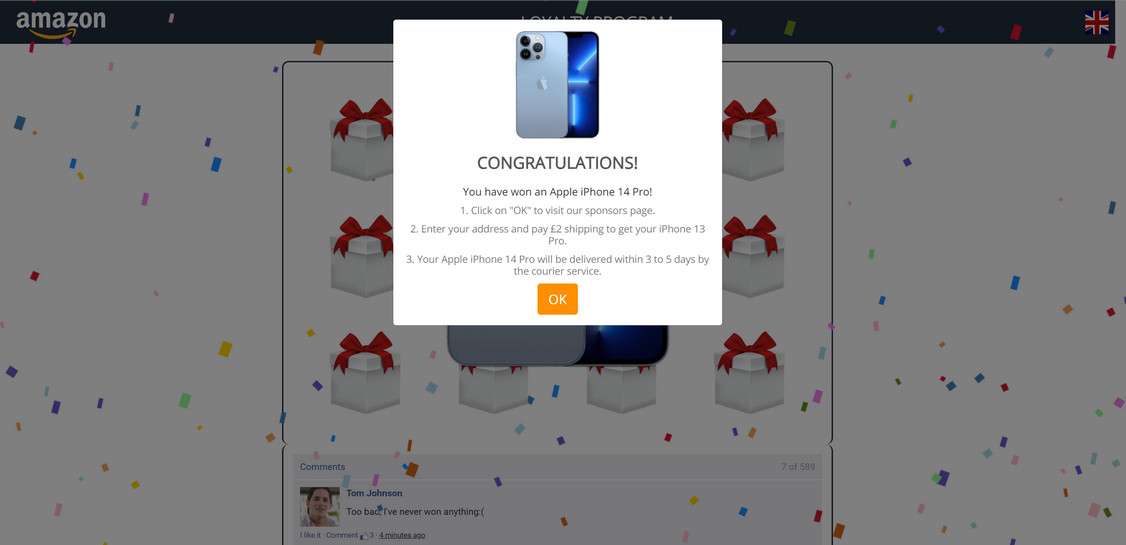
- Prize Selection Game – Users must choose from boxes as if playing an online game to secure prizes. Pre-set winnings are shown regardless of box picked, often iPhones, gift cards, or smart home devices.
- Shipping Payment Page – On this final page, personal and payment details are collected under the guise users must cover a small $9.90 shipping fee to receive winnings. In reality, account and billing information is stolen for recurring monthly subscriptions.
With an understanding of tactics used on the website itself, it becomes clearer how otherwise wary internet users can be smoothly manipulated into participating in sweepstakes offers and surveys.
What Happens After Entering Payment Information
Once credit card information is collected on Jarteaused.live for the supposed shipping payment, victims soon realize they have been scammed in multiple ways:
- No Prize Delivery – The promised free gifts like iPhones, smartwatches, or gift cards are never shipped out. Delivery timeframes provided were false all along.
- Unauthorized Subscriptions – Within 1-2 weeks, victims see monthly charges from unfamiliar third-party companies appear on credit card statements. Monthly fees typically ranging from $89-$299 are billed recurrently for mystery subscription services never signed up for.
- Payment Details Resold – Credit card numbers, passwords, addresses, and other sensitive information entered on the site are sold on dark web marketplaces. This exposes victims to future financial fraud or identity theft.
Essentially, the Jarteaused.live website acts as a fraudulent front to collect sensitive user data and sign unknowing visitors up for recurring monthly billing scams. The promised prizes and survey participation are completely fake – solely manipulation techniques to lower defenses before stealing financial information.
How the Jarteaused.live Scam Works Step-By-Step
Now that you understand the devious intentions driving Jarteaused.live, let’s break down exactly how this scam ensnares good-faith website visitors into unwilling subscription plans:
Step 1: Entice Victim Clicks with Misleading Offers
As outlined in the overview section, Jarteaused.live relies heavily on lead generation tricks to drive target traffic to their scam portal. Most visitors reach the site after clicking social media ads, contextual banners, email links, or popups promoting free gift cards, prize giveaways, or urgent warnings while browsing dubious websites.
For example, a Facebook ad may read:
“iPhone 15 Pro Giveaway! We’re giving away 100 FREE iPhone 15 Pros. Click here to take a short survey and see if you’ve won!”
These type of attention-grabbing messages convince website visitors to click without considering potential risks.
Step 2: Build Trust and Excitement Around Survey Participation
After clicking misleading offers, visitors land directly on Jarteaused.live. The website branding and content focus intensely on building credibility around the advertised survey and prize giveaways.
Visitors see exciting confirmation messages emphasizing they’ve been specially selected to participate in an exclusive customer satisfaction survey. Completing the quick 3-4 question survey allegedly enters them into iPhone, AirPods, or gift card prize drawings.
To manufacture trust, fake reviewer quotes, security badges, a US business address, and established brand logos are displayed prominently. Everything down to site aesthetics make the scam more convincing.
Step 3: Collect Personal Information Through Survey Questions
Now that visitors are enthused to take the survey for prize eligibility, the questioning begins.
A series of 3-4 multiple choice questions request fairly innocent personal details like age, gender, shopping habits, and brand preferences. Users’ guard is down believing survey responses may improve Amazon, Walmart or other major retailer experiences.
Little do they know, this information is only gathered to build detailed user profiles for targeting and selling data. Still, the minimal questions seem harmless enough to proceed for the promised generous prizes.
Step 4: Show Visitors They’ve “Won” Valuable Prizes
Seconds after completing the short survey, exciting prize claim notifications appear on-screen. Despite random guessing, visitors are told they were specially selected as winners for iPhones, AirPods, Walmart gift cards, or other hot ticket items.
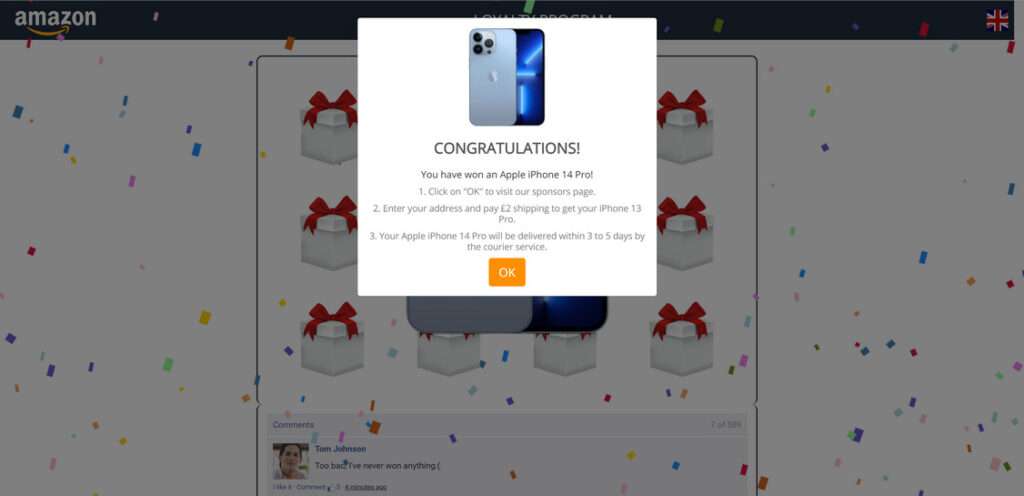
To build suspense, a simulated online game similar to a claw machine runs prompting visitors to pick a box hoping their prize lies inside. A countdown clock pressures visitors to select boxes quickly before time expires.
Ultimately, the victim’s “lucky” box choice reveals they have won either an iPhone, AirPods Pro, or a $500 grocery gift card. The only catch left is paying a mere $9.90 shipping fee and the incredible prizes will arrive within 3-5 days. Even savvy shoppers would have a hard time walking away from deals too good to be true.
Step 5: Collect Credit Card Information for “Shipping Charges”
Having come this far showing viewers personalized prize claim notifications, Jarteaused.live now asks visitors to validate eligibility by covering a small $9.90 shipping charge.
A reasonable shipping fee is what finally motivates visitors blinded by dollar signs to input sensitive payment information including:
- Full Name
- Physical Address
- Phone Number
- Credit Card Number
- CVV Security Code
Website language clearly confirms only shipping costs will be applied to visitor accounts. No recurring charges or confusing fine print in sight. Visitors gleefully input details, pay, and await arrival of promised iPhone and other hot electronic prizes.
Step 6: Sign Up Victims for Recurring Monthly Subscriptions
Within 1-2 weeks the cold reality sets in. Not only do the promised free prizes never arrive, but unfamiliar recurring $49, $89, or $99 charges from random third-party companies emerge on credit card statements.
These charges relate to monthly subscription plans scammers illicitly signed victims up for after stealing financial data. Monthly plans may be for pdf convertors, antivirus software, movie clubs, job listing sites, or other services never requested.
Sadly, contact information entered on the website cannot be traced as scammers utilize dummy domains and offshore hosting. Any credit card charge disputes also mysteriously fail. At this point, victims have no choice but to painstakingly cancel each fraudulent monthly subscription and monitor financial statements moving forward.
In the end, Jarteaused.live obtains all the sensitive personal and payment information they need to profit from underground selling of data, forced subscription plans, or potential financial theft.
What to do if You Have Fallen Victim to Jarteaused.live
Discovering you’ve been manipulated into entering personal information and hard-earned money into Jarteaused.live under false pretenses is understandably enraging. While some financial or data privacy damage may be irreversible, here are smart action steps victims should immediately take in response:
Cancel Any Active Subscriptions or Services
The first priority is identifying all monthly subscription charges, services, software, or physical products signed up for without authorization as result of Jarteaused.live credit card data theft.
Check bank and credit card statements carefully highlighting any unfamiliar recurring fees from the past 1-3 months. Common charges range from $89-$299 per month for unsolicited services.
Once all fraudulent businesses are identified, immediately call each company demanding cancellation of services and refund of charges. Be persistent explaining payments were made without consent. Dispute all charges with credit card providers as well for the best chance of remuneration.
Call Banks to Monitor Accounts for Future Fraud
Unfortunately, once personal information is sold on the dark web to Jarteaused.live or similar scammers there is no way to undo potential future harm. Financial account or identity theft may emerge down the road beyond the initial subscription scam charges.
As a precaution, call all banks and credit card companies used on the malicious website to flag accounts as high risk for fraud. Request increased security through methods like PIN code transactions, lowered cash withdrawal limits, online purchase verification procedures and have fraud monitoring enabled if available.
Ask financial institutions to issue new card numbers altogether to further protect accounts that may have payment data compromised unknowingly. Though extreme, total card replacement gives peace of mind against recurring financial breach.
Run Anti-Virus Scans to Remove Spyware or Keyloggers
Visiting technically-savvy scam websites like Jarteaused.live poses threats beyond immediate billing fraud or privacy invasion. Victims may be exposed to dangerous malware like spyware, keystroke loggers, or trojan bot downloads designed to capture passwords, financial data, or control devices covertly over months.
Run full system anti-virus scans to check for and remove these sophisticated hacking threats that historically bypass standard Windows or MacOS protections. Safeguard online identities by changing account passwords as added precaution too.
Monitor Credit Reports and Set Fraud Alerts
With bad actors potentially having access to full names, addresses, social security digits and more, victims should take measures to protect credit histories as well by setting up protective fraud alerts.
Order full credit reports looking for signs of emerging identity theft. Place 90-day fraud victim alerts warning lenders of compromised information to prevent scammers from opening unauthorized lines of credit. Options also exist for credit freezes stopping all access without approval and extended 7-year fraud alerts. Though extreme, such alerts provide security after falling prey to privacy threatening scams.
Report Scam Website and Charges to Federal Trade Commission
While frustratingly difficult to achieve direct restitution from elusive scam websites like Jarteaused.live, reporting these malicious sites and associated credit card fraud to the Federal Trade Commission (FTC) can build critical cases to some day shut operations down fully.
The more victims able speak up on shady business practices, file complaints noting financial damages and privacy violations, then stronger consumer protection rulings can be enacted. Add your voice by contacting the FTC fraud division online or by phone.
Is Your Device Infected? Run a Free Malware Scan
Slow performance, constant pop-ups, or strange behavior? These are classic signs of a malware infection. The fastest way to find out is to scan your device with Malwarebytes Free — one of the most trusted malware removal tools available.
The free version detects and removes the most common threats, including:
- Adware — the cause of those annoying pop-ups
- Browser hijackers — unwanted redirects and changed homepages
- Trojans and spyware — hidden programs stealing your data
- Potentially unwanted programs (PUPs) — software you never asked for
👉 Select your device below — Windows, Mac, or Android — then follow the simple steps to download Malwarebytes, scan your system, and remove any threats it finds. The scan usually takes 5 to 20 minutes.
Run a Malware Scan with Malwarebytes for Windows
Malwarebytes is one of the most popular and trusted anti-malware tools for Windows — and it’s completely free for removing infections. It catches threats that many antivirus programs miss, including adware, browser hijackers, and trojans. Follow the steps below to scan and clean your PC in just a few minutes.
Download Malwarebytes
Click the button below to download the latest version of Malwarebytes for Windows from the official source. The free version is all you need — it will scan your computer and remove adware, browser hijackers, and other malicious software at no cost.
Download MalwarebytesOfficial installer for Windows 11 and 10. Your download starts right away.Want real-time protection? See Malwarebytes Premium Malwarebytes Free for WindowsScans and removes malware at no cost
-
Install Malwarebytes
When the download finishes, open your Downloads folder and double-click the MBSetup file. If Windows shows a User Account Control pop-up, click “Yes” to allow the installation.
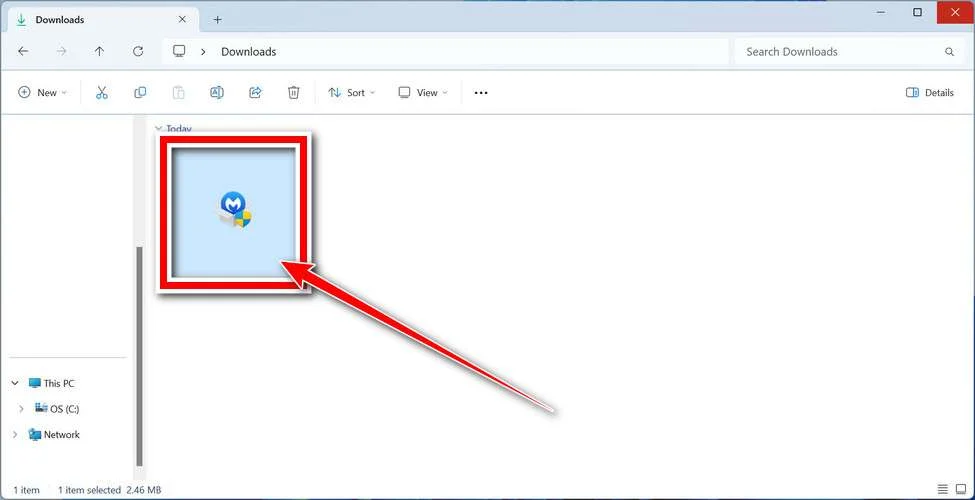
Follow the On-Screen Prompts to Install Malwarebytes
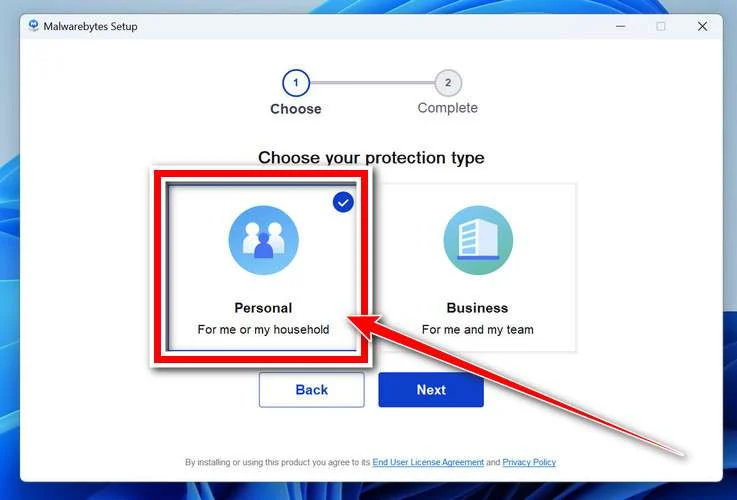
The setup wizard will walk you through a few quick screens:
-
Choose where you’re installing the program — “Personal Computer” or “Work Computer” — then click Next.
-
Malwarebytes will now install on your device. This usually takes under a minute.

-
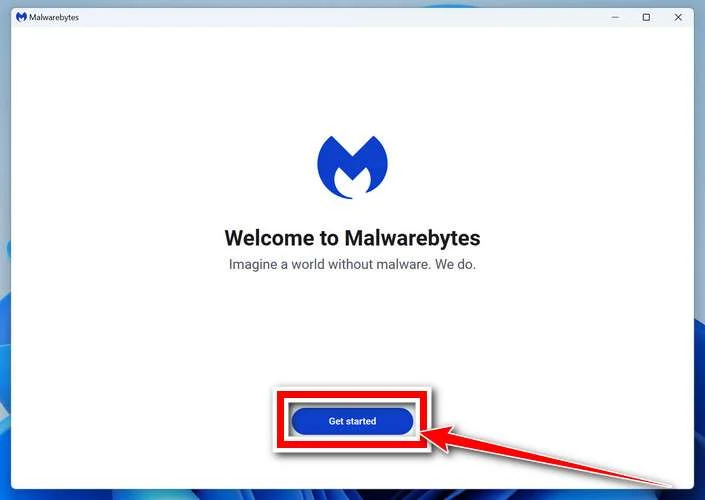
When installation is complete, the “Welcome to Malwarebytes” screen will open automatically.
-
On the final screen, click Open Malwarebytes to launch the program.

-
Enable “Scan for Rootkits”
Before scanning, turn on rootkit detection so Malwarebytes can find even the most hidden threats. Click the Settings gear icon on the left side of the screen.
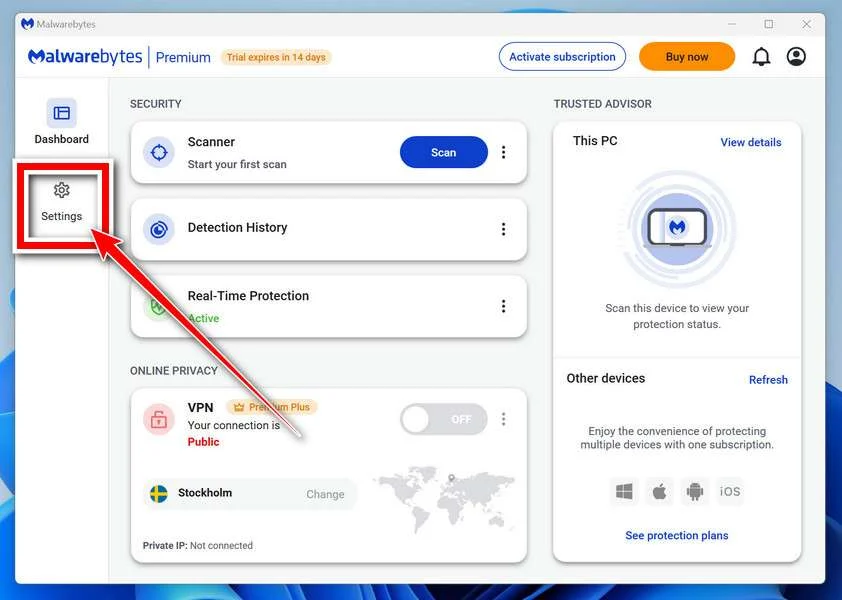
In the settings menu, find “Scan for rootkits” and click the toggle so it turns blue.

Done? Click “Dashboard” in the left pane to return to the main screen.
Start the Scan
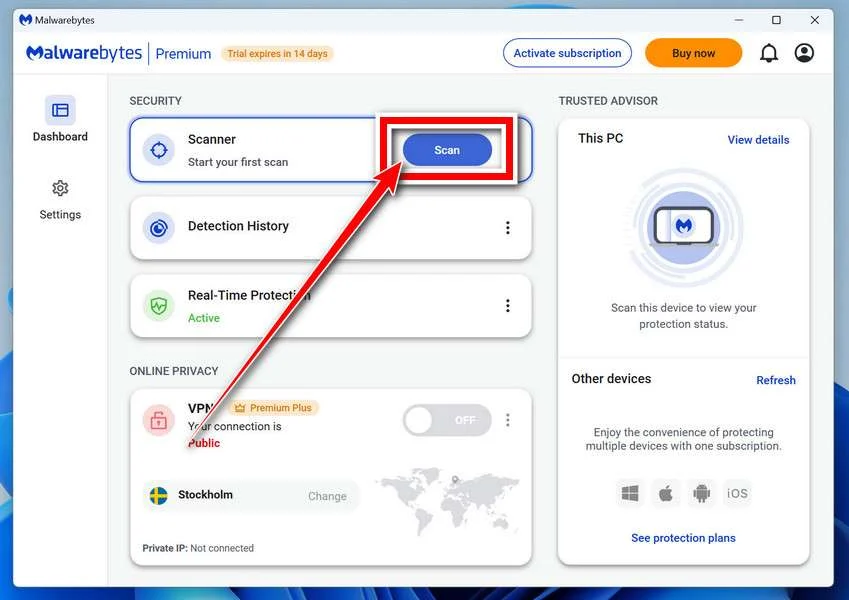
Click the blue Scan button. Malwarebytes will automatically update its virus database and start checking your computer for malware.
-
Wait for the Scan to Finish
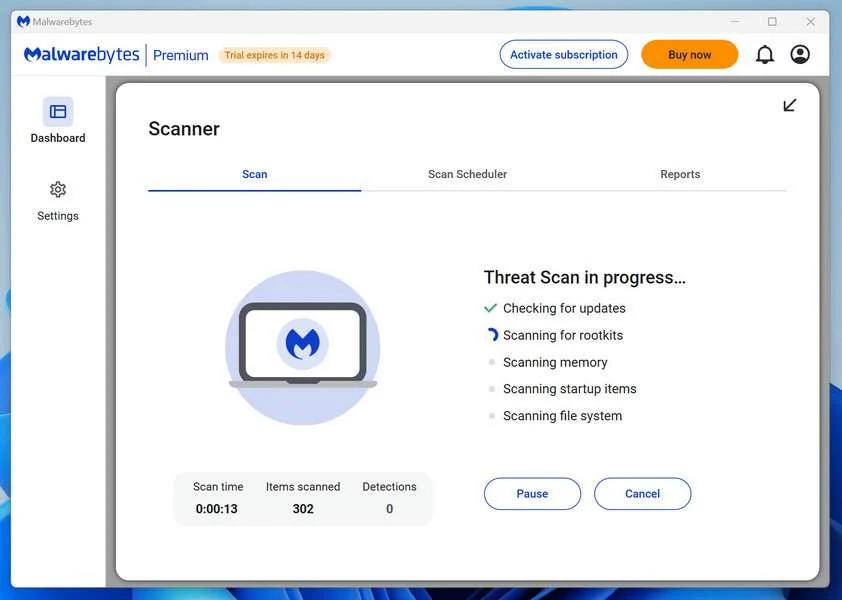
The scan checks your entire system for browser hijackers and other malicious programs, so it can take 5 to 20 minutes depending on your computer. Feel free to do something else — just check back occasionally to see the progress.
-
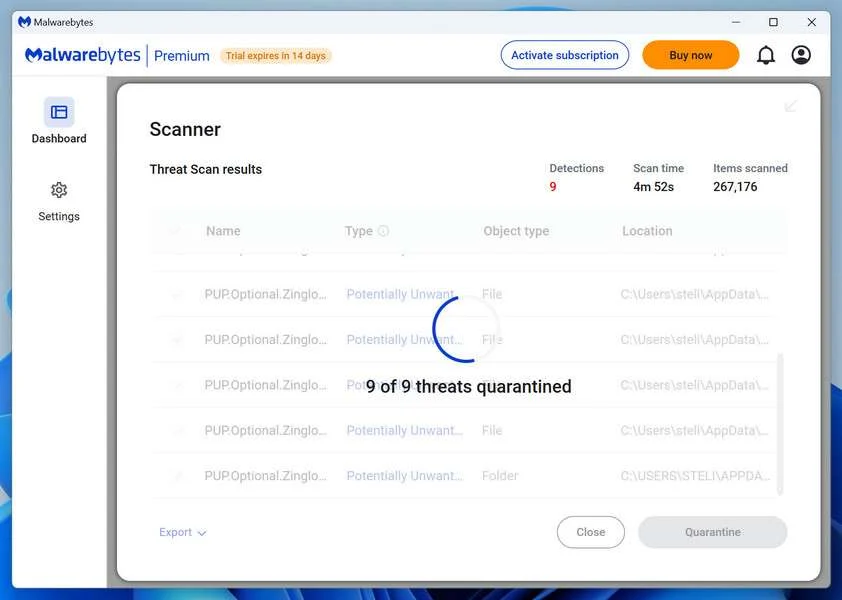
Quarantine the Detected Threats
When the scan is done, you’ll see a list of everything Malwarebytes found — malware, adware, and potentially unwanted programs. Click the “Quarantine” button to remove all of them at once.
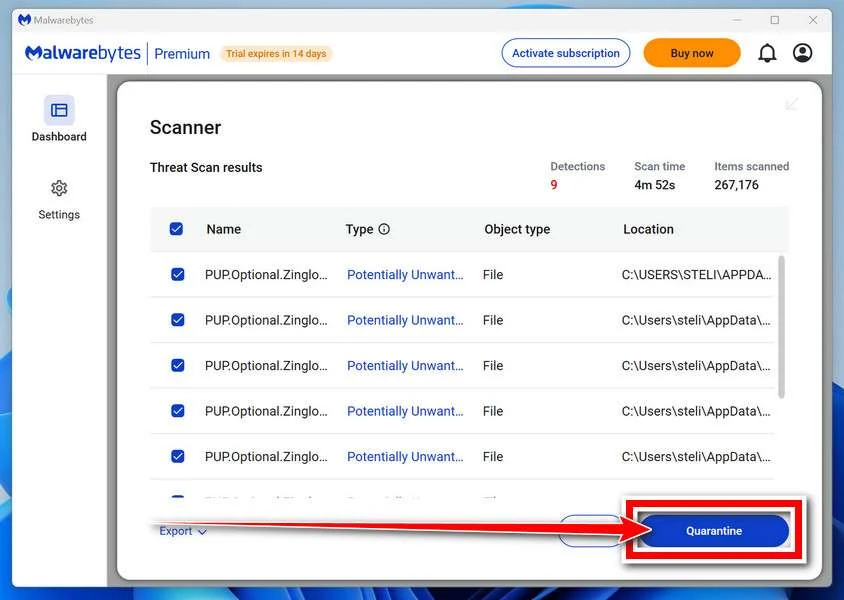
Malwarebytes will now remove the malicious files and registry entries and move them safely into quarantine.
-
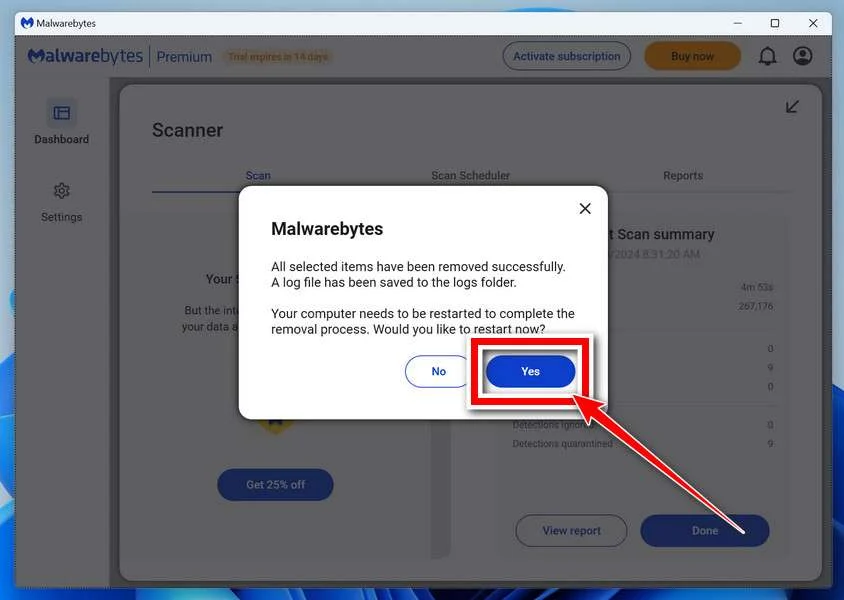
Restart Your Computer
Some threats can only be fully removed after a reboot. If Malwarebytes asks you to restart, click Yes. Once you’re logged back in, Malwarebytes has finished removing the threats it found.
That’s it — your Windows PC is now clean of trojans, adware, and other malware, and should be back to running smoothly.
If you are still having problems with your computer after completing these instructions, then please follow one of the steps:
- Run a computer scan with ESET Online Scanner
- Ask for help in our Windows Malware Removal Help & Support forum.
Run a Malware Scan with Malwarebytes for Mac
Malwarebytes for Mac is a free on-demand scanner that removes the malware other security software tends to miss — adware, browser hijackers, and unwanted programs included. Cleaning an infected Mac with Malwarebytes has always been completely free, and it’s our go-to recommendation. Follow the steps below to scan and clean your Mac in just a few minutes.
-
Download Malwarebytes for Mac
Click the button below to download the latest version of Malwarebytes for Mac.
Download MalwarebytesOfficial installer for macOS. Your download starts right away.Want real-time protection? See Malwarebytes PremiumMalwarebytes Free for MacScans and removes malware at no cost -
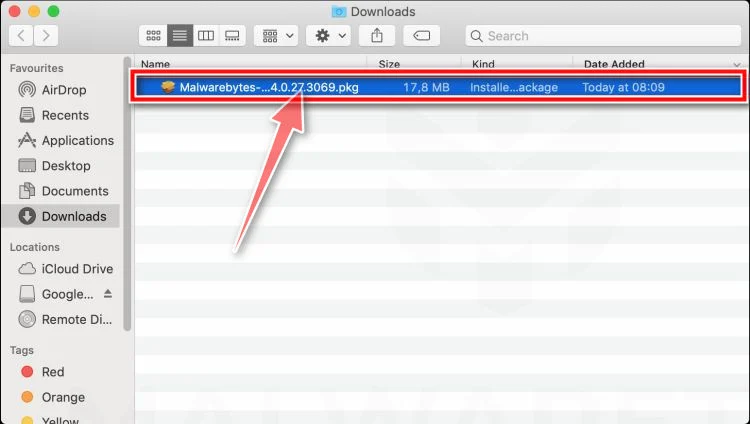
Open the Malwarebytes setup file
When the download finishes, open your Downloads folder and double-click the setup file to begin the installation.
-
Follow the On-Screen Prompts to Install Malwarebytes
The Malwarebytes for Mac Installer will guide you through a few quick screens. Click “Continue” and keep following the prompts until the installation completes.
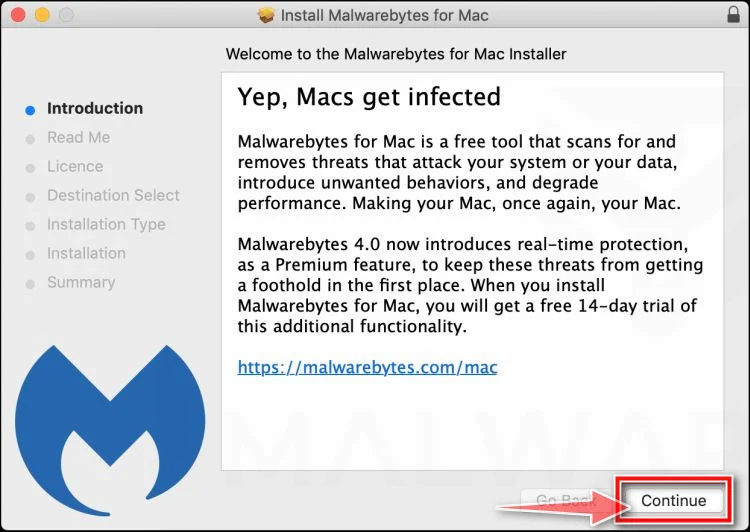
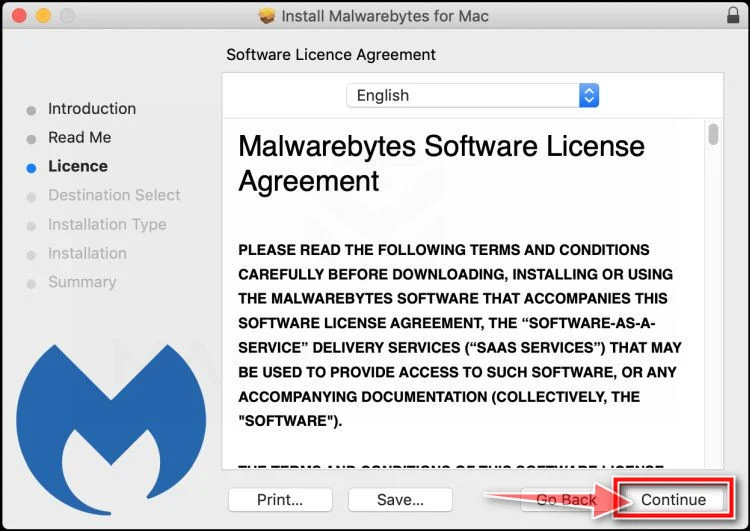
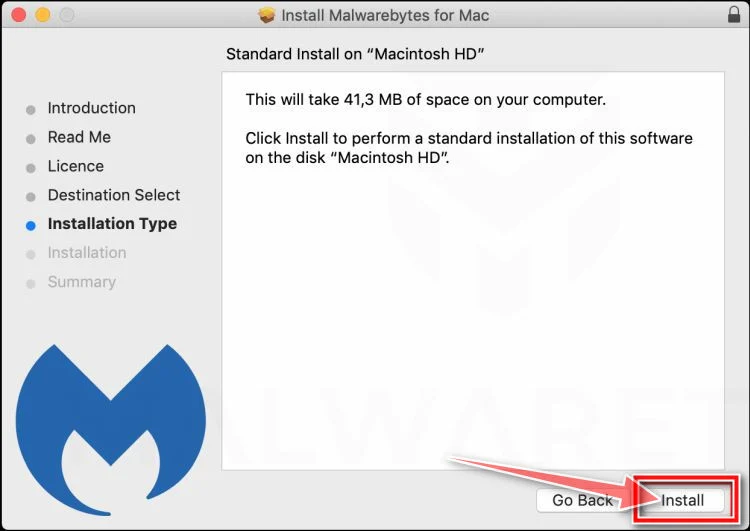
When the installation is complete, Malwarebytes opens to the Welcome to Malwarebytes screen. Click “Get started“.
-
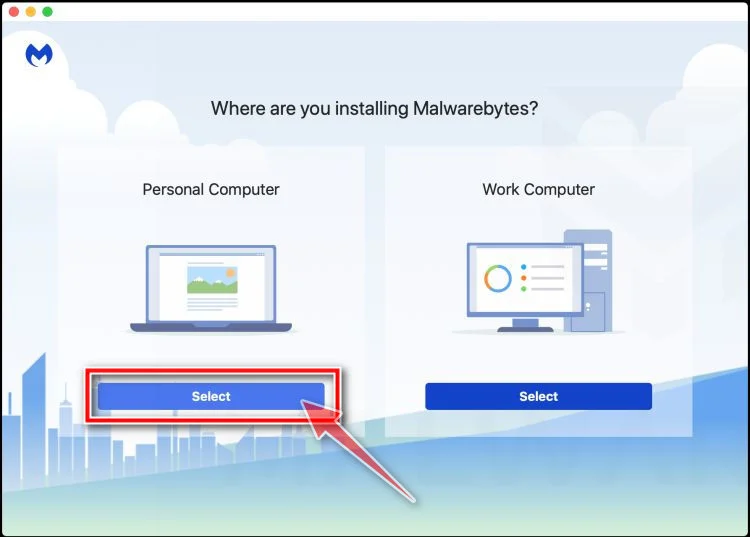
Select “Personal Computer” or “Work Computer”
Malwarebytes will ask what type of computer you’re installing it on. Click either Personal Computer or Work Computer, whichever applies.
-
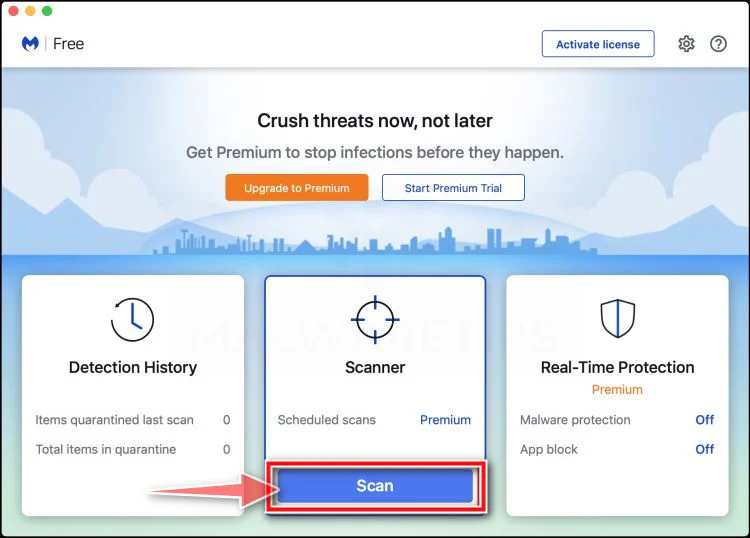
Start the Scan
Click the “Scan” button. Malwarebytes will automatically update its detection database and begin checking your Mac for malware.
-
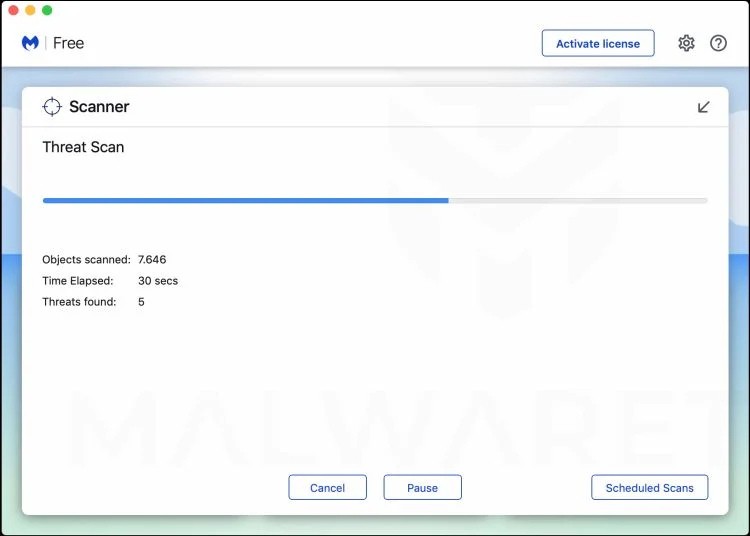
Wait for the Scan to Finish
Malwarebytes will scan your Mac for adware, browser hijackers, and other malicious programs. This can take a few minutes, so feel free to do something else — just check back occasionally to see the progress.
-
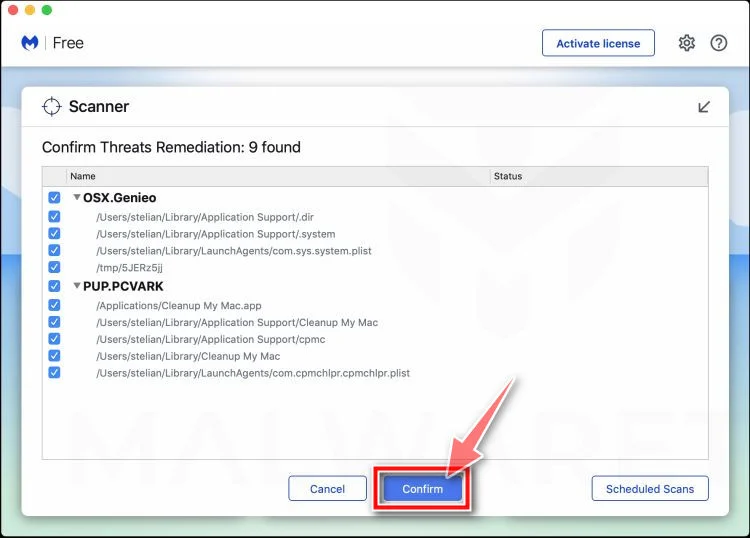
Quarantine the Detected Threats
When the scan is done, you’ll see a list of everything Malwarebytes found. Click the “Quarantine” button to remove all the threats at once.
-
Restart Your Mac
Malwarebytes will now remove all the malicious files it found. Some threats can only be fully removed after a reboot — if Malwarebytes asks you to restart, allow it. Once you’re logged back in, your Mac is clean.
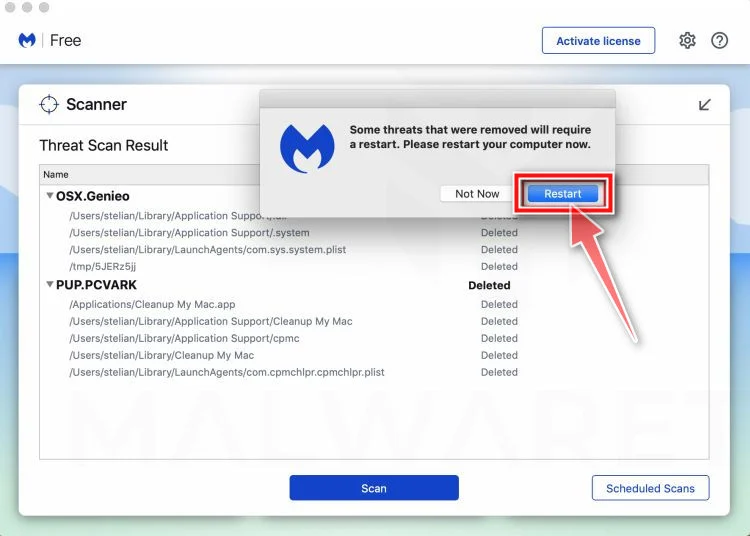
That’s it — your Mac is now free of adware, rogue browser extensions, and other potentially harmful software.
If you are still experiencing problems while trying to remove a malicious program from your computer, please ask for help in our Mac Malware Removal Help & Support forum.
Run a Malware Scan with Malwarebytes for Android
Malwarebytes for Android automatically detects and removes dangerous threats like malware and ransomware so you don’t have to worry about your most-used device being compromised. Aggressive detection of adware and potentially unwanted programs keeps your Android phone or tablet running smooth.
-
Download Malwarebytes for Android.
You can download Malwarebytes for Android by clicking the link below.
Get Malwarebytes for AndroidOpens Google Play in a new tab.Want real-time protection? See Malwarebytes Premium for AndroidMalwarebytes for AndroidScans your phone and removes malware at no cost -
Install Malwarebytes for Android on your phone.
In the Google Play Store, tap “Install” to install Malwarebytes for Android on your device.

When the installation process has finished, tap “Open” to begin using Malwarebytes for Android. You can also open Malwarebytes by tapping on its icon in your phone menu or home screen.

-
Follow the on-screen prompts to complete the setup process
When Malwarebytes will open, you will see the Malwarebytes Setup Wizard which will guide you through a series of permissions and other setup options.
This is the first of two screens that explain the difference between the Premium and Free versions. Swipe this screen to continue.
Tap on “Got it” to proceed to the next step.
Malwarebytes for Android will now ask for a set of permissions that are required to scan your device and protect it from malware. Tap on “Give permission” to continue.
Tap on “Allow” to permit Malwarebytes to access the files on your phone.
-
Update database and run a scan with Malwarebytes for Android
You will now be prompted to update the Malwarebytes database and run a full system scan.

Click on “Update database” to update the Malwarebytes for Android definitions to the latest version, then click on “Run full scan” to perform a system scan.

-
Wait for the Malwarebytes scan to complete.
Malwarebytes will now start scanning your phone for adware and other malicious apps. This process can take a few minutes, so we suggest you do something else and periodically check on the status of the scan to see when it is finished.

-
Click on “Remove Selected”.
When the scan has been completed, you will be presented with a screen showing the malware infections that Malwarebytes for Android has detected. To remove the malicious apps that Malwarebytes has found, tap on the “Remove Selected” button.

-
Restart your phone.
Malwarebytes for Android will now remove all the malicious apps that it has found. To complete the malware removal process, Malwarebytes may ask you to restart your device.
That’s it — your Android phone is now clean — no more malicious apps, adware, or browser redirects.
If you are still having problems with your phone after completing these instructions, then please follow one of the steps:
- Restore your phone to factory settings by going to Settings > General management > Reset > Factory data reset.
- Ask for help in our Mobile Malware Removal Help & Support forum.
Stay Protected: Block Ads and Malicious Sites
Now that your device is clean, keep it that way. Most infections start with a malicious ad or a fake download button — so blocking them at the source is your best defense.
We recommend AdGuard, which blocks malicious ads, phishing pages, and dangerous redirects before they can reach you.
👉 Download AdGuard and browse safely
The Bottom Line: Avoiding Jarteaused.live and Subscription Scams
In the end, Jarteaused.live operates with pure malicious intent to mislead internet users into entering valuable financial and personal data under false pretenses. By enticing visitors to take branded surveys with prize offers then strong-arming credit card information for alleged shipping charges, this scam business steals identities, forces unwanted subscription plans, resells sensitive data and may install dangerous system malware given website access.
Moving forward, extreme caution is advised when encountering similar money-too-good-to-be promotions across squirrelly websites, social channels, inboxes or online ads. Look for these red flags signaling likely subscription scams:
- Branding From Well-Known Retail/Tech Companies
- Easy Online Game Simulations Where You Always “Win” Valuable Prizes
- Requests for Personal Info Through Benign Surveys
- Claims of Needing Credit Cards Strictly for Shipping, Handling or Processing Costs
- Spelling Errors, Grammar Mistakes or Legal Wording Oversights
No legitimate corporation would solicit consumers randomly through third-party channels with hot ticket item giveaways in exchange for taking a few fun survey questions. That business model simply does not exist. Anytime financial details are explicitly required upfront to claim promised prizes or free gifts, scam alarms should sound.
Be vigilant, trust intuition, and refrain from inputting details onto shady websites regardless of messaging urgency or seeming security assurances. Financial harm may happen split-seconds after personal data changes hands with unscrupulous scammers masquerading as familiar brands. Simply put, if the offer appears too good to be possibly true – it always will be fraudulent.

Join the discussion
0 commentsShare your experience or ask a question about this article.
Discussion
Start the conversation
Have a question or something useful to share? Add the first comment.