

You may have seen viral Facebook posts claiming “Just happened an accident” and showing an ABC News logo and link. This is a dangerous phishing scam. Read on to learn what it is, how it works, what to do if you clicked, and answers to frequently asked questions.
Overview of the “Just Happened An Accident” Facebook Scam
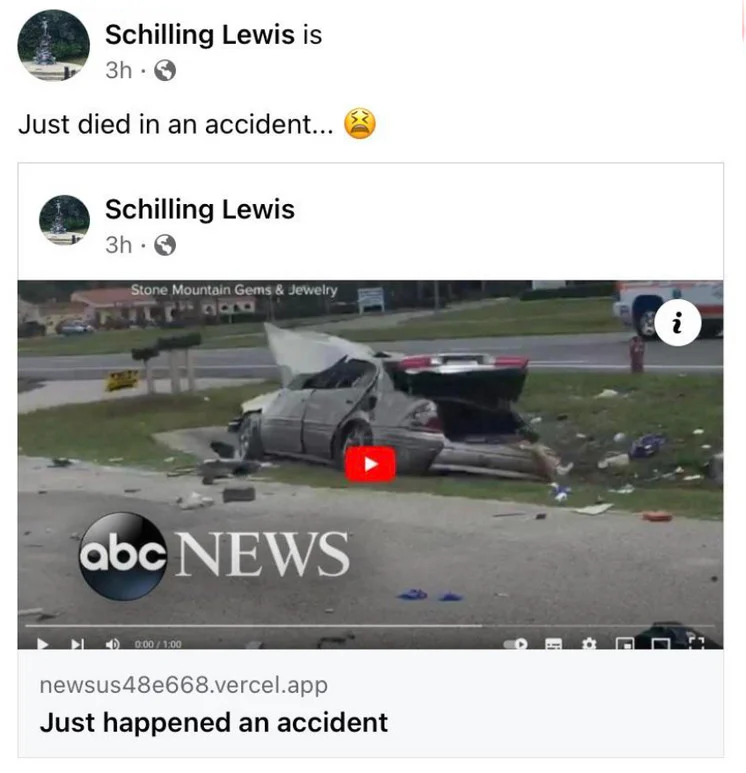
A Facebook scam has been spreading that uses shocking language like “Just happened an accident” or “Just happened a crash” to lure people to click malicious links.
The posts typically show an ABC News logo and image of a car crash. The link goes to a fake page impersonating ABC News, but actually sends visitors to phishing sites designed to steal Facebook login credentials and spread more spam posts.
This “just happened an accident” scam is a form of clickbait designed to arouse curiosity and panic to generate clicks and shares. However, the promised video footage does not exist. The car crash picture is from a real 2016 incident, but is being recycled out of context as Shocking imagery to spread the hoax further.
he posts may be shared by compromised accounts or fake profiles. Or you may see it spread organically as people fall for the clickbait and share the post without realizing it’s a scam. Avoid links promising shocking footage and be wary of sensationalized headlines from friends.
How the “Just Happened An Accident” Scam Spreads on Facebook
The criminals behind this scam use clever psychological tricks and automation to spread their posts rapidly on Facebook. Here’s how it works:
1. Hijack Real Facebook Accounts
The scammers use phishing sites, malware, or hacking tools to access and take over real Facebook accounts. This lets them post from profiles people already trust.
2. Create Fake Profiles
Scammers also create networks of fake accounts designed to look like real people. Some even use profile pictures generated with AI.
3. Post Shocking Clickbait
They post the “Just happened an accident” text along with accident images and prominent news logos. Curiosity and concern for the story makes the post spread rapidly.
4. Drive Traffic to Phishing Sites
The link directs victims to a fake ABC News page asking them to share or like the page to see the video. A second popup steals login credentials.
5. Spread Through Networks
Once someone falls for the scam, the hoax post spreads to their network, exponentially expanding the scam’s reach.
6. Post Variations
Scammers recycle the tactic with different shocking headlines, logos, and photos to keep the scam fresh.
Stay vigilant for posts promising exclusive footage of accidents, disasters, or other tragedies. Verify links before clicking, especially from accounts that seem suspicious.
What to Do If You Clicked the “Just Happened An Accident” Link
If you clicked the link from this “Just happened an accident” Facebook scam post, take these steps to protect yourself:
- Scan devices for malware: Run a Malwarebytes scan to check for and remove any malware that may have been installed from the phishing site.
- Change Facebook password: Even if you did not enter info, change your Facebook password in case of a breach. Enable two-factor authentication as well.
- Check Facebook activity: Look for posts you did not authorize or strange messages to friends which could indicate your account is compromised.
- Review privacy settings: Check that your profile visibility, posting ability, and approved apps are locked down.
- Monitor accounts: Watch bank and credit card statements for any suspicious charges indicating identity theft.
- Report scam: Notify Facebook to have the fraudulent post and account removed. You can also report phishing attacks to the FTC.
- Warn others: Let your friends know about the “just happened an accident” scam post so they can avoid it and similar social media clickbait scams.
With vigilance and safe internet practices, you can protect yourself from disturbing content like this designed to manipulate emotions and exploit victims.
Frequently Asked Questions About the “Just Happened An Accident” Facebook Scam
Here are answers to common questions about the viral “Just happened an accident” Facebook scam and phishing campaign:
Is the pictured car accident real?
The car crash image used in the posts is real, but several years old. It stems from a 2016 accident in Arizona that was covered by local news at the time. Scammers are recycling the old image out of context.
Does ABC News warn about this scam?
Yes, ABC News has posted about the scam claiming there is footage of a crash, clarifying they are not the source of the hoax posts.
How does the phishing work after clicking the link?
The initial link goes to a fake ABC page asking you to share or like to see footage. A second popup asks for your Facebook login, sending credentials to scammers.
Are there other versions of this “just happened” scam?
Yes, scammers recreate the posts with other logos like Fox News, BBC, or CNN. Any post promising exclusive accident footage is suspect.
Can this scam install malware on my device?
Possibly. The phishing sites may try to get you to download files containing malware. This is why you should scan your device afterward as a precaution.
Is there any real video of the crash described?
No, there is no actual exclusive video to see. The scam fabricates the story to trick people into clicking and sharing the post.
How can I remove the scam post or report it?
You can report phishing posts directly to Facebook. Click the three dots in the top corner and select “Report post” or “Find support.”
Can I get hacked just from clicking the link?
Simply clicking the link likely won’t lead to your account being hacked. Entering your login credentials on the phishing page, however, can compromise your account.
How can I tighten my Facebook security?
Enable two-factor authentication, be wary of third-party apps requesting excessive permissions, maintain complex passwords, and watch for signs of unauthorized access.
Should I delete Facebook because of scams like this?
Deleting Facebook may reduce your risk of phishing scams on the platform. However, many find the benefits outweigh the risks if you exercise caution, set proper privacy settings, and avoid sketchy links.
Conclusion
The “Just happened an accident” Facebook scam is a dangerous phishing campaign that exploits emotions to steal personal information. Use skepticism before interacting with dramatic posts online, no matter if shared by friend or stranger. Report fake news and spam to protect those in your network as well. With proper precautions, you can confidently spot and stop scams aimed at manipulating you through social media.

Join the discussion
0 commentsShare your experience or ask a question about this article.
Discussion
Start the conversation
Have a question or something useful to share? Add the first comment.