

A caller says there is a problem with your medical bill or insurance. They sound organized, know the Kaiser Permanente name, and want a quick answer.
Kaiser Permanente scam calls can arrive between genuine appointments and ordinary paperwork. Before discussing a claim, it helps to know which parts of the conversation deserve checking.
Overview
The caller borrows a real healthcare name
Kaiser Permanente is a real healthcare organization. The scam concerns outsiders pretending to represent it, not evidence that its ordinary services or legitimate bills are fraudulent.
A caller may raise an unpaid bill, an unfamiliar claim, or a coverage problem. Those topics fit the kind of administration patients already expect.
In its online scam guidance, Kaiser Permanente warns about impostors seeking personal information and payments through calls, texts, email, and fake websites.
The crucial question is whether the person speaking has independently verified authority. A displayed name or convincing explanation is not enough.
The request matters more than the opening
A scam call can begin with a question rather than an obvious demand. Asking whether you recognize a treatment may make you feel responsible for resolving it.
The risk increases when resolving that supposed problem requires payment, sensitive information, a login, or an action you have not independently checked.
A claim you do not recognize could also have an innocent explanation or require a genuine billing investigation. Verify the record through the provider, not the stranger.
Do not cancel appointments, stop treatment, or assume your insurance has ended because of an unsolicited call. Contact the appropriate member service team yourself.
Watch for requests that remove your control
These are reasons to end the conversation and take the issue to a trusted channel:
- Immediate payment to prevent a claimed coverage cancellation.
- Gift cards, cryptocurrency, or a payment site unrelated to the provider.
- A password or security code requested during an unsolicited contact.
- A demand to open an unfamiliar portal or install software.
- Threats, secrecy, or a transfer to supposed police who demand money.
You can decline the caller’s route while still checking a real account concern. Those choices are not in conflict.
What a Genuine Billing Check Should Establish
Start with the record, not the caller’s confidence
A recognizable organization name does not identify the call’s origin. Patient information, clinic names, and public contact details can be used to make an approach believable.
Ask yourself what you would need to understand the actual bill: the service date, relevant account record, amount, and explanation of the charge.
A screenshot sent by the caller is not the same as a bill viewed after independently signing in. The caller controls what they send.
Similarly, an explanation of benefits and a bill serve different purposes. If a document is confusing, ask the genuine provider or insurer to explain it.
Do not guess that every listed amount is currently due. Your own records and the verified billing team should establish what the document means.
Use the contact route you already trust
Use the member service number on your own identification card, the official app, or a provider website you reach independently.
A stranger may offer a callback number or send a link while you are talking. Taking either keeps you inside their version of the process.
Letting them transfer you to a supervisor has the same problem. Another voice on their call is not an independently reached provider representative.
If the matter is genuine, ask the independently contacted team how to address it. Keep any real deadlines while refusing the stranger’s payment instructions.
Identity verification is not a blanket excuse
When you initiate a legitimate service call, a representative may need information to identify your account. That is different from volunteering details to an unexpected caller.
Kaiser Permanente’s personal information guidance says it will not ask for your password over the phone or by email.
Do not give an unsolicited caller a list of medical or identifying facts just to discover what they supposedly know. You can verify elsewhere first.
How the Kaiser Permanente Call Scam Works
Step 1: An unexpected call presents a healthcare problem
The person introduces a billing, claims, or membership issue. The topic may sound plausible even if you cannot immediately connect it to an appointment.
A busy patient might answer because a real provider could be calling back. That ordinary expectation creates the opening for the impostor.
Caller ID can be spoofed. A familiar organization name or number on the display does not prove the call came from that organization.
The caller may sound professional, friendly, or impatient. Voice quality and office-like background noise cannot settle the identity question either.
Keep the first response narrow. You can ask what the call concerns without confirming a Social Security number, account password, or payment information.
If you are worried about missing a genuine call, record the claimed department and end the conversation. Then ask the real provider whether there is an issue.
Step 2: A plausible concern becomes urgent
The story makes waiting feel dangerous: coverage could stop, a bill could escalate, or a treatment claim could be associated with your identity.
Each possibility creates a different worry. The caller does not need to prove it while you are trying to remember an old appointment or payment.
This is why a rushed explanation can work. You are asked to act before you have the records needed to understand the claim.
Urgency alone is not proof that every medical contact is fake. The warning is urgency combined with an unverified identity and an unsafe requested action.
A deadline supplied only by the stranger should not override verification. Ask the genuine team about any real deadline after reaching it independently.
Step 3: The caller asks for money or private information
Some impostors push immediate payment. Others collect identifying details under the explanation that they need to locate or secure the patient’s account.
The information request can grow gradually. A name becomes a birth date, then a member number, then a password or a copy of identification.
Do not confuse a longer conversation with a more trustworthy one. Time spent explaining the story can make the relationship feel established without establishing who is speaking.
If payment is requested, identify what it supposedly settles and where it would go. A recipient unrelated to the verified bill is a serious warning.
Gift-card codes and cryptocurrency are especially unsuitable instructions for resolving a supposed provider bill. Kaiser’s scam guidance specifically warns about these demands.
A card number should not be supplied because the caller promises a small verification transaction. Check the underlying bill and authorized payment route first.
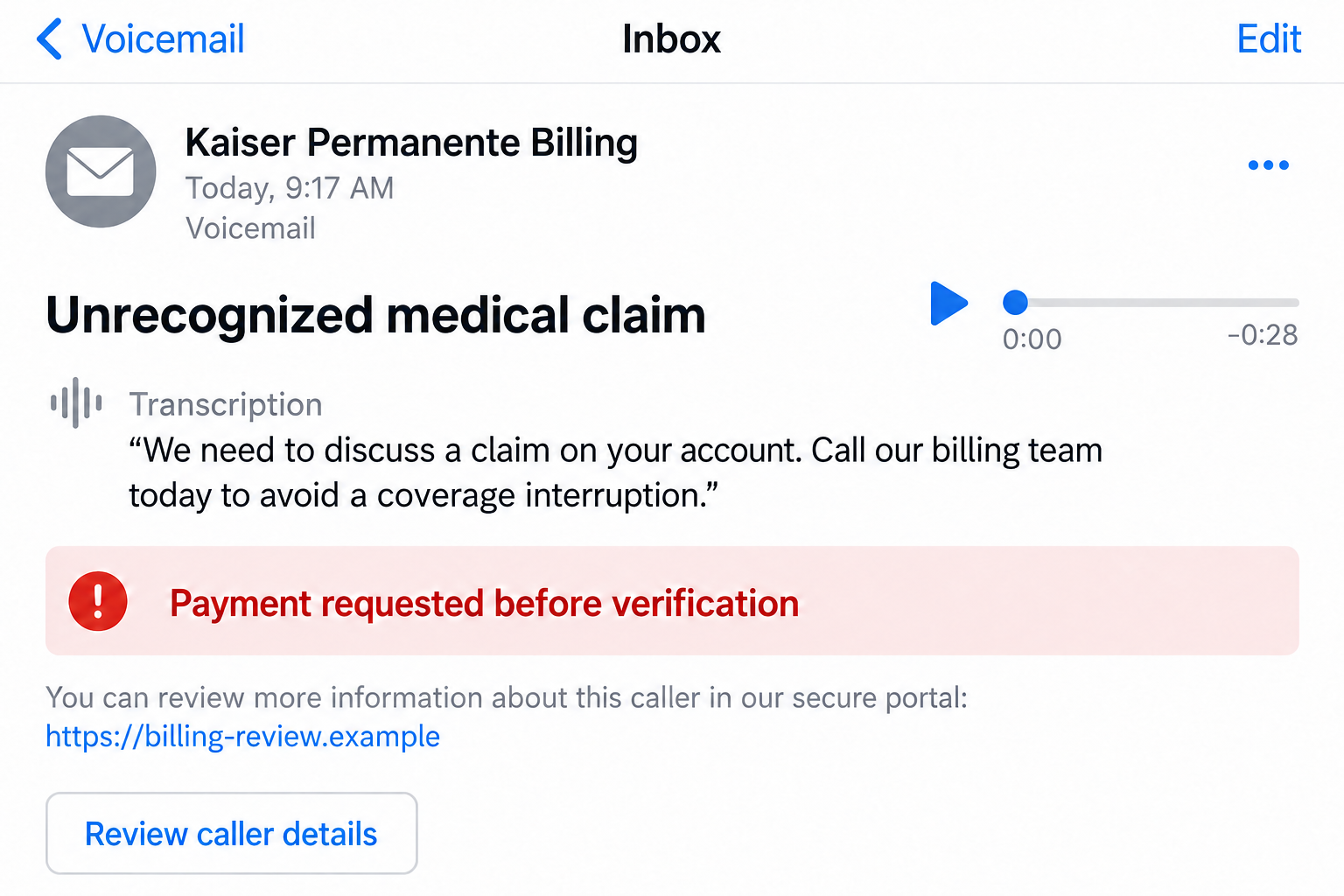
The illustrative voicemail screen above combines common pressure cues. It is not a recording, a patient account, or proof that every impostor uses identical words.
Step 4: A link, software request, or fake official may extend the pressure
A follow-up message may offer a portal or document. Treat it as part of the same unverified contact, even if it arrives while you are speaking.
Entering credentials into a lookalike page can expose them. A familiar layout does not make the site an authorized place to sign in.
Separate insurance impersonation cases can take another turn. The FBI has warned about health-insurer callers transferring people to fake Chinese law enforcement.
That warning describes threats involving alleged claims, fraudulent invoices, prosecution, and supposed bail. Some victims are told to maintain video connectivity.
This is a documented broader variant, not a feature of every Kaiser impersonation call. A simple billing impostor and an extended extortion attempt can require different responses.
Neither route deserves access to your device or continuous surveillance. A stranger’s claim to official authority does not make those instructions safe.
Step 5: The caller tries to keep the issue inside their own process
After you hesitate, the impostor may insist the matter cannot wait or offer another department to reassure you. The verification still remains under their control.
If you disclose information, the conversation may continue even after the original concern seems resolved. Further requests can arrive as corrections, extra checks, or payment complications.
You do not have to complete the process because you already started it. Stop, identify what you actually shared, and reach the real institutions involved.
Knowing a partial detail does not prove the person has access to your provider account. Likewise, receiving the call alone does not establish a healthcare data breach.
Work from what happened: a shared password, a payment, or access you granted. The stranger’s frightening claims should not decide the recovery plan.
Before You Return a Suspicious Medical Call
Separate three questions
First, is the caller who they claim to be? Second, does the account issue exist? Third, is the requested payment or information necessary?
A real unpaid bill answers only the second question. An impostor can exploit a genuine concern without becoming the right person to resolve it.
A correct name or appointment detail is similarly incomplete. Verify the channel and the requested action, not just one fact that sounds familiar.
Check without replying to the stranger
Open the official app from your usual device or navigate to the provider yourself. Do not use the contact’s link as your starting point.
Have your own bill, member card, and appointment records ready. Ask the genuine team whether the service, charge, or membership issue appears in its records.
If you find an unfamiliar claim, explain the discrepancy and ask how to dispute or investigate it. Do not assume the scam call has resolved it.
If records appear normal, you can still report the impersonation. Avoid asking the stranger for more proof or forwarding sensitive account screenshots to them.
Give family members a calm callback rule
Agree that unexpected medical payment demands are checked using the member card or official account. A trusted relative can help locate those routes.
Keep personal medical details private while asking for help. A warning to family does not require sharing the whole bill in a group chat.
If someone speaks more comfortably in another language, ask the provider about available assistance. Language should not become a barrier to independent verification.
What to Do if You Have Fallen Victim to This Scam
-
End contact and write down the exposure. Note what the caller said, what information you gave, and any link, installation, approval, or payment involved.
Keep voicemails, messages, and receipts. If you do not remember whether a field was submitted, tell the genuine support team that uncertainty.
-
Contact Kaiser Permanente independently. Use your own member card or the official account to ask about the bill, claim, or coverage issue.
Explain that someone impersonated the provider. If your member number or medical information was shared, ask which account or claims checks are appropriate.
Request the correct process for disputing unfamiliar records. Keep reference numbers, and do not disregard a genuine bill solely because a scammer mentioned it.
-
Call the payment provider if money or card data was involved. Describe how the payment was obtained and where it went.
Ask about stopping pending transactions, card replacement, a dispute, or a transfer recall. Options depend on the payment method and timing.
If gift-card codes were supplied, contact the issuer immediately with purchase records. Do not pay another fee to the caller to release a refund.
-
Secure credentials through the genuine service. Change any password entered on the suspicious page or supplied to the caller, using a trusted device.
If that password was reused elsewhere, change those accounts too. Review security settings and ask support about unfamiliar sessions or recovery changes.
For Social Security numbers or significant identity exposure, use IdentityTheft.gov to plan an appropriate response. Account passwords and identity records need different remedies.
-
Remove access you actually granted. End remote-support sessions and disconnect an affected device if a stranger can still control it.
If you installed an unknown program or encountered a suspicious download, Malwarebytes can help check for malware or unwanted software.
AdGuard may reduce exposure to known malicious web destinations and ads. It cannot authenticate a phone caller, erase stolen information, or reverse a payment.
Answering a call alone is not a reason to assume malware infection. Prioritize the relevant account, payment, or identity exposure.
-
Report threats and online financial fraud. Keep the caller’s claimed organization, displayed numbers, URLs, transaction details, and your timeline.
The FBI directs victims of the insurer-to-fake-police pattern to IC3. Use emergency services if you face immediate danger.
If someone demands continuous video contact or secrecy from family, stop complying and seek trusted assistance. Do not send supposed bail to a stranger.
-
Follow through on genuine account issues. Monitor relevant payment and provider records, and keep written responses to your dispute or report.
A new person promising guaranteed recovery may be another impostor. Verify any follow-up through the institution you contacted, rather than trusting a fresh incoming call.
Frequently Asked Questions
Are all calls from Kaiser Permanente fraudulent?
No. Genuine healthcare and billing contact exists. Check an unexpected request through your own member card, official app, or independently reached provider website.
Can the displayed provider number be spoofed?
Yes. Caller ID is not sufficient authentication. A legitimate-looking number does not establish who is speaking or justify sharing sensitive information.
What if the caller knows my appointment details?
That detail still does not verify the caller. End the contact and ask the real provider about the relevant record and any necessary action.
Should I pay to stop an immediate coverage cancellation?
Do not pay through an unsolicited caller’s instructions. Ask the genuine member service team whether a coverage issue exists and how to address it.
Does a medical claim call always lead to fake police?
No. The FBI documents that extended insurance impersonation variant, but it is not established for every Kaiser-related call.
Do I need a malware scan if I only answered?
Not merely for answering. Software checks become relevant after risky downloads or remote access. Information and payment exposure require their own response.
The Bottom Line
Do not pay, share passwords, or follow a stranger’s portal to resolve a supposed Kaiser Permanente issue. Check the real record through a trusted member channel.
If you already responded, tell the provider what was shared and contact the payment provider promptly where money was involved. Keep genuine medical care separate from the impersonation.

Join the discussion
0 commentsShare your experience or ask a question about this article.
Discussion
Start the conversation
Have a question or something useful to share? Add the first comment.