

An ad asks whether your partner has secret social accounts. A photo, a quick search, and an app called Lens AI appear to offer answers.
Before curiosity becomes a paid subscription, it helps to look at what the app actually promises, what the advertisement leaves out, and where your information goes.
Overview
A real app, promoted through a very personal question
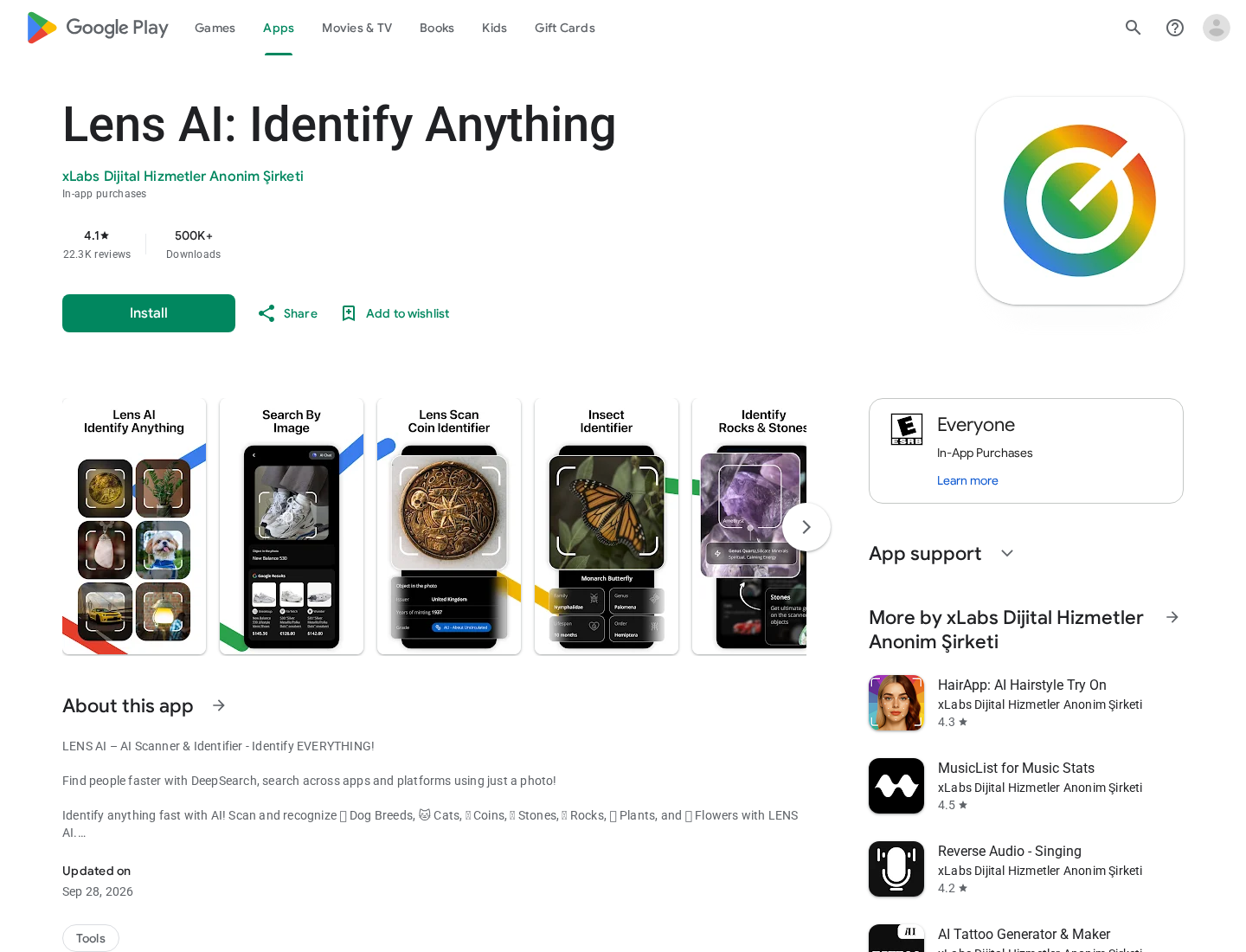
Lens AI: Identify Anything is an actual application from xLabs Dijital Hizmetler Anonim Şirketi. It has listings on Google Play and Apple’s App Store.
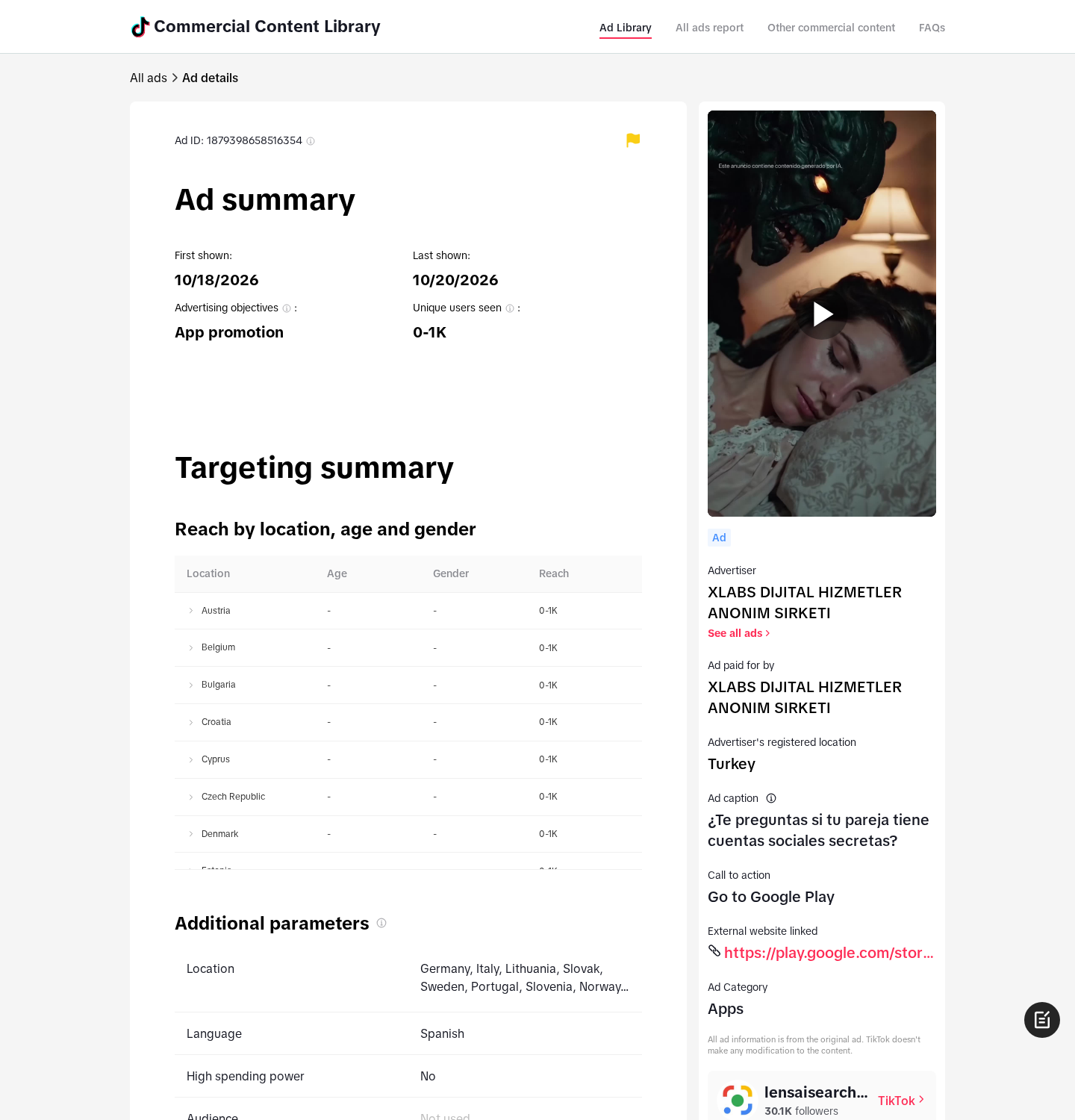
A TikTok advertising-library entry names that same company as advertiser and payer. Its Spanish caption asks whether your partner has secret social accounts.
The destination is the Android package com.lens.scan.ai.app. This identifies the particular Lens AI discussed here, rather than every application containing the word Lens.
That distinction matters. Google’s own visual-search tools and unrelated scanner apps should not be confused with this developer’s paid offering.
People search and object identification share the same listing
The Android description promotes finding people across platforms using a photo. It also describes recognizing pets, plants, coins, rocks, and other objects.
Apple’s listing similarly combines image identification with references to social and dating apps. Those descriptions do not establish access to private conversations or someone’s live location.
- The app exists, but its presence in an app store does not authenticate every advertising impression.
- Both stores identify in-app purchases. A free download is not a promise of free searches.
- Displayed customer complaints describe confusing trial charges and disappointing searches. Those are individual reports, not independently reproduced tests.
- The linked refund page discusses playlist transfers and website payments, creating a practical mismatch for someone buying an image-search app.
The buying problem is expectation, billing, and privacy
There is enough here to question this offer without claiming that Lens AI secretly hacks phones or that every charge is unauthorized.
Do not subscribe because an ad appears to promise certainty about another person. The advertised emotional payoff is much bigger than a documented image-search capability.
If you already paid, identify the billing platform first. Ending a subscription and asking for money back are separate actions.
What a Photo Search Can Actually Tell You
Suppose you upload a photograph and receive a profile match. Before drawing conclusions, you still need to know how that match was produced.
The same photograph could have been copied, reposted, attached to an impersonation account, or indexed long after the original account stopped being used.
A similar face is weaker still. Resemblance alone cannot establish identity, a relationship, or who controls a particular account.
Now consider an empty result. It might mean the search found nothing accessible, not that the person has no other accounts.
Neither outcome gives you a reliable shortcut to a sensitive personal conclusion. A search result is something to examine, not a verdict about someone’s conduct.
Public discovery and private access are different functions. Finding an indexed page does not unlock its messages, reveal deleted content, or grant access to a locked profile.
These limits matter especially when an ad arrives during an argument or a moment of doubt. You may be buying reassurance rather than evaluating software.
The useful purchasing question is simple: what exact output does the service promise, and can you assess that output before authorizing recurring charges?
For example, a useful demonstration would distinguish a confirmed exact-image match from a visually similar stranger. It would also explain the source and age of the result.
Without that distinction, a confident-looking profile card can encourage a conclusion that the underlying information cannot support.
Keep a search service out of urgent safety decisions. If someone is missing or in immediate danger, contact appropriate emergency services rather than buying speculative search results.
How the Lens AI Advertising and Subscription Funnel Works
Step 1: The advertisement turns uncertainty into a reason to search
The inspected TikTok entry leads with the possibility of secret accounts. It does not begin by asking whether you need help identifying a flower.
That choice gives an ordinary download decision emotional weight. Once you imagine an answer waiting behind the next screen, small payment requests can feel easier to justify.
You can follow the library’s recorded destination to the matching store listing. Check the developer and package identifier rather than relying on a familiar-looking icon.
Keep the distinction between this documented caption and more extreme claims you may encounter elsewhere. Private-message access is not established by the caption alone.
Step 2: The app-store page adds familiarity and social reassurance
A recognizable storefront, download counter, and rating can make the next step feel routine. You are no longer looking at an unfamiliar payment page.
However, the store description ranges across several uses. Someone arriving for partner searches is also being sold a general scanner and identifier.
Read the specific people-search wording instead of treating every screenshot or enthusiastic rating as evidence that your particular question can be answered.
Store reviews can reveal problems worth checking, but they are not a controlled demonstration of accuracy. Positive and negative experiences can coexist.
Step 3: A download can become a purchase decision
The listings disclose in-app purchases. Apple’s US page shows several prices, but the public price list does not clearly associate each amount with a billing interval.
It would be misleading to call every listed amount a weekly fee. Your actual confirmation screen and receipt determine what you agreed to buy.
Before approving payment, find the charge due immediately, any introductory period, the renewal amount, and whether renewal is automatic.
Do not assume the word trial means nothing is charged. If the confirmation shows an immediate price, treat it as a purchase.
Some displayed reviewers report paying when they expected a free trial. Keep those complaints in mind, but do not substitute them for your own purchase terms.
Step 4: A search can encourage another payment without resolving the question
If a search errors, produces vague matches, or finds nothing, paying again may feel like the only way to finish what you started.
That is the point to stop. Ask whether the service has demonstrated a useful result, rather than whether another attempt might finally settle your worry.
No result should require you to invent the missing explanation. A profile must be checked in context, and a blank search must remain a blank search.
Do not enter another person’s passwords, verification codes, or private account information to make a promised search work.
Step 5: The subscription can outlast the reason you installed it
You might close the app after one disappointing search and assume the matter is over. Billing can continue if an auto-renewing subscription remains active.
Google’s subscription guidance warns that uninstalling an app does not cancel its subscription. Apple provides subscription controls separately from deleting applications.
Check for a cancellation confirmation or expiration date. A message sent to a developer is not the same thing as turning renewal off.
Once you identify the merchant on your receipt, use that merchant’s billing controls. Do not guess between Apple, Google, and a website payment provider.
Check the account used for payment, too. A family member’s device, a second Google account, or an older Apple account can explain a missing subscription entry.
Finding the right account is more productive than repeatedly uninstalling the app or waiting for a developer response while the next billing date approaches.
Developer Identity, Contact Details, and Billing Policies
xLabs is named, but that does not make every sales claim reliable
The stores identify XLABS DIJITAL HIZMETLER ANONIM SIRKETI. The inspected TikTok advertisement names the same business as its payer.
That is a traceable connection between this ad and this app. It is stronger than assuming common ownership from a similar logo.
It still does not establish how accurate searches are. An identifiable developer can publish a product whose advertising leaves buyers with unrealistic expectations.
The policies describe a broader app business
The developer website lists an Istanbul address. Its policies cover multiple services rather than providing a narrowly written explanation of Lens AI’s people-search operation.
The refund page refers to transferring playlists, a free playlist allowance, and Paddle website payments. Those details do not naturally describe an image-identification purchase.
Do not assume that page’s two-day refund window governs your Apple or Google purchase. Start with the platform receipt and the rights attached to it.
Several contact addresses make the receipt especially important
The app description prints support@xlabs.com. The developer’s website policies list hello@xlabs.com.tr. These are published contact details, not response-tested support channels.
Keep requests specific: identify the application, transaction, amount, purchase platform, and the feature or trial representation that caused the problem.
You should never need to provide a full card number, account password, or one-time security code to explain a disputed app purchase.
Your photos and search information deserve an app-specific explanation
Apple’s developer-declared privacy label includes photos or videos, identifiers, and usage information. Google displays its own developer-supplied data-safety disclosures.
These labels describe declared practices, not independent proof of what happened to a particular uploaded photograph.
The broader privacy policy also contains sections for other apps. A retention promise about hairstyle photos should not automatically be applied to Lens AI searches.
Before uploading a sensitive image, ask which service receives it, how long it stays, and how to request deletion of that specific information.
Why This Is Not Proof That Someone Can Spy on You
Seeing an unnerving advertisement does not mean your partner has used the advertised app, or that your phone has been compromised.
The inspected materials establish an advertisement, a real app, paid features, and policy questions. They do not demonstrate remote access to another person’s device.
Do not confront someone on the strength of a generated match or an advertising demonstration. First establish whether the underlying page and identity are genuine.
If you want to check your own public exposure, begin with accounts and images you control. Review privacy settings and remove unnecessary public identifiers.
Use account security tools when there are actual warning signs, such as unknown sessions or password-reset messages you did not request.
Installing more people-search apps is not a substitute for protecting an account. It may simply spread the same personal information across more services.
What to Do If You Subscribed to Lens AI
-
Find the receipt before taking the next step. Search your email and purchase history for Lens AI and the charged amount.
Record the purchase date, transaction reference, account used, and whether Apple, Google, or another provider billed you.
-
Cancel an unwanted renewal through the billing platform. On iPhone, open Settings, tap your name, choose Subscriptions, and select the relevant subscription.
For Google Play, open Payments and subscriptions, then Subscriptions. Select the correct Google account if the purchase does not appear.
Follow the platform’s cancellation prompts and save the resulting expiration or cancellation screen. Removing the app alone is not enough.
-
Request a refund separately. For an Apple-billed purchase, use Apple’s official refund process at reportaproblem.apple.com.
For a Google-billed purchase, use Google Play’s refund support. Describe what you expected, what you authorized, and what actually happened.
Attach a saved advertisement or confirmation screen where available. Eligibility depends on the purchase and applicable rules, so do not assume approval is guaranteed.
-
Keep useful evidence without exposing someone else’s identity. Save the ad URL, app listing, offer wording, receipt, and cancellation confirmation privately.
If reporting a misleading search result, redact names, photographs, and usernames that do not need to be shared.
-
Review permissions and uploaded information. Revoke photo, camera, location, or contact access that you no longer want the app to have.
Ask the developer about deletion of previously uploaded information. Permission removal controls future access; it does not necessarily erase data already submitted.
-
Escalate an unresolved billing problem accurately. Contact the platform or payment provider with your evidence, and distinguish an unwanted renewal from a charge you never authorized.
Do not pay anyone who promises a guaranteed refund or secret access to a target’s accounts. That would create another risk instead of fixing this one.
Frequently Asked Questions
Is Lens AI the same as Google Lens?
No. This article concerns the xLabs app, identified on Android as com.lens.scan.ai.app. Do not attribute its advertising or subscription terms to Google’s separate products.
Can Lens AI reveal private messages or live phone locations?
The inspected listings do not demonstrate those abilities. Searching images or public profiles is not equivalent to unlocking a private account or remotely tracking a device.
Is every Lens AI trial free?
Do not assume that. Check the actual purchase confirmation for the immediate charge, introductory terms, renewal amount, and interval before approving anything.
Does deleting Lens AI stop its charges?
Not by itself. Cancel any active subscription through the provider that billed you, then retain confirmation showing that renewal has ended.
Does an app-store listing prove the advertisement is accurate?
No. A listing establishes that the application is distributed there. It does not independently verify every implied search result or emotional promise in an ad.
Should I subscribe to check whether my partner has secret accounts?
No. Do not purchase this offer for that certainty. Public-search results can be incomplete or misidentified, and the billing and policy questions deserve resolution first.
The Bottom Line
Do not subscribe to Lens AI expecting proof about a partner’s private life. A people-search advertisement is not evidence of reliable answers or private-account access.
If you already paid, cancel unwanted renewal through the platform on your receipt, request a refund separately, and review what personal information you uploaded.

Join the discussion
0 commentsShare your experience or ask a question about this article.
Discussion
Start the conversation
Have a question or something useful to share? Add the first comment.