

Did Donald Trump really say “trans people don’t exist”?
In late August 2025, a video began circulating across social media platforms claiming to show the former U.S. president making exactly that statement behind a White House podium.
The clip, quickly gaining millions of views, appeared authentic at first glance. Trump’s voice sounded real, his lip movements matched, and the backdrop was consistent with official White House events.
But fact-checkers soon revealed the truth: the video was not real. It was an AI-generated deepfake, designed to look and sound like Trump delivering a controversial and inflammatory speech that never happened.
This article investigates how the video spread, how it was made, why so many believed it, and what the deeper implications are for politics, journalism, and society in an era where artificial intelligence can fabricate reality in seconds.
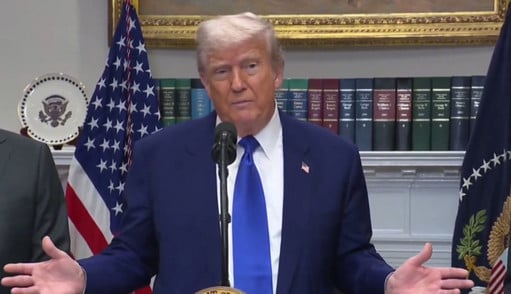
Overview of the Trump “Trans People Don’t Exist” Video
The fake video began trending on August 28, 2025, when a post on X (formerly Twitter) by user @MaverickDarby featured the clip with the caption:
“Trump: ‘Trans people don’t exist.’ Unreal.”
The short clip quickly gained momentum, amassing over 4.6 million views within 24 hours. Soon after, it spread across other platforms including TikTok, YouTube, Facebook, Instagram, Bluesky, and LinkedIn, often shared without disclaimers or warnings about its authenticity.
What the Fake Video Showed
In the doctored clip, Trump is seen standing at a White House lectern, allegedly declaring:
“My fellow Americans, enough is enough. We need to call a spade a spade. Trans people don’t exist. Let me say it again. Trans people do not exist. I can tape a stick on a horse’s head but that doesn’t make it a unicorn. It’s a horse, folks. Total horse. These are deeply disturbed individuals who have been manipulated by liars and psychopaths in positions of influence. They are on mind drugs, very powerful. And they are all addicted to porn—‘porno,’ is what some people call it, I believe. Very destructive to the mind and spirit is pornography.”
The speech contained Trump’s recognizable rhetorical style—repetition, colloquialisms like “folks,” and the kind of exaggerated comparisons he often makes. This familiarity made the deepfake highly convincing.
The Real Footage Behind the Fake
Fact-checking organizations including Snopes, Reuters, and PolitiFact quickly traced the manipulated video back to its source material: a May 2025 White House event where Trump discussed economic and trade policy.
At no point in the original footage did Trump mention transgender people. Instead, deepfake creators synced AI-generated voice lines with Trump’s lips, altered the audio track, and stitched segments together to simulate a seamless delivery.
The Timing of the Fake
The video’s virality coincided with heightened tensions around gender identity issues in the U.S. Just a day before its release, news broke of a tragic school shooting allegedly involving a transgender suspect. The timing gave the fake clip extra traction, as it appeared to show Trump responding directly to the incident—even though no such speech ever took place.
How the Trump Deepfake Was Created
Understanding how this clip was fabricated sheds light on why deepfakes are such a growing threat.
1. AI Voice Cloning
The fake video used AI-powered voice synthesis, replicating Trump’s tone, cadence, and verbal quirks. Modern tools such as ElevenLabs, OpenVoice, and similar AI voice models can generate near-perfect speech from just a few minutes of audio samples.
Trump, as one of the most recorded individuals in the world, provides an abundant dataset for such systems. This made cloning his voice with uncanny accuracy especially easy.
2. Lip-Sync and Face Animation
To make the words appear natural, the creators likely employed AI-driven lip-syncing software like DeepFaceLab, Wav2Lip, or Synthesia. These tools map new mouth movements onto existing video frames, ensuring the lip motions correspond to the fabricated dialogue.
3. Video Splicing
The original May 2025 footage was cut into segments, removing references to unrelated topics and creating pauses that allowed for seamless insertion of the AI-generated speech.
4. Background Consistency
To avoid suspicion, the backdrop remained identical to the real White House setting, complete with flags and podium seals. Viewers familiar with Trump’s past addresses recognized the setting, reinforcing the illusion.
Why People Believed the Deepfake So Quickly
The Trump “Trans People Don’t Exist” video highlights how psychological, social, and technological factors converge to make deepfakes dangerously believable.
Familiar Style of Speech
The AI-generated lines mimicked Trump’s recognizable communication style:
- Repetition of key phrases (“Trans people don’t exist”)
- Use of analogies (“horse with a stick taped on its head”)
- Dismissive, mocking tone
This rhetorical authenticity made the speech sound like something Trump might plausibly say, even if he hadn’t.
Existing Controversial Policies
Trump’s real record on transgender issues—such as rolling back protections for transgender students and restricting military service for transgender individuals during his presidency—gave viewers additional reason to believe he might have said something along these lines.
Timing and Emotion
The clip appeared just after a high-profile tragedy involving a transgender suspect, fueling emotions of anger, fear, and polarization. In such emotionally charged contexts, people are more likely to accept shocking content at face value.
Speed of Social Media
On platforms like X and TikTok, content spreads faster than corrections. By the time fact-checkers debunked the video, millions had already seen—and many had already believed—the false claims.
Confirmation Bias
Viewers predisposed to either support or oppose Trump on LGBTQ+ issues were more likely to believe the clip, because it aligned with their expectations of him.
What the Real Footage Actually Shows
To be clear: Trump never said “trans people don’t exist.”
The event used for the deepfake was a May 2025 White House economic briefing. In that speech, Trump addressed topics such as:
- Inflation and cost of living
- Energy policy
- Trade negotiations with China
- Infrastructure investment
At no point did the subject of transgender people arise.
Fact-checkers compared the fake and original videos side by side, confirming that the visuals matched but the audio track was manipulated.
The Dangerous Future of AI Misinformation in Politics
The Trump deepfake is just one example of how AI can distort reality. But the implications are far-reaching.
Deepfakes and Democracy
In an election year, false clips can:
- Damage reputations of candidates
- Shift public opinion
- Influence voter turnout
- Distract from real policy discussions
The speed of misinformation outpaces fact-checking, leaving millions misinformed even after corrections circulate.
Loss of Trust in Media
If people cannot distinguish real from fake, they may stop trusting any video evidence at all. This “liar’s dividend” benefits those who want to deny real scandals by claiming “it’s just a deepfake.”
Targeted Harassment
Deepfakes are often used to harass individuals, especially minorities, activists, and public figures. A political deepfake like this one can also inflame social divisions and fuel hate speech online.
Legal and Ethical Challenges
Laws around deepfakes are still evolving. While some states have passed regulations against political deepfakes close to elections, global enforcement remains patchy.
What To Do If You’ve Shared or Believed the Video
If you fell for the Trump “Trans People Don’t Exist” video, you’re not alone. Millions did. But here’s how to handle it:
- Verify Sources – Before sharing, check if reputable outlets (Reuters, AP, Snopes) have reported on the clip.
- Delete Misinformation – If you shared the video believing it was real, remove it from your feed to stop further spread.
- Post a Correction – Consider posting that the video was fake, linking to fact-checking sources.
- Stay Critical – Look for red flags in videos: strange mouth movements, unnatural pauses, or captions like “unreal.”
- Educate Others – Share awareness about how deepfakes work and encourage skepticism of viral political clips.
The Bottom Line
The viral Trump “Trans People Don’t Exist” video is not real. It is a fabricated AI deepfake built from real White House footage but altered with cloned voice and manipulated lip-sync technology.
Trump has indeed made controversial statements and policies related to transgender rights, but this specific quote is false.
The video illustrates the urgent threat AI misinformation poses to democracy, media trust, and public discourse. As deepfake technology improves, society must strengthen its defenses—through fact-checking, platform accountability, and public awareness.
Did Trump say trans people don’t exist? No. The video is fake. But the danger of deepfakes is very real.
FAQ: Trump “Trans People Don’t Exist” Deepfake
Did Donald Trump really say “trans people don’t exist”?
No. The viral clip was a deepfake. Trump never made those remarks in any official setting.
Where did the fake video come from?
The manipulated footage was based on a White House economic event in May 2025. The audio track was altered using AI voice cloning.
How many people saw the fake video?
The original X post received over 4.6 million views in just one day, and the clip spread across TikTok, YouTube, Instagram, and Facebook.
Why was the video believable?
Because it used Trump’s real image, a cloned voice, and his rhetorical style. It also appeared at a politically sensitive moment.
Who made the deepfake?
The specific creator remains unknown, though the tools used are widely available online.
Why are deepfakes dangerous in politics?
They can manipulate voters, spread false narratives, and damage trust in democratic processes.
How can you spot a deepfake?
Look for unnatural lip-syncing, odd audio quality, captions like “unreal,” and confirm with trusted news outlets.
What should you do if you shared the fake video?
Delete the post, share corrections, and encourage others to fact-check before spreading content.
What does this incident mean for the future?
It highlights how misinformation will become increasingly sophisticated and harder to detect, especially during elections.
Will platforms ban AI deepfakes?
Some platforms are developing AI labeling systems, but enforcement is inconsistent. Regulation may increase as more incidents arise.








