

Live Security Platinum is a malicious program also known as rogue security software, which will display fake security alerts in an attempt to scare you into buying this fake security product.
In addition, Live Security Platinum has also hijacked your PC,blocking your from running files,so now when your trying to open and executable file (file ending with .exe), this program will instead display this fake alerts:
Warning!

Application cannot be executed. The file rdpclip.exe is infected. Please active your antivirus software.
Security Monitor: WARNING!

Attention! System detected a potential hazard (TrojanSPM/LX) on your computer that may infect executable files. Your private information and PC safety is at risk.

To get rid of unwanted spyware and keep your computer safe you need to update your current security software.

Click Yes to download official intrusion detection system (IDS software).
Live Security Platinum Warning Spyware.IEMonster activity detected. This is spyware that attempts to steal passwords from Internet Explorer, Mozilla FireFox, Outlook and other programs. Click here to remove it immediately with Live Security Platinum
Live Security Platinum Firewall Alert Live Security Platinum Firewall has blocked a program from accessing the Internet. Internet Explorer Internet Browser is infected with SVCHOST.Stealth.Key-logger. This worm is trying to send your credit card details using Internet Explorer Internet Browser to connect to remove host
Live Security Platinum will also cause malicious browser redirects and system slowdowns so it needs to be removed from your computer as soon as possible.
This is are a few images of Live Security Platinum:
![[Image: Live Security Platinum virus]](http://malwaretips.com/blogs/wp-content/uploads/2012/06/Live-Security-Platinum.png "Live Security Platinum")
![[Image: Live Security Platinum Alert]](http://malwaretips.com/blogs/wp-content/uploads/2012/06/Live-Security-Platinum-alert1.png "Live Security Platinum fake alert")
![[Image: Live Security Platinum Warning]](http://malwaretips.com/blogs/wp-content/uploads/2012/06/Live-Security-Platinum-warning1.png "Live Security Platinum fake warning")
Registration codes for Live Security Platinum
As an optional step,you can use the following license key to register Live Security Platinum and stop the fake alerts.
AA39754E-715219CE
Please keep in mind that entering the above registration code will NOT remove Live Security Platinum from your computer , instead it will just stop the fake alerts so that you’ll be able to complete our removal guide more easily.
Live Security Platinum Removal Guide
STEP 1 : Start your computer in Safe Mode with Networking
- Remove all floppy disks, CDs, and DVDs from your computer, and then restart your computer.
- Press and hold the F8 key as your computer restarts.Please keep in mind that you need to press the F8 key before the Windows start-up logo appears.
Note: With some computers, if you press and hold a key as the computer is booting you will get a stuck key message. If this occurs, instead of pressing and holding the “F8 key”, tap the “F8 key” continuously until you get the Advanced Boot Options screen. - On the Advanced Boot Options screen, use the arrow keys to highlight Safe Mode with Networking , and then press ENTER.
![[Image: Safemode.jpg]](data:image/gif;base64,R0lGODlhAQABAAAAACH5BAEKAAEALAAAAAABAAEAAAICTAEAOw== "Safe Mode with Networking screen")
![[Image: Safemode.jpg]](http://malwaretips.com/images/removalguide/safemode.jpg "Safe Mode with Networking screen")
STEP 2: Remove Live Security Platinum malicious proxy server
Live Security Platinum may add a proxy server which prevents the user from accessing the internet,follow the below instructions to remove the proxy.
- Start the Internet Explorer browser and if you are using Internet Explorer 9 ,click on the gear icon (Tools for Internet Explorer 8 users) ,then select Internet Options.
- Go to the tab Connections.At the bottom, click on LAN settings.
- Uncheck the option Use a proxy server for your LAN. This should remove the malicious proxy server and allow you to use the internet again.
![[Image: IE gear icon]](http://malwaretips.com/images/removalguide/icongear.jpg "Gear Icon") (Tools for Internet Explorer 8 users) ,then select Internet Options.
(Tools for Internet Explorer 8 users) ,then select Internet Options.![[Image: Internet-options-IE.png]](http://malwaretips.com/images/removalguide/ie1.png "Internet Options in IE")
![[Image: Remove-proxy-server2.png]](http://malwaretips.com/images/removalguide/ie2.png "Connections tab in Internet Explorer")
![[Image: Remove-proxy-server3.png]](http://malwaretips.com/images/removalguide/ie3.png "Uncheck the option Use a proxy server for your LAN")
If you are a Firefox users, go to Firefox(upper left corner) → Options → Advanced tab → Network → Settings → Select No Proxy
STEP 3: Repair your Windows Registry from Live Security Platinum malicious changes.
Smart Fortress 2012 has changed your Windows registry settings so that when you try to run a executable file (ending with .exe ) , it will instead launch the infection rather than the desired program.
- Download the registryfix.reg file to fix the malicious registry changes from Live Security Platinum.
REGISTRYFIX.REG DOWNLOAD LINK (This link will automatically download the registry fix called registryfix.reg) - Double-click on registryfix.reg file to run it. Click “Yes” for Registry Editor prompt window,then click OK.
![[Image: fix registry]](http://malwaretips.com/blogs/wp-content/uploads/2011/12/registry.png "Remove Live Security Platinum (Uninstall Guide) 1")
STEP 4: Run RKill to terminate known malware processes associated with Live Security Platinum.
RKill is a program that will attempt to terminate all malicious processes associated with Live Security Platinum,so that we will be able to perform the next step without being interrupted by this malicious software.
Because this utility will only stop Live Security Platinum running process, and does not delete any files, after running it you should not reboot your computer as any malware processes that are configured to start automatically will just be started again.
- While your computer is in Safe Mode with Networking ,please download the latest official version of RKill.Please note that we will use a renamed version of RKILL so that Live Security Platinum won’t block this utility from running.
RKILL DOWNLOAD LINK (This link will automatically download RKILL renamed as iExplore.exe) - Double-click on the iExplore.exe icon in order to automatically attempt to stop any processes associated with Live Security Platinum.
- RKill will now start working in the background, please be patient while the program looks for various malware programs and tries to terminate them.
IF you are having problems starting or running RKill, you can download any other renamed versions of RKill from here. - When Rkill has completed its task, it will generate a log. You can then proceed with the rest of the guide.
![[Image: run-rkill-1.png]](http://malwaretips.com/images/removalguide/rkill1.png "RKILL ICON")
![[Image: run-rkill-2.png]](http://malwaretips.com/images/removalguide/rkill2.png "RKILL Command prompt")
![[Image: Live Security Platinum rkill3.jpg]](http://malwaretips.com/images/removalguide/rkill3.png "RKILL LOG")
WARNING: Do not reboot your computer after running RKill as the malware process will start again , preventing you from properly performing the next step.
STEP 5: Remove Live Security Platinum malicious files with Malwarebytes Anti-Malware FREE
- Download the latest official version of Malwarebytes Anti-Malware FREE.
MALWAREBYTES ANTI-MALWARE DOWNLOAD LINK (This link will open a download page in a new window from where you can download Malwarebytes Anti-Malware Free) - Start the Malwarebytes’ Anti-Malware installation process by double clicking on mbam-setup file.
- When the installation begins, keep following the prompts in order to continue with the setup process. Do not make any changes to default settings and when the program has finished installing, make sure you leave both the Update Malwarebytes’ Anti-Malware and Launch Malwarebytes’ Anti-Malware checked. Then click on the Finish button. If Malwarebytes’ prompts you to reboot, please do not do so.
- Malwarebytes Anti-Malware will now start and you’ll be prompted to start a trial period , please select ‘Decline‘ as we just want to use the on-demand scanner.
- On the Scanner tab,select Perform full scan and then click on the Scanbutton to start scanning your computer.
- Malwarebytes’ Anti-Malware will now start scanning your computer for Live Security Platinum malicious files as shown below.
- When the scan is finished a message box will appear, click OK to continue.
- You will now be presented with a screen showing you the malware infections that Malwarebytes’ Anti-Malware has detected.Please note that the infections found may be different than what is shown in the image.Make sure that everything is Checked (ticked) and click on the Remove Selectedbutton.
- Malwarebytes’ Anti-Malware will now start removing the malicious files.After completing this task it will display a message stating that it needs to reboot,please allow this request and then let your PC boot in Normal mode.
![[Image: Malwarebytes Installer]](http://malwaretips.com/images/removalguide/malwarebytes-setup.png "Malwarebytes Anti-Malware Installer")
![[Image: Finishing Malwarebytes installation]](http://malwaretips.com/images/removalguide/update-malwarebytes.png "Malwarebytes last setup screen")
![[Image: Decline Malwarebytes trial]](http://malwaretips.com/images/removalguide/mbam3.PNG "Decline trial period in Malwarebytes Anti-Malware")
![[Image: Starting a full system sca]](http://malwaretips.com/images/removalguide/start-scan-malwarebytes.png "Perform a Full System Scan with Malwarebytes Anti-Malware")
![[Image: Malwarebytes scanning for malicious files]](http://malwaretips.com/images/removalguide/scan-malwarebytes.png "Malwarebytes Anti-Malware scanning for Live Security Platinum")
![[Image: Malwarebytes scan results]](http://malwaretips.com/images/removalguide/results-malwarebytes.png "Malwarebytes when the system scan has finished")
![[Image: Infections found by Malwarebytes]](http://malwaretips.com/images/removalguide/detection-malwarebytes.png "Removing the infections found by Malwarebytes")
STEP 6: Double check your system for any left over infections with HitmanPro
- This step can be performed in Normal Mode ,so please download the latest official version of HitmanPro.
HITMANPRO DOWNLOAD LINK(This link will open a download page in a new window from where you can download HitmanPro) - Double click on the previously downloaded fileto start the HitmanPro installation.
IF you are experiencing problems while trying to starting HitmanPro, you can use the “Force Breach” mode.To start this program in Force Breach mode, hold down the left CTRL-key when you start HitmanPro and all non-essential processes are terminated, including the malware process. (How to start HitmanPro in Force Breach mode – Video) - Click on Next to install HitmanPro on your system.
- The setup screen is displayed, from which you can decide whether you wish to install HitmanPro on your machine or just perform a one-time scan, select a option then click on Next to start a system scan.
- HitmanPro will start scanning your system for malicious files. Depending on the size of your hard drive, and the performance of your computer, this step will take several minutes.
- Once the scan is complete,a screen displaying all the malicious files that the program found will be shown as seen in the image below.After reviewing each malicious object click Next.
- Click Activate free license to start the free 30 days trial and remove the malicious files.
- HitmanPro will now start removing the infected objects, and in some instances, may suggest a reboot in order to completely remove the malware from your system. In this scenario, always confirm the reboot action to be on the safe side.
![[Image: hitmanpro-icon.png]](http://malwaretips.com/images/removalguide/hpro1.png "HitmanPro Installer")
![[Image: installing-hitmanpro.png]](http://malwaretips.com/images/removalguide/hpro2.png "HitmanPro installation process")
![[Image: hitmanpro-setup-options.png]](http://malwaretips.com/images/removalguide/hpro3.png "HitmanPro setup options")
![[Image: hitmanpro-scanning.png]](http://malwaretips.com/images/removalguide/hpro4.png "HitmanPro scanning for Live Security Platinum")
![[Image: hitmanpro-scan-results.png]](http://malwaretips.com/images/removalguide/hpro5.png "HitmanPro Live Security Platinum scan results")
![[Image: hitmanpro-activation.png]](http://malwaretips.com/images/removalguide/hpro6.png "Activate HitmanPro free license to remove detected infections")
STEP 7: Remove any left over malicious registry keys and files
Live Security Platinum has sadded some malicious registry keys to your Windows installation , to remove this malicious changes we need to run a scan with RogueKiller
- Please download the latest official version of RogueKiller.
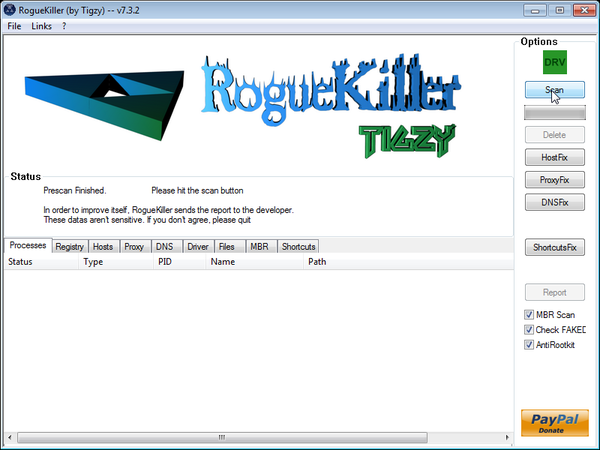
ROGUEKILLER DOWNLOAD LINK (This link will automatically download RogueKiller on your computer) - Double click on RogueKiller.exe to start this utility and then wait for the Prescan to complete.This should take only a few seconds and then you can click the Start button to perform a system scan.
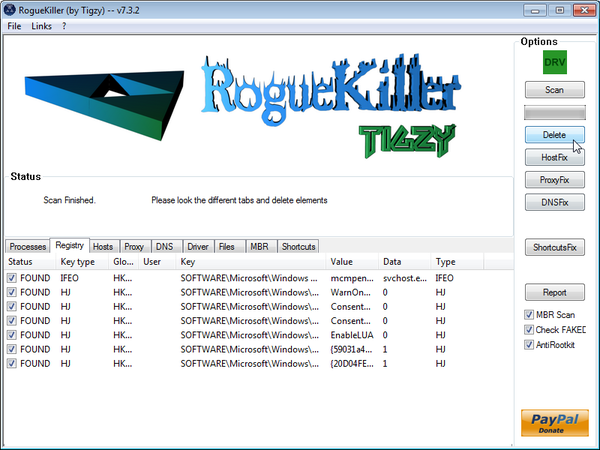
- After the scan has completed, press the Delete button to remove any malicious registry keys.
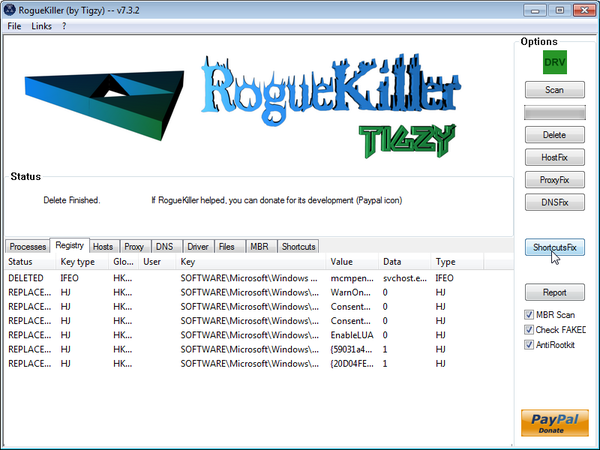
- Next we will need to restore your shortcuts, so click on the ShortcutsFix button and allow the program to run.









Thank you for taking the time to post this! It worked out great and I really appreciate your instructions. Go FC Barcelona
How long should it take for RKILL to scan and create a log? I have been waiting about 10 minutes, every once in a while I see an hourglass by the pointer.
Should I try another RKILL?
Hello Michelle,
Yes, try another RKILL version… If it doesn’t kill the process in 10 minutes then it’s most likely stuck.
If it still doesn’t work,please try the below steps:
STEP 1. While in NORMAL MODE,download HitmanPro and then start this program in ForceBreach Mode
1.Here are the direct download links for HitmanPro,
– http://dl.surfright.nl/HitmanPro36.exe (For 32bit)
– http://dl.surfright.nl/HitmanPro36_x64.exe (For 64bit)
2.Hold down the left CTRL-key when you start HitmanPro and all non-essential processes are terminated, including this rogue malicious process
Here is a video that explains with graphic details how to do this : http://www.youtube.com/watch?v=m6eRWTv2STk
3. Let HitmanPro scan and remove the detected infections.
STEP 2: While in NORMAL MODE,download/Run Rkill and then run a scan with Malwarebytes
1.Download any re-named version of Rkill (direct download links bellow):
RKILL DOWNLOAD LINK #1
RKILL DOWNLOAD LINK #2
RKILL DOWNLOAD LINK #3
2.Next,please perform a scan with Malwarebytes as seen on the guide.
STEP 3. Run a scan with ESET Online Scanner
ESET Online Scanner Download Link (This link will automatically download ESET Online Scanner on your computer.)
Waiting for your reply to tell me how everything is working.. :) Good luck!
I ended up going back to safe mode and using HitManPro. It found A LOT of items and removed them. I then used malwarebytes Anti-malware and it found 21 more. Went back to HitMan, it found more and then back to malwarebytes, it didn’t find any, went back to Hitman, it didn’t find any….I can now use my computer!! Thanks so much!! there are free advice places that have a section where you can donate to help out you wonderful people. Do you have one???
Stelian,
I tried to use your advice to remove the platinum malware virus but I cannot even access the I tenet on my computer anymore so I can go all the way to step 6 where it tries to access the Internet and I can’t go any further to finish the process, please help, my IT department can’t figure it out either!!??
Any help would be appreciated??!!
Heather
This is an activation code for Live Security Platinum: AA39754E-715219CE , this will NOT remove this rogue software,however it should stop those annoying alerts until you will use the removal tools.Does your internet connection work now?
Also you can download Malwarebytes and perform a scan now?
Hi :) i have this virus and every time i try to install RKill or one of its renamed counterparts i get an error field stating that the installation failed because ‘it was already being used in another process’..could it be because i think this computer is infected with live security platinum as well as security shield? (at the same time!)…please help!!
Hello,
Hello,
Lets try do this another way.Please follow the below steps:
STEP 1. While in NORMAL MODE,download HitmanPro and then start this program in ForceBreach Mode
1.Here are the direct download links for HitmanPro,
– http://dl.surfright.nl/HitmanPro36.exe (For 32bit)
– http://dl.surfright.nl/HitmanPro36_x64.exe (For 64bit)
2.Hold down the left CTRL-key when you start HitmanPro and all non-essential processes are terminated, including this rogue malicious process
Here is a video that explains with graphic details how to do this : http://www.youtube.com/watch?v=m6eRWTv2STk
3. Let HitmanPro scan and remove the detected infections.
STEP 2: While in NORMAL MODE,download/Run Rkill and then run a scan with Malwarebytes
1.Download any re-named version of Rkill (direct download links bellow):
RKILL DOWNLOAD LINK #1
RKILL DOWNLOAD LINK #2
RKILL DOWNLOAD LINK #3
2.Next,please perform a scan with Malwarebytes as seen on the guide.
STEP 3. Run a scan with ESET Online Scanner
ESET Online Scanner Download Link (This link will automatically download ESET Online Scanner on your computer.)
Waiting for your reply to tell me how everything is working.. :) Good luck!
Ok. I got HitmanPro to run, but at the end of the scan, there was no ‘activate free license’ option. …is that normal?
If this is your personal computer then it’s not normal….HitmanPro is free to use for scanning and removal for home users…..
This is an activation code for Live Security Platinum: AA39754E-715219CE , this will NOT remove this rogue software,however it should stop those annoying alerts.
Now,can you please run the HitmanPro Force Breach Mode again just stop the malicious process.
Next, please start a scan with Malwarebyte Anti-Malware as seen on the guide and remove any detected infections.
Next,run a ESET Online scan (you have the instructions in my previous reply) to remove any other malicious files.
Then please re-scan with HitmanPro and if it will find any malicious files then write the path and then we will manually remove them.
well this is a work computer…could that be the problem? is there a way to remove the malware without using hitman pro or using a different program? i have eset antivirus and eset sysinspector on this computer already…will either of those do the job?
Yes,ESET and Malwarebytes should remove this infection without any problems…Just to the scans and then report back.
Good…now i have a new problem. I went to download malwarebytes and it hit download now on the free version. it took me to a site called majorgeeks.com and tried to have me do a scan….I went back to the link you provided got to the malwarebytes page, hit the left ctrl key and hit download now. the majorgeeks site opened in a new tab. am i supposed to go through majorgeeks? or is this just the virus redirecting me?
MajorGeeks is a good site which is hosting a Malwarebytes download mirror…so it’s ok to download from them :)
Here is the direct download link for Malwarebytes Anti-Malware: http://www.malwarebytes.org/mbam-download-exe.php
11 minutes into the scan and no objects detected!!! hopefully it stays that way :) thanks for all your help…ill let you know how it turns out…you are AMAZING!!! and your help is priceless :) THANK YOU!!!!
ok. so malwarebytes doesnt come up with anything but everytime i run an eset scan this is what pops up and i manually delete it every time:
Operating memory » \GLOBAL??\2b090f37\WINDOWS\$NtUninstallKB9278$\722014007\Desktop.ini a variant of Win32/Sirefef.EZ trojan
how to get rid of this for good? live security platinum isnt listed in the programs in the control panel so can i assume it isnt on the computer anymore?
Yes,it should be gone.How is your computer behaving?Are you seeing any other alerts from Live Security Platinum?
Also download, save and run the ESET ‘Win32/Sirefef’ stand-alone malware removal tool and follow the prompts as directed to check for any sirefef ifnection.
ESET Sirefef Remover Download Link
ok. just finished an eset scan.
Scan Log
Version of virus signature database: 7309 (20120718)
Date: 7/18/2012 Time: 9:04:08 AM
Scanned disks, folders and files: Operating memory;C:\Boot sector;C:\
Operating memory » C:\Program Files\UltraVNC\WinVNC.exe » ZIP » – archive damaged
googledesktopsetup.exe » PECompact v2.xx – is OK
C:\WINDOWS\Temp\avg-4d0cf54e-7a81-4f59-8160-c52061d3f159.tmp » INNO » – archive damaged
Number of scanned objects: 584806
Number of threats found: 0
Time of completion: 10:17:52 AM Total scanning time: 4424 sec (01:13:44)
Notes:
[4] Object cannot be opened. It may be in use by another application or operating system.
‘no objects found’!!! THANK YOU!!! you are a lifesaver…i will definitely look you up if i ever run into another virus :) you’re amazing Stelian ;D
…btw..my computer is a little slower but there is no redirecting or messages from live security platinum…so unless theres something else i could do to get my internet back to speed im a-ok!!!
Worked great! Thanks for your help!
Thanks for this!! Actually, I was fixing this on a remote machine and couldn’t start any programs or boot into safe mode (because I was remote). Putting in the activation code allowed me to run the regedit fix and delete the virus all without safe mode, am currently scanning to remove anything else.
It’s really a wonderful easy step by step removal of harmful marlware. I was shocked to see that my computer was affected. After reading your article, I got the confidence to do it myself and followed your 6 steps and everything went fine. Now my computer is without any malware. I really thank you for this wonderful article.
I love you Mr. Stelian Pilici!
Stelian
Thank you. Thank you. Thank you. Everything worked perfectly. My computer actually feels like it is running faster now!!
Sanjay
Hello Stelian:
I posted earlier thanking you – but now have a question. How do these people
continue on the web collecting unsuspecting users credit card information and using it without eventually getting caught? You would think that the credit card police would be able to track them down. Do you have any insight into this? – Thanks (more just wanting to vent my frustration – not only about going through the fix – which you made easy – but going through the initial panic when your computer/programs/data won’t run)
Hello Debbie,
This cyber criminals are usually from China,Russia or another eastern European countries,and at some point they get caught however it takes along time for this to happen because different organizations across the globe from need to work together.As you imagine this process is not very quick and all the investigations take some time so from here comes the need for a International cyber crime police divison.
Another problem is that users aren’t even aware that they have been the victim of cyber criminals and they don’t report it.
Here is some very interesting video which you can watch:
http://www.youtube.com/watch?v=cf3zxHuSM2Y
http://www.youtube.com/watch?v=WQgeUHlTThc
Just today,there are reports that 3 cyber criminals where convicted to 8 years of prison for install keyloggers on some computers: http://nakedsecurity.sophos.com/2012/07/16/seattle-cybercrime-trio-sentenced-for-3m-hacking-spree-via-wifi-and-malware/
You ROCK!!!! All of the virus seems to be gone from my computer – I had this or a similar virus approximately 1 year ago and we wound up cleaning off the hard drive and starting over. Thank you, thank you, thank you.
Stelian, you are a saint! I initially thought this virus had totalled my computer (since nothing would open), but thanks to you and your six easy steps, everything seems to be back to normal. I am running the Kaspersky scan just to be extra-sure, but all seems to be going well. Thanks so much!
Kaspersky did catch something the others did not. Here’s the report:
: Deleted (events: 1)
7/16/2012 9:20:17 PM Deleted Trojan program Trojan.Win32.Inject.eift C:\Documents and Settings\Lauren\AppData\LocalLow\Sun\Java\Deployment\cache\6.0\55\25877b37-15c52381 High
Based on that report, I am now concerned about the Java icon that appeared on my toolbar at some point during the virus attack and keeps saying it needs to be updated. How do I get rid of this?
Thanks again, Stelian.
What browser are you using and why on earth do you need a toolbar?:)
Please run a ESET scan as seen on my previous reply.
Thanks. The printer icon is the only thing I use on the toolbar (if that’s even what you call it). I don’t know how to get rid of the other stuff and have never felt particularly motivated to find out. I am using Firefox. I just started the ESET scan; I imagine it will take a long time, as Kapersky took all night.
Hello Lauren,
You can also run an ESET scan if you have the time:
Run a scan with ESET Online Scanner
ESET Online Scanner Download Link (This link will automatically download ESET Online Scanner on your computer.)
I ran the ESET scan, and it deleted eight threats, all connected with Netscape Navigator (which is installed on my computer, though I haven’t used it in a long time). Still don’t know how to get rid of this Java thing on my toolbar. Thanks, again, for all your help.
Hello,
Just reset Firefox to its default settings: http://support.mozilla.org/en-US/kb/reset-firefox-easily-fix-most-problems and everything should be ok.
Thanks, but the Java thing is not on the Firefox toolbar; it’s on the Windows toolbar (though perhaps it’s not called a toolbar). Maybe it’s perfectly innocuous and I’m being unnecessarily suspicious. I did take your advice and reset Firefox to its default settings, though. Certainly can’t hurt.
Ok,now I understand..You see that Java sign in Windows…Because you have Java installed… :)….
Go to Add or Remove Programs and uninstall Java…and you’re done – http://www.java.com/en/download/uninstall.jsp
Stay safe!
Thanks! It worked :)
Thanks so much! The instructions were amazing for someone who is not at all computer savvy. I was able to delete the malware myself and am very grateful.
Lavinia
I am trying to remove the virus for the 2nd time– thought I had it last night ( followed instructions) only to find it was in place when I started the computer this morning.
I don’t remember getting a “re-start” message after the latest scan with malwarebytes.. but apparrently 7 files were removed
Now the computer seems to be hung up at removing a trojan — while on the 2nd sweep, with Hitman
also for your info.. there was no Proxy checked on the LAN settings
any suggestions?
Hello,
Lets try do this another way.Please follow the below steps:
STEP 1. While in NORMAL MODE,download HitmanPro and then start this program in ForceBreach Mode
1.Here are the direct download links for HitmanPro,
– http://dl.surfright.nl/HitmanPro36.exe (For 32bit)
– http://dl.surfright.nl/HitmanPro36_x64.exe (For 64bit)
2.Hold down the left CTRL-key when you start HitmanPro and all non-essential processes are terminated, including this rogue malicious process
Here is a video that explains with graphic details how to do this : http://www.youtube.com/watch?v=m6eRWTv2STk
3. Let HitmanPro scan and remove the detected infections.
STEP 2: While in NORMAL MODE,download/Run Rkill and then run a scan with Malwarebytes
1.Download any re-named version of Rkill (direct download links bellow):
RKILL DOWNLOAD LINK #1
RKILL DOWNLOAD LINK #2
RKILL DOWNLOAD LINK #3
2.Next,please perform a scan with Malwarebytes as seen on the guide.
STEP 3. Run a scan with ESET Online Scanner
ESET Online Scanner Download Link (This link will automatically download ESET Online Scanner on your computer.)
Waiting for your reply to tell me how everything is working.. :) Good luck!
Thanks a lot for this step by step guide. Really helpful!
Dear Stelian
Thanks this virus/trojan got into my computer too. Could still use the internet but antivirus and makware remover wouldnt work, and couldnt remove the pirate program either
The people doing these things are malicious arent they?
Managed without too much effort by following yr instructions…..
You laid it out very simply, you should also do something paid….. for sale, great style, that you have.
However my 75 yo Mum would be challenged, probably to follow this if she had to, probably why my brother set her up with linux LOL
Thanks again very very very much !
Hello,
I went through all the steps as instructed. Is there any way for me to check if all malware is gone? Also i had some files on my computer that i sent via e-mail after it was infected (didn’t want to lose them) is there any chance they are infected? As you can see i’m not very knowledgable about this stuff :). Any help is appreciated.
Steven
Hello Steven,
If you want to perform another check,then I recommend that you do a scan with the following tools:
1.Run a scan with Kaspersky Virus Removal Tool
Click here to download the Kaspersky Virus Removal Tool.
2.Run a scan with Eset Online Scanner.
ESET Online Scanner Download Link (This link will automatically download ESET Online Scanner on your computer.)
Stay safe!
Hello,
I ran both scans and they both found nothing :).
Thank you very much for your help!
Steven
Thank you very much, this has been highly helpful. God bless you :)
thank you for the sharing.
Great article…helped me save a lot of time.
Thanks,
Ram
Thank you very much for your easy guide in removing the Life Security Platinum virus…was able to do it just by following it step by step. God bless you.