

A lottery notice says a delayed announcement has finally reached you. There is a substantial prize, a reference number, and someone ready to handle the paperwork.
It’s easy to pause over that possibility. Before replying to the supposed representative, look at how the notice explains your unexpected good fortune.
Overview
A false winning notice combines familiar lottery names
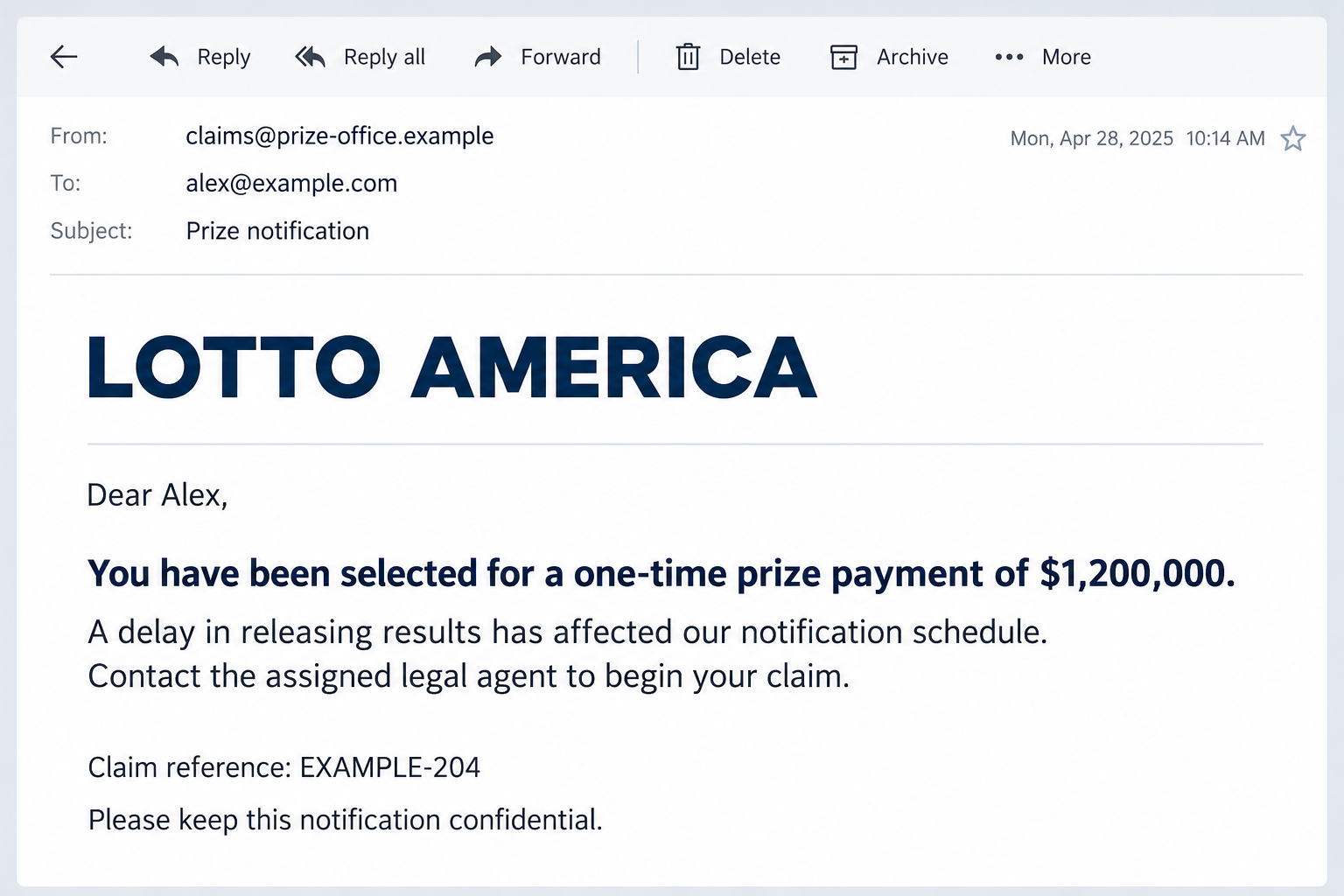
The Lotto America email scam claims an unexpected $1.2 million prize and mixes Lotto America with a supposed Mega Millions international promotion.
It explains the late notice as an internal delay and provides invented claim details. None establishes that the recipient holds a winning ticket.
The genuine lottery games are being impersonated. The warning concerns the fabricated award and collection process, not an accusation that those games are fraudulent.
A legal agent becomes the route to collecting the money
The notice directs the recipient toward a supposed legal representative. It describes travel or an overseas alternative as ways to complete collection.
That makes the next step sound like logistics rather than a decision about trust. But a fictional prize does not become real through professional-sounding paperwork.
No actual fee payment, genuine lawyer’s involvement, or delivered award was established in this example. Any later demand must be recorded as its own event.
You don’t need to answer to protect a prize you never won
Do not contact the alleged representative, send identification, or pay to secure this award. A deadline in an unsolicited notice does not create a genuine entitlement.
- Check a real ticket with the actual lottery that issued it.
- Don’t use the notice’s contact details to authenticate its own claim.
- Keep ticket references, public results, and your identity documents separate.
- Discuss the approach with someone you trust instead of obeying its secrecy request.
- Contact your actual payment provider promptly about money already sent.
Why a Delayed Announcement Can Sound Plausible
The email needs to explain why this is the first you have heard of the money. An internal mistake offers a convenient answer.
Instead of asking whether the prize exists, you may wonder how long it has been waiting. The sender turns missing context into part of the story.
A reference number adds to that impression. It makes the notice look connected to a record, even if no genuine lottery has issued that record.
Formal wording can have the same effect. Being told a payment was approved sounds stronger than being invited to apply for a chance to win.
Neither detail resolves the basic question: which actual entry is supposed to have won? Start there, outside the email’s conversation.
If you did buy a ticket, use that ticket’s issuing lottery. Don’t assume this notice concerns it just because the message mentions a familiar game.
If you didn’t enter, don’t supply identity information so the sender can find an explanation. You shouldn’t have to help build the case for your supposed win.
You can reject the email without proving every line false. Its unsupported claim is not a problem you must solve before moving on.
How the Lotto America Email Scam Works
Step 1: A surprise award places money in the reader’s imagination
The opening announces a substantial payment as though the decision has already been made. The recipient is positioned as a winner rather than a potential entrant.
That can change how the reader evaluates risk. Sending a document may feel like preserving a valuable opportunity rather than giving information to an unknown person.
Slow down before making that mental switch. A claimed award is not money you already own or an asset you can lose by declining an email.
Don’t make spending plans or financial commitments based on the notice. Those choices can create real obligations before the supposed prize has any credibility.
A stranger knowing your name would not settle the issue either. Personalization can make a false claim feel addressed correctly without making it authorized.
Step 2: Numbers and multiple lottery names imitate official records
The message surrounds the claim with ticket-style identifiers and a combined promotion name. Those details suggest a larger administrative process behind the email.
But a printed identifier is easy to invent. It has meaning only if the genuine issuing organization recognizes it in the appropriate context.
The mixed names also borrow recognition from more than one game. Don’t assume that combining legitimate names creates another legitimate international draw.
Check the actual game’s official information, not an unrelated results website that happens to use the same words in its address.
A website can report lottery results without being the operator. Distinguish information pages from the organization authorized to validate a ticket.
There is no need to argue over the sender’s numbers. Your own real entry and the genuine lottery’s process are the useful reference points.
Step 3: A supposed representative makes the prize feel nearly collectible
The email introduces someone who can supposedly handle the claim. A legal title shifts attention toward signing, collection, or delivery arrangements.
The travel alternative makes the process appear accommodating. It offers a way forward even for someone who cannot attend in person.
Do not let an apparent accommodation authenticate the person offering it. An impostor can invent both the obstacle and the convenient workaround.
A named firm or professional should be checked outside the message. Their name may be fabricated or used without their knowledge.
Don’t send a passport to prove you are the right winner. First establish that an actual lottery recognizes a real claim through its genuine channels.
Step 4: Confidentiality and a deadline discourage independent advice
The notice asks the recipient to keep the matter private. That can stop someone from showing the email to a friend who notices the inconsistencies.
It also adds a claim deadline. The deadline in the circulated example is historical, not a current instruction that readers need to meet.
Even a newly dated version would need verification. A short window does not make an unverified representative a safe recipient for money or documents.
Don’t confuse personal privacy with secrecy from your own trusted advisers. Protecting financial information is sensible; refusing independent help benefits the impostor.
If the sender objects to your contacting the real lottery, stop. They shouldn’t get to control both the claim and every route for checking it.
Step 5: The claim conversation can introduce real costs or disclosures
Once someone responds, further paperwork or charges may be presented as the final obstacle. Those are common lottery-fraud risks, not confirmed payments in this sample.
A fee labeled administration, insurance, delivery, or tax still requires scrutiny. A convincing label cannot turn an invented prize into an actual payment.
If you already sent something, don’t keep cooperating to make the first decision worthwhile. Another payment does not recover the earlier one.
Preserve any later requests with their dates and destinations. That evidence is more useful than assuming every recipient encountered the same sequence.
End the claim exchange and contact the relevant genuine provider about actual exposure. Do not let the supposed representative manage your fraud response.
What the Real Lottery Warnings Say
Mega Millions’ official scam warning explains that its name is commonly misused for false awards and supposed international lottery organizations.
That is directly relevant to the mixed-brand story. Familiar names and a claim number do not establish an authorized promotion.
The warning also cautions against sending money or banking information to collect a supposed prize. Use genuine lottery contacts rather than the email’s representative.
Its advisory about false winning notices describes the gap between a legitimate ticket-based game and random awards supposedly assigned through contact details.
A real game’s public existence is not disputed. The question is whether your particular ticket and claim belong to that game.
Iowa Lottery’s security guidance likewise warns readers to protect banking information and avoid offers that guarantee a prize.
For any genuine ticket, follow the rules of its issuing lottery. Eligibility, validation, deadlines, and tax handling depend on the relevant game and jurisdiction.
A real prize can come with tax obligations. That does not make this false notice genuine or justify sending an advance payment to its alleged agent.
If a Check or Bank-Transfer Promise Appears Later
A payment promise is not settlement. If the sender supplies a check or screenshot, ask your actual bank to assess it before relying on the funds.
Do not forward money elsewhere because part of a deposit appears available. Ask the bank about the particular instrument and its status.
Keep any supposed prize proceeds separate from instructions to pay a courier or agent. A new recipient creates another transaction you need to understand.
If you receive a transfer you cannot explain, contact the bank through a verified route. Don’t negotiate a return using only the stranger’s instructions.
A genuine bank can discuss your account without needing the lottery sender on the call. Don’t let the agent supervise what you tell the bank.
These are precautions for possible follow-up, not a claim that this email delivered a particular check. Report the instrument you actually received, if any.
Keep envelopes, correspondence, and transaction records where relevant. They can help explain how the request developed.
If there is no payment, do not create one by paying to release it. Your own money is real even when the displayed prize is not.
What to Do if You Have Fallen Victim to This Scam
Stop dealing with the alleged claims agent. Don’t arrange travel, send more paperwork, or pay to extend the deadline. Preserve the message and any later correspondence.
A reply does not oblige you to finish the claim. You can end the exchange even after discussing the supposed collection options.
Contact the provider for any payment you made. Explain the lottery impersonation and supply the actual amount, destination, and date. Ask about available recall or dispute options.
Be accurate about what you authorized and what you were promised. Reimbursement is not guaranteed, but prompt reporting can matter.
Report exposed banking or card details. Use your genuine bank or issuer’s established contact method. Ask what monitoring, restriction, or replacement is appropriate.
Don’t wait for the fake agent to confirm a cancellation. They are not a reliable source about how your information will be used.
Handle identity-document exposure separately. Record which documents or identifiers were sent and consult the appropriate issuer or identity-protection guidance for your country.
Do not send a second copy to obtain a deletion certificate. A sender’s promise cannot retrieve information already disclosed.
Secure credentials if a later page collected them. Change affected passwords through genuine services and review access with the account provider. Replace reused passwords elsewhere.
If a work account was involved, tell the administrator. Report actual login exposure rather than assuming the lottery email automatically accessed every account.
Report the false award through verified channels. Use your email provider’s phishing feature and the appropriate national fraud-reporting service. Contact the real lottery where relevant.
Keep the claim as a claim in your report, not money the lottery actually owed you. Preserve the support or incident reference.
Check software exposure and avoid repeat lures. If you installed a suspicious attachment or tool, investigate with updated protection such as Malwarebytes. Review unexpected site notifications.
AdGuard may reduce misleading advertising. Neither tool validates a prize, reverses a payment, or retrieves an identity document sent to an impostor.
Is Your Device Infected? Run a Free Malware Scan
Slow performance, constant pop-ups, or strange behavior? These are classic signs of a malware infection. The fastest way to find out is to scan your device with Malwarebytes Free — one of the most trusted malware removal tools available.
The free version detects and removes the most common threats, including:
- Adware — the cause of those annoying pop-ups
- Browser hijackers — unwanted redirects and changed homepages
- Trojans and spyware — hidden programs stealing your data
- Potentially unwanted programs (PUPs) — software you never asked for
👉 Select your device below — Windows, Mac, or Android — then follow the simple steps to download Malwarebytes, scan your system, and remove any threats it finds. The scan usually takes 5 to 20 minutes.
Run a Malware Scan with Malwarebytes for Windows
Malwarebytes is one of the most popular and trusted anti-malware tools for Windows — and it’s completely free for removing infections. It catches threats that many antivirus programs miss, including adware, browser hijackers, and trojans. Follow the steps below to scan and clean your PC in just a few minutes.
Download Malwarebytes
Click the button below to download the latest version of Malwarebytes for Windows from the official source. The free version is all you need — it will scan your computer and remove adware, browser hijackers, and other malicious software at no cost.
Download MalwarebytesOfficial installer for Windows 11 and 10. Your download starts right away.Want real-time protection? See Malwarebytes Premium Malwarebytes Free for WindowsScans and removes malware at no cost
-
Install Malwarebytes
When the download finishes, open your Downloads folder and double-click the MBSetup file. If Windows shows a User Account Control pop-up, click “Yes” to allow the installation.

Follow the On-Screen Prompts to Install Malwarebytes
The setup wizard will walk you through a few quick screens:
-
Choose where you’re installing the program — “Personal Computer” or “Work Computer” — then click Next.

-
Malwarebytes will now install on your device. This usually takes under a minute.

-
When installation is complete, the “Welcome to Malwarebytes” screen will open automatically.

-
On the final screen, click Open Malwarebytes to launch the program.

-
Enable “Scan for Rootkits”
Before scanning, turn on rootkit detection so Malwarebytes can find even the most hidden threats. Click the Settings gear icon on the left side of the screen.

In the settings menu, find “Scan for rootkits” and click the toggle so it turns blue.

Done? Click “Dashboard” in the left pane to return to the main screen.
Start the Scan
Click the blue Scan button. Malwarebytes will automatically update its virus database and start checking your computer for malware.

-
Wait for the Scan to Finish
The scan checks your entire system for browser hijackers and other malicious programs, so it can take 5 to 20 minutes depending on your computer. Feel free to do something else — just check back occasionally to see the progress.

-
Quarantine the Detected Threats
When the scan is done, you’ll see a list of everything Malwarebytes found — malware, adware, and potentially unwanted programs. Click the “Quarantine” button to remove all of them at once.

Malwarebytes will now remove the malicious files and registry entries and move them safely into quarantine.

-
Restart Your Computer
Some threats can only be fully removed after a reboot. If Malwarebytes asks you to restart, click Yes. Once you’re logged back in, Malwarebytes has finished removing the threats it found.

That’s it — your Windows PC is now clean of trojans, adware, and other malware, and should be back to running smoothly.
If you are still having problems with your computer after completing these instructions, then please follow one of the steps:
- Run a computer scan with ESET Online Scanner
- Ask for help in our Windows Malware Removal Help & Support forum.
Run a Malware Scan with Malwarebytes for Mac
Malwarebytes for Mac is a free on-demand scanner that removes the malware other security software tends to miss — adware, browser hijackers, and unwanted programs included. Cleaning an infected Mac with Malwarebytes has always been completely free, and it’s our go-to recommendation. Follow the steps below to scan and clean your Mac in just a few minutes.
-
Download Malwarebytes for Mac
Click the button below to download the latest version of Malwarebytes for Mac.
Download MalwarebytesOfficial installer for macOS. Your download starts right away.Want real-time protection? See Malwarebytes PremiumMalwarebytes Free for MacScans and removes malware at no cost -
Open the Malwarebytes setup file
When the download finishes, open your Downloads folder and double-click the setup file to begin the installation.

-
Follow the On-Screen Prompts to Install Malwarebytes
The Malwarebytes for Mac Installer will guide you through a few quick screens. Click “Continue” and keep following the prompts until the installation completes.



When the installation is complete, Malwarebytes opens to the Welcome to Malwarebytes screen. Click “Get started“.
-
Select “Personal Computer” or “Work Computer”
Malwarebytes will ask what type of computer you’re installing it on. Click either Personal Computer or Work Computer, whichever applies.

-
Start the Scan
Click the “Scan” button. Malwarebytes will automatically update its detection database and begin checking your Mac for malware.

-
Wait for the Scan to Finish
Malwarebytes will scan your Mac for adware, browser hijackers, and other malicious programs. This can take a few minutes, so feel free to do something else — just check back occasionally to see the progress.

-
Quarantine the Detected Threats
When the scan is done, you’ll see a list of everything Malwarebytes found. Click the “Quarantine” button to remove all the threats at once.

-
Restart Your Mac
Malwarebytes will now remove all the malicious files it found. Some threats can only be fully removed after a reboot — if Malwarebytes asks you to restart, allow it. Once you’re logged back in, your Mac is clean.

That’s it — your Mac is now free of adware, rogue browser extensions, and other potentially harmful software.
If you are still experiencing problems while trying to remove a malicious program from your computer, please ask for help in our Mac Malware Removal Help & Support forum.
Run a Malware Scan with Malwarebytes for Android
Malwarebytes for Android automatically detects and removes dangerous threats like malware and ransomware so you don’t have to worry about your most-used device being compromised. Aggressive detection of adware and potentially unwanted programs keeps your Android phone or tablet running smooth.
-
Download Malwarebytes for Android.
You can download Malwarebytes for Android by clicking the link below.
Get Malwarebytes for AndroidOpens Google Play in a new tab.Want real-time protection? See Malwarebytes Premium for AndroidMalwarebytes for AndroidScans your phone and removes malware at no cost -
Install Malwarebytes for Android on your phone.
In the Google Play Store, tap “Install” to install Malwarebytes for Android on your device.

When the installation process has finished, tap “Open” to begin using Malwarebytes for Android. You can also open Malwarebytes by tapping on its icon in your phone menu or home screen.

-
Follow the on-screen prompts to complete the setup process
When Malwarebytes will open, you will see the Malwarebytes Setup Wizard which will guide you through a series of permissions and other setup options.
This is the first of two screens that explain the difference between the Premium and Free versions. Swipe this screen to continue.
Tap on “Got it” to proceed to the next step.
Malwarebytes for Android will now ask for a set of permissions that are required to scan your device and protect it from malware. Tap on “Give permission” to continue.
Tap on “Allow” to permit Malwarebytes to access the files on your phone.
-
Update database and run a scan with Malwarebytes for Android
You will now be prompted to update the Malwarebytes database and run a full system scan.

Click on “Update database” to update the Malwarebytes for Android definitions to the latest version, then click on “Run full scan” to perform a system scan.

-
Wait for the Malwarebytes scan to complete.
Malwarebytes will now start scanning your phone for adware and other malicious apps. This process can take a few minutes, so we suggest you do something else and periodically check on the status of the scan to see when it is finished.

-
Click on “Remove Selected”.
When the scan has been completed, you will be presented with a screen showing the malware infections that Malwarebytes for Android has detected. To remove the malicious apps that Malwarebytes has found, tap on the “Remove Selected” button.

-
Restart your phone.
Malwarebytes for Android will now remove all the malicious apps that it has found. To complete the malware removal process, Malwarebytes may ask you to restart your device.
That’s it — your Android phone is now clean — no more malicious apps, adware, or browser redirects.
If you are still having problems with your phone after completing these instructions, then please follow one of the steps:
- Restore your phone to factory settings by going to Settings > General management > Reset > Factory data reset.
- Ask for help in our Mobile Malware Removal Help & Support forum.
Stay Protected: Block Ads and Malicious Sites
Now that your device is clean, keep it that way. Most infections start with a malicious ad or a fake download button — so blocking them at the source is your best defense.
We recommend AdGuard, which blocks malicious ads, phishing pages, and dangerous redirects before they can reach you.
👉 Download AdGuard and browse safely
Support Someone Who Is Worried About Losing the Prize
Begin with the part they find convincing. Is it the amount, the legal title, or the fear that the deadline will pass?
Then help verify that specific point through the genuine lottery. Avoid making the conversation a test of whether they should have known better.
Someone who already paid may feel embarrassed or defensive. Focus on stopping the next disclosure and contacting the actual financial provider.
Don’t contact the agent yourself to negotiate. A second person entering the same conversation can create more pressure without improving verification.
Frequently Asked Questions
Did I win the $1.2 million mentioned in the email?
The described message announces a fabricated award. Its reference numbers and representative do not establish a real winning ticket.
Do not pay or submit documents to collect it.
Does using two real lottery names make the promotion genuine?
No. Combining recognized names can create borrowed credibility without authorization from either game.
Check any genuine entry with the actual issuing lottery.
Should I travel to sign the papers?
Do not arrange travel based on this notice. The collection story is part of the false award.
Verify a real claim independently before taking any consequential action.
What if the agent says a tax payment is required?
Don’t pay the unverified agent. Legitimate tax obligations do not authenticate an unsolicited prize or its collection instructions.
Use genuine lottery and qualified tax guidance for an actual win.
Does the printed deadline mean I must reply now?
No. The circulated notice’s date is part of its story, not a current obligation. A replacement date would still need independent verification.
Do not rush a disclosure to preserve a fictional award.
Can a second agent guarantee my money back?
No unsolicited recovery approach can guarantee that outcome. Be cautious of another payment demand dressed as recovery assistance.
Work with your genuine payment provider and appropriate reporting authorities.
The Bottom Line
Ignore this Lotto America prize notice and do not deal with its alleged legal agent. The mixed-brand award story is not a genuine ticket-based claim.
If you already sent money or information, act on those real exposures now. Contact the responsible providers instead of continuing toward the fictional payout.

Join the discussion
0 commentsShare your experience or ask a question about this article.
Discussion
Start the conversation
Have a question or something useful to share? Add the first comment.