

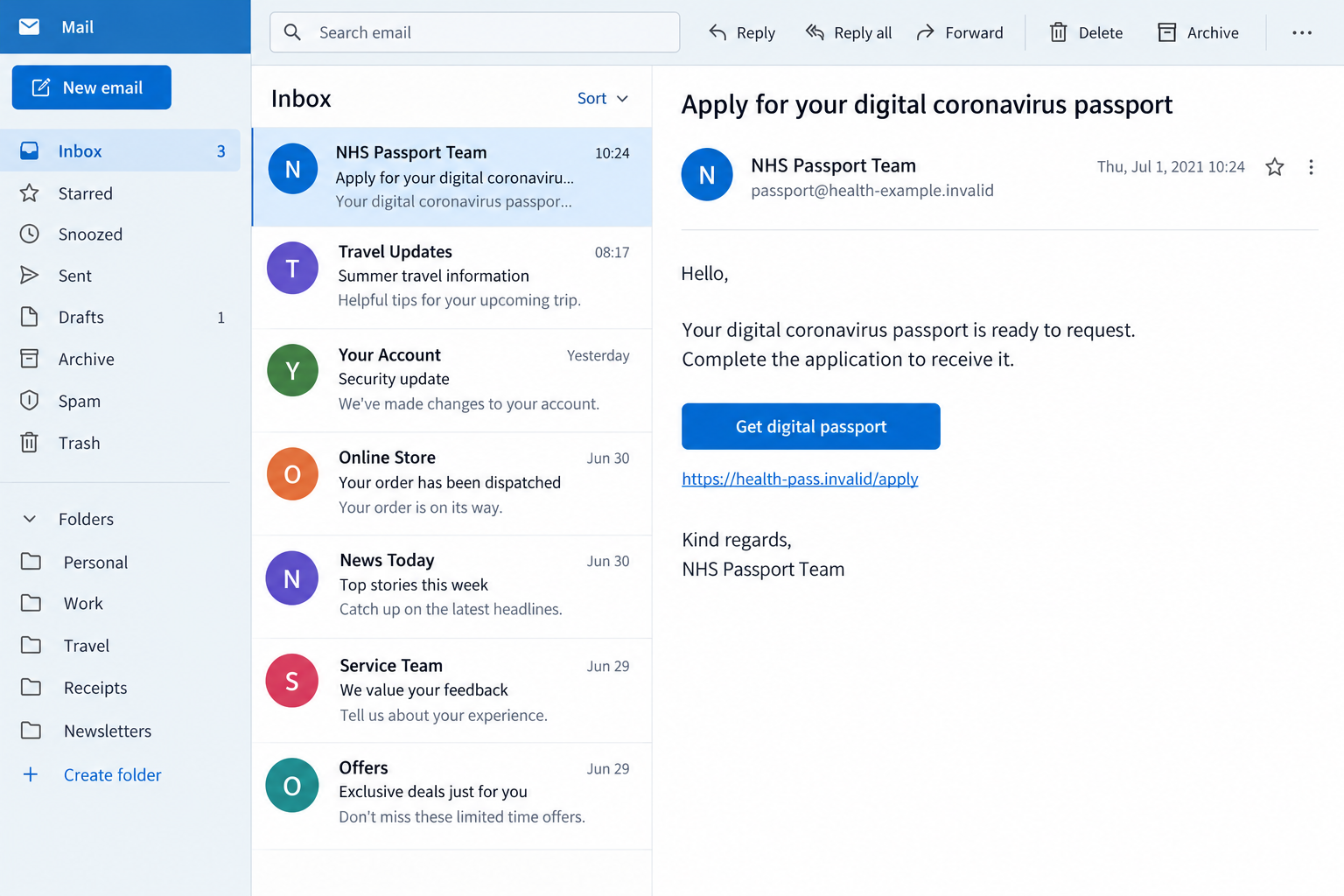
The email offers a digital coronavirus passport and a convenient application button. For someone planning a trip, it once looked like paperwork worth getting out of the way.
The NHS COVID Pass scam used that familiar concern as its opening. The important question is what the supposed application asks you to hand over next.
Overview
The documented email impersonated a free public service
In 2021, fraudulent messages offered a digital coronavirus passport while pretending to represent the NHS. Their links led to imitation application pages seeking personal and payment details.
The North Tees and Hartlepool NHS Foundation Trust’s July 2021 alert documented that approach and explained that payment details were not required to obtain the genuine pass.
The scam was the impersonation and false fee, not the NHS itself. A convincing health-service page did not make the payment request legitimate.
The historical case should not be presented as a newly intercepted 2026 email or a current vaccination requirement. Its date matters to understanding the offer.
We have not captured a live malicious site or established that every later message uses the same operator. The article explains the documented mechanism.
England’s COVID Pass service has since closed
The live GOV.UK COVID Pass guidance says the service closed on December 4, 2023. That page expressly applies to England.
Do not follow an old article’s application instructions as if the former service still operates unchanged. A 2021 helpline or eligibility statement is not current guidance.
That closure does not settle every country’s travel rules or every U.K. nation’s health-record arrangements. Check current official information for your actual question.
This is a phishing investigation, not advice about vaccine eligibility, doses, testing, clinical decisions, or a particular destination’s entry requirements.
The fee request is the part you can reject
An unsolicited passport offer does not justify disclosing a card, banking login, or security code. Verify the claimed service independently before sharing anything.
- The message offers a passport or certificate through its own link.
- The page requests an administrative or processing payment.
- Familiar NHS wording is used to support an unfamiliar destination.
- A deadline discourages checking the real service.
- A later contact says more information is needed to complete the application.
The images are fictional interfaces dated to the historical context. They contain no real certificate, patient record, valid QR code, or authentic payment instructions.
Why the Passport Offer Once Felt Timely
The message arrived during changing travel arrangements
In the historical period, people were trying to understand how vaccination records, travel plans, and venue requirements fitted together. A simple application link could look helpful.
That context supplied credibility before the sender established identity. The reader might focus on completing a document rather than checking the person offering it.
Do not import those old requirements into the present. A dated government announcement can explain the scam’s background without becoming current travel advice.
If you need information now, start with the relevant official health or destination guidance. An unsolicited message should not define what document you supposedly require.
An official-looking form makes a false fee seem routine
A neat header and familiar health-service terminology can make personal questions feel like ordinary administration. The page then introduces payment as another field to complete.
The label administrative fee can sound modest and unavoidable. It does not explain why an unverified page is entitled to receive your money or card details.
A small charge would not make the request harmless. The information entered to pay it can expose more than the amount displayed.
Equally, not every health-related payment is fraudulent. The documented warning concerns a false fee for this pass, not every service associated with the NHS.
How the NHS COVID Pass Scam Works
Step 1: A message invites the reader to obtain a passport
The email or text presents the document as available or necessary. An application button turns a broad concern into a clear task.
The sender may display NHS wording without proving any connection to the health service. A copied name or signature block is not authentication.
Receiving the message does not establish that your health records were accessed. The investigation provides no evidence of an agency breach behind the historical contact.
If a message reaches you today, compare it with the current service and your own situation. Do not assume an old program has returned because an email says so.
Keep the subject and date for reporting. There is no need to start an application just to determine what the message claims.
Step 2: The link supplies an imitation official application
The destination can look like a health-service page while being controlled by someone else. The historical NHS alert described convincing fake sites, not official applications.
Government or NHS terms inside an address do not prove ownership. The actual host and the independently verified route matter more than the page’s heading.
Start with the official website or app you locate yourself. Do not let the message supply both the service and the evidence that it is authentic.
A closed or changed historical scam site would not make the original email genuine. It only changes what is available at that old address now.
Do not try archived malicious links to compare them with an illustration. Reporting can rely on the message and information safely available to you.
Step 3: Personal questions prepare the reader for payment
The fake application may request a name, date of birth, or other identifying information before the payment screen. That sequence can make the fee feel part of an established process.
Some identifying questions are legitimate in verified health-service interactions. Their presence does not authenticate this particular application or an unrelated payment request.
Ask which service you are actually using and how you reached it. An ordinary field becomes risky when its recipient has not been established.
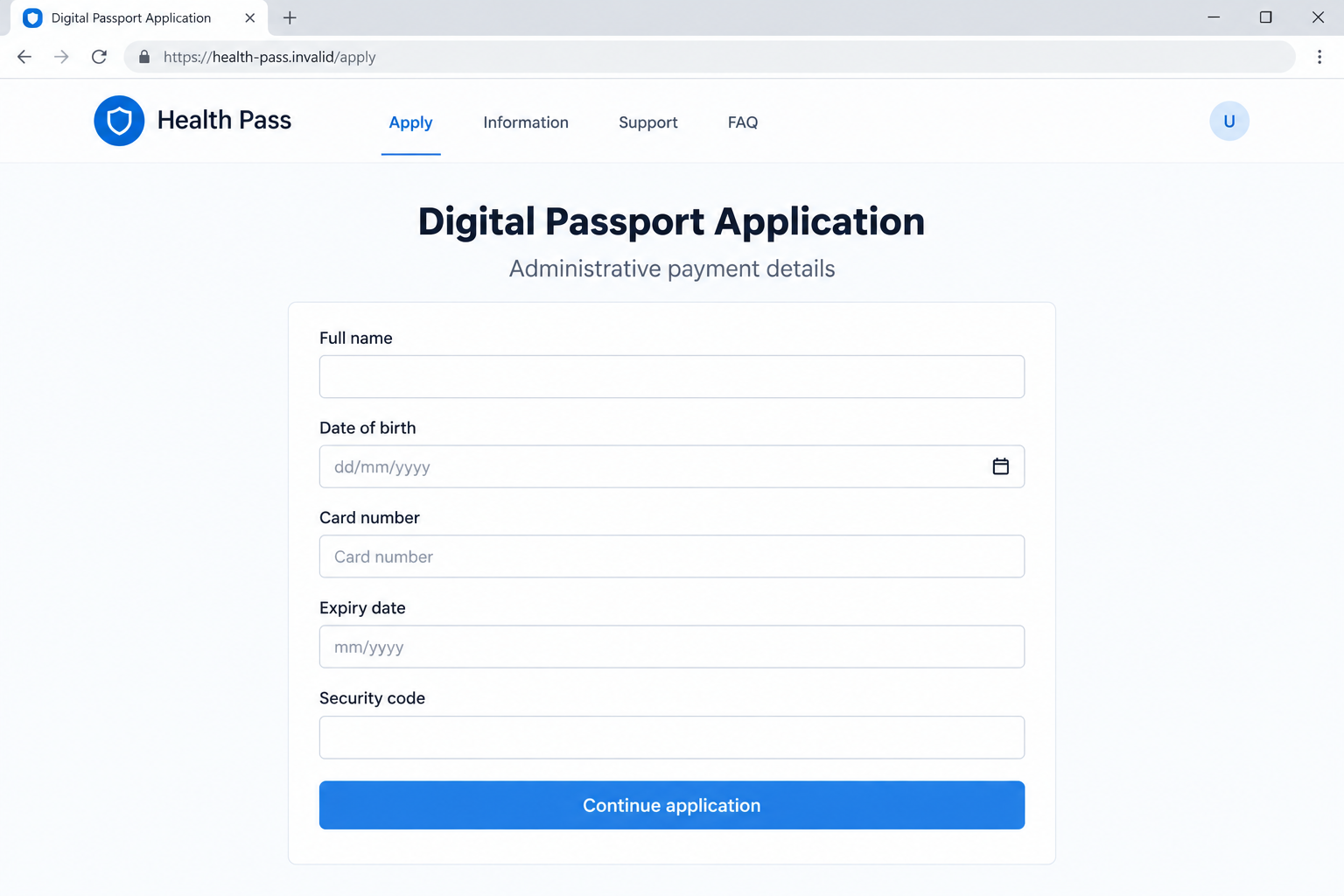
The fictional form below shows this combination of personal and card information. It is not an actual NHS login screen or a patient record.
No real information should be entered to test such a page. A submission can expose details even when the promised certificate never appears.
Step 4: An administrative charge replaces the free pass
The historical warning identified a payment demand for a service that was free. The supposed administration did not turn the impostor into an authorized provider.
A card form can collect account information whether or not a visible charge occurs. Keep information exposure separate from any completed transaction.
If a banking prompt appears, read its actual purpose. A payment or login approval is not made safe by the website calling it passport verification.
The image deliberately quotes no fee. It should not create a false fixed amount, currency conversion, or current application price for readers.
A request to pay for reactivating the former English COVID Pass service should not be accepted through an unsolicited route. Check the present official information instead.
Step 5: The promised document can become a reason for further contact
The recipient may receive an application confirmation, an error, or a request for another step. None of those screens verifies that the NHS received the details.
A contact can use information already supplied to sound more credible. Knowing your name or application attempt does not establish an official support relationship.
Do not upload identification or grant remote access to resolve the supposed processing problem. Stop using the sender’s route for advice.
Work through your bank, account provider, and appropriate reporting channels if exposure occurred. A fake passport agent is not a safe recovery adviser.
Historical Advice Must Not Become Today’s Instructions
The old pass and current health records are different questions
The COVID Pass had a particular purpose during the pandemic period. A present request for vaccination records should be checked through the appropriate current health service.
This article does not promise that a particular app, letter, or certificate is available to everyone. Processes can depend on the country, service, and individual record.
Do not send clinical or identity information to an email claiming it can restart an old passport application. Confirm the genuine request through a channel you select independently.
If you have a real healthcare enquiry, pursue it normally. Rejecting the phishing offer does not require ignoring legitimate messages about that separate matter.
Country and jurisdiction limits matter
The cited closure notice applies to England. It should not be used to declare every Scottish, Welsh, Northern Irish, or overseas vaccination document invalid.
For travel, check the official requirements of the places you plan to visit or pass through. A random health-service email should not be your source.
Do not buy an unverified certificate to resolve uncertainty. Payment would not establish that a document is genuine, accepted, or connected to your medical record.
Health and entry questions need current official answers. The scam investigation identifies an unsafe route; it does not make those decisions for you.
The NHS name is not a universal payment verdict
The historical pass was free. That fact does not mean every product, appointment, document service, or transaction associated with healthcare is free in every circumstance.
Evaluate the particular service and recipient. A legitimate account check should not be confused with an unverified card collection page just because both mention personal details.
The safe boundary is independent verification before a sensitive disclosure. You can take a genuine health-service request seriously while refusing the unsolicited passport link.
What Your Information-Exposure Record Should Include
Separate viewing, submitting, and approving
Record whether you merely saw the email, opened a link, filled a form, shared a password, or approved a transaction. Those are different levels of interaction.
Do not assume that an error after submission means nothing was received. Equally, opening a page without providing information does not prove card theft.
Keep any separate file download or device permission in the record. That may need a technical response in addition to financial or account protection.
Protect the evidence from becoming another disclosure
A screenshot can contain dates of birth, addresses, card fragments, or health information. Redact that material before sharing a public warning.
Give necessary unredacted evidence only to verified providers or reporting services. A person offering to investigate in a comment is not an official support route.
You can explain the fraudulent request without circulating a medical record or identification document. Keep the helpful warning narrower than the private evidence.
What to Do if You Have Fallen Victim to This Scam
-
Stop the passport application and follow-up conversation. Decline further payments, documents, or account approvals requested by the unverified sender.
Save the original email or text and any existing confirmation. Avoid reopening the page solely to finish a screenshot or collect a certificate.
-
Tell your bank about card or banking exposure. Use the bank’s real app or established contact details, not a refund number supplied afterward.
State which details were entered and whether a transaction or prompt was approved. Ask about protective measures and any applicable dispute options.
An exposed card and an authorized payment under deception may require different handling. Describe both accurately rather than assuming a guaranteed charge reversal.
-
Secure passwords and account recovery details that were shared. Use the actual provider’s process on a device you trust.
If the password was reused, replace it on the affected accounts too. Review unexpected recovery-contact changes and relevant access alerts.
Do not let a supposed passport helper supervise the reset. A new unsolicited support link can recreate the same exposure.
-
Document personal or health information submitted. Keep a private list of fields, document images, and dates involved.
Tell the appropriate verified provider or authority about specific misuse if it appears. A health-service logo alone does not establish which real organization received the data.
Do not publish unredacted patient or identity records in a warning post. Protecting evidence and publicly describing the scam are separate tasks.
-
Investigate device exposure only where relevant. If the interaction led to software installation, remote access, or persistent suspicious behavior, seek trusted technical help.
Malwarebytes can assist with suspicious downloads or device threats. AdGuard can reduce malicious advertising, but it cannot authenticate an application or refund a fraudulent charge.
A received email by itself does not establish infection. If the device is managed by your employer, report the actual interaction to its IT team.
-
Report suspicious messages using current guidance. The NCSC’s phishing-response page covers evidence, message reporting, and exposure-specific actions.
Current instructions include forwarding suspicious texts to 7726 where supported. Use verified reporting details rather than a contact supplied in the fake passport email.
Keep the message date in the report. Historical examples and a message received now should not be described as the same intercepted incident.
-
Report financial fraud through the appropriate national route. In Scotland, contact Police Scotland. Use Report Fraud for England, Wales, and Northern Ireland.
Preserve bank and authority reference numbers together. A report can support an investigation, but it does not guarantee an immediate recovery or identify the operator.
Do not accuse a real NHS employee solely because their name was copied into a message. Report the identity claim and deceptive conduct.
-
Verify any present health or travel question separately. Use the relevant current official service, not the old passport agent or historical application instructions.
Do not pay a follow-up recovery specialist to obtain a pass or reverse the loss. Continue through the genuine providers you reached yourself.
Frequently Asked Questions
Is this warning about a newly discovered NHS email?
No. It explains a documented 2021 passport-phishing pattern. It does not claim to have intercepted a new campaign or verified an active malicious destination.
Was payment needed for the genuine NHS COVID Pass?
The historical NHS warning said obtaining that pass did not require payment details. The false administrative charge was part of the impersonation.
Can I still use England’s old COVID Pass application route?
The live GOV.UK page says the service closed on December 4, 2023 and applies to England. Do not treat historical application steps as current instructions.
Does that closure settle all vaccination-document or travel rules?
No. Different jurisdictions and current travel requirements need their own official checks. This phishing article does not determine what documentation a particular destination requires.
Does every NHS message asking personal questions count as fraud?
No. Genuine verified healthcare interactions can require identifying information. The issue is an unsolicited passport route whose identity and payment request have not been established.
What if I only opened the link?
Close it and record any additional action. Opening alone does not establish card theft; details submitted, files downloaded, or permissions granted can change the response.
The Bottom Line
The NHS COVID Pass scam used a once-familiar document to justify an unverified application and payment request. Neither the NHS name nor a neat form established authenticity.
Reject the unsolicited passport route and check current official information for genuine questions. If information or money was exposed, contact the relevant provider and report the incident accurately.

Join the discussion
0 commentsShare your experience or ask a question about this article.
Discussion
Start the conversation
Have a question or something useful to share? Add the first comment.