


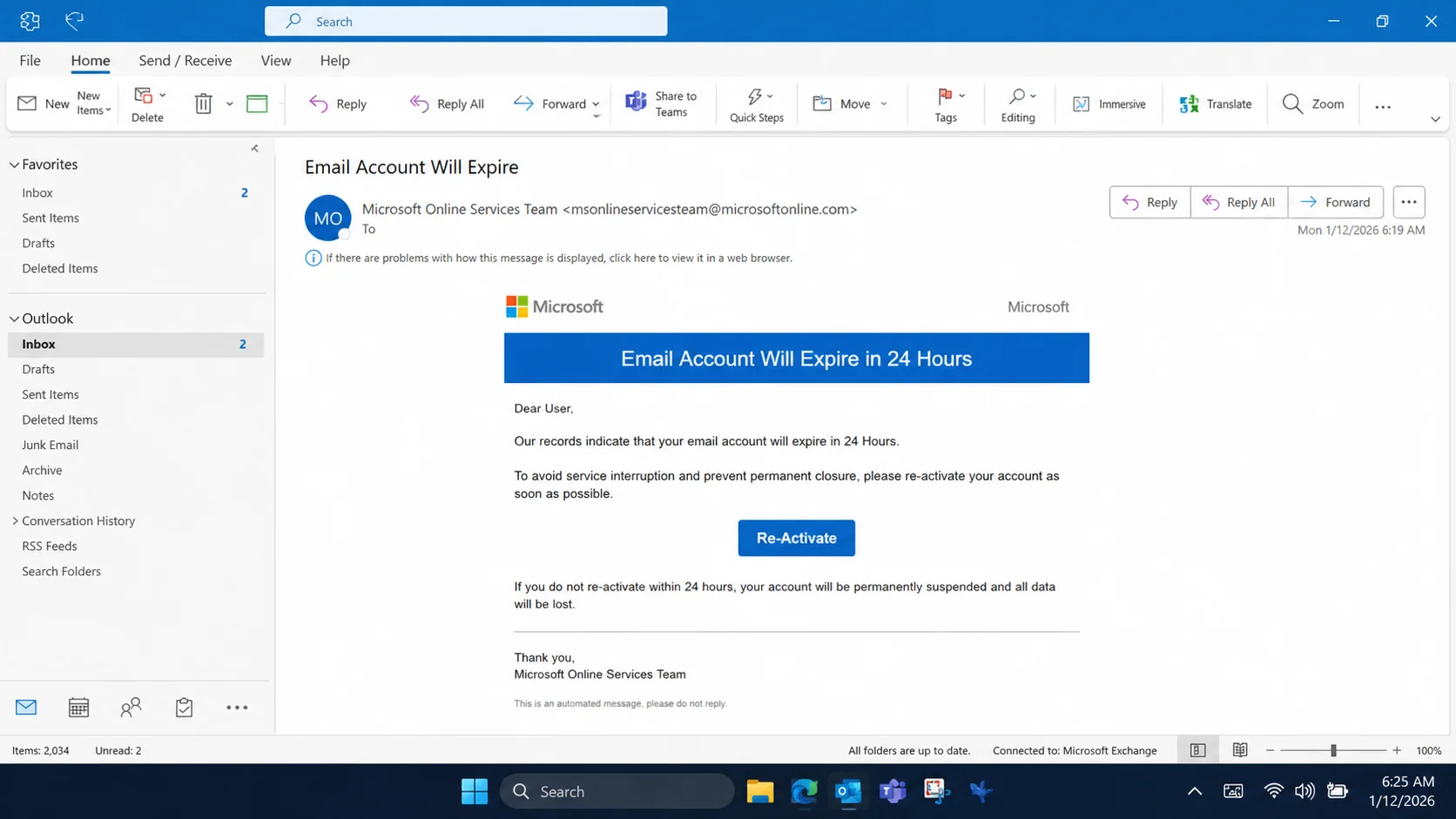
A familiar blue notice warns that an Office 365 email account is approaching expiration. One prominent reactivation button promises to preserve access within 24 hours.
The timing sounds urgent, especially when the mailbox belongs to work. Losing meetings, files, and daily communication would be disruptive enough to demand attention.
Overview
The email confuses a mailbox with a subscription deadline
The Office 365 Account Expiry scam claims the recipient’s business email will stop working unless it is reactivated within a short period.
An observed version used the subject “Email Account Will Expire” and borrowed Office 365 colors, logos, and product language.
The message often provides little account-specific information beyond the recipient’s address. It relies on the familiarity of Microsoft services to fill that gap.
Paid Microsoft 365 subscriptions can require renewal. That reality gives criminals a plausible concept, but subscription billing and mailbox authentication are not interchangeable events.
A genuine licensing issue should be visible in the organization’s administration center or the subscriber’s official account. It should not depend on an unknown email form.
Employees may not know who manages licensing. That uncertainty makes the warning feel possible, even when the user has never handled the company’s subscription.
The 24-hour deadline discourages asking an administrator. A recipient fears that waiting for confirmation could result in lost access the next morning.
The reactivation page is hosted outside Microsoft
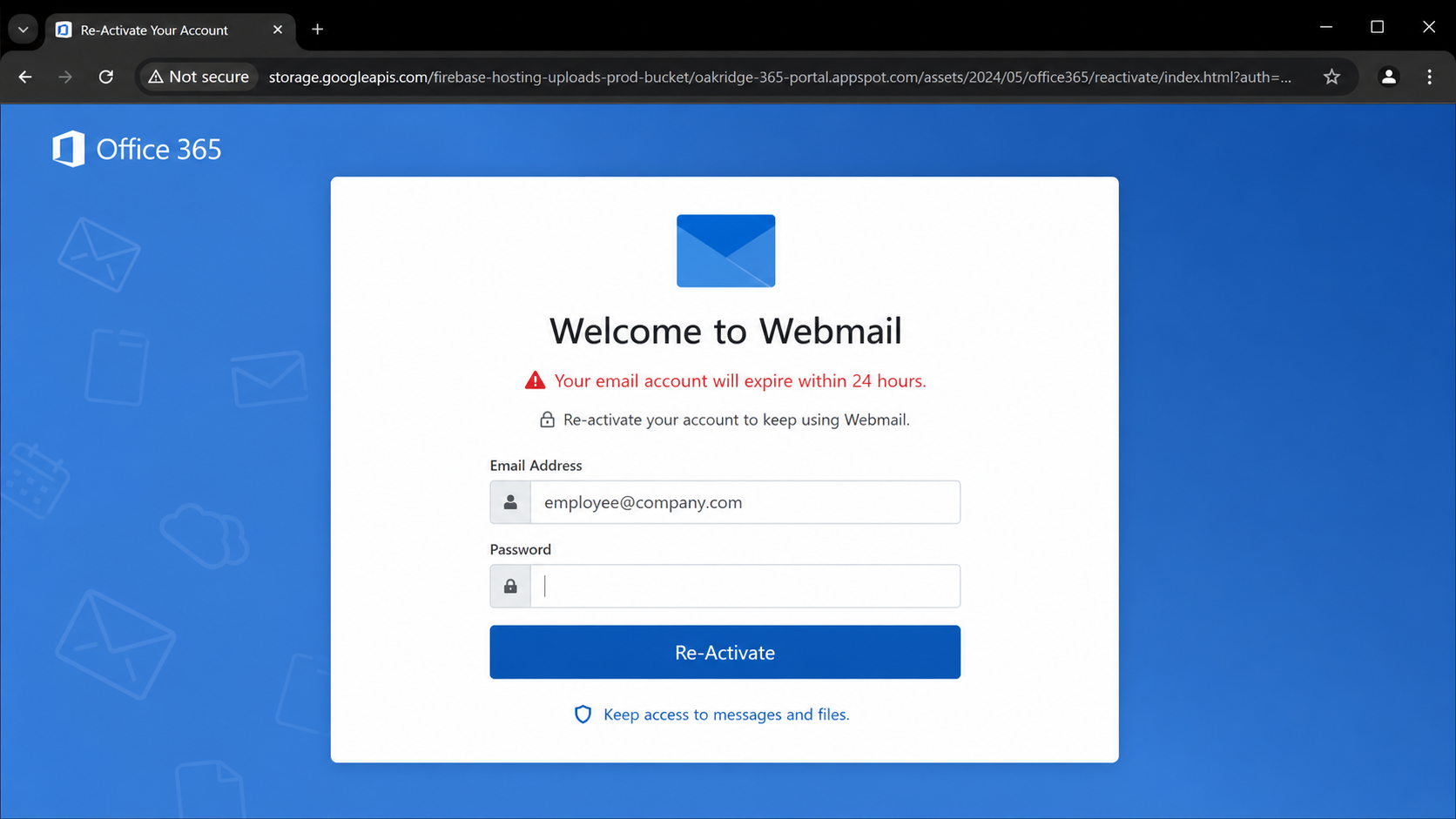
Selecting the button opens a “Welcome to Webmail” page that resembles a corporate sign-in screen. The visitor’s email address may already appear in the form.
The analyzed destination was stored through Google Firebase infrastructure rather than a Microsoft-owned account domain. Cloud hosting can serve fraudulent content alongside legitimate applications.
A storage or application URL does not become a Microsoft login because the page displays an Office symbol. Browser addresses carry more weight than artwork.
The form asks for a password to complete reactivation. Those credentials are sent to the operator controlling the page, not to the employer’s tenant.
The false portal can display a success message or redirect elsewhere after submission. That smooth ending reduces the chance that the victim reports the incident immediately.
Important warning signs include:
- An expiry warning sent directly to an ordinary employee.
- A 24-hour deadline without an administrator’s prior notice.
- A reactivation link hosted outside Microsoft-controlled domains.
- A generic “Welcome to Webmail” page.
- A prefilled address followed by a password request.
- No matching alert in the genuine Microsoft 365 portal.
- Branding that looks correct while the address bar does not.
A stolen work login can reach far beyond email
Microsoft 365 credentials may unlock Outlook, Teams, SharePoint, OneDrive, address books, calendars, and applications connected through organizational single sign-on.
The exact access depends on company configuration and the user’s permissions. Even a basic account can expose valuable conversations and trusted contact relationships.
Attackers search mailboxes for payments, payroll, contracts, password resets, and internal processes. They learn who can authorize money or disclose protected information.
Cloud documents can reveal customer data, corporate plans, identity records, and credentials stored unsafely in spreadsheets or notes.
A hijacked account also provides an authentic sending address. Messages delivered internally may bypass the suspicion applied to unknown external mail.
Some organizations allow self-service application consent. An attacker may authorize a malicious application and retain access even after the original password changes.
That is why remediation must cover identity sessions, applications, mail rules, and audit logs rather than focusing on the inbox alone.
How The Scam Works
Step 1: Employees receive a branded expiry warning
The campaign distributes messages to workplace addresses collected from public staff pages, past breaches, professional networks, or automated address patterns.
Microsoft-related branding suits a wide audience because many organizations use Outlook and Microsoft 365 for daily communication.
The sender name may contain words such as Office, Admin, Webmail, IT, or Support. Those labels are display text and can be written by anyone.
A concise body helps the message resemble a system alert. Long explanations would create more opportunities for factual mistakes.
The subject promises disruption rather than financial reward. Employees who would ignore a marketing email may respond quickly to a threatened loss of work access.
Security teams should compare copies across recipients. Repeated templates, reply paths, and destinations can reveal a wider campaign.
Step 2: The deadline discourages internal verification
The notice states that the account expires within 24 hours. This short window creates urgency without allowing a normal licensing discussion.
A user might assume finance forgot a renewal, information technology missed a notice, or a company plan changed silently.
That ambiguity is useful to the attacker. Each employee invents a plausible organizational explanation for the same unsupported claim.
Legitimate administrators generally manage tenant licensing centrally. An ordinary worker should not need to submit an email password to fix corporate billing.
Before acting, contact the internal help desk through a known channel. Do not reply to the sender or use telephone numbers included in the warning.
Administrators can inspect tenant health, subscriptions, assigned licenses, and service notifications through authenticated management tools.
Step 3: The Re-Activate button crosses into cloud hosting
The main button sends the browser away from the message. Its label describes the attacker’s promise, not the technical destination.
In the examined example, content was served using Firebase-related Google storage infrastructure. This gives the page reliable hosting and encrypted traffic.
Criminals favor reputable cloud platforms because their domains may look less alarming than a newly registered address. Filters also cannot block entire services casually.
The important question is whether that location is authorized to receive the organization’s credentials. A random hosted application is not.
Employees can hover over the button on a computer to preview its URL. Security gateways may also rewrite links, so staff should follow company reporting procedures.
Opening a fresh Microsoft bookmark is safer than trying to judge the message’s route. Genuine account issues should remain visible after independent sign-in.
Step 4: A generic webmail panel copies the expected login
The destination displays “Welcome to Webmail,” an Office-style emblem, the recipient’s address, and a password box.
Prefilling the username creates continuity between the email and webpage. The value can be encoded directly inside the link.
The design may be responsive and polished. Modern phishing kits include professional typography, mobile layouts, validation messages, and familiar loading animations.
Visual accuracy cannot authenticate the operator. Anyone can reproduce public colors, labels, and icons without access to Microsoft’s systems.
Some corporate sign-ins use custom branding, which makes employees accustomed to varied appearances. The domain and initiated context remain essential clues.
A valid session should begin from a trusted Microsoft address or the employer’s approved identity portal, not an unsolicited expiry button.
Step 5: Credentials and approval codes are intercepted
When the password is submitted, the page records it. An automated service or human operator can test it against the real Microsoft account immediately.
A protected account may trigger repeated approval requests. The criminal can also ask for a one-time code or display another imitation prompt.
A victim expecting reactivation may approve the request without reading its location or application details. The attacker benefits from that prepared expectation.
Some phishing systems relay credentials to genuine sign-in services in real time. They can attempt to steal session material after a successful challenge.
Users should reject unexpected approvals and report them. A flood of prompts can indicate the password is already known.
Administrators can enforce stronger phishing-resistant methods, conditional access, and risk-based controls, but human reporting still shortens exposure.
Step 6: The intruder alters the cloud identity quietly
Successful access allows the operator to enumerate mail, files, groups, contacts, and permissions available to the compromised user.
Mailbox rules can redirect finance conversations or conceal warnings. Forwarding may copy selected messages to an external account.
Unknown authentication methods, application consents, tokens, and delegated permissions can provide persistence beyond the visible login session.
The attacker may avoid noisy behavior initially. Quiet monitoring reveals payment cycles, leadership travel, vendor relationships, and valuable conversation threads.
Security logs should be retained before remediation obscures details. Sign-in locations, applications, user agents, consent events, and rule changes help define the incident.
Containment may require coordination across identity, email, endpoints, and connected services. Resetting one password addresses only one control.
Step 7: Authentic business channels deliver the next fraud
The operator can send an invoice change from the real account, request documents through Teams, or share a malicious file from the victim’s cloud storage.
Internal recipients recognize the sender and conversation history. That inherited trust can overcome warnings that protected the original target.
A compromised address can also target external customers and suppliers. Replies return to the genuine mailbox, where criminal rules may hide them.
Executives, finance personnel, and administrators identified through directory data become high-value secondary targets.
The intruder may reset other corporate applications connected through single sign-on. The breadth depends on privileges and tenant design.
Incident review should therefore identify every action performed with the identity, not merely confirm that email access occurred.
Subscription Expiry and Mailbox Expiry Are Different Events
Microsoft 365 is a paid service in many environments. A subscription can reach renewal, a license can be reassigned, and administrators can change user access.
Those facts do not validate an email demanding credentials. Billing administration occurs within authorized account and tenant management systems.
An organization may purchase licensing through Microsoft or a partner. Employees should follow their internal support route rather than guessing who sent an expiry notice.
A genuine service problem should produce evidence in known dashboards, administrator communications, or established support cases.
Criminals deliberately blend technical and commercial language. “Reactivate your email” sounds reasonable because it avoids explaining whether the issue involves billing, licensing, or identity.
Ask one precise question: where does our organization normally manage this? If the answer is not the emailed page, do not authenticate there.
Sender, Expiry Claim, Domain, and Tenant Checks
Compare the real sender with company expectations
Expand the From, Reply-To, and return-path details. A Microsoft display name cannot compensate for an unrelated sending domain.
Ask whether your employer normally sends license notices directly to users. Many organizations route these matters through administrators or their help desk.
Use the mail client’s reporting feature so security teams receive headers and link information without risky forwarding.
Confirm the claimed expiry inside approved systems
Administrators should review subscriptions, assigned licenses, service health, and message-center notices through their normal tenant portal.
Individual subscribers can enter Microsoft’s known account address manually. Do not reuse the email link merely because the official portal shows no warning.
If the claim cannot be reproduced independently, the 24-hour threat lacks credibility.
Identify who owns the credential page
Read the complete host in the address bar. Firebase, cloud storage, or another hosting provider is not automatically an authorized Microsoft sign-in endpoint.
HTTPS confirms an encrypted connection to the displayed host. It does not confirm that Microsoft or the employer controls that host.
Close any login that appeared after an unsolicited button, especially when the page uses generic webmail wording.
Audit the tenant after suspected submission
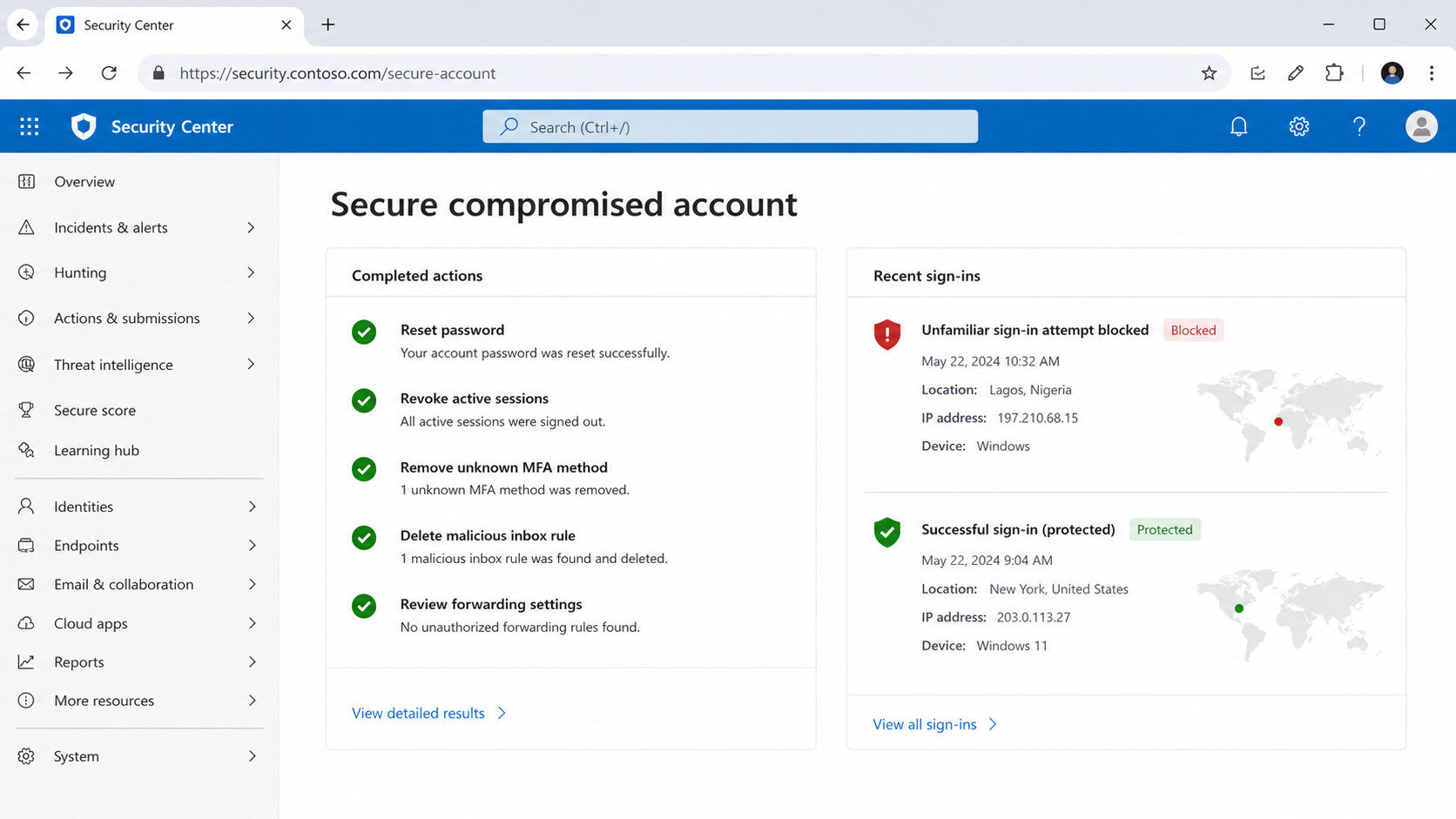
Review sign-ins, session tokens, authentication methods, application consents, role changes, inbox rules, forwarding, delegates, and unusual file access.
Search for messages sent internally or externally during the exposure window. Warn recipients before they act on fraudulent instructions.
Assess whether the identity accessed other applications through single sign-on. Their logs may show compromise beyond Microsoft 365.
What to Do if You Have Fallen Victim to This Scam
- Contact your organization’s help desk immediately. Use a known telephone number or portal and provide the message, destination, submission time, and prompts you approved.
- Reset the password through the genuine identity service. Choose a unique value and replace it anywhere it was reused.
- Revoke sessions and tokens. Administrators should invalidate active access, remove suspicious authentication methods, and investigate unfamiliar application consents.
- Inspect mailbox configuration. Delete malicious forwarding, inbox rules, delegates, and application passwords, then examine sent and deleted items.
- Review cloud activity. Check SharePoint, OneDrive, Teams, directory, and connected application logs for downloads, sharing changes, or impersonation.
- Examine the computer. Run Malwarebytes, inspect browser extensions, and preserve any files downloaded from the false reactivation page.
- Report the email and block its destination. AdGuard may prevent visits to recognized phishing pages, but organizational containment must continue.
- Notify affected recipients. Retract fraudulent messages and independently verify invoices, payment changes, document shares, or credential requests sent during exposure.
Is Your Device Infected? Run a Free Malware Scan
Slow performance, constant pop-ups, or strange behavior? These are classic signs of a malware infection. A quick way to check is to scan your device with Malwarebytes Free, one of the most trusted malware removal tools available. If you only visited a scam page and didn’t download or install anything, this scan is optional.
The free version detects and removes the most common threats, including:
- Adware — the cause of those annoying pop-ups
- Browser hijackers — unwanted redirects and changed homepages
- Trojans and spyware — hidden programs stealing your data
- Potentially unwanted programs (PUPs) — software you never asked for
👉 Select your device below — Windows, Mac, or Android — then follow the simple steps to download Malwarebytes, scan your system, and remove any threats it finds. The scan usually takes 5 to 20 minutes.
Run a Malware Scan with Malwarebytes for Windows
Malwarebytes is one of the most popular and trusted anti-malware tools for Windows — and it’s completely free for removing infections. It catches threats that many antivirus programs miss, including adware, browser hijackers, and trojans. Follow the steps below to scan your PC and remove what Malwarebytes finds.
Download Malwarebytes
Click the button below to download the latest version of Malwarebytes for Windows from the official source. The free version is all you need — it will scan your computer and remove adware, browser hijackers, and other malicious software at no cost.
Download MalwarebytesOfficial installer for Windows 11 and 10. Your download starts right away.Want real-time protection? See Malwarebytes Premium Malwarebytes Free for WindowsScans and removes malware at no cost
-
Install Malwarebytes
When the download finishes, open your Downloads folder and double-click the MBSetup file. If Windows shows a User Account Control pop-up, click “Yes” to allow the installation.

Follow the On-Screen Prompts to Install Malwarebytes
The setup wizard will walk you through a few quick screens:
-
Choose where you’re installing the program — “Personal Computer” or “Work Computer” — then click Next.

-
Malwarebytes will now install on your device. This usually takes under a minute.

-
When installation is complete, the “Welcome to Malwarebytes” screen will open automatically.

-
On the final screen, click Open Malwarebytes to launch the program.

-
Optional: Check for rootkits with a Custom Scan
You don’t need to change any settings for a normal scan. The standard Threat Scan in the next step is enough for most problems, so you can go straight to it.
If you also want to check for rootkits, use a Custom Scan. In current versions of Malwarebytes, rootkit scanning is only available there:
- On the Scanner tile, click the three-dot menu and select Advanced Scan.
- Choose Custom Scan. In its options, check Scan for rootkits.
- Select your system drive (usually C:\) as the location to scan, then start the scan. It takes longer than a Threat Scan.
- When it finishes, review and quarantine the results as described in the steps below.
Rootkit scanning isn’t available on Windows devices with ARM processors.
Start the Scan
Click the blue Scan button. Malwarebytes will automatically update its virus database and start checking your computer for malware.

-
Wait for the Scan to Finish
The scan checks your entire system for browser hijackers and other malicious programs, so it can take 5 to 20 minutes depending on your computer. Feel free to do something else — just check back occasionally to see the progress.

-
Quarantine the Detected Threats
When the scan is done, you’ll see a list of everything Malwarebytes found — malware, adware, and potentially unwanted programs. Click the “Quarantine” button to remove all of them at once.

Malwarebytes will now remove the malicious files and registry entries and move them safely into quarantine.

-
Restart Your Computer
Some threats can only be fully removed after a reboot. If Malwarebytes asks you to restart, click Yes. Once you’re logged back in, Malwarebytes has finished removing the threats it found.

When the scan is done, check whether the problems you noticed have stopped. If they continue, see the options below.
If you are still having problems with your computer after completing these instructions, then please follow one of the steps:
- Run a computer scan with ESET Online Scanner
- Ask for help in our Windows Malware Removal Help & Support forum.
Run a Malware Scan with Malwarebytes for Mac
Malwarebytes for Mac is a free on-demand scanner that removes the malware other security software tends to miss — adware, browser hijackers, and unwanted programs included. Cleaning an infected Mac with Malwarebytes has always been completely free, and it’s our go-to recommendation. Follow the steps below to scan your Mac and remove what Malwarebytes finds.
-
Download Malwarebytes for Mac
Click the button below to download the latest version of Malwarebytes for Mac.
Download MalwarebytesOfficial installer for macOS. Your download starts right away.Want real-time protection? See Malwarebytes PremiumMalwarebytes Free for MacScans and removes malware at no cost -
Open the Malwarebytes setup file
When the download finishes, open your Downloads folder and double-click the setup file to begin the installation.

-
Follow the On-Screen Prompts to Install Malwarebytes
The Malwarebytes for Mac Installer will guide you through a few quick screens. Click “Continue” and keep following the prompts until the installation completes.



When the installation is complete, Malwarebytes opens to the Welcome to Malwarebytes screen. Click “Get started“.
Malwarebytes needs Full Disk Access to check your whole Mac. When it asks, open System Settings > Privacy & Security > Full Disk Access, turn on Malwarebytes (it may be listed as Malwarebytes Protection), and confirm with your password or Touch ID. Then return to Malwarebytes. On macOS Monterey and earlier, this setting is in System Preferences > Security & Privacy > Privacy.
-
Select “Personal Computer” or “Work Computer”
Malwarebytes will ask what type of computer you’re installing it on. Click either Personal Computer or Work Computer, whichever applies.

-
Start the Scan
Click the “Scan” button. Malwarebytes will automatically update its detection database and begin checking your Mac for malware.

-
Wait for the Scan to Finish
Malwarebytes will scan your Mac for adware, browser hijackers, and other malicious programs. This can take a few minutes, so feel free to do something else — just check back occasionally to see the progress.

-
Quarantine the Detected Threats
When the scan is done, you’ll see a list of everything Malwarebytes found. Click the “Quarantine” button to remove all the threats at once.

-
Restart Your Mac
Malwarebytes will now remove all the malicious files it found. Some threats can only be fully removed after a reboot — if Malwarebytes asks you to restart, allow it. Once you’re logged back in, check whether the problems you noticed have stopped. If they come back, save the scan report and ask for help in our forum.

If the problems you noticed continue after the scan, see the options below.
If you are still experiencing problems while trying to remove a malicious program from your computer, please ask for help in our Mac Malware Removal Help & Support forum.
Run a Malware Scan with Malwarebytes for Android
Malwarebytes for Android scans your phone or tablet for malware, adware, and potentially unwanted apps. The free version scans only when you start a scan. Real-time protection, which checks apps automatically, is part of the paid Premium version.
-
Download Malwarebytes for Android.
You can download Malwarebytes for Android by clicking the link below.
Get Malwarebytes for AndroidOpens Google Play in a new tab.Want real-time protection? See Malwarebytes Premium for AndroidMalwarebytes for AndroidScans your phone and removes malware at no cost -
Install Malwarebytes for Android on your phone.
In the Google Play Store, tap “Install” to install Malwarebytes for Android on your device.

When the installation process has finished, tap “Open” to begin using Malwarebytes for Android. You can also open Malwarebytes by tapping on its icon in your phone menu or home screen.

-
Follow the on-screen prompts to complete the setup process
When Malwarebytes opens, it walks you through a short setup. Tap Get started and follow the prompts. If you see an offer for a trial or a paid plan, read it before you accept. You can skip it and keep using the free scanner.
Malwarebytes will ask for permission to access the files on your phone so it can scan them. Tap Allow, or turn on the permission in the Android screen that opens, then return to Malwarebytes.
-
Run a scan with Malwarebytes for Android
On the main screen, tap Scan now. In some versions, you open the menu, tap Scanner, and then tap Run a scan.
-
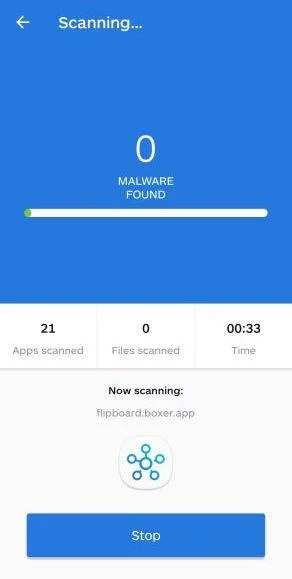
Wait for the Malwarebytes scan to complete.
Malwarebytes will now start scanning your phone for adware and other malicious apps. This process can take a few minutes, so we suggest you do something else and periodically check on the status of the scan to see when it is finished.
-
Remove the detected apps.
When the scan has been completed, you will see a list of the threats that Malwarebytes for Android has detected. Next to each detected item, tap the menu icon (three dots), then choose to uninstall the app or delete the file. Android then asks you to confirm. Tap OK or Uninstall to remove the app.
-
Restart your phone.
When the detected apps are removed, restart your phone if Malwarebytes asks you to. Then check whether the problems you noticed have stopped.
If the problems you noticed continue after the scan, see the options below.
If you are still having problems with your phone after completing these instructions, then please follow one of the steps:
- Ask for help in our Mobile Malware Removal Help & Support forum.
- Only as a last resort, reset your phone to factory settings. Read the warning below first.
- Back up your photos, videos, files, and messages, for example to your Google account or a computer.
- Make sure you know your Google account email and password. The phone asks for them after the reset. If you changed the password recently, Google recommends waiting 24 hours before you reset.
- On a Samsung phone, also make sure you know your Samsung account password.
- If you use an authenticator app for two-step verification, move your accounts to another device or save your backup codes first.
Stay Protected: Block Ads and Malicious Sites
No scan can prove a device is completely clean, so it helps to block threats before they reach you. Most infections start with a malicious ad or a fake download button — so blocking them at the source is your best defense.
We recommend AdGuard, which blocks malicious ads, phishing pages, and dangerous redirects before they can reach you.
👉 Download AdGuard and browse safely
Frequently Asked Questions
Can an Office 365 account genuinely expire?
Licenses and subscriptions can change, but the issue should be confirmed through administrators or official account portals, never an unknown email form.
Does a Firebase address belong to Microsoft?
No. Firebase is Google’s application platform. A page hosted there may be legitimate software, but it is not automatically an authorized Microsoft login.
Why did the fake page already know my work address?
The address can be embedded in the link or harvested beforehand. Its appearance in a form does not prove access to employer systems.
What should I do with an unexpected multifactor prompt?
Deny it, report it, and change the password through an approved route. Repeated prompts may mean someone is actively testing stolen credentials.
Is changing my Microsoft password enough?
It is only the beginning. Sessions, tokens, authentication methods, application consents, mailbox rules, and connected services also require review.
How can employees verify licensing notices safely?
Use the internal help desk or independently opened Microsoft administration tools. Established company procedures are safer than instructions inside unsolicited mail.
The Bottom Line
The Office 365 Account Expiry scam borrows a believable business concern and converts it into a counterfeit reactivation login.
The message may look polished, but its external destination reveals that credentials are leaving the organization’s approved identity path.
Verify licensing through known administrators, report unexpected approvals promptly, and treat a submitted work password as a wider cloud-identity incident.

Join the discussion
0 commentsShare your experience or ask a question about this article.
Discussion
Start the conversation
Have a question or something useful to share? Add the first comment.