

A text message claims you have an unpaid traffic ticket connected to the Oklahoma DMV. It warns about late fees, a registration hold, or even enforcement action if you do not pay immediately.
The message feels official, the deadline feels real, and the payment process looks simple.
That combination is exactly why this scam is spreading across multiple states and cities using the same script with only the location swapped out.
Scam Overview
The Oklahoma DMV unpaid traffic ticket scam texts are a form of SMS phishing, often called “smishing.” Scammers send text messages that impersonate a state DMV, traffic division, court, or citation system and pressure recipients to pay a small amount right away.
The money is not the main objective.
The real objective is to capture your credit card details and personal information, then use that data for unauthorized charges, identity fraud, and follow-up scams.
What the scam usually claims
Most versions follow the same storyline, even when the city and state change.
The text message typically claims:
- You have an outstanding traffic ticket, “citation,” or “unpaid violation”
- A deadline is approaching, sometimes within 24 to 72 hours
- You must pay to avoid consequences, such as:
- late fees
- a registration hold or “registration lien”
- suspension of driving privileges
- collections action
- a court hearing or civil infraction process
- A link or QR code will take you to a payment portal
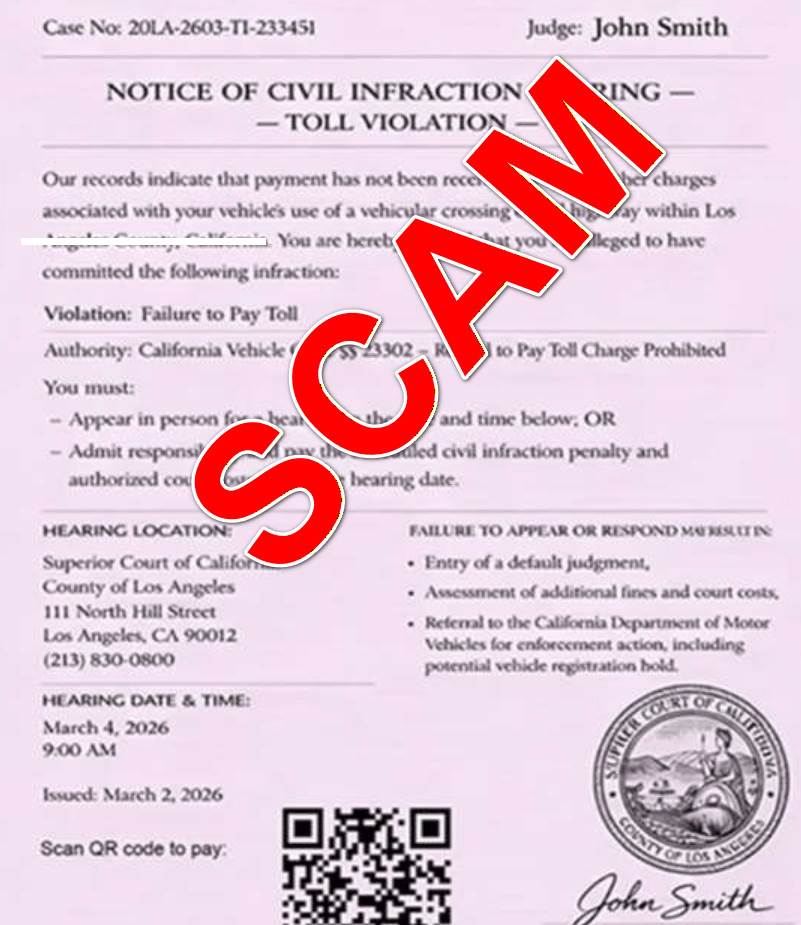
In some versions, the scam leans into court-style language, including phrases like:
- “Notice of Civil Infraction Hearing”
- “Failure to appear or respond may result in judgment”
- “You must admit responsibility or appear in person”
In other versions, it leans into DMV language:
- “Pending citation action required”
- “DMV Traffic Division”
- “Vehicle registration hold”
Scammers mix and match these elements because they are not trying to be legally precise. They are trying to be emotionally effective.
Why the scam works so well
This campaign succeeds because it pushes three psychological buttons at once.
Authority
A DMV name, court header, or “traffic division” label makes the message feel official.
Urgency
Deadlines trigger panic. People act before they verify.
Convenience
A QR code or “Pay Now” link looks like a fast solution, especially when the amount looks small.
When people are busy, tired, or distracted, they often choose the fastest path to remove stress. Scammers build the entire flow around that instinct.
The small payment amount is a trap, not a discount
A major tell in these scams is the amount due.
Victims commonly see amounts like:
- $6.99
- $9.99
- $12.49
- $19.95
These amounts are carefully chosen because they feel “low risk.”
Many people think:
“It might be real, and it is only $6.99. I will pay and move on.”
That moment of rationalization is the conversion point.
Once you type your card number, expiration date, CVV, and billing address, scammers can do far more damage than the small fee suggests.
What the fake DMV payment site often looks like
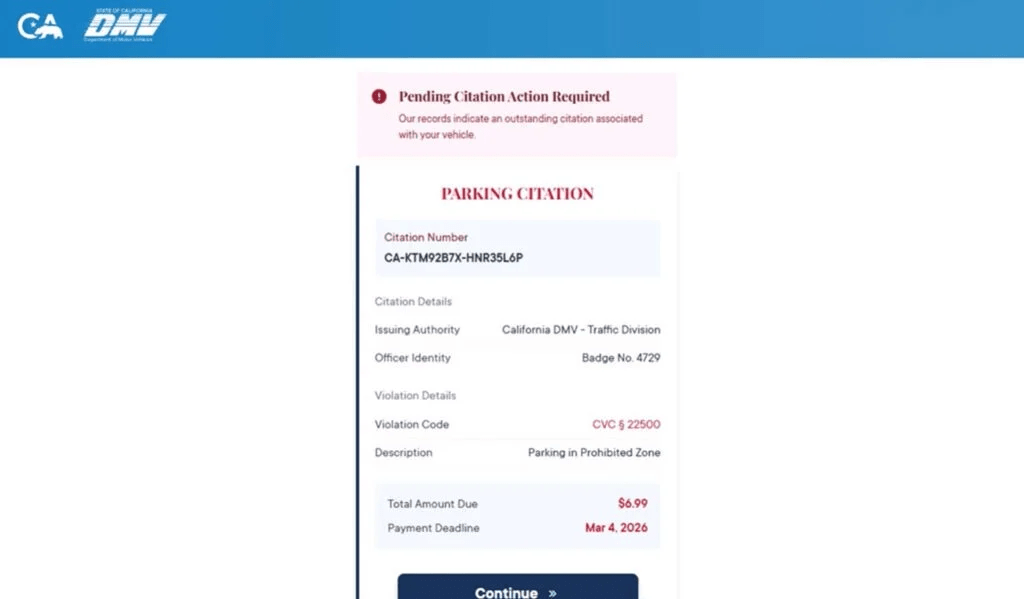
After clicking the link or scanning the QR code, victims are taken to a website that imitates an official citation portal.
These pages often include:
- A header implying a government agency (DMV, traffic division, citation unit)
- A “Citation Number” field or “Case Number” field
- “Violation Details” like a vehicle code reference (real or invented)
- A “Total Amount Due” displayed prominently
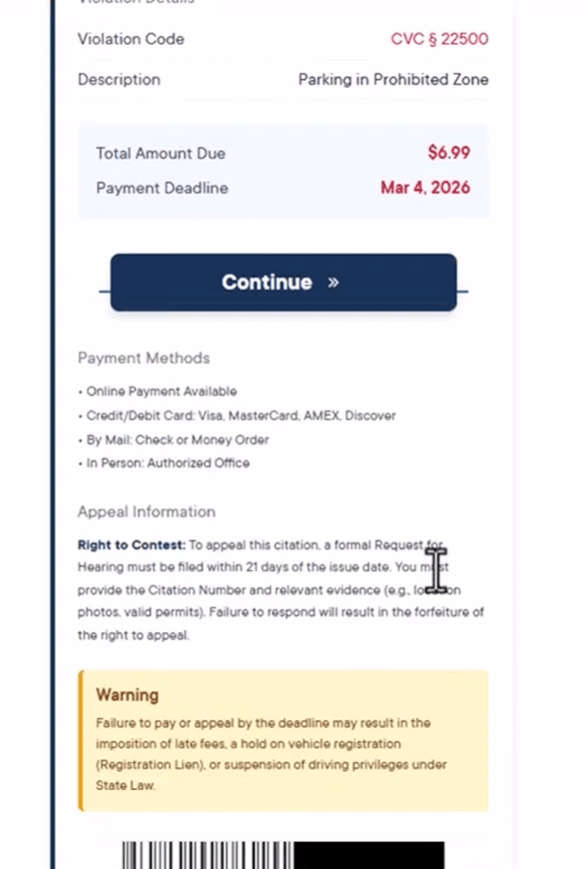
- A “Payment Deadline” highlighted in red
- A large button like “Continue” or “Pay Now”
- A list of “Payment Methods” to appear legitimate
Many pages also include an “Appeal Information” section, warnings about consequences, and formal language about hearings, deadlines, and forfeiture of appeal rights.
This text is not there to inform you. It is there to convince you that paying is the safest choice.
Why the same scam shows up as Idaho DMV, Nebraska DMV, CT DMV, Oklahoma DMV, Colorado DMV, and more
This is a modular scam.
Scammers reuse the same design and simply swap:
- the state name
- the city name
- the DMV label
- the court name
- the “issuing authority” line
The infrastructure stays the same. The branding changes.
That is why you will see the same message template and the same payment layout, but with different locations in the header.
It also explains why some victims receive the message even if they have never visited that state. These campaigns are sent in bulk, not based on real driving records.
Common message wording you can use as a reference
You can adapt the examples below for your article template. Scammers change details, but the structure is consistent.
Example style 1: DMV citation pressure
“Oklahoma DMV Notice: You have an unpaid traffic citation. Action required by [DATE] to avoid additional fees and a registration hold. Pay now: [LINK]”
Example style 2: Court-style intimidation
“NOTICE OF CIVIL INFRACTION HEARING: Toll or traffic violation associated with your vehicle. You must appear or pay the penalty before [DATE]. Scan to pay: [QR/LINK]”
Example style 3: Final warning
“Final Notice: Outstanding violation. Failure to pay may result in suspension of driving privileges. Resolve now: [LINK]”
If a message looks like this and you were not expecting it, the safest assumption is that it is a scam until you verify through official channels.
What scammers are actually collecting
This scam is built to harvest two types of information.
1) Payment information
- Card number
- Expiration date
- CVV
- Billing ZIP code
- Billing address
2) Personal information
- Full name
- Address
- Phone number
- Email address
- Sometimes plate number or vehicle details
Some scam sites also add extra steps that feel like “verification,” such as confirming your address or entering a code sent by text. Those steps are often designed to make the interaction feel official, while collecting additional identifiers that make your data more valuable.
What happens after the scam gets your data
The most common outcomes include:
- Unauthorized charges (sometimes small “test” charges first)
- A sudden spike in scam calls and texts (your number is marked as responsive)
- Attempts to enroll your card in recurring subscriptions
- Follow-up scams posing as “refund departments” or “fraud investigators”
- Identity misuse if enough personal information was collected
A key detail: the first fraudulent charge may not happen immediately. Stolen card details are often used later, or sold to other criminals.
Red flags that expose the scam quickly
If you want a fast filter, look for these signals:
- The message arrives unexpectedly and demands payment right away
- The link uses a strange or unrelated domain
- The site asks for card details for a small fee, like $6.99
- The wording mixes toll violations, parking citations, and DMV language
- The notice includes a QR code and insists that is the payment method
- The message threatens extreme consequences on a short deadline
- The “case number” and names look generic or placeholder-like
Any one of these is enough to slow down. Several together usually confirm it is fraud.
A practical rule that prevents most losses
Do not pay tickets, tolls, or DMV fees through links received in unsolicited texts.
Even if the message includes your state name and looks polished, you should only verify and pay through official websites you reach independently.
How The Scam Works
Below is the typical step-by-step flow of the Oklahoma DMV unpaid traffic ticket scam texts, including the details that make it convincing and the points where victims lose the most.
Step 1: Scammers send bulk texts to huge lists of phone numbers
This is not a personalized notice based on your actual driving history.
Scammers usually send these messages using:
- bulk SMS services
- spoofed sender IDs
- rotating phone numbers
- automated sending tools
They target entire number ranges and purchased lists because only a small percentage needs to fall for the scam to make it profitable.
That is why people get these messages even if they:
- do not drive
- have no recent tickets
- have never been to that state
- do not have a car registered in their name
Step 2: The message creates a fear-based urgency loop
The text is designed to make you feel there is no safe delay.
It often includes:
- a short deadline
- escalating penalties
- threats of registration holds or license suspension
- “final notice” language
This is a classic pressure pattern.
If you feel rushed, you are less likely to check official sources.
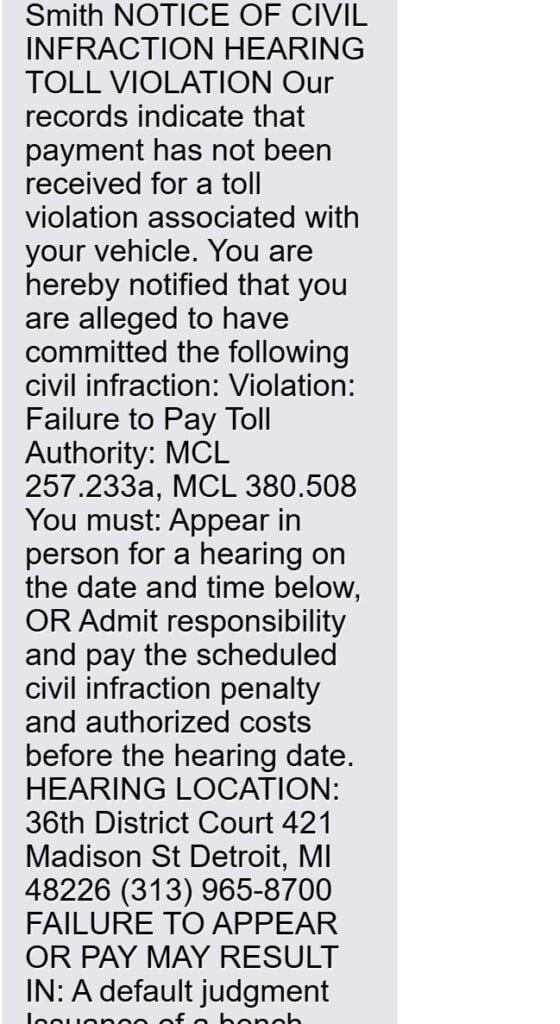
Here is what it might say:
NOTICE OF CIVIL INFRACTION HEARING
TOLL VIOLATIONOur records indicate that payment has not been received for a toll violation associated with your vehicle. You are hereby notified that you are alleged to have committed the following civil infraction:
Violation: Failure to Pay Toll
Authority: MCL 257.233a, MCL 380.508You must:
- Appear in person for a hearing on the date and time below, OR
- Admit responsibility and pay the scheduled civil infraction penalty and authorized costs before the hearing date.
HEARING LOCATION:
36th District Court
421 Madison St
Detroit, MI 48226
(313) 965-8700FAILURE TO APPEAR OR PAY MAY RESULT IN:
- A default judgment
- Issuance of a bench warrant
- Additional fines and costs
HEARING DATE & TIME:
[DATE] / [TIME]Scan QR code to pay:
John Smith
Clerk of the 36th District Court
Wayne County, Michigan
Step 3: The scam uses official-sounding labels to bypass skepticism
Scammers use words like:
- DMV
- Traffic Division
- Citation Unit
- Court Clerk
- Civil Infraction
- Hearing Notice
These phrases are meant to trigger compliance, not to accurately describe a real legal process.
Sometimes the scam even references statutes or vehicle code numbers. Those references can be real, partially real, or entirely made up.
The presence of a code does not prove legitimacy.
Step 4: The QR code or link routes you to the scammer’s website
This is the pivot point.
QR codes feel safer than links, but they function the same way.
Once you scan or tap, you are taken to a website controlled by the scammer.
That website might:
- imitate a DMV portal
- imitate a court payment page
- imitate a parking citation system
- imitate a toll payment system
Scammers choose whatever layout looks most credible to the target audience.
Step 5: The fake portal shows a neat “citation” layout with a small amount due
A typical scam portal displays:
- a citation number
- “issuing authority: Oklahoma DMV”
- a violation description
- a small balance due, such as $6.99
- a red deadline date
- a big “Continue” button
This layout does two things:
- It reduces suspicion through structure and formatting
- It pushes you toward payment before you think to verify
Step 6: The scam collects personal details under the guise of verification
Before payment, victims may be asked for:
- full name
- address
- phone number
- ZIP code
- plate number
This step is not required for scammers to steal your money, but it increases the value of the victim profile.
A stolen card number is valuable.
A stolen card number plus verified name, address, and phone number is more valuable.
Step 7: The portal captures credit card details during the “payment” step
When victims proceed, the portal requests:
- card number
- expiration date
- CVV
- billing address
At this moment, the scam succeeds.
Even if the site shows a fake confirmation, the scammer already has what they want.
Step 8: The site may show a fake confirmation or a fake error to collect more cards
Scammers often end the flow one of two ways:
Fake success
- “Payment complete”
- a receipt-like screen
- a confirmation message designed to calm you down
This can delay victims from calling their bank.
Fake failure
- “Payment failed, try again”
- prompts you to re-enter the card
- sometimes encourages you to try a second card
This can increase the total amount of stolen financial data.
Step 9: Fraud attempts begin and follow-up targeting increases
After exposure, scammers may:
- run small test charges to confirm the card works
- attempt larger purchases later
- sell the card data to other criminals
- reuse your personal information for follow-up scams
This is why the scam is dangerous even when the amount due is small.
The harm is in the data, not the fee.
Step 10: Victims get pulled into secondary scams
Once scammers know a target responds, they often escalate with:
- fake bank fraud alerts
- “refund processing” messages
- calls posing as DMV support
- collections threats
This is how a single interaction can lead to multiple losses.
If someone contacts you after the incident and claims they can “reverse the payment,” treat it as suspicious. Refund scams are common after phishing events.
How to verify a real ticket or DMV issue safely
This is one of the most important sections to include in your template because it gives readers a clear alternative.
Safe verification checklist
- Do not use the link or QR code in the text.
- Open a browser and type the official DMV website for Oklahoma yourself.
- If the message mentions a court, look up the court’s official contact information independently.
- If you have an existing DMV account, log in through the official site or official app.
- If you are unsure, call the official DMV phone number listed on the official DMV website.
What to avoid, even if you are stressed
- Do not call the phone number printed on the scam notice.
- Do not reply to the text.
- Do not click “unsubscribe” links.
- Do not enter any personal details “just to check.”
The safest path is always: independently find the official portal, then verify.
What To Do If You Have Fallen Victim to This Scam
If you clicked, scanned, paid, or entered information, focus on damage control. The sooner you act, the more you can limit.
1) If you entered card details, contact your card issuer immediately
Use the number on the back of your card.
Explain clearly:
- You entered your card details on a fraudulent website linked from a text message.
- You want to block the card and issue a replacement.
- You want to review transactions and stop pending charges.
Ask about:
- reversing unauthorized charges
- replacing the card number
- blocking online transactions temporarily if available
- adding additional verification to your account
2) Turn on real-time transaction alerts
Set alerts for:
- all card purchases
- online transactions
- transactions over $1
- international transactions, if available
This helps you spot test charges quickly.
3) Review recent transactions and dispute anything you do not recognize
Look for:
- small “test” charges
- digital purchases you did not make
- subscription charges
- charges from unfamiliar merchants
Dispute unauthorized charges with your issuer and document the case number.
4) If you provided personal information, increase identity monitoring
If you entered your address, phone number, and other identifying details:
- monitor your credit reports
- consider a credit freeze if you shared high-risk data
- watch for new account openings you did not initiate
Even if no fraud appears immediately, personal data can be used later.
5) Change passwords if you entered any login details
Most DMV scam portals do not ask for passwords, but some phishing flows expand.
If you entered any password:
- change it immediately
- enable 2-factor authentication
- do not reuse that password elsewhere
6) Save evidence before the scam site disappears
Take screenshots of:
- the text message
- the sender number
- the link or QR code
- the scam website pages
- any confirmation or error screens
- the domain name shown in the browser
This helps with disputes and reports.
7) Report the scam text
Recommended actions:
- mark it as spam in your messaging app
- forward the message to 7726 (SPAM) if your carrier supports it
- report the scam through official consumer fraud reporting channels in your country
- if money was stolen or sensitive data was shared, file a report with local law enforcement if appropriate
8) Watch for follow-up scams and do not engage
After an incident, scammers may try to “finish the job.”
Be cautious of:
- calls claiming to be your bank
- texts claiming to be the DMV “fraud team”
- refund offers
- “verification” calls asking for codes
If you need to contact your bank or DMV, use official numbers you locate independently.
9) If you only clicked or scanned, but did not enter data
If you did not submit any information, your risk is lower.
Still:
- close the page
- do not return to it
- do not download any apps or profiles suggested by the site
- monitor for repeat targeting
10) Verify your real DMV status through official channels
If you are still worried you might owe something:
- go directly to the official state DMV website
- verify through the official portal or official customer support
- if needed, confirm ticket status through the official court system for Oklahoma
Do not use any contact info embedded in the scam message.
The Bottom Line
The Oklahoma DMV unpaid traffic ticket scam texts are designed to create fear, trigger urgency, and push victims into paying a small amount through a fake portal.
The amount due is bait.
The real goal is to steal your credit card details and personal information, then exploit that data through unauthorized charges and follow-up fraud.
If you receive one of these messages, do not click, do not scan, and do not reply. Verify only through official DMV and court websites you access independently. If you already entered payment details, treat the card as compromised and contact your issuer immediately.
FAQ
What is the Oklahoma DMV unpaid traffic ticket text scam?
It is a phishing scam where criminals send text messages that pretend to be from the Oklahoma DMV and claim you have an unpaid traffic ticket or citation. The message pushes you to pay through a link or QR code so scammers can steal your card details and personal information.
Are these texts really from the Oklahoma DMV?
No. The Oklahoma name is used to make the message feel official and local. The payment link or QR code typically leads to a scam website, not a real DMV portal.
Why do the messages feel so urgent?
Scammers use urgency to stop you from verifying. They often threaten late fees, enforcement action, or restrictions tied to your vehicle so you pay quickly without checking.
Why is the amount due often small, like under $10?
Small amounts lower suspicion. Many people will pay a small fee just to avoid hassle. The real target is your credit card number, CVV, billing details, and any personal data you enter.
What happens if I pay on the scam site?
Your payment card details can be stolen and used for unauthorized charges. Scammers may also save and reuse the personal information you entered for identity fraud or future scams.
What personal information are scammers trying to collect?
Commonly:
- Full name
- Address and ZIP code
- Phone number and email
- Vehicle-related details
They can use this information to target you again or attempt identity-related fraud.
I clicked the link or scanned the QR code but did not enter anything. Am I safe?
Your risk is much lower if you did not submit information. Close the page, do not go back, and watch for follow-up texts or calls that try to pressure you again.
I entered my card details. What should I do immediately?
- Call your card issuer and report card details were entered on a fraudulent site
- Cancel or freeze the card and request a replacement
- Review transactions and dispute anything you do not recognize
- Turn on real-time purchase alerts
Should I replace my card even if I do not see any fraud yet?
Yes. Stolen card details are often used later or sold. Replacing the card quickly is the safest move.
Can these scammers actually suspend my license or place a hold on my registration?
Not through a scam website. Those threats are pressure tactics. Only legitimate agencies following real procedures can apply enforcement actions.
How can I verify if I really owe anything, without getting scammed?
Do not use the link, QR code, or phone number from the text. Instead, go directly to official Oklahoma DMV channels by typing the website yourself or using an official app you already trust, then verify from there.
How do I report Oklahoma DMV scam texts?
- Mark the text as spam in your messaging app
- Forward it to 7726 (SPAM) if your carrier supports it
- If you lost money or shared sensitive info, report it through official fraud reporting channels and keep screenshots as evidence








