


A chance to recover lost OneCoin money can bring an old disappointment rushing back. An official-looking petition page makes the next step seem straightforward.
The form asks for documents, personal details, and proof of your loss. Before uploading any of them, check who is actually asking.
Overview
A real compensation program gives the copy its credibility
There is a genuine U.S. Department of Justice remission process connected with OneCoin. Kroll Settlement Administration is the administrator identified by the DOJ.
The FBI identifies justice.gov and onecoinremission.com as the only authorized websites for this investigation. Notice that the administrator’s domain uses the singular word remission.
A separate portal claims the same authority while repeatedly giving the plural address onecoinremissions[.]com. A copy is hosted at onecoinremission[.]onrender[.]com.
The false authority claim leads to an identity-document form
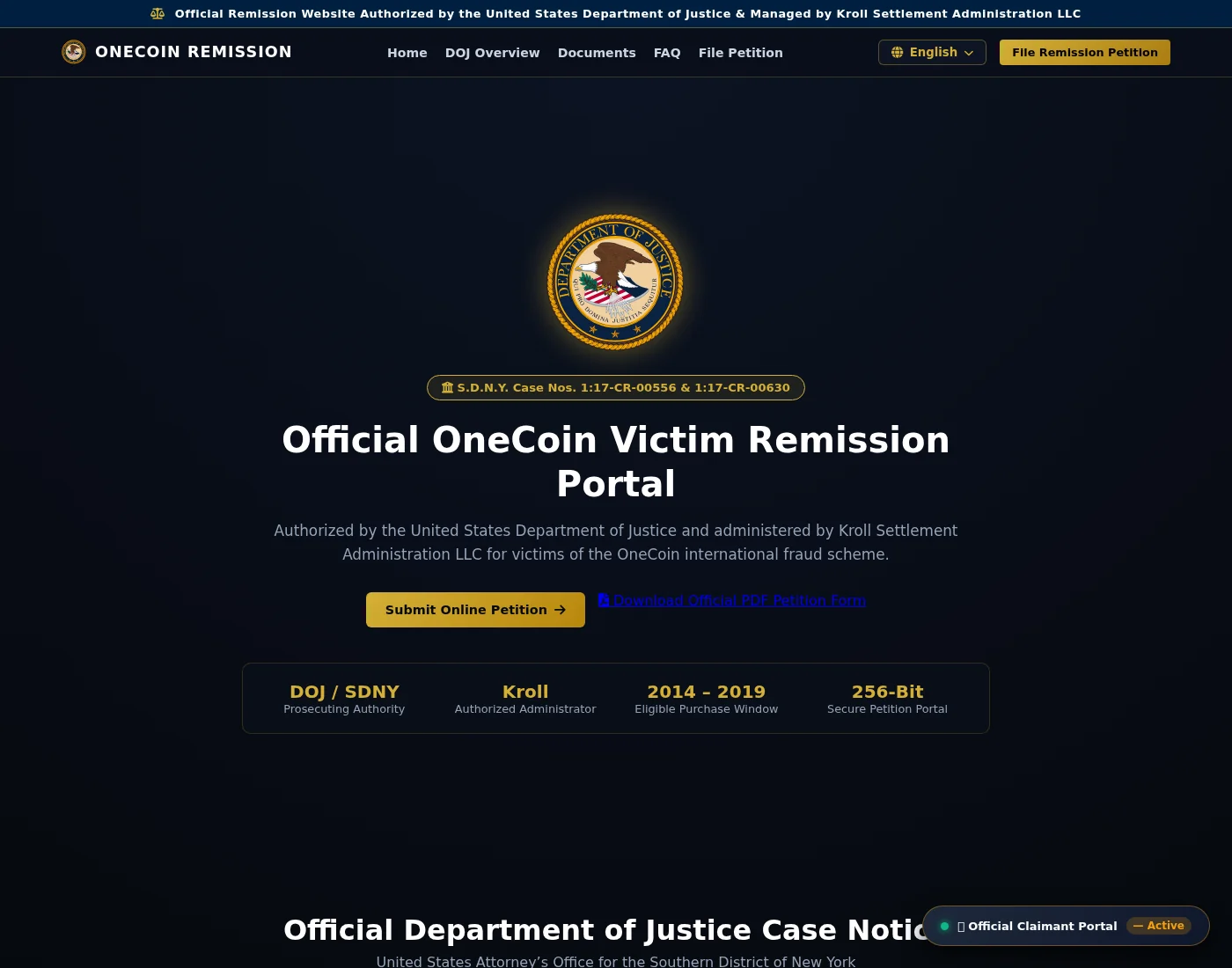
The counterfeit page displays a DOJ seal, federal case numbers, and Kroll’s name. It describes itself as an authorized OneCoin victim portal.
Its petition form then asks for information that reaches far beyond an email address. The requested details include:
- Your full legal name, email address, and telephone number.
- A Social Security number or tax identification number.
- Your country, claimed net loss, and OneCoin username or account identifier.
- Uploads described as proof of loss, bank records, or government identification.
- A statement explaining your investment history and loss.
The problem isn’t that a compensation application might require documentation. It’s that this page falsely presents itself as the authorized place to receive it.
The scam is the impersonating portal, not the legitimate claim process
Don’t submit records through the plural-domain or Render-hosted copy. Follow official government information to distinguish the genuine administrator from an imitation.
The original June 30, 2026 filing deadline has passed. Questions about late petitions belong with the real administrator; a missed deadline doesn’t make every later inquiry fraudulent.
The Details That Make This Page Easy to Trust
Someone searching for compensation after a major investment fraud expects a formal process. Case numbers, legal language, eligibility dates, and document requests can all feel appropriate.
The counterfeit portal supplies those cues together. It refers to the 2014 through 2019 purchase window and presents a government-style explanation of remission.
Those details connect the page to a real event in the reader’s life. A former investor may recognize the case and assume the remaining branding is equally reliable.
But recognizing the story doesn’t establish who controls the website. Accurate public case information can be copied just as readily as a logo.
For the background to the original fraud, see our OneCoin investigation. This warning concerns the separate attempt to obtain records under a false official identity.
How the OneCoin Remission Scam Works
Step 1: The page borrows the identity of the real proceeding
The portal opens with the DOJ seal and a prominent claim that the department authorized the website. It also names Kroll as the administrator.
Federal case numbers underneath the seal make the page look connected to a specific proceeding. That is more persuasive than a vague promise to recover cryptocurrency.
A reader doesn’t have to believe an unfamiliar investment pitch again. The page only needs them to believe they have reached an official next step.
Keep the distinction clear: DOJ and Kroll are being impersonated. Their genuine role in the OneCoin process doesn’t authorize the copy using their names.
Step 2: Similar addresses blur the destination
The genuine administrator domain is onecoinremission.com. The counterfeit page repeatedly directs readers to a version with an added final s.
That small spelling change can disappear during a quick check. A reader may notice OneCoin and remission without comparing the entire address.
The Render-hosted version presents the same official-authorization story. Render is a hosting service; using it doesn’t establish DOJ approval or make the hosting provider the impersonator.
Inspect the full destination before supplying information. A familiar name inside an address doesn’t mean the address belongs to that organization.
Don’t use the questionable page’s own contact details to settle the question. Those details are part of the same claim you are trying to authenticate.
The page lists info@onecoinremissions[.]com for emailed petitions. Sending records by email instead of using the form wouldn’t resolve the problem with that destination.
A reply signed with Kroll’s name would still need independent authentication. Verify the contact before forwarding the documents, rather than asking the recipient to approve itself.
Step 3: Legal explanations make sensitive questions seem routine
The page’s FAQ explains why a claimant supposedly needs to provide a Social Security number. It cites a federal debt-collection law and warns about petition denial.
That explanation can turn hesitation into fear of losing compensation. Instead of asking whether the website is genuine, a reader may worry about leaving a required field blank.
A reference to a real law doesn’t prove that the person requesting your number has authority to collect it. The destination still needs independent verification.
The portal also gives phone number 1-347-841-1289 as a contact. Its FAQ even uses that number in a supposed Treasury-related explanation.
This is a number published by the questionable portal, not a verified contact for DOJ, Kroll, or Treasury. Don’t call it to authenticate the page.
Step 4: The petition gathers a detailed picture of the claimant
The form asks for identity information, investment details, and supporting uploads in one place. That combination makes the exposure broader than an unwanted mailing-list signup.
A bank statement can reveal where you bank, account details, transactions, and your address. An identity-document copy adds information that may be useful in later impersonation attempts.
The investment history can reveal something else: the reason you’re hoping for help. A later message could refer to those details to sound familiar.
Don’t send a sample document to see whether the site responds convincingly. Even a partial upload can disclose information you didn’t intend to share.
The page also advertises a PDF petition. An official-looking document doesn’t establish where the completed copy will go; check the return instructions separately.
This warning doesn’t mean every PDF offered there contains malware. The demonstrated problem is the false official identity used to request the completed records.
The public form shows what the portal requests. It doesn’t establish how submitted records are stored or what every recipient later experiences.
Step 5: A seemingly free process lowers the remaining guard
The counterfeit FAQ says participation is free and warns about other recovery scams. Those reassuring words don’t cure the false claim of authorization.
A reader looking only for an upfront payment demand could miss the earlier risk. Handing over identity records can be harmful before anyone asks for money.
If a follow-up requests a release payment, tax, or processing charge, stop. The DOJ’s remission guidance says participation and receipt of funds don’t require payment.
No such later payment is necessary to identify this impersonation. The mismatch between the portal’s claimed authority and the official authorized route is already decisive.
How to Check a Remission Notice Without Sending Your Records
Start a separate browsing session and find the government’s case information yourself. Avoid beginning with a link sent by the person asking you to complete a petition.
Compare the administrator’s name and exact domain with the official notice. Check every character, including an extra letter at the end of an otherwise familiar word.
Be careful with search advertisements. Paying for prominent placement doesn’t establish that a result belongs to a court, government agency, or settlement administrator.
A padlock addresses the connection to a website. It doesn’t determine whether the website’s claim to represent DOJ is true.
Check the date and purpose of each notice as well. A historical announcement can establish an authorized administrator without proving that a filing portal remains open today.
The DOJ’s OneCoin listing includes archived links. Read current instructions through independently verified official contacts rather than assuming an old page guarantees present eligibility or payment.
If you need help, ask someone you trust to compare the addresses with you. They don’t need copies of your bank statement or identification to do that.
Keep your original OneCoin records private while checking the route. Verifying a domain should never require uploading the very information whose destination remains in doubt.
What to Do if You Have Fallen Victim to This Scam
-
Stop using the counterfeit portal. Don’t return to complete missing fields, replace an upload, or respond to a request to activate the claim.
If you only viewed the page and supplied nothing, focus on avoiding further contact. Viewing a form alone doesn’t mean your identity documents were submitted.
-
Write down exactly what you supplied. Separate contact information, identification numbers, uploaded files, and any later payments.
Check copies of the documents you uploaded. A statement or photo may contain additional information beyond the field you were thinking about when sending it.
Look for joint account holders or relatives named in those records. Tell them privately if their information was included, so they can assess their own exposure.
You don’t need to reopen the questionable form to make this list. Work from your own files, sent messages, and browser history where available.
-
Save the page address and communications. Preserve the full URL, message dates, sender details, and any acknowledgment or reference number.
Keep an original copy of each message. For public warnings, conceal identification numbers, bank details, and information belonging to other people.
Don’t reply to ask the operator to prove it deleted your records. A reassuring answer wouldn’t independently establish what happened to the data.
-
Tell your bank if financial records were exposed. Explain which statement, account number, or identification document was involved.
Ask the bank’s fraud team what protective measures fit that exposure. Use the number on your genuine bank card or inside its official app.
A copied statement doesn’t automatically mean someone can empty the account. The bank needs the actual details to assess the risk and advise you.
-
Act on exposed identity information. U.S. readers can use the FTC’s IdentityTheft.gov to find reporting and recovery guidance suited to what was shared.
If a Social Security number was exposed, consider the FTC’s credit-freeze guidance. A freeze is free and involves contacting all three credit bureaus.
Outside the U.S., contact the relevant identity-document authority and local fraud-reporting service. Use independently obtained contact details, not a link provided by the portal.
-
Watch for messages that know your history. A caller mentioning your OneCoin investment, loss amount, or uploaded file hasn’t thereby proved an official role.
End unexpected contact and verify through the real administrator. Don’t reveal banking codes, passwords, private keys, or wallet recovery phrases to confirm a claim.
-
Report the impersonating website. U.S. readers can provide the URL and supporting messages to the FBI’s IC3 reporting service.
Also keep the real administrator informed through a contact independently verified from government information. Don’t forward sensitive documents to an unverified address while reporting the copy.
Reporting this portal is separate from filing a compensation petition. One doesn’t automatically complete the other, establish eligibility, or guarantee a payout.
-
Keep an existing genuine claim separate. Preserve its acknowledgment and the original official contact route. Don’t replace them with instructions from the lookalike page.
If you ask about your claim’s status, explain that you encountered an impersonator. Let the verified administrator advise you about the actual petition record.
-
If you paid a later fee, report that transfer promptly. Contact the bank, card issuer, payment service, or exchange that handled it.
Give the transaction reference and receiving details. Ask what intervention remains available, and avoid another recovery service promising a guaranteed refund for an advance charge.
Frequently Asked Questions
Is every OneCoin remission website a scam?
No. A genuine DOJ process exists. The FBI identifies justice.gov and singular onecoinremission.com as authorized. This warning concerns the separate page falsely claiming that authority.
Why does one extra letter in the domain matter?
The added final s changes the address. The counterfeit portal repeatedly uses the plural version, while the FBI identifies the singular administrator domain.
Does the DOJ seal prove the form is official?
No. A copied seal and real case numbers don’t authenticate the website displaying them. Verify the administrator and destination through government information before providing records.
Is it safe because the portal says there is no fee?
No. The form asks for sensitive identity and financial information under a false official identity. A payment request isn’t required for that exposure to matter.
Does the passed deadline mean all late inquiries are fraudulent?
No. Ask the genuine administrator about current instructions and any late petition. Don’t interpret an impersonating site’s promise as permission or a guarantee of compensation.
Should I upload another document to correct my submission?
Don’t send more records to the counterfeit portal. List what was already exposed, preserve communications, and contact the appropriate bank or identity-protection authority independently.
The Bottom Line
Don’t submit identification or bank records through this OneCoin remission scam portal. It borrows a real case and official names to claim authority it doesn’t have.
If you already submitted information, act on the details exposed and report the impersonation. Keep any genuine compensation inquiry on the independently verified DOJ and administrator route.

Join the discussion
0 commentsShare your experience or ask a question about this article.
Discussion
Start the conversation
Have a question or something useful to share? Add the first comment.