


An email says a recent platform update needs one more thing from you: confirm your address within 24 hours so your account stays active.
The Platform Update email scam starts with that small administrative request. A familiar-looking button makes it easy to continue before asking which platform supposedly changed.
Overview
The notice invents an account-maintenance deadline
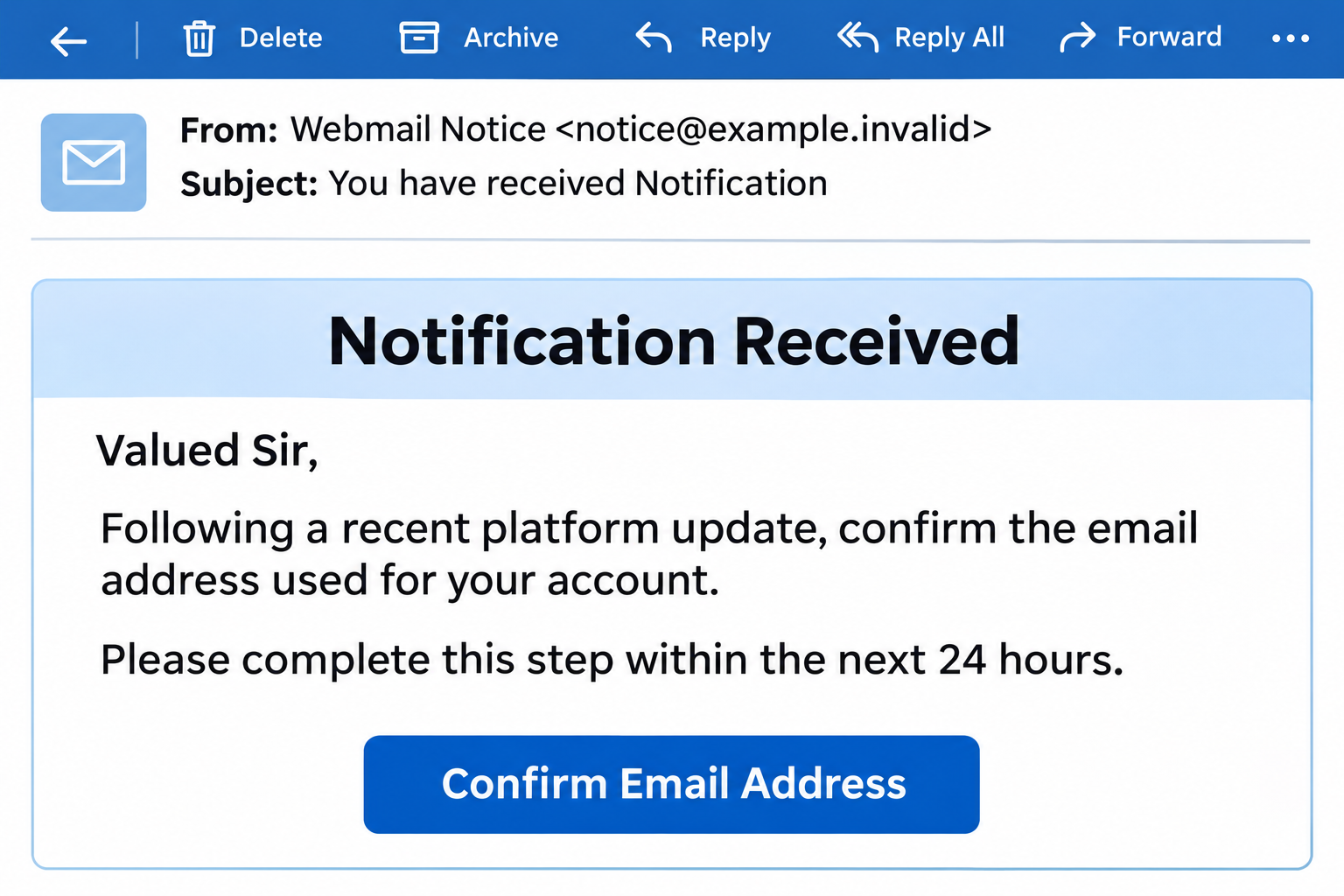
The message uses a generic webmail identity rather than naming a provider responsible for the recipient’s account. It presents confirmation as necessary after an unspecified update.
Its subject, “You have received Notification,” sounds routine. The body warns that continued account activity and incoming messages depend on responding within a day.
A button labeled “Confirm Email Address” supplies the proposed fix. The notice gives no independently verifiable maintenance announcement, account setting, or support reference.
The message’s wording creates urgency, but the destination’s own code provides the more revealing part of the story. Its login screen is built around the intended recipient.
The destination builds its disguise around your address
The linked page contains email and password fields. Its script can read an address supplied in the link, lock that address into place, and select matching branding.
The displayed provider name and logo therefore need not come from the provider. They can be assembled from information already included by whoever prepared the link.
When submitted, the form is programmed to send both fields to an unrelated collection address. It does not send the password through Google’s normal sign-in process.
The password request is the point of danger
This is a credential-phishing scheme, not a genuine confirmation procedure. Its fake update creates a reason to disclose a password the sender should never receive.
- The email names no specific platform that readers can check.
- A 24-hour deadline encourages a quick response.
- The link can carry the recipient’s address before the page opens.
- The page uses that address to personalize a counterfeit login.
- The script sends submitted credentials to a different domain.
- A failed-login message can appear regardless of the collection request’s outcome.
Why a Confirmation Button Can Hide a Password Request
Confirming an address and entering an existing mailbox password are different actions. The email blurs them together by presenting its button as account housekeeping.
You may expect confirmation to mean proving that a message reached your inbox. Instead, the next page asks for a secret that could unlock the inbox itself.
The vague wording helps the message fit different recipients. Someone using personal Gmail may imagine a Google update; an employee may assume their hosting administrator sent it.
That assumption supplies a relationship the email never establishes. A professional-looking notice cannot appoint itself as your provider or your workplace’s technical support.
The deadline also competes with ordinary work. Readers may click while answering other messages because keeping email available sounds like a task they should finish immediately.
There is no need to race that clock. Open the service through your usual app or bookmark and check any real account notice there.
Google’s phishing guidance recommends reaching the service directly instead of entering a password after following a message link.
That advice does not depend on spotting poor spelling. A carefully written email can still lead to a page controlled by someone outside the account provider.
How the Platform Update Email Scam Works
Step 1: An unspecified update becomes your responsibility
The email turns a supposed background platform change into a task for the account holder. Confirmation is presented as the condition for keeping ordinary service working.
It does not explain what changed or how the change affects your account. The missing details make the prominent button seem more useful than the message itself.
A real administrator may announce maintenance or request an account change. Verify that request through an established channel, especially when the notice introduces a new login address.
Step 2: The link brings an email address with it
The destination’s script reads a parameter named utm from the page address. It accepts an email address directly or attempts to decode one first.
This lets a link arrive personalized before you type anything. The page can display your address because the link supplied it, not because it authenticated your account.
The script then disables the email field. That fixed address can make the page feel like it has already recognized you and is waiting only for your password.
Knowing an address does not prove mailbox access. The important question is whether the page is authorized to receive the separate password, not whether it knows your username.
Step 3: Familiar branding is fetched to fit the address
The code separates the email domain from the address and uses it to build a provider-style page title. It also requests a matching website icon.
That small icon can appear where a reader expects the provider’s logo. The same script can request a website image to use behind the login card.
A Gmail-themed version can therefore borrow a familiar visual identity without being a Google login. Other addresses can produce different labels and visual cues.
Those are instructions present in the script, not proof that every possible provider theme has been displayed or works correctly.
Google’s icon service and the image service are resources the page calls. Their presence does not make either service the sender or operator of the phishing campaign.
Step 4: The form points the password at another domain
The page is hosted at lookup-supprt-specializedsuppliers-team-resetline-compadin.pages[.]dev. Its address is not Google’s account sign-in address.
The form’s submission code names a separate destination on grandstores[.]live. It packages the email address and password together for an outgoing request.
That separation matters more than the login card’s appearance. The form is giving the entered secret to a collection route, not proving control through the real provider.
The submitted values are read from the fields when the form handler runs. The code is not merely linking readers onward to a legitimate authentication page.
The host and collection domain identify the observed route, not a verified legal operator. Their owners’ identities and any wider network remain unestablished.
Step 5: An error can encourage another password attempt
The script has an attempt counter. Both successful and failed network callbacks advance that counter and run the same routine for the next displayed response.
Before the threshold, that routine produces an invalid-password message. It does not first confirm that the real email provider rejected the password.
A reader may respond by carefully retyping a correct password, trying an older one, or testing a password used elsewhere. Each further submission can disclose another secret.
Do not interpret rejection as protection. A counterfeit form can report failure after attempting to send the values away, even when no genuine login was attempted.
Step 6: A familiar website can appear at the end
After the counter reaches three attempts, the script is written to redirect the browser to the domain taken from the email address.
Landing on a familiar website afterward can make the episode seem like a temporary login problem. It does not undo an earlier submission to the collection route.
This is the behavior written into the page, not a record of what happened inside your account. Only the real provider’s activity can help establish that.
No successful credential transfer or account takeover is confirmed here. If you submitted information, do not wait for that confirmation before securing the account.
Why the Same Link May Seem Broken to Someone Else
Opening the host without a recipient parameter is not equivalent to following the personalized email link. The script treats those situations differently.
When the expected address is missing, the code selects a page-not-found display instead of the login card. That display is part of the page’s design.
A colleague who checks only the shortened address may therefore describe a different screen from the one you saw. Neither person needs to have imagined the difference.
Do not repair the link by adding an address or asking someone else to try it. Preserve the original message for your provider or security team.
The complete message matters because a shortened link can omit the information that selects the counterfeit interface. A copied headline cannot preserve that detail.
At work, use the organization’s approved reporting route. Forwarding an active link casually to several colleagues creates more opportunities for someone to open it.
Sender and Domain Checks That Actually Help
Check the request, not just the sender label
The displayed sender name is not authentication. Expand the address and compare it with your provider’s established communication, but do not treat a plausible address as final proof.
The original message headers can help a security team evaluate the sending route. A screenshot of the From line alone cannot settle whether an address was spoofed.
The stronger warning here is the mismatch between the promised task and the requested secret. Confirming an address should not hand your mailbox password to this outside form.
Read the address before trusting the artwork
A logo and page title are content chosen by the page author. In this case, the code explicitly changes them using the address supplied in the link.
Likewise, secure transport does not identify the recipient of your password. An encrypted connection to the wrong destination still goes to the wrong destination.
You do not need to determine who registered every domain before stopping. The unrelated submission route and manufactured provider appearance are sufficient reasons not to use this form.
Keep the legitimate provider separate from the impersonation
The Gmail branding is being borrowed. This warning concerns the counterfeit update email and its collector, not a claim that Google is asking for these submissions.
There is also no reason to distrust every website sharing the same hosting service. A hosted address identifies where this page sits, not who approved its claims.
If your actual provider announces a change, its normal account dashboard or known support contact should explain it without requiring this message’s link.
What to Do if You Have Fallen Victim to This Scam
-
Stop interacting with the counterfeit page.
Close it without testing more passwords. If you only received the email, report it as phishing and remove it from your inbox.
A received notice is not proof your mailbox was accessed. The response should match what happened, rather than treating every recipient as already compromised.
-
Replace a submitted password through the genuine service.
Use your established app or a manually opened account page. Do not follow a second link from the notice to change the password.
Act if you submitted the password or cannot tell whether it was sent. Replace reused copies on other accounts as well, using different passwords.
If you are locked out of Google, follow its compromised-account recovery instructions. Business users should notify their administrator promptly.
-
Review access, not just whether your inbox still opens.
Check recent security activity and unfamiliar sign-ins. For Google accounts, its device and session guidance explains how to examine access and sign out.
Several sessions can belong to one device. Review their details before assuming every unfamiliar entry is an attacker, and ask your administrator about uncertain business activity.
-
Check settings that could keep exposing mail.
Look for unfamiliar recovery contacts, connected applications, mail delegation, filters, and forwarding settings. Have an administrator inspect managed accounts if those controls are unavailable.
In Gmail, open Settings, then See all settings, and inspect the Forwarding and POP/IMAP or Forwarding tab.
Google’s forwarding instructions explain disabling unwanted forwarding. Check filters too, since selected messages can be forwarded separately.
-
Strengthen future sign-ins without approving unexpected requests.
Enable stronger account authentication through the provider’s own settings. Where supported, a passkey offers protection against phishing that ordinary typed passwords lack.
Create it only on a device you control. Do not approve a surprise authentication request or give anyone a recovery code to complete the supposed update.
-
Protect conversations that could be misused.
If the exposed mailbox handles invoices, customer information, or payments, tell the responsible team. Check whether unusual messages or changed payment instructions were sent.
Verify sensitive requests through contact details already held outside the suspicious conversation. Do not assume a continuing email thread proves that every participant still controls their account.
-
Preserve useful evidence and report the message safely.
Keep the original email, its full link, approximate interaction time, and any genuine account alerts. Do not include your password in the report.
Use the mail application’s phishing-report control or your workplace’s reporting process. Keep recipient-bearing links private rather than posting them in a public complaint.
-
Separate account recovery from device problems.
The identified mechanism collects credentials; it does not demonstrate a software installation. A malware scan cannot revoke mailbox sessions or remove an unwanted forwarding rule.
If you also installed software, added an extension, or granted remote access, describe that separate exposure to IT or trusted technical support.
If you actually sent money after a follow-up, contact the payment provider immediately. Do not pay anyone promising guaranteed recovery of the account or funds.
Frequently Asked Questions
Does the 24-hour platform update deadline apply to my account?
The message provides no verified account-maintenance requirement. Check your real provider independently instead of using its countdown as a reason to submit a password.
How did the page already know my email address?
The script can read it from the link and prefill the form. Displaying an address does not prove authentication, mailbox access, or a relationship with your provider.
Why did the login show a Google logo?
The code requests branding based on the email domain. A familiar icon can be inserted into an unrelated page without making its password form part of Google.
Am I safe because the page rejected my password?
No. Its script can show an invalid-password response after the outgoing request. Treat a submitted password as exposed and change it through the genuine account service.
What if someone checking the link sees a missing-page screen?
The page includes that display for visits lacking the expected address parameter. It does not establish that your personalized link was harmless or that earlier submissions disappeared.
Does receiving this message mean my computer has a virus?
No infection is established by receiving this notice. The demonstrated threat is the password-collection form; investigate any separate downloads or installations according to what actually happened.
The Bottom Line
Do not use the Platform Update email scam’s confirmation button or enter passwords on its destination. The page personalizes a disguise while directing credentials elsewhere.
If you submitted a password, replace it through the real provider, review account access and forwarding, and report it. An error screen is not a clean bill of health.

Join the discussion
0 commentsShare your experience or ask a question about this article.
Discussion
Start the conversation
Have a question or something useful to share? Add the first comment.