

An unexpected message about loyalty points can feel routine, especially when it uses the name of a store you recognize. It may say a reward is waiting, a free gift has been reserved, or valuable points will disappear unless you act today.
That familiar setting is exactly what makes the O’Rewards scam convincing. The message borrows a real program’s identity, then quietly sends the recipient into a process controlled by criminals.
Overview
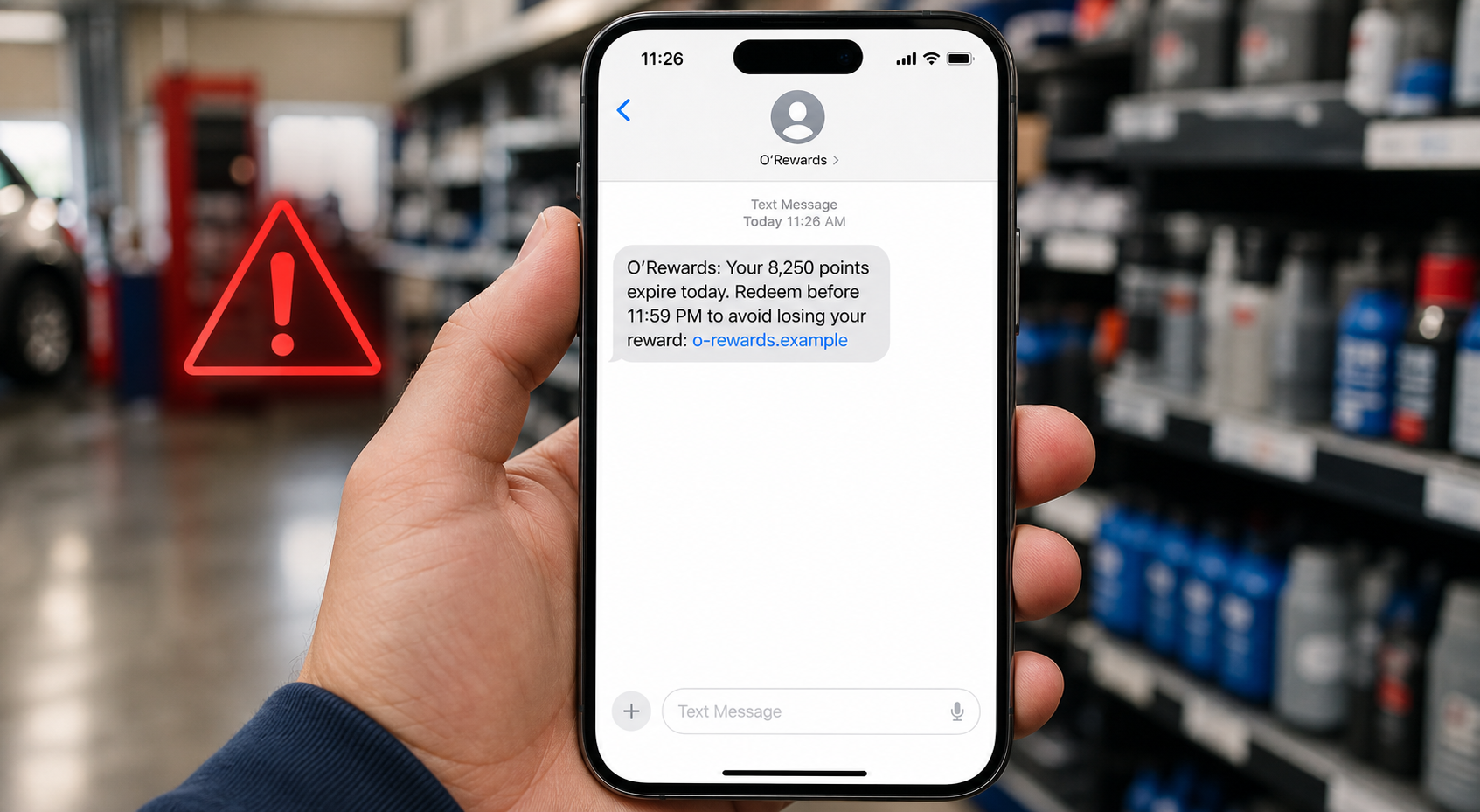
The O’Rewards scam is a phishing campaign that impersonates O’Reilly Auto Parts and its legitimate O’Rewards loyalty program. It commonly arrives as a text message or email claiming that points are expiring, an account needs attention, or the recipient has qualified for a free customer gift.
O’Rewards itself is real. O’Reilly Automotive Stores, Inc. operates the program for eligible customers, and genuine members can earn points from qualifying purchases. The fraud begins when someone outside O’Reilly copies the program name, logo, colors, or writing style to make a fake message look official.
The deceptive message usually contains a link and a reason to use it immediately. That link can lead to a cloned sign-in page, a fake customer survey, a prize-selection screen, or a payment form requesting a small shipping or processing fee.
Any information entered there goes to the operator of the fake page, not to O’Reilly Auto Parts. Depending on the version, the scam can steal an OReillyAuto.com password, an email password, a phone number, a home address, card details, or a one-time security code.
The safest response is to ignore the message’s link and check the account independently. Type OReillyAuto.com into the browser yourself, use a saved official bookmark, or contact O’Reilly through information obtained from its real website.
The real O’Rewards program is not the scam
This distinction matters because a blanket statement that every O’Rewards text is fraudulent would be inaccurate. O’Reilly’s official terms say earned rewards may be delivered by email or text, so criminals are imitating a communication method real members may already recognize.
According to the official program information, members receive 1 point for every $1 spent on qualifying purchases. After earning 150 points, a member receives a $5 reward. Genuine rewards can be used at an O’Reilly Auto Parts store or entered during checkout on OReillyAuto.com.
O’Reilly also states that accrued points expire at the end of the month one calendar year after they are earned. Issued rewards expire 90 days after issuance or after they are used. Those rules are specific and far less dramatic than a random promise of an expensive gift for answering a few questions.
Official terms listed several short codes for different messages at the time of this investigation, including codes for promotions, earned rewards, and order updates. However, sender information alone is not enough to establish trust because phone numbers and sender names can be spoofed, copied, or changed.
Verify the content inside the official account instead. A genuine account balance, reward code, or expiration notice should be confirmable after navigating directly to OReillyAuto.com without using the link in the message.
Common versions of the fake message
Scammers regularly change the wording, sender number, deadline, and linked domain. Looking for one exact sentence or phone number is therefore less useful than recognizing the underlying request.
Common O’Rewards scam themes include:
- Your unused O’Rewards points expire tonight and must be redeemed through a link.
- You were selected for a free tool set, emergency kit, cooler, or other customer gift.
- A short satisfaction survey will unlock a high-value loyalty prize.
- Your O’Rewards account has been restricted and must be verified immediately.
- A duplicate account was detected and you must sign in to preserve your points.
- A birthday or anniversary reward is waiting, even though the timing does not match your account.
- You only need to pay a small shipping, tax, or processing fee for a supposedly free product.
- A caller claiming to be customer service needs your password or a code sent to your phone.
The exact prize is not important. It can be changed to match the season, current advertising, or products that O’Reilly customers are likely to want.
Why the O’Rewards scam is easy to believe
Loyalty programs already train customers to expect points, coupons, expiring rewards, and promotional messages. A short notice about a $5 credit may not feel unusual enough to trigger immediate suspicion.
Criminals exploit that familiarity through a technique called brand impersonation. They do not need to compromise O’Reilly’s systems. They only need a logo, a plausible message, and a website that looks convincing for the few minutes a victim spends on it.
Loss aversion adds more pressure. The message does not merely promise something new. It often claims that value already belonging to the recipient is about to be taken away. People move faster when they think they are preventing a loss.
A small fee can also make a fake prize seem believable. Someone may question a completely free tool set but accept $6.95 or $9.95 as reasonable shipping. The amount is deliberately low because the card number is more valuable than the first charge.
Warning signs that expose a fake O’Rewards message
Professional formatting is not proof of authenticity. Modern phishing kits can reproduce a company’s branding accurately, while generative tools help criminals write cleaner messages than the error-filled scams many people expect.
Look for the following warning signs:
- The message creates a very short deadline or threatens immediate loss of all points.
- The displayed link does not end in the official
oreillyauto.comdomain. - A shortened link hides the real destination.
- The page asks you to sign in before showing any verifiable account information.
- A free reward requires card details for shipping, tax, validation, or processing.
- The message promises a prize that is much larger than the normal $5 reward described by the official program.
- You receive the notice even though you never joined O’Rewards.
- The sender asks you to reply with a password, card number, or one-time verification code.
- The page lacks a normal path back to OReillyAuto.com or uses buttons that all lead to the same form.
- After the first form, you are pushed through surveys, partner offers, trials, or repeated redirects.
A domain can contain words such as “oreilly,” “rewards,” “member,” or “redeem” and still be fraudulent. The important part of a web address is the registered domain immediately before the first single slash, not the words placed elsewhere in a long URL.
A real-looking sender does not make the link safe
Some phones group messages by sender name, and email apps prominently display a friendly name instead of the complete sending address. That presentation can make a fraudulent message appear beside a legitimate conversation.
Scammers may also use lookalike characters, compromised email accounts, email-to-SMS gateways, or sender spoofing. Never treat the logo, caller ID, or display name as the final verification step.
Open the official account separately and compare the message with what appears there. If the account contains no matching reward or alert, do not continue through the message.
How The Scam Works
The O’Rewards scam can stop after stealing a password, or it can continue through several stages designed to collect increasingly valuable information. The following sequence shows how the most dangerous versions operate.
1. A text or email is sent to a broad list
The criminals do not need to know who shops at O’Reilly. They can send thousands of messages and rely on chance. With a large enough list, some recipients will be O’Rewards members and others will recognize the retailer.
Basic information from prior data breaches can make the message more personal. A first name, city, phone number, or email address may be inserted automatically without giving the sender access to the person’s actual O’Rewards account.
2. The message creates urgency or excitement
An expiration warning pushes the victim to prevent a loss, while a free gift creates excitement. Both emotions shorten the time available for careful inspection.
The call to action is intentionally simple: “Redeem now,” “Verify points,” “Claim gift,” or “Take survey.” The scammer wants the recipient to tap before checking the URL or opening the official website independently.
3. The link opens a lookalike domain
The destination may reproduce O’Reilly colors, a logo, navigation labels, and product photographs. On a phone screen, the browser’s address bar can be small or partially hidden, allowing the page design to dominate attention.
The domain may be newly registered, compromised, or unrelated to automotive retail. Some campaigns use several redirects so the address visible in the message differs from the final phishing site.
4. A fake account check collects credentials
One version asks the visitor to sign in to protect expiring points. The form records the email address and password, then may display a generic error or send the victim to the real O’Reilly site to reduce suspicion.
If the password was reused, the attacker can try it against the victim’s email, shopping accounts, social networks, and other services. The email account is particularly valuable because it can be used to reset many other passwords.
5. A survey or prize page collects identity data
Another version asks a few harmless questions before announcing that the visitor won. The survey is often theater. It creates participation and makes the prize feel earned.
The claim form then requests a full name, phone number, email address, date of birth, and delivery address. That information can support targeted phishing, account-recovery abuse, identity fraud, or resale to other marketers and criminals.
6. A small fee captures payment information
The supposed gift is described as free, but the victim must cover shipping or verification. Entering a card exposes the number, expiration date, security code, billing address, and cardholder name.
The page may make an immediate charge, attempt a larger transaction, or enroll the card in a recurring subscription hidden in fine print. Even if the first amount is small, the card should be treated as compromised.
7. A verification code can complete an account takeover
If an attacker already has a password, the next obstacle may be a one-time code. A fake customer-service caller or form may claim the code is needed to confirm the reward.
That code is often the final key required to enter a real account or authorize a password reset. A legitimate employee should not need you to read back an unexpected security code that explicitly says not to share it.
8. The stolen information is reused
After the first interaction, the victim may receive more convincing messages because the criminals now know which address is active and which subject attracted a response.
Follow-up scams may impersonate the bank, a fraud department, a delivery service, or O’Reilly support. The attacker can reference the earlier “reward” to make the new contact sound legitimate.
9. The campaign moves to another domain
Phishing domains are disposable. Once a page is blocked or reported, the same template can reappear under a new address with slightly different wording.
This is why a warning tied to only one URL becomes outdated quickly. The reliable rule is to avoid message links and navigate directly to OReillyAuto.com whenever an O’Rewards notice needs verification.
What To Do If You Have Fallen Victim
Do not panic. The right response depends on what you did, and acting quickly can prevent a click from becoming a financial loss or account takeover.
- Stop interacting and preserve the evidence. Close the fake page and do not reply to the sender. Save screenshots of the message, sender information, URL, form, payment confirmation, and any charges before deleting anything.
- If you only opened the link, check the device. Merely viewing a page does not automatically mean the phone or computer was compromised. If a file, app, profile, or browser extension downloaded, remove it, update the operating system and browser, and run a trusted security scan.
- Change any password entered on the fake page. Navigate directly to the real service and create a new, unique password. If the same password was used anywhere else, change it on every affected account, starting with the email account.
- Secure the email account. Review active sessions, recovery addresses, forwarding rules, and recent security events. Sign out unfamiliar devices and enable multi-factor authentication using an authenticator app or security key when available.
- Contact the card issuer immediately. If you entered card information or paid a fee, call the number printed on the card. Explain that the details were entered into a phishing site, ask whether the card should be replaced, and dispute unauthorized or misleading charges.
- Review the official O’Rewards account. Sign in through OReillyAuto.com, not through the message. Check account details and contact O’Reilly Customer Experience using the information on its official site if you see changes or need confirmation.
- Never approve an unexpected verification request. If codes or login prompts continue arriving, someone may still be trying to enter an account. Deny the request, change the password from a trusted device, and contact the affected service directly.
- Report the text and email. Use the phone’s “Report Junk” option and forward the original text to 7726, which spells SPAM. Mark fraudulent emails as phishing and report the incident to the FTC through ReportFraud.ftc.gov.
- Respond to exposed identity information. If you shared a Social Security number or enough information for identity fraud, visit IdentityTheft.gov for a personalized recovery plan. Consider a fraud alert or credit freeze based on that guidance.
- Monitor for follow-up attacks. Watch bank statements, card activity, email security alerts, password-reset notices, and mobile-account changes. Treat calls claiming to “help” with the original incident as untrusted until independently verified.
The FTC’s spam text guidance recommends avoiding unexpected links, contacting the company through a known website or number, and forwarding unwanted texts to 7726. Its scam recovery guide also advises contacting the card issuer and changing compromised passwords promptly.
The Bottom Line
O’Rewards is a legitimate O’Reilly Auto Parts loyalty program, but criminals are exploiting its trusted name through fake expiration alerts, free-gift messages, surveys, and customer-service calls. A realistic logo or familiar sender name does not make a link safe.
Do not claim an O’Rewards offer through an unexpected message. Open OReillyAuto.com independently and verify the account there. If a page requests a password, card details, shipping payment, or verification code, close it and report the message.

Join the discussion
0 commentsShare your experience or ask a question about this article.
Discussion
Start the conversation
Have a question or something useful to share? Add the first comment.