

The decentralized finance (DeFi) space has grown rapidly, attracting millions of users worldwide. With platforms like PancakeSwap leading the way, decentralized exchanges (DEXs) have become popular choices for swapping cryptocurrencies. However, this popularity has also attracted cybercriminals. Fake PancakeSwap websites have surfaced, tricking unsuspecting users into connecting their wallets and losing their funds. In this article, we will expose these scams in detail, explain how they work, and provide guidance on what to do if you have fallen victim.
Scam Overview
The Rise of Fake PancakeSwap Websites
PancakeSwap is one of the largest decentralized exchanges operating primarily on the BNB Chain. As a trusted platform, it processes billions in trading volume. This success has unfortunately made it a prime target for scammers. Fraudulent websites are carefully designed to mimic the official PancakeSwap interface, making it difficult for users to distinguish between the real and the fake.
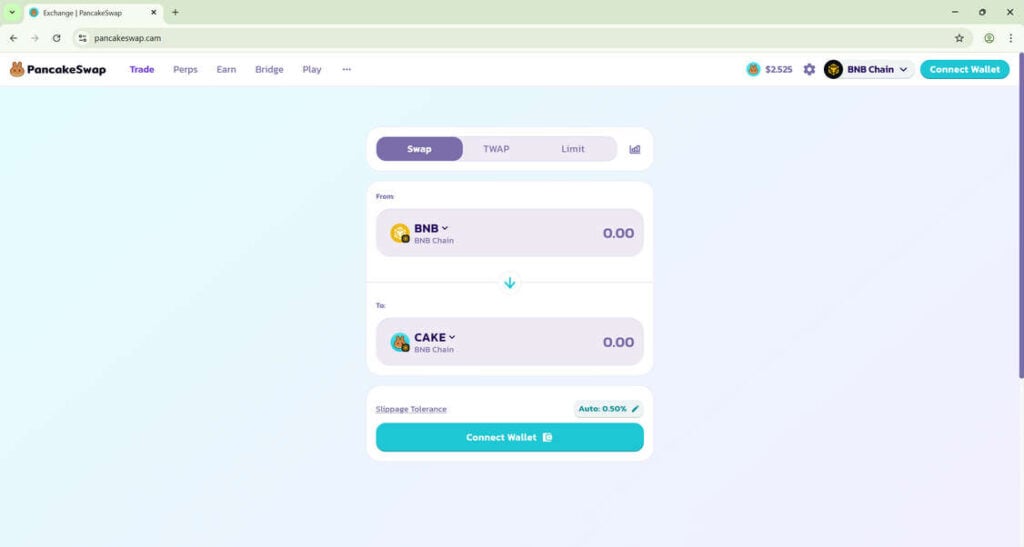
These scam websites often use domain names that look strikingly similar to the official one, such as pancakeswap.cam, pancakeswap.exchange, or other deceptive variations. To an unsuspecting eye, these fraudulent sites look authentic. They use the same logos, layouts, and user interfaces as the legitimate PancakeSwap website.
Common Traits of the Fake Sites
Scammers put significant effort into replicating the PancakeSwap experience. Here are some common traits:
- Identical Interface: The fake website mirrors the PancakeSwap trading page, showing token swap options and wallet connection prompts.
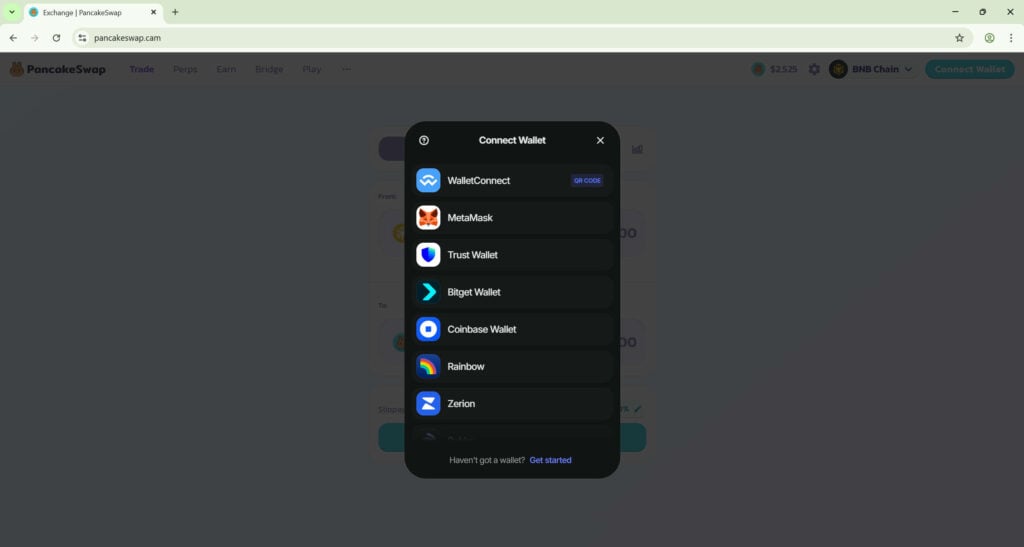
- Wallet Connection Prompt: The fraudulent page immediately requests users to connect their wallets via MetaMask, WalletConnect, Trust Wallet, or other options.
- Malicious Redirection Links: Once the wallet is connected, victims are asked to approve malicious transactions.
- Hidden Code Execution: Behind the scenes, the fake site executes smart contracts that drain the victim’s assets.
The Goal of the Scam
The primary objective of these scams is to steal users’ funds. Once a wallet is connected and permissions are granted, attackers can transfer tokens and cryptocurrencies without requiring further confirmation from the victim. Many users lose their entire balances within minutes.
Why the Scam Works
The scam is effective because:
- Trust in PancakeSwap’s Brand: Users know PancakeSwap is a reputable exchange, so they let their guard down.
- Domain Deception: Slight changes in domain extensions (e.g., .cam instead of .finance) can go unnoticed.
- Urgency in DeFi: Crypto trading often involves quick decision-making, which reduces vigilance.
- Lack of Security Awareness: Many crypto users are unaware of phishing tactics and website verification methods.
Scale of the Scam
Hundreds of phishing domains targeting PancakeSwap users have been reported. Social media ads, fake Google search results, and phishing links in Telegram or Discord groups often drive traffic to these malicious websites. Some reports indicate that scammers have collectively stolen millions of dollars from victims worldwide.
Real-Life Example
In one documented case, a user searching for PancakeSwap on Google clicked a sponsored ad. The ad led to a fake PancakeSwap website. Believing it was real, the user connected their wallet. Within minutes, unauthorized transactions drained thousands of dollars’ worth of BNB and CAKE tokens. Stories like these highlight the importance of extreme caution.
How the Scam Works
Step 1: Creation of a Fake Website
Scammers register domains that closely resemble the official PancakeSwap domain. They often use:
- Alternative domain extensions (.cam, .net, .org)
- Misspelled names (pancakswap, pancakesawp)
- Subdomains (pancakeswap.fakewebsite.com)
They then copy the legitimate PancakeSwap interface to make the site look real.
Step 2: Luring Victims
Once the site is ready, scammers lure victims using different strategies:
- Paid Ads: They run ads on Google or social media platforms to appear at the top of search results.
- Phishing Links: Links are spread via email, Telegram groups, Discord channels, and even fake influencer accounts on Twitter.
- SEO Manipulation: Fake sites are optimized to appear in search engine results.
Step 3: Wallet Connection Prompt
The fraudulent page prompts users to connect their wallet. Supported wallets often listed include:
- MetaMask
- Trust Wallet
- WalletConnect
- Coinbase Wallet
- Bitget Wallet
To the unsuspecting victim, this looks harmless because these wallets are widely recognized.
Step 4: Malicious Approval Request
Once connected, the fake PancakeSwap asks the user to approve transactions. Instead of approving a swap or staking, the victim is unknowingly granting unlimited access to their wallet.
For example:
- Approval requests may give the scammer permission to transfer all USDT, BNB, or CAKE tokens.
- The code is hidden behind seemingly legitimate contract interactions.
Step 5: Immediate Fund Drain
Once approval is granted, the scammer can instantly drain funds. Victims often see:
- Their tokens disappearing within minutes.
- Pending transactions they did not initiate.
- Wallet balances reduced to zero.
Step 6: Covering Tracks
To avoid being traced, scammers:
- Transfer stolen funds to multiple wallets.
- Use mixers and bridges to obscure transactions.
- Cash out funds on other exchanges.
Step 7: Continuation of the Scam
After draining funds from one group of victims, scammers move on to new domains and new ads. This cycle continues, making it difficult to shut down the operations completely.
What to Do if You Have Fallen Victim to This Scam
If you suspect you have connected your wallet to a fake PancakeSwap website or approved a malicious transaction, act immediately. Here are the steps you should take:
1. Revoke Permissions Immediately
Go to a trusted blockchain explorer or token approval management tool like BscScan Token Approval Checker or Etherscan Token Approval Checker. Revoke any suspicious approvals to prevent further unauthorized access.
2. Transfer Remaining Funds to a New Wallet
If you still have funds left, transfer them to a new wallet that has not interacted with the malicious contract. Do not reuse compromised wallets.
3. Report the Scam Website
Report the fake site to:
- PancakeSwap’s official support channels
- Google Safe Browsing
- Phishing reporting services
This helps prevent further victims.
4. Scan Your Device
Ensure your device is free from malware. Use antivirus software to detect and remove malicious extensions or keyloggers.
5. Avoid Clicking on Suspicious Ads
Only access PancakeSwap by typing the official URL: https://pancakeswap.finance. Bookmark it for safety.
6. Notify Your Community
If you found the fake link in a Telegram or Discord group, warn other users immediately. Public awareness reduces the scam’s effectiveness.
7. Legal and Regulatory Steps
While crypto scams are difficult to trace, report the incident to your local cybercrime authority. Some regions have dedicated crypto crime units that investigate these cases.
8. Strengthen Wallet Security
- Use a hardware wallet for large funds.
- Regularly review and revoke token approvals.
- Enable additional security settings in your wallet.
Frequently Asked Questions About PancakeSwap Fake Websites
What is a fake PancakeSwap website?
A fake PancakeSwap website is a fraudulent copy of the official PancakeSwap decentralized exchange. It looks identical to the real site but is designed to steal your cryptocurrency by tricking you into connecting your wallet and approving malicious transactions.
How can I identify a fake PancakeSwap site?
Look for subtle red flags such as domain extensions like .cam, .net, or .org instead of .finance. Check for spelling errors, unusual pop-ups, and suspicious ads that appear in search engines. Always confirm that you are visiting https://pancakeswap.finance.
Can I lose funds just by visiting a fake site?
No, you cannot lose funds by visiting alone. The risk arises when you connect your wallet and approve transactions. That is why scammers push hard for you to connect your wallet immediately after visiting their fraudulent site.
What happens when I connect my wallet to a fake site?
When you connect your wallet, the fake site prompts you to approve smart contract interactions. These approvals often grant unlimited access to your tokens, enabling scammers to drain your wallet.
Are fake PancakeSwap sites promoted through ads?
Yes, scammers often pay for ads on Google, Twitter, or Facebook. These ads appear at the top of search results and look official. Clicking them can lead directly to phishing websites.
How do scammers drain wallets so quickly?
Once you approve malicious permissions, scammers gain direct access to your funds. Automated scripts then execute transfers within seconds, moving your tokens to scammer-controlled wallets.
What should I do if I approved a malicious contract?
Immediately use a tool like BscScan Token Approval Checker to revoke the permissions. Transfer any remaining assets to a new, uncompromised wallet. Quick action can sometimes save part of your funds.
Can I recover my stolen funds from a fake PancakeSwap site?
Recovering stolen funds is extremely difficult. Scammers quickly move assets through multiple wallets and cross-chain bridges, making tracing nearly impossible. Your best chance is to report the scam to authorities and raise awareness to protect others.
How can I protect myself from PancakeSwap scams?
Always bookmark the official PancakeSwap site. Never click on sponsored ads or random links shared in groups. Regularly check your wallet permissions and use hardware wallets for better security.
Are PancakeSwap fake websites common?
Yes, hundreds of fake domains are regularly reported. Scammers continuously launch new phishing sites, so vigilance is essential.
Is PancakeSwap itself safe?
Yes, PancakeSwap is a reputable decentralized exchange. The danger comes not from PancakeSwap itself but from counterfeit websites designed to impersonate it.
The Bottom Line
Fake PancakeSwap websites are a growing threat to DeFi users. They exploit trust in PancakeSwap’s brand and use sophisticated tactics to trick people into connecting their wallets. Once permissions are granted, funds can be drained instantly. Protect yourself by always double-checking URLs, bookmarking the official PancakeSwap site, and staying alert for phishing attempts. If you fall victim, act quickly to revoke permissions, move your funds, and report the scam. Awareness and vigilance remain the best defense against these malicious attacks.
The fight against crypto scams is ongoing, but by understanding how they work and spreading awareness, the community can limit their impact. Stay safe, verify every site you interact with, and always put security first.

Join the discussion
0 commentsShare your experience or ask a question about this article.
Discussion
Start the conversation
Have a question or something useful to share? Add the first comment.