

A familiar name appears above an invitation, but the event details are hidden behind a button. It feels easier to open the card than ask questions.
The Paperless Post email scam takes advantage of that small social hesitation. Look at the next request before letting curiosity choose where you sign in.
Overview
The invitation is a route into another account
Paperless Post is a genuine invitation service. The scam impersonates its cards or messages, then uses the apparent invitation to solicit private account information.
The company’s official phishing guidance says these deceptive messages can originate outside its platform, including from email accounts that have already been compromised.
That explains why a message can seem personal without being safe. Recognizing the supposed host is useful context, but it does not authenticate the link.
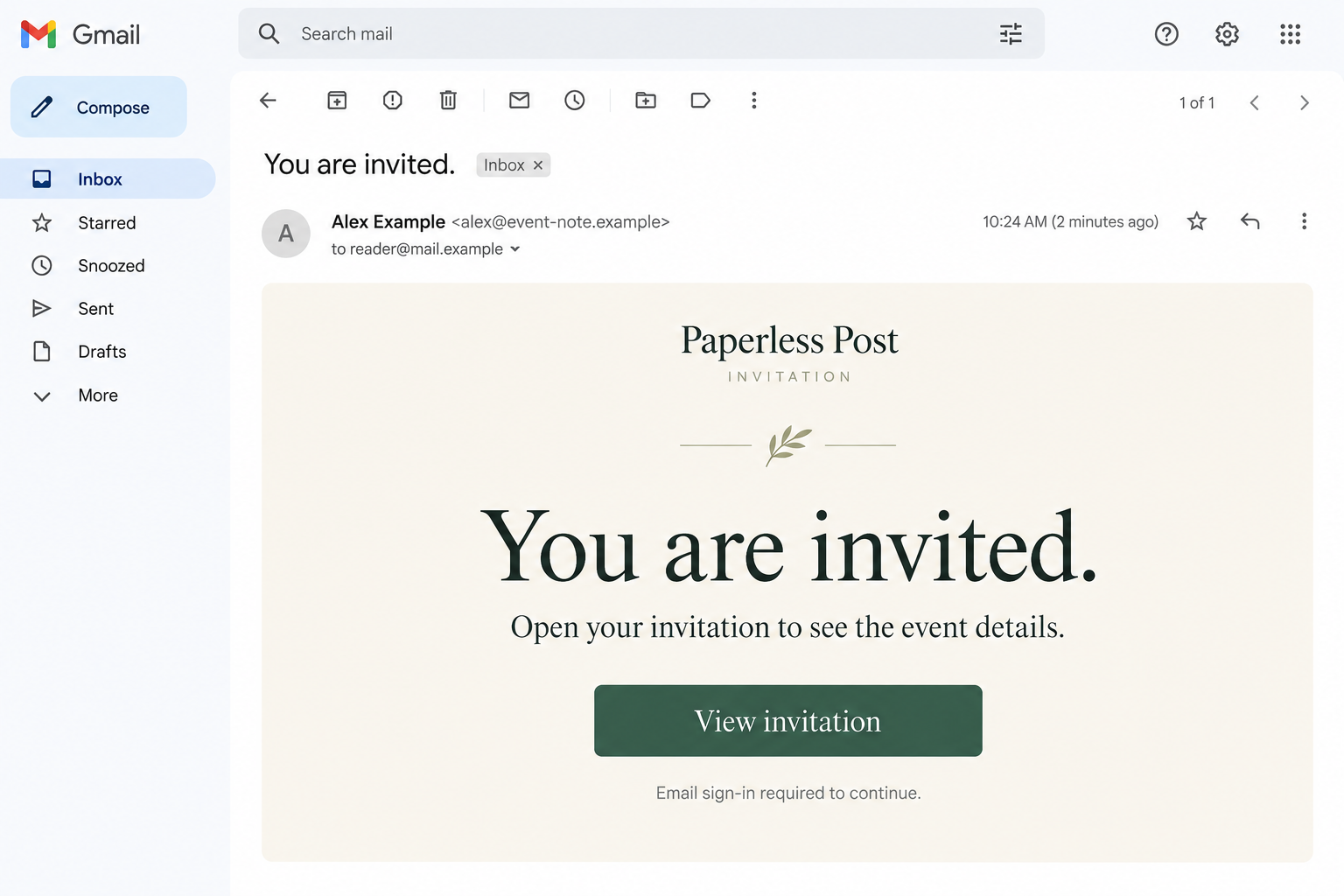
The illustration is a fictional invitation message, not a card received from a real host. Its invented address demonstrates the disguise without exposing anyone’s information.
Viewing a real invitation does not require a mailbox password
Paperless Post says a received invitation can be opened without logging in or downloading anything. A form demanding your email password contradicts that viewing process.
Do not confuse viewing a card with managing your own platform account. Those are separate tasks, and neither requires giving a stranger your mailbox credentials.
A fake page may describe the password request as recipient verification. Calling it verification does not change which account the password would unlock.
If you are unsure, ask the named host through a contact method you already know. You can confirm the invitation without opening the questionable page.
Check the host, sender, destination, and request together
One reassuring detail should not carry the whole decision. A copied logo, familiar first name, or polished card can coexist with an unrelated destination.
Check these four points:
- Did the supposed host confirm sending you an invitation?
- Does the full sender address match the service’s published invitation addresses?
- Does the destination belong to the service, rather than merely contain its name?
- Can the invitation open without supplying unrelated account secrets or downloads?
If the page asks for the password to Gmail, Outlook, or another mailbox, stop. An event invitation should not become permission to enter your inbox.
What Genuine Paperless Post Messages Look Like
Invitation addresses are different from a familiar display name
The service publishes these invitation and transactional sender addresses:
- paperless@email.paperlesspost.com
- paperlesspost@paperlesspost.com
- paperlesspost@accounts.paperlesspost.com
Expand the sender details instead of reading only the bold name. A name such as Paperless Post or a friend’s name can be chosen by someone else.
Matching displayed text is still not a complete authentication test. A compromised contact account can send a real email containing a fraudulent invitation link.
If anything feels wrong, use the host’s known number or another established channel. Do not use a new contact address supplied inside the questionable invitation.
A legitimate short link is not the same as an unknown shortcut
The published invitation domains include paperlesspost.com, pp.events, and links.paperlesspost.com. The company also describes invitations through its verified RCS business profile.
That makes a blanket rule against every shortened link unhelpful. The relevant question is whether the actual address belongs to the documented service.
For example, paperlesspost.com.invitation-check.example would belong to the fictional invitation-check.example domain, not paperlesspost.com. The familiar words at the front do not change ownership.
Do not visit that example or other questionable destinations to experiment. Compare addresses without opening them, and ask the host if the invitation remains uncertain.
The invitation should not arrive as an installer
Paperless Post’s guidance distinguishes embedded images from separate downloadable attachments. It says viewing a received invitation does not require downloading software or logging in.
A file labeled Guest List or Secure Invitation can still be a risky attachment. The label describes what the sender wants you to expect.
Do not install an extension, run an application, or follow a security-update instruction just to see an event. Ask for confirmation outside the message.
How the Paperless Post Email Scam Works
Step 1: A personal-looking invitation earns your attention
The message may suggest a party, wedding, gathering, or private card. A recognized host name makes ignoring it feel a little impolite.
The sender may be imitated, or the email may genuinely come from a contact whose account is being misused. Those are different routes to the same trust.
You do not need to determine which route was used before protecting yourself. A separate question to the host can establish whether the invitation was intended.
Keep the question simple: did you send me a Paperless Post invitation? You do not need to reveal private event details or forward the active link.
Leave the form alone if the host cannot confirm it. Describe the message you received so they can check their own account.
Step 2: The card preview makes one more click feel reasonable
The message withholds enough detail to encourage opening it. A button promises the date, venue, or host’s note, so the next click feels like normal reading.
The linked page may imitate an invitation design. Its attractive layout has no bearing on whether the destination is controlled by the real service.
Before entering anything, read the address and the requested action. A copied invitation can look convincing while sending information somewhere unrelated.
Returning to the message and clicking again will not authenticate it. Use the official guidance or the host’s known contact route instead.
Step 3: Opening the invitation turns into an email sign-in
The fraudulent page asks for credentials to reveal the card. It may describe this as checking that the invitation belongs to the intended recipient.
The invitation does not need the key to your inbox. Your mailbox password protects private conversations and reset messages for other accounts.
Typing the password into an impostor’s form can disclose it even if the next screen says the sign-in failed. An error is not a privacy assurance.
Do not try several old passwords to get past that screen. Each additional entry may reveal another credential you still use somewhere else.
The safe response is to leave and contact the host. The genuine service’s no-login viewing rule gives you a straightforward reason not to continue.
Step 4: A code or additional approval can widen the access
Some phishing approaches follow a password request with a security code or account approval. Read the notification from the actual provider before responding.
A code for a mailbox login, password reset, or new device is not an RSVP. Its real purpose matters more than the invitation page’s explanation.
Paperless Post also has genuine account-verification processes. The distinction is what you initiated and which verified service is asking, not a claim that all codes are fraudulent.
Never send a code to a person who says they need it to show you a card. Verify an unexpected request through the service itself.
Step 5: A trusted inbox can carry the invitation onward
If a mailbox is taken over, its contacts and conversations can help spread the same lure. New recipients may recognize the real address and trust the invitation.
That is why protecting the account involves more than deleting the original message. You need to check access, recovery settings, and signs of unauthorized outgoing mail.
A friend asking about an event you never arranged can be an important warning. Treat the report seriously without assuming that every contact received the same thing.
Tell affected people through a reliable channel. A clear warning about the suspicious invitation is more helpful than forwarding it as an example they might open.
Keep the Invitation Account and the Email Account Separate
Know which password was actually entered
People often describe every login as their email login because the username is an email address. The password may belong to a different service.
Identify which credential you supplied. If it was the mailbox password, secure the email provider. If it was a reused password, protect every account sharing it.
If your actual Paperless Post account was affected, its support team needs that information too. Protecting one account does not automatically repair the other.
A warning to contacts should be specific and calm
You do not need to announce that everything was stolen. Explain that an invitation from your account may be fraudulent and should not be opened.
Give the approximate sending time or subject if known. Leave out the live link, private guest details, passwords, and recovery codes.
If it was a work account, involve the organization’s support team. They can assess access and messages beyond what an individual inbox view shows.
What to Do if You Have Fallen Victim to This Scam
-
Leave the invitation page and stop further attempts. Do not retry a password, approve a new sign-in, or install anything to reveal the card.
Keep the original message, sender details, and approximate time. Record what you entered while it is fresh, without writing the actual password into an unsecured note.
Contact the supposed host through a known route. That can stop a misunderstanding and alert them if their own account may be involved.
-
Recover the mailbox if its password was disclosed. Open the email provider yourself and follow its account-security or recovery process. Use a trusted device if software was installed.
Choose a replacement password that is not shared with other accounts. If you are locked out, use the provider’s recovery instructions rather than paying an unsolicited helper.
The FTC’s hacked-account guide provides recovery links and explains why access to email can put other accounts at risk.
-
Inspect sessions and recovery information. Sign out other sessions using the provider’s controls. Review recovery addresses, phone numbers, connected applications, and unfamiliar authentication methods.
Enable two-factor authentication if available. Do not assume a password change alone has corrected every setting the intruder may have altered.
If you entered a code, identify which account it protected and include that account in the review. An invitation-themed screen may conceal a different service.
-
Check the inbox for continuing access and outgoing messages. Look for unfamiliar forwarding rules and filters, including rules hiding security warnings or moving messages out of sight.
Examine sent and deleted folders for invitations or other messages you did not create. Preserve useful evidence before changing unauthorized settings.
Prioritize important services that use this mailbox for password resets. Review their genuine security notices and account activity, starting with accounts involving money or sensitive records.
-
Warn the people actually affected. Tell recipients not to open the suspicious invitation or supply account details. Use another verified channel when the mailbox is not yet secure.
If the named host was impersonated, explain what you received without blaming them for creating the scam. Their real account may also need attention.
For a workplace incident, provide IT with the subject, time, destination, and actions taken. Let them handle organization-wide warnings or technical investigation.
-
Report the fake invitation to the service and mail provider. Paperless Post lists phishing@paperlesspost.com for suspicious messages and concerns about its accounts.
Explain whether you received a fake card, whether messages were sent from your mailbox, and whether your actual Paperless Post account appears affected.
Include the original email when possible, but never supply a password or verification code. Use your mail application’s phishing-report function as a separate step.
-
Investigate files or software only if that exposure occurred. A downloaded invitation file should not be opened to check its contents. Report it to trusted technical support.
If you ran software or installed an extension, a Malwarebytes scan can help find malicious components. Scanning does not remove an attacker’s access to your email account.
AdGuard can help limit malicious ads and redirects encountered online. It is an additional browsing safeguard, not an invitation authenticator or a substitute for session checks.
-
Handle any payment disclosure separately. A normal invitation should not require a card payment to unlock its contents. Contact the card issuer if details were submitted.
Explain the requested charge and any transaction that followed. Ask about the appropriate protective and dispute options, keeping a record of the response.
Do not pay someone promising to erase the incident or instantly recover the inbox. Continue with the real providers and the case references you already have.
Frequently Asked Questions
Do I need to log in to view a received Paperless Post invitation?
The service says no login or download is required to open a received invitation. Managing your own account is a separate activity.
Can a fake invitation come from a friend’s real address?
Yes. A compromised mailbox can send the message. Confirm with the person through an established contact method rather than trusting the address alone.
Is every pp.events link a scam?
No. Paperless Post identifies pp.events as its official short-link domain. Check the exact address, message context, and requested action together.
What if I entered only my email address?
An address alone is not a mailbox password. Expect possible follow-up phishing, and take additional account action if you also disclosed credentials or approvals.
Should I keep trying when the invitation says my password is wrong?
No. A fake form can collect entries despite displaying an error. Leave it and protect any passwords you already tried.
Does reporting the invitation restore my email account?
No. Reporting helps the service assess the abuse. Mailbox recovery, session controls, and recovery-setting checks belong with the email provider.
The Bottom Line
Do not give a supposed invitation page your mailbox password or an account code. Confirm the host and use Paperless Post’s published message and domain checks.
If you already supplied a secret, secure the account it protects and review continuing access. Warn affected contacts, then report the fraudulent invitation through the genuine service.

Join the discussion
0 commentsShare your experience or ask a question about this article.
Discussion
Start the conversation
Have a question or something useful to share? Add the first comment.