

A security alert says the recovery email for your account was changed. If you did not make the change, a Check activity button appears to offer the fastest way to stop an intruder.
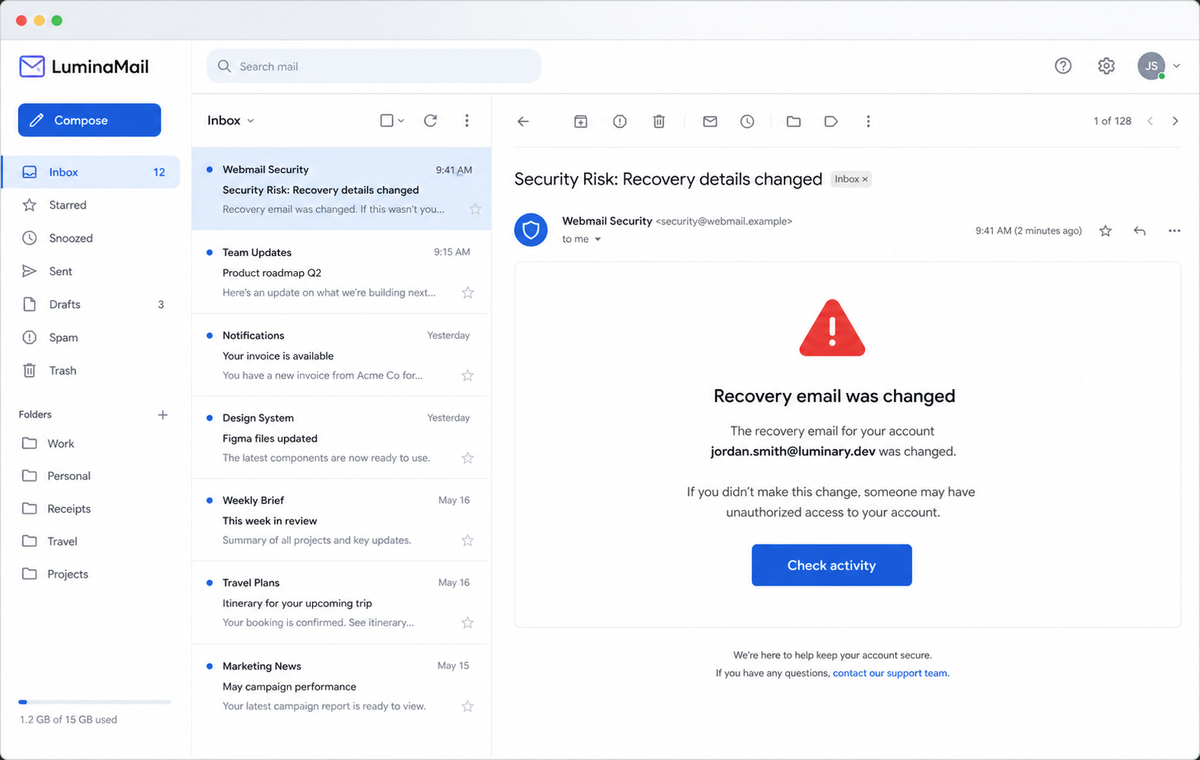
The Recovery Email Was Changed Scam reverses that logic. The warning is fake, and the button leads to a counterfeit login that gives the attacker the very password needed to compromise the mailbox.
Recovery information is sensitive, so genuine providers really do alert users about important changes. The criminals rely on that normal safety behavior to make immediate action feel responsible.
Do not investigate through the message. Open the provider account independently, review recent security events, and change the password there if an unfamiliar recovery method actually appears.
Overview
The alert imitates a high-priority account security event
The subject says “Security Risk: Recovery details changed.” The body claims the recovery email was changed for the recipient's account and warns that anyone who did not authorize it should check what happened.
A Check activity button promises a direct path to the evidence. The footer uses the invented name Webmail LLC and a familiar-looking corporate address to make the generic alert resemble a major provider notification.
The destination was hosted on a cloud-storage domain
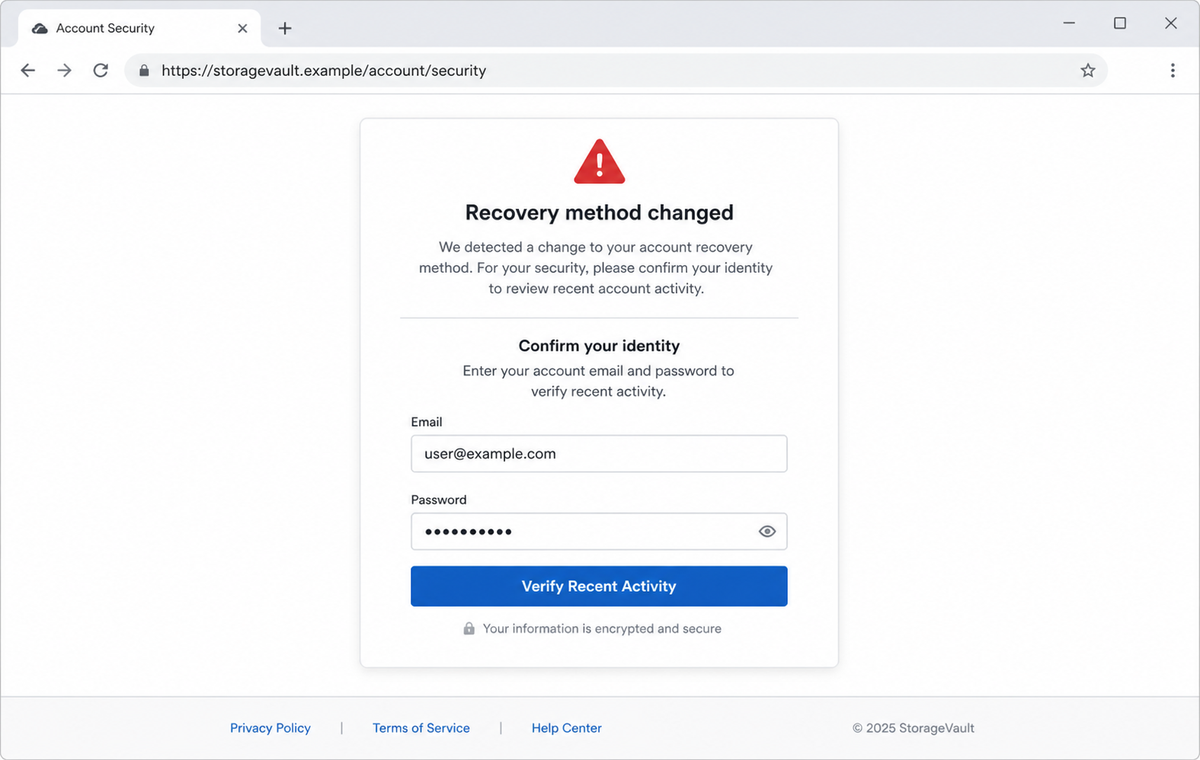
The campaign link reached eu2.contabostorage[.]com, a cloud-storage host abused to serve the fraudulent content. That hostname is not a recognized Gmail or other provider sign-in domain.
Legitimate infrastructure can host malicious files when an account or public object is misused. The reputation of the underlying cloud company does not transfer to every page stored on its service.
A familiar account screen hides a credential collector
The page placed a fake login form over a convincing Gmail-style background. It requested the email address and password, and the URL could carry the recipient address so the design appeared personalized.
Other email domains may trigger different branding. Google, Gmail, and legitimate webmail providers have no connection to the fake Webmail LLC identity or the credential form used in this campaign.
- The subject labels the event as a security risk.
- An unauthorized recovery email change is claimed without evidence.
- Check activity is presented as the urgent protective response.
- The footer uses the fabricated identity Webmail LLC.
- A recognizable corporate address is copied as decorative trust text.
- The link used eu2.contabostorage[.]com in the reviewed campaign.
- A real cloud-storage host was misused to deliver fake content.
- The landing page resembled a familiar provider sign-in.
- The recipient's address could be carried in the URL.
- The form collected the mailbox email address and password.
How Genuine Recovery-Method Alerts Should Be Verified
Recovery email addresses and telephone numbers help a provider restore access when the main credential is lost. An unauthorized change is serious because it may help an intruder keep control or intercept future recovery attempts.
Google's official guidance says unfamiliar changes to a recovery phone number or other security settings are warning signs. It directs users to the Google Account and Recent security activity rather than asking them to trust any arbitrary page.
Providers can notify users by email, push alert, in-product banner, or recovery contact. The correct response is to open the known service independently and compare the event inside the authenticated security history.
A genuine alert and a phishing email can arrive close together. Attackers sometimes trigger real notifications or imitate them after learning that users have been trained to react quickly.
Account security pages should be hosted on the provider's documented domains. A familiar background shown inside a cloud-storage URL is not part of that chain, even when the page has HTTPS.
If a recovery method truly changed, secure the account from a clean device, change the password, remove unknown methods and devices, and use the provider's official recovery process when sign-in is no longer possible.
Details That Reveal the Fake Recovery Alert
The sender identifies itself as Webmail LLC rather than the specific service that owns the account. Generic branding lets the same campaign target many providers while avoiding details that could be checked.
The corporate-style footer copies credibility but does not establish control of the sending domain. Addresses and copyright lines are plain text that anyone can place in an email.
The security-event line in the message is incomplete, leaving a dash where an official destination or activity record would normally appear. The button therefore becomes the only practical route offered.
eu2.contabostorage[.]com is the clearest technical mismatch. It belongs to storage infrastructure, not to the provider interface that the page imitates.
Embedding the email address in a URL can prefill the form and choose a brand. That personalization may also expose the address in browser history, server logs, analytics, and intermediary requests.
The form asks for the password before proving any account event exists. A user can review genuine security activity from the official service without handing credentials to the warning's destination.
How the Recovery Email Was Changed Scam Works
Step 1: Attackers send a provider-neutral security warning
Addresses from breaches, public pages, and guessed company formats receive the same Webmail LLC template. The sender does not need to know whether the account has any recovery email configured.
The alleged change is generated inside the message and can be personalized with the recipient's address.
Step 2: The recovery-change claim creates immediate fear
People understand that altered recovery details could lock them out. The alert frames hesitation as dangerous because an intruder may already be changing the account.
That urgency encourages the recipient to use Check activity before inspecting the sender or destination.
Step 3: Copied footer details imitate a major provider
Webmail LLC, a copyright year, and a recognizable corporate address give the message a formal ending. None of those elements is cryptographic or account-specific proof.
The actual From address and authentication results matter more than a polished signature block.
Step 4: The button opens content on cloud storage
The browser reaches eu2.contabostorage[.]com or another campaign host. Criminals favor hosted files because deployment is fast and the surrounding infrastructure may initially look reputable.
The provider's name can appear in the path or page title while the registered domain remains unrelated.
Step 5: The page recreates the recipient's normal login
A Gmail-style background, provider colors, and a prefilled address reduce friction. The page says identity must be confirmed to inspect the recovery event.
The visual match is selected from public information and does not connect the form to the real account.
Step 6: Credentials and authentication codes are captured
The form sends the email address and password to the attacker. A second screen may request a one-time code or push approval if the real account uses multi-factor authentication.
Repeated errors can collect multiple passwords before the victim is redirected to the genuine service.
Step 7: The attacker changes the real recovery settings
With access, the criminal can add a new recovery method, remove trusted devices, create forwarding rules, and reset linked accounts. The fake warning may become the event it originally invented.
The compromised mailbox can then impersonate the owner and send security-themed phishing to contacts.
Company and Checkout Checks
Open recent security activity from the official account
Close the email and use the provider application, a bookmark, or a password-manager entry. Navigate to security events and recovery methods after confirming the registered hostname.
Look for the same time, device, location, and change inside the provider record.
Inspect the real recovery methods
Confirm that every recovery email, telephone number, passkey, authenticator, and security key belongs to you. Remove anything unfamiliar only after preserving evidence needed by support or an administrator.
A message alone cannot establish that a setting changed.
Reject cloud-storage login forms
A legitimate provider may use cloud services behind the scenes, but its user-facing login should follow documented domains and redirects. Do not enter a mailbox password on an exposed storage hostname.
The path, page title, and copied background cannot change who controls the registered domain.
Use official recovery when access is already lost
If the password no longer works, go to the provider's account-recovery page by typing the address yourself. Answer recovery questions from a familiar device and network when the provider recommends it.
Do not pay strangers who claim they can bypass the provider or recover the account through a private contact.
Warning Signs to Check Before You Act
- The alert uses the generic company name Webmail LLC.
- No actual recovery address or event identifier is shown.
- A copied corporate address is treated as authentication.
- The security-activity destination is incomplete in the email.
- Check activity is the only useful route offered.
- The link opens eu2.contabostorage[.]com or another storage host.
- The destination does not match the documented provider domain.
- A familiar account background hides an unrelated hostname.
- The email address is carried in the link and prefilled.
- The form requests the existing mailbox password.
- The provider theme changes according to the recipient's address.
- No matching event appears in the official security history.
A recovery-method change deserves urgent attention, but urgency should send you to the known account dashboard, not to a cloud-hosted password form selected by the email sender.
What to Do if You Have Fallen Victim to This Scam
- Change the exposed password immediately. Open the email provider's official account security and recent-activity pages through a saved bookmark or its official application, not through the Recovery Email Was Changed message. Set a long password through the real provider after that recovery-changed message. Change matching or closely related passwords on other accounts.
- Treat the password entered after the recovery-email warning as compromised. Set a long password through the real provider after that recovery-changed message. Change matching or closely related passwords on other accounts. Audit the authentication methods registered after this recovery-changed case. Remove unknown telephone numbers, recovery addresses, app passwords, and security keys.
- End the access created through the recovery-email warning. Sign out all other sessions from the email provider’s security page, revoke unfamiliar OAuth grants, and reconnect trusted mail applications only after the password change. This closes tokens that can survive a simple reset.
- Review the mailbox for changes connected with the recovery-email warning. Remove unknown forwarding addresses, delegates, inbox rules, filters, and automatic replies. The mailbox history surrounding this recovery-changed incident may expose attacker activity. Inspect sent mail, deleted items, trash, and recovery messages.
- Protect the wider account chain. Prioritize email, recovery methods, and every account tied to the inbox. The mailbox involved in that recovery-changed message may unlock other accounts through reset links. Change those credentials before an intruder does.
- Restore recovery methods and review every security event. Remove unfamiliar recovery addresses, telephone numbers, passkeys, authenticators, app passwords, delegates, and trusted devices. Save the phishing URL and unknown-event details, then follow the provider's official compromised-account process.
- Check the device used to open the recovery-email warning. Use Malwarebytes after that recovery-changed message whenever an attachment or browser add-on was opened. Review installed software before returning to banking or email.
- Reduce the chance of reopening a related page. AdGuard or another reputable DNS and content blocker may stop known phishing hosts and malicious advertisements tied to the recovery-email warning. Keep checking destination addresses after this recovery-changed case. New campaign domains can appear faster than blocklists update.
- Report the phishing message. Use the mail provider's Report Phishing control and notify the email provider, the abused cloud-storage service, and the organization's IT or security team. Keep the original headers for this recovery-changed incident, not only a cropped screenshot. Administrators can use them to trace and block related messages.
- Warn mail administrator, recovery contact, and recent correspondents through a separate channel. Explain that the recovery-email warning may have exposed the account and ask them to distrust recent file shares, password requests, invoices, payment changes, or urgent replies until the timeline is confirmed.
- Expect follow-up fraud based on the recovery-email warning. Anyone citing this recovery-changed incident while promising recovery must be verified independently. A demand for money first is a warning sign. Seek support for this recovery-changed phishing attempt through known channels. A provider or incident responder verified for this recovery-changed phishing attempt is safer than an unsolicited fixer.
Frequently Asked Questions
Is the Recovery Email Was Changed alert genuine?
The campaign reviewed here is phishing. It uses a fake Webmail LLC identity and sends users to a cloud-hosted credential form instead of the provider's real security page.
Do real providers warn about recovery changes?
Yes. That is why the lure works. Verify every alert inside the official account's recent security activity rather than through the message button.
Why is a cloud-storage address suspicious?
Cloud storage can host ordinary files, but it is not the documented login domain for the provider being imitated. Legitimate infrastructure can be abused to deliver malicious pages.
Can the fake page know my email address?
Yes. The sender already has the address and can place it in the URL. The page then prefills the field or chooses a provider theme without accessing the real account.
What if the recovery method really was changed?
Use the provider's official security or recovery process immediately. Change the password, remove unknown methods and sessions, and secure linked accounts from a clean device.
Can someone recover my account for a fee?
Only use the provider, employer, or a verified incident-response professional. Unsolicited recovery agents who demand payment, codes, passwords, or remote access are likely extending the scam.
The Bottom Line
The Recovery Email Was Changed Scam copies a security event people are trained to take seriously, then uses that fear to collect the password needed for a real account takeover.
Open recent security activity independently and trust the documented provider hostname. Webmail LLC branding, a familiar background, and a cloud-service lock icon do not authenticate the page.
If credentials were submitted, change them immediately, revoke sessions, restore recovery methods, inspect forwarding and connected apps, secure linked accounts, warn contacts, scan downloaded content, and report the host.

Join the discussion
0 commentsShare your experience or ask a question about this article.
Discussion
Start the conversation
Have a question or something useful to share? Add the first comment.