

You’re halfway through your day when a text lands on your screen: a “Parking Charge Notice” you supposedly need to deal with right now. There’s a link. There’s a warning tone. And there’s just enough detail to make you wonder if you really did miss something.
Most people don’t keep a mental record of every car park, every payment app, every quick stop where the signage was unclear.
That tiny doubt is the doorway.
Because the moment you tap the link, this stops being about a parking fine and starts becoming something else entirely.
Scam Overview
Parking Charge Notice scam texts are a form of SMS phishing, often called smishing. They’re designed to impersonate an official parking authority, a government department, or a legitimate parking operator, then pressure you into clicking a link to “pay” an alleged fine.
The message can look simple and believable. It might say you have an unpaid Parking Charge Notice (PCN), that penalties will increase, or that your case will be escalated if you do not act.
Sometimes the text claims to be connected to a well-known government process, even using language that sounds like it was lifted from a real policy page. Other times it leans on vague intimidation: “final notice,” “enforcement,” “legal action,” “collections.”
The goal is always the same: get you off the text message and onto a scam payment site where they can capture your details.
In this wave of scams, victims have reported being redirected to suspicious domains like:
- uk.paying-br.vip
- Other lookalike “payment” pages hosted on unfamiliar domains
And scammers may include or follow up with a phone number such as:
- +447529680099
If you see a link like uk.paying-br.vip or any similar random domain, treat it as a major red flag. A parking authority does not need a brand-new, obscure web address to collect legitimate payments.
Why Parking Charge Notice scam texts work so well
This scam is effective because it borrows credibility from a situation that’s already stressful.
Parking charges are common. People get them for being a few minutes late, entering a registration number incorrectly, parking in the wrong bay, or misunderstanding confusing signage. Even careful drivers can get caught out.
So when a text claims you have a PCN, your brain does something predictable:
You try to remember.
And if you cannot confidently rule it out in two seconds, the message feels “possible.” That’s all scammers need.
From there, they use a handful of psychological levers that reliably drive clicks.
- Urgency: “Pay now” language discourages verification.
- Authority: Official-sounding wording makes you hesitate to ignore it.
- Low payment amount: A small fee like $8.99 feels easier to pay than to investigate.
- Fear of escalation: People worry about bigger fines or enforcement steps.
The scam is not built for someone calmly reading at home with time to research. It’s built for real life: commuting, working, distracted, tired, or rushing.
The PCN confusion scammers love
In everyday conversation, “PCN” can be used to refer to different types of parking notices, and scammers take advantage of that ambiguity.
In the UK context, PCN is widely recognized as “Penalty Charge Notice” for council-issued penalties. But many private parking companies also use the term “Parking Charge Notice.” The acronyms overlap, the language overlaps, and most people are not thinking about technical differences when they’re staring at an unexpected text.
That confusion gives scammers room to sound official without being specific.
A real notice usually contains verifiable identifiers. A scam text often avoids them.
What official parking payments typically do not do
A helpful way to spot Parking Charge Notice scam texts is to focus on what legitimate systems generally do not do.
They typically do not:
- Send a cold text demanding payment through a random link
- Use unusual domains with “vip” endings or odd hyphen patterns
- Ask you to pay without providing a citation reference you can verify
- Threaten immediate enforcement in the first message
The UK government has also warned about scam messages that claim to be from official departments. For example, GOV.UK explicitly notes that if you receive a text message claiming to be from the Department for Transport (DfT) telling you to pay an unpaid parking fine, it is a scam.
That matters because scammers frequently borrow official department names to increase believability.
What happens after you click the link
The link is the pivot point.
Once you tap it, you’re taken to a page the scammer controls. That page can be dressed up to look like a real payment portal, complete with:
- Clean layouts and “official” looking headings
- Forms that resemble government or council payment pages
- A pre-filled amount due, sometimes as low as $8.99
- Buttons like “Pay Now,” “Confirm,” or “Resolve Notice”
The page may ask for card details, billing address, phone number, and email. Some versions also request date of birth or additional “verification,” which can be used for identity fraud.
Even when the scam appears to be about a small parking charge, the information you enter can be far more valuable than the payment itself.
What scammers do with your information
Once scammers capture your data, several things can happen, and not always immediately.
They may:
- Attempt card-not-present fraud with your card details
- Run small “test” transactions first to check if the card works
- Sell your payment details to other criminals
- Use your personal details to craft more convincing scams later
It’s common for victims to notice nothing at first, then see unexpected charges days or weeks later. That delayed impact is part of why these scams keep working.
The “real” parking fine process vs. the scam process
Scammers want you to believe their link is the normal way to pay.
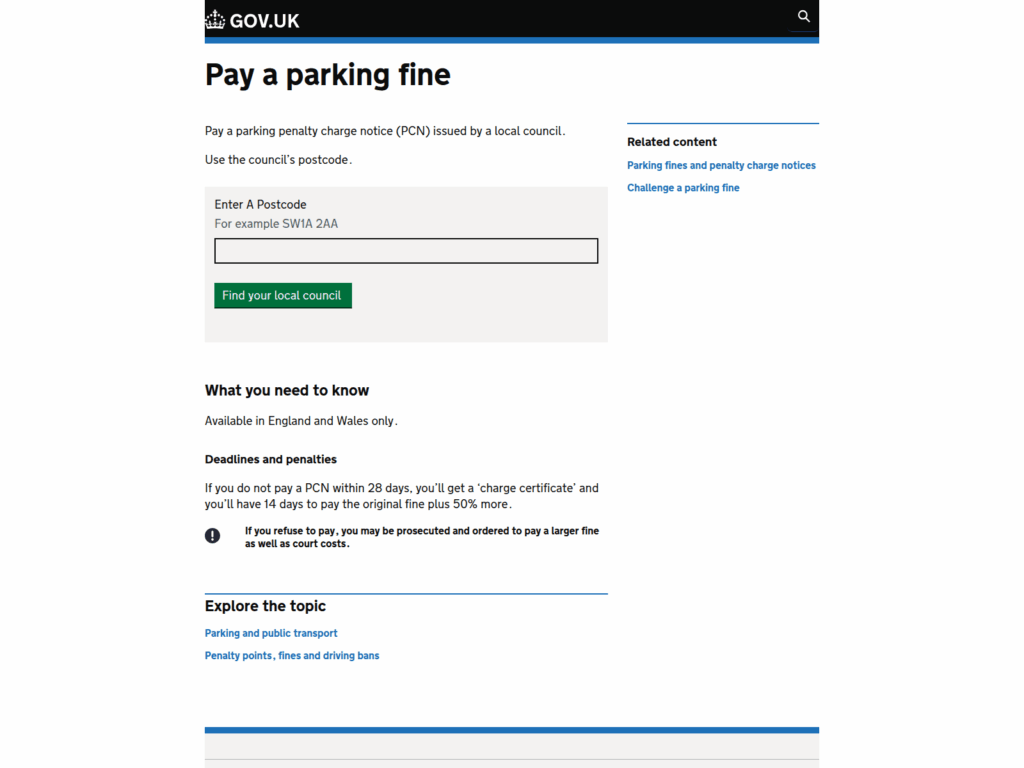
In reality, legitimate payment pathways in the UK are discoverable through official sources. For council-issued PCNs, GOV.UK provides a “Pay a parking fine” page that directs people to pay a PCN issued by a local council by using the council’s postcode.
The key idea is simple:
You should be able to find your payment route by going to an official site yourself, not through a surprise text link.
When the only “proof” is the link in the message, that’s a strong sign you’re dealing with a scam.
Why this scam is spreading now
Parking has become more digital.
More people pay with apps. More people manage vehicle-related admin online. And that shift has made it easier for scammers to pretend there’s a digital “account” connected to your car that needs urgent attention.
Scammers also know that people are trained to respond quickly to messages that look like:
- delivery notifications
- bank alerts
- account warnings
- official notices
Parking Charge Notice scam texts fit neatly into that pattern. They look like something you’re supposed to deal with quickly, quietly, and without drama.
How The Scam Works
To protect yourself, it helps to see the scam as a step-by-step funnel. Each stage is designed to move you forward before you pause and verify.
Below is a detailed breakdown of how Parking Charge Notice scam texts usually play out, including where domains like uk.paying-br.vip and numbers like +447529680099 fit in.
Step 1: The scam text arrives with a “PCN” warning
The first message is often brief. It may mention:
- A Parking Charge Notice or “PCN”
- An unpaid balance
- A deadline or escalation language
- A link to “pay” or “resolve” the notice
The message may avoid naming a specific council or location. That’s strategic.
If it named one council, most recipients would instantly know it’s wrong. Keeping it generic makes it usable nationwide.
Step 2: The message triggers doubt and urgency
Most people do not know, instantly, whether they have a parking notice pending.
You might remember parking somewhere unfamiliar. You might have used a car park payment app. You might have been traveling. You might have been in a rush.
Scammers rely on the fact that uncertainty creates motion.
When your brain cannot quickly disprove the claim, it often defaults to: “I’ll just check.”
And the scam text offers a convenient way to “check”: click the link.
Step 3: The link takes you to a convincing payment page
This is where the scam becomes more persuasive.
A domain like uk.paying-br.vip may load a page that looks polished and official. It can include:
- A headline referencing a “Parking Charge Notice”
- A warning that penalties may increase
- A payment field showing an amount due
- A form for your name and card details
The site may try to feel “UK official” through layout choices, wording, or a generic government-like aesthetic.
But the domain itself tells a different story.
Legitimate parking payment systems do not require strange, newly created “vip” domains. They use established council websites or known providers, and they can be reached by navigating from official pages.
Step 4: The small amount lowers your defenses
Many versions of this scam use a low amount, often around $8.99.
This is one of the scam’s strongest tricks.
A small charge feels like something you could plausibly owe for:
- overstaying by a few minutes
- a minor administrative fee
- a payment app error
- a “late” meter payment
Scammers know people will think: “It’s not worth the hassle. I’ll pay it.”
But the payment is not the product. Your data is.
Step 5: The form quietly collects more than payment
The payment form is where the real theft happens.
It may request:
- Full name
- Home address
- Email address
- Card number, expiry date, and CVV
- Phone number
In some cases, the site asks for additional information “to confirm identity.”
That’s a major warning sign.
A real parking payment portal typically does not need your full identity profile to accept a payment. It needs a citation reference and a payment method.
The more personal details the site requests, the more likely it’s built for fraud.
Step 6: You get a “success” message, and then the follow-on fraud begins
After you submit the form, many victims see a confirmation screen.
This is not proof of legitimacy. It’s a tactic to reduce suspicion and delay your response.
Once scammers have card details, they may:
- Run small test charges first
- Attempt larger purchases later
- Try transactions with different merchants to avoid detection
- Sell the card details to other criminals
Because the original “fine” was small, many people do not check their bank app immediately. That gap gives scammers time.
Step 7: Some scams introduce a phone call angle
A number like +447529680099 may appear in messages or follow-ups.
This creates a second route for manipulation.
If you call, scammers can:
- Pressure you verbally with threats and urgency
- Ask you to “confirm” personal details
- Guide you to make a bank transfer or provide card info again
- Convince you to install apps or follow steps that compromise your device
If a parking-related text encourages you to call a mobile number, treat that as highly suspicious.
Real councils and legitimate parking operators provide contact routes that you can independently verify on official websites.
Step 8: Follow-up texts try to keep you hooked
If you click once, you may get more messages.
Common follow-ups include:
- “Payment failed, please retry”
- “Final notice before escalation”
- “Additional fee required to close the case”
This is not random. It’s targeted.
Your click may mark your number as “responsive,” making you more valuable.
How to verify a PCN safely without taking the bait
If you are worried the notice could be real, the safest approach is to avoid the link entirely.
Do this instead:
- Go to GOV.UK directly and find the official guidance pages for parking tickets
- Use official routes to locate your council payment page if it is a council-issued PCN
- If the notice claims to be from a government department, treat it with extra caution, as official warnings exist about DfT-branded parking fine texts being scams
The safest verification method is always one you initiate yourself.
If a text is trying to force you into a specific link, it’s trying to control the environment and your decisions.
What To Do If You Have Fallen Victim to This Scam
If you clicked the link, entered information, paid a charge, or called a number like +447529680099, do not panic. The most important thing is to act quickly and steadily.
Here’s a calm, step-by-step plan.
- Stop interacting with the message and the website
Close the browser tab. Do not click again. Do not reply to the text. Do not continue any conversation with a number linked to the scam. - If you entered card details, contact your bank or card provider immediately
Explain that you believe your card details were entered into a phishing site. Ask them to cancel the card, issue a replacement, and review recent transactions with you. - Check for small “test” charges
Scammers often start with small amounts to confirm the card works. Look for any unfamiliar transactions, even if they seem minor, and report them. - Turn on transaction alerts
Enable instant notifications for purchases and online transactions. Alerts can help you catch fraud early, before it grows. - If you shared personal details, consider protecting your identity
If you entered your address, email, or date of birth, keep a closer eye on accounts. Consider additional monitoring or safeguards appropriate to your situation. - Change passwords if there’s any chance you reused information
Start with your email password. Then update banking, payment apps, and shopping accounts. Use unique passwords and enable 2-step verification where available. - Report the scam text
In the UK, you can forward suspicious text messages to 7726 for free, which reports the message to your mobile provider. - Report the scam through official channels
You can also report phishing and fraud attempts through UK resources. Action Fraud’s reporting guidance includes how to report suspicious texts and phishing. - Document what happened
Take screenshots of the text, the link, and any pages you saw. Note the date and time, the website domain (like uk.paying-br.vip), and any phone numbers included. This helps your bank and supports any fraud report. - Watch for follow-up scams
After one interaction, scammers may try again. Be extra cautious with any “payment failed” messages, refund claims, or new PCN threats.
The Bottom Line
Parking Charge Notice scam texts are built to feel urgent, believable, and easy to solve. Links like uk.paying-br.vip and pressure-driven wording are designed to push you into a quick click, then a quick payment, and finally a quiet handover of your personal and card details.
If you receive one of these texts, do not use the link. Verify through official routes you find yourself, and report suspicious messages by forwarding them to 7726.
And if you already clicked, you’re not stuck. A quick call to your bank and a few focused security steps can shut this down before it spreads into something bigger.
Frequently Asked Questions
1) What is the Parking Charge Notice (PCN) scam text?
It’s a phishing text message that pretends you have an unpaid Parking Charge Notice and urges you to click a link to pay. The link leads to a fake payment site designed to steal your card details and personal information.
2) Is a PCN text message ever legitimate?
Some parking operators and apps may send real messages, but legitimate notices usually include clear identifiers and point you to a trusted, verifiable website you can find on your own. Scam texts are typically vague, urgent, and include suspicious links.
3) What are the biggest red flags that a PCN text is a scam?
Watch for any of the following:
- A strange link or unfamiliar domain (for example, uk.paying-br.vip)
- No clear council name, operator name, location, date, or reference you can verify
- Generic wording like “final notice” or “immediate action required”
- A message that pressures you to pay quickly to avoid penalties
- A request to call a random mobile number (for example, +447529680099)
4) Why do these scams often demand a small amount?
A small amount lowers your resistance. People are more likely to pay quickly if it feels like a minor fee rather than a major expense. Scammers use that quick-pay instinct to capture your card details and personal information.
5) What happens if I click the link but do not enter any information?
If you clicked but didn’t type anything, your risk is lower. Still, close the page and avoid clicking again. If the site asked you to download anything or behaved strangely, update your phone and consider scanning for security issues.
6) What if I entered my card details on the scam site?
Treat your card as compromised:
- Contact your bank or card issuer immediately
- Cancel the card and request a replacement
- Dispute any suspicious transactions
- Turn on transaction alerts so you’re notified of any new charges
7) Can scammers steal my identity from this?
Yes, depending on what you entered. If you provided personal details like your name, address, phone number, or date of birth, scammers may use that information for identity fraud or to craft more convincing scams later.
8) Why do the texts sound awkward or overly official?
Scammers often use stiff, strange wording to sound “bureaucratic,” even when the phrasing doesn’t make much sense. They care more about creating pressure than being clear.
9) How do I check if a PCN is real without clicking the link?
Use a safe verification method:
- Do not click the link in the text
- Search for your local council or the parking operator’s official website yourself
- Navigate to the official payment page from that site
- If you have a real paper notice, use the official reference number there, not anything in the text
10) Should I call a number included in the text, like +447529680099?
No. If a text message includes a random mobile number, treat it as suspicious. Always use contact numbers listed on official council or operator websites, not the number in the message.
11) Why am I getting these texts if I didn’t park anywhere recently?
Scammers send messages in bulk. They do not need to know whether you actually parked or received a notice. They rely on the fact that some recipients will click out of uncertainty.
12) How do I report a Parking Charge Notice scam text?
You can do several things:
- Use your phone’s “Report junk” or “Report spam” feature
- Forward the message to your carrier’s spam reporting service if available in your region
- Report it to your local consumer protection or fraud reporting authority
- If you lost money, report it and keep screenshots for your bank and any official complaint
13) I paid the small fee. Does that mean it’s over?
Not necessarily. Scammers often test cards with small charges and later attempt bigger ones, or sell your details to other fraud groups. If you paid, contact your bank and monitor your account closely.
14) What should I do if I keep receiving scam parking texts?
- Do not engage, reply, or click
- Block the sender
- Report the message as spam
- Consider filtering unknown senders in your phone settings
- Stay alert for new variations using different links and wording

Join the discussion
2 commentsShare your experience or ask a question about this article.
Discussion
how can anyone get a mobil phone details from a car reg number to text you ? they can’t,
In reply to clifton stokes
You are right, and it is worth spelling out because the assumption behind these texts is what makes them work. A vehicle registration does not give anyone your mobile number. In the UK, DVLA data is released only to specified bodies with reasonable cause – police, insurers, parking enforcement under strict rules – and it contains no phone number in the first place. Nor does a US state DMV hand out numbers, and the Driver’s Privacy Protection Act restricts what can be released at all.
So where does the text come from? Not from your plate. The messages are sent to blocks of numbers generated automatically or bought from a marketing list, and your registration is either not mentioned at all or was gleaned from something you filled in yourself – an insurance comparison form, a warranty registration, a competition entry. The scam works on volume: send a hundred thousand vehicle-related texts and a proportion of recipients own a car, have recently parked in a city, or are expecting a delivery. It feels targeted because it arrived on a day when it happened to fit.
The test that never fails: no legitimate agency asks for payment or card details by text link. Forward suspicious texts free to 7726 in the UK, or 7726 in the US as well, which reports them to the carrier, and never tap the link. If you did enter card details, ring your bank straight away.