


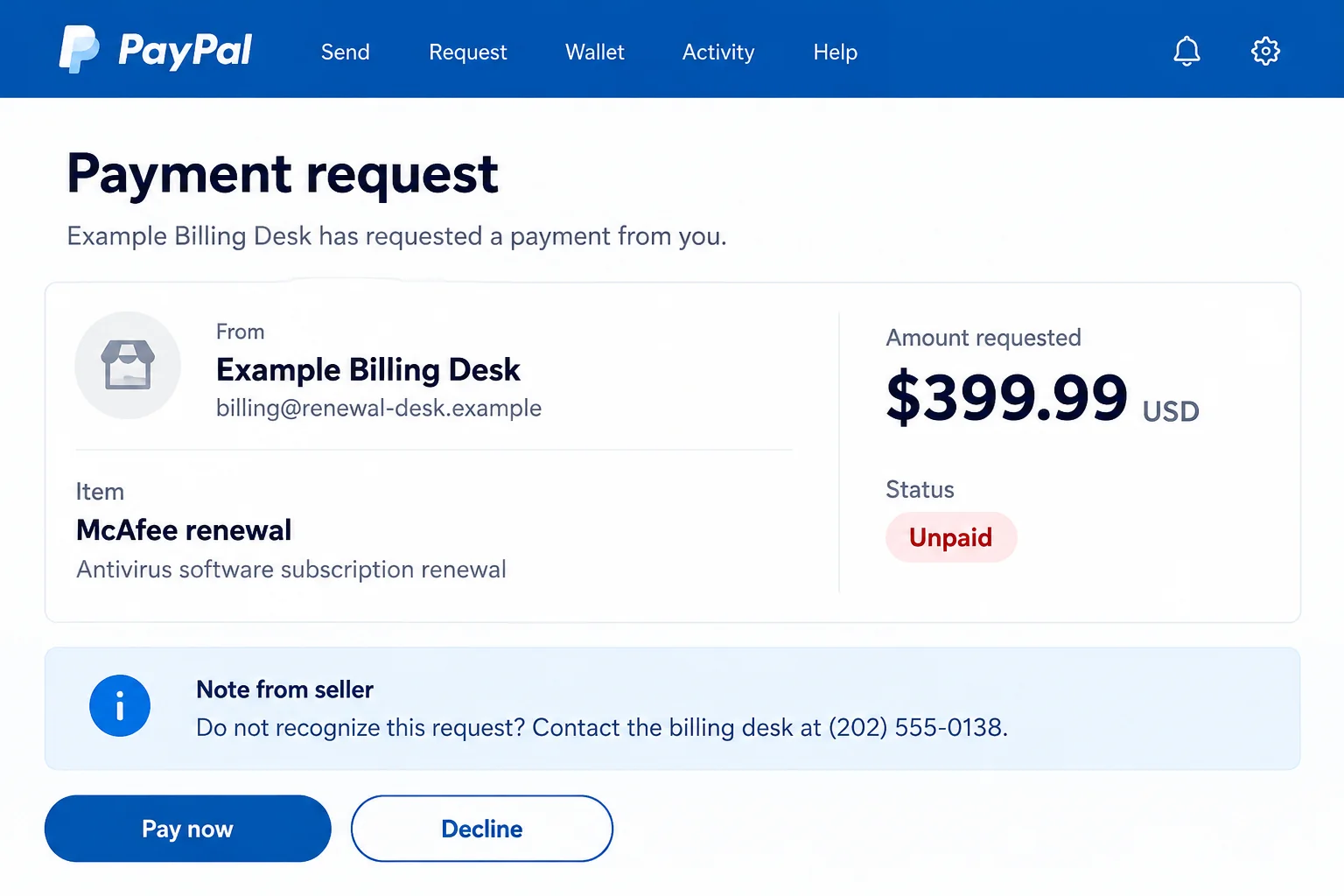
A McAfee payment request appears in PayPal, and the seller’s note offers help if you do not recognize it. You have never ordered anything from that sender.
The PayPal McAfee invoice scam becomes confusing at exactly this point. A familiar payment service is on the screen, but the person asking for your money needs another look.
Overview
A real payment request can carry an invented obligation
PayPal provides invoicing and payment-request tools. Seeing one of those requests inside your account does not mean you ordered the item named in it.
PayPal’s invoice scam guidance describes requests for unordered goods and notes that direct recipients toward a fake support number.
In the McAfee version, an antivirus renewal supplies the reason to worry. The names belong to genuine companies, but neither name authenticates the stranger’s demand.
The illustration contains an invented seller, amount, and contact. It demonstrates the distinction between a payment request and a charge, rather than documenting a particular received invoice.
The seller’s note is not PayPal customer support
An invoice can contain information supplied by whoever created it. A phone number in that material is not automatically a help line operated by the payment service.
The note may sound helpful: call to cancel, confirm an error, or stop a renewal. That invitation gives an unwanted request a second purpose beyond collecting payment.
You may refuse to pay yet still follow the dangerous instruction by calling. From there, a stranger can introduce an entirely different account or refund process.
Check what actually happened before choosing a response
There are several possibilities, and they require different actions:
- An unpaid request for something you never ordered.
- A forged email that only pretends to come from PayPal.
- A completed transaction that needs investigation through the genuine account.
- A phone conversation during which you shared details or allowed device access.
Open PayPal independently to establish which situation applies. Do not let the invoice’s author decide that a payment occurred or that a phone call is required.
Why an Invoice Inside Your Account Feels Different
The platform looks familiar, so the request gets less scrutiny
You may have learned to distrust odd sender addresses and misspelled websites. Finding the request in the app you normally use seems to settle those concerns.
You have found a request, not a purchase you recognize. The next question is whether you actually agreed to pay this person.
Think of a payment service as a way to deliver a request, not a witness to every purchase mentioned in one. The product description is still a claim.
This is also why a genuine delivery email cannot validate everything written by the requester. The service and the author of the invoice have different roles.
A renewal story can fill a gap in your memory
Antivirus software often arrives with a new computer, a trial, or a household purchase. You may remember the brand without remembering whether a subscription remains active.
That uncertainty makes checking worthwhile, but it does not make the invoice correct. Review the subscription through the provider’s website or application you already know.
A relative might have bought protection separately. Ask through your usual conversation before treating an unfamiliar request as the household’s renewal bill.
If a real subscription exists, compare its billing record with the request. Matching a product name is less useful than matching the actual order and seller.
At work, take the request to whoever authorized the software purchase. Compare it with a purchase order or established supplier record before accounts payable handles it.
A familiar colleague’s name in the invoice is not confirmation either. Ask that colleague through your usual internal channel, rather than the contact supplied with the request.
Fear of a charge can turn refusal into a callback
The message does not have to persuade you to buy anything. It can work by making you desperate to prevent a purchase you never wanted.
A cancellation number then looks like an escape. But calling it hands the explanation to the same person whose invoice created the concern.
You do not owe that person a conversation to reject an unordered item. Account reporting and genuine provider support are available without using their note.
How the PayPal McAfee Invoice Scam Works
Step 1: An unfamiliar sender introduces a McAfee purchase
The contact may resemble an invoice, renewal notice, payment request, or receipt. McAfee’s name supplies a recognizable product while the surrounding message creates an account question.
Some versions use the real payment platform’s request tools. Others imitate a PayPal email without creating any corresponding request in the recipient’s account.
Do not assume one version from appearance alone. Navigate to the genuine account yourself and compare what is there with the message you received.
Step 2: The amount is made to feel like an immediate loss
A prominent total can draw attention away from words such as requested, pending, or unpaid. You may start planning a refund before checking whether money moved.
The invoice’s own statement is not a substitute for your transaction history and funding-provider record. Look for the actual status rather than inferring it from a heading.
If the email says a charge already completed but the request remains unpaid, preserve that mismatch. It is a reason to stop, not to call faster.
Step 3: The note directs you outside the normal account process
The requester adds a number or another contact route for disputes. Its placement beside genuine payment controls can make it appear to belong to the platform.
Once you call, the person answering can claim to handle PayPal, McAfee, or a supposed billing partner. Those introductions do not independently establish any affiliation.
Find assistance through the service’s own help area instead. You can explain an unwanted invoice without accepting the contact information printed by its sender.
Step 4: A cancellation becomes a request for access
The caller may ask for account credentials, security codes, financial information, or remote-control software. Each request should be judged separately from the original invoice.
A seller does not need your bank password to answer whether you ordered antivirus software. Sharing it changes the incident from an unwanted bill into exposed account access.
Likewise, remote access is not an ordinary condition for declining a payment request. Refuse a demonstration that requires opening banking or email while someone controls your screen.
Step 5: The explanation creates a new payment problem
A fake agent can introduce a release fee, verification transfer, or supposed refund mistake. The new demand may have little connection to the item on the invoice.
Do not move money because a caller shows a balance or says an adjustment went wrong. Ask your actual financial provider to explain its own account records.
Stop the conversation if the solution involves paying another person, buying gift cards, or sending cryptocurrency. Those actions do not cancel the original request.
Step 6: Follow-up contact borrows credibility from the first conversation
After you respond, another caller might know the invoice reference or the details you supplied. Familiarity can make the follow-up seem like an internal handoff.
It is not independent verification. Return to PayPal, the subscription provider, and your bank through contact routes you chose without the invoice author’s help.
Separate the Invoice, the Subscription, and the Money
Find the request without opening the email’s link
Use the PayPal app already installed or open its website from a trusted starting point. Review Activity and the details of any matching request.
If nothing matches, do not assume the missing entry will appear after you call. A forged message can describe a transaction that the real service never recorded.
If a request is present, examine its status and whether you recognize the sender. Do not test the payment button to learn whether it is genuine.
Check the actual subscription with its provider
Open the account associated with your security software. Review the plan, billing arrangements, and any purchase you recognize without using instructions supplied by the unknown requester.
If you bought through another retailer, find that receipt. The route for a genuine subscription question may differ from the route for an unsolicited PayPal request.
Keep those inquiries separate. Declining a suspicious request does not necessarily cancel a real plan, and canceling a real plan does not protect details given to an impostor.
Ask about a real debit through the account that funded it
If money actually left, save the transaction reference and contact the relevant provider. Explain whether you approved the payment or found a transaction you did not authorize.
Tell support whether you approved the payment or discovered it afterward. That detail helps it choose the appropriate investigation, rather than treating every loss alike.
What to Do if You Have Fallen Victim to This Scam
-
Stop communicating through the invoice note. End the call or chat. Do not complete another verification, payment, or screen-sharing step while checking the account.
Save the request, sender information, and any messages already available. Make a short timeline of what you did rather than returning to the sender for confirmation.
Keep the record private if it includes your email, address, or financial information. A useful report does not require publishing a complete invoice online.
-
Decline or cancel an unordered request through PayPal. Its current instructions describe selecting the request in Activity, choosing Cancel, and confirming.
The app may offer Decline. Use the available genuine account controls, not a cancellation link or number supplied by the requester.
If those controls are missing, reach PayPal support from within the service. Do not interpret a missing button as a reason to pay.
-
Report the request separately from declining it. PayPal describes Report this invoice or Report within the request details. Follow the prompts in your own account.
For a suspicious email or website, its published reporting address is phishing@paypal.com. Forward the message there without including passwords or additional account documents.
Retain the reference you need for follow-up. Removing an unpaid request and opening a dispute about completed money are not the same task.
-
Contact the payment provider about any completed loss. Identify the actual transaction and explain the invoice or phone conversation that led to it.
The FTC’s recovery advice recommends acting promptly with the bank, payment app, or other service used to send money.
Ask what review or recovery options fit your payment. Keep receipts and correspondence, but do not accept a stranger’s promise that reimbursement is guaranteed.
-
Secure accounts whose information was disclosed. Replace exposed passwords using the genuine service, address reused passwords, and review available two-factor authentication and account-session controls.
Tell the provider if you gave a security code or approved access. Ask it to help inspect account changes rather than assuming a password reset fixes everything.
Include your mailbox if the caller gained access to it. Recovery messages sent there can matter to accounts beyond the original PayPal request.
-
Deal with software exposure if there was any. If you permitted remote control, disconnect the session and seek trusted help before using that device for sensitive accounts.
Malwarebytes can assist with checking a compatible device for malicious software. A scan cannot cancel a payment or remove information already disclosed.
AdGuard can reduce intrusive ads and some risky browsing encounters. It does not make a requester honest or replace the account and bank steps above.
-
Report wider fraud and reject paid recovery offers. Use ReportFraud.ftc.gov for a US fraud report, keeping the incident details together.
If sensitive identity information was involved, IdentityTheft.gov can help you identify suitable protective steps. Explain what was shared and any misuse you actually found.
Do not pay someone who contacts you offering guaranteed recovery. Knowledge of your invoice or loss is not proof that they represent PayPal or law enforcement.
Frequently Asked Questions
Can a scam invoice really appear in my PayPal account?
Yes. PayPal warns about requests for unordered products and alarmist invoice notes. Their presence inside the platform does not establish a legitimate debt.
Does an unpaid McAfee invoice mean my card was charged?
No. Check completed transactions and your funding account separately. A request for money is not, by itself, evidence that the requested payment happened.
Is the support number in the seller’s note safe to call?
Do not use it to verify the request. Find help through PayPal or the subscription provider independently, outside the invoice author’s instructions.
Will declining the request cancel my genuine McAfee subscription?
Not necessarily. Handle an authentic subscription through its actual provider. Rejecting an unordered payment request addresses that request, not every separate billing arrangement.
What if I paid before realizing the request was suspicious?
Contact PayPal and the relevant funding provider promptly with the transaction details. Explain what happened and ask about available reporting and recovery options.
Do I need to scan my computer after only reading the invoice?
Reading alone does not demonstrate infection. Device checks become relevant if you installed something, permitted access, or encountered other signs needing investigation.
The Bottom Line
Do not pay an unordered PayPal McAfee invoice or call the number in its note. Check the request, real subscription, and actual transactions through their separate genuine services.
If you already responded, protect what you exposed and report any payment promptly. Declining the request is useful, but it is not a substitute for those recovery steps.

Join the discussion
0 commentsShare your experience or ask a question about this article.
Discussion
Start the conversation
Have a question or something useful to share? Add the first comment.