

A parcel is on its way, according to an email bearing Planzer’s name. There’s a button to check its progress, just like countless genuine delivery updates.
If you’re waiting for something, that button is easy to tap. The important part is what happens after the tracking page opens.
Overview
A dispatch notice turns into a customs bill
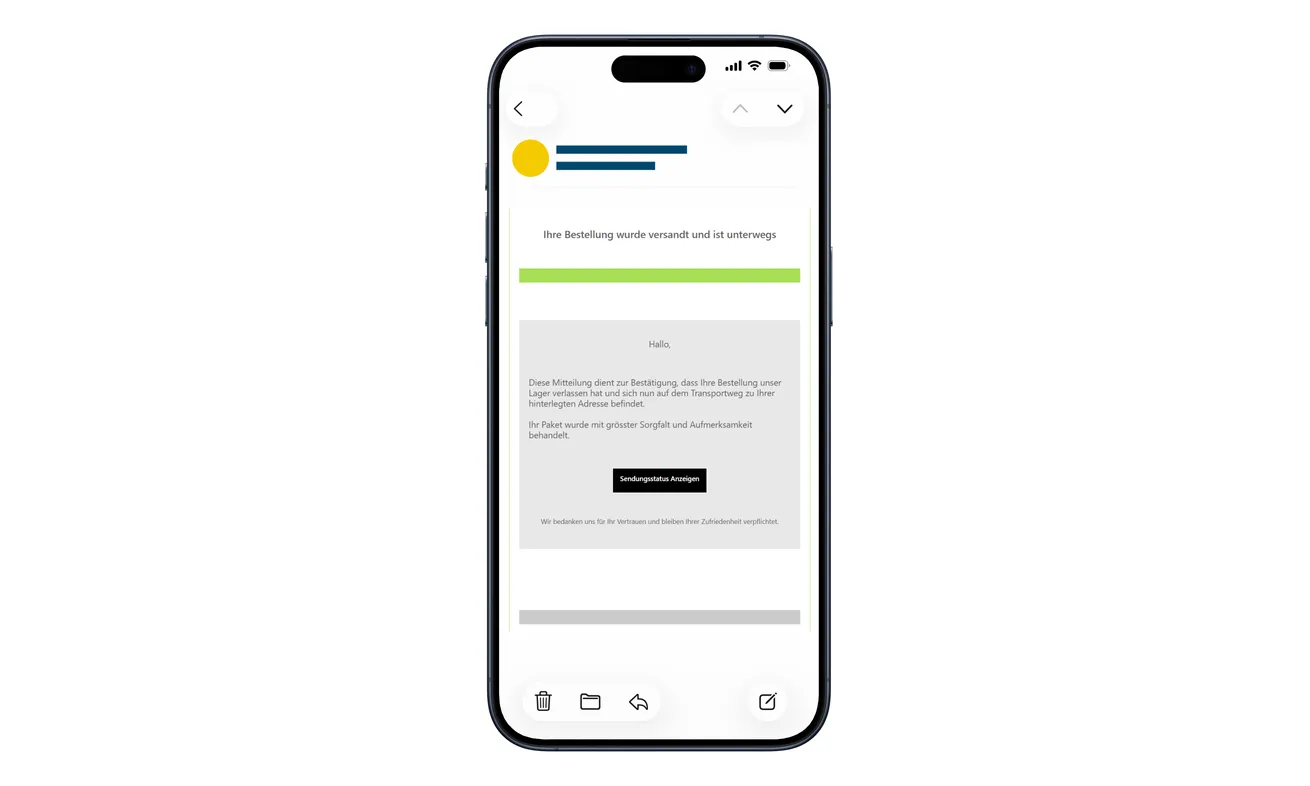
The Planzer delivery email scam begins with a shipment update. The email claims an order has left the warehouse and offers a way to view its status.
The linked page asks for a name and address as shipment verification. Then it introduces a supposed CHF 5.21 customs fee.
That small amount is the lure, not a reliable measure of the risk. The payment process asks for full card details and a bank confirmation.
Planzer is the legitimate company being impersonated. The warning applies to this fraudulent email and copied payment journey, not to genuine deliveries.
The route is documented by police
Cybercrimepolice’s Planzer warning describes the copied website, personal-data request, customs pretext, and approval through a banking app or SMS code.
The original email shown above helps identify the opening message. It isn’t a receipt establishing that customs assessed a charge against your parcel.
You also shouldn’t read this as a confirmed CHF 5.21 loss limit. Criminals seeking card information aren’t constrained by the reassuring fee printed on their page.
What should make you stop
A tracking check shouldn’t talk you out of checking who wants your card. Find the real order before deciding what this supposed customs bill means.
- A delivery notice unexpectedly asks you to verify personal information.
- A tracking check becomes a request for a complete card number.
- A small fee is followed by a bank code or approval request.
- The payment doesn’t match a shipment you can independently identify.
- The message supplies the only contact route for resolving its own demand.
If you’ve already submitted a card, speak to the issuer now. You don’t need to wait for a parcel, an error message, or an unfamiliar charge.
Expecting a Package Doesn’t Authenticate the Email
Parcel messages are especially persuasive when the timing seems right. You’re waiting for an order, and a dispatch notice arrives.
That coincidence can feel like confirmation. But a sender doesn’t have to know your purchase to reach someone who happens to be expecting a delivery.
The captured message uses the German button Sendungsstatus anzeigen, meaning view shipment status. It invites a check, rather than announcing the entire payment request upfront.
That matters because opening a tracking page feels routine. Your attention is on when the package will arrive, not on whether a payment journey is beginning.
By the time a fee appears, you may already feel you’re dealing with the courier. The first click has quietly supplied the trust for the next request.
Instead, open the retailer account where you placed the order. Look for the carrier and tracking details associated with that purchase.
If the retailer’s records don’t explain the email, ask the retailer through its established support route. Don’t use the disputed message as your only reference.
You can be expecting a real parcel and still receive a fake notice. Those two facts are not contradictory.
How the Planzer Delivery Email Scam Works
Step 1: A routine dispatch notice earns the click
The opening email claims a shipment is already moving. That makes the tracking button seem useful even to someone who isn’t worried about a problem.
You don’t have to be threatened or offered a prize. Curiosity about an ordinary purchase can be enough to start the journey.
The safest response is to trace the order from the shop you used, not from a message that suddenly claims to represent its delivery.
Don’t reply with your order number to help the sender locate it. Give that information only to a retailer or courier you’ve reached independently.
Step 2: The copied page asks you to verify the shipment
The page borrows Planzer’s logo and appearance, then asks for a name and address. Those fields sound relevant to delivering a parcel.
But their relevance doesn’t establish the identity of whoever is asking. A fraudulent site can collect information that appears perfectly appropriate for its disguise.
Stop if the process unexpectedly requires personal details. Check whether the genuine tracking information can be viewed through your known order record.
Don’t assume that reaching the next screen means your answers were checked against a real delivery. A form can simply accept what you type.
Step 3: CHF 5.21 makes the payment look too small to question
The supposed customs amount is specific and modest. It may feel easier to pay than to work out whether it’s legitimate.
That’s a poor trade when the form asks for an entire payment card. The sensitive information has value beyond this one alleged fee.
Preserve the currency when comparing records. This campaign’s demand is in Swiss francs, not USD or euros.
A genuine question about import charges belongs with the retailer or carrier responsible for the shipment. It doesn’t require trusting an unrelated email destination.
Step 4: Card collection is followed by bank authentication
The counterfeit payment process requests full card information. It then asks for confirmation through a banking app or an SMS verification code.
Read that bank request on its own terms. What amount and merchant does it name, and are you intentionally making that payment?
EMVCo’s explanation of separate-channel authentication shows why a bank app can be involved in authenticating an online card transaction.
The existence of a genuine banking prompt isn’t a character reference for the website. Don’t let the parcel story tell you to ignore the payment details.
If anything differs, reject the request. If you’ve already approved it, contact the issuer and explain the complete sequence.
After the Fake Tracking Page, Check the Right Records
Once you recognize the problem, don’t look to the same site for cancellation or reassurance. Its confirmation screen isn’t an independent account record.
Check the bank for payment activity and the retailer for shipment information. Each can answer the part it actually controls.
Keep any existing messages, but don’t return to the fake process to generate a receipt. The original email is already useful evidence of the approach.
If you’re contacted later about a refund, start a new verification through your bank. Don’t continue simply because the caller mentions the parcel or fee.
What Planzer Itself Says About Suspicious Messages
Planzer’s security guidance warns about electronic messages designed to obtain sensitive information and explains how recipients can ask the company to examine suspicious messages.
It advises comparing the sender’s display name with the actual address and inspecting link destinations without opening them.
Those checks are useful, but none should become an invitation to investigate a live malicious page. When uncertain, use the company’s independently opened support information.
A generic greeting or unexpected request can raise concern. Good grammar and a plausible signature don’t settle it in the other direction.
Similarly, receiving the email at an unusual hour isn’t proof of fraud. Focus on the payment demand, account context, and independently confirmed shipment.
Don’t blame yourself because the branding looked right. The fraudulent page is designed to borrow recognition from an ordinary delivery workflow.
The point of checking isn’t to win a visual guessing game. It’s to avoid giving a stranger control over where and how you pay.
Sorting Out the Real Order and the Fake Charge
Start with the purchase you actually made. Find the order confirmation in your retailer account rather than searching through similar-looking delivery emails.
Compare the recipient, order reference, carrier, and current tracking information. A mismatch is something the retailer can help clarify.
If you’re handling several household orders, ask which person placed the relevant one. Don’t fill in the missing details yourself because the message feels familiar.
For business deliveries, let the usual purchasing or receiving contact check the request. Someone outside that process may not know which charges are expected.
Don’t cancel a legitimate order just because this email arrived. The fraudulent message may have no relationship to the real shipment.
Likewise, don’t file an accusation against the retailer based solely on the sender’s chosen disguise. Explain that you received a suspicious message claiming a delivery connection.
If a statement entry appears, record its actual descriptor and amount. Don’t label every unfamiliar entry Planzer without asking the issuer what it relates to.
That distinction helps the bank investigate the financial incident while the retailer continues dealing with the real package.
When the Amount on the Bank Prompt Doesn’t Fit the Parcel
Don’t mentally replace the bank’s payment details with CHF 5.21 because that’s what the delivery page promised. Read the request actually presented to you.
If its merchant or amount is unfamiliar, leave it unapproved. A website explanation about verification or a temporary hold isn’t independent confirmation.
If the request vanishes before you finish reading, don’t revisit the fake page to recreate it. Your issuer can advise on recent attempts.
For someone who already approved, write down the approximate time and what you remember. Tell the bank when you’re uncertain rather than filling gaps with guesses.
Keep the original fee screenshot if you already have one. It can show the difference between what was promised and what your financial records show.
There’s no need to identify the criminal’s entire operation before asking for help. The issuer can act on an exposed card and a reported suspicious transaction.
The earlier you describe the actual payment step, the less likely the conversation is to become a routine inquiry about a missing parcel.
What to Do if You Have Fallen Victim to This Scam
-
Stop the tracking and payment journey. Close the suspicious tab. Don’t enter another card or approve another bank request to release the parcel.
If the message is all you encountered, report it as phishing. An email in your inbox doesn’t by itself mean your device or financial accounts were compromised.
-
Call your card provider about anything you submitted. Use a number from the physical card or your established bank app.
Say that a fake courier website collected your card details under a customs-payment pretext. Ask whether the card should be blocked and replaced.
Report a second card too if the page asked you to retry. A supposed payment failure doesn’t establish that earlier information was discarded.
-
Describe any SMS or app approval. Give the issuer the approximate time, displayed amount, merchant, and confirmation method if you remember them.
Ask it to review pending attempts and completed charges. Check when you must submit a dispute, and keep the bank’s reference number.
Don’t promise yourself the loss is only CHF 5.21. Let the issuer determine what actually happened and what protection is available.
-
Verify the real delivery separately. Open the shop account where you ordered and use its shipment details to identify the correct carrier.
Ask genuine support about any customs question. Don’t call a number printed in the suspicious email, even if it appears next to a familiar logo.
-
Record the information you exposed. Keep the message, its sender details, the destination address, and relevant bank notices privately.
Tell the bank whether the site also received your name, address, or phone number. This helps explain later messages that seem unusually personalized.
If you entered a password, change it on the real service and anywhere it was reused. Don’t reset unrelated accounts without an exposure reason.
-
Check downloads only if downloads were involved. If the website pushed a tracking application, document viewer, or other installation, assess that additional risk.
Malwarebytes can help inspect unwanted software. AdGuard offers another layer against some malicious sites and ads, without guaranteeing that every phishing page will be blocked.
Neither tool cancels a bank transaction. Card protection takes priority when financial details have already been handed over.
-
Report the impersonation through trusted routes. Use Planzer’s own security page to find its reporting instructions and your mail provider’s phishing-report control.
For a formal complaint about loss, contact your local police. Cybercrimepolice’s online incident reporting is distinct from filing a criminal complaint.
Avoid publishing your full address or card details when warning others. A redacted screenshot usually conveys the message without creating another privacy problem.
Frequently Asked Questions
Is the Planzer delivery company a scam?
No. This is a fraudulent email and website impersonating a legitimate carrier. The warning doesn’t accuse Planzer or your actual retailer of operating the scheme.
Why is the fake customs charge exactly CHF 5.21?
That’s the amount identified in the documented campaign. A precise-looking fee can make a payment request feel routine, but it doesn’t authenticate the request.
Can the scam work while I’m expecting a real package?
Yes. A real pending delivery doesn’t establish that an unrelated email belongs to it. Match the notice with information in your retailer account.
Does paying the fee guarantee the parcel will arrive?
No. The fake payment page isn’t a verified delivery service. Ask the genuine retailer or carrier about the shipment instead of paying the impersonator.
Should I approve the bank notification to cancel the fee?
Don’t approve an unfamiliar payment based on a website’s explanation. Contact the issuer independently and tell it if an approval has already been given.
What if I only entered my address?
Stop the form and watch for follow-up messages using that information. Don’t disclose a card because someone later claims to know the delivery address.
The Bottom Line
Don’t pay the CHF 5.21 demand through this Planzer delivery scam email. Check the real order through your retailer, away from the sender’s link.
If the counterfeit site collected a card or bank approval, contact the issuer immediately. A small customs pretext can expose much more than a small payment.

Join the discussion
0 commentsShare your experience or ask a question about this article.
Discussion
Start the conversation
Have a question or something useful to share? Add the first comment.