

What if claiming free cryptocurrency meant losing it all? That’s exactly the risk unsuspecting users face with the recent PumpBTC airdrop scam. Disguised as an opportunity to earn more $PUMP tokens, scammers have created convincing fake websites designed to drain your digital wallet. If you’re curious about how this works and how to protect yourself, keep reading.
Scam Overview: The Rise of the PumpBTC Airdrop Fraud
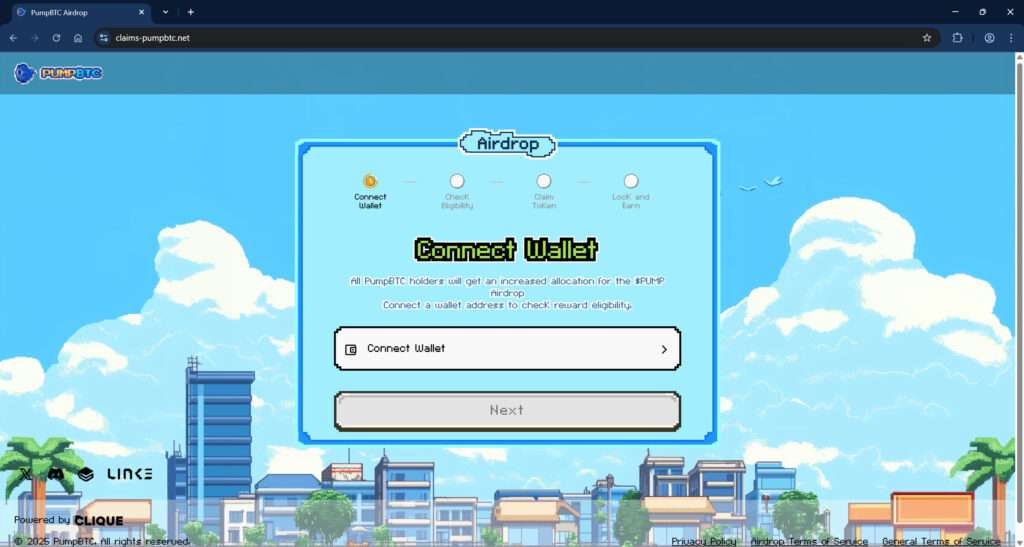
PumpBTC has gained attention for its innovative concept—allowing Bitcoin holders to stake their coins through Babylon and earn rewards over time. This has naturally attracted a lot of interest, which scammers have quickly exploited. One of the most insidious examples is the fake website claims-pumpbtc[.]net, which mimics the branding and interface of legitimate PumpBTC platforms.
The Illusion of Legitimacy
The fake site uses pixel art graphics, a retro theme, and clean UX design that mirrors the official PumpBTC branding. It displays a multi-step process encouraging users to:
- Connect their wallet
- Check eligibility
- Claim $PUMP tokens
- Lock tokens to earn rewards
This seemingly harmless flow is a deliberate attempt to create trust. The site even includes a privacy policy, terms of service, and “Powered by CLIQUE” footer to further simulate authenticity.
The Target: Bitcoin Holders Seeking Yield
Users who have interacted with the real PumpBTC ecosystem are especially vulnerable. They might expect to receive news about rewards or airdrops, so a website promising bonus $PUMP tokens seems plausible. This sense of legitimacy makes users more likely to proceed without hesitation.
The Trap
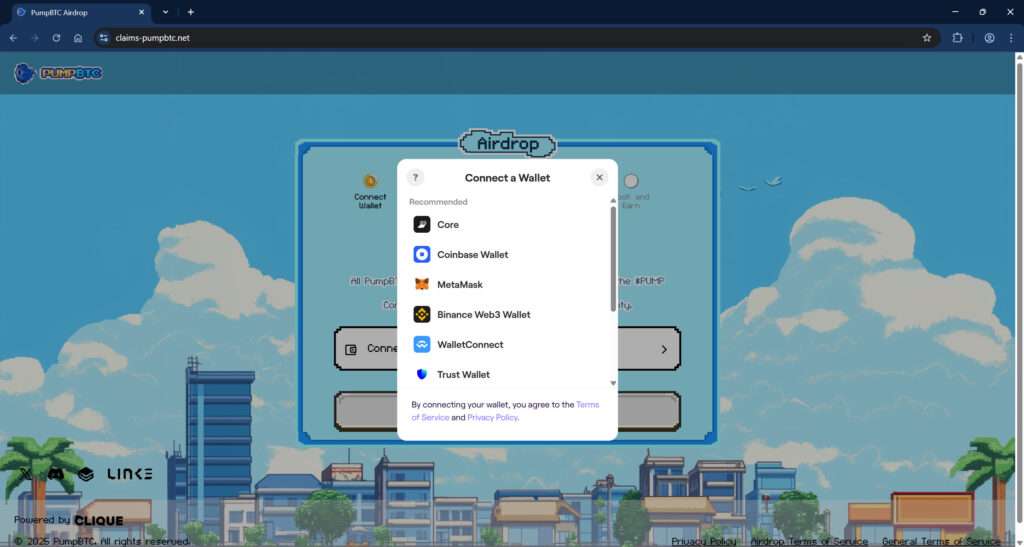
When the user clicks “Connect Wallet,” a standard wallet selection popup appears, offering options like MetaMask, Coinbase Wallet, Trust Wallet, Binance Web3 Wallet, and WalletConnect. This selection feels familiar, which again lowers the user’s guard.
However, once the wallet is connected, the platform quietly activates a crypto-draining script. This drainer operates in the background, transferring any accessible assets to the scammer’s wallet. Victims may not realize anything is wrong until they check their balance—and find it wiped clean.
A Growing Threat
As of early 2025, reports are emerging across Reddit, Twitter, and cybersecurity forums about users losing thousands of dollars. This suggests that claims-pumpbtc[.]net is just one node in a larger scam network. Cloned domains, Discord bots, fake social media accounts, and even paid ads are being deployed to funnel users into the trap.
How the PumpBTC Airdrop Scam Works
Understanding the mechanics of the scam is key to avoiding it. Here is a detailed breakdown of how scammers execute this scheme:
Step 1: Hook the Victim with a Fake Incentive
The scam begins with the promise of a PumpBTC airdrop. Scammers distribute this information through a mix of:
- Spam emails
- Discord DMs
- Fake social media profiles (e.g., impersonating PumpBTC officials)
- Ads on search engines or crypto sites
- Telegram group chats
The message claims that PumpBTC holders are eligible for increased $PUMP airdrop allocations and are urged to visit a website to “claim their rewards.”
Step 2: Drive Traffic to the Fake Website
Victims are directed to phishing domains like:
claims-pumpbtc[.]netpumpbtc-airdrop[.]xyzpumpbtc-rewards[.]org
These URLs are designed to look legitimate and may even use SSL certificates to appear secure. Scammers often use URL shorteners or redirectors to mask the true destination.
Step 3: Imitate a Legitimate Platform
The fake website mimics the design of the real PumpBTC site. It includes:
- A user dashboard with progress bars
- Logos and partner badges (e.g., Babylon, Clique, LINK)
- A roadmap or timeline for the airdrop
Every visual element is designed to build trust and urgency.
Step 4: Request Wallet Connection
Users are prompted to connect their cryptocurrency wallet to “check eligibility.” The site uses WalletConnect and other APIs to trigger the wallet integration popup, which looks exactly like the real one.
Step 5: Activate the Drainer
Once a wallet is connected, malicious scripts go to work. These can:
- Request unauthorized approvals
- Transfer funds using approved smart contracts
- Exploit permissions for token transfers
Unlike traditional phishing, no seed phrase or private key is requested. Instead, the wallet connection itself is enough to grant dangerous access.
Step 6: Drain and Vanish
Assets are quickly transferred from the victim’s wallet to one or more addresses controlled by the scammer. Because blockchain transactions are irreversible, there’s no way to get the funds back. In many cases, the website also disappears soon after the theft.
Step 7: Repeat the Cycle
Scammers often rebrand and launch new domains. They update visuals and text slightly to bypass blocklists. This creates an ongoing cycle that continues to trap new victims.
What To Do If You’ve Fallen Victim to This Scam
If you’ve already connected your wallet or lost funds through one of these fake sites, act immediately. Here’s what you need to do:
1. Revoke All Wallet Permissions
Use a site like:
Connect your wallet and review any active approvals. Revoke anything suspicious, especially for unknown contracts.
2. Transfer Remaining Funds
If you still have assets in your wallet, move them to a fresh wallet address that has never interacted with the malicious site. Use a different device if possible.
3. Report the Scam
- Report phishing to Google Safe Browsing
- Alert crypto wallet providers (MetaMask, Coinbase, etc.)
- Post alerts in community forums like Reddit and Twitter to help warn others
4. File a Complaint
Depending on your region, you may be able to file a report with:
- IC3 (FBI Internet Crime Complaint Center) https://www.ic3.gov
- FTC for US residents https://reportfraud.ftc.gov/
- Action Fraud for UK users https://www.actionfraud.police.uk/
5. Monitor Your Wallet
Add your address to trackers like:
This helps you quickly detect unauthorized movements.
6. Warn Others
Spreading awareness is one of the best defenses. Post on social media, tag official accounts, and share screenshots of the scam to prevent others from falling into the trap.
FAQ: PumpBTC Airdrop Scam
What is the PumpBTC airdrop scam?
The PumpBTC airdrop scam is a phishing scheme where fraudulent websites pose as legitimate PumpBTC platforms to trick users into connecting their cryptocurrency wallets. Once connected, malicious scripts drain the wallet’s funds without the user’s knowledge.
How do I identify a fake PumpBTC site?
Fake sites often mimic the design of the real PumpBTC platform but have suspicious domain names like claims-pumpbtc.net or pumpbtc-airdrop.xyz. Always double-check the official website URL and avoid clicking links from unknown sources.
What happens when I connect my wallet to a scam site?
Connecting your wallet can trigger smart contract approvals that allow scammers to access and transfer your funds. These actions are often automated and immediate.
Can scammers steal my crypto without my seed phrase?
Yes. If you approve malicious transactions or smart contracts, scammers can move assets without needing your seed phrase. Simply connecting your wallet and approving actions is enough.
Is it possible to recover stolen funds?
Unfortunately, blockchain transactions are irreversible. Once your crypto is transferred to a scammer’s wallet, it is extremely unlikely you will recover it.
What should I do if I connected my wallet to a suspicious site?
Immediately revoke token approvals using tools like Revoke.cash, move remaining funds to a new wallet, and report the incident to appropriate authorities or forums to warn others.
How can I check which sites have access to my wallet?
You can use tools such as Etherscan’s Token Approval Checker or Revoke.cash to see and manage smart contract approvals associated with your wallet address.
Is PumpBTC itself a scam?
No, the legitimate PumpBTC platform is not a scam. The fraud involves lookalike sites created to impersonate PumpBTC and deceive users.
How can I stay safe from similar scams?
Avoid clicking unsolicited links, always verify URLs, use official sources for announcements, and never connect your wallet to unknown websites. Bookmark the real PumpBTC site for safety.
Where can I report scam websites?
You can report scam sites to Google Safe Browsing, wallet providers like MetaMask or Coinbase, and relevant cybercrime authorities such as the FBI’s IC3 or local consumer protection agencies.
The Bottom Line
The PumpBTC airdrop scam is a stark reminder that even seasoned crypto users can fall prey to well-executed frauds. These fake websites are designed to trick you into connecting your wallet—and once you do, it may be too late.
Stay alert. Double-check URLs. And never connect your wallet to a site unless you’re absolutely certain it’s legitimate. In the ever-evolving world of crypto, caution isn’t just wise—it’s essential.

Join the discussion
0 commentsShare your experience or ask a question about this article.
Discussion
Start the conversation
Have a question or something useful to share? Add the first comment.