

A purchase order can sit in the middle of an ordinary workday: one supplier is waiting, another document needs approval, and the inbox is already crowded.
That is why an update promising a secure PDF can feel routine. This particular “Purchase Order Updated” notice deserves a closer look before anyone opens it.
Overview
A document notice aimed at business habits
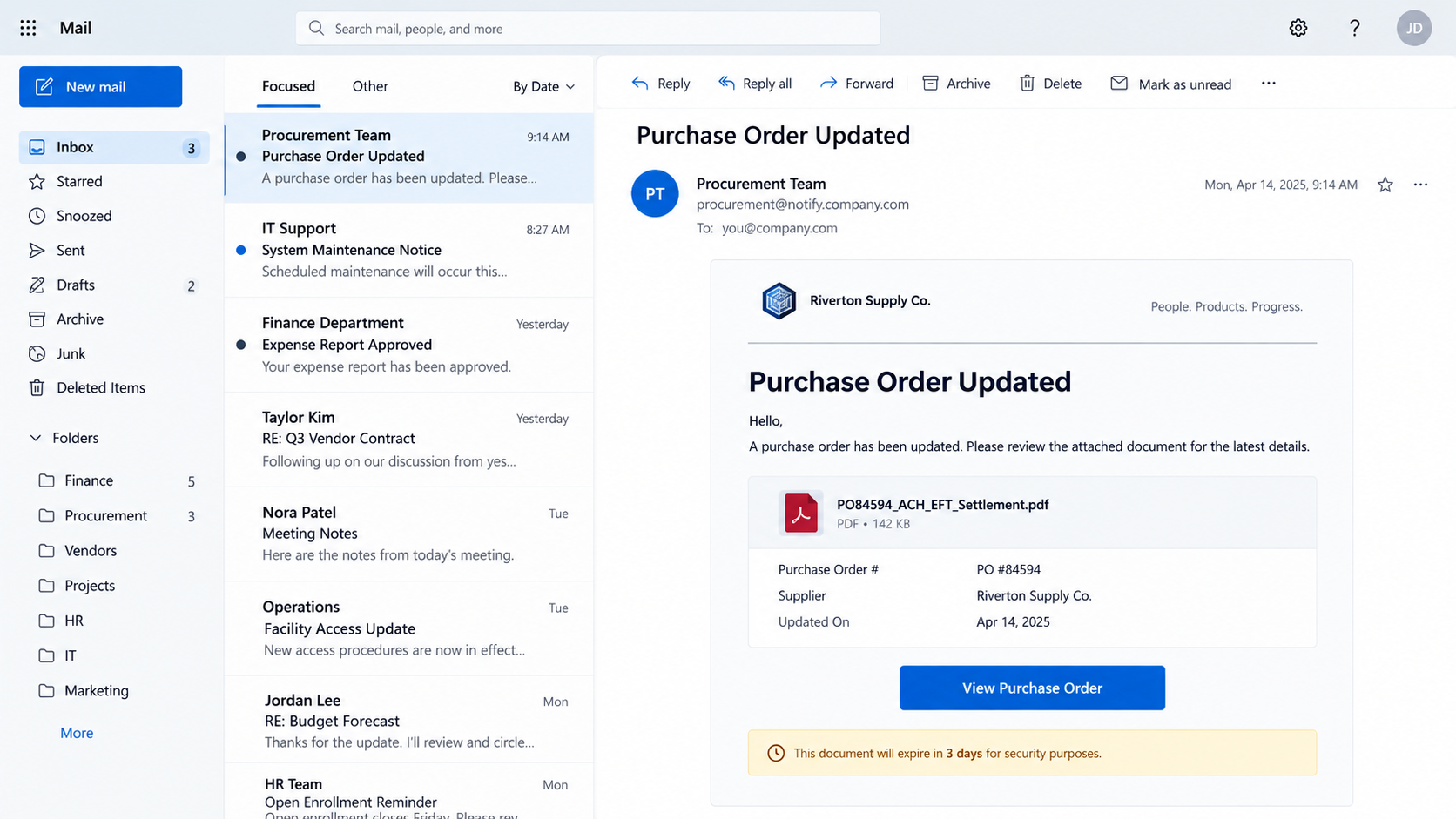
The reported message presents itself as a ShareFile notification about purchase order PO #84594. It says a secure document is waiting for review.
Its filename mixes procurement and payment language, including ACH, EFT, contract agreement, and settlement. Those terms sound at home in a finance mailbox.
The email also says the link expires in three days. That small deadline nudges the recipient to act before asking a colleague whether the order exists.
Where the request actually leads
The observed campaign uses the document invitation as a path to a fake email login. The target is the recipient’s credentials, not approval of a purchase order.
ShareFile is a legitimate file-sharing service. Its name is being misused in this message; the evidence does not implicate the real company.
The reported phishing destination was no longer active when reviewed. We cannot claim every later copy of the email still points to that exact page.
- A specific order number makes the email feel directed to a real transaction.
- Financial words in the PDF name increase apparent relevance for office staff.
- A three-day deadline discourages normal verification.
- The reported link leads to credential collection instead of the promised document.
The answer before you click
Treat this particular purchase order update as phishing. If the document might be genuine, verify it outside the email with the person or organization involved.
A real ShareFile notification does not override your normal purchasing controls. You should know the sender, order, and expected document before signing in.
Do not enter an email password into a page reached through this message. The stakes include more than one document, especially for a shared business inbox.
Why This Email Looks Like Normal Procurement Traffic
Purchase orders are not inherently dramatic. People receive revisions, invoices, shipping changes, and contract files every week.
The lure benefits from that familiarity. It does not have to promise a prize or threaten immediate account closure to make someone curious.
The number PO #84594 gives the notice a surface layer of specificity. It may mean nothing to the target, but it resembles an internal reference.
A busy employee might search their memory for a matching order while already hovering over the button. That is the moment to pause.
The long PDF filename is another prop. ACH and EFT are payment methods, while “settlement” suggests a transaction nearing completion.
Those words can put a finance employee on alert. They can also make the message appear relevant to a vendor relationship that never existed.
The three-day expiration sounds reasonable for a secure share. Unlike a ten-minute ultimatum, it gives the email a professional tone.
Yet a clock is still a clock. Its purpose in this context is to make delay feel like lost access to an important document.
Business email compromise often begins with someone treating a document invitation as ordinary workflow. One stolen mailbox can expose conversations and payment details.
That does not mean the message itself moved money. The documented mechanism here is credential phishing; later misuse is a risk to investigate separately.
How the Purchase Order Updated Scam Works
Step 1: A secure-file notification appears in the inbox
The message borrows the language of a file-sharing platform. It tells the reader that a document has been shared and is awaiting review.
That framing matters because office users are accustomed to opening cloud documents through emailed invitations. The email asks for a familiar behavior.
The scammer does not need a personal relationship with the recipient. A generic greeting paired with an order number may be enough to start a click.
Its sender name and visual styling may look polished. Neither proves a real ShareFile account sent the message.
Step 2: The file name supplies a business reason
The reported PDF label joins purchase-order, contract, ACH, EFT, and settlement terms. It suggests a document that could affect payment or fulfillment.
If the recipient handles invoices, those words may feel more relevant than a generic “you have a file” alert.
But a filename inside an email is only text. It does not establish that a PDF exists, that a known supplier uploaded it, or that anyone approved it.
The safest verification starts with the underlying transaction. Ask whether PO #84594 belongs to your organization before opening a shared link.
Step 3: The expiration notice creates a small deadline
Three days is long enough to seem reasonable and short enough to feel urgent. The reader may postpone a call and click immediately.
In a real office, changing deadlines should not replace verification. A legitimate supplier can confirm the document through established contact details.
Do not use a phone number in the suspicious email to perform that check. If the message is fraudulent, its contact details can be part of the trap.
Step 4: The button opens a lookalike login
The reported destination imitated an email sign-in rather than delivering the expected purchase order. That change in task is the clearest warning.
A secure-file invitation may legitimately require authentication, but the account, URL, and workflow should make sense for the real service you use.
Fraudulent pages can mimic Gmail, Outlook, or other providers. An accurate logo or prefilled address says little about who controls the server.
The phishing site observed for this specimen later went offline. A dead link today does not make the email harmless if another copy uses a replacement.
Step 5: A stolen mailbox gives the attacker context
If someone submits credentials, the operator may try to enter the actual account. Successful access could reveal orders, staff names, and financial correspondence.
The attacker might then write from the real address or reply inside an existing thread. That can be harder for coworkers to recognize than an outside email.
They could also search for invoices and payment instructions, hoping to redirect a future transfer. We have not established that this specimen reached that stage.
What matters now is limiting access quickly and warning anyone who might trust a compromised mailbox.
How to Verify a Shared Purchase Order
Begin with your organization’s purchasing record. A real PO should have an owner, vendor, amount, and approval trail before a surprise email enters the picture.
Search the order number in the system you already use. Do not let the email become your only evidence that an order exists.
If a supplier supposedly sent it, contact that supplier using the address or number already on file. Do not reply to the suspicious notice.
When ShareFile is part of your workflow, open its known portal directly. Check whether the file appears in the account and whether the sender is expected.
Inspect the full destination before sign-in. A page with a familiar title but an unfamiliar domain is not an acceptable substitute for a trusted portal.
Ask your IT or security team to analyze the message if it reached many coworkers. A coordinated warning can stop repeated attempts across a department.
Consider whether the file invitation itself has a business purpose. An unsolicited “settlement” document without a matching deal deserves a slower response.
Real transactions survive a verification call. A fake notification loses its leverage when the recipient checks the order through another channel.
What Finance Teams Should Check Before Any Payment Change
A purchase order and a payment authorization are different records. A document title containing ACH or EFT does not authorize a bank transfer.
Separate the person who receives a file from the person who approves payment details. That simple division makes a stolen inbox less powerful.
Look for a verified vendor account, matching contract number, agreed amount, and authorized signer in your purchasing system.
If one piece is missing, request clarification through the vendor contact already stored in that system. Avoid numbers supplied by the new email.
Be especially careful if the document asks for a changed bank account. A genuine supplier can confirm a change through a preexisting telephone contact.
Staff should know whether a vendor normally uses ShareFile at all. An unexpected platform is not automatic fraud, but it creates another reason to verify.
For shared finance inboxes, record who opened the link and when. That information helps IT assess whether only one user or several accounts need attention.
A manager should avoid blaming an employee for reporting a mistake. Fast reporting is far more valuable than a perfect-looking incident record.
After an exposure, review pending payments during the affected period. Do not assume the security work ends when the account password changes.
Some organizations can restrict external document invitations or add warnings for unfamiliar file-share domains. Those controls should support, not replace, human verification.
Even when the supposed PDF never opens, keep the original message. Headers and destination history can help identify a broader campaign inside the company.
Finally, give staff one clear route for suspicious purchase orders. If reporting is easy, fewer people will improvise by replying to a sender they do not know.
The Brand and the Impersonator Are Not the Same
ShareFile provides legitimate document-sharing tools. This article concerns an email borrowing that reputation to drive traffic to a fake login.
Do not assume a supplier account was compromised simply because its name appears in a message. The displayed sender could be invented.
Likewise, do not assume a real ShareFile link is always safe. Attackers can sometimes abuse legitimate platforms to deliver deceptive content.
The judgment belongs to this message’s complete journey: sender, expected transaction, link destination, and the account it asks you to enter.
For a workplace, that distinction matters. It keeps the response focused on the actual exposure instead of blaming a service or vendor without evidence.
What to Do if You Have Fallen Victim to This Scam
-
Stop the document workflow. Do not open the email button again or forward it as a legitimate PO. Ask the transaction owner whether the order number is real.
If you simply received the email, mark it as phishing. There is no reason to reset an account that was never touched.
-
Protect the account if you typed a password. Go directly to the real provider, change that password, and revoke active sessions or suspicious devices.
Enable multifactor authentication and replace the password anywhere else it was reused. Alert your company’s administrator if the mailbox is managed at work.
-
Look for business-email misuse. Inspect forwarding rules, delegates, connected apps, sent mail, deleted messages, and unexpected password-reset emails.
Ask finance or procurement to independently verify any recent bank-detail change or urgent payment instruction associated with that mailbox.
-
Check downloads if the page delivered a file. Do not open it. Preserve the filename for IT and scan the device with a trusted security tool.
Malwarebytes is reasonable after a suspicious download or executable. A password-phishing page does not automatically mean the computer is infected.
-
Warn the people who may be targeted next. If an attacker accessed your work inbox, colleagues and suppliers may receive messages that appear to come from you.
Use a separate trusted channel for that warning. Describe the compromised address and time window without redistributing the original link.
-
Preserve the message and report it. Save full headers, the visible URL, screenshots, and any account alerts for the security team or mail provider.
If the page asked for browser notifications, remove that permission. AdGuard can reduce risky ad exposure, but it cannot restore a stolen password.
Frequently Asked Questions
Is “Purchase Order Updated” a real ShareFile notification?
The reported specimen is a fake notification. ShareFile itself is real; verify any genuine document by entering its known service directly.
Does PO #84594 prove a purchase was made?
No. The number appears in the suspicious message. Check your organization’s procurement records and ask the assigned buyer or supplier.
Why does the email mention ACH and EFT?
Those payment terms make the supposed PDF sound relevant to business finance. Their presence does not authenticate the document or a bank instruction.
Is the email safe because its link has expired?
No. The reported landing page later went offline, but other copies may use new destinations. Do not treat a broken link as proof of legitimacy.
What if I opened the page but entered nothing?
Close it and check for downloads or permissions you granted. Change a password if you typed it, not merely because a page displayed a form.
Could this lead to a payment diversion attempt?
A compromised business mailbox can support later impersonation. No such payment diversion is established for every recipient; verify any unusual bank change separately.
The Bottom Line
The purchase order update email uses a plausible business document and an expiration warning to draw readers into a fake login. The order number is a lure, not proof.
Check the transaction and shared file through existing company systems. If a password was entered, secure the mailbox before its contents become fuel for another message.

Join the discussion
0 commentsShare your experience or ask a question about this article.
Discussion
Start the conversation
Have a question or something useful to share? Add the first comment.