

A flash-sale label can make an unfamiliar gadget feel like an easy decision. The price looks temporary, and the product photographs do the rest.
YoursBrilliant deserves a closer reading before checkout. Its product page, contact details, and return rules tell a more useful story than the discount badge.
Overview
An online store with a measurable discount mismatch
YoursBrilliant is a live online store selling household and personal-use products. We inspected its limited-time USB product listing on October 10, 2026.
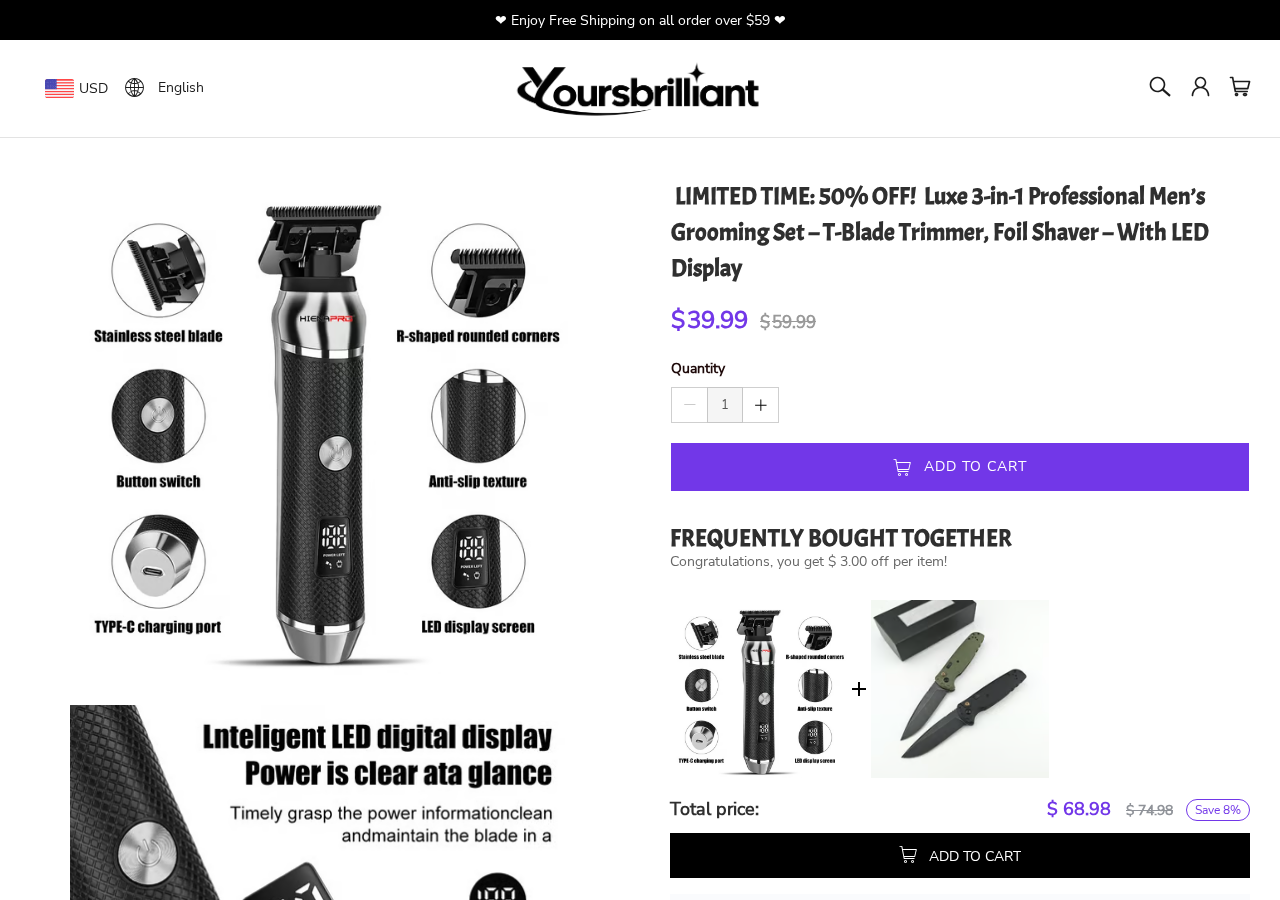
The page title advertised 50% off. During our visit, the displayed USD prices were $39.99 and $59.99.
That is a $20 difference, about 33% off the displayed comparison price. It is not 50% off that particular comparison price.
A regional homepage view also showed a 33% badge. We cannot tell why the product title retained the larger figure.
Why the policies deserve attention
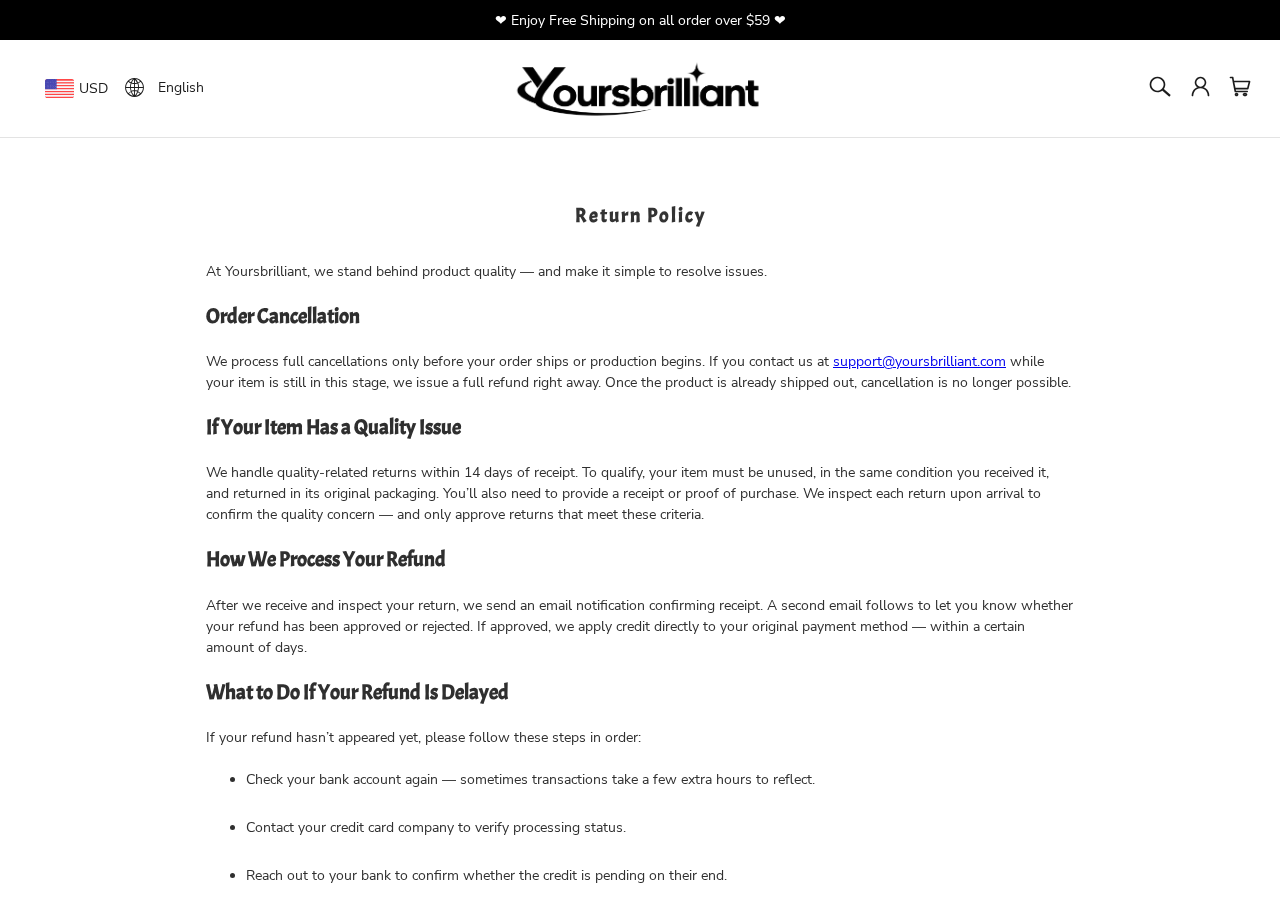
The store’s return policy limits quality-related returns to 14 days after receipt and calls for unused goods in original packaging.
It says cancellations are available before shipping or production, not indefinitely after purchase. The return address is provided after contacting support.
Those rules can be lawful commercial conditions. They are still important if the sale pitch made the purchase feel risk-free.
- Compare the headline discount with the actual two prices and checkout total.
- Read the return deadline, condition requirements, and cancellation timing before ordering.
- Check how to reach support and where a return would go.
- Save the product page and policy version you saw at purchase.
What we can and cannot conclude
We found a price-claim inconsistency and restrictive return details worth knowing. We did not establish that the shop is fraudulent.
We did not buy an item, test its quality, contact support, or examine delivery records. No evidence here proves that every order fails.
The defensible conclusion is narrower: shoppers should verify the real discount and understand the seller’s remedy process before paying.
The 50% Headline Versus the Prices on the Page
The USB product title uses the phrase “LIMITED TIME: 50% OFF.” A shopper might reasonably expect the current price to be half the comparison price.
The prices visible in the inspected USD view were $39.99 and $59.99. Half of $59.99 would be about $30, not $39.99.
Subtracting $39.99 from $59.99 gives $20. Dividing that difference by $59.99 yields approximately 33%.
Different currencies, promotions, or variants could change displayed prices. Our finding applies to the version we observed, not every possible checkout configuration.
The simplest test is to calculate the discount using the numbers on your screen. Do not rely on a headline that may be reused across product variants.
Also ask what the crossed-out price represents. A comparison price does not prove that the item was recently sold at that amount.
We have not verified the product’s price history. That uncertainty is another reason to compare similar items elsewhere before treating the sale as exceptional.
A countdown or “limited time” phrase should not stop a buyer from reading basic terms. The price difference remains the same after a short pause.
How a YoursBrilliant Purchase Can Become Frustrating
Step 1: A promotional title creates urgency
The discount claim sits where shoppers first decide whether the product is worth a click. It can anchor expectations before the actual arithmetic happens.
This is a marketing concern, not proof of an invented product. The specific issue is the mismatch between the headline percentage and displayed prices.
Use the amount charged at checkout as your decision point. Taxes, shipping, and selected variants may change the final figure.
Step 2: Product photos carry much of the persuasion
Visuals can show an intended use, but they cannot tell you durability, dimensions, power specifications, or what arrives in the box.
Look for precise measurements and compatibility details. If the listing is vague, ask the seller a specific question before placing an order.
We did not authenticate the source of every product image. A polished photograph is not evidence of independent testing or customer satisfaction.
Step 3: The buyer completes checkout under the store’s terms
The checkout creates an order, but it also makes the refund and cancellation policies relevant. Read them before the payment button, not afterward.
Save a copy of the product description, total price, promised delivery information, and policy pages. Those details help if the item differs from its listing.
Check whether any optional service or recurring charge appears in the order summary. We did not verify a YoursBrilliant subscription plan.
Step 4: A cancellation window may close quickly
The store says full cancellation is available before shipping or production. Once that process starts, a buyer may need to use the return route instead.
“Production” can be hard for a customer to observe. Ask support for the order status in writing if you need to cancel.
Do not assume that an unopened package can simply be refused with an automatic refund. Ask for the store’s instructions first.
Step 5: A return requires several conditions
The stated quality-related return period is 14 days from receipt. The item must be unused, in original packaging, and supported by proof of purchase.
The seller reviews requests and may inspect returned goods. This means mailing a package without authorization may not start a valid refund.
The policy does not publish a universal return address. Buyers are told to obtain one after contacting support.
Step 6: The refund outcome depends on the record
If the item is defective or materially different, photograph the issue as soon as you open it. Preserve the packaging and tracking number.
A clear timeline is more useful than a general complaint. Record delivery date, first contact, response, authorization, shipment, and refund status.
If support does not resolve a documented problem, your card issuer or payment service may have a dispute process with its own deadlines.
What the Return Page Actually Says
The return policy is central to this investigation because it explains what happens when the sale does not go as expected.
During our review, it required customers seeking a quality-related return to act within 14 days of receiving the product.
The policy also required an unused item in its original packaging and proof of purchase. Read the current wording for your order and location.
A buyer who opens and tests a gadget may find the unused condition difficult to meet. Ask support how defects discovered during testing are handled.
The separate cancellation page says there is no fixed return address provided in advance. The address follows a valid cancellation or return request.
That arrangement is not inherently fraudulent. Many retailers use different warehouses, but it makes written authorization and tracking especially important.
The page says the business will respond to a valid cancellation notice within 24 hours. We did not test that promise with a customer-service inquiry.
A refund timeline can also depend on inspection and payment processing. If the policy does not give you the certainty you need, reconsider before buying.
Before returning anything, ask which address applies to your order, who pays postage, and whether tracking or a return number is required.
Do not send a package to an address found on an unrelated review site. Use the seller’s written instructions for your specific order.
Seller Identity and Contact Details
What the contact page provides
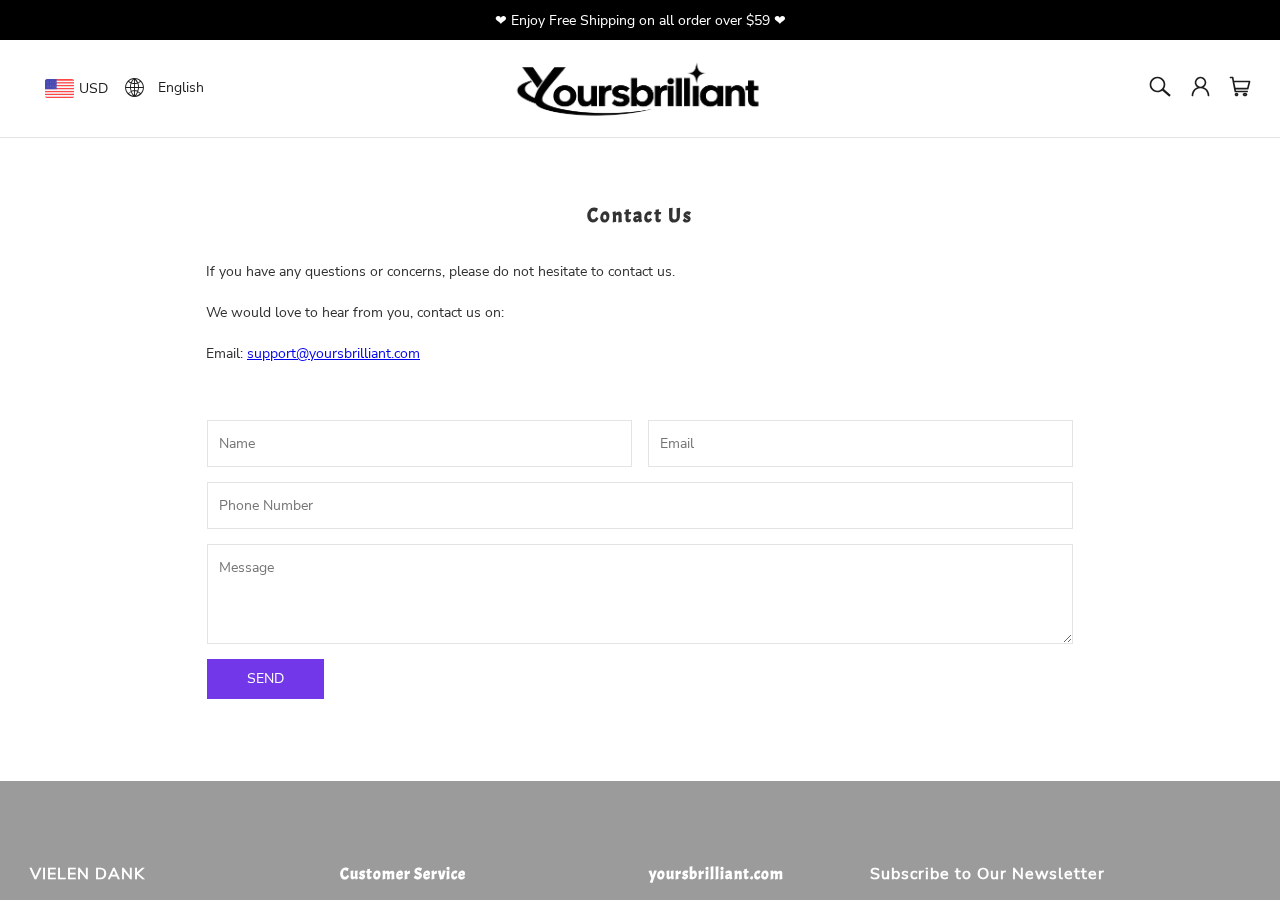
The contact page we saw lists support@yoursbrilliant.com and a web form. We did not see a telephone number or street address there.
That does not prove the business lacks those details elsewhere. The visible direct contact routes were email and the form.
For a time-sensitive cancellation, email and a form can feel limiting. Send a clear request with order number and keep a copy.
We did not send a message or measure response time. It would be unfair to claim that support ignores customers based on an untested address.
What is still worth checking
Look for the legal seller name in the terms, receipt, and payment descriptor. Those should point to an entity you can identify if a dispute arises.
A domain name alone is not a company name. Nor does a shipping origin prove where a product was designed or manufactured.
We did not establish that YoursBrilliant products are made in China, that its address is fake, or that its images were generated by AI.
Claims about fulfillment location and product origin require independent evidence. The return process is a clearer, documented buyer issue here.
Practical checks before a small purchase
Search the exact product description and image for comparable offers. Similar goods may be available elsewhere with clearer specifications or returns.
Use a card or payment service with a dispute process. Keep the checkout confirmation and shipment tracking in one folder.
Review the seller’s own return policy and cancellation policy immediately before paying. Policies can change after an article is written.
The FTC’s online-shopping guidance also recommends researching sellers and preserving records. That advice applies to unfamiliar stores generally.
Delivery and return locations are different questions
A package’s origin shows where that shipment entered the delivery network. It does not identify the seller’s headquarters or the product manufacturer.
The return destination can be different again. Request the address for your particular order before posting a return, and use tracked delivery.
We did not place an order, so we cannot independently identify the current dispatch point. The documented issue is the policy’s address-on-request process.
How to Evaluate the Store Without Jumping to Conclusions
A mismatch in one discount claim is a reason to question the offer. It does not prove that goods are never shipped.
A narrow return window is a business policy, not automatically a scam. The important question is whether it was clear before purchase and honored afterward.
An email-only contact page can make resolution slower, yet many real businesses start support by email. We have no response test here.
Conversely, the existence of a polished website does not guarantee quality. A buyer should evaluate the actual product details and remedy terms.
The strongest conclusion rests on facts a visitor can independently reproduce: the title, price calculation, return deadline, and contact method.
If those facts do not meet your comfort level, the simplest protection is to pause. The discount is not a reason to surrender basic checks.
One useful comparison is the cost of resolving a problem. Add possible return postage and the time required to obtain authorization to the apparent savings.
For a low-cost gadget, those costs can erase a promotional discount quickly. A better-known retailer with a clearer return path may be worth considering.
Check the payment descriptor after ordering. It should help you connect the card transaction with the store and the receipt you received.
If the descriptor is unfamiliar, do not assume fraud immediately. Compare the amount, date, and order confirmation, then ask the seller or issuer.
Delivery estimates deserve the same scrutiny. A shipment notice is not proof of delivery, and a tracking number may take time to show carrier scans.
Keep an eye on the promised delivery window. If it passes without the item, ask for a concrete update rather than accepting indefinite assurances.
What to Do if a YoursBrilliant Order Goes Wrong
-
Document the problem immediately. Save the listing, order confirmation, delivery date, packaging, and photographs of the item.
Make a short note describing exactly how the product differs from its listing or why it does not work.
-
Contact the seller within the stated window. Email support with your order number and request the appropriate return or cancellation instructions.
The quality-related return period shown during our review was 14 days from receipt. Do not wait for that deadline to pass.
-
Ask for the exact return terms in writing. Confirm the address, postage responsibility, tracking requirement, and whether the item must remain unused.
Keep the seller’s approval message. Do not mail the item to a guessed warehouse address.
-
Track the outcome. Save your return receipt, carrier tracking, delivery confirmation, and any refund notice.
If the seller asks for more information, answer promptly and keep each message in the same thread.
-
Escalate a documented unresolved issue. Contact your payment provider within its dispute deadline if the goods never arrive or a valid refund is not processed.
Give a concise timeline and evidence. A chargeback is not a shortcut for bypassing a clearly disclosed policy without a valid dispute.
-
Report misleading advertising where appropriate. If the discount or product claim caused the problem, document the exact page and price you saw.
Report facts, not guesses about ownership or manufacturing. That makes a complaint more useful to other buyers and consumer authorities.
Frequently Asked Questions
Is YoursBrilliant proven to be a scam?
No. Our review found a discount mismatch and return terms worth checking, not proof that the store takes orders without shipping goods.
Is $39.99 half of $59.99?
No. The difference is $20, roughly 33% of $59.99. The observed product title claimed 50% off.
How long is the stated return window?
The inspected policy gave 14 days from receipt for quality-related returns, subject to conditions including unused goods and original packaging.
Can I cancel after the item ships?
The store says full cancellation is available before shipping or production. Afterward, ask support whether a return is available for your order.
Does the contact page provide a phone number?
We saw a support email and web form, but no phone number there. Check the current site and your receipt for updated contact information.
Should I install security software after visiting the store?
Not merely because you viewed a product page. This is a shopping and policy investigation, not a finding that visiting the site installs malware.
The Bottom Line
YoursBrilliant is not a proven scam in the evidence reviewed. Its 50% headline did not match the two USD prices we observed.
The short, conditional return process also deserves attention. Calculate the discount yourself, read the policy, and keep records if you decide to buy.

Join the discussion
0 commentsShare your experience or ask a question about this article.
Discussion
Start the conversation
Have a question or something useful to share? Add the first comment.