


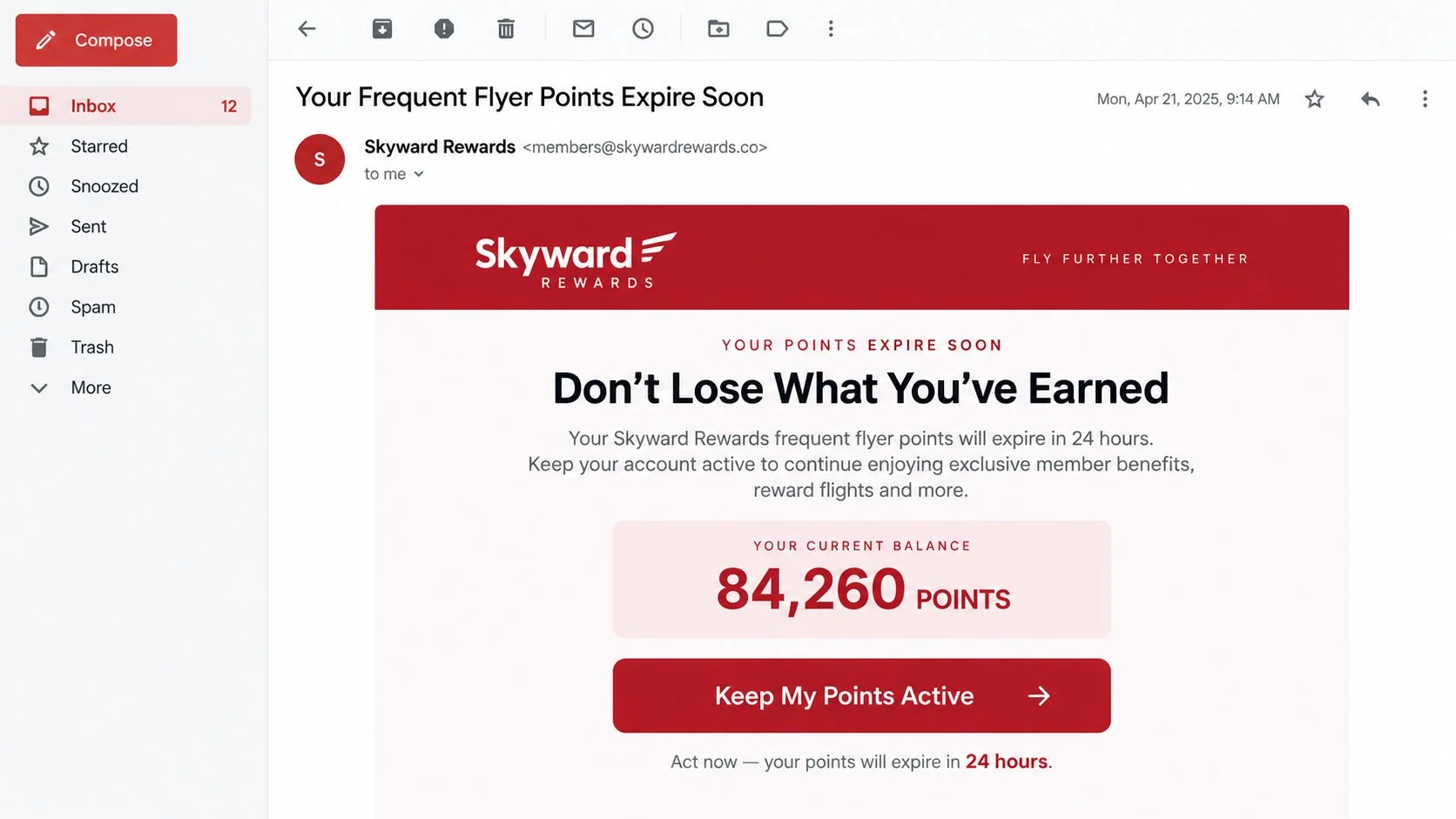
The message says thousands of Qantas Points will expire unless you act today. A button offers to save the balance, confirm bonus points, or process a refund before the opportunity disappears.
It looks like a routine loyalty notification. The page behind the button is where the familiar travel story turns into credential and card theft.
Overview
The Qantas Frequent Flyer scam uses real loyalty language
Scammers impersonate Qantas in emails and text messages about expiring points, pending bonus allocations, unprocessed refunds, suspicious sign-ins, profile deactivation, or card verification.
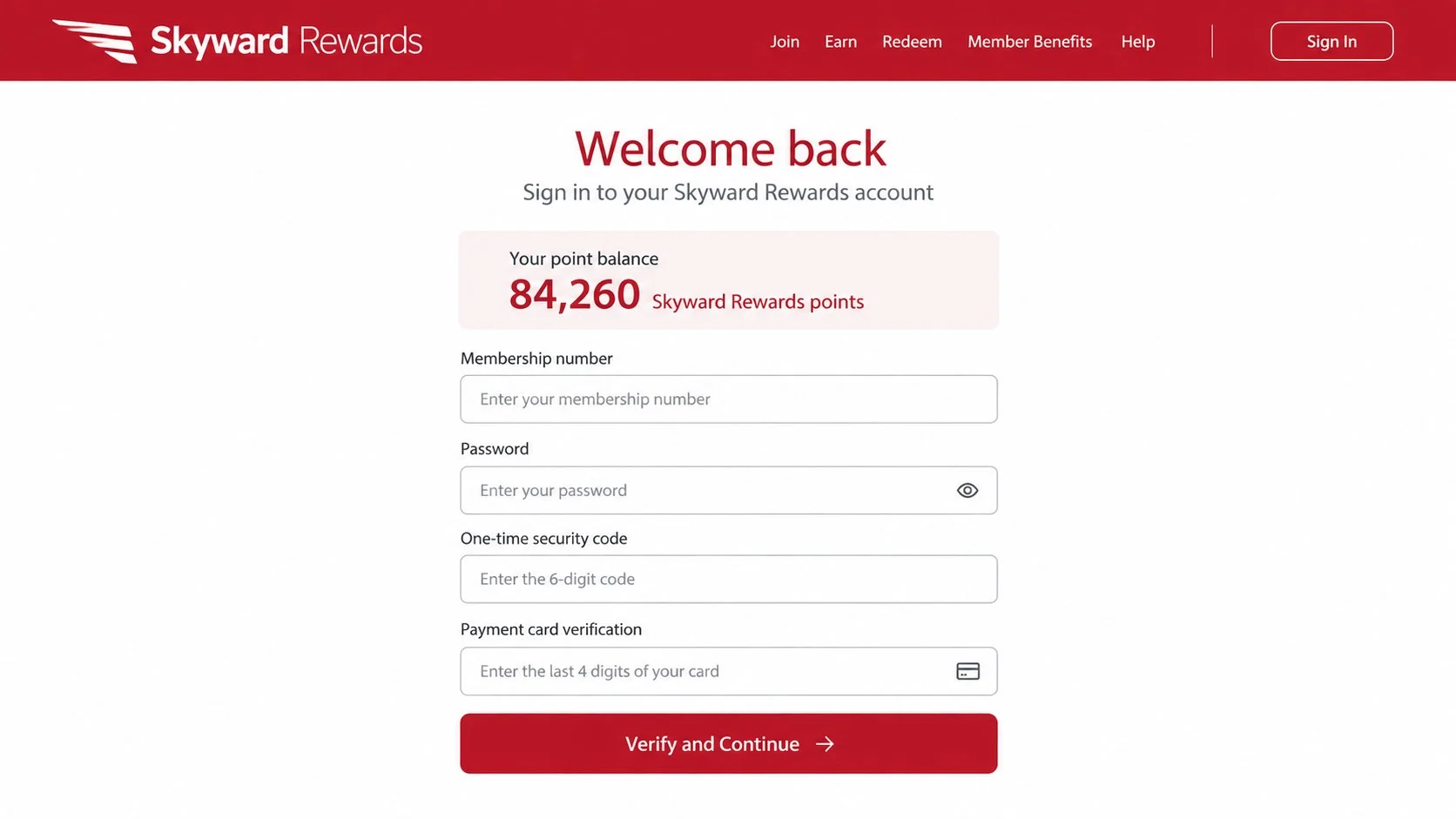
The message directs the recipient to a fake page that may request a Frequent Flyer number, last name, PIN, password, date of birth, address, and credit card information.
Qantas and Australia’s National Anti-Scam Centre have both warned about active impersonation campaigns. A recipient does not need to be a Qantas customer to receive one.
The fake page can steal both points and money
Loyalty points have real value. With access to an account, a criminal may redeem points, change profile details, book travel, or use the personal information to attack other accounts.
Some phishing flows add a small processing fee or card-verification step. The amount looks harmless, but the form captures complete payment details that can be used for unauthorized transactions.
A single fake alert may collect:
- Qantas Frequent Flyer membership number and PIN.
- Full name, birth date, phone number, and address.
- Email credentials or a reused password.
- Card number, expiration date, and security code.
- One-time passwords sent by a bank or airline.
- Device, browser, and network information.
Urgency is the most consistent clue
The scam warns that points expire tonight, a refund will be canceled, or the account will be locked. The deadline discourages the recipient from opening the real Qantas app and checking the balance.
Qantas says promotional points are credited automatically and do not need to be claimed through an external link. It also warns customers not to provide PINs, passwords, one-time passwords, or financial details through unsolicited messages.
The safe check is simple: close the message and open the official Qantas app or type the official website address yourself.
Current Qantas Impersonation Messages to Watch For
Qantas has documented fake bonus-points emails that claim an allocation is waiting for confirmation. Subject lines may refer to a pending allocation and include a reference number to make the message look personalized.
Another campaign claims award points are about to expire. Some text messages instruct the recipient to reply with “Y,” close the message, and reopen it to activate the link. That unusual instruction is intended to make a blocked link clickable.
Refund phishing claims money could not be processed and asks the customer to verify a membership number, last name, PIN, and card. Profile and card-verification emails use similar forms.
Why the Message May Know Something About You
A personalized email is not necessarily genuine. Names, email addresses, phone numbers, birth dates, and loyalty numbers can circulate after data breaches, marketing-list exposure, malware infections, or account compromise.
Criminals can combine leaked information with public travel posts and loyalty terminology. A correct name or membership detail is evidence that the sender has data, not proof that the sender is Qantas.
Scamwatch advises that people who know or suspect their data appeared in a breach may face more convincing targeting. Anyone can still receive a bulk impersonation message.
How the Qantas Frequent Flyer Scam Works
Step 1: A points, refund, or security message creates urgency
The recipient receives an email or SMS using Qantas colors, travel language, and a deadline. The message may promise a reward or warn about a loss.
Examples include expiring points, pending bonus points, a failed refund, an unrecognized login, or a profile that will be deactivated.
Step 2: A button opens a copied Qantas-style page
The link leads to a domain that is not controlled by Qantas. The page uses copied logos, images, navigation, and sign-in fields to appear familiar.
The address may include words such as qantas, points, rewards, frequent-flyer, account, or secure. Those words do not make the domain official.
Step 3: The fake sign-in form captures account credentials
The victim enters a Frequent Flyer number, last name, PIN, or password. The information is sent to the scammer rather than an airline account system.
An error message may ask for the information again, allowing the attacker to collect multiple password variations.
Step 4: Personal and card information is collected
The flow continues to identity confirmation or a small processing payment. Address, birth date, card number, expiration, and security code are requested.
A tiny fee is not the real objective. It makes the request feel routine while the criminal obtains enough card data for larger transactions.
Step 5: A one-time code completes the takeover
The criminal may immediately attempt a real login or card transaction. The victim then receives a genuine code and is told to enter it into the fake page.
That code authorizes the attacker’s action. Qantas says it will not ask customers to provide one-time passwords through an unsolicited email or text.
Step 6: The stolen account and identity are monetized
Points can be redeemed, contact details changed, and payment cards tested. Reused passwords may expose email, travel, retail, and financial accounts.
The victim may later receive fake support or recovery messages because the criminal already knows which account was compromised.
Sender, Website, and Support Checks
The display name is not the sender’s real address
An inbox may show “Qantas,” “Qantas Digital Services,” or “Frequent Flyer” while hiding an unrelated address. Expand the sender details before trusting the name.
Even a familiar-looking sender can be spoofed. Use the content, destination domain, and independent account check together.
The destination domain must belong to the real service
Pressing and holding a link or hovering over it can reveal where it leads, but the safest approach is not to open it. Launch the Qantas app or type the official address separately.
A padlock only means the connection to that site is encrypted. Scam websites can also use HTTPS.
Real support will not demand secrets from an unsolicited message
Qantas support may verify a customer through established procedures, but an unexpected email should not direct the customer to surrender a PIN, password, one-time code, or full card information.
Use the service number displayed in the official app, on the official site, or in account documents you already possess.
A reward should be visible inside the genuine account
Qantas states that promotional points are credited automatically. If a balance, refund, or booking cannot be found in the official account, do not fix the discrepancy through the message link.
Take a screenshot and ask official support to verify it. Do not let a countdown decide which page receives your credentials.
Warning Signs of a Fake Qantas Message
A convincing message may have correct colors, a familiar sender name, and a professional footer. Those visual details can be copied, so the decision should rest on the destination, request, and account activity.
Pause when a message includes any of these warning signs:
- Points will allegedly disappear within hours unless a link is opened.
- Bonus points must be claimed through an external form.
- A refund requires a card number and one-time security code.
- The displayed link text and actual destination do not match.
- The web address contains extra words, misspellings, or an unrelated ending.
- The page asks for both loyalty and email account passwords.
- A small processing or verification charge must be paid first.
- The sender discourages use of the official app or normal support channel.
- The greeting, points balance, or recent activity does not match your account.
Personal details do not make the message genuine. Names, email addresses, and partial travel information may come from unrelated data leaks, public posts, or a compromised account belonging to someone else.
- An unexpected deadline says points expire within hours.
- The message promises bonus points that must be manually claimed.
- A refund requires new card information through an email link.
- The sender address is unrelated to Qantas.
- The link uses extra words, hyphens, or a different domain ending.
- The text tells you to reply “Y” to activate a link.
- The page requests a bank one-time password.
- The account balance shown in the message cannot be confirmed in the app.
- Support threatens immediate account deletion.
- The message reaches someone who has never joined Qantas Frequent Flyer.
How to Verify Qantas Points and Refunds Safely
Close the message and open the official Qantas app or type the known website address yourself. Check the points balance, account notifications, recent redemptions, and profile details without using the supplied link.
If the message mentions a booking or refund, compare its reference with the confirmation already stored in your account or email history. A random reservation number should not be treated as proof.
Contact Qantas through the support information published on its official website when the account view does not resolve the question. Provide the suspicious message for review, but never send your password, PIN, or one-time code.
For promotional points, read the conditions from within the genuine site. Legitimate points are normally handled under the promotion’s published rules; an unexpected page should not need your full card details simply to add a reward.
When a suspicious message claims there was a security event, change the password from the genuine account rather than through the alert. Then review your linked email account, because access to email can make loyalty-account recovery easier for an attacker.
Open the official Qantas app without using the message. Check the points balance, recent activity, profile, bookings, and notifications.
If a refund is expected, verify it against the original booking and payment method. Contact Qantas using a number found on its official site and provide the real booking reference, not information requested by the suspicious page.
Use a unique Frequent Flyer PIN or password and secure the associated email account. Account alerts are most useful when the attacker cannot also read or delete the email.
What to Do if You Have Fallen Victim to This Scam
- Close the fake page and stop responding. Do not return to correct information, request a refund, or test the password. Every new submission gives the attacker more data.
- Change the Qantas Frequent Flyer PIN or password. Use the official app or website. Review account details, point activity, bookings, saved travelers, and contact information.
- Secure the associated email. Change its password, sign out unfamiliar sessions, inspect forwarding rules, and enable multifactor authentication. Email access can allow repeated account resets.
- Contact Qantas Frequent Flyer support. Report the phishing message and any missing points or unauthorized changes through official contact details. Ask that the account be reviewed for suspicious access.
- Call the bank or card issuer. Replace any card entered on the fake page and dispute unauthorized transactions. Tell the issuer if a one-time code was also provided.
- Change reused credentials. Replace the same PIN or password everywhere it was used, particularly on travel, email, shopping, and financial accounts.
- Check the device for malware. If the link downloaded a file, browser extension, or application, run a full Malwarebytes scan. It can detect credential stealers and other malicious software that may survive after the page closes.
- Block repeat phishing pages. AdGuard can block many known malicious domains, deceptive redirects, and fraudulent advertisements. Continue using the official app for account checks because no blocker catches every new site.
- Preserve the evidence. Save the sender, full headers, message text, URL, screenshots, transaction details, and time of the incident. Do not publicly post unredacted membership or card information.
- Report the scam. Australians can report it to Scamwatch and seek identity support from IDCARE when personal information was exposed. Report the message to the email or mobile provider as phishing.
- Reject paid recovery offers. Anyone who contacts you unexpectedly and guarantees the return of points or money for an upfront fee is likely attempting another scam.
Frequently Asked Questions
Do Qantas Points really expire?
Points are governed by program terms, but an unsolicited expiration link should not be trusted. Check the balance and relevant dates directly in the official account.
Does Qantas ask members to claim promotional points by email?
Qantas says promotional points are credited automatically and do not require confirmation through an external link.
Can a scam text appear under a real Qantas sender name?
Yes. Sender IDs and display names can be spoofed or grouped into an existing message thread. The name shown by the phone is not sufficient verification.
What if I clicked but did not enter anything?
Close the page and check for downloads or new permissions. Clicking alone usually does not reveal a password, but malicious pages can attempt downloads or collect device information.
Can scammers steal Qantas Points?
Yes. Stolen account credentials can be used to redeem points, alter profile details, or support wider identity fraud.
Should I trust a small card-verification charge?
No. A small charge can be bait to collect full card details or test whether the card works before larger transactions.
The Bottom Line
The Qantas Frequent Flyer scam turns points, refunds, and account security into urgent reasons to click. The branding may look polished, but the fake page exists to collect credentials and payment information.
Ignore the deadline in the message. Open the official app, check the account independently, and contact Qantas through a verified channel if something appears wrong.
Points can wait long enough for verification. A PIN, card number, or one-time code entered on a phishing page may be used within seconds.

Join the discussion
0 commentsShare your experience or ask a question about this article.
Discussion
Start the conversation
Have a question or something useful to share? Add the first comment.