


The advertisement promised one inexpensive watch could quietly read the body metrics that normally require specialized medical equipment.
That promise felt convenient and modern. It also carried consequences far beyond an inaccurate step count.
Overview
What the Qatteeey watch claimed
Qatteeey advertised a smartwatch with non-invasive blood glucose, ECG, blood pressure, blood lipids, uric acid, heart-rate, and fitness functions.
Some listings described a free trial or presented the device as a painless alternative to drawing blood.
The offer targeted people seeking convenient health monitoring, especially consumers managing diabetes, hypertension, or age-related concerns.
That positioning moved the watch beyond casual wellness and toward decisions that can affect medication and emergency care.
Why the central glucose promise is unsafe
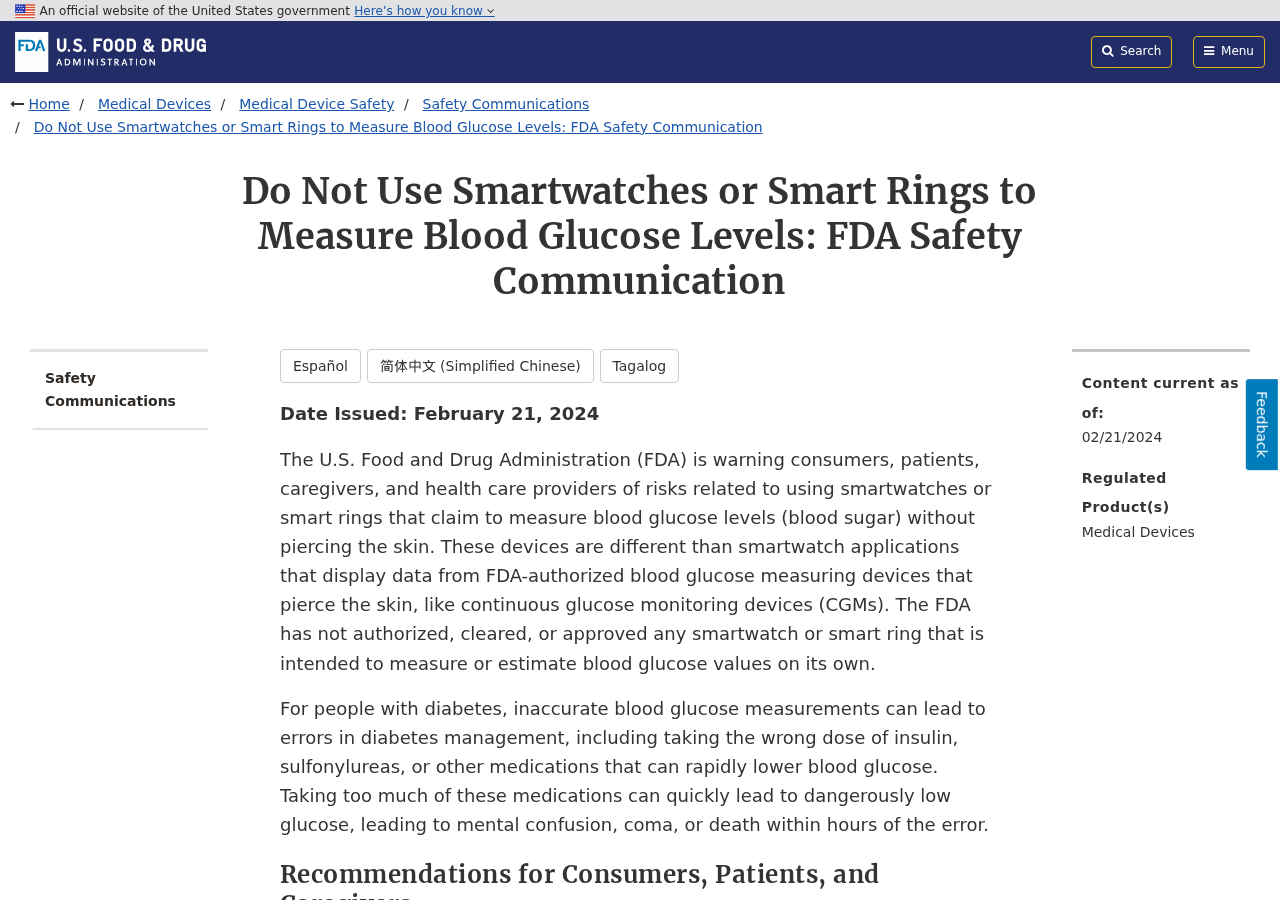
The FDA warns consumers not to use smartwatches or smart rings claiming to measure blood glucose without piercing the skin.
The agency says it has not authorized, cleared, or approved any device intended to provide independent glucose values this way.
A smartwatch may display information from a separately authorized continuous glucose monitor. That is different from measuring glucose by itself.
Qatteeey’s presentation blurred this crucial distinction by describing painless wrist-based testing as a built-in feature.
What happened to the sales page
The original smartwatch product URLs now return a 404 page instead of a working medical-device listing.
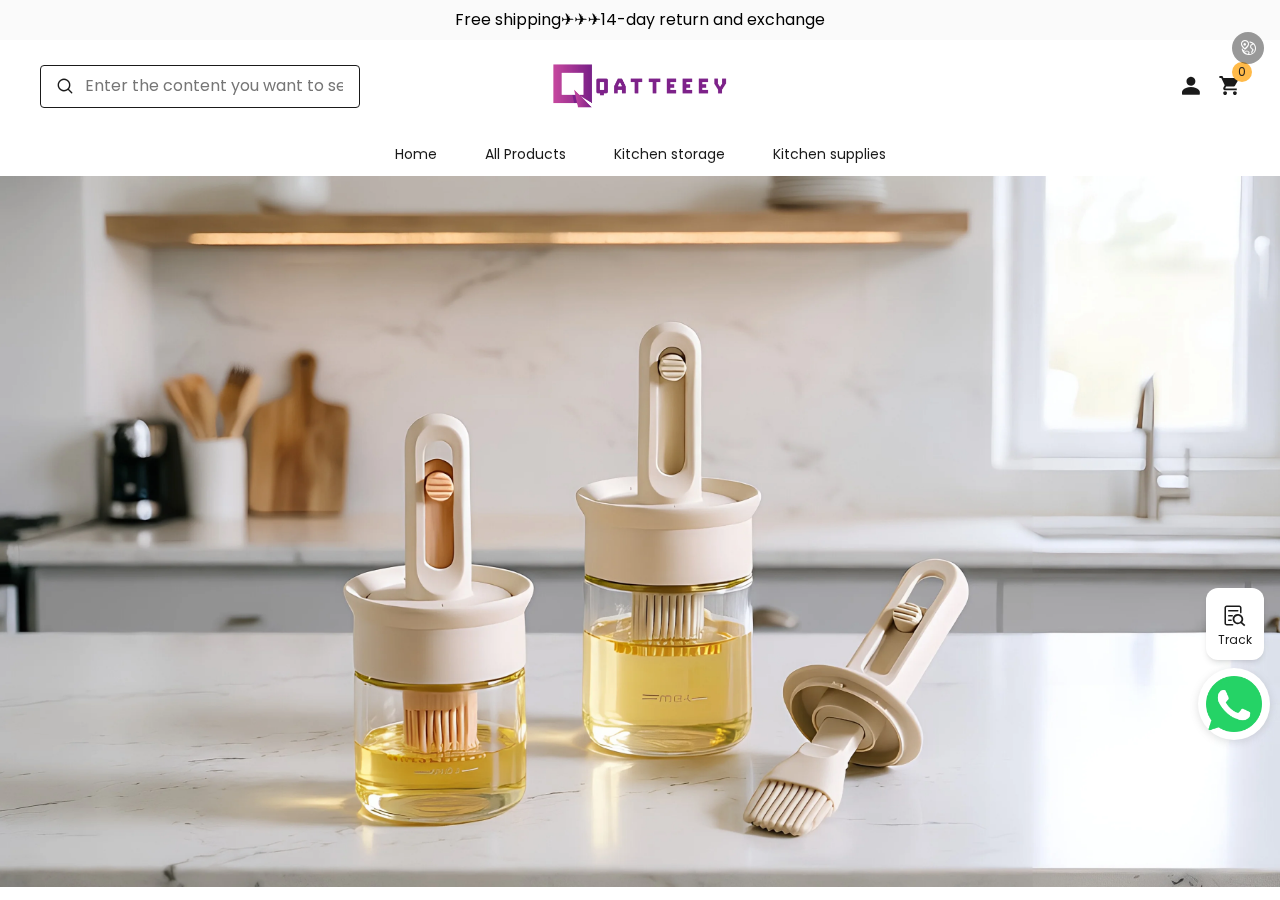
Qatteeey.com remains online, but the current storefront emphasizes kitchen storage and household tools rather than wearable health technology.
BBB displays a Qatteeey online-shopping profile with complaints and no accreditation, while third-party reviewers describe refund problems.
Our main findings are:
- The advertised needle-free glucose function conflicts with FDA guidance.
- The watch pages disappeared while the domain stayed active.
- The storefront shifted from health wearables to kitchen goods.
- No device-specific clearance was located for the glucose claim.
- Contact information relies primarily on a service email.
- Complaint records raise return and refund concerns.
- A gadget reading should never guide insulin dosing.
A Wellness Gadget Is Not Automatically a Medical Device
Consumer watches commonly estimate steps, sleep patterns, exercise duration, heart rate, and other fitness indicators.
Even those readings have limitations involving skin contact, motion, placement, device calibration, body characteristics, and software algorithms.
Blood glucose is a much harder measurement because treatment decisions require dependable concentrations, trends, and alerts.
Authorized continuous glucose monitors use a sensor that penetrates the skin and samples interstitial fluid.
The watch then may act as a remote display, but it is not secretly measuring glucose through decorative optical sensors.
A Qatteeey-style listing collapses these two systems into one appealing promise: glance at the wrist and know the blood sugar.
That shortcut is precisely what the FDA safety communication tells consumers to avoid.
An incorrect high value might prompt unnecessary medication. An incorrect low or normal value could delay treatment for a dangerous condition.
The risk is not theoretical inconvenience. Poor diabetes decisions can produce severe hypoglycemia, confusion, coma, or other medical emergencies.
The Other Measurement Claims Also Need Scrutiny
ECG capability does exist in certain regulated consumer devices, but that does not validate every inexpensive watch displaying an ECG-style graph.
Genuine ECG functions identify their intended use, supported hardware, limitations, compatible regions, and regulatory status.
Blood-pressure estimation is also complex. Reliable assessment ordinarily involves validated cuffs, correct positioning, suitable sizing, and careful technique.
A wrist gadget claiming “balloon blood pressure” without transparent validation should not replace a clinically validated monitor.
Blood lipids and uric acid normally require biological sampling and laboratory or approved point-of-care analysis.
A screen presenting plausible numbers does not prove the device measured those chemicals inside the body.
Software can generate smooth charts, historical trends, and health scores from algorithms or user inputs.
Visual sophistication should never be mistaken for analytical capability.
Ask for the model number, regulatory database entry, intended-use statement, validation study, accuracy range, and known contraindications.
If the seller cannot provide them, treat every medical-looking value as unverified entertainment data.
How the Qatteeey Smartwatch Funnel Works
Step 1: The advertisement identifies a painful routine
Finger sticks, cuffs, clinic visits, and laboratory tests are uncomfortable or inconvenient.
The promotion offers freedom from that routine through a watch that supposedly watches everything continuously.
People already worried about their health are more likely to interpret convenience as a breakthrough rather than a warning.
Step 2: A long feature list overwhelms careful evaluation
The page combines glucose, ECG, blood pressure, uric acid, lipids, sleep, temperature, oxygen, sports, calls, and notifications.
Each familiar function makes the next extraordinary claim appear slightly more believable.
Buyers may confirm that watches can measure pulse, then incorrectly assume the same sensor can directly analyze blood chemistry.
Step 3: Medical words appear without medical accountability
Charts, heart symbols, numerical dashboards, and doctor language create the atmosphere of a regulated health device.
The seller may simultaneously place small disclaimers saying the watch is not intended for diagnosis or treatment.
A disclaimer cannot neutralize a headline promising painless blood-sugar testing for health protection.
Step 4: A discount or free-trial label reduces hesitation
The customer sees a low price compared with established medical equipment and decides the experiment seems affordable.
Urgency, limited inventory, free shipping, or trial wording compresses the time available for regulatory verification.
The checkout still collects full payment details and personal contact information, regardless of how casually “trial” is framed.
Step 5: The delivered gadget displays persuasive numbers
A buyer may receive a watch that powers on, pairs with an app, counts steps, and produces changing health values.
Those visible responses make the entire feature list feel confirmed, even when no reference measurement is used.
Random-looking variation is not accuracy. The watch must match validated equipment across realistic conditions and clinically important ranges.
Step 6: The listing disappears or the catalog changes
By the time performance or refund problems become clear, the original product URL may no longer exist.
Qatteeey’s domain currently sells unrelated kitchen products, leaving the old smartwatch claims difficult to revisit.
A vanished listing weakens the buyer’s evidence unless screenshots, receipt details, and advertisements were saved earlier.
Why a Changing Storefront Matters
Retailers change inventories, and an expired product page alone does not prove fraud.
Context matters here because Qatteeey moved from a health-monitoring device to generic kitchen merchandise under the same domain.
The transition provides little continuity for software updates, watch compatibility, warranty parts, security patches, or medical-claim accountability.
A smartwatch depends on more than metal and a display. Its companion application and servers may be essential for basic operation.
If the seller pivots or disappears, the application can stop syncing, vanish from an app store, or expose unsupported permissions.
Customers should understand what data the companion app collects, where it is stored, and whether deletion requests are honored.
Health readings, location, device identifiers, contacts, and notification access can create significant privacy exposure.
Qatteeey’s current kitchen catalog does not answer what long-term support exists for previously sold wearables.
Complaint and Refund Signals
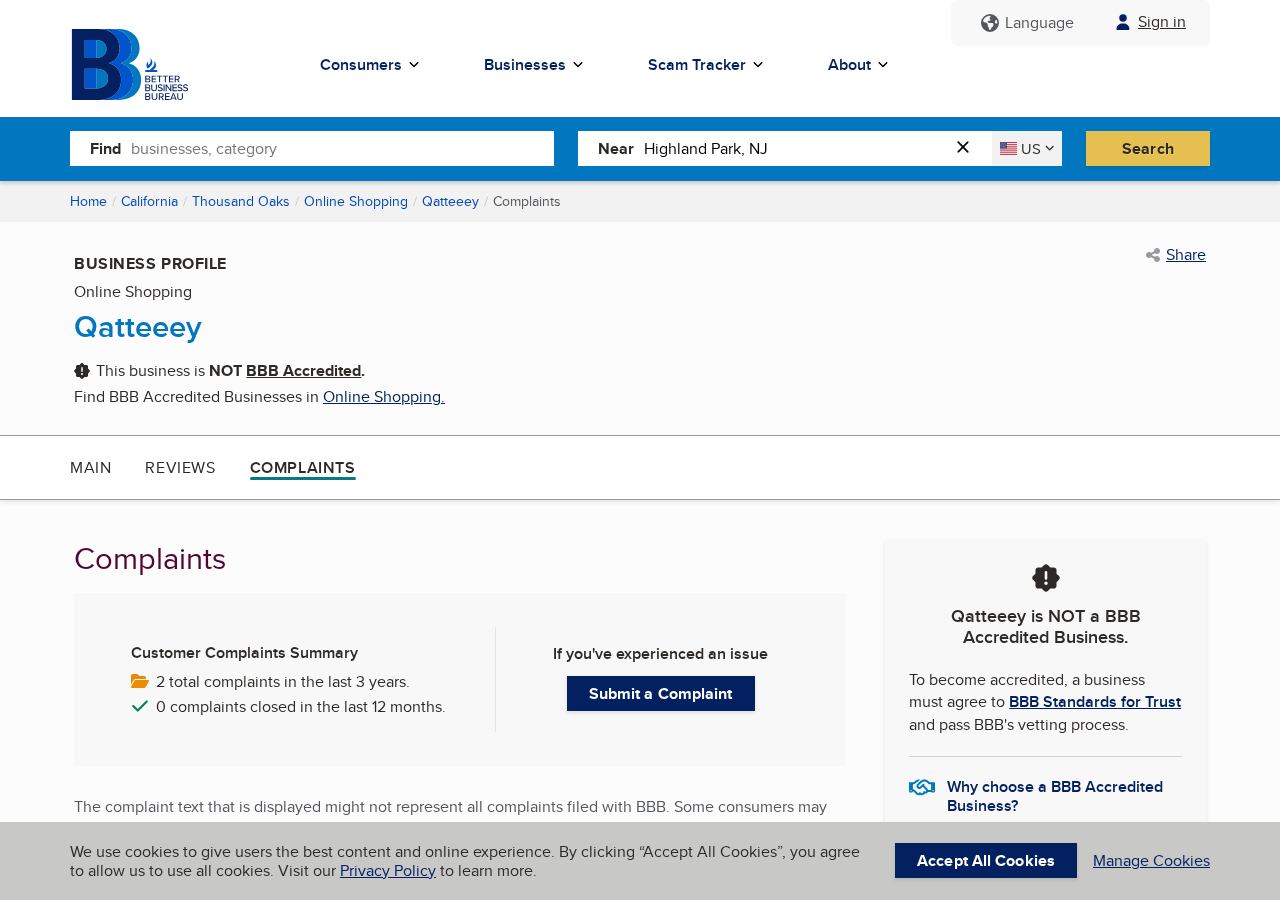
BBB identifies Qatteeey as an online-shopping business and states it is not accredited.
Accreditation status alone does not determine legitimacy. The complaint record is more useful when evaluating recurring patterns.
Public complaints discuss returns, address problems, products that did not match expectations, and difficulty obtaining full refunds.
Separate reports identify 2452 Gillingham Circle in Thousand Oaks, California, in connection with complaints or shipping information.
A shipping-label address may be a residence, forwarding location, returns handler, or unrelated destination.
It should not be assumed to represent a medical-device manufacturer or engineering facility.
The current site advertises a 14-day return and exchange period and lists service@mail.qatteeey.com for support.
Fourteen days can be short when international delivery, device pairing, comparison testing, and support correspondence consume time.
Anyone requesting a refund should begin immediately, preserve tracking, and avoid sending a product without written authorization.
Company, Address, and Fulfillment Checks
The website does not establish a medical manufacturer
Qatteeey’s current About Us presence is minimal, and the catalog resembles a general cross-border goods store.
We found no clear continuity linking the smartwatch’s health claims to a named regulated-device company.
The addresses require context, not assumptions
An address printed on a parcel or complaint page may identify only the location handling returns.
Search property records and business registries, then compare the result with the entity shown on the receipt and card statement.
Email-only support limits accountability
The site lists a service email but no prominent telephone support capable of answering medical-device questions.
Before buying health technology, ask who validates the readings, issues software updates, handles adverse events, and manages warranty claims.
Generic fulfillment cannot certify medical accuracy
A warehouse can ship watches manufactured at scale without verifying whether their displayed values are clinically meaningful.
Only device-specific authorization and credible validation can support a measurement claim. Packaging and fast delivery cannot substitute for either.
How to Check a Health Watch Safely
Search the exact model number, not only the marketing brand, in the relevant regulatory database.
Confirm whether the device measures a metric itself or merely receives data from an authorized external sensor.
Read the intended-use statement and limitations. A wellness estimate should never be presented as a diagnostic result.
Compare blood pressure only under a clinician-approved protocol using a validated cuff.
Never test an unverified glucose watch by adjusting insulin or skipping a conventional measurement.
Review application permissions before pairing. Deny access unrelated to the features you intend to use.
Keep the original packaging, model label, receipt, advertisements, and return instructions until the refund period has fully passed.
How Inaccurate Readings Can Cause Real Harm
A false number becomes dangerous when a person changes treatment, delays care, or ignores symptoms because the screen appears reassuring.
Someone using insulin may calculate a dose around a value the watch never genuinely measured.
Too much insulin can drive glucose dangerously low, while insufficient treatment can leave severe hyperglycemia uncorrected.
Both situations require accurate conventional testing and an established medical plan.
A fabricated blood-pressure value can create similar confusion.
An apparently normal reading may discourage urgent assessment during chest pain, weakness, severe headache, or neurological symptoms.
An alarming false reading can also produce panic, unnecessary medication, or inappropriate emergency decisions.
ECG-style graphics deserve equal restraint because a single-lead consumer feature cannot diagnose every rhythm or cardiac condition.
A normal-looking trace does not exclude a heart attack, intermittent arrhythmia, structural disease, or another serious problem.
Uric-acid and lipid estimates can mislead people into believing dietary changes or treatments are working without laboratory confirmation.
The psychological effect matters too. Constant unreliable alerts can increase anxiety and compulsive checking.
Conversely, repeated reassuring values can create misplaced confidence in a device chosen primarily for price.
Medical measurements require known accuracy across different skin tones, temperatures, motion levels, circulation conditions, and disease ranges.
A seller should publish validation methods and error limits, not only attractive dashboards.
Regulatory clearance also applies to a specific device, intended use, and market.
A different watch cannot borrow another manufacturer’s authorization simply because both products use optical sensors.
People with diabetes should carry their prescribed testing method even when using authorized displays or companion applications.
Unexpected symptoms must outweigh any consumer-gadget reading.
Call emergency services for severe symptoms rather than spending time comparing an unverified watch with internet reference ranges.
If a Qatteeey reading influenced a harmful decision, document the number, time, symptoms, reference test, treatment, and resulting medical care.
That record can help a clinician, regulator, card issuer, or consumer authority understand the seriousness of the misrepresentation.
Preserve the companion application’s version number because later updates may change calculations, screens, or displayed disclaimers.
Export any available history before deleting the account, then redact private health information from evidence shared publicly.
Ask the seller whether raw sensor data exists or whether the application only provides calculated wellness estimates.
A vague answer is important because genuine measurement systems explain their sensor, calibration, accuracy, and intended use.
Do not mail the watch away before photographing its serial number and confirming the return destination in writing.
Chargeback reviewers need a coherent trail connecting the advertisement, received model, failed claim, support response, and final disposition.
What to Do if You Have Fallen Victim to This Scam
- Stop using the readings medically. Return to an authorized meter or prescribed continuous monitor and contact a clinician about any treatment decision already made.
- Preserve the original claims. Save the product page, video, free-trial wording, order total, model number, receipt, application name, and health dashboards.
- Request cancellation and refund immediately. Quote the advertised medical functions and explain how the delivered device failed independent verification.
- Protect the payment account. Ask the card issuer about an item-not-as-described dispute, future merchant blocks, and relevant filing deadlines.
- Remove unnecessary app access. Revoke health, location, contacts, notifications, microphone, and storage permissions before uninstalling the companion application.
- Check the connected phone. Run Malwarebytes after suspicious sideloads, browser redirects, unknown configuration profiles, or applications installed outside an official store.
- Reduce repeat exposure. AdGuard can block many deceptive advertisement chains, while regulatory verification remains necessary for every health-device claim.
- Report dangerous measurements. Contact the advertising platform, marketplace, consumer authority, and FDA MedWatch if inaccurate values caused or risked harm.
Is Your Device Infected? Run a Free Malware Scan
Slow performance, constant pop-ups, or strange behavior? These are classic signs of a malware infection. A quick way to check is to scan your device with Malwarebytes Free, one of the most trusted malware removal tools available. If you only visited a scam page and didn’t download or install anything, this scan is optional.
The free version detects and removes the most common threats, including:
- Adware — the cause of those annoying pop-ups
- Browser hijackers — unwanted redirects and changed homepages
- Trojans and spyware — hidden programs stealing your data
- Potentially unwanted programs (PUPs) — software you never asked for
👉 Select your device below — Windows, Mac, or Android — then follow the simple steps to download Malwarebytes, scan your system, and remove any threats it finds. The scan usually takes 5 to 20 minutes.
Run a Malware Scan with Malwarebytes for Windows
Malwarebytes is one of the most popular and trusted anti-malware tools for Windows — and it’s completely free for removing infections. It catches threats that many antivirus programs miss, including adware, browser hijackers, and trojans. Follow the steps below to scan your PC and remove what Malwarebytes finds.
Download Malwarebytes
Click the button below to download the latest version of Malwarebytes for Windows from the official source. The free version is all you need — it will scan your computer and remove adware, browser hijackers, and other malicious software at no cost.
Download MalwarebytesOfficial installer for Windows 11 and 10. Your download starts right away.Want real-time protection? See Malwarebytes Premium Malwarebytes Free for WindowsScans and removes malware at no cost
-
Install Malwarebytes
When the download finishes, open your Downloads folder and double-click the MBSetup file. If Windows shows a User Account Control pop-up, click “Yes” to allow the installation.

Follow the On-Screen Prompts to Install Malwarebytes
The setup wizard will walk you through a few quick screens:
-
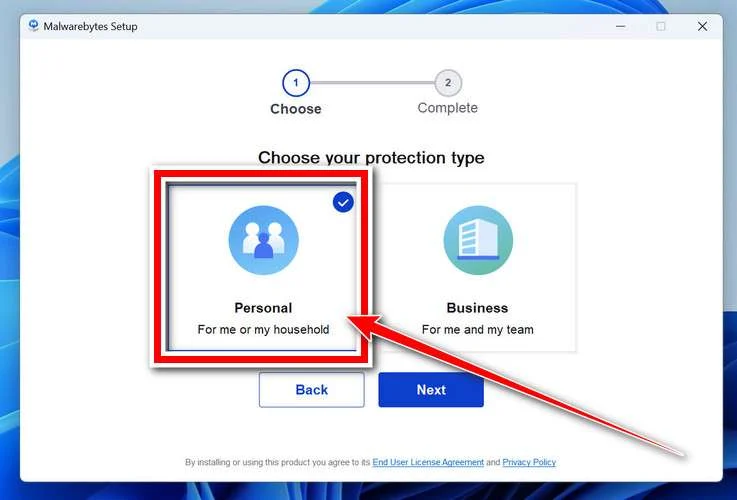
Choose where you’re installing the program — “Personal Computer” or “Work Computer” — then click Next.
-
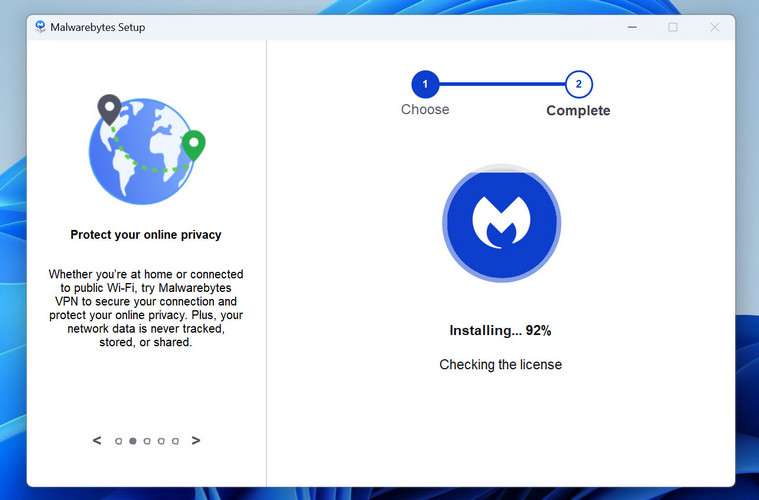
Malwarebytes will now install on your device. This usually takes under a minute.
-
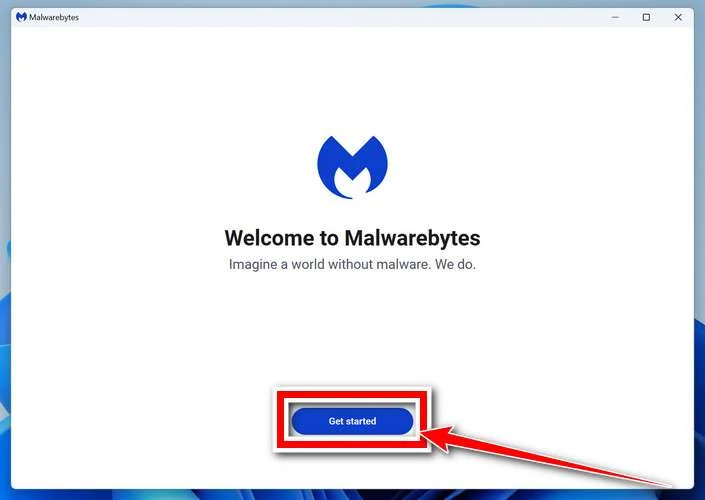
When installation is complete, the “Welcome to Malwarebytes” screen will open automatically.
-
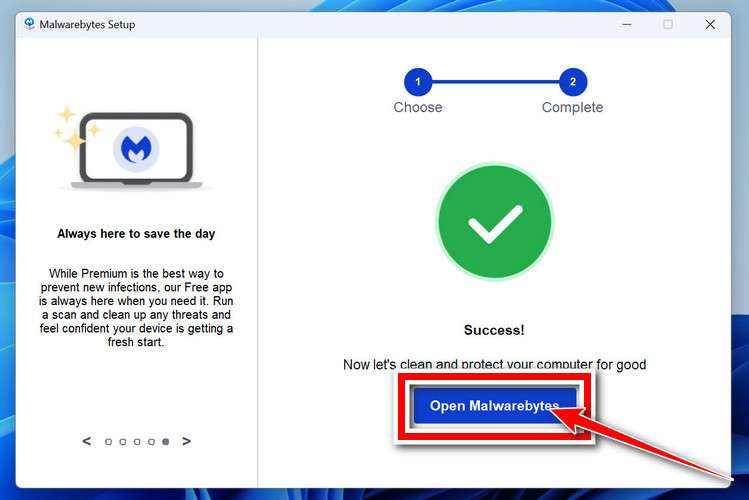
On the final screen, click Open Malwarebytes to launch the program.
-
Optional: Check for rootkits with a Custom Scan
You don’t need to change any settings for a normal scan. The standard Threat Scan in the next step is enough for most problems, so you can go straight to it.
If you also want to check for rootkits, use a Custom Scan. In current versions of Malwarebytes, rootkit scanning is only available there:
- On the Scanner tile, click the three-dot menu and select Advanced Scan.
- Choose Custom Scan. In its options, check Scan for rootkits.
- Select your system drive (usually C:\) as the location to scan, then start the scan. It takes longer than a Threat Scan.
- When it finishes, review and quarantine the results as described in the steps below.
Rootkit scanning isn’t available on Windows devices with ARM processors.
Start the Scan
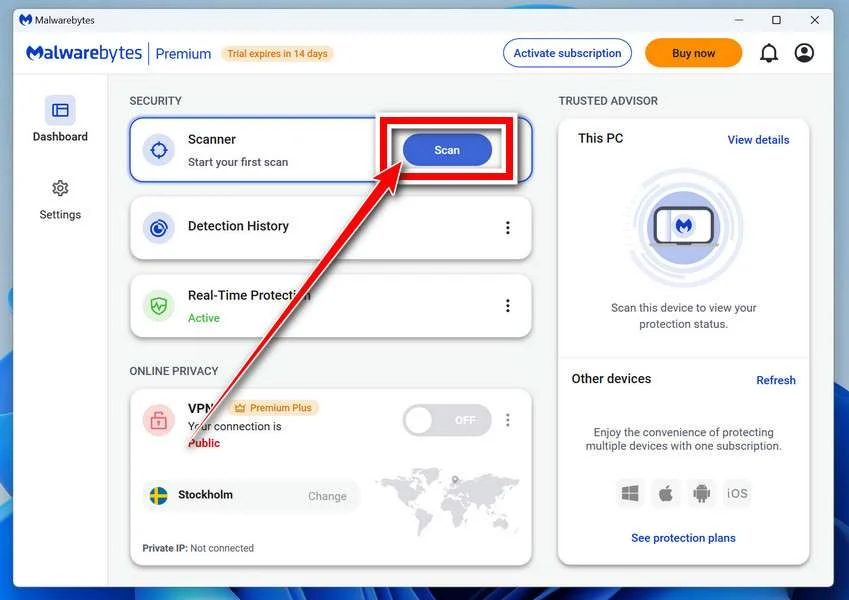
Click the blue Scan button. Malwarebytes will automatically update its virus database and start checking your computer for malware.
-
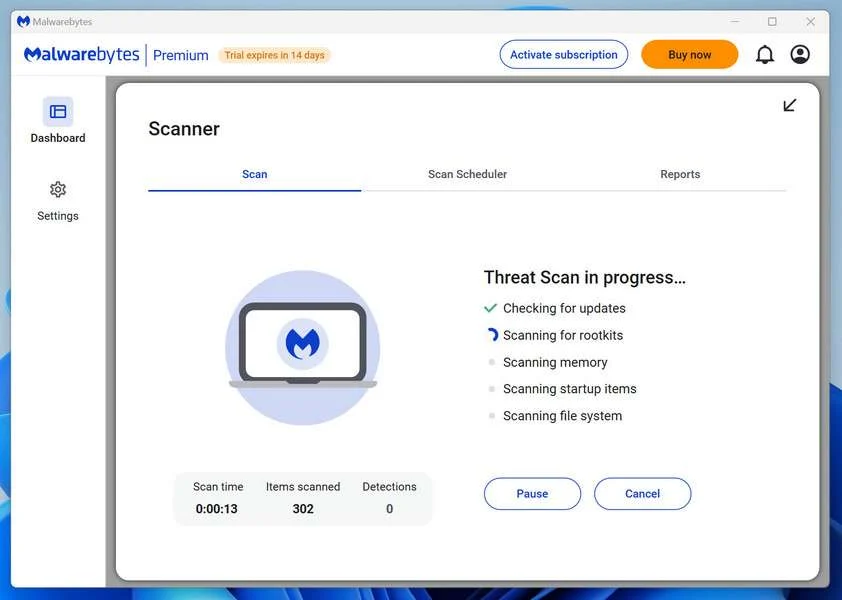
Wait for the Scan to Finish
The scan checks your entire system for browser hijackers and other malicious programs, so it can take 5 to 20 minutes depending on your computer. Feel free to do something else — just check back occasionally to see the progress.
-
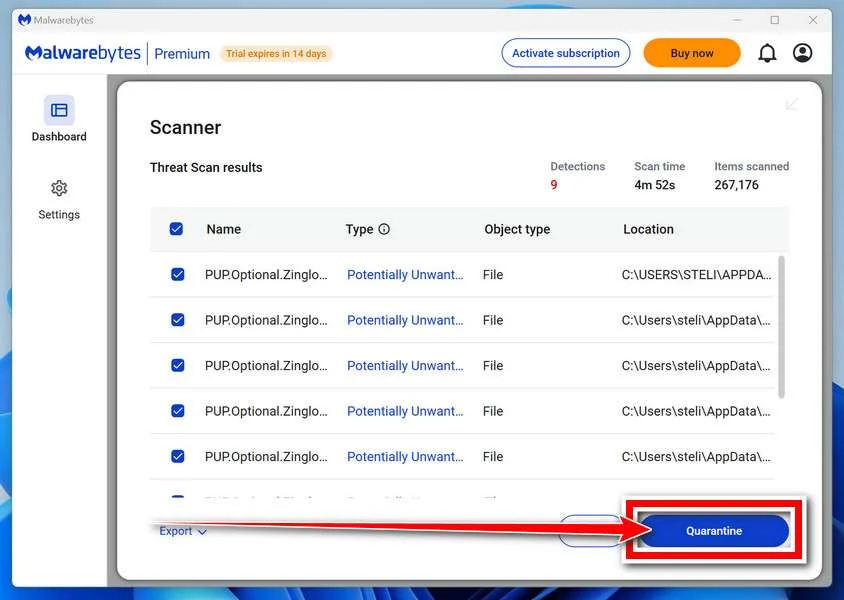
Quarantine the Detected Threats
When the scan is done, you’ll see a list of everything Malwarebytes found — malware, adware, and potentially unwanted programs. Click the “Quarantine” button to remove all of them at once.
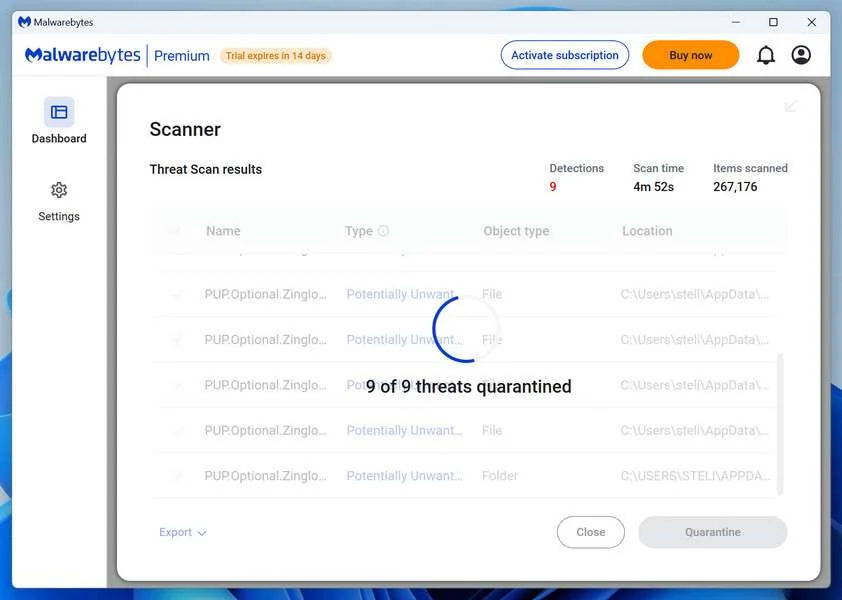
Malwarebytes will now remove the malicious files and registry entries and move them safely into quarantine.
-
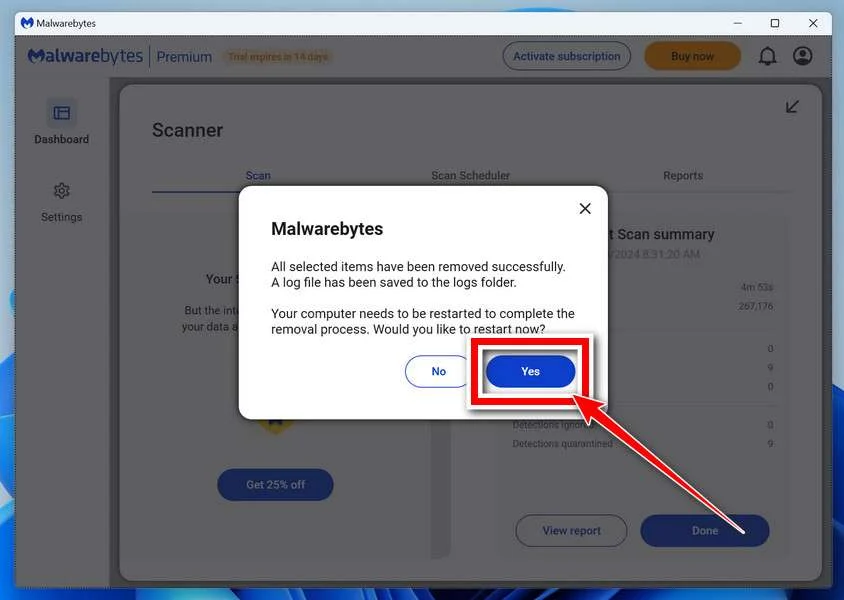
Restart Your Computer
Some threats can only be fully removed after a reboot. If Malwarebytes asks you to restart, click Yes. Once you’re logged back in, Malwarebytes has finished removing the threats it found.
When the scan is done, check whether the problems you noticed have stopped. If they continue, see the options below.
If you are still having problems with your computer after completing these instructions, then please follow one of the steps:
- Run a computer scan with ESET Online Scanner
- Ask for help in our Windows Malware Removal Help & Support forum.
Run a Malware Scan with Malwarebytes for Mac
Malwarebytes for Mac is a free on-demand scanner that removes the malware other security software tends to miss — adware, browser hijackers, and unwanted programs included. Cleaning an infected Mac with Malwarebytes has always been completely free, and it’s our go-to recommendation. Follow the steps below to scan your Mac and remove what Malwarebytes finds.
-
Download Malwarebytes for Mac
Click the button below to download the latest version of Malwarebytes for Mac.
Download MalwarebytesOfficial installer for macOS. Your download starts right away.Want real-time protection? See Malwarebytes PremiumMalwarebytes Free for MacScans and removes malware at no cost -
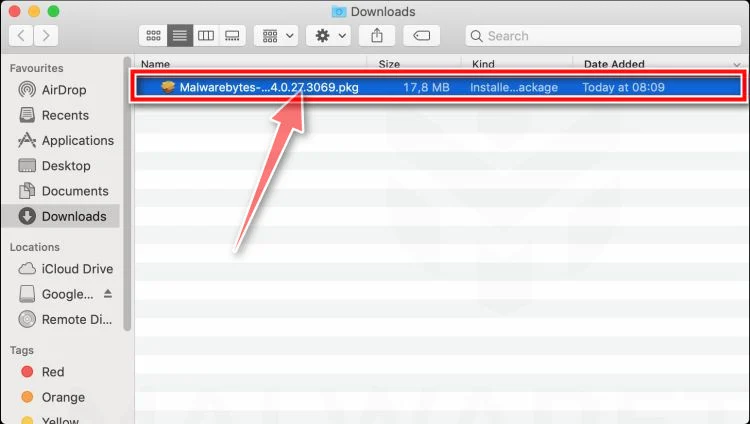
Open the Malwarebytes setup file
When the download finishes, open your Downloads folder and double-click the setup file to begin the installation.
-
Follow the On-Screen Prompts to Install Malwarebytes
The Malwarebytes for Mac Installer will guide you through a few quick screens. Click “Continue” and keep following the prompts until the installation completes.
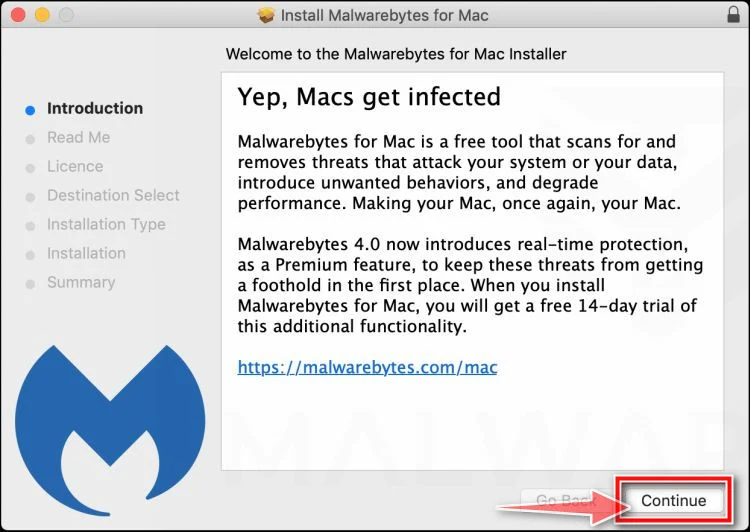
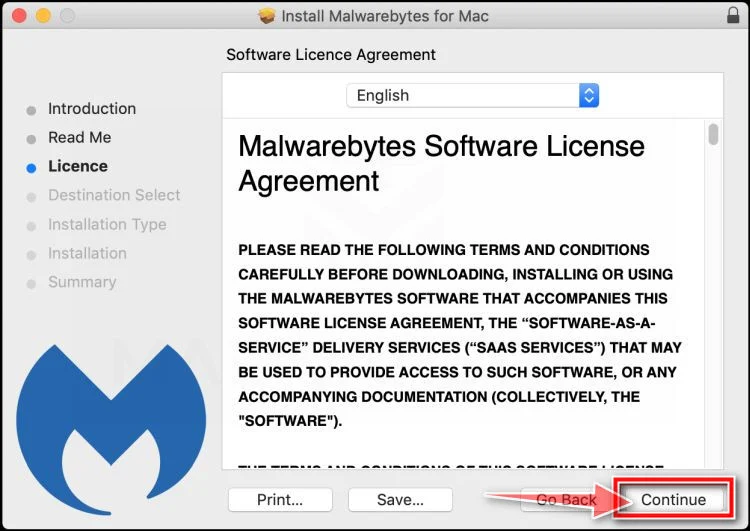
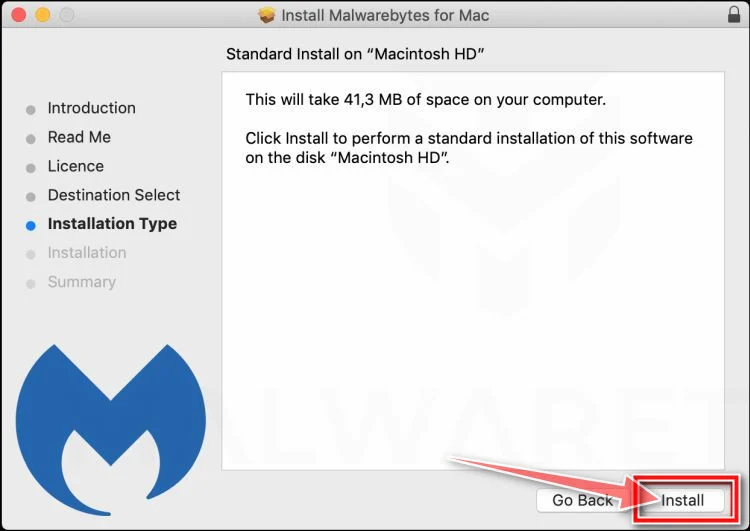
When the installation is complete, Malwarebytes opens to the Welcome to Malwarebytes screen. Click “Get started“.
Malwarebytes needs Full Disk Access to check your whole Mac. When it asks, open System Settings > Privacy & Security > Full Disk Access, turn on Malwarebytes (it may be listed as Malwarebytes Protection), and confirm with your password or Touch ID. Then return to Malwarebytes. On macOS Monterey and earlier, this setting is in System Preferences > Security & Privacy > Privacy.
-
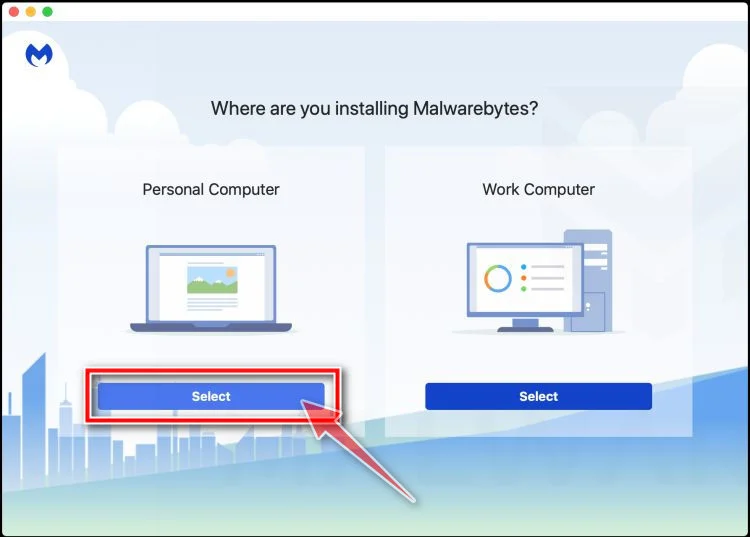
Select “Personal Computer” or “Work Computer”
Malwarebytes will ask what type of computer you’re installing it on. Click either Personal Computer or Work Computer, whichever applies.
-
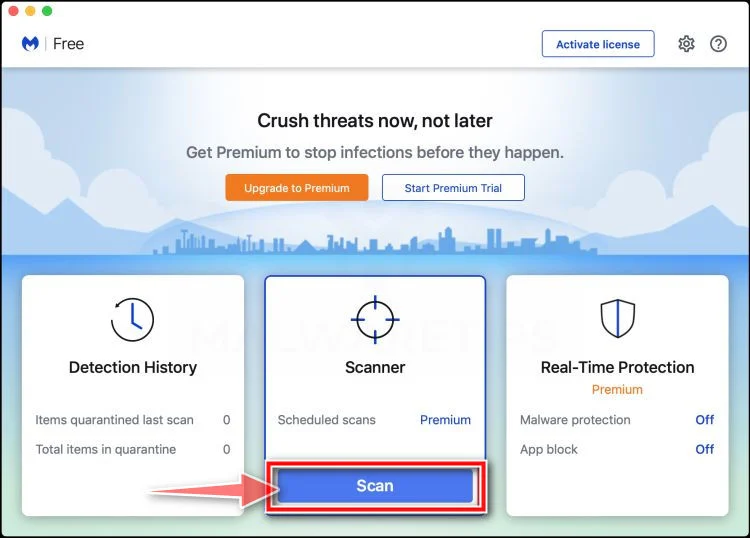
Start the Scan
Click the “Scan” button. Malwarebytes will automatically update its detection database and begin checking your Mac for malware.
-
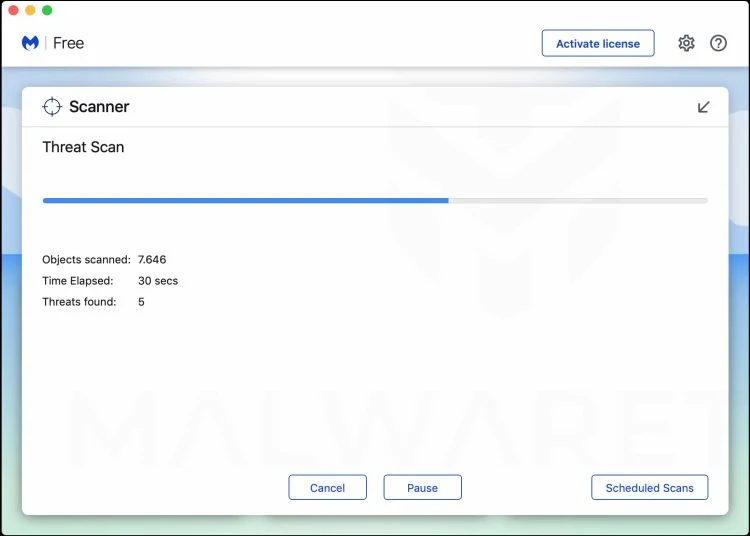
Wait for the Scan to Finish
Malwarebytes will scan your Mac for adware, browser hijackers, and other malicious programs. This can take a few minutes, so feel free to do something else — just check back occasionally to see the progress.
-
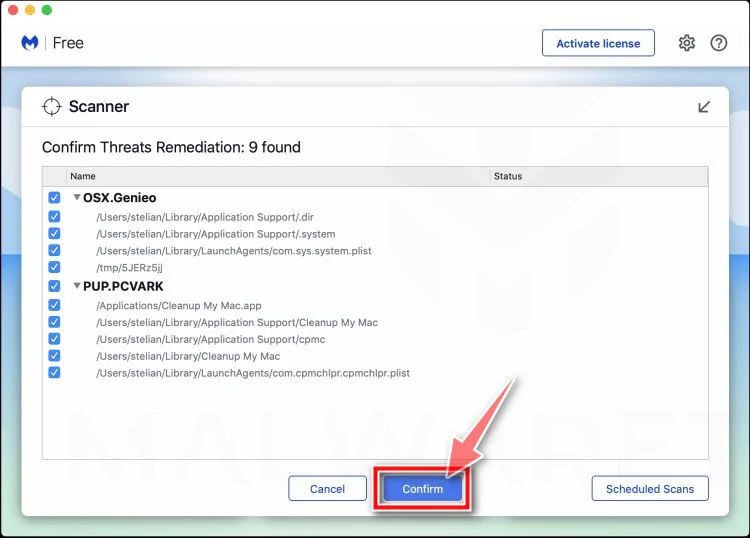
Quarantine the Detected Threats
When the scan is done, you’ll see a list of everything Malwarebytes found. Click the “Quarantine” button to remove all the threats at once.
-
Restart Your Mac
Malwarebytes will now remove all the malicious files it found. Some threats can only be fully removed after a reboot — if Malwarebytes asks you to restart, allow it. Once you’re logged back in, check whether the problems you noticed have stopped. If they come back, save the scan report and ask for help in our forum.
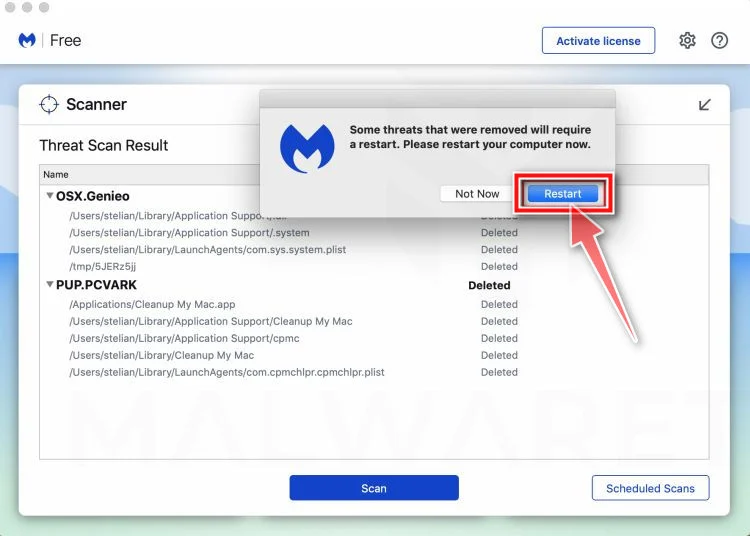
If the problems you noticed continue after the scan, see the options below.
If you are still experiencing problems while trying to remove a malicious program from your computer, please ask for help in our Mac Malware Removal Help & Support forum.
Run a Malware Scan with Malwarebytes for Android
Malwarebytes for Android scans your phone or tablet for malware, adware, and potentially unwanted apps. The free version scans only when you start a scan. Real-time protection, which checks apps automatically, is part of the paid Premium version.
-
Download Malwarebytes for Android.
You can download Malwarebytes for Android by clicking the link below.
Get Malwarebytes for AndroidOpens Google Play in a new tab.Want real-time protection? See Malwarebytes Premium for AndroidMalwarebytes for AndroidScans your phone and removes malware at no cost -
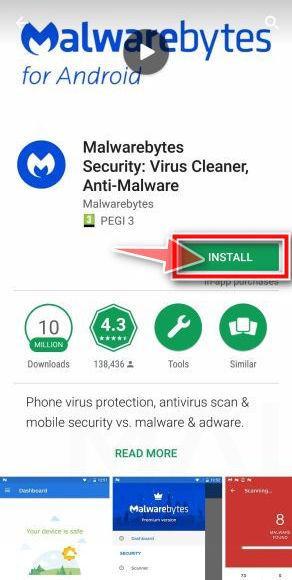
Install Malwarebytes for Android on your phone.
In the Google Play Store, tap “Install” to install Malwarebytes for Android on your device.
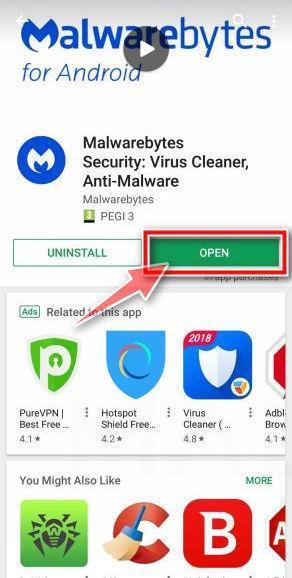
When the installation process has finished, tap “Open” to begin using Malwarebytes for Android. You can also open Malwarebytes by tapping on its icon in your phone menu or home screen.
-
Follow the on-screen prompts to complete the setup process
When Malwarebytes opens, it walks you through a short setup. Tap Get started and follow the prompts. If you see an offer for a trial or a paid plan, read it before you accept. You can skip it and keep using the free scanner.
Malwarebytes will ask for permission to access the files on your phone so it can scan them. Tap Allow, or turn on the permission in the Android screen that opens, then return to Malwarebytes.
-
Run a scan with Malwarebytes for Android
On the main screen, tap Scan now. In some versions, you open the menu, tap Scanner, and then tap Run a scan.
-
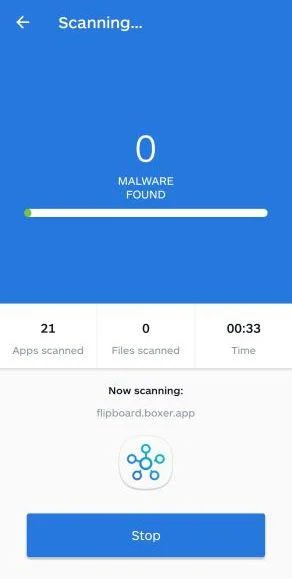
Wait for the Malwarebytes scan to complete.
Malwarebytes will now start scanning your phone for adware and other malicious apps. This process can take a few minutes, so we suggest you do something else and periodically check on the status of the scan to see when it is finished.
-
Remove the detected apps.
When the scan has been completed, you will see a list of the threats that Malwarebytes for Android has detected. Next to each detected item, tap the menu icon (three dots), then choose to uninstall the app or delete the file. Android then asks you to confirm. Tap OK or Uninstall to remove the app.
-
Restart your phone.
When the detected apps are removed, restart your phone if Malwarebytes asks you to. Then check whether the problems you noticed have stopped.
If the problems you noticed continue after the scan, see the options below.
If you are still having problems with your phone after completing these instructions, then please follow one of the steps:
- Ask for help in our Mobile Malware Removal Help & Support forum.
- Only as a last resort, reset your phone to factory settings. Read the warning below first.
- Back up your photos, videos, files, and messages, for example to your Google account or a computer.
- Make sure you know your Google account email and password. The phone asks for them after the reset. If you changed the password recently, Google recommends waiting 24 hours before you reset.
- On a Samsung phone, also make sure you know your Samsung account password.
- If you use an authenticator app for two-step verification, move your accounts to another device or save your backup codes first.
Stay Protected: Block Ads and Malicious Sites
No scan can prove a device is completely clean, so it helps to block threats before they reach you. Most infections start with a malicious ad or a fake download button — so blocking them at the source is your best defense.
We recommend AdGuard, which blocks malicious ads, phishing pages, and dangerous redirects before they can reach you.
👉 Download AdGuard and browse safely
Frequently Asked Questions
Can the Qatteeey watch measure blood glucose without needles?
Do not rely on that function. The FDA says no smartwatch or smart ring has authorization to independently measure glucose without piercing skin.
Does a changing number prove the sensor works?
No. A display can generate varying values through software. Accuracy requires comparison against validated reference methods across clinically meaningful conditions.
Can I use it for insulin decisions?
No. Use only an authorized glucose meter or prescribed continuous monitor and follow the treatment plan provided by your healthcare professional.
Why does Qatteeey.com now sell kitchen products?
The original watch pages were removed while the domain continued with another catalog. We cannot confirm why the operator changed its merchandise.
Is every Qatteeey watch function false?
Not necessarily. Basic time, notifications, steps, and optical pulse features may operate, but that does not validate blood-chemistry or diagnostic claims.
What evidence is most useful for a dispute?
Preserve the medical promises, model label, product URL, reference comparisons, support messages, return tracking, receipt, and final card charge.
The Bottom Line
Qatteeey sold a real-looking smartwatch around a glucose promise the FDA specifically warns consumers not to trust. That makes the offer medically unsafe.
The removed listings, changed catalog, and complaint record deepen the concern. Treat its health values as unverified and protect both your treatment decisions and payment account.

Join the discussion
0 commentsShare your experience or ask a question about this article.
Community experiences
Did this happen to you?
Your experience could help someone recognize the same scam. Submit a private report for our team to review.
I experienced this tooReports are reviewed before publication. Sharing publicly is always your choice.
Discussion
Start the conversation
Have a question or something useful to share? Add the first comment.