


An account update arrives between ordinary work messages. It sounds administrative, mentions changes to sign-in requirements, and asks you to review an attachment before continuing your day.
The familiar wording makes this notice worth examining carefully. Before opening anything, take a closer look at what the message actually asks you to trust.
Overview
An account notice dressed as internal housekeeping
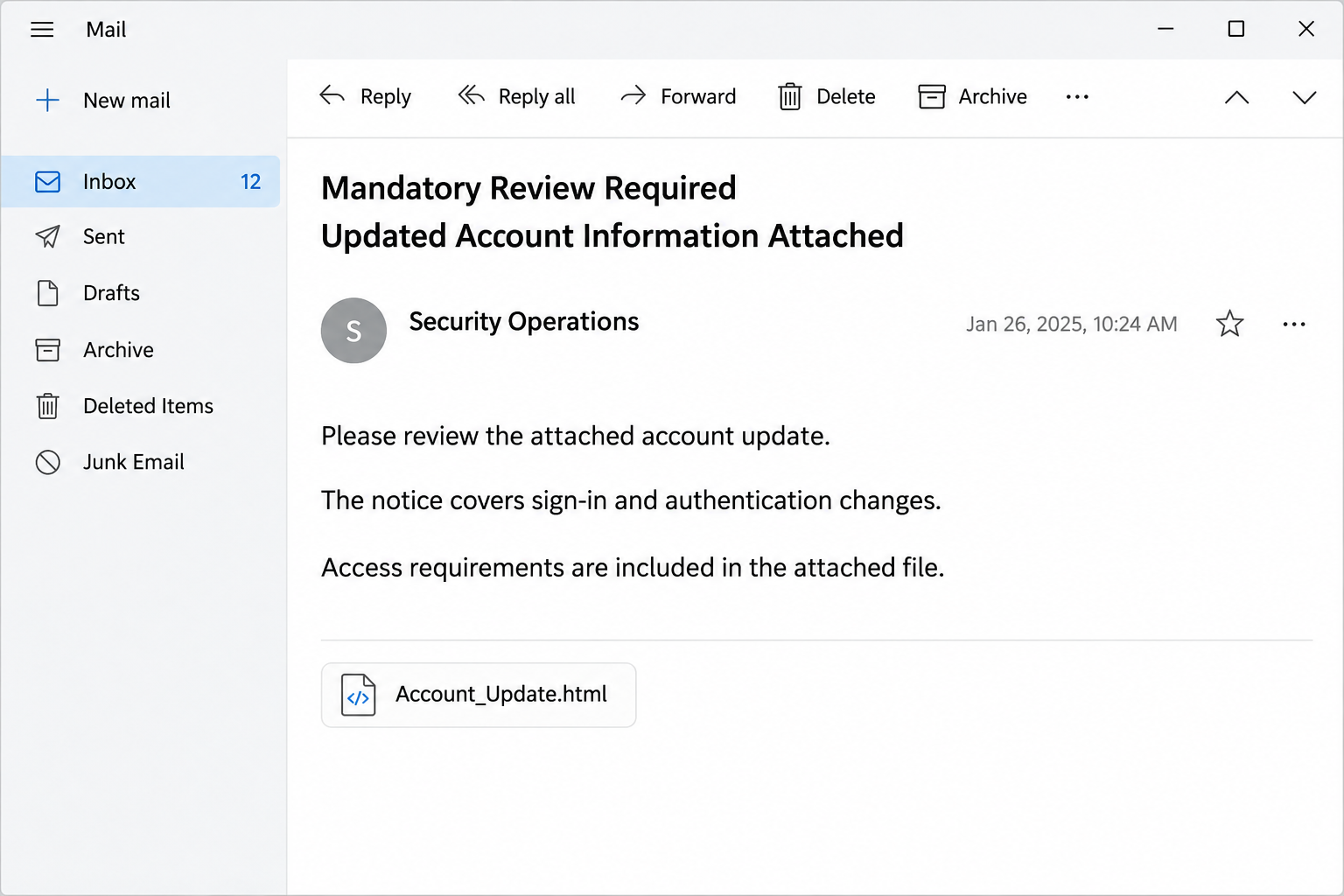
The Security And Identity-Access Improvements email presents an account change as routine company business. Its subject refers to a mandatory review and attached updated account information.
The sender poses as a security operations or account-management team. References to authentication methods, compliance, and continued access give the message an apparently practical purpose.
This is not an announcement you should accept because it sounds technical. The documented campaign uses an HTML attachment to present a counterfeit email sign-in page.
The distinction matters when deciding what to do. Reading the notice and giving a password to its attachment are different actions, with very different consequences.
The attachment supplies the missing authority
Instead of directing you to an account screen you already recognize, the message places important details inside a file. The reported attachment uses an account-update name.
An HTML file is a web document, even when it arrives beside an email rather than through a browser link. It can display a convincing form.
Opening a page from your Downloads folder does not make its contents trustworthy. A form can still ask for credentials and communicate with an outside destination.
The useful questions are specific, rather than simply whether the message looks polished:
- Did your organization announce this access change through an established channel?
- Does the attachment contain information, or demand another account sign-in?
- Can your usual administrator confirm the notice without using its contact details?
- Are you being asked to reveal credentials before seeing the supposed update?
The account password is the valuable item
The purpose of the counterfeit form is credential theft. A successful submission gives an attacker something they can try against the real mailbox or another reused login.
That does not mean every recipient has already lost their account. Exposure depends on whether information was entered, what information was shared, and existing account protections.
A work mailbox can contain purchase discussions, employee details, password-reset messages, and contacts. Access can therefore lead to impersonation that looks more convincing than the original email.
The safest response is to check the alleged change through your normal IT route. There is no need to open the attachment to request that confirmation.
Why This Particular Notice Can Be Convincing
Security notices often interrupt normal work, so an unexpected one does not automatically feel unusual. Employees are accustomed to password changes, new authentication methods, and policy acknowledgments.
The account-update story fits into that background. It offers an explanation for why a technical message has appeared and why someone outside your immediate team might send it.
The wording also gives the request an institutional voice. A reference to compliance can make a questionable attachment feel like an assigned task rather than an unsolicited file.
Think about the difference between being informed and being authenticated. An email can tell you a policy has changed, but it cannot establish its own authority by saying so.
A genuine rollout should have an accountable owner. You should be able to ask your service desk which system is changing and where the approved instructions are published.
Some legitimate organizations do distribute HTML reports or documents. The file extension alone therefore is not a verdict, although an unexpected login inside one deserves immediate caution.
What makes this campaign dangerous is the combination: an unverified security notice, an attached web page, and a credential request presented as the route to ordinary work access.
The correct response does not require identifying the attacker first. You can decline the attachment while independently checking whether any real account action is necessary.
How the Scam Works
Step 1: The email introduces an access-related task
The message arrives under the appearance of an administrative update. Its account-management language suggests that the recipient already belongs to the organization handling the supposed change.
Rather than selling something unfamiliar, it attaches a task to something you already value: reliable access to your email and workplace systems during an ordinary working day.
The subject is designed to be noticed during quick inbox scanning. An attached account update sounds more relevant than an advertisement, especially if you recently changed workplace software.
That apparent relevance is not evidence of an actual connection. A broad phishing campaign can use generic administrative wording without knowing which systems a particular recipient uses.
Step 2: Authentication language makes the attachment seem necessary
The notice describes sign-in or authentication changes and asks for a review. This gives the file an apparent reason to exist and an apparently sensible reason to open it.
The recipient is encouraged to think about completing a process, not evaluating an unknown sender. That shift is the social-engineering part of the request, before any form appears.
A reference to an approved support channel can add reassurance. It remains just wording unless you independently reach the support team through information you already trust.
Do not reply to the notice to ask whether it is genuine. A reply controlled by the same sender would not provide an independent answer to that question.
Step 3: The HTML attachment presents a borrowed login experience
The attached page displays a sign-in form instead of simply explaining an update. Familiar email-account styling can make that request feel like an ordinary authentication step.
Someone might assume the session expired while opening the document. Another person might believe the attachment needs permission because it contains private account information or company instructions.
Neither explanation is established by the form itself. The person who supplied the attachment also supplied the reason for entering credentials, so the reassurance is circular.
An address beginning with a local file location is not a trusted company origin. The browser is opening a document, not certifying who authored its contents.
Step 4: The victim supplies information to the wrong recipient
When credentials are entered into a phishing form, they can be transmitted to its operator. The real provider does not need to display an error for theft to occur.
An apparent failed login can therefore be misleading. Trying several passwords because the first attempt failed may expose additional secrets rather than solve an access problem.
The same caution applies if another screen asks for a verification code. Never approve an unexpected authentication request just because you have already started the process.
The documented case establishes a credential-stealing attachment, not a confirmed malware installation. The form’s danger does not depend on installing a program on the recipient’s computer.
Step 5: Mailbox access creates opportunities beyond the first login
If the credentials work and other protections do not stop access, an attacker can inspect messages or impersonate the account owner. That can affect coworkers and outside contacts.
For example, an existing invoice conversation could be reused to request a payment change. Such follow-on abuse is a risk of mailbox access, not a verified outcome for every recipient.
An attacker may also alter settings that preserve access or hide messages. This is why recovering an account involves more than changing its password and closing the original attachment.
Workplace administrators can check relevant sign-in and mail activity. Prompt reporting gives them a better chance to identify the affected account, message, and possible secondary recipients.
HTML Attachments Need a Different Kind of Caution
Many people judge attachments by whether they resemble executable software. A web document can fall outside that mental checklist because it looks closer to a report than an installer.
The browser opening normally can reinforce that impression. There may be no installation prompt, permission request, or obvious sign that anything unusual is happening on the device.
Credential phishing does not require those events. The attack can succeed when a person voluntarily enters a secret into a convincing page that sends it elsewhere.
This also changes the response when someone has already opened the file. Ask what happened next, instead of assuming either complete safety or a full computer infection.
Did they view the page without typing anything? Did they submit a password, approve a sign-in, download another file, or run a program that the page suggested?
Those answers determine the next actions. Password disclosure requires account recovery, while running untrusted software also creates a separate reason to investigate the device itself.
Do not forward the live attachment around to demonstrate the problem. Send it only through an approved reporting mechanism that your security team can handle safely.
For colleagues who just need a warning, a short description is enough. Explain the subject, attachment name, and unexpected credential request without redistributing the potentially harmful file.
What To Do If You Fell Victim
-
Stop interacting with the attachment and preserve the original message.
Close the page without trying another password. Keep the email available for your security team, including its original headers and attachment, rather than editing the evidence.
Write down what you entered and approximately when it happened. You do not need to repeat the actual password in a support ticket or public complaint.
-
Reach your administrator through an existing support channel.
Use your company directory, intranet bookmark, or established help-desk number. Explain that an account-update HTML attachment requested credentials, and identify the affected work account.
Administrators may need to revoke sessions, review access logs, or contain a broader campaign. Let them coordinate changes to a managed device instead of attempting improvised cleanup.
-
Change the exposed password through the real account service.
Open the provider independently on a trusted device. Choose a unique replacement, and replace the old password anywhere else you reused it, particularly recovery email accounts.
If you cannot sign in, begin the provider’s established recovery process. Do not pay a stranger who claims to bypass account recovery or retrieve stolen credentials.
-
Review active access and security settings with appropriate help.
Check unfamiliar sessions, recovery details, authentication methods, application permissions, and any app passwords. Ask an administrator to help when those controls belong to your employer.
Remove unauthorized changes through verified account settings. Enabling stronger authentication helps future security, but does not automatically invalidate every session or permission already granted.
-
Inspect the mailbox for quiet changes and impersonation.
Review forwarding, inbox rules, deleted mail, and sent messages. Watch for rules that hide security notices or redirect incoming business correspondence to an address you never approved.
Alert affected contacts through a known channel if suspicious messages were sent. Verify pending invoices independently before anyone acts on changed payment instructions inside an email thread.
-
Match further protection to what actually happened.
Merely receiving this message does not justify declaring the computer infected. If you also ran untrusted software, follow your administrator’s device-response procedure before using it for sensitive work.
For a personal Windows device with that additional exposure, use a reputable removal guide and Malwarebytes scanning. Account recovery remains necessary even if a device scan finds nothing.
-
Keep useful records and report any financial consequences promptly.
Retain the sender details, timestamps, suspicious destinations, and account alerts. Share secrets only through legitimate recovery systems, never with unsolicited callers claiming to investigate this message.
If mailbox abuse changed a payment, contact the bank and the intended recipient immediately. Explain the suspected account compromise and ask what protective action is still possible.
A Better Way to Handle Future Account Updates
Make verification a normal part of completing a security task. There is no contradiction between taking account protection seriously and declining instructions from an unverified email attachment.
When a notice claims your access is changing, leave the message and open the system through your usual route. Look for the same requirement within that authenticated environment.
If it is a company-wide rollout, check an internal announcement or ask your manager how it was communicated. A legitimate support team can identify its own project and instructions.
For personal accounts, use the provider’s security settings rather than searching for the email’s exact wording and selecting the first sponsored result that appears promising.
Google’s compromised-account guidance provides a useful example of checking account activity and unauthorized settings. Follow the equivalent official process for your actual provider.
A password manager can also help you notice an unfamiliar login location. If it does not recognize a page, stop and verify rather than manually pasting credentials to continue.
Avoid turning that signal into an absolute guarantee. A recognized-looking page, a familiar logo, or an encrypted connection cannot replace knowing which organization actually controls the login destination.
The simplest habit is also durable: account maintenance starts from the account you opened yourself. An attachment from an unexpected message should not become the authority for that decision.
Frequently Asked Questions
Is Security And Identity-Access Improvements a genuine account update?
The documented email campaign is a credential-phishing attempt using an HTML attachment. Verify any real workplace update with your own IT team instead of trusting its sender label.
Why does the file open in my browser?
HTML is the format used for web pages. A browser opening the attachment is normal behavior for that file type, not evidence that its login request is authorized.
Does opening the attachment automatically mean malware was installed?
That conclusion is not established for this campaign. The reported mechanism steals credentials through a form, so distinguish viewing the page from submitting information or running additional software.
What if I entered a password but received an error?
Treat the password as exposed despite the error. Close the page, change the password through the actual provider, and review sessions and account settings without using the attachment.
Can two-factor authentication make the email safe?
Additional authentication can reduce account-takeover risk, but it does not authenticate the email. Never share codes or approve unexpected prompts simply because a page claims verification is required.
Should I report this even if it was my work password?
Report it promptly through your established internal support route. Your administrator can investigate organizational access and related messages, while you provide a clear timeline of what happened.
The Bottom Line
Do not use an unexpected HTML attachment to review or authenticate a security update. Check the claimed change through the account service or support team you already know.
If you supplied credentials, act on the account exposure now. Replace the password, review ongoing access, and report the incident before the stolen login becomes someone else’s convincing email.

Join the discussion
0 commentsShare your experience or ask a question about this article.
Community experiences
Did this happen to you?
Your experience could help someone recognize the same scam. Submit a private report for our team to review.
I experienced this tooReports are reviewed before publication. Sharing publicly is always your choice.
Discussion
Start the conversation
Have a question or something useful to share? Add the first comment.