


An email about unauthorized network activity arrives while you are working. It says a dangerous infection threatens company information, and your account needs immediate attention.
The message seems to anticipate your usual caution about suspicious links. Instead, it directs you toward a telephone conversation presented as emergency support.
Overview
The warning impersonates your employer’s security team
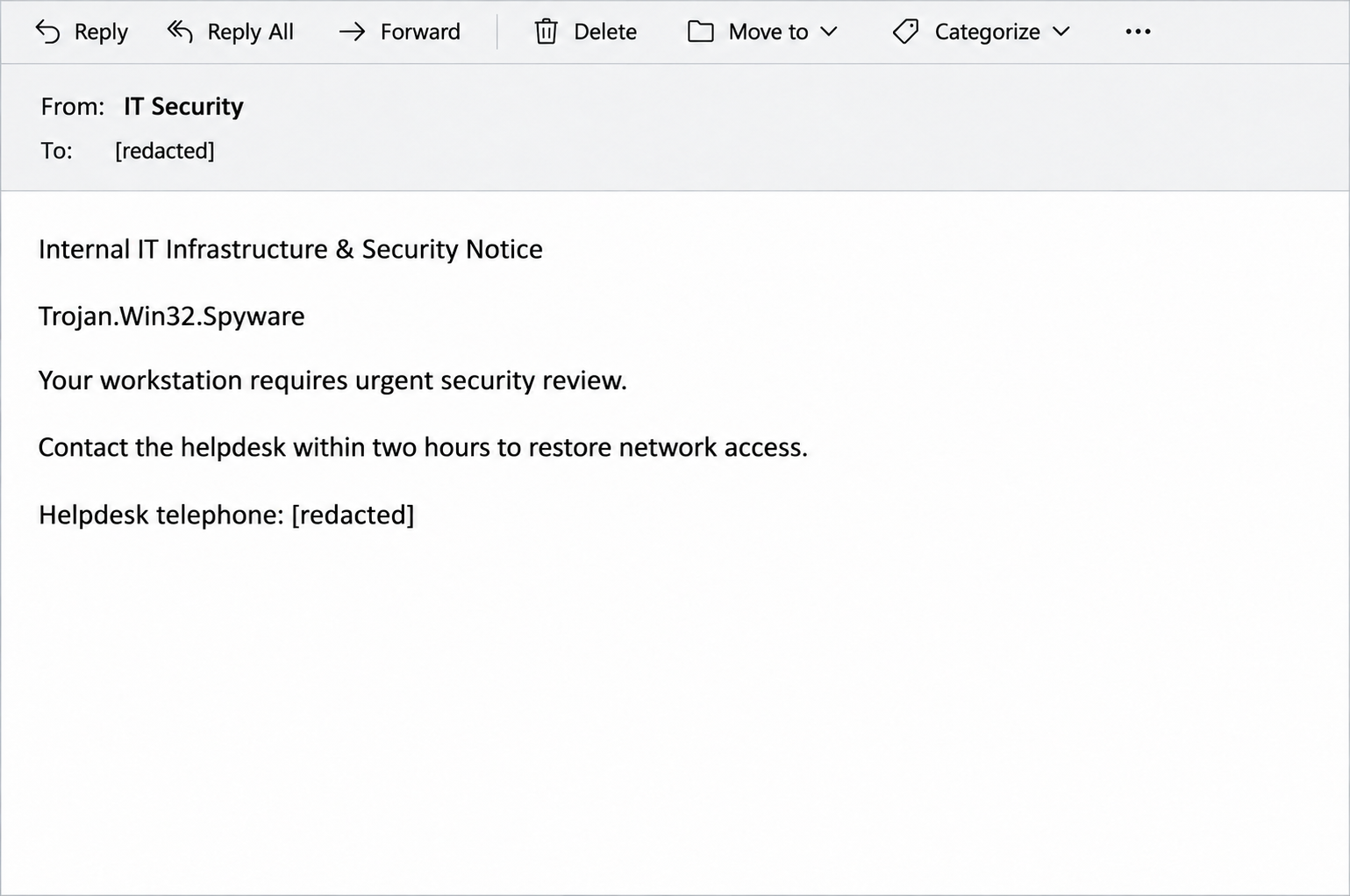
The Unauthorized Network Activity email poses as an internal IT notice. It claims a high-severity Trojan infection and says account access has already been restricted.
This is a callback scam, not a trustworthy computer-security report. Its instructions steer the recipient away from independent verification and toward the sender’s chosen contact.
A phone call replaces the suspicious link
The message says its lack of web links follows an anti-phishing protocol. That reassurance does not authenticate the telephone number it supplies.
A fraudulent request can move between email and telephone without changing its purpose. The person answering can continue the impersonation that the message started.
Your response determines the next action
- If you only received or read it, report the message without following its instructions.
- If you called, tell your real IT team what information or permissions you provided.
- If you allowed device access, stop the session and obtain incident-response help through a known channel.
- If money or account details were involved, address those exposures separately from checking the computer.
How the Unauthorized Network Activity Email Scam Works
Step 1: A security incident is asserted before you can check it
The notice names Trojan.Win32.Spyware and invokes confidential files, employee credentials, and corporate financial information. That technical vocabulary makes an ordinary inbox message feel operationally important.
A threat name written in an email is not a scan result from your computer. The sender has supplied a claim, not recorded device activity.
The reference to restricted access creates a second worry: you might lose the ability to work unless you comply. That makes contacting the supposed technician appealing.
Pause before accepting that connection between warning and remedy. Your employer’s actual security team can establish whether there is a genuine incident affecting your device.
Step 2: Familiar security advice becomes a trust shortcut
The email labels itself an internal infrastructure and security notice, then discourages external links. It borrows the language employees often associate with protective workplace procedures.
The trick is treating one sensible precaution as proof that the remaining instruction is safe. Avoiding an unfamiliar website does not make an unfamiliar caller trustworthy.
A telephone number inside an unverified message is another destination selected by its author. The communication channel changes, but the identity problem remains.
Step 3: A deadline makes verification feel like disobedience
The sample demands a call within two hours, threatens full suspension, and frames inaction as a compliance issue. It also retains a [Company Name] placeholder.
That unfinished field exposes a template where an organization-specific identity should appear. It is especially revealing beside language claiming to enforce that organization’s security policies.
The pressure targets your sense of responsibility, not just your fear of malware. You might worry that checking with someone else would delay a mandatory response.
In reality, reporting a suspicious security instruction through established channels helps protect the organization. You do not owe an unverified sender obedience.
Step 4: The callback opens another opportunity for impersonation
The sample routes recipients to 833-735-4121 as an emergency incident desk. Do not call that number or use it to investigate the warning.
No call was placed for this article. Remote-access requests, credential demands, and repair charges are possible continuations of tech-support fraud, not a recorded conversation in this case.
The FTC’s explanation of tech-support scams describes how fabricated computer problems can become demands for device access or payment.
If a caller gives further instructions, their confidence does not authenticate them. End the conversation before opening software, sharing codes, or acting on payment requests.
Verify the Warning Without Following Its Contact Instructions
Use the support route you had before the email
Open your existing help-desk bookmark, company directory, or approved support application. Alternatively, call the IT number supplied during onboarding or previously verified workplace communications.
Ask whether the security team issued a workstation alert for your account. Give the arrival time and subject, then follow the team’s reporting procedure.
Do not use a number supplied by the suspicious sender to confirm that same sender. That simply puts the original claim back in control.
If you cannot reach IT through your usual account, contact your manager through a known method. Ask how to reach support without using that account.
An account lockout should make independent contact more important, not less. It is not a reason to accept a stranger’s replacement help desk.
Real IT teams can contact staff and restrict access
A legitimate employer may phone an employee, isolate a workstation, or disable an account during an incident. None of those actions alone proves a scam.
The difference is whether the request can be authenticated through your organization’s existing processes. A genuine incident should not depend on trusting an unfamiliar email’s telephone number.
Likewise, polished terminology, a case reference, and an urgent tone do not settle the question. Those details can be copied into a false notice.
Let the security team assess the original message
Keep the original email available for the approved reporting process. A screenshot captures the appearance, but it may omit routing information needed to examine the sender.
Use the workplace phishing-report button if your organization provides one. Otherwise, ask IT how to submit the message without spreading it to other employees.
The Canadian Centre for Cyber Security’s email guidance recommends reporting suspicious work messages to IT and security teams and following their instructions.
Do not warn coworkers by circulating the original message casually. A brief notice through an approved channel can avoid putting the callback instructions in more inboxes.
What to Do if You Received or Responded to the Email
- Stop using the contact instructions in the message. Do not call, reply to obtain reassurance, or continue a conversation with someone reached through that number.
- Report it through your established workplace channel. Include what happened and whether you called, downloaded anything, entered credentials, approved access, or made a payment.
- Preserve relevant records without running suspicious material. Keep the email, call time, chat history, payment reference, and names of any applications the caller mentioned.
- Contain any active access through your incident procedure. Stop interacting with the caller and contact real IT from another device if the affected workstation is involved.
- Protect the accounts or payments actually exposed. Use independently verified providers and follow the relevant recovery process rather than relying on a computer scan alone.
- If access was granted, follow IT’s return-to-work instructions. The security team may need to examine activity, preserve evidence, or restore approved settings.
If you only received or opened the email
The warning itself does not establish that your computer is infected. Merely seeing the alleged Trojan name is not a diagnosis requiring a purchased cleanup service.
Report the message and follow your organization’s retention or deletion instructions. Do not install security software simply because the email tells you an emergency exists.
If you separately notice real device problems, describe them to IT. Keep those observations separate from the claims made by the suspicious sender.
If you called but did not install anything
Hang up rather than arguing about the diagnosis. Write down what you disclosed while the conversation is fresh, including any account names or verification codes.
Calling alone is not proof that someone gained access to your computer. The important question is what you permitted or revealed during the conversation.
Tell IT if you described company systems, employee roles, or security arrangements. That information can matter even when no password or payment was involved.
Be prepared for follow-up messages claiming the same incident remains unresolved. Another call using familiar details does not establish that the first contact was genuine.
If you installed an application or allowed remote access
End the remote session if you can do so safely. If unauthorized control continues, follow your workplace containment procedure and alert security through another device.
Where immediate guidance is unavailable, disconnecting the affected device’s network connection can interrupt ongoing remote access. Tell IT exactly what you disconnected and why.
Do not wipe the workstation, erase logs, or remove unfamiliar corporate software yourself. Those actions can destroy useful evidence or disrupt legitimate management tools.
A remote-support application can be legitimate software used by the wrong person. Its brand name alone cannot tell you whether the session was authorized.
Microsoft’s tech-support scam guidance explains that attackers can misuse remote access and misrepresent ordinary system information as signs of trouble.
Have the actual administrator review the session, installed software, and any changes. A scan without findings cannot prove that no files were viewed or copied.
If you shared a password or approved a sign-in
Contact your account administrator promptly from a trusted device. Explain which account was involved and whether you provided a password, authentication code, or approval notification.
Follow the official recovery process to replace exposed credentials and review active sessions. A changed password and revoked access address different parts of an account compromise.
Do not approve further authentication prompts while waiting for help. Someone describing them as a security check does not make the requests legitimate.
For personal accounts, use the provider’s known app or website directly. Replace reused passwords elsewhere if the same secret was disclosed.
If you paid or disclosed financial information
Contact the bank, card issuer, or payment service through its official app or a number you already know. Explain the payment and request its fraud procedure.
If corporate funds or payment details were involved, notify your finance team as well as security. They may need to coordinate a recall or provider contact.
Keep transaction identifiers and receipts, but do not promise yourself that every transfer can be reversed. Recovery options depend on the method, timing, and provider.
Decline anyone offering guaranteed recovery for another fee. Additional demands can continue the same fraud under a different supposed department.
Do Not Let the Malware Claim Dictate the Cleanup
This email is an impersonation attempt, not a confirmed Trojan diagnosis. Seeing a malware name is not a reason to start deleting files or changing system settings.
A professional response starts with what happened: a received message, a disclosed account, an installed program, or an actual remote session. Those situations require different response actions.
On a managed computer, let the responsible team decide whether scanning, software removal, account containment, or a rebuild is needed. Preserve their ability to investigate further.
Do not disable company security tools because the caller says they interfere with repair. Do not bypass management policies or grant administrator rights to make the session work.
For a personal device that received remote access, seek help from a trusted technician through an independent route. Describe the access granted and anything the caller changed.
The objective is not merely making the alarming message disappear. It is stopping unauthorized contact, protecting any exposed accounts, and resolving actual device access appropriately.
Frequently Asked Questions
Is the Unauthorized Network Activity email a real IT alert?
The message described here is a fake internal-support warning designed to prompt a callback. Do not use its number to check whether it is genuine.
Contact your real IT team through a known help-desk route. They can determine whether a separate legitimate incident affects your workstation or account.
Does the Trojan name mean my computer is infected?
A threat label in an email does not demonstrate a detection on your device. It can be typed into the message without examining your computer.
If you have a genuine security alert or device symptom, report it through the normal process. Do not treat the sender’s instructions as the diagnosis.
Why does the email avoid links and request a call?
The lack of links is used as reassurance while the phone number supplies the response route. A callback can move the same deception into a conversation.
The safe check is independent contact, not choosing telephone over email. Verify the identity before allowing the person to direct further actions.
Can a real employer suspend access during an incident?
Yes, a real security team may restrict access while investigating a problem. That possibility does not authenticate this particular email or its contact instructions.
Use your employer’s established support procedure, including its alternative contact route if needed. Do not ask the suspicious sender to become your verification service.
I called the number but hung up, so what now?
Report the contact and note what you shared or approved. If you provided nothing and granted no access, do not assume the call alone infected your computer.
If credentials, payment details, or permissions were involved, address those specific exposures promptly. Be wary of follow-up callers repeating information from the conversation.
Should I install a scanner after reading the email?
Not solely because you read this warning. The email does not establish malware, and a workplace computer should follow its administrator’s incident-response process.
Actual downloads or remote access require further assessment. Tell the responsible team what happened rather than attempting an unapproved cleanup yourself.
The Bottom Line
Do not call the number in this Unauthorized Network Activity email. Its urgent security language is designed to hand control of your response to an unverified operator.
Report the email through your real IT channel and verify any genuine access problem independently. If you already responded, disclose exactly what happened so the right protections follow.
Receiving the message is not a Trojan diagnosis. Calling, sharing credentials, paying, and allowing remote access create different risks, and each needs the appropriate response.

Join the discussion
0 commentsShare your experience or ask a question about this article.
Community experiences
Did this happen to you?
Your experience could help someone recognize the same scam. Submit a private report for our team to review.
I experienced this tooReports are reviewed before publication. Sharing publicly is always your choice.
Discussion
Start the conversation
Have a question or something useful to share? Add the first comment.