


Your phone says an order is on its way. You recognise the app that sent the notification. You don’t recognise the purchase.
Inside the order is a number to call if something’s wrong. Before you dial it, check where the alert actually came from.
Overview
The fake order can appear in the real Shop app
The Shop app fake order scam puts an unfamiliar purchase in front of someone who uses Shopify’s order-tracking app.
A note in the order then supplies a number to call about the charge.
Gen Digital documented fake Norton invoices in the Shop app. It also described reports using Apple gift cards, iPhones and other purchases to create the same worry.
One recipient reported seeing an order for $339.96, with someone else’s shipping details and a number to call about suspected fraud.
They checked their cards and saw no matching charge at the time.
An order record and a bank charge answer different questions
An order-tracking app shows information about orders it associates with you.
A bank statement shows what happened to the money in your account. Check the account before assuming the app shows a charge.
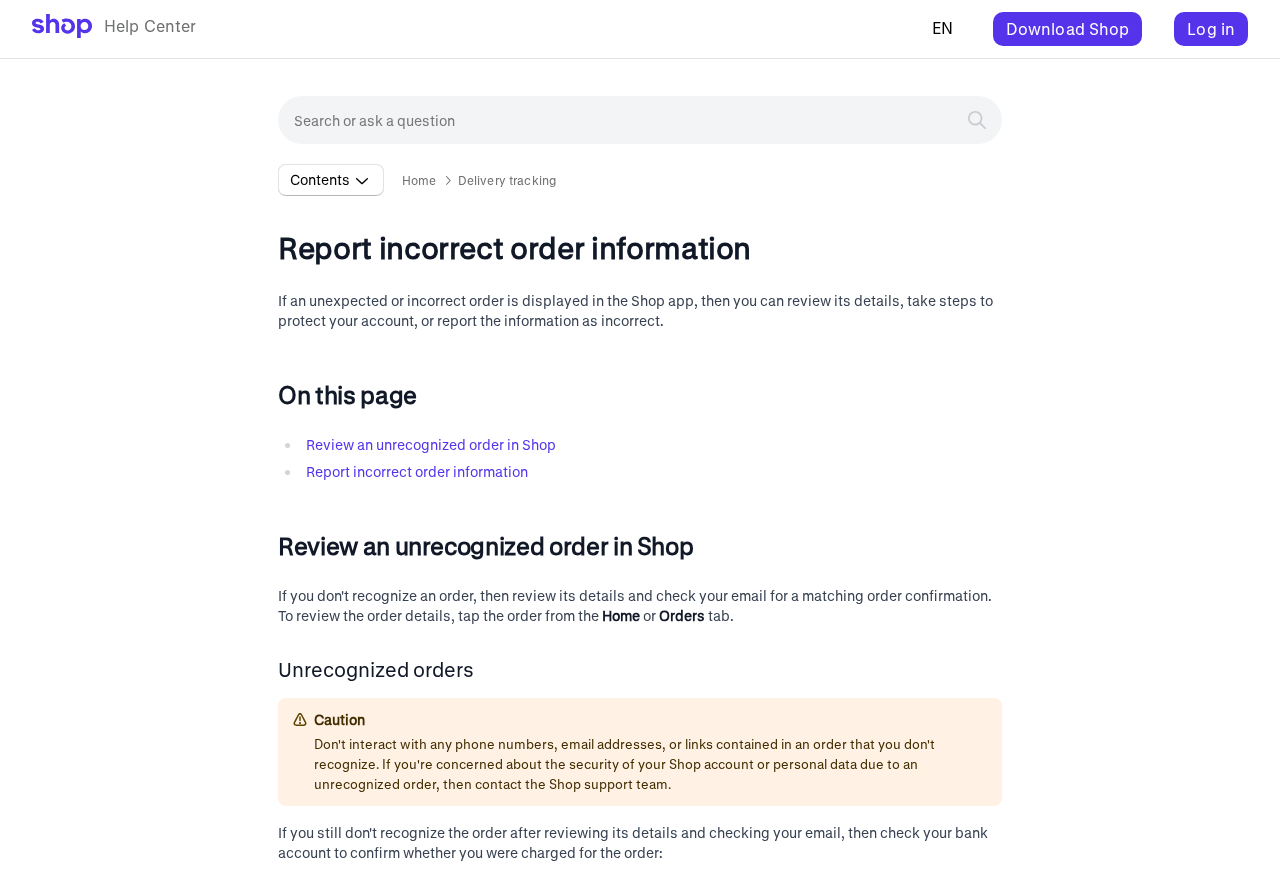
Shop’s help centre, shown above, tells people to avoid contact details inside orders they don’t recognise. It also explains how to flag an order as someone else’s.
The $339.96 report describes what appeared on one screen. It doesn’t establish a card debit or how the person’s contact information was obtained.
An unexpected order can also result from an ordinary mistake.
What to look at first
- Check for the amount and merchant in your bank or card app.
- Compare the supposed order with purchases you actually made.
- Leave any number or link in the unfamiliar receipt alone.
- Flag the entry as “Not my order” through Shop’s own controls.
- Call the card issuer directly if you find an unauthorised charge.
You can do all of that without asking the seller listed on the order whether it’s real.
That matters when the seller’s own contact information is what sent you looking for help.
Why Seeing It Inside Shop Feels So Convincing
When a surprising purchase lands in your inbox, you might open an app to check it.
A notification from an app you already trust can feel as if that check has happened.
There’s an important distinction between the notification and the information it displays.
The app is telling you that there is an order record. The seller’s text inside that record can still be deceptive.
Shop’s tracking guide explains that eligible orders can appear when the order email matches one linked to your Shop account.
An order’s appearance alone doesn’t tell you which payment method was used.
A shipping address you’ve never seen adds urgency. It makes the story feel as if someone is about to collect something you’ll be stuck paying for.
That’s why the quickest independent check is your own payment activity.
You can also check the official account for the product named in the receipt, especially if it mentions a subscription.
How the Shop App Fake Order Scam Works
Step 1: An unfamiliar purchase appears
You may see a push notification, an entry on the home screen or an unfamiliar item among orders you were already tracking.
A $339.96 total is enough to get your attention.
The entry can include information that feels specific to you.
In the $339.96 report, the recipient recognised their own contact details and saw somebody else’s name and address in the shipping information.
Finding your email address in the order is a reason to investigate it. Start by checking what account data actually changed, if any, and what your payment providers show.
Step 2: The description gives you a number to call
The order gives you what appears to be an immediate way to dispute it.
The instruction may be mixed in with delivery information or appear in a note about the purchase.
Pause when a receipt tells you to contact a specific number about fraud. Shop’s own help page advises against using contact details inside an unrecognised order.
If you need to speak to your bank, find the number on your card or in its app.
If you need to ask Norton about a renewal, open your Norton account yourself.
Step 3: The apparent purchase becomes a support call
Gen Digital found that the fake invoice is designed to draw the recipient into a conversation.
Once a caller reaches the number on the receipt, the story can shift to cancellation or a refund.
The July recipient said they tried the number and shared no information. The campaign is the concern here.
A separate report about one phone call can’t tell you what every caller will hear.
The moment someone asks for card information, an account sign-in or access to a device, end the call.
A real charge can be handled through the card issuer without the order’s callback.
Step 4: The caller may request access or payment information
In documented callback scams, the person on the phone may say they need to verify you or help you complete a refund.
They may ask you to let them see your device.
The FTC’s tech support scam guide explains why remote control is dangerous in these conversations.
Someone who can see your screen may see private information you open while they are connected.
If the person wants you to make a transfer as part of the refund, stop.
Ask your bank to check the actual transactions before you act on anything the caller says.
Step 5: What you shared determines what to secure
If you simply saw the order, verify your payments and flag it. If you made a call and shared nothing, keep the number for reporting and watch for follow-up contact.
Treat a disclosed password, a card number and a remote access session as three different exposures. Each has a different first call or first account to secure.
If the call led to a bank approval, tell the issuer exactly what appeared on screen and how you responded. It can check details that an order-tracking app can’t see.
How to Check the Order Without Calling the Number
Open your card or bank app yourself. Look at pending and posted transactions on any payment method you might have used. Pay attention to the date, amount and merchant.
If the amount is present and you don’t recognise it, contact the card issuer immediately. Say that an unfamiliar order appeared and describe what the bank itself shows.
When the amount is absent, use Shop’s own instructions for an unrecognised order.
Review the entry and select the reporting route inside the app. You can also reach Shop through its help centre.
Some legitimate purchases may come from someone in your household or show a different billing name. Check those possibilities independently, especially if you share a payment method.
An incorrect order is different from an ordinary delivery complaint
If you really bought the product and it never arrived, you have a real order to investigate. Check the merchant’s confirmation and the delivery record from your own purchase history.
If the order is completely unfamiliar, look for the “Not my order” option in Shop’s instructions. You don’t need a refund from a seller for money your bank never paid.
If the reporting screen sends you somewhere you didn’t expect, stop and open Shop’s help centre yourself.
Support can explain the current options without requiring you to use the merchant’s number.
A Norton charge deserves its own check
Norton’s scam guidance shows an example of a bogus shopping-app notification. It tells readers to ignore the phone number inside the notice.
If you use Norton and think a renewal might be due, check your subscription through the account you already use. Look for a matching record in your own payment history.
The scam can put a brand you know beside a price that seems plausible. The safest question is still whether you have a corresponding purchase in the real service.
Save the part of the order that sent you looking for help
Before reporting the entry, take a screenshot of the order screen if you can do so safely. Include the merchant label and the note containing the instruction.
Keep the copy in a private folder. There may be someone else’s shipping address in the record. Support can examine it without you posting that address in public.
If the app removes the entry after you flag it, your screenshot gives you something to refer to. Keep any response from Shop next to it.
Write down how you reached the order. A push alert, the Orders tab and an email about the same purchase can arrive at different times.
If you called the number, note what the caller claimed to represent. Record whether you entered a password, allowed screen sharing, shared a code or made a payment.
What to keep when the bank finds a payment
Download or save the bank record showing the transaction. Leave account numbers and other private transactions out of any copy you send outside the bank.
Check whether the payment is pending or posted. Your issuer can tell you which actions it can take at that stage and whether it needs more information.
Write down the date you reported it and the reference your issuer gave you.
If the payment later settles or a second charge appears, use that reference when you call back.
Some receipts list a different total from the one on a bank statement. Give the bank both amounts and the dates. Let its fraud team determine whether they belong together.
If a real subscription was also due, keep the service’s own renewal record separately.
It can help you identify which payment you authorised without relying on a receipt from an unfamiliar store.
What to Do if You Have Fallen Victim to This Scam
-
End contact with the number in the order. Open your bank independently and look for the charge in pending and posted activity.
-
Call the card issuer if you find a charge or gave the caller card details. Ask about locking or replacing the card and disputing unfamiliar transactions.
-
Tell the bank about any code you shared, app approval you accepted or transfer you sent. Save the reference for the bank’s fraud report.
-
Disconnect any device you let the caller control. Use a separate trusted device to reach the bank and secure email and financial accounts.
-
Change any password you entered or disclosed. Review active sessions, linked devices and recovery details. Secure your primary email account if it was involved.
-
Keep a screenshot of the order and its note. Save the time of the call, the transaction reference and any records of what happened afterward.
-
Use the official Shop app or help centre to report the unfamiliar order. If money was taken, report it through your local fraud reporting service too.
If you gave the caller remote access, get the affected device checked before returning to banking on it. An updated scan with Malwarebytes can help identify unwanted software.
AdGuard can reduce exposure to some harmful sites and deceptive ads. A blocker has a different job from reporting an order that already appears in an app.
If you called without sharing anything or installing software, the call itself leaves little for a device scan to check. Keep the number for your report and ignore follow-up calls.
If someone offers to recover money or says the first cancellation failed, call your bank or Shop’s official support. Leave any new callback number alone.
Frequently Asked Questions
Can a fake order really appear in the Shop app?
Yes. Gen Digital documented fake invoices in the app’s order history. Shopify’s help centre explains what to do with an order you don’t recognise.
Does an unfamiliar order mean Shop Pay charged me?
Check your bank or card activity directly. The order record alone doesn’t tell you whether your payment method was used or whether a charge went through.
Should I call the cancellation number in the receipt?
Leave it alone. Contact your bank directly about a charge. Use Shop’s official help centre for the order record and the named company’s official support for a real subscription.
What if there is a real charge for the same amount?
Call your issuer and ask it to investigate. Share the bank transaction details and the Shop screenshot. Explain whether you had any contact with the person in the receipt.
Does the notification prove somebody signed in as me?
Review your sign-in history and payment methods if you’re concerned. Shop can associate order information with a matching email address, so an unexpected entry alone doesn’t settle the question.
Can I report it even if I found no charge?
Yes. Shop’s help centre tells you how to mark it as “Not my order.” Keep a screenshot if it contains a suspicious callback instruction you want to report.
The Bottom Line
When an unfamiliar order appears in Shop, leave the number in the receipt alone. Check your own payment activity and report the order through Shop’s official controls.
If there’s a charge, or you shared card details or let a caller see your device, contact your card issuer immediately.
Keep the order as evidence of what prompted the call.

Join the discussion
0 commentsShare your experience or ask a question about this article.
Discussion
Start the conversation
Have a question or something useful to share? Add the first comment.